-
Daz After Death
I'd suggest contacting a lawyer and have them review the EULA/TOS to see if it's legal or not.
My armchair non-lawyer opinion, you can transfer it, if you contact daz3d and request the transfer(eula section,Other restrictions)
Keys for Shock look etc.I said morph but I guess it is a shape, oops.
Daz After DeathCan a user account be transferred to someone else?
I have been diagnosed with Cancer and currently don't know my life-expectancy.
I have a massive library of content. All of my computer equipment, including the disk holding the Daz content is left to a friend in my will.
Can I transfer the library connection to my account to him? Will the content still be useable otherwise?
Tutorial: Making TriAx Figures from Old Parametric CharactersMaybe for personal use and rendering this is a case where it will make more sense to make a natu morph for Genesis of choice?
Keys for Shock look etc.I have moved my characters head to bend down and then I go into the timeline and can adjust the keys to better fine tune the movement. But when I try to find the keys for the ( example, shocked look) and all other morphs under the paremeters tab I can't find those in the timeline to make adjustments. Is there a way to see the morph movements in the timeline?
G9 Shape Preset for SWOLE Garrick mixnonesuch00 said:
leemoon_c43b45a114 said:
nonesuch00 said:
Thanks Mr Lee,
I am converting a bunch of Muscleman Bodybuilder poses from Genesis 8 Male/Female to Genesis 9 however, I am finding that the Genesis 9 figure just doesn't look correct in the elbows. I have all the DAZ Originals backages you listen but which of the others you listed is most crucial to getting normal muscular arms in the biceps flexed pose looking correct without deformed looking forearms, wrists, and albows? I'm lacking the Garrick 9 character as yet too.
You are very welcome, nonesuchoo!
Posing bulky, beefy, heavily muscular figures are certainly a challenge with respect to joints. I often have to dial back a bend pose to account for the folding artifacts that might show up. I do use a few bend enhancer products, though I can't recall which ones at the moment. Not sure if it helps or not, but take a look at the G9 automatic flexion strength parameter - I have it turned on at 100% - I think it's 0% by default. Not sure what it controls (perhaps under the hood joint/bend correctives?) Anyway, I always set it to 100%. There's a new product in the store, Ultimate Natural Bend Morphs for Genesis 9 Feminine 2.0. It states that it can be of use in G9 masculine shapes. I have it in my wishlist and will purchase it at some point.
Feel free to share you experiences with the various morph sets. I'd love to find out what others are doing to make those types of poses work better.
Thanks!
Lee
OK, well I decided to switch to another G9 character as I felt the PA of the product I want to use probably didn't thoroughly test the product in all the poses they should have. I am going to try to use these posings to pose AI prompts at NightCafe.Studio as I stumbled upon how to use their Flex training database to do that. I will update you here though after I buy the products you've listed (SimonWM only: probably as I must watch my budget). I do have a one or two pose corrective products already, one from 3DU, I will try them and post here too.
I'll be looking forward to seeing what you find out regarding bends/flexes.
When I create a dial-spun figure, I always try a variety of poses to see if the figure is bending properly. Sometimes I make other adjustments to the figure, sometimes I just scrap the figure and start over entirely. :)
Lee
G9 Shape Preset for SWOLE Garrick mixleemoon_c43b45a114 said:
nonesuch00 said:
Thanks Mr Lee,
I am converting a bunch of Muscleman Bodybuilder poses from Genesis 8 Male/Female to Genesis 9 however, I am finding that the Genesis 9 figure just doesn't look correct in the elbows. I have all the DAZ Originals backages you listen but which of the others you listed is most crucial to getting normal muscular arms in the biceps flexed pose looking correct without deformed looking forearms, wrists, and albows? I'm lacking the Garrick 9 character as yet too.
You are very welcome, nonesuchoo!
Posing bulky, beefy, heavily muscular figures are certainly a challenge with respect to joints. I often have to dial back a bend pose to account for the folding artifacts that might show up. I do use a few bend enhancer products, though I can't recall which ones at the moment. Not sure if it helps or not, but take a look at the G9 automatic flexion strength parameter - I have it turned on at 100% - I think it's 0% by default. Not sure what it controls (perhaps under the hood joint/bend correctives?) Anyway, I always set it to 100%. There's a new product in the store, Ultimate Natural Bend Morphs for Genesis 9 Feminine 2.0. It states that it can be of use in G9 masculine shapes. I have it in my wishlist and will purchase it at some point.
Feel free to share you experiences with the various morph sets. I'd love to find out what others are doing to make those types of poses work better.
Thanks!
Lee
OK, well I decided to switch to another G9 character as I felt the PA of the product I want to use probably didn't thoroughly test the product in all the poses they should have. I am going to try to use these posings to pose AI prompts at NightCafe.Studio as I stumbled upon how to use their Flex training database to do that. I will update you here though after I buy the products you've listed (SimonWM only: probably as I must watch my budget). I do have a one or two pose corrective products already, one from 3DU, I will try them and post here too.
Character used in Princess Petra productssavin.andrej_ac91e63765 said:
I think our friend Plant is trying to tell us something else. The PPGD Dress, which Princess sells, contains the PrincessPetra9_Body_bs_Body.dsf morph. Which means that Princess will likely release the product soon.
The elusive Princess Petra herself! I would definitely pick up that product. Dunno if the PA browses the forums, but based on my own personal adventures, I have seen numerous inquiries about the princess herself, so there's definitely a demand for the true model.
Character used in Princess Petra productsI think our friend Plant is trying to tell us something else. The PPGD Dress, which Princess sells, contains the PrincessPetra9_Body_bs_Body.dsf morph. Which means that Princess will likely release the product soon.
Character used in Princess Petra productsHalcon Bluesky said:
elf.sa It will probably be a custom morph model.
Try with the adjustments for the face with any character you have at hand and then fit the hair when you think is ready.
I have made an experiment, but this was not the face it was the body as well

Next time I will focus on the face.
Come on, don't be lazy, try it yourself!
Yeah I agree she looks to be a custom model. I'll give a go at it later myself-I think she has a baseline of a Magic Brush model and then from there the adventure begins!
Character used in Princess Petra productshere is fit morph PrincessPetra9_Body_bs_Body.dsf
TurboLoader Morph List Reset?I used RiverSoft Art's TurboLoader pretty extensively to tone down my morphs a lot and make loading figures faster. I then use the TurboLoader Booster Utilities to load morphs on demand when I am loading a figure that has morphs I've disabled. It really was a game changer.
My problem is that I've been away from Daz for a while and picked it back up again recently. When I attempted to load a figure with TurboLoader to enable to morphs in the save it was not working. I then ran the manager for Genesis 8 and my morph list was gone. It prompted me to scan for morphs, which I did, but it only found the morphs I typically kept enabled; a very short list compared to the number I own. The long list of morphs I had disabled were nowhere to be found.
Is there some type of way for me to have TurboLoader scan my directories and find the morphs that it disabled so I can enable them again? Right now I'm working with a fraction of the content I actually own. Any help would be greatly appreciated!
Diffeomorphic - Eyes Side to Side Morph stopped working for some reason!Exactly what changes did you make and how ?
p.s. In general you're only allowed to sculpt the mesh and morphs, I mean only deforming vertices without changing the mesh itself. If you mess up with the rig then you could reimport and transfer/copy the morphs you did.
p.p.s. However, it always advised to make changes on the daz rig version, then backup, before converting to MHX or rigify.
Character used in Princess Petra productsIt will probably be a custom morph model.
Try with the adjustments for the face with any character you have at hand and then fit the hair when you think is ready.
I have made an experiment, but this was not the face it was the body as well
Next time I will focus on the face.
Come on, don't be lazy, try it yourself!
G9 Shape Preset for SWOLE Garrick mixnonesuch00 said:
Thanks Mr Lee,
I am converting a bunch of Muscleman Bodybuilder poses from Genesis 8 Male/Female to Genesis 9 however, I am finding that the Genesis 9 figure just doesn't look correct in the elbows. I have all the DAZ Originals backages you listen but which of the others you listed is most crucial to getting normal muscular arms in the biceps flexed pose looking correct without deformed looking forearms, wrists, and albows? I'm lacking the Garrick 9 character as yet too.
You are very welcome, nonesuchoo!
Posing bulky, beefy, heavily muscular figures are certainly a challenge with respect to joints. I often have to dial back a bend pose to account for the folding artifacts that might show up. I do use a few bend enhancer products, though I can't recall which ones at the moment. Not sure if it helps or not, but take a look at the G9 automatic flexion strength parameter - I have it turned on at 100% - I think it's 0% by default. Not sure what it controls (perhaps under the hood joint/bend correctives?) Anyway, I always set it to 100%. There's a new product in the store, Ultimate Natural Bend Morphs for Genesis 9 Feminine 2.0. It states that it can be of use in G9 masculine shapes. I have it in my wishlist and will purchase it at some point.
Feel free to share you experiences with the various morph sets. I'd love to find out what others are doing to make those types of poses work better.
Thanks!
Lee
Diffeomorphic - Eyes Side to Side Morph stopped working for some reason!I did some basic editing on my DAZ model in Blender, and now the eyes are bulging out when I try to move them side-to-side using the face expressions (FACS options). Before the editing, everything worked fine. Could this issue be related to bone influences, vertex groups, or something else? How can I fix this and make the eyes move correctly again without losing my progress?
Frustrating download issues between DAZ3D/DIM/DAZConnect: Install vs SmartContent vs ContentLib tabsRichard Haseltine said:
If they have the download symbol and a coloured thumbnail then theya re not awaiting installation, they are just telling you that you could install them through Connect. That marker will be going away for items that are installed in the next update, the Public beta already has it hidden for such files.
With some complex products it can help to look at how they are arranged in the Content Library - right-click on a file>Show Asset In>[Virtual|Mapped] folder - as the folder arangement or instructional thumbnails that don't show in the category structure may be enlightening.
Then I evidently have multiple issues going on.
The Grasslands we just got through T/Sing have colored picture elements showing under the Poser Format in the ContentLibrary tab, where you had me look yesterday.
But there are other items with the cartoon "empty picutre frame" with the ⚠ warning sign that I mentioned in my last post.
And still others might exist as morph sliders in the figures for which they were made, but I haven't yet confirmed they're there or not.
For all three cases, I was getting the same symptom of the Gray Photo in the Available subtabs within the Install and Smart Content tabs
Dear PAs, please make some ancient/old Chinese contentAsuCafe said:
OrangeFalcon said:
AsuCafe said:
Here are some furniture https://www.daz3d.com/ancient-chinese-bedroom
I have never seen anything other than this(in DAZ). I also want to find antique Chinese furniture and a really cool Chinese dragon.
I really like that room. Added to my Wishlist.
Here's a cool Chinese dragon. I agree that we generally need some more nice Chinese themed products. Hoping for more!
This is on my wish list, but the build is more like a dinosaur than a dragon, https://www.daz3d.com/eastern-dragon , This body shape is ideal, but the material and modeling are too old.
Just as some people are waiting for the next generation of cats and dogs, I am also waiting for the next generation of dragons.
I'm not worried about it because I bought too many things that I don't need.

Wsmonkeyking, Sue-yee, Moonk-tg, Stonemason, they have a lot of ancient Chinese things.
There is some good stuff from other artists too, but I believe you can find it using keywords.
Oh yes, once we get the next generation of dragons that will be a quick buy for me. Hopefully they do a bundle on a Thursday with some great variety like this one. The Daz Dragon 3 models still look decently good, but yeah we are in need of a new version. A new Chinese version would be quite ideal, and extra points if we get a head morph to make it look like Falkor. I suppose you could say we'd be lucky to get that! Aha...ha.
Is it necessary to ERC freeze eye/mouth/lashes morphs (G9)?Actually there're two typical cases of "ERC Freeze":
1) Freeze ERC Links Only, e.g. create a Control property for a character's head and body morphs; create a Pose Control property linked to the joint transforms (Rotate / Translate / Scale) that have values, or from an animated range. ( as this way is faster than using Property Hierarchy )...
2) Adjust Rigging + ERC Freeze, e.g. for full head / body morphs; for partial head / body morphs that'll be influenced by the rigging of related joints ...So, I believe the option 2) applies for your case of making Eyes / Mouth... morphs (partial head morph, PHM). The general principle is: whether Adjust Rigging + ERC Freeze or not depends on if a Morph will be influenced by the rigging of joints that fall in the area of its vertex positions change.
You can study the similar official G9 PHMs (coming from Daz Originals). For instance, Mouth Height (head_bs_MouthHeight), Eye Whole Width (head_bs_EyeWholeWidth). Let's take Mouth Height as an exampleThis morph will be influenced by the rigging of some joints under Upper and Lower Face Rig: Lips, Upper / Lower Teeth and Chin.... so Daz Adjusted Rigging by only selecting these joints then ERC Freezed the morph. If you check this morph in Property Hierarchy, you'll find the freezed result. Notice there's an R icon at the beginning of each line, that means Rigged + ERC Freezed. (screenshot 1) By doing Adjust Rigging + ERC Freeze, the most precise shaping result can be assured when those joints rotate, i.e. with given poses.
But the above principle is not 100% absolute... or case by case, e.g if a morph is only related to the rigging of one joint or no joint, or at least there's no shape distortion with given poses, you don't have to do option 2). Besides, for the similar partial morphs, some vendors do it, some don't. For instance, as for Mouth Width (Wider / Widen / Narrow), Daz, SF-Design, Vinme did it, P3Design didn't... yada yada ~
So at the end of day, as long as there's no issue with the partial morphs when you tested with related Poses, you don't have to do option 2), IMO ~
Tutorial: Making TriAx Figures from Old Parametric CharactersOK. Natu doesn't seem to be available at the moment, so I can't try myself.
I think the first thing to do is nail down exactly where the problem is. To do this I need to ask a few questions, and I fear it may be a bit of a slog to get to the point where the source of the problem is.
- Is Natu a morph of a DAZ Character or a stand-alone? (I can't find out definitively from the discussions I've been able to find, but I think she's a stand-alone)
- Did you succeed in the saving of an obj file for Natu (Section 4 of the tutorial)? If so, is it possible to see a clay image of the obj model?
- If Natu is a DAZ origin character morph, did you succeed in saving an obj of other characters of the same generation (Section 5)? If so, is it possible to see a clay image of the obj model?
- Did you create any obj files of morphed versions of Natu to match any other Genesis characters (Section 6)? If so, is it possible to see a clay image of the obj model?
- Were you able to save a TriAx version of Natu (Section 8)?
- If we've got here, is it possible to explore a few bends of Natu in clay render to check if the rigging has gone right at this point. One where poor arm rigging shows up fast is with one arm down at the figure's side, elbow bent forward, hand bent across the tummy, as in the image:
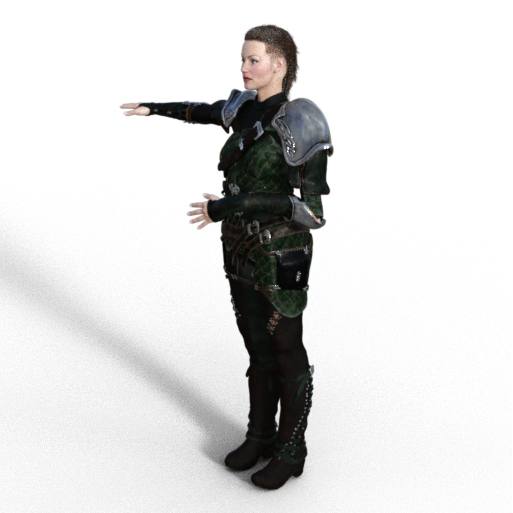
- Try a few others, see if the rigging is wrong. If there is an issue here, I'm sorry, I can't help as it's a rigging issue during the Parametric to TriAx conversion and I'm not convercent enough with the ways of correcting rigging at the moment.
- If however the rigging works well, how does Natu take to the Natu autofit clone (section 9)? (Is it possible to see an image)
- Finally how does Natu take to the other clones (Sections 10/11)? (Is it possible to see an image or two if this is where it goes wrong?)
Once we establish at what main stage Natu has gone wrong we can then look at what might be the exact step at which it has gone wrong.
Regards,
Richard
Daz 3D is part of

Connect
DAZ Productions, Inc.
7533 S Center View Ct #4664
West Jordan, UT 84084Licensing Agreement | Terms of Service | Privacy Policy | EULA
© 2026 Daz Productions Inc. All Rights Reserved.