-
AIUTO...CHI CONOSCE L’ITALIANO? PARTE QUATTORDICI
Tiziano said:
Se non vuoi usare direttamente Growing Up, potresti usarlo indirettamente, ovvero:
Carica G8F, setta con Growing Up le fattezze del corpo che ti vanno bene, poi fai tutte le misurazioni delle varie parti del corpo con Measure Metrics, e cerchi di replicarle su G8F (o magari anche Teen Josie 8), usando tutti i morph che hai a disposizione.
Non è più semplice applicare i morph giovanili, esportare l'OBJ per le modifiche, eseguire i cambi per il personaggio, importarlo come nuovo morph, annullare i moprh commerciali e poi esportare l'OBJ finale pulito?
 Question on sleeve sponge prop on left hand (have image)
crosswind said:
That's great ! And the logos look nice ! You can freely adjust the logos position in image editor as needed.
As for the Ghostblde Elbow Strap, you can follow the steps below to make one for using on the left arm.
1) Export it to OBJ file ( File > Export... ) by using the settings in (ss1). Import OBJ file into the scene ( File > Import... ).
2) Rig the OBJ to G8F figure ( Edit > Object > Transfer Utility...) by using the settings in (ss2).
3) Select the strap on the right, go to Surfaces pane to select its Surface, right-click menu > Copy Selected Surfaces(s)... Then select the strap on the left, Paste to Selected Surface(s). (ss 3 ~ 4)
4) Then you need to Horizontally Flip the partial logos, in Image Editor, on the texture maps of Base Color, Glossy Roughness and Normal Map slots. Save them as new maps and assign them to the strap on the left accordingly. (ss 5 ~ 6)Finally save it as a Wearable Preset. Done ~
This product : https://www.daz3d.com/mirror-geometry can automate the above steps but you still have to tweak texture maps...
You are really awesome! You write it so well step by step BUT I STILL MISSED something! xD hehehe look what it made to me.. I pretty sure missed something in the start?
Also if you have time for commissions as well let me know, You didn't say nothing so pretty sure you can't but in case you miss that hehe , all good if you can't as well by the way! your help me a lot! ^^AIUTO...CHI CONOSCE L’ITALIANO? PARTE QUATTORDICIUsando Teen Josie 8 come base di partenza si ha anche una maggiore compatibilità con vestiti e capelli, i quali hanno di solito i morph TJ8 incorporati.
AIUTO...CHI CONOSCE L’ITALIANO? PARTE QUATTORDICISe non vuoi usare direttamente Growing Up, potresti usarlo indirettamente, ovvero:
Carica G8F, setta con Growing Up le fattezze del corpo che ti vanno bene, poi fai tutte le misurazioni delle varie parti del corpo con Measure Metrics, e cerchi di replicarle su G8F (o magari anche Teen Josie 8), usando tutti i morph che hai a disposizione.
AIUTO...CHI CONOSCE L’ITALIANO? PARTE QUATTORDICIMa poi, scusami tanto... Ma perchè non usi i vari Growing Up o morph giovanili come base? Basta metterlo poi come requisito.
Però fai attenzione a non includere la base nel morph finale!
Diffeomorphic - Weird Expression Importupdate. The bug is fixed in the last commit. Be sure to "morph armature" after loading/making the pose, as this is required for ERCs to work. As a side note, as already explained above, in blender it is much better to use the basic FACS, rather than pre-made expression sets.
https://bitbucket.org/Diffeomorphic/import_daz/issues/2382/
https://bitbucket.org/Diffeomorphic/import_daz/downloads/?tab=branches
Paying for a Daz modeler to make a G8F morphLeana said:
anaximanes_2000 said:
Leana said:
I'm pretty sure you can't make a character like that with morphs only, you'd need extra mesh (probably a geograft) for the abdomen, antennae and wings at least.
I would beg to differ using @RawArt Wasp Queen as an example:
https://www.daz3d.com/wasp-queen-for-genesis-8-female
If I can get a roach like this, I am set. The problem for me is that he moved onto the G9 figures which I do not use since I invested tens of thousands of dollars into G8F. So, i need to hire someone.The Wasp Queen is actually the perfect example of what I said: the product is not just a morph, the wings, bug back and antennas are geografts.
Oh that's what you meant? Oh ok, yeah whatever it takes, I need a roach.
got this character morphed...Face Height morph (or adjust Mouth Height, Nose Height, Brows Height and Eyes Height separately ) in:
https://www.daz3d.com/200-plus-genesis-9-edition or https://www.daz3d.com/200-plus-head-and-face-morphs-for-genesis-8-male-s
Diffeomorphic - Weird Expression ImportThanks for looking into this further - and just to clarify, Padone you are correct. I was looking to use the morphs in Blender (as an easy way to animate between expressions)
I tried it with the exported pose as well, to see if that was an option, but it had the same result. I was trying to determine where in the process the error was occurring..
Interestingly, if I export with the character already in that pose, no problem. Also, exporting the character and morph slider with bridge, also no problem (not an ideal solution though..)
I'll investigate it a bit further today. Normally I'd be happy to troubleshoot my way through such a puzzle, but after a while it did seem like a bug to me, which is why I reached out.
Also the function/translation of the tongue and ERC/FACS is a bit new and mysterious to me, so I appreciate the help.
Question on sleeve sponge prop on left hand (have image)That's great ! And the logos look nice ! You can freely adjust the logos position in image editor as needed.
As for the Ghostblde Elbow Strap, you can follow the steps below to make one for using on the left arm.
1) Export it to OBJ file ( File > Export... ) by using the settings in (ss1). Import OBJ file into the scene ( File > Import... ).
2) Rig the OBJ to G8F figure ( Edit > Object > Transfer Utility...) by using the settings in (ss2).
3) Select the strap on the right, go to Surfaces pane to select its Surface, right-click menu > Copy Selected Surfaces(s)... Then select the strap on the left, Paste to Selected Surface(s). (ss 3 ~ 4)
4) Then you need to Horizontally Flip the partial logos, in Image Editor, on the texture maps of Base Color, Glossy Roughness and Normal Map slots. Save them as new maps and assign them to the strap on the left accordingly. (ss 5 ~ 6)Finally save it as a Wearable Preset. Done ~
This product : https://www.daz3d.com/mirror-geometry can automate the above steps but you still have to tweak texture maps...
Mechasar's Characters Catalog: Who's next? (commercial)barbult said:
Watch out for mesh intersections when posed. Soft tissue would compress.
Hey there. If you are referring to her legs in the picture, they are not intersected, it’s just an optical illusion due to the frontal light. Actually her left leg is farther forward than the right one. Anyway, the character will come with a large amount of auto-morphs that will minimize the intersection of her surfaces during poses. Obviously it’s just impossible to avoid all potential intersections in a character (even more so in the case of a massive character), also due to the lack of predictability when poses combination get involved. But, after all these years, I noticed that a bit of skin intersection in DAZ characters is also necessary for a better result. Imho, sometime the minimal intersection can help the character’s body to get the right curvature inside the cavity between two compressed limbs. That's just my philosophy.
The auto-morphs will act on the larger number of common poses, e.g.
- smoothing morph on single spines bending; spine1 AND spine2; spine2 AND spine3; spine1 AND spine2 AND spine3; etc.
- compression morph of her arms when they are bent downward, but that morph is null when you move her arm away from her torso even keeping it downward.
Also the preset character will come with specific rotation limits on her limbs, in order to avoid unnatural movements. My suggestion is indeed to use the preset character.
Having said that, I will count on user shrewdness to pose the character in a way that suits her body shapes :)Loading Full Body Morph to Genesis 9?Well, if so, to clarify some key points:
1. Write Separate Objects option means when importing OBJ file in other applications, OBJ can be splitted into separate objects. If uncheck the option, OBJ file can be just imported as a single object. However, it has nothing to do with including the sub parts into OBJ file or not...
2. If just want to export G9 figure per se without including the sub parts, you need to select G9 first, check the option Filter Objects in Export Options dialogue, choose Primary Root (or Selected Roots...) Then it'll only export G9 root node only
3. Yes, if you you ever Updated and Merged Menus in DS 4.23+, the menu structures under Edit would be changed a lot ... You just use Morph Load Pro no matter when its menu item locates...As for geometry mismatch issue, make sure you firstly set Resolution Level to Base on G9 figure, then export to OBJ by using the options described in above 2nd point.
Loading Full Body Morph to Genesis 9?I thought I mentioned, but evidently forgot, that I did export at BASE resolution. It's 60560 polygons.
And unfortunately I can't just export the figure (ie: skin) because the morph also affects the eyes, mouth, lashes, and brows. I tried exporting and importing the parts separately but that didn't work either.
It would be nice if there was an updated tutorial that explained the entire process from export to reimport.
EDIT: Now I'm wondering if it's a Modo thing.
Loading Full Body Morph to Genesis 9?Deecey said:
OK I figured out what setting I needed to uncheck in DAZ Studio to get it to export as a single OBJ instead of having the subparts beneath that separately. There's a "Write Separate Objects" option in DS OBJ Export Options dialog that, when not checked, exports everything as a single object with no subparts.
But here's where I'm having a problem. In that video you linked to, I can't even get that far. I notice he's using 4.21 publishing build, which I don't have. The closest I have is 4.21.0.5 regular build. Anything other than that is no longer available to download. For the record, I see the same issues described below in the 4.23 publishing build.
Starting at 2:25, he chooses Edit > Object > Morph Loader Pro. I see no such command. For me, it's at Edit > Figure > Shape > Morph Loader Pro. There's difference number one.
Next, he gets to the Morph Loader Pro screen and then accepts the default options to load the morph. And the morph works fine. In my case, I get a message that the geometry is incompabie and the morph fails to load.
So I'm finding tutorials, but I'm not seeing the screens that are being shown. They appear to be outdated.
EDIT TO ADD:
Just to make sure my morph worked correctly, I exported Genesis 9 as a base OBJ in default pose. I then imiported that OBJ into Modo and applied my morph to it. It worked perfectly. But I'm having problems getting it to work in DAZ Studio.
It shouldn't make a difference as far as the version of Daz Studio - most of the DS versions released in the past few years have the same Morph Loader Pro, it's not changed IIRC. However, the issue you're having sounds like it is likely due to you not exploring the figure as an OBJ at it's BASE resolution. By default the figure loads with a sub-division level. You'll need to go to the Parameters Tab and change the Mesh Resolution to "Base" before exporting:
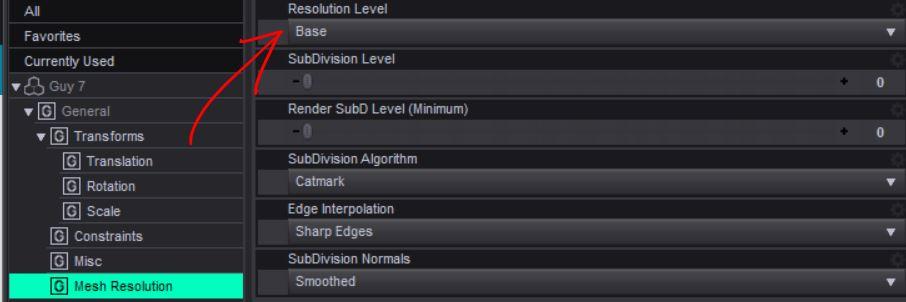
Also make sure you're exploring just the figure and not any attachments (delete any eyes, mouth, etc, that may be attached to the figure first).
Loading Full Body Morph to Genesis 9?OK I figured out what setting I needed to uncheck in DAZ Studio to get it to export as a single OBJ instead of having the subparts beneath that separately. There's a "Write Separate Objects" option in DS OBJ Export Options dialog that, when not checked, exports everything as a single object with no subparts.
But here's where I'm having a problem. In that video you linked to, I can't even get that far. I notice he's using 4.21 publishing build, which I don't have. The closest I have is 4.21.0.5 regular build. Anything other than that is no longer available to download. For the record, I see the same issues described below in the 4.23 publishing build.
Starting at 2:25, he chooses Edit > Object > Morph Loader Pro. I see no such command. For me, it's at Edit > Figure > Shape > Morph Loader Pro. There's difference number one.
Next, he gets to the Morph Loader Pro screen and then accepts the default options to load the morph. And the morph works fine. In my case, I get a message that the geometry is incompabie and the morph fails to load.
So I'm finding tutorials, but I'm not seeing the screens that are being shown. They appear to be outdated.
EDIT TO ADD:
Just to make sure my morph worked correctly, I exported Genesis 9 as a base OBJ in default pose. I then imiported that OBJ into Modo and applied my morph to it. It worked perfectly. But I'm having problems getting it to work in DAZ Studio.
Strange knees / elbows deformation after posing - ResolvedThoswe look like product bugs - probably the link between the bend and the morph should be multiplied by the value of the shapes themselves and isn't. If they are from here report them to support, if from another store report to the artist or store (depending on how they handle it). If you want you can apply a fix (assuming I am right) - right-click on the Parameters pane and enable Edit Mode (if it isn't already), right-click on the problem slider and seelct Show in Property Hierarchy, then expand to show its attributes>Controllers>and you want to see "nd stage (1st stage should already have the knee bend), then find the body slider (for the first, something like EM3DAlinaBody) in Parameters and drag it across into Controlers>2nd Stage for the corrective morph.
Cannot write custom property slider (pose) to keyframes in timelineI guess this is just a begiiner's error here, but I didn't find an answer searching for an hour now.
I'm trying to create a custom slider for several poses. So: I create a timeline with the poses, then create a custom property/slider, I call "ERC Freeze…" and tell it to take the data from the timeline. After this, my new slider works as intended, I can morph through the poses with it, but when I try to animate this slider via keyframes on the timeline, nothing seems to be written.
Is there a setting I*m overlooking?
Help appreciated!
Michael
Strange knees / elbows deformation after posing - ResolvedRichard Haseltine said:
awdz said:
Richard Haseltine said:
I am having trouble sorting out what the image shows, but it could well be a corrective morph kicking in when it isn't needed - in a way the opposite of not adjusting rigging to shape.
What appears to be happening from a "form" point of view is that, as the knees bend, it almost looks like the calves are pressing up on the underside of the thighs, but not touching them; it's as if their "boundary" is several inches beyond where it would appear to be based on the figure's "flesh."
Which is why I think it looks like a corrective morph - it should go with another shape, which probably does thicken the shins, and is trying to compenmsate for that when the knee bends. Does it show on a pure, vanilla figure with just the knee bent?
Yes, it does.
Paying for a Daz modeler to make a G8F morphanaximanes_2000 said:
Leana said:
I'm pretty sure you can't make a character like that with morphs only, you'd need extra mesh (probably a geograft) for the abdomen, antennae and wings at least.
I would beg to differ using @RawArt Wasp Queen as an example:
https://www.daz3d.com/wasp-queen-for-genesis-8-female
If I can get a roach like this, I am set. The problem for me is that he moved onto the G9 figures which I do not use since I invested tens of thousands of dollars into G8F. So, i need to hire someone.The Wasp Queen is actually the perfect example of what I said: the product is not just a morph, the wings, bug back and antennas are geografts.
Blender bridge questionmanual export and manual import via morph loader pro are not severely arduous tasks.
ive made many morphs and never thought it was so stenuous to require a live link/bridge/faster process to save you 10-20 seconds of work.
Daz 3D is part of

Connect
DAZ Productions, Inc.
7533 S Center View Ct #4664
West Jordan, UT 84084Licensing Agreement | Terms of Service | Privacy Policy | EULA
© 2026 Daz Productions Inc. All Rights Reserved.