-
Hair cap causing 'cracks'
This rendering artifact usually happens when the cap is intersecting the character geometry, either because of displacement applied to the character or a HD morph that doesn’t have a corrective projection morph to account for the HD details. Most of these caps have an ‘Adjust Expand All’ or similar morph. Dialling this up by a couple of percent will usually overcome the problem.
Thanks Redz. Yeah I realised it was the Vas Morph that was causing the issue from a conversation with a friend who'd also had that problem. I didn't understand why the same morphs weren't automatically being applied to the hair too in the way you'd exppect for a character morph on clothing.
I'll try your fix too. Thanks.
Daz Studio Pro BETA - version 4.12.2.60! (*UPDATED*)WARNING:
Dont use Face Transfer,,,, it uses hard coded path for files into C: !!!
If you have your DAZ3D installed in other location all your work will be wasted and even if you point to missing files It will be a broken character... 4 hours wasted beacause of that.
Errro message even that I have everytrhing on N:
c:/users/fableman/appdata/roaming/daz 3d/studio4 public build/temp/face transfer/generate/924/g8fbasearmsmapd_1004.jpg
c:/users/fableman/appdata/roaming/daz 3d/studio4 public build/temp/face transfer/generate/924/g8fbaseeyes01_1007.jpg
c:/users/fableman/appdata/roaming/daz 3d/studio4 public build/temp/face transfer/generate/924/g8fbasefacemapd_1001.jpg
c:/users/fableman/appdata/roaming/daz 3d/studio4 public build/temp/face transfer/generate/924/g8fbaselegsmapd_1003.jpg
c:/users/fableman/appdata/roaming/daz 3d/studio4 public build/temp/face transfer/generate/924/g8fbasemouthmapd_1005.jpg
c:/users/fableman/appdata/roaming/daz 3d/studio4 public build/temp/face transfer/generate/924/g8fbasetorsomapd_1002.jpg
That's the temp folder - which you can move in preferences. You need to save the face, using the function in the pane, to get permanent texture files.
Thanks.
GenX2 and V4 foot poseThanks. I've managed to export the V4 cr2 with the flat foot pose, but GenX2 still uses the original Victoria 4.2 source which has the tippy toe pose. How do I replace the Victoria 4.2 morph that GenX2 moprh with the new flat foot V4.2 I created?
Hair cap causing 'cracks'This rendering artifact usually happens when the cap is intersecting the character geometry, either because of displacement applied to the character or a HD morph that doesn’t have a corrective projection morph to account for the HD details. Most of these caps have an ‘Adjust Expand All’ or similar morph. Dialling this up by a couple of percent will usually overcome the problem.
DAZ Studio 4.12 ... Face creation abilities????I like the new Face transfer too.
however there are some things i wish were implemented.
1: the possibility to rotate your reference image. If the image is in profile view the Face transfer program turn the image into landscape view. A rotate function would help. Best would be a slider that can rotate the image 360 degrees.
2: the added optional function of a profile image for better end result. As the chin and check usually needs some manual corrections.
3: possibility to choose the hue and saturation of the skin that is not the face. I have ended up with weird combos where the Face is my image and the body is super red.
thats just the things i can come up with now. Other than that I Love this feature! /J
Laggy Genesis8I think you're not reading what people are saying. This willhappen with G8F. How many G8 Characters and morph packages do you have? I have 558 G8F characters and 135 G8F related morph packages.
@Bobvan "due to my 1070 failing to render some large scenes. The scene renders fine on my 1080i beast at home."
Do you not understand how Iray works? The 1080TI has 3 GB more Vram than the 1070.
I think it is more badly made character related as I have no lag with G8.
My phone will not charge complaint threadnot sure if this is a complaint complaint: i swore i wasn't buying any more characters but 1.99 is hard to pass.
complaint because i'm greedy and needy: i need hair styles and genesis 8 f/m clothes and props. thank you.
not so much a complaint as it is a proclamation that most will just roll their eyes at: i restrict myself to genesis 8 and 3 (if I can convert it) so anything else is a easy pass.
complaint/observation: hmmm Tilly seems to have some quirk that messes up some of her shirts. I found a morph that seems to resolve the issue. Not sure where the morph came from but it works.
Are we supposed to create art with the stuff we buy here?
Why only stop at hair and clothes? You can make hair yourself - with the SBH editor you don't even need to leave Studio and it's completely free.scene's are generally a waste of space, along with most charector models, you only need to buy hair, clothes and morph packs, if you have the time, you can make every charector yourself using the G8 base model and your morph packs
a few shader packs are probably good to have for different enviroments, which you can use as a base to tweak and make your own with custom diffuse textures
piugins are good to, like decimator, which you need if you use an external terrain generator you can paint all the paths and roads etc on, to lower the polys
Also, morph packs: I only use morph packs to make minor adjustments to my own characters but if I were not do lazy I could actually skip them myself. I kind of do, i only have morph packs for Male, never felt the need for morph packs for my females. The main character morph I create myself. There are a couple of free options you can choose from and also some cheap ones. Same for clothes.
Are we supposed to create art with the stuff we buy here?scene's are generally a waste of space, along with most charector models, you only need to buy hair, clothes and morph packs, if you have the time, you can make every charector yourself using the G8 base model and your morph packs
When you get right down to it, we could learn how to draw and paint really well, and skip the entire 3D modelling thing altogether. We could use paints we make from dirt and leaves and the blood of roadkill, which could also provide the hair for brushes, and hides upon which to create our masterpieces. You know, if we had the time.
Well with all the time you spend with making all your 3D stuff work the way you want, the time you spend in the store/forums, as well as the time you have to work to pay the expenses, there might not be such a huge difference in the time spent if we did it all from scratch instead.
 DAZ Studio 4.12 ... Face creation abilities????
So tried out the free version, was more than pleased with it compared to FaceGen or Headshop, so buckled under and bought the Unlimited version.....Face Transfer on left, Face Gen on right....because it is integrated right into Genesis 8 Character, you can use morphs to msake necessary adjustments, and and use expressions......Im quite pleased with it!
Very nice. I also like Face Transfer the best, because of its direct integration in Daz Studio and easy way to use it.
Style Transfer For Smoke Simulations for alvin BermarNice effect- code for blender https://users.cg.tuwien.ac.at/zsolnai/wp/wp-content/uploads/2014/10/blender_fluid_control.zip
 GenX2 and V4 foot pose
Is there any way to reset the V4.2 morph in GenX2 so that the foot pose looks more like G3?
Whenever I create morphs from GenX2 using V4.2, the feet are always on tippy-toes which messes with poses. I've tried recreating the V4.2 source morph in GenX2 so that the feet are flat but I haven't had much luck fixing it.
Thanks!
Are we supposed to create art with the stuff we buy here?scene's are generally a waste of space, along with most charector models, you only need to buy hair, clothes and morph packs, if you have the time, you can make every charector yourself using the G8 base model and your morph packs
When you get right down to it, we could learn how to draw and paint really well, and skip the entire 3D modelling thing altogether. We could use paints we make from dirt and leaves and the blood of roadkill, which could also provide the hair for brushes, and hides upon which to create our masterpieces. You know, if we had the time.
you can use terragen free for terrains https://planetside.co.uk/free-downloads/terragen-4-free-download/
you can use p.Con planner with BIM for free for rooms/buildings https://pcon-planner.com/en/
you can use any asset in p.Con planner downloaded from 3d warehouse https://3dwarehouse.sketchup.com/?hl=en / you can also use them importing them directly to Daz, if you clean them up in hexagon
if you have the right morph packs, a charector only takes an hour to make, with a skin builder script ontop
DAZ Studio 4.12 ... Face creation abilities????So tried out the free version, was more than pleased with it compared to FaceGen or Headshop, so buckled under and bought the Unlimited version.....Face Transfer on left, Face Gen on right....because it is integrated right into Genesis 8 Character, you can use morphs to msake necessary adjustments, and and use expressions......Im quite pleased with it!
Novica & Forum Members Tips & Product Reviews Pt 12So here's a short review of Rex for Genesis 8 Male.
I was excited when Rex showed up in Fast Grab a few days ago! I've been meaning to beef my library up with a few more characters and he's been on my wish list for a while now. And of course I'm happy to support Gypsy Angel given the circumstances. It's unfortunate then that this is going to be a mixed review rather than an entirely positive one. But what's the point of reviews if they aren't honest?
The number one selling point of Rex is in my opinion his facial morph. That's one handsome fella! Especially since there aren't that many black men to choose from. He's a real dreamboat.
There are a few things that I don't love but that are relatively minor. I think his lashes are too feminine and his body morph is a bit off - his mid section is a little too bulky and his legs a little too spindly. Needless to say, all this is very subjective... and easily adjusted.
The one aspect where I find Rex a bit disappointing is his skin. Which is really unfortunate because the skin is such a major part of any character!
Rex comes with 3Delight materials, IRAY materials, and "Anagenessis" materials. I don't own any of the Anagenessis products.
He also comes with three facial hair options - clean shaven, slight goatee, and full on goatee. All three look pretty good! The goatees are not overlays and therefore can't be used on other character's skins.
There are also several eye options, which are fine but nothing to write home about.
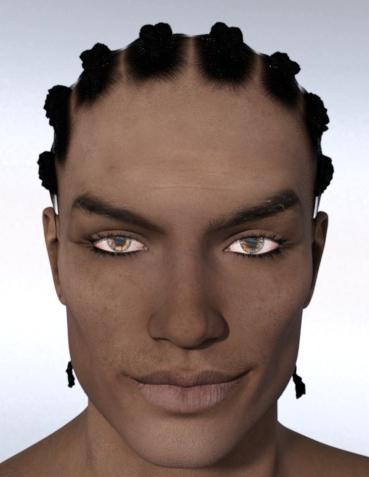
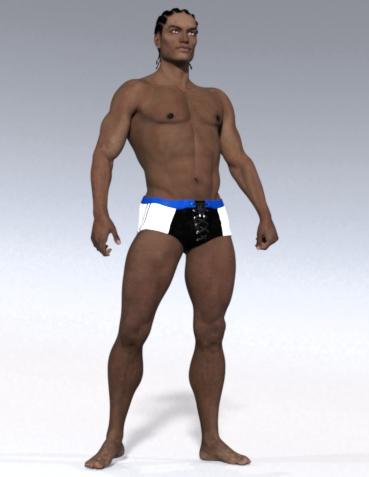
Here's Rex out of the box with IRAY materials. This just doesn't look very good to me; I almost feel like his skin is covered with a thin film of white powder or something.
(I don't think it's the fault of the HDRI; all characters I've worked with so far look good in this light.)
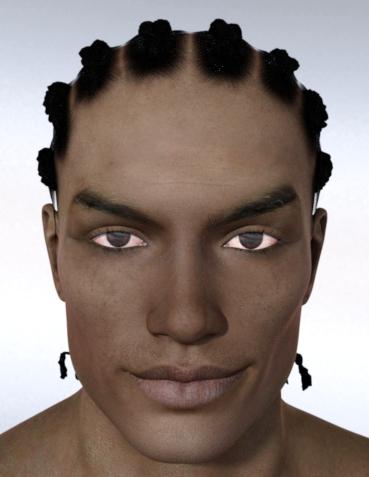
Here's Rex with Anagenessis materials (but without the Anagenessis product). I also gave him more masculine lashes and applied one of the darker eye options.
I don't love how his skin now has a yellow/green tinge but otherwise this looks better to me than the standard IRAY skin.

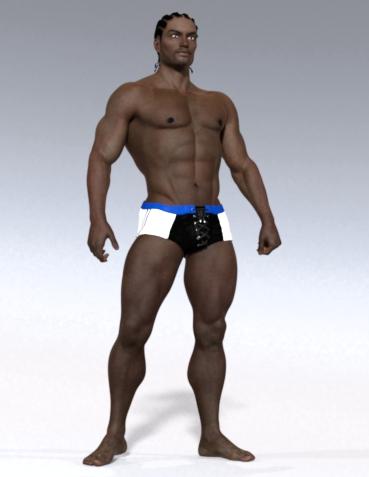
Here's Rex with Anagenessis materials again, with the translucency turned up to 0.90. I also gave him a goatee, whitened his sclera a little, and tweaked his body shape.
I feel now I'm getting somewhere. Even so, it's just not the most exciting skin in my opinion.
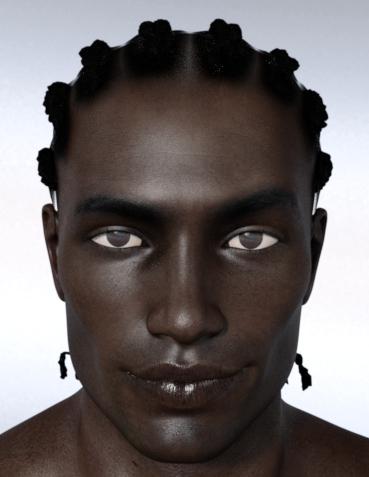
And just as a reference, here's Rex with a tweaked G8M base skin.
It's a bummer that Rex' skin just doesn't excite me. But he's still a very handsome character and I think I'm going to have a lot of fun with him. I'm currently rendering my first "proper" render with him, will post it here as soon as it's done.
If anybody has suggestions about how to give Rex' skin more depth, I'm all ears!
Are we supposed to create art with the stuff we buy here?scene's are generally a waste of space, along with most charector models, you only need to buy hair, clothes and morph packs, if you have the time, you can make every charector yourself using the G8 base model and your morph packs
When you get right down to it, we could learn how to draw and paint really well, and skip the entire 3D modelling thing altogether. We could use paints we make from dirt and leaves and the blood of roadkill, which could also provide the hair for brushes, and hides upon which to create our masterpieces. You know, if we had the time.
:) when I was a kid we used to use sandstone rocks as paint ... the red ones were especially good. red, brown, tan.
A bit of an issue with eyes using Face TransferRan Face Transfer again, images are numbered in order.
The fix that Spartan outlined above worked fine. This is what Vanessa looks like now with that fix:

Now you can clearly see her eyes!
Face Transfer also creates dark and murky iris texture maps:
g8fbaseeyes01_1007.jpg
I guess it largely depends on the photo, as you're not going to get good lighting on the eyes anyway in most cases. I would suggest throwing them out and using your own.It be awesome if FT could detect a person's eye color and substitute its own pre-made HD eyeball maps with 100% clarity, but that's wishful thinking.
Yes, I have noticed this too. If you have good lighting on the eyes then it is not as bad. However, as you pointed out as well, it is rare that you get good lighting on the eyes. Substituting the eyes for another set in my Daz library worked most of the time, but sometimes it didn't. I have used the fix that Spartan outlined above and that seemed to have done the trick.
Thank you all for chiming in on this. I guess it should be brought to the attention of the devolpers and perhaps they might release a fix for the program.
Novica & Forum Members Tips & Product Reviews Pt 12Are we allowed to actually post honest reviews here? Not that I'm going to bash anybody's product, but there are some that turned out to be somewhat disappointing or less than expected. Everybody posts positive reviews but the rest of the stuff - well, it's hard to find out what it's like and I don't always get to try things out within a 30 day window.
Yes, we point out shortcomings as well as what we like. We've noted paper thin skirts due to dForce, architectural flaws, character mapping errors, etc. Just be specific and perhaps offer what you'd like to see/ what could be done differently. It's not bashing if done in a civil manner. If it is something that isn't actually wrong with the product, just state it as an opinion. ("I'd like to see.... instead of..." ) Just recently I gave my opinion that I don't like built-in blush on characters. It's not actually a flaw of the product, but it does limit those of us who don't want blush, or want to use it and morph the character down to a child.
+1
I prefer the flexibility of being able to decide if I would want the character to have blush. I don't purchase characters that have it built in.
Are we supposed to create art with the stuff we buy here?scene's are generally a waste of space, along with most charector models, you only need to buy hair, clothes and morph packs, if you have the time, you can make every charector yourself using the G8 base model and your morph packs
When you get right down to it, we could learn how to draw and paint really well, and skip the entire 3D modelling thing altogether. We could use paints we make from dirt and leaves and the blood of roadkill, which could also provide the hair for brushes, and hides upon which to create our masterpieces. You know, if we had the time.
Are we supposed to create art with the stuff we buy here?scene's are generally a waste of space, along with most charector models, you only need to buy hair, clothes and morph packs, if you have the time, you can make every charector yourself using the G8 base model and your morph packs
a few shader packs are probably good to have for different enviroments, which you can use as a base to tweak and make your own with custom diffuse textures
piugins are good to, like decimator, which you need if you use an external terrain generator you can paint all the paths and roads etc on, to lower the polys
Daz 3D is part of

Connect
DAZ Productions, Inc.
7533 S Center View Ct #4664
West Jordan, UT 84084Licensing Agreement | Terms of Service | Privacy Policy | EULA
© 2026 Daz Productions Inc. All Rights Reserved.