-
Put this on the fridge, mum!
First attempt at my own water in Daz, will give myself an E for effort. The surface ripples were easy, but the vortices have too many artifacts and do not fade as intended, likewise the cone shower. The other nozzle is supposed to be producing a fine mist, trouble is it is too fine! In 3DS or Maya I would use particle systems but those do not transfer as objects into DAZ, or rather I cannot figure out how! Back to the drawing board.
Wacky Modelling ~ In Carrara ~maybe have to add a bend morph to it lol ... we still have one and it's pretty straight still though the grandkids are getting taller so won't be long!
 What if Blender could seamlessly render Iray materials?
I don't know what it takes to transfer a Studio scene with the MDL material settings intact, but if it's pretty simple, it sounds like it would be really useful. It makes me wonder if Cycles could somehow be made to use as a render engine in Studio itself.
Missing Contents...Looks like a whoops that got through QC.
I just went through all my Rarestone stuff, and double checked the file lists for every product on here and nothing has that dsf.
Of course it also doesn't say it requires the zev0 200 morphs for g8f either, so somebody dropped the ball on this one.
Try dropping a support ticket and see if maybe it gets fixed, i wouldn't hold my breath though.
In the interim, i'd suggest creating a new character preset.
Load a genesis 8 Female, apply the Minto full body, then the full mat preset and save as a Character preset(file>saveas>Character preset)
As an aside, the two errors generated by this character, missing Zev0 200 morphs and the laugh morph, only appear to be in the character preset, but are not present in the Morph preset, nor in any of the DSF files.
The question on everybody's mindCould have a contest for multi-mammary gland toons. That way you could say, "And may the breast morph win!"
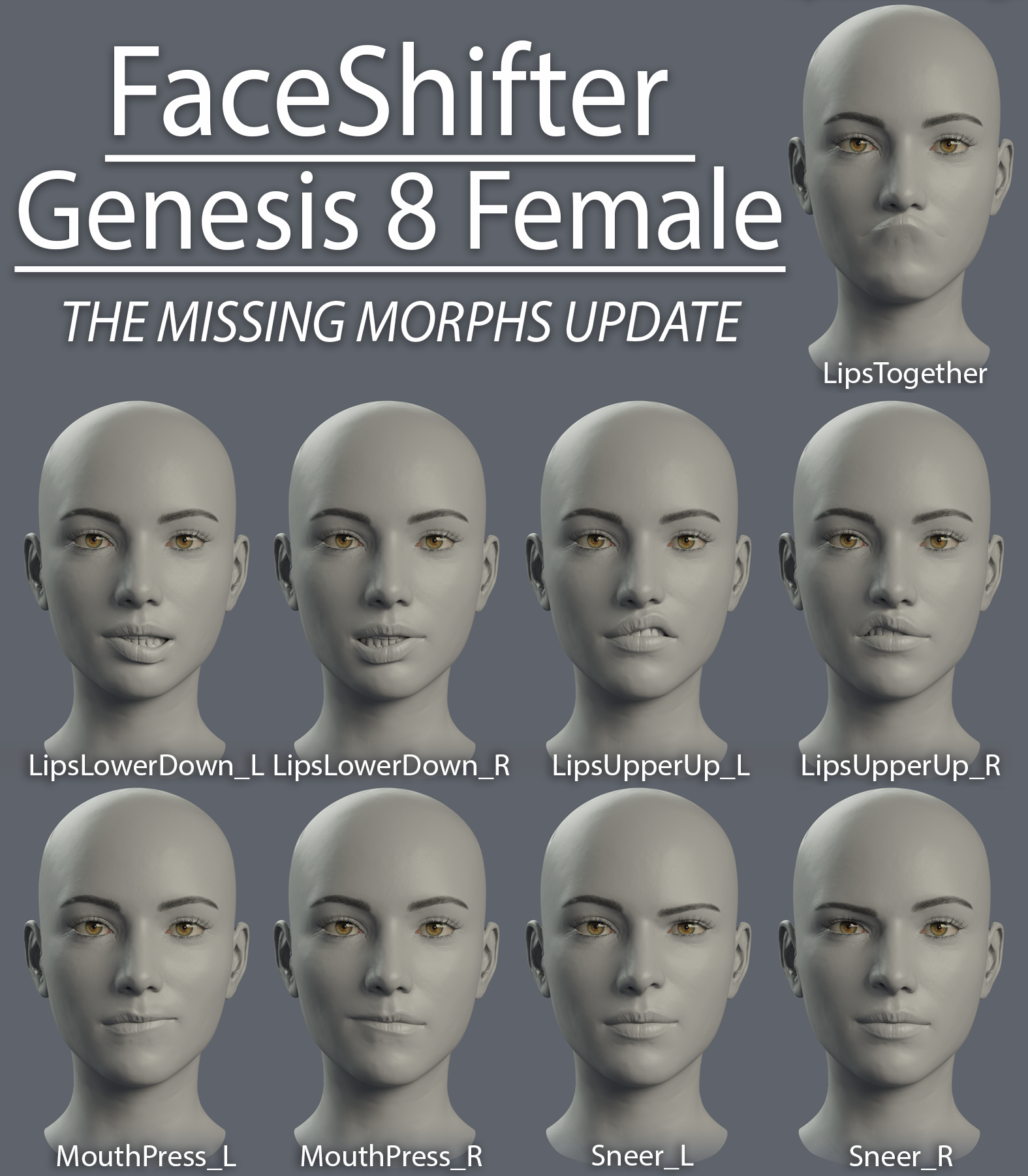
FaceShifter for Genesis 8 FemaleFaceShifter for Genesis 8 Female: The Missing Morphs Update


 I finally manged to snag some spare time between projects to update FaceShifter with some missing morphs.
The original FaceShifter posts have been updated with the new files, this contains the updated morphs only.
Copy files to your Daz library
Cheers,
Daniel
-------------------------------------------------------------
Download the update from your Gumroad library
Or, download at ShareCG:
https://sharecg.com/v/94800/browse/21/DAZ-Studio/FaceShifter-G8F-Missing-Morphs-Update
-------------------------------------------------------------
Also updated the .CSV file for easy morph export
Download the update from your Gumroad library
Or, download at ShareCG:
https://sharecg.com/v/94802/browse/21/DAZ-Studio/FaceShifter-Morph-Export-.CSV
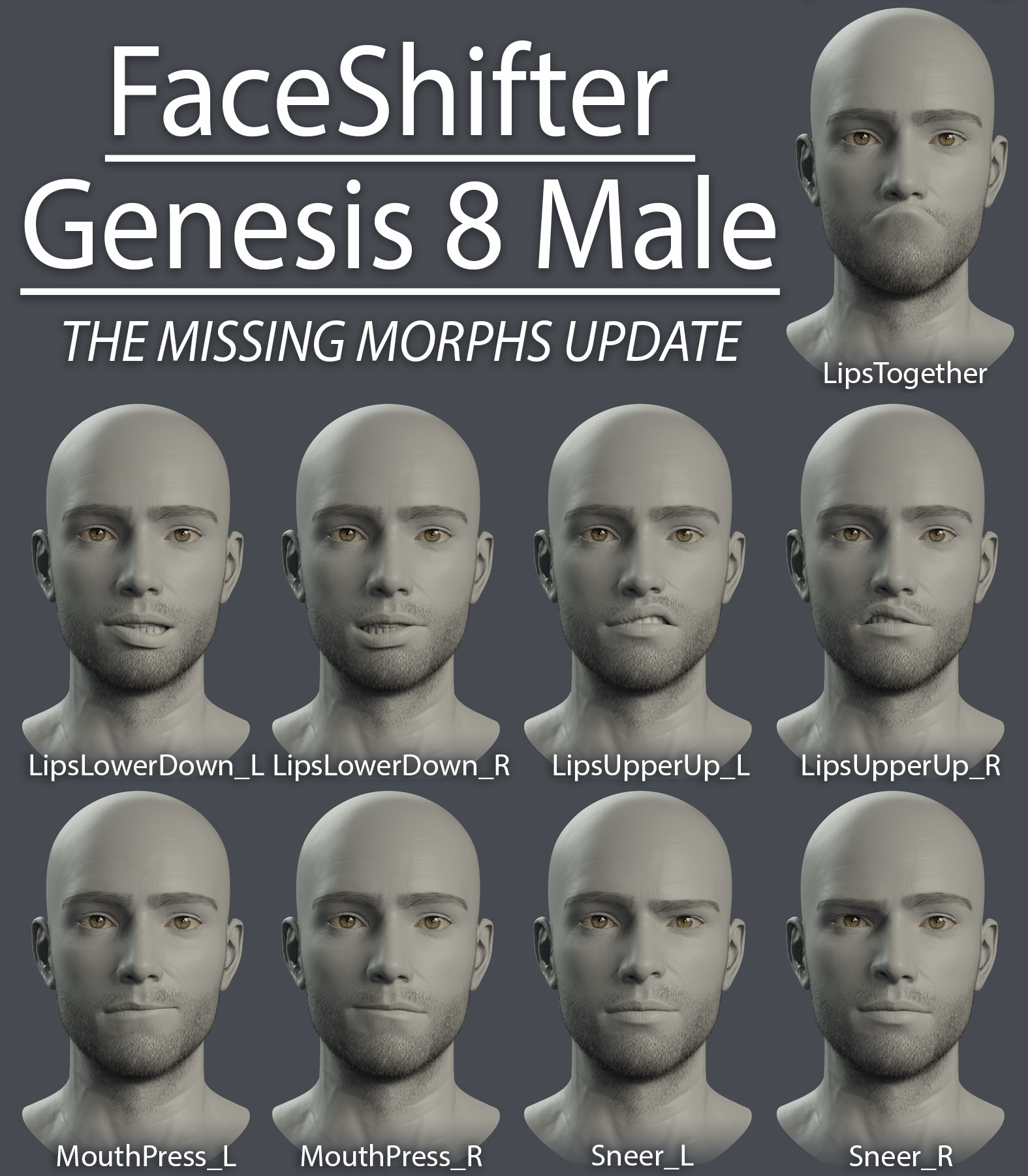
FaceShifter For Genesis 8 MaleFaceShifter for Genesis 8 Male: The Missing Morphs Update
I finally manged to snag some spare time between projects to update FaceShifter with some missing morphs.The original FaceShifter posts have been updated with the new files, this contains the updated morphs only.
Copy files to your Daz library
Cheers,
Daniel
-------------------------------------------------------------
Download the update from your Gumroad library
Or, download at ShareCG:
https://sharecg.com/v/94801/browse/21/DAZ-Studio/FaceShifter-G8M-Missing-Morphs-Update
-------------------------------------------------------------
Also updated the .CSV file for easy morph export
Download the update from your Gumroad library
Or, download at ShareCG:
https://sharecg.com/v/94802/browse/21/DAZ-Studio/FaceShifter-Morph-Export-.CSV
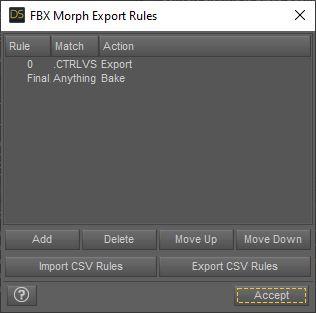
Problem with FBX export.What have you got under edit morph export rules?
also are you using a pose control too? I found my A to T pose ones using the arm and leg sliders don't export but your bones don't appear to be following the mesh either
 [Released] Assembly Line Pose Automation Kit [Commercial]
Thanks for quick reply :)
Used both:
Assembly Line Create Poses For Figure Type
Assembly Line Make Preset Compatible for FigureBut with your reply, that implied it should work, made me dig a bit more.
DL'd the manual install file for Hands Dial Up product.Now see that this product actually works based on morphs and not actual poses.
Yes, there are poses, but those dufs all have 0,0 for key values.
Which confused me.
So,
Checked in the Daz/Data folder (as opposed to Daz/people/Genesis 8 Female/Poses) and saw morphs like this one in a .dsf:"output" : "lThumb1:/data/DAZ%203D/Genesis%208/Female/Genesis8Female.dsf#lThumb1?rotation/x",
"operations" : [
{ "op" : "push", "url" : "Genesis8Female:#Left%20Hand%20Pose%2001?value" },
{ "op" : "push", "val" : 35.52138 },
{ "op" : "mult" }
]
So since it's not actually a pose but a morph pack, can't convert it I guess?
Learned something new lol.BTW, Thanks for all your great products! Makes things easier and more fun.

Update: Well there is a way. But this time nothing to do with your helpful product. Working for G8M now. Normally would just buy the G8M product too, but since plan on making own morphs and activate with pose clicks, this was all actually very helpful to figure out a workflow for myself. Your product got me going exploring. So thanks again!
Anyone tried gradient texture on the Animated Candle?I have actually been looking for a candle that melts. I don't need it to be super smooth (i.e. not doing animation), but the plan is to use a gradient texture so that one color is totally at the top and another color is totally at the bottom. Can anyone who has purchased this product do a simple test to see if the melted morph just compresses the colors together (i.e. the effect of using the Y scale on a non-morphed candle) or if the top color is "lost" as the candle melts?
Teen Raven 8 not the correct height as listedAt this late stage, I think the best they can really do is update the store page.
Changing the character morph, other than to fix something that's actually broken, would mess up existing scenes for people.
Long hair on toons?I think the easiest way is if you can find some dforce hair and then simulate it.
Some other options as I see it.
- Try to add cloth dforce to the hair - might need some weight painting for dforce influence.
- You can create a custom morph for the wanted hair; if you know how to do that.
- Weight paint the lower part of the hair so it follows the head instead of the shoulders. But that might have other unwanted affects depending on your pose.
So long to loadThe scene file is about 130mb but at the minute of loading, DS has useb 4gb of memory. The hd where the file and data is stores is a SSD, all the other porcess are closed, same result.Note that the scene file size doesn't really tell you how much memory it needs, or how long it takes to load. The scene file has external links to other files for the textures, actual object mesh, and morph data — these are not stored as part of the scene file.
Long hair on toons?I recently picked up @JoeQuick's Toon Girl, and so far every (female) hair I've tried to apply to her has been distorted in some way or another. Long hairs veer sharply inwards right below the jaw, and short hairs just disappear inside the head. On one hand, given what an extreme morph she is, it's not surprising that there would be challenges. On the other hand, though, there has to be a solution. What's more frustrating is that the problem is much less pronounced with Toon Boy; while Greer hair also disappears inside his head like it does hers, I can use other male hairs, even for other generations, and they work as expected. Even male hairs applied to Toon Girl work better. So my questions are:
1) Is there some trick to using hair with Toon Girl?
2) Are there some hairs that work better with Toon Girl? I notice that nearly all the promo images of her use the same hair (Sloane), which uses the Girl in its promos, so is that one optimized for toony shapes? I don't have other female toons, so maybe this is just a known issue that I hadn't encountered before.
Jenni 8If you think Jenni looks good, try her with almost any BJ character skin preset. I guarantee you will be blown away by the difference. I would bet money on BJ Murphy's skin looking absolutely stunning on Jenni. Her realistic skin with a little shadow under her eyes would be perfect for a busy soccer mom character. Seriously, I'd like to see someone post that combination here, I'm sure somebody here has Jenni and a few BJ characters in their runtime.
I'll give that a shot if I have time this evening, as I own all of BlueJaunte's characters and the skins on them are, indeed, excellent. However, wth the exception of Amala, they are all also either teens or younger adults and those skins clearly reflect that. Murphy does have some good weathering and discoloration on her legs, but there's no significant age spotting, flawless neck and chest, and no laugh or frown lines, so the end effect will be quite different.
You get weathering from normal maps. So the answer is to apply the Murphy preset, and simply replace Murphy's normal maps with Jenni's. You can dial the value above 1 as well. You can also apply the HD morph if you have it. You can do 1 of these, or both.
I do not have Jenni. So I will demonstrate this with one of Edie's add on characters, Dorothea. I did Edie as well, but her toony shape might throw people off. I think Dorothea shows this better anyway.
So here is Dorothea with Murphy's preset applied, and no further changes. Edie's HD morph is on and her subdivision is 3.

She does look nice, yes, but her skin may indeed look too smooth. So lets swap the normal maps like I described for Dorothea's. I dialed their value up to 2.

BANG! She looks completely different, and pretty darn amazing IMO. So try this with Jenni, and I guarantee you will be impressed.
Eh, here is a bonus pic of Edie, with Edie's normal maps applied just like above.

Looking good Edie! If I went without Edie's normals, she would actually look quite young!

I am not joking. I truly believe that doing something like that could propel Daz Studio up quite a bit. I think more people would notice what Daz is selling and doing, and it could attract a new base of customers. If they are done right, even the more snobby 3D modelers would take notice. The Daz Original lineup IMO should be the best of what Daz can offer.
Thanks for the renders. I migrate normals maps, but I'd never done a systematic comparison. I don't know if we're allowed to point out what Daz should be doing.
How to transfer "Categories" to new computer.Over the years I've spent many many hours building my category list of DAZ Studio models. Dragging icons into multi-structured trees that are my window into my vast library.
I now have a new computer and a new installation of DAZ Studio. I've transfered the physical library to the new computer and linked them to the Content Manager. But how do transfer my logical "Categories" list to the new computer. Help!
 Any G8 or G7 age morphs that incorporates an actual age number gauge?
I highly doubt it, and even if there was, I wouldn't trust it.
The age of the original character morph(s), the skin used, etc, will all impact the apparent age of the result, so age morphs can't be that specific. Unfortunately, it's just a case of "dial it until it looks about right".
renaming base mesh name.Thanks for the tip, but the scene identification doesn't allow the change of the figure name.
How can we do that in order to avoid ridiculous long morph names at export?Thank you for helping.
Strange Hair deformationIs the character shorter? It may be failing to project the morph into the hair areas thata re more distant from the base sahpe. In general it's often better not to AutoFit - you can either use Edit>SceneID to make the hair directly compatible with Genesis 8 Female (I assume the 6 was a typo) or you can simply parent the hair to the head.
I even did a skeletal transfer.
What do you mean by that?
Transfer rigging.
Why do you do atransfer rigging, if you have changed the scene identifier?
My guess is, it is the transfer rigging causing this.
Shoulders are different in G3 and G8 and it can cause some hairs to lay oddly. All transfer rigging does is make the bones match up.
Also, directly transfering it by simply just changing the identifier doesn't fix the problem.
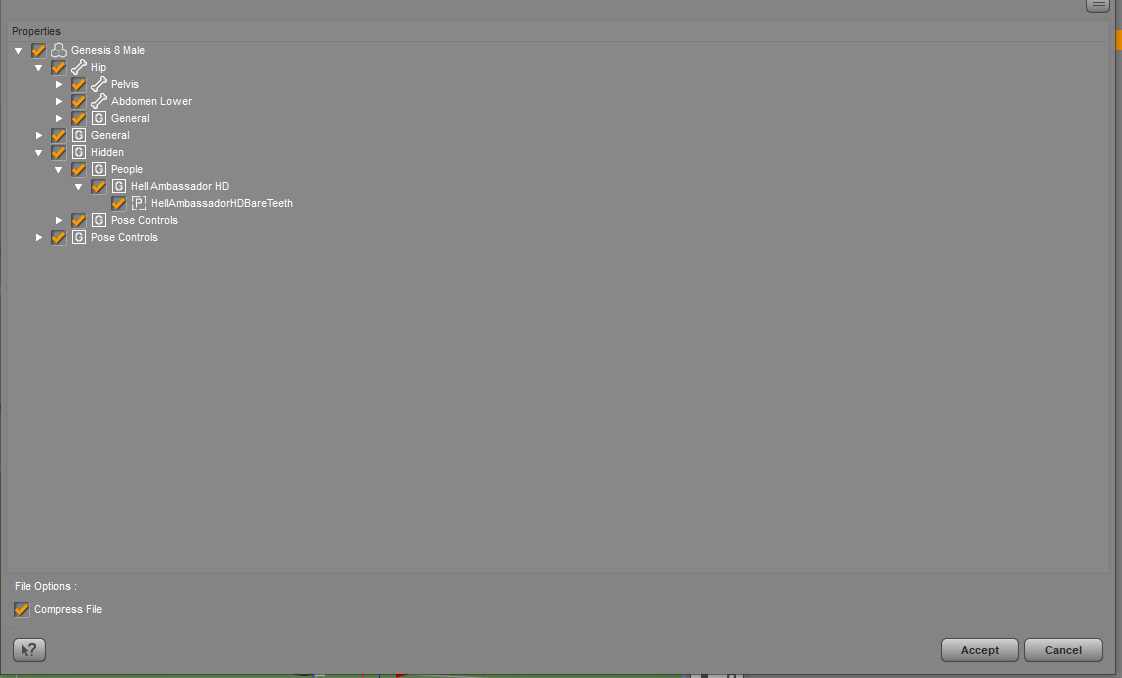
Content Improperly Made by Pa'sNext up, I have Helll Ambassador teeth, which is a morph, saved as a pose, in every file. Why?
Daz 3D is part of

Connect
DAZ Productions, Inc.
7533 S Center View Ct #4664
West Jordan, UT 84084Licensing Agreement | Terms of Service | Privacy Policy | EULA
© 2026 Daz Productions Inc. All Rights Reserved.