-
New DS Filament Render Engine
3Diva said:
I just upgraded DAZ to the latest version and found out that it has this new feature. but unfortunately, it is not of much use because everything looks horrible unless you deliberately tweak your scene for this engine but then it will be not usable for iRay anymore
That's not true. All you need to do is adjust the Filament Draw Options Node to suit your taste - it doesn't affect the way the scene looks in Iray at all.
Go to Create >> New Filament Draw Options Node.
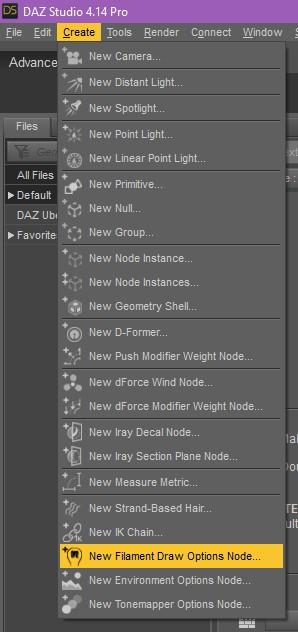
Select it in the Scene Tab and in the Parameters Tab adjust it's ISO Scale.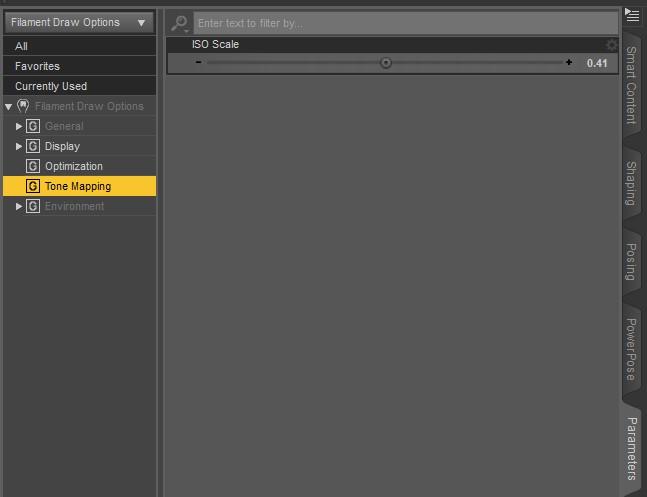
That brings the Filament Preview more in line with what you see in Iray.
Filament:
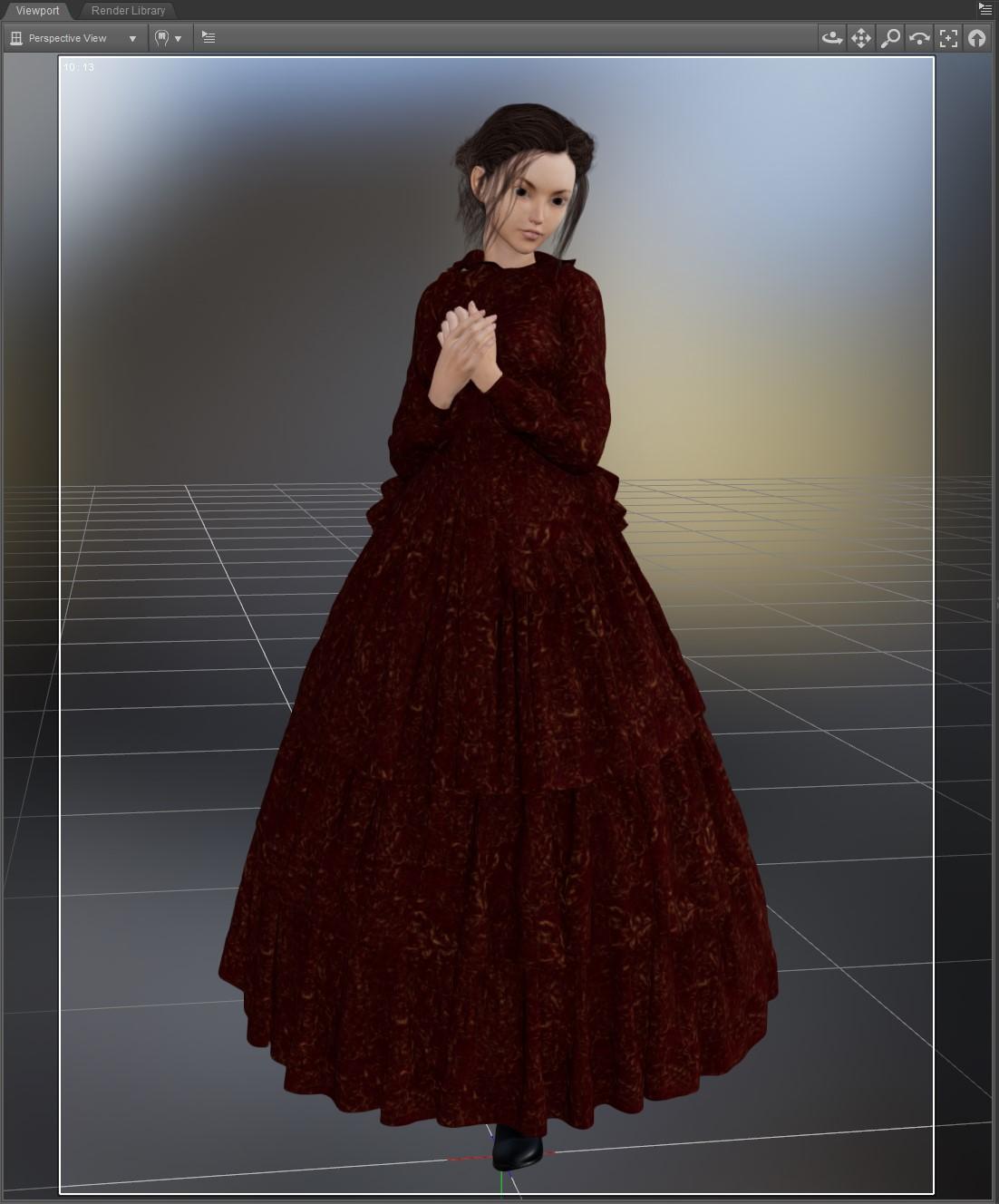
Iray:
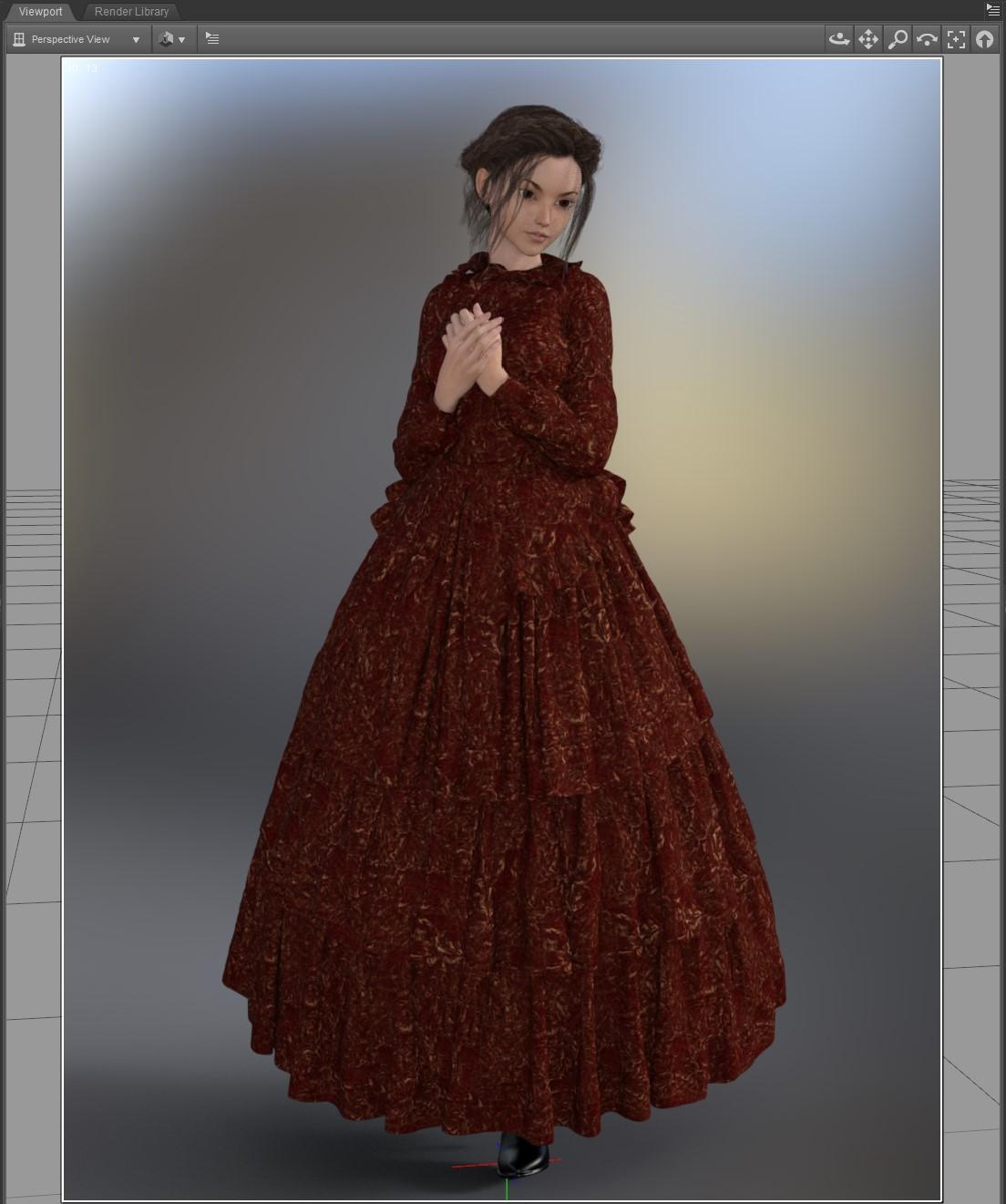
And just for comparison, what most people USED TO USE for a preview draw style, texture shaded:
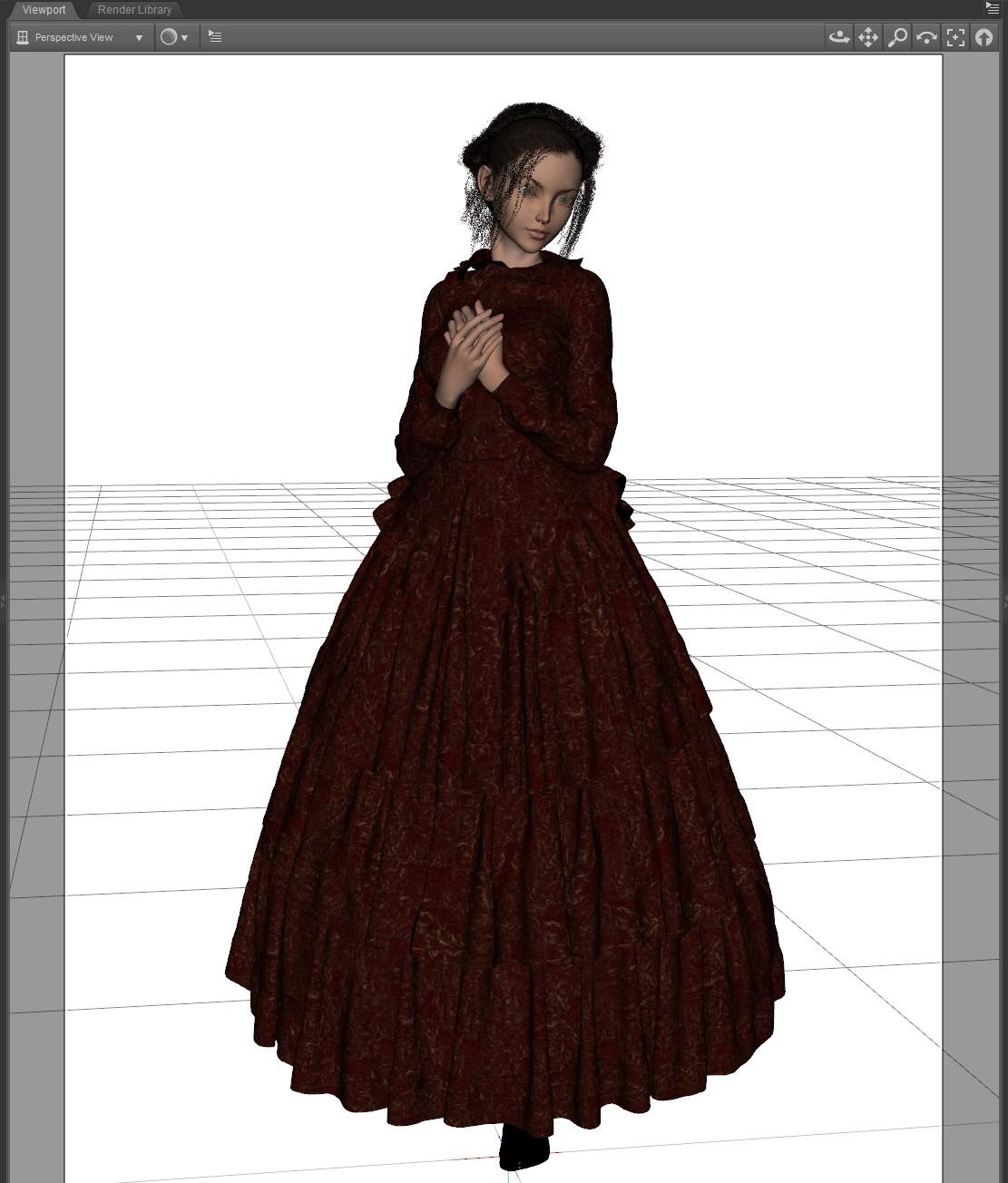
Filament preview is MUCH more in line with what you see with Iray.Thanks. That's a big change. Looks like my requests are already implemented. I just did not find how to do it.
Now for full happiness, we only need to find out how to do refractive materials in filament :)
Buggy post editing window. Post requiring html to hold formatting.It's nice to see the icons back, but I'm noticing that editing a post now requires the use of html on the user's side to maintain any type of formatting.
/edit This post doesn't seem to be doing it. For what it's worth, this is the post doing it for me: filament refraction ??? - Daz 3D Forums
filament refraction ???They show up with the dome on for what it's worth. Filament can handle refraction according to the official docs, but I don't know if there's any difference with studio's implementation of it.
You probably already have it, but I here are the official docs: Filament (google.github.io) Core Docs > Materials Overview is the sweet stuff.
If you'd prefer to leave the dome off, you can see that they indeed are there if you increase the glossy roughness. (first pic)
With the dome on, you can leave glossy off. (pic 2)
I don't think the iray shader is quite ready for filament. This thing might do better w/ it's own shader.
Any Mac users using Daz Studio on a Mac?scottidog2, you're very welcome. When DAZ updates Studio for the Mac, I'm pretty sure they'll include Filament and compatibility with Big Sur. It may take them some time to do so. They're saying mid-2021. Not ideal, but if your current iMac can render quick enough using Iray and the CPU, then I'd say go for it. That's what I've been doing for the bulk of this year. Getting a new MacBook Pro with an 8-core i9 made a huge difference in rendering speed, though certainly not as speedy as being able to use an Nvidia GPU.
There are some official forum threads here that have more in-depth discussions of Big Sur and DAZ Studio. Some users are attempting to load a system library into Big Sur (it was replaced by a newer version which seems to cause DAZ Studio to become inoperable.) We'll see how that progresses. :)
I can't wait to try Filament. I'd like to get back into animation (at a basic level). Haven't done that since my Amiga/NewTek/Lightwave days in the late 1980s.
My iMac is a 2011 model with a 256MB Nvidia card, but is sitting unused since it's having issues now. Hence my new MacBook Pro.
Lee
Any Mac users using Daz Studio on a Mac?eemoon_c43b45a114, Thank You for replying. I love using my iMac but its a 2013 model with 1GB Nvidia card. Using Catalina which has no Nvidia drivers. Want to get into Daz Studio for still images and animations, Is Filament going to be a render alternative that Mac users can use on CPU instead of Iray?Filament vs Eevee?The simple reason why Filament is "not there yet" is first of all DAZ Studio! Filament without it renders pretty insane good (in comparsion with DAZ Filament implementation) and can match even evee but not cycles or iray. What you would have to do is install it and render exported FBX files. The thing is - and this is only a strong hunch and therefor a guess at the moment - i think Daz Studio also cannot propperly convert the shaders and textures for an acceptable FBX format. Because if it would, we would not even have this conversation, since everyone would render in his faforite render engine.
Filament can do hair and can do emission, but Daz Studio's system on things like refraction alone is insanely stupid! This is why nothing really works out, when we try to transfer things. Daz Studio has overall "wrong" settings and this also forces a lot of people tweaking on every corner to get things "right", even if it would not be necessary. There will be a topic on this part, where i get into this comming up in the future... maybe this year!Just take a look at this and you could feel like WTF: https://www.deviantart.com/gniiial/gallery
These use ALL the same skin, the same settings, tweaked to get in the right direction. BUT... if you would see the shaders and materials... you would cry how many money you spend on iray shading crap to get a better looking character! Because the shaders in general are iray. ALL of them... there is no special light, no special whatever. The Skin is from Jenni8 (the right character), the second right is the first version to both of the left ones. These are older versions. ATM I'am at version 3 of this render engine overarching workflow. Imagine a world where you just put the character you want into YOUR faforite render engine and it just renders like it should! (...surely you would need to make changes BUT only really decent ones on the diffuse/base color/albedo end)
And now let me tell you something... the world is already there a few years and it's called PBR shading! But Daz Studio fails to "see" it comming for years with it's very own way of trying to simulate everything with the wrong math in the shader system...
If you really want to know what Filament can do knock yourself up and get ready to be impressed: https://google.github.io/filament/Materials.htmlFilament vs Eevee?I'm sure Filament will be improved and expanded to be more 1 to 1 with Eevee but DAZ 3D has multiple moving targets so they needed to get Filament out even if not 100% of the Filament features weren't available on initial integration with DAZ Studio.
Not discouraging anyone from using Eevee though or asking them to wait an indeterminant amount of time for Filament features that actually weren't promised by DAZ 3D.
Hair looks transparent in viewportIf it does not work in OpenGL you can try filament renderer for the viewport, it is pretty much just as fast as openGL
Or you can try this solution above
Hair may look transparent in the viewport but the issue I have more often is that it looks transparent enough in renders as well. A quick way to fix this is to remove the limit on opacity and crank it up to at least 4.0.
Daz Studio and LinuxNot seen any more freezeups than usual, so far. But I'm still in the habit of switching render previews on when needed and off before scene manipulation.
Interesting... I usually only have Studio freezing when loading a scene with characters that have morphs related problems (loading takes a long time and then may freeze but even the most stubborn projects usually load after a couple attempts) and well recently when using Filament. Otherwise Studio is running rock solid I gotta say.
Regarding the switching between preview and iray rendered, I have mine setup in a way that I have the Iray-render always on in the viewport tab and off/normal OpenGL in the Aux-view tab. This has the advantage that it's almost instant to switch back and forth while switching between render modes in the same view usually takes a short while to process the scene again before the render process even starts.
Daz Studio and LinuxCurious how Filament will turn out. Does it work for you guys? So far it generally works but I always get a complete freezup of the program sooner or later, especially when moving some sliders that have a big impact on the scene like for example the environment strength. And since this is all highly experimental with Wine and the render engine itself in very early stage, probably no one can really say if it's a Wine problem or a Filament problem (don't know if Windows users also encounter these freezups with Filament). It is a ton of fun to play around with though and looking SOOO forward to be able to use it without freezing problems.
Not used Filament much - just turned it on and played about with it - no scene render attempts.
Not seen any more freezeups than usual, so far. But I'm still in the habit of switching render previews on when needed and off before scene manipulation.
Daz Studio and LinuxCurious how Filament will turn out. Does it work for you guys? So far it generally works but I always get a complete freezup of the program sooner or later, especially when moving some sliders that have a big impact on the scene like for example the environment strength. And since this is all highly experimental with Wine and the render engine itself in very early stage, probably no one can really say if it's a Wine problem or a Filament problem (don't know if Windows users also encounter these freezups with Filament). It is a ton of fun to play around with though and looking SOOO forward to be able to use it without freezing problems.
Filament vs Eevee?Evee is from the output result more comparable to iRay, in terms of qualitly.
Filament is for me just a waste of resources.New DS Filament Render EngineHere's something that might have been mentioned elsewhere, but I didn't see it.
Is there a way to make textures glow in Filament? For example, Design Anvil created material settings to make the eyes of a figure glow. But when I tried that out in Filament, it didn't work. Any suggestions?
Sadly, Filament, in its current version, isn't able to do emissive surfaces. What you might try is adding Point Lights at low intensity right in front of the eyes and see if that can give a glow-like effect. I don't know if that would work but it might be worth a try.
Filament vs Eevee?The more accurate comparison for Filament is Blender's Material previw in the viewport
New DS Filament Render EngineHere's something that might have been mentioned elsewhere, but I didn't see it.
Is there a way to make textures glow in Filament? For example, Design Anvil created material settings to make the eyes of a figure glow. But when I tried that out in Filament, it didn't work. Any suggestions?
Filament vs Eevee?Can Filament do Subsurface scattering,Bloom, Ambient occlusion,screen space reflections object based motion blur during animation, volumetric lighting effects (smoke,fog etc) and depth of field???.Yeah, not sure how people are even comparing Filament to EEVEE at all.
UltraScenery [Commercial]The freeze of the USC interface has happened to me also. I can track it to building a scene with Restrict to Camera set to Current View and then rebuilding the scene with Restrict to Camera set to None. Did you go through that same sequence of events?
I did not have the workspace corruption that you showed. When I closed DS after the USC freeze, DS crashed. Did that happen to you?
Try reloading your workspace or a different workspace, and see if that restores the workspace to the way you want it.
Thanks barbult. I didn't use restrict camera. I ended DS through TM. Opened DS now and running USC again. It is stalled at "Creating Base Grass Instances" after 9 min. I am using extended background option in USC, so will close this and try w/o.
Yes, just closed USC dialog, exited DS through menu, then DS crashed like yours did.
It sounds like your freeze problem is different, then, if you aren't using Restrict to Camera. What terrain settings, feature, ecology, water and build settings are you using? I can try and see if I can reproduce the problem.
I used Oaks 11, River 3, Clear Stream. With/without extended background. Everything else default. Thanks.
I built it without background (extend forest) and it completed successfully in under 1 minute. I then rebuilt it with background (extend forest) and it completed successfully in 1 minute 21 seconds. In both cases there was a pause while building the litter layer, but after a few seconds, it continued. The Done button worked and everything was normal.
I wonder if you have some other plugin or setting conflicting. I built with my viewport draw style in texture shaded mode. Once I accidently built in Filament draw style, and that worked, too. I don't have Octane or Reality plugins installed.
I don't get the log message about the script completing successfully, though. That seems strange that you get the message after a failure and I don't get it after a success.
New DS Filament Render EngineI have no way of seeing if it is using my onboard graphics on the computer with a card I know some other programs I use doI use this software and is free:
https://openhardwaremonitor.org/
when opened it displays a full list of hardware values which you can select the desired ones and being represented in a styled gadget like this:

for me is a must detect how much memory and temperatures increases when I do iRay rendering,
for Filament I've seen it uses GPU Vram in some initial states when preprocess textures. the environment below increased VRAM from 2114Mb to 4483Mb VRAM, using 3Delight shaders only.
 filament refraction ???
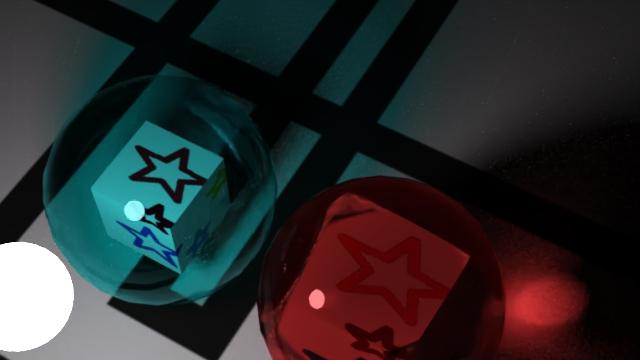
Hi all, I'm doing some tests with refraction and I was curious about filament so I just thrown it in. Well it seems filament doesn't handle refraction at all, unless I miss something. Below an example first iray then filament, the two glass balls seem to be completely ignored by filament, and only the cubes are taken into account for rendering.
Scene file included.
 New DS Filament Render Engine
Is there a switch or setting somewhere I don't see that lets you tell Filament to use BOTH CPU and GPU? I was rendering an animated pose to a movie and it seemed to be using only CPU, and while it was muuuch faster than Iray, I can't help but feel that it would be even faster using the power of all the cuda cores on my GPU....
~GenPretty sure I've read that Filament doesn't use your Cuda cores. Some people have said that it does use your graphics card and not your cpu, but then I've seen posts from people happily using it in a machine with onboard graphics and no separate GPU.
Daz 3D is part of

Connect
DAZ Productions, Inc.
7533 S Center View Ct #4664
West Jordan, UT 84084Licensing Agreement | Terms of Service | Privacy Policy | EULA
© 2026 Daz Productions Inc. All Rights Reserved.