-
How do you create a slider dial from an expression?
Hi Richard,
I tried following your instructions and was partially successful in creating an expression in the Pose Control Slider. However, the sliders, though they appeared successfully saved (after the ERC Freeze route), disappeared once I deleted the character.
So I tried your other suggestion -- make it universal via File>Save as>Support Assets>Morph Assets. Not sure where the exact location of the saved morph should be. Also, I couldn't find the dialogue for 'new property' to be checked in the Morph Asset Save Option box (see attached) as (per #9 "You probably don't want this as a universal control, since not every shoe set willw ant the same values, but if you do File>Save as>Support Assets>Morph Asset and in the dialogue check just the new property")
I would be grateful for some direction on saving (universal) expression morphs to the Pose Control Slider.
Thanks
There's Always Another Sale Thread -- Discussions Only Pt 3OrangeFalcon said:
XiousDs said:
Ghosty12 said:
Just seen Lycan 9 looked interesting, that is until I read that the female Lycan 9 shape is locked behind premier. So any thought of getting anything Lycan 9 has gone straight out the window.
Did Victoria 9 provide a specific male version for it? Did Michael 9 provide a specific female version for it? No, but you could super easily make the opposite gender for them by just dialing in the opposite gender shape. Later we got daz customized opposite genders for the models. With gen 9 you can put boobs and gens on any model, so I think you might be over reacting. The female shape is literally a convenience feature for premier rather than a requirement, unlike Aiko 9. I would dare say, though, you can pretty much replicate Aiko 9 via the toon essentials and some time so even that is probably more of a convenience feature too.These are great points. With sliders you can easily do things like change genders and go all out with the customizing.
However, in this case, having Lycan female is required because it's a unique model-the Lycan morph is great, but there are things that just don't work. For example, the feet need the slider to be at or close to 100% to look right. And, well, there isn't an individual morph for it, so you'll get the full bulky Lycan model. M3D Claws look fantastic, but my lady werewolf isn't a bodybuilder so I'm awaiting the female to be released (I have Premier and it look like it isn't available to add to my library yet).
I'd like to reiterate that I do not support putting anything behind the subscription paywall. If anything, this makes it more annoying because you CAN'T easily morph Lycan to female. I suppose you could get Phenotypes for Monsters but a full, dedicated model is always the best way to go.
You can dial in base feminine and breast morphs just fine with the Lycan 9 at 100%. Won't be quite the same, but it will work and there are anatomy textures in Lycan 9 for females.
There's Always Another Sale Thread -- Discussions Only Pt 3XiousDs said:
Ghosty12 said:
Just seen Lycan 9 looked interesting, that is until I read that the female Lycan 9 shape is locked behind premier. So any thought of getting anything Lycan 9 has gone straight out the window.
Did Victoria 9 provide a specific male version for it? Did Michael 9 provide a specific female version for it? No, but you could super easily make the opposite gender for them by just dialing in the opposite gender shape. Later we got daz customized opposite genders for the models. With gen 9 you can put boobs and gens on any model, so I think you might be over reacting. The female shape is literally a convenience feature for premier rather than a requirement, unlike Aiko 9. I would dare say, though, you can pretty much replicate Aiko 9 via the toon essentials and some time so even that is probably more of a convenience feature too.These are great points. With sliders you can easily do things like change genders and go all out with the customizing.
However, in this case, having Lycan female is required because it's a unique model-the Lycan morph is great, but there are things that just don't work. For example, the feet need the slider to be at or close to 100% to look right. And, well, there isn't an individual morph for it, so you'll get the full bulky Lycan model. M3D Claws look fantastic, but my lady werewolf isn't a bodybuilder so I'm awaiting the female to be released (I have Premier and it look like it isn't available to add to my library yet).
I'd like to reiterate that I do not support putting anything behind the subscription paywall. If anything, this makes it more annoying because you CAN'T easily morph Lycan to female. I suppose you could get Phenotypes for Monsters but a full, dedicated model is always the best way to go.
[Released] RSSY Character And Material Conversion Bundle Genesis 8 to Genesis 9 [Commercial]Hylas said:
This is how Dain 8 and The Brute 8 look after conversion to G9. Help?

Usually, I tell people "You need to show Currently Used parameters to show all morphs on the converted character. Then, one by one, dial in the morphs to find the offending morph(s). Once you find them, delete the morphs from your HD (click the Gear icon, Parameter Settings, and look at File Path for the asset to figure out where the morph is and what it is called). You should also resave the character with the offending morph(s) dialed out (set to 0)."
However, you are showing your currently used and there is not a lot there. I just converted Dain 8 and I got very good results. Which morph is the offending morph? The Daz Log file on conversion will list the morphs it is converting. For my run, it listed:
2024-10-31 07:44:44.043 [DEBUG] :: newNameList 2 FHMDain8,FBMDain8
If yours shows the same thing, perhaps the original G8 morphs are corrupted somehow? If not, please post the Daz log (not the script log) of the conversion for Dain 8.
Also, how do I delete the morphs that the character convertor creates? I would have expected to find them under
\My DAZ 3D Library\data\Daz 3D\Genesis 9\Base\Morphs
but I can't find them...
ETA: I did find the answer to this second question
Freebie Challenge October 2024 - "Monster Mash '24!" - Main Threademanuela1 said:
Halloween 2024 Monster Mash
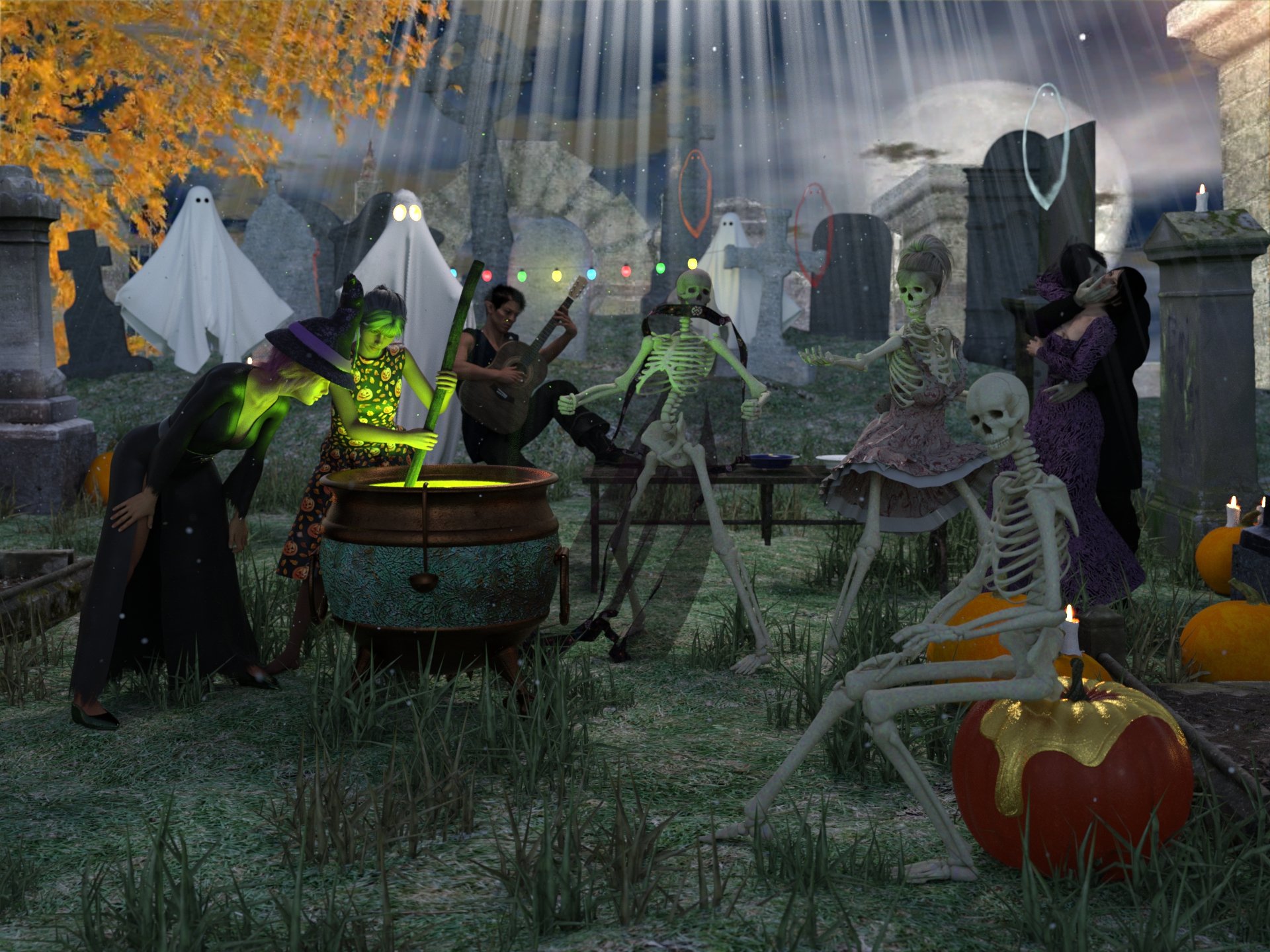
Freebies
Halloween Party for DAZ
https://www.renderhub.com/shredder/halloween-party-for-dazAA Cauldron
https://sharecg.com/v/98638/browse/21/DAZ-Studio/AA-CauldronTrixie's Pumpkin for Daz Studio by TwiztedMetal
https://www.renderosity.com/freestuff/items/83410/trixies-pumpkin-for-daz-studioProp - Morphing Godrays
https://www.deviantart.com/squarepeg3d/art/Prop-Morphing-Godrays-875530244Prop - Dust Mote Cloud
https://www.deviantart.com/squarepeg3d/art/Prop-Dust-Mote-Cloud-875458221freebie Abyss ghosts
https://www.deviantart.com/greendragon-gecko/art/freebie-Abyss-ghosts-791607529Mystics-Ghost
https://www.deviantart.com/mysticartdesign/art/Mystics-Ghost-815468075Ghost by teknology3d
https://www.renderosity.com/freestuff/items/80215/ghostWROUGHT IRON GARDEN BENCH by doggod
https://www.renderosity.com/freestuff/items/70611/wrought-iron-garden-bench2 Hallow Dishes by Emanuela1 day 12
https://www.thefantasiesattic.net/halloween/2024/index.htmlEl Mariachi Guitar Part 1 by sadrielxv
https://www.renderosity.com/freestuff/items/93700/el-mariachi-guitar-part-1El Mariachi Guitar Part 2 by sadrielxv
https://www.renderosity.com/freestuff/items/93701/el-mariachi-guitar-part-2Bloody Vampires
https://sharecg.com/v/94729/gallery/21/DAZ-Studio/Bloody-VampiresErmine for G9
https://www.renderhub.com/undeadcrabb/ermine-for-g9Modular Orc Morphs for G9
https://www.renderhub.com/undeadcrabb/modular-orc-for-g9-october-freebieCassie 9 Character Morph for Genesis 9
https://www.renderhub.com/lambdax/cassie-9-character-morph-for-genesis-9Second Sid by MortemVetus
https://www.renderosity.com/freestuff/items/84772/second-sidFWSA Sharah HD for Olympia 8 Daz biweekly freebie 4-10-2024 (I don't own Olimpia 8 and I applied the character to Genesis 8 female and it works)
https://www.daz3d.com/fwsa-sharah-hd-for-olympia-8Elvira Dress - Simple dForce dress for G8F by chriscox
https://www.renderosity.com/freestuff/items/96252/elvira-dress-simple-dforce-dress-for-g8fWitch Hat for G3F and G8F - Free 3D model
https://www.deviantart.com/bubblecloud/art/Witch-Hat-for-G3F-and-G8F-Free-3D-model-767900163
https://www.renderosity.com/freestuff/items/84212
https://www.renderhub.com/bubblecloud/whitch-hat-for-g3f-g8fNew Dress by Nena Lu/PeTeGe day 20
https://www.thefantasiesattic.net/halloween/2024/index.htmlCaptain Barbossa by Paspu (Pants and boots)
https://www.renderosity.com/freestuff/items/91488/captain-barbossaG3M Weekend Set (waistcoat)
https://www.wilmapsdigitalcreations.co.uk/view_product.php?id=422NeoIndia Veil for G2F and G3F by Arki
https://www.renderosity.com/freestuff/items/75797/neoindia-veil-for-g2f-and-g3fFloral Dress Complete Set-For Genesis 2 Female
https://www.cgtrader.com/free-3d-models/character/clothing/flo-71c1b700-a088-4278-84e4-85fdeca7ded5dForce Medieval Dress for Genesis 9 by syzethal
https://www.renderosity.com/freestuff/items/96799/dforce-medieval-dress-for-genesis-9Medieval Dress G9 - additional textures by eblank
https://www.renderosity.com/freestuff/items/96812/medieval-dress-g9-additional-texturesStar Trek Uniform Set for Genesis 8 Male (Pants and boots)
https://www.deviantart.com/amyaimei/art/Star-Trek-Uniform-Set-for-Genesis-8-Male-7522328091940's Inspired Mens Suit Long Jacket for G8M by perlk
https://www.renderosity.com/freestuff/items/95401/1940s-inspired-mens-suit-long-jacket-for-g8mHair 1 for Daz 3D Genesis 9
https://www.deviantart.com/amyaimei/art/Hair-1-for-Daz-3D-Genesis-9-935744713Noki Airy Low Ponytail Hair
https://www.daz3d.com/forums/discussion/698421/noki-airy-low-ponytail-hair#latestUPDATE - V Devil May Cry 5 Hair Prop for G8M
https://sharecg.com/v/93558/browse/21/DAZ-Studio/UPDATE-V-Devil-May-Cry-5-Hair-Prop-for-G8MLorelay hair
Ds Creative 11 Published on Apr 30, 2015, pag 18-19
https://issuu.com/philatdsc/docs/ds_creative_11
http://4eyes.code66.se/dsc/Lorelay_Hair.zipHAIR - Pugilist Punk Hair for G8F By SquarePeg3D
https://www.deviantart.com/squarepeg3d/art/HAIR-Pugilist-Punk-Hair-for-G8F-926178644Everyday Poses 01, 02, and 03 by Foxclaw
https://www.renderosity.com/freestuff/items/86791/everyday-poses-01-02-and-03Paid
iG 100 Must Have Poses for Genesis 8 Female(s)
https://www.daz3d.com/ig-100-must-have-poses-for-genesis-8-females
Entry approved, please move to entries thread!
Freebie Challenge October 2024 - "Monster Mash '24!" - Main ThreadHalloween 2024 Monster Mash
Freebies
Halloween Party for DAZ
https://www.renderhub.com/shredder/halloween-party-for-dazAA Cauldron
https://sharecg.com/v/98638/browse/21/DAZ-Studio/AA-CauldronTrixie's Pumpkin for Daz Studio by TwiztedMetal
https://www.renderosity.com/freestuff/items/83410/trixies-pumpkin-for-daz-studioProp - Morphing Godrays
https://www.deviantart.com/squarepeg3d/art/Prop-Morphing-Godrays-875530244Prop - Dust Mote Cloud
https://www.deviantart.com/squarepeg3d/art/Prop-Dust-Mote-Cloud-875458221freebie Abyss ghosts
https://www.deviantart.com/greendragon-gecko/art/freebie-Abyss-ghosts-791607529Mystics-Ghost
https://www.deviantart.com/mysticartdesign/art/Mystics-Ghost-815468075Ghost by teknology3d
https://www.renderosity.com/freestuff/items/80215/ghostWROUGHT IRON GARDEN BENCH by doggod
https://www.renderosity.com/freestuff/items/70611/wrought-iron-garden-bench2 Hallow Dishes by Emanuela1 day 12
https://www.thefantasiesattic.net/halloween/2024/index.htmlEl Mariachi Guitar Part 1 by sadrielxv
https://www.renderosity.com/freestuff/items/93700/el-mariachi-guitar-part-1El Mariachi Guitar Part 2 by sadrielxv
https://www.renderosity.com/freestuff/items/93701/el-mariachi-guitar-part-2Bloody Vampires
https://sharecg.com/v/94729/gallery/21/DAZ-Studio/Bloody-VampiresErmine for G9
https://www.renderhub.com/undeadcrabb/ermine-for-g9Modular Orc Morphs for G9
https://www.renderhub.com/undeadcrabb/modular-orc-for-g9-october-freebieCassie 9 Character Morph for Genesis 9
https://www.renderhub.com/lambdax/cassie-9-character-morph-for-genesis-9Second Sid by MortemVetus
https://www.renderosity.com/freestuff/items/84772/second-sidFWSA Sharah HD for Olympia 8 Daz biweekly freebie 4-10-2024 (I don't own Olimpia 8 and I applied the character to Genesis 8 female and it works)
https://www.daz3d.com/fwsa-sharah-hd-for-olympia-8Elvira Dress - Simple dForce dress for G8F by chriscox
https://www.renderosity.com/freestuff/items/96252/elvira-dress-simple-dforce-dress-for-g8fWitch Hat for G3F and G8F - Free 3D model
https://www.deviantart.com/bubblecloud/art/Witch-Hat-for-G3F-and-G8F-Free-3D-model-767900163
https://www.renderosity.com/freestuff/items/84212
https://www.renderhub.com/bubblecloud/whitch-hat-for-g3f-g8fNew Dress by Nena Lu/PeTeGe day 20
https://www.thefantasiesattic.net/halloween/2024/index.htmlCaptain Barbossa by Paspu (Pants and boots)
https://www.renderosity.com/freestuff/items/91488/captain-barbossaG3M Weekend Set (waistcoat)
https://www.wilmapsdigitalcreations.co.uk/view_product.php?id=422NeoIndia Veil for G2F and G3F by Arki
https://www.renderosity.com/freestuff/items/75797/neoindia-veil-for-g2f-and-g3fFloral Dress Complete Set-For Genesis 2 Female
https://www.cgtrader.com/free-3d-models/character/clothing/flo-71c1b700-a088-4278-84e4-85fdeca7ded5dForce Medieval Dress for Genesis 9 by syzethal
https://www.renderosity.com/freestuff/items/96799/dforce-medieval-dress-for-genesis-9Medieval Dress G9 - additional textures by eblank
https://www.renderosity.com/freestuff/items/96812/medieval-dress-g9-additional-texturesStar Trek Uniform Set for Genesis 8 Male (Pants and boots)
https://www.deviantart.com/amyaimei/art/Star-Trek-Uniform-Set-for-Genesis-8-Male-7522328091940's Inspired Mens Suit Long Jacket for G8M by perlk
https://www.renderosity.com/freestuff/items/95401/1940s-inspired-mens-suit-long-jacket-for-g8mHair 1 for Daz 3D Genesis 9
https://www.deviantart.com/amyaimei/art/Hair-1-for-Daz-3D-Genesis-9-935744713Noki Airy Low Ponytail Hair
https://www.daz3d.com/forums/discussion/698421/noki-airy-low-ponytail-hair#latestUPDATE - V Devil May Cry 5 Hair Prop for G8M
https://sharecg.com/v/93558/browse/21/DAZ-Studio/UPDATE-V-Devil-May-Cry-5-Hair-Prop-for-G8MLorelay hair
Ds Creative 11 Published on Apr 30, 2015, pag 18-19
https://issuu.com/philatdsc/docs/ds_creative_11
http://4eyes.code66.se/dsc/Lorelay_Hair.zipHAIR - Pugilist Punk Hair for G8F By SquarePeg3D
https://www.deviantart.com/squarepeg3d/art/HAIR-Pugilist-Punk-Hair-for-G8F-926178644Everyday Poses 01, 02, and 03 by Foxclaw
https://www.renderosity.com/freestuff/items/86791/everyday-poses-01-02-and-03Paid
iG 100 Must Have Poses for Genesis 8 Female(s)
https://www.daz3d.com/ig-100-must-have-poses-for-genesis-8-females
Extremely bad performance with DAZ charactersupdate. rigidity.
The rigidity performances have been fixed, now rigidity doesn't bog the animation anymore. It is still a good practice to finalize the figure once we're done and ready for animation. The transfer time has also been improved about 3x faster, that means it's faster to load figures with rigidity outfits.
All thanks to Thomas for the good job here.
Premier Membership FAQ (Questions Only Please)Richard Haseltine said:
TesseractSpace said:
Richard Haseltine said:
shadowfire87 said:
If I upgrade to Premier, create a project using Premier Exclusive Tools and then later downgrade back to a Daz+ membership, will my projects, created in Studio Premiere, open and be editable in Daz Studio +?
If you mean tols as in plug-ins then the only one that can leave a relic in the scene is Geometry Sculptor (ne Mesh Grabber) which can create a live modifier which can be saved in the scene and adjusted later, but it can also be turned into a moprh that will work without the plug-in. Render Queue obviosuly needs the plug-in to process a queue, but you could still do renders of single frames or images sequences without it (or use another queue manager). The others just create things and are done, their output (converted shapes or poses) does not depend on the plug-ins to work.
Content will fail to load; so far it has all been shapes so if a shape was used in a character you would lose its contribution but you would otherwise still have the character.
AIko 9 has textures, so if the textures are used in a character and the files are removed when the subscription ends, those too will cause errors
No, though the license to use them will have expired. Textures do not get encrypted.
That... isn't any better.
So you then have a character with unlicensed textures and no error message to warn you unless you also used the morph? Like if I gave Vicky 9 one of Aiko 9's eye textures, my subscription ends, and I'm expected to remember using the Aiko 9 eye texture and replace it lest I infringe and potentially be subject to whatever penalty daz inflicts on those found to be using unlicensed content?
Another what character is this threadThanks!
I can see some other morphs going on there, but I was really interested in the pillowy lip morph, which definately is from that base.
JD
Celebrity Look-a-Likes for 3D figures Part 4WandW said:
nDelphi said:
WandW said:
Is there a way to convert those RR morphs to apply them to regular V3 and M3?
I just applied a smoothing modifier on the John Lennon morph and it was an improvement. I went as far as sub-dividing him, then started applying morphs, and at one point it looked as if I had converted John Lennon into Jeff Bezos. LMAO

The reason I asked, is that I can convert V3 and M3 morphs to Genesis 3 using GenX2...Can you!?!
I must confess to failing utterly to do that. I have GenX2 and all the extras, and converting fro V3 to anything looks almost entirely unlike what it started as. Particularly wanted to try GND2, and the Genesis3 figure only bore the tiniest resemblance.
Ahh well.
Regards,
Richard
[Released] Hat Check for Genesis 9 [Commercial]There is an update already submitted:
- Fixed crash on some saved scene or morph files because vertex count was not set
- Sets TargetVertexCount for the Morph Deltas
- By default, the CreateHairMorph function will use the base geometry and not the final world-space transformed cached geometry mesh when using influence effect volumes. (This means that Hat Check will be faster by default (less geometry) and avoid the experimental option, which with the current v4.23.0.1 version of DS can cause a crash when reading a saved scene or saved morph)
- Fixed GetFitTo function to return getNodeParent() if FitTo is empty (this kept the script from running because it could not find the parent figure)
- Added Use Cached Geometry (Experimental) option (this option should not be chosen unless you are not going to save the scene with the morph, until DS is updated)
- Fixed issue with sliders not having enough range when loaded for a hat twice (due to the figure not being in proper default pose & shape on load)
For now, do not have any morphs dialed in on the hair when running Hat Check and make sure the figure is in the default pose and shape before running.
more....Wacky Modelling ~ In Carrara ~Stezza said:
keep going @Bunyip02 the days go by quickly when pulling polys

Yesterday I I used the cube and my body to model cricket's disappointed guy, just because cricket season is upon us, boned with a morph or two

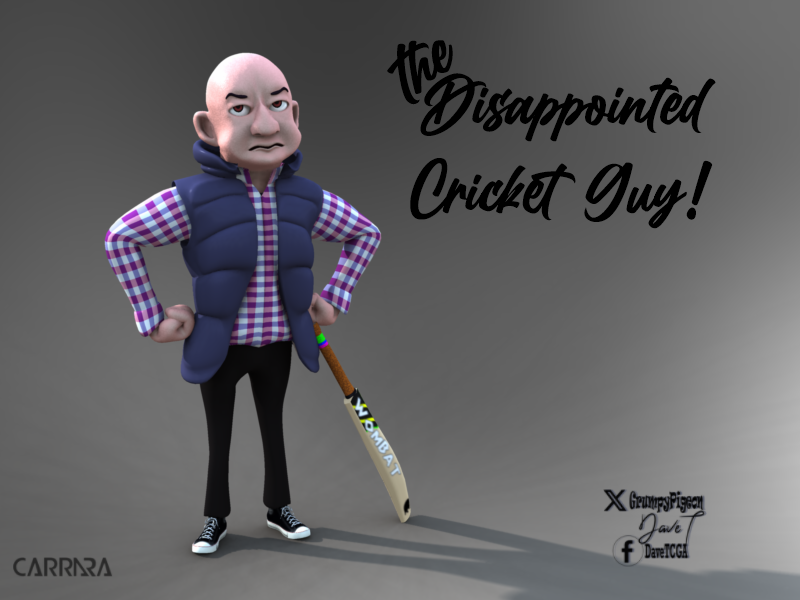
Lovely model of the Cricket Guy !!!
Had to jump on thr Laptop as it was too hot for my Graphics computer. Modelled a chest, still need to texture/material it, but will be able to model away in the warmer weather rather than just surfing the web/listening to music !
ARKit Eye Movement and G8.1 and G9 Eyelashes (No Morphs/Shape Keys)I'm still so confused. In Blender, the eye movement is using a driver to change a shape key that tells the shape key/morph to activate when the eye is in a certain position. This btw is totally broken for G8.1 as the z rotation does nothing and the x rotation drives eye look left and right (which is incorrect). Putting that aside for now, the bigger issue is that there is no "look" morphs on the eyelashes so the eyelashes do not morph when the eye looks around triggering the look morphs on the eyelids.
Does that make sense? I've tried several characters. G9 works best (seems to work correctly but I have not tested extensively). G8 seems to have no ARKit shapes or morphs and G8.1 has everything but it just doesn't work and does not export with eyelash morphs/shape keys.
more....Wacky Modelling ~ In Carrara ~keep going @Bunyip02 the days go by quickly when pulling polys
Yesterday I I used the cube and my body to model cricket's disappointed guy, just because cricket season is upon us, boned with a morph or two
Daz crashing frequently with new release.Thought I'd give an update to this thread just in-case the information is of use to anyone..
After posting my first comment on this thread I decided (mainly out of frustration) to disable some of the plugins I don't use.
After disabling the plugins I haven't had a single crash in two days.
I'm not suggesting any of the disabled plugins were the root cause of the crashes but there does seem to be a link.
The plugins I disabled:
aniMate 2
Face Transfer
Face Transfer 2
ManFriday's Mesh Grabber
ManFriday's Mesh Grabber Rotations Add-On(Disabled the last two since there are newer versions included with Premier)
Need to hook up a blink morphRAMWolff said:
Hmm, watched the video again this morning. There are no Eyes in the Geometry Selection> Select By> (There is no Region for Genesis 9 Just Face Groups) so must have been another figure. I get confused easily these days so I'll need to rethink how to go about this with perhaps ignoring that selection part of the video.
I suspect if you really used a G9 or if there was sth. wrong with the G9 character you used... There're Regions for sure. (ss1)
As I said above, if you don't want to use Attenuate option, make corrective morph on one side then use Mirroring option instead...
Not so handsome and muscular menIt's subjective. I'd suggest using the filtering tools available in the store to sort by gender and figure, and consider looking at morph sets to adjust features.Not so handsome and muscular menIf you want an average male of middle age check out https://www.daz3d.com/koo-nils-hd-for-genesis-9 by Kooki99. He is attractive without being movie star handsome. And on deep sale today as the DoorBuster. Matter of fact the PA specializes in normal people.
One character I have used many times is https://www.daz3d.com/willis-bundle. The bundle has the character, hair, outfit and usable for a variety of needs. It is at full price right now unforttunately.
If you need a variety of normal looking Japanese characters, this morph pack could help. https://www.daz3d.com/japanese-face-and-body-shapes-for-genesis-3-and-8-male
Or look at AliveSheCried's store. The PA released a number of morph packs for the G8/8.1 generations which often turned good looking characters into average folks.
https://www.daz3d.com/leland-for-genesis-8-male
https://www.daz3d.com/abraham-for-leroy-8 and https://www.daz3d.com/leroy-8
https://www.daz3d.com/mr-woo-8
https://www.daz3d.com/anatoly-hd-for-genesis-8-males
https://www.daz3d.com/feng the PA has a number of G9M characters who are normal, also G9F.
Harlow 9 and his alternate shapes
Neanderthal 9 is good for mixing.
Rogues HD for G9 good for mixing.
Wagner 9 good for mixing.
Walter 9 HD older man.
Xola 9 HD and his masculine shapes.
Linday appreciationDartanbeck said:
I love the way the new hair drapes and behaves! It's gorgeous!
On another note:
I'm experimenting with making my own Before Simulation and After Simulation morphs - currently for Rosie's Classic Long Curly Hair with dForce for Genesis 8 Females.
It's a load of fun and, even this very first 'trial run' of it turned out really nice in quite a few animations - every animation I've tried with it, actually. Which is quite a few now.
These are using my PonyTail Maker apparatus, which is why we see the little curls up high toward the back of her head. For that apparatus, I've created a "PonyTail Lift" morph, which lifts the hair affected by the gathering, and then forms the arc from the tie area to the rear drape. This morph gets applied After the simulation is completed.
New, however, I've created a morph specifically to direct the frontal left hair to raise from the scalp and naturally fall over the left eye. This gets applied Before simulating. After the first basic simulation, I sculpted the look I want the front left bangs to make as they flow up and out of her Headband, and another that I can use to gently alter how much the hair covers the eye throughout animations, and made them into morphs. And it turned out Great!!! These get applied After the simulation is completed.
Then I clear the simulation and make the whole setup (collision helpers included) into a Wearable Preset, so I can go back and load this modified version onto any of my many saved animation scenes.
Image removed
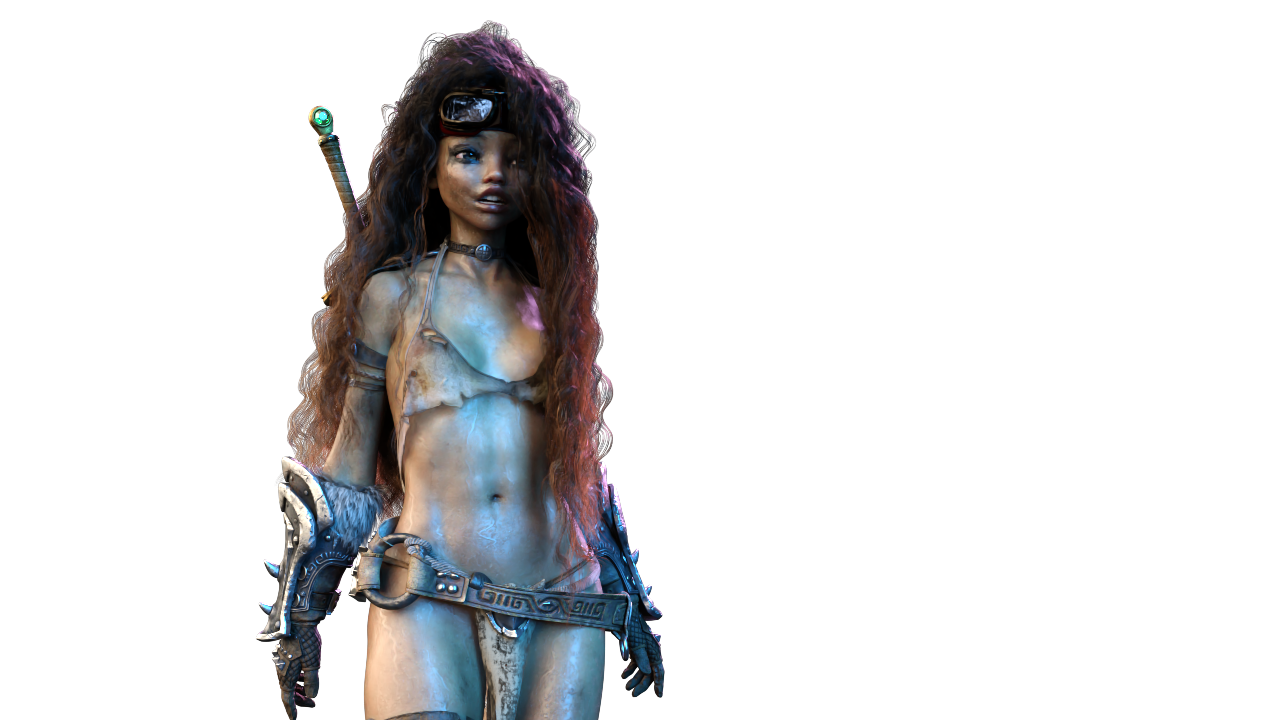
I have a Lot more Linday Hair experiments going All the Time, so I'm working on a full-blown course study on the whole thing. It's truly mind-blowing what can be achieved here - from simple, basic operation (but with a few flicks of a dial here and there) to really digging in and doing something really complex and fun!
Stay Tuned! :)
I am definitely staying tuned! That sounds like a must-see for me! I dabble, and only produce morphs I really really need, otherwise I just shoehorn the process to get the correct look for the camera angle/scenario. Would love to see how others do things, and find ways to implement them!
Genesis 9 Shoulders Distortioncrosswind said:
bernardo.odreman said:
crosswind said:
I couldn't reproduce the issue with the characters you mentioned.... So check corrective morph firstly with Victoria 9.
- filter cbs in Parameters pane, select Currently Used with Show Hidden Properties... > On
- there should be only eight corrective morphs in the list, is that correct?I have 6 only and they dont mirror exactly yours either...Screenshot attached for quick reference.
THank you!
Oh... you gave her a different pose this time, not a big deal... if you pose both Shoulders and Upper Arms, you'll see more corrective morphs.
Anyway, have you noticed there're another two corrective morphs from another character: Boragia ? (ss1) They're the culprits. If you set them to zero, the distortion will be gone.
The vendor wrongly set ERC settings... they should've been only triggered when Boragia body morph is dialed... You can fill a ticket and uninstall that character product for the time being... or correct the ERC settings in Property Hierarchy yourself. (refer to this thread if you want to do so: https://www.daz3d.com/forums/discussion/comment/8915156/#Comment_8915156 in Edit Mode, locate the corrective morphs in Property Hierarchy, and drag Boragia's Body Morph property to 2nd stage controller.)
Just perfect...Thank you kind Sir, that did the trick O.-
Daz 3D is part of

Connect
DAZ Productions, Inc.
7533 S Center View Ct #4664
West Jordan, UT 84084Licensing Agreement | Terms of Service | Privacy Policy | EULA
© 2026 Daz Productions Inc. All Rights Reserved.