-
3 heads and 4 arms goddess or monsters
Oso3D said:
I've often thought of doing multiarmed characters and... there are some very very very large obstacles:
Any limbs you add would not take any of the morphs you add later. Also there would be problems with morphs mixing with the limbs you added.
So, for example, if you add a muscular morph, not only would the additional arms not be muscular, but there'd probably be some ugly warping/tearing between the main body and the new arms.Clothes would just be a mess.
Skin textures. You could provide some, but people would want their own textures. You could work things so that the new arms take the old arms' textures, but then you're going to have an obvious seam where the new arms are placed on the torso.
Which were exactly the problems the "4 arms for Genesis" product encountered when it was availavle.
3 heads and 4 arms goddess or monstersI've often thought of doing multiarmed characters and... there are some very very very large obstacles:
Any limbs you add would not take any of the morphs you add later. Also there would be problems with morphs mixing with the limbs you added.
So, for example, if you add a muscular morph, not only would the additional arms not be muscular, but there'd probably be some ugly warping/tearing between the main body and the new arms.Clothes would just be a mess.
Skin textures. You could provide some, but people would want their own textures. You could work things so that the new arms take the old arms' textures, but then you're going to have an obvious seam where the new arms are placed on the torso.
Yeah.
Your best bet is to use something like RawArt's severed products and some postwork Heal brush.
Chevybabe's Dforce SBH Hair ThreadNo, it is not true that only PAs can create custom morphs for dForce SBH hairs.
Only PAs can turn SBH hairs into dForce hairs, but anyone can create their own morph for dForce SBH hair products. I have created several morphs for Neroli hair in the past. Someplace on the forum I posted instructions for how I did it. Crosswind later posted some optimization tips for steps I did that were not needed. One key step is to activate the Geometry Editor when exporting and importing the hair to create the morph.Here are my instructions. I'm not sure where Crosswind posted the optimization tips.
Chevybabe's Dforce SBH Hair Thread"Is it true that only PA have the tool to create custom morphs for Dforce SBH hairs?"
Yes. However, the premiere version of daz studio has the newest version of meshgrabber which is helpful in manipulating the strand hair exactly how you would like!
"if the hair simulates the way I imagine then the Behind Ear morphs will likely be superseded by the sim pose and my elf ears will be covered again."
Most likely, but you shouldnt really need to use that morph just for that. The hair is meant to sim, and with some clever basic geometry, you can prevent it from doing things you dont want it to do. I have included ear caps and a face shield to get you started. You may need to turn them on in the scene to be able to see what they look like while they work. The Face shield, as an example.. will keep the hair from simming directly into the face, and the ear caps will keep the hair from penetrating the ear, should you use the behind the ear morphs.
The hair has a lot of movement morphs to help guide you into teh direction you need to use the hair. The special "sim morph" was for those that wanted hair to do fancy things like fan out on a floor.
"Are the Behind Ear morphs high enough to reveal longer elf ears? "
The behind the ear morphs tuck the hair behind the ear, so as long as the elf ear morphs you use come out away from the body a bit, Id imagine they would work to some extent. I really think it will be a buy and try for you. Daz has an excellent return policy, so if it doesnt do exactly what you need it to do, you can always return it.
"The description doesn't say but is the Faustian hair Omnihair?"
Yes. All of the hairs in my store from the Nordic Knots Forward are OmniShader.
Bodacious Bob and Feisty Feather Bun are Feisty Feather Bun are a low-weight dual lobe shader.. and everything before those are heavier dual lobe shaders.
Hope that answers everything :)
The Mac FAQMy primary reason for buying the M4 Mac Mini was to replace my 2013 iMac which had an Nvidia 660. That was the first computer I had installed D|S on in 2016, version 4.7, but within a week or so, 4.8 was released. I was okay but had no clue what I was doing with D|S then. That computer was used for business and editing with Office 365. Then the 660 was dropped by Nvidia and in my ignorance I tried to force an update and destroyed my OS. I ended up taking the iMac to the Apple store and they reinstalled the OS, but I lost everything that had been on it, except a few files on a stick. So D|S went onto Windows computers. I had used two HP monitors with the iMac. One is now on the Mac Mini and the other is attached to my MacBook Pro M2.
But my iMac has been dying gradually the past few years and I have been saving for an upgrade. So I jumped on the Mac Mini M4 Pro and the Studio Display. (I have cataracts forming in both eyes now, so I need really good monitors.) At first my own confusion gave me some fits, but Totte helped me. Poor man, I really drive him crazy.
The Mini's hardrive is 4Tb and I have my old iMac files and program files on that. Still have 3.11 Tb free. I will download other programs later here.
I have a 24Tb external hard drive where I installed my Daz Studio product files. I am still installing from DIM my products, limited by an allotment of 1.29Tb/monthly that I share with a flatmate, cats who watch YouTube, and my streaming. So far, only filled up 5.68 Tb and have 18.32 Tb left. I now have over 24,000 products with 2.8Tb installed, and 2.2Tb left to pick out what I want to install still. I restrict myself to 30 - 40GBs a day. Edit to add: I have barely started to add my other store purchases and freebies.
I haven't had much time to play with Daz on the computer, most of my time is spent fixing metadata, thumbnails, and inspecting each item as it is installed or has gone missing. I have been having problems with DIM crashing in the past week and losing track of products I thought were installed, to find them back in Ready to Download. I tried to do something in US2 the other night and found I had forgotten how to do anything again. Will have to go over the tutorial again. Along with many others.
What I have found, DIM works really nice generally. Downloads of course depends on interactions with the web and DAZ servers, but with the file downloaded, the installation of a 1 or 2 GB file goes super fast. I made a purchase of multiple items today that totalled 1Gb and flicked my eyes away and back and it was done. Time of day helps too.
I am being selective on installing characters/morphs that I own, so loading up a character does not take a long time. I have installed the Genesis Core characters and a few PA characters/morphs that I love and main morph packs. Same for pose packs, realism counts and with Bone Minion no generation is restricted to one only. I am picking my wardrobe with more realistic clothing, leaving all the skimpwear/fantasy uninstalled. Shaders and sets are a love and I have many. That is what is taking so long now, especially with the PBR materials. Scripts, plugins, key morphs are done.
Scripts use are a challenge, but that is my learning curve again. Before setting up this computer I had just finished setting up a Win 11 laptop with Daz Studio. So it has been almost nine months of installations without fun or lengthy use. I learn by doing repeatedly. But I am making headway there with everyone's advice and help.
Compared to my MacBook Pro M2, the Mac Mini Pro M4 is faster, but compared to the Win 11 with Nvidia RTX 4080, not so much as my test showed. And of course, no filament. I love filament.
And it is small and light. But that monitor, I can barely lift it. In the box, I can't. Security had to carry it from the Apple store to my van, and my flatmate to our 2nd story apartment. I can barely lift the empty box. Seriously bad lower back. That monitor should come with a warning label. I could carry the iMac in its case. The MacBook Pro was bought because I needed a computer I could carry to other locations to work on my editing. Gaming computers are too heavy now for me to carry easily in a backpack. Aging is a pain, not just for computers.
Mary
Broken bones for G8?Catherine3678ab said:
Could try making a morph, adjust rigging to mesh, apply ERC freeze, zero morph and save.
Hello; would you mind actually explaining those steps in detail?
I know what a morph is; I have no idea how to create one in Daz Studio. Likewise the other steps you mention.
Thank you.
How to change the shape of the character's head, without changing the shape of the hair?Option 1: Before dialing the ear morph for the first time, go into its parameter settings and turn Auto Follow off.
Option 2: If the ear morph has already been dialed, select the hair, make sure hidden properties are shown, and dial the unwanted morph back to zero.
How to change the shape of the character's head, without changing the shape of the hair?I need to change the shape of the character's ears. When I change ears morph, the hair automatically changes its shape, adjusting to the changes of the ears. But I liked the way hair looked before it was auto-adjusted to the ears changes. I want the hair to be the same as it was before changing the shape of the ears. At the same time, I do not want to lose the functionality of automatic hair adjustment to the character's head morphs, so complete disabling this feauture is not an option. Is it possible to somehow save the hair shape as a morph before changing the ears and then apply this morph after changing the ears, to return the hair to its previous shape?
Blender Beginner -- Help needed with Expressions and Auto Lip SyncI'm just starting to dip my toes in the Blender water and am hoping to get a little help, even if it's only to tell me where to read in the manual.
Disclaimer: I love DAZ Studio and I'm happy with the limited animation it does, but without a 64-bit lip sync option for Mac I'm starting to move over to Blender. I hate having a 32-bit iMac standing by just to do the lip sync using DAZ's 32-bit version of Mimic built-in. If they'd license the 64-bit version, I wouldn't be looking at Blender at all. It's frustrating that I can open up DAZ Studio 32-bit, do my lip syncing, save the file, open the 64-bit version on the same, 2012 iMac and both hear the audio and generate movie files in a single render with sound... but I can't do any of that with a newer machine.
I've installed Blender 4.3.2 for Mac and so far I'm trying to limit the Blender add-ons I install while I work my way through building a workflow.
To this end, I've taken a custom character and using DAZ's Send to Blender option I've moved the character into Blender with only minor issues.
The main issue is the apparent inability to automatically move Expressions or combined morphs (morph "controllers" that are "connected") into Blender when transferring the character. For example, a blink morph for the right eye or for the left eye come through and work perfectly, but a combined "blink eyes" morph doen't. Blender is worried, apparently, that it might be added at the same time as one of the individual morphs. Is there any easy way to override this when doing the "Send to Blender" option, or to *easily* add them back in once the character has been moved?
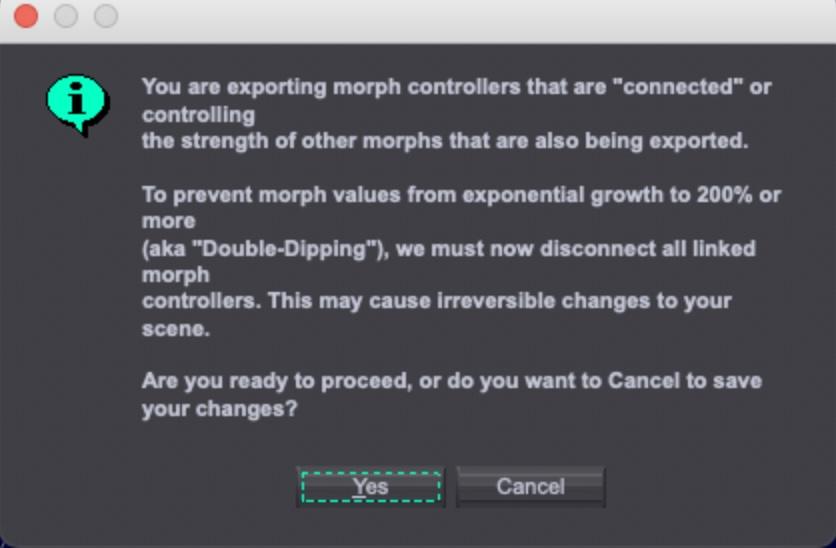
Second, with the mouth morphs transferred over to Blender, what would be the easiest way to to auto lip sync? Ideally, I'd love the same easy method that Mimic uses inside DAZ Studio 32-bit, but recognize that there's probably no Blender equivalent. I'm not interested in any camera-tracking option, just the quickest, easiest way to mimic (pun unintentional) the way I do it in DAZ Studio.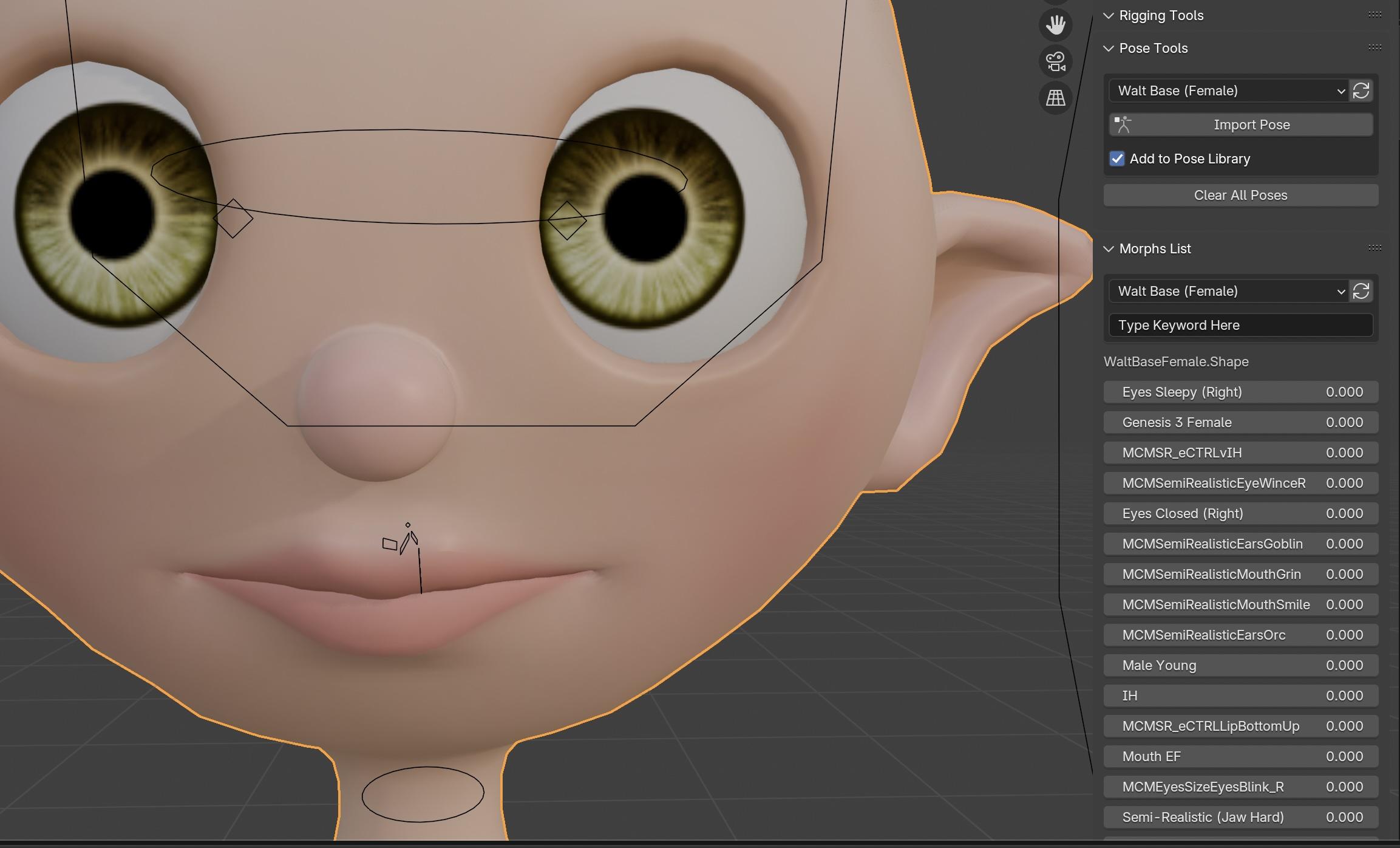
I'd like to get a simple workflow set up where I can work on some simple animations while learning Blender and its animation capabilities in more depth.
Finally, is this workable using the morphs that I'm transferring over, or am I looking at absolutely looking at having to re-rig, add armatures, etc.?
My animations tend to be more dialogue-driven than high-end action sequences, I'm open to any advice that will help me get there as simply and smoothly as possible. I don't mind investing in any plug-ins and add-ons that will help, but don't want to install things that I won't use. I'm all about the K.I.S.S. methodology where I am most definitely the second "S".

Thanks.
How to fix G8 mouth abnormality(Resolved)crosswind said:
Because the character was designed for G8F and the controller expression properties ( at 2nd Stage in ERC link... ) for some of the corrective morph of this character are blocked by G8.1F as default.
I'd recommend a once and for all solution: remove the dummy blockers by checking this post: https://www.daz3d.com/forums/discussion/comment/8833706/#Comment_8833706
Then reload G8.1F, the corrective morphs won't be auto-dialed.
I will try, thnak you.
Invicta Couture Lingerie [Commercial]Midnight Gold - Out Now!
Been a bit busy the last few weeks for me on things outside of Daz but I will be teasing you here soon on the next set expanding upon this line. I appreciate all the support and sales have been pretty good so you can expect me to continue focusing on expansions and related products here for the Invicta Couture line. My main goal is always to try and deliver the very best product I can while also trying to keep things feeling fresh and exciting. I do plan on adding in a new thong as well and it will certainly include its own pressure morph this time around. If anyone has anything they are really wanting to see, like a certain item or theme, please don't be afraid to share what you would like to see added.
Genesis 8 female neck broken.In Parameters pane, turn Show Hidden Properties, select Currently Used, check if there's any morph properties unexpectedly dialed...
How to fix G8 mouth abnormality(Resolved)Because the character was designed for G8F and the controller expression properties ( at 2nd Stage in ERC link... ) for some of the corrective morph of this character are blocked by G8.1F as default.
I'd recommend a once and for all solution: remove the dummy blockers by checking this post: https://www.daz3d.com/forums/discussion/comment/8833706/#Comment_8833706
Then reload G8.1F, the corrective morphs won't be auto-dialed.
High Resolution Blender MorphsHi,
I was able to do a morph for a piece of clothing in Blender, but base mesh resolution is so low, it is impossible to make anything good looking.
Is it possible to somehow use mesh with higher resolutions for creating morphs in blender?
Tips for Creating Genesis 9 Body Morphs That Work Well with Marketplace Poses in DAZ StudioThat's why PAs provide character-oriented corrective morphs and folks sometimes have to fix corrective morphs as well with the posed figure when using custom body morphs.... but the key is how the geometry from the custom body morph affects the mesh area of the existing corrective morphs.
For instance: (assuming adjust rigging has been done already...), if the delta of the vertex positions coming from a partial area of the custom body morph is proportionally similar to the mesh area of a correctiver morph, in terms of scale, direction, etc.. you won't see ugly distortion or break after giving the figure a relevant pose.
But if it's not, you may see some defective mesh and have to supplement some corrective morphs linked to the custom body morph. An example: one of my custom chars has a sunken mesh around the shoulder area, with Should Up 90°, there's a fold of mesh(ss1), then I fixed it by making an MCM (ss2) ~~
So, although you pay very close attention when blending FBMs / PBMs or sculpting the body morph, you still have to fix the corrective morphs from time to time. It's pretty routine ~~
Help understanding Geometry SwitchingThanks all. So my takeaway from this is that "geometry switching" is either not relevant or no longer the best solution, and the two alternatives are:
- A more complicated mesh which covers all variations wanted and has different surfaces for each variation + bools to switch surface visibilities on or off; or
- morphs tp reshape a mesh to the different variations, perhaps with bools and hiding the underlying morph to make any variation and on or off affair.
I suppopse the key thing to note is that for option #2 all variations have to share an identical mesh structure (# vertices and # surfaces), and that UVs might end up a bit distorted (but that could be rectified with alternative UV sets, whilst with option #1 the modeler has free reign.
Cheers, Lx
New Year, New Sales Thread: Report Issues Here 2 "Reporting Only"I just noticed I have Kalei for Kai 9 HD in my DIM. Is she a random freebie that Daz just put there? I think she was one of the exclusive add-ons for Premier only, so she should only be available through connect by logging into Daz Studio. But here she is in my DIM today. Maybe she was there for a while and I didn't notice. Granted it looks like only the shape morph is included and there is no texture for her in DIM. My question is should I install her or is it a mistake that Daz is likely to correct and remove from my library?
Tips for Creating Genesis 9 Body Morphs That Work Well with Marketplace Poses in DAZ StudioI'm looking for advice on how to create body morphs for Genesis 9 figures in DAZ Studio so that they can work more seamlessly with pose packs sold on the DAZ Marketplace and other sources.
I often create custom body morphs by referencing commercially available 3D scan models and using tools like Wrap3. Through this process, I’ve noticed that some body morphs apply poses correctly, while others cause poses to break or distort significantly.
Over time, I’ve observed that when a Genesis 9 body morph maintains a body structure (leg spread, hand position, joint placement, etc.) similar to the Genesis 9 base figure, pre-made Genesis 9 poses tend to apply more accurately.
However, I’ve also found that in some cases, even without making meticulous adjustments to match the base figure, poses still apply relatively well. This makes me wonder—what are the key factors that have the greatest impact on how well a pose applies?
For example, does something like arm spread significantly affect pose accuracy, while shoulder height is less important? I’d love to hear any specific advice on which aspects of body morphs have the most influence on pose compatibility.
Of course, no matter how much I fine-tune the morphs, manual adjustments with PowerPose are often necessary in the end. But my goal is to minimize errors when applying poses so that the workflow is smoother and more efficient.
I’d appreciate any insights or recommendations on achieving a more pose-friendly body morph setup. Thanks in advance!
Help with shortening and editing some hair.Duck Dumble said:
crosswind said:
Select the custom bones, then reduce Y Scale Values. (ss1) Then simulate.
Hide the custom bones that you don't need... (ss2)
Edit: Dont' try deleting any hair strands as that'll destroy this hair ~~
Y'know, I was wondering where those bones were, lol. Where I went wrong is that when I put it on my G8F figure I autofitted it, which got rid of all the custom bones. Y'know something the product manual specifically warned my idiot head about.
Thanks for the help, this is exactly what I needed!Right ~ the product gives the hair for G8F and G8M... but if you want to used it on other generation, e.g. G9, never use Auto Fit which'll remove custom bones. Instead, re-rig the hair to G9 by using Transfer Utility plus G8 clone, and check Merge Hierarchies option. Then all custom bones can be preserved.

Refer to this thread: https://www.daz3d.com/forums/discussion/comment/9082271/#Comment_9082271
Help me find poses for jcmsI create my own morphs for female genesis 8.
The basic model already has its own built-in jcms and I want to supplement them with my own for my morph.
My morph doesn't play well with default jcms
Does anyone have poses for a model where the bone is turned to the maximum to work 100% jcms no more no less
I know that there are jcm properties and the name of the morph itself gives a hint. but in the model 94 jcms and manually searching for the right angle for each bone takes too long. Please help
Daz 3D is part of

Connect
DAZ Productions, Inc.
7533 S Center View Ct #4664
West Jordan, UT 84084Licensing Agreement | Terms of Service | Privacy Policy | EULA
© 2026 Daz Productions Inc. All Rights Reserved.