-
The Leprechaun for Barnabus Ragwort
RCDeschene said:
Though, I'd love to see the outfit on a regular Genesis 9 human.
Keep in mind that this is an original figure, not a morph built off G9. It will take a little work to fit the clothes to Genesis 9.
Is it possible to put an alias of a control morph into the main body of Genesis?[solved]A is Alias and M is Morph, P is anything else - not just a pose. Names must be disctinct for each proeprty on a given element, not just the root node.
LIVE! In the store NOW!! LowPi - the Low Poly Figure, and Crowd Creator ScriptsI see the same error message as @tmreiter23 when I load FF Standing Kit and uncheck the Casual tag. So, instead of unchecking the Casual tag, I tried selecting the FF Standing Kit and set the Casual Clothing Grp Pres to 0. I unchecked Child, Feminine and Unisex, so only Masculine was still checked. The crowd generated, but I still got Women in skirts in the crowd. Something seems to be wrong.
Edit: No, they are not women! I checked the morphs used on each LowPi and they are all Masculine and Head Masculine. But something is still wrong. Why are Masculine LowPi wearing skirts? These are not Unisex. None of the LowPis generated have any Feminine morph dialed in. Something is still not working as expected by the user.
Is it possible to put an alias of a control morph into the main body of Genesis?[solved]crosswind said:
Property Mover can only move the Properties that vendors or users created by using : Create New Property... (with icon P)... their Owners are Nodes rather than Morphs. Properties with icon M are Morphs (Modifier/Shape) with Owner: Morphs, they cannot be "moved" across Nodes with Property Mover. (ss1) Morphs can be only "cloned" rather than "moved"... so I really wonder how you made them moved by using Property Mover.
On the contrary, "Control property" as well as Pose Controls (both with P marks), again, their Owners are Node, they just can be simply "moved" via Property Mover (as long as there's no property with same Node Name in the target Node). (ss 2 ~ 4)
I wonder why it didn't work for you ~~
Edit: if as you said, from Hip to root node, I don't have any movable or cloneable properties on Hip node (G8/G9). So I wonder what you were referring to... If they're Transforms properties, nope... they can be neither moved nor cloned. If they're the ones you moved from other Nodes, you can move them to any other Nodes by using Property Mover, or clone them with Aliases by using Property Cloner.
The reason for the confusion, you seem to keep missing i'm working with ALIAS parameters.
You don't have anything in the hip node, because you haven't created a new ALIAS and put it there, unlike i did.
You did, inadvertantly, solve my problem though.
An Alias(A designation parameter) cannot have the same Name(not label) as a P designation parameter in the root node.
By changing the Name(not label) of the ALIAS, i was able to put it back in the root node, create a new DSF and it works as intended.
Thanks.
A couple minor corrections though.
As i understand it, P is "Pose parameter", M is "Morph Parameter" and A is "Alias parameter".
The primary differnece, P and A type do not include the 'morph" line of code in the file.
Functionally, an M can be a morph, and/or a pose/control, depending on whether it contains the rest of the morph code, such as vertex data.
The designations can be changed by editing the DSF, though they may not function properly on subsequent loads.
P to M and A to P, don't appear to cause problems, but M to P and A to M do. at least in my testing.
Create New Property, can create P, M or A designated parameters
This is determined by the node selected, and whether the "Create Empty Morph" box is checked or not.
If the root node is selected, P or M are created, with M being created by checking the box for "Create empty morph".
If a sub-node, such as Hip, is selected, P or A are created, with A being created by checking the box for "Create Empty Morph".
P and M type will load from a dsf created for them, even if they don't do anything, but A type won't, if there's no association with a parent parameter..
In regards to Presentation Type(modifier, modifier/shape, etc) this has no real correlation to the P, M or A designation, nor does changing it change the designation.
Basically, it's upto the PA/creator what type is used, if anything, as None is an option by deafult
As a couple of examples, G8F's Chest Scale has a P designation, but a type of Modifier/shape and Breast Control's Center shift is M type with Modifier/Pose.
It's also possible to make a custom type, by ediing the "type" under "presentation" in the DSF. Though, this doesn't appear to carry over to the drop down for other parameters.
LIVE! In the store NOW!! LowPi - the Low Poly Figure, and Crowd Creator Scriptstmreiter23 said:
Hi, I recently bought the Lowpoly Crowd Creator Bundle and am having a very hard time getting it to work properly. I installed it via DIM and read the manual, but it did not address my issues. Here are problems I'm having so far:
1) the biggest issue is that I can't get the crowds to finish generating....it will generate crowds, figures will appear, but then when it appears to finish, it just hangs, for hours (a spinning circle), and I have to kill Daz Studio to get it to stop. I've tried with 50 figures, then 40, then 20, but get the same result every time. I've got a GForce GTX 3060 and 64 GB of RAM, so I doubt that computer specs are the issue, but dunno.
2) Another major issue is that he crowds it is generating are basically the opposite of what I tried to create: I tried to create a crowd of men in business attire, but got crowds of women in casual attire. Perhaps I'm choosing the wrong set, but I only have three to choose from: FF standing set, FF moving set, and sitting people (I chose FF Standing). I unchecked the boxes for women, children, and unisex in the bottom right. Aslo, when I unchecked all the tags except business in the top right, the program would not let me generate a crowd, saying that it didn't have any sets with the tags I chose--it would only generate a crowd once I'd checked the casual box as well.
Was looking forward to this product but so far am getting pretty frustated, and would appreciate some help.
Hi,
First, which version of Studio are you running?
Anyway, follow these steps...
(1) Mark the area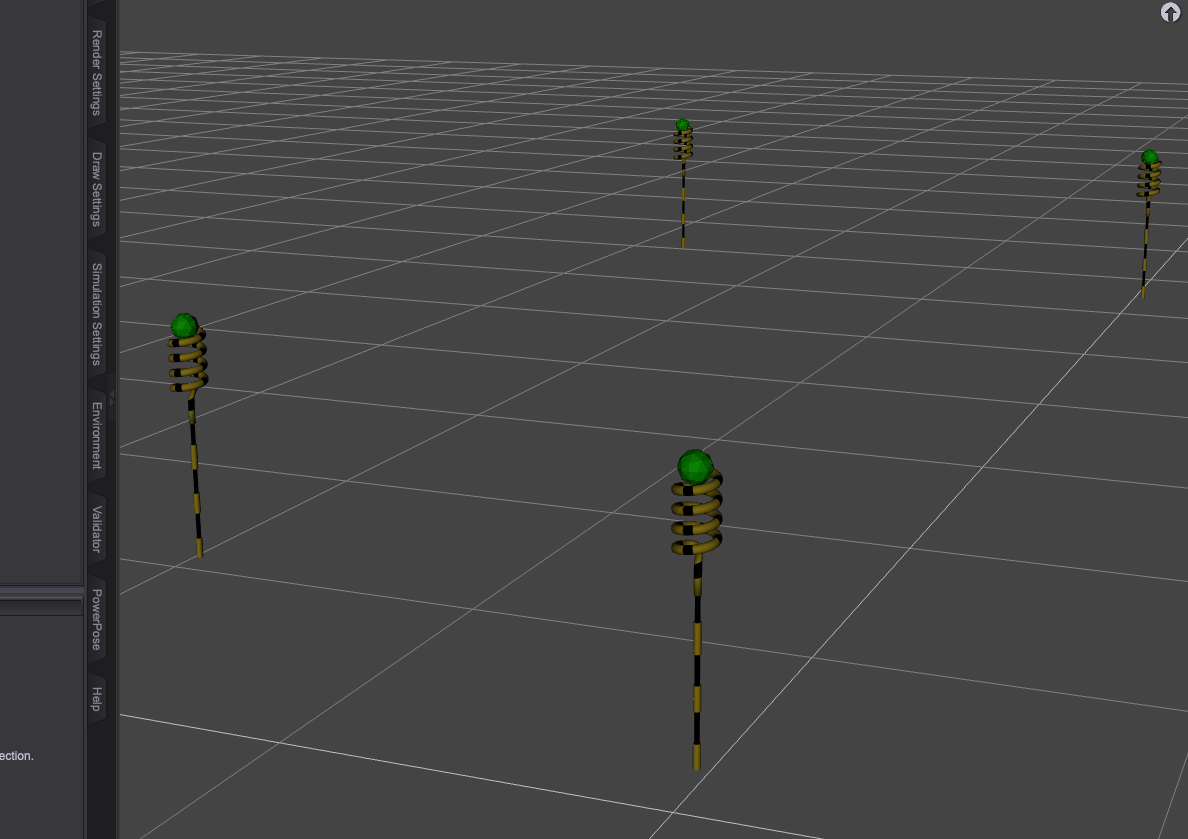
(2) Setup the crowd
Set Causal to 0 if you dont want any causal attire, and go to the LowPi Morphs tab and select your morph random settings
(3) Run it
You will see which LowPi it's working on and the progress
(4) Done AIUTO...CHI CONOSCE L’ITALIANO? PARTE QUATTORDICI
Crios said:
Oltre al Base Morph, a volte anche le UV Map sono diverse Ad esempio l'UV Map di V7 è diversa da quella di Genesis 3 Female, anche se di poco.
Fortunatamente questo non comporta troppi problemi, basta scegliere la UV che preferisci e puoi usare i materiali che vuoi. Raramente ho avuto problemi ad usare, per esempio, le texture di Ribbit su un personaggio umano.
In ogni caso, in molti casi si può acquistare un morph basato su un altro senza dover per forza prendere anche la base. Io ne ho parecchi e funzionano alla perfezione anche senza la figura a cui si appoggiano, l'unico inconveniente è che non è identico al "prodotto completo". Per farti un esempio se le orecchie hanno una forma specifica, senza la base avranno comunque la forma giusta ma meno marcata.
Looking for hip waders for G3/8/8.1MI attached a photo for reference; I hope I didn't break some kind of rule by doing so. If I did, I'm sorry!
Basically, what the title says. The closest thing I've found is the Angler Outfit for G8M, but if there's something closer to the picture I added, I'd love to know. Something that combines the pants and boots together. As I'll be importing it into Blender with Diffeomorphic, all I need is for it to have weight painting and vertex groups (which is kinda the standard anyhow, so that was redundant). The rest of the post-modeling and texturing I can do there. I also purchased the clone transfer/swap thingy (can't remember the name) where I can use G3/8F and G3M clothing on G8M, so if there's something for any of those, I can interchange it out. It doesn't even have to be on this site; I'm no stranger to the 'Hub, the 'Osity, and the 'Otica. I didn't have any luck on those sites either, although I might just be completely blind. Now that I've turned 40, EVERYTHING is going, and fast! Anyhow, any help/suggestions would be greatly appreciated!K-Pop Female CharacterMore or less just a Base head morph needs to be generated, it doesn't have to be perfect. Blending / tweaking with partial head morphs (or plus the head morphs from other characters) as per the idol picture is the key ~~
Here's an example of my Korean characters that I ever made with the similar way. Well... plus some sculpting I have to say ~~
AIUTO...CHI CONOSCE L’ITALIANO? PARTE QUATTORDICIvangelrise said:
Non ho capito una cosa, ora che ci penso. Perché alcuni personaggi, tipo Victoria 7/8/9 ecc., Stephanie, Darius, ecc. sono usati come base per altri personaggi?
Cioè, se a me piace "Xanthe 8 for Stephanie 8" significa che devo comprarmi prima Stephanie 8, per dire. Ma Stephanie 8 costa un botto di più non solo di Xanthe 8, ma anche di tanti altri personaggi G8 "indipendenti" (cioè che non sono basati su altri personaggi). Perché questa differenza di prezzo? Cos'ha Stephanie 8, o Victoria, o chi per loro, in più rispetto alla media degli altri personaggi?
Oltre al Base Morph, a volte anche le UV Map sono diverse Ad esempio l'UV Map di V7 è diversa da quella di Genesis 3 Female, anche se di poco.
Saving additional shape presets from 'memorised' shape?Memorize Figure Shape has nothing to do with "Check Modified"... as long as a morph property has a non-zero Value, it's Modified.
As for your requirements, the better way is to create a full head morph and a full body morph for your character 1st of all. Then you can further fine tune the shape with PHMs and PBMs...
K-Pop Female CharacterYea, TBH, there're very few Korean female chars. in this store... let alone really good ones ~~
You can use Face Transfer plugin to build a Base with an image of the idol, then customize the character by using partial head morphs, or even sculpting. This workflow is less difficult and more controlable.
Regarding the issue that the MD adjustment of G9 clothing will failcrosswind said:
Well, the culprit is that these pants were defectively made ... There're unused vertices on them.
1) If you switch to Geometry Editor, right-click in Viewport, Geometry Editing > Delete Unused Vertices (ss1), you'll find 1108 vertices unused (ss2)
2) If you directly export / import them into MD, MD OJB importer will remove the unused vertices (ss3)... just like the OBJ Importer in Blender. Then you'll have no way to import them back to DS as a morph. Therefore, do the step 1) firstly before importing OBJ as a morph with Morph Loader Pro.
It'll work (ss4) ~~

It works ! It works !!
Thank you PANDA !
May God bless you with bamboo by your side.
I can at last freely step into the G9 era without any restraint.
 Regarding the issue that the MD adjustment of G9 clothing will fail
Well, the culprit is that these pants were defectively made ... There're unused vertices on them.
1) If you switch to Geometry Editor, right-click in Viewport, Geometry Editing > Delete Unused Vertices (ss1), you'll find 1108 vertices unused (ss2)
2) If you directly export / import them into MD, MD OJB importer will remove the unused vertices (ss3)... just like the OBJ Importer in Blender. Then you'll have no way to import them back to DS as a morph. Therefore, do the step 1) firstly before importing OBJ as a morph with Morph Loader Pro.
It'll work (ss4) ~~
Regarding the issue that the MD adjustment of G9 clothing will failRichard Haseltine said:
Are you sure the exported clothes don't have any additional elements, usch as buttons parented to Rigid Follow Nodes?
Sorry, I don't really understand these terms you mentioned. Even for DAZ, I can only use about 50% of its functions. As for more advanced features, such as node editing, normal mapping, and animation, I simply don't know how to use them.
So needless to say, the advanced functions in MD are even more beyond comprehension. In MD, I only carried out the above basic steps and did not perform any additional actions. Before posting this message, I also tried it with the ordinary G8F and a pair of G8F and G9F universal pants (of course, I chose the G8F mode pants), and even the G8F posture was the default one. Entering MD, I only dragged the pants a few times, fixed them and exported the OBJ. Even with such a simple operation, when importing back to DAZ and generating MORPH, there was still an error reported.
During the G8F era, I have successfully applied this method many times. However, after the appearance of G9 clothes, most of the G9 clothes would report errors; some garments with both G8F and G9F modes would also go wrong.
3 heads and 4 arms goddess or monstersMatt_Castle said:
Those examples would probably be better handled by a dragon morph for Genesis that's built without anything like spikes that would cause a problem with fitting clothes to it, particularly as they're not winged.
scorpio said:
Yes, I have the Drago for G8M. There's an attachment for wings, and I'd have to customize the existing outfits for G8M using the Geometry tool to put wing-holes/sleaves in it.
But I'd like to be able make more use of the Millennium Dragonfolk, as well as many posing options to anthropormorphise the Sub-D & Daz3Dragons, too. I'm trying to follow Sickleyield's Blender tutorials to develope some basic tunics for them, but any complex or fancy-looking outfits is just beyond my skill level ATM.
As an added note that was rather funny, but when I directed the AI to have the robed anthropormoric draconians to have wings, all their robes either disappeared or were destroyed!
 Regarding the issue that the MD adjustment of G9 clothing will fail
crosswind said:
That was one of my favorite workflows as well... so what was the error to be exactly?
Glad to see u again ,panda
here is my workflows
[in DAZ]
- load G8F into scene
- load pants into scene , by the G8F selected in scene pane.
- set both of their [resolution level] to be [base]
- export both of them to OBJ ,named [G8F] and [TT]
[in MD]
- load G8F OBJ into scene
- load pants OBJ into scene as a cloth
- click [ space bar] in keyboard ,start dforce caculation , then stop
- export pants OBJ selected ,also named [TT],rewrite old [TT]
[in DAZ]
- unparent pants.
- with pants selected, edit→figure→morph loader PRO→choose morph files , pick [TT] just mentioned.
- then......warning error, just like the picture
This problem appears less on G8F clothes and more on G9F clothes.
I guess, it may be that the clothes of G9F have more complex elements such as folds and buttons, and after simulation in MD, it is impossible to return DAZ to re-fit the original clothes.
That's my guess.This problem has been bothering me for over a year, and if it could be solved, I would swear off fish for a week.
A plea to RawArtFirstBastion said:
Maybe a product like this could help? morph splitter https://www.daz3d.com/shape-splitter
TY. I tried shape splitter. It ran painfully slow on my computer. I was able to use it to isolate areas but when I'd save and return later, the morphs created by shape splitter wouldn't work properly. Rather than troubleshoot something that already ran slow for me, I just kinda gave up on shape splitter.
A plea to RawArtMaybe a product like this could help? morph splitter https://www.daz3d.com/shape-splitter
Reminder of how to save out an INJ and REM"Morph assets" have been replaced by "modifier assets", so maybe check there?
3 heads and 4 arms goddess or monstersThose examples would probably be better handled by a dragon morph for Genesis that's built without anything like spikes that would cause a problem with fitting clothes to it, particularly as they're not winged.
Daz 3D is part of

Connect
DAZ Productions, Inc.
7533 S Center View Ct #4664
West Jordan, UT 84084Licensing Agreement | Terms of Service | Privacy Policy | EULA
© 2026 Daz Productions Inc. All Rights Reserved.