-
Blender Bridge for Daz Studio
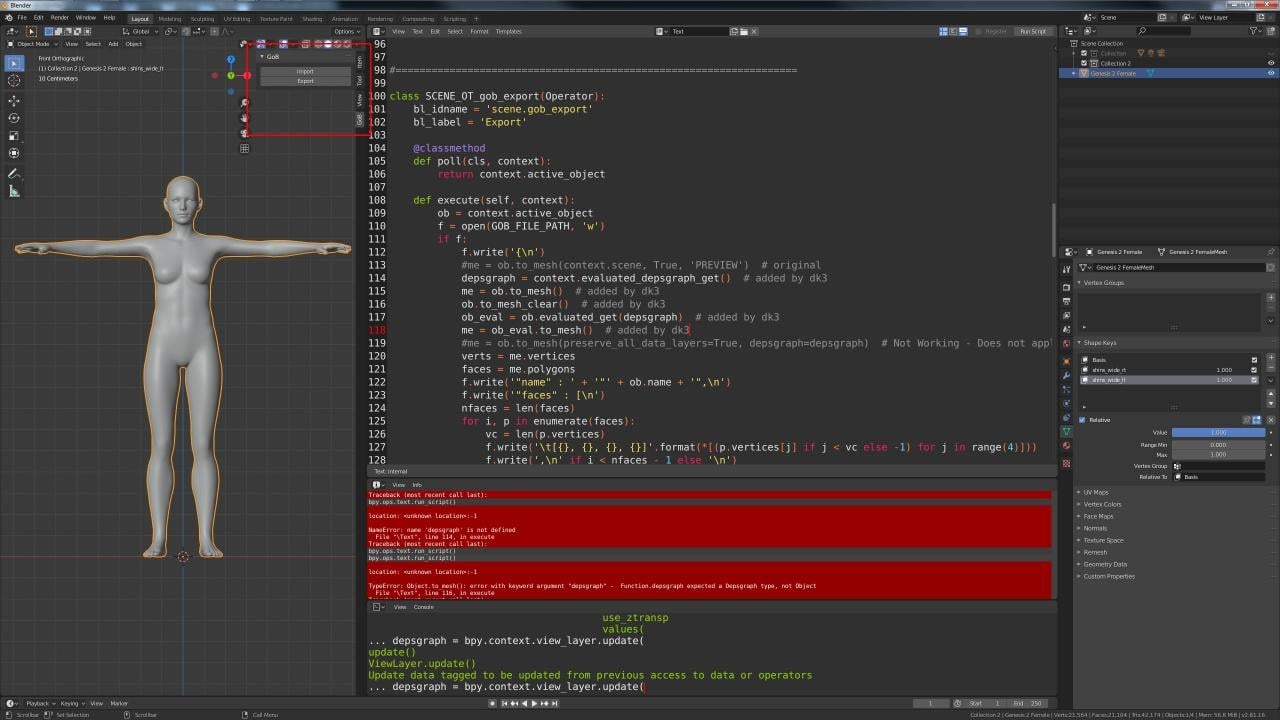
And, successfully ported to Blender 2.81...
I really hate all this new Depsgraph crap - that took the longest to figure out how to get the Shape Key morph targets to export correctly as they do for 2.79.
I was surprised how small and simple his scripts were (no modules with multiple script linking) -- I am both impressed, and not impressed at the same time.
He wrote a custom importer and exporter instead of utilizing one of the included I/O such as OBJ (like I use for my DS/Blender bridge and all my other bridges). The magic is in his DSA import script which auto-sets up the newly created morph target within DS. I'm still going through the Morph Loader Pro with mine, but I am going to look into adopting his approach. It's quite good.
Did anyone try it with 2.79?
If you did, were you able to get it to work?
He hard-coded the file path to what his is, and/or what he believes everyones is, so I had to change it to mine (created custom bridge folder instead).
If you don't have the same file path, it won't work for you unless you edit the Blender Python script to your file path.
When I get some other free time, I'm going to rectify that nonsense...
problem with a producthttps://www.daz3d.com/jw-hd-microphone-and-singing-poses-for-genesis-8
How well do you know Daz Studio- the interface and working with products and the Parameters tab?
Pardon me for asking, but it does say adjustable microphone stand and the image shows it in multiple positions.So there's probably a morph (or setting) in the parameters tab that adjusts the length.
You select the stand in the main scene and edit it in the Tab.
 Geometry does not match???
Are you able to export the base G8 figure as obj and then immediately import it back with morph loader without attempting to modify it in any way with other programs?
any experience with Janna original figure?a fresh gene pool is always welcome
But it's not a gene pool if it is standalone.
i am also puzzled with the decision of creating a stand alone figure. I can see showing off your talents in creating it, but it makes no sense financially in this market.
well it could when it comes to game licence pricing for example
I don't know, a one off like Janna might make even less sense for gaming models. Daz Genesis has a pipeline of sorts for it, and so somebody could buy several Genesis models and use that same pipeline for them all. But Janna is standalone, and would require altering that method, and most probably one would not wish to devote their time to do that for just a single model. It might make more sense if you plan on ditching the rigging from the start, but then that would seem to defeat the purpose of buying a model from Daz in the first place.
I would have bought Janna, but I was quite saddened that she is standalone. Its not just about fitting clothing or hair. I like messing around with textures and things. There are no other textures for Janna's UV, so I can't just swap say Bluejaunte's girls skins on her or other characters. I can customize the textures, but that's about it. I can't even convert them like I could from Genesis 2 or Victoria 4. And if I wanted to alter her shape, I'd have to go to Hexagon or Blender to do it. I couldn't just use a morph from something else.
Questions about the newest Daz Studio'Ello.

I been using the old Daz3.1 since 2011 (well, if it's not broke, why fix it, yes?
 ), and getting a new compy set up, and wondering what differences will there be with the newest, compared to the old one? And any turotorals out there I can look at to get the general jist of it? Also, will I still be able to use my favorite figurs, Aiko3 and Hiro3, as well as the Goblin, with the newest version?
Thanks.

Big difference between the programs, many improvements :-)
Yes you could still use the old legacy figures such as Aiko3 and Hiro3 but please, be nice to yourself. Consider using Genesis for which there are the legacy morph shapes available. It is a LOT easier to make clothing for Genesis figures than the .cr2 models. By now these are older items and so do become available now and then at very good prices.
https://www.daz3d.com/v4-and-m4-shapes-for-genesis
https://www.daz3d.com/gen-3-iconic-shapes-for-genesis
https://www.daz3d.com/gen-4-iconic-shapes-for-genesis
With Genesis {any of them} one can mix the morphs so for example one can dial in a little of V3, a little of V4, etc. to make new characters.
The legacy clothing at least from V4/M4 can be auto-fitted to Genesis. If I recall correctly the other figure's clothing will autofit as well after purchasing/installing the shape morphs listed above.
There are tutorials mentioned from various product pages and of course via Youtube.com. Also in the New Users Forum Parmy puts out a weekly 'how to' video.
Face Transfer plugin fails to loadWhere is it supposed to be at in Daz Studio?
Only available for PC - Windows 64-bit.
To launch the pane, go from the top Windows > Panes > Face Transfer, then dock it where you want it.
Auto Face Enhancer [Commercial]This is my top favorite product in the store right now, I like how the eyes change shape when looking around. It's much more natural now.
However, there is a bug when turning on HD details for Kala 8. It makes her all wrinkly: (gif)
Any idea why this is happening? I disabled AFE bump, morph, and powerpose controllers and even uninstalled the smoother from your dropbox.
I have transferred the HD on to AFE at Sub-d 0 head is already HD. Don't turn on HD morph when AFE is on.
When render far away turn off AFE.
When you need the Facial close UP using Skin Detail then turn on AFE.
Do you mean that Kala HD morphs are enabled automatically when I use AFE? They are clearly not enabled when I turn on AFE. Here is a comparison between AFE and HD morphs. (gif)

You can see, especially, that the lips are much more well defined with the HD morphs on.
Anybody tried using Wrap3d to convert 3D characters to Daz format and between Daz generations ?if you mean Ultimate Unwrap 3D repaint
I do this quite often
you need to have matching clone shape on both meshes
the lashes, eyeballs, mouth parts moved out, there is a morph on shareCG
or hidden
and the DS U3D exporter is useful as it saves resaving an obj as a u3d to use repaint
sadly as a third party product I cannot link any tutorials
a forum thread here but Facebook breaks image links after a while so are missing
https://www.daz3d.com/forums/discussion/151431/ultimate-unwrap-3d-repaint-option-solved
Actually I was refering to russian3dscanner but Ultimate Unwrap 3D repaint looks interesting so thanks for mentioning it. R3DS have a program called Wrap where you take a floating mesh (G3F or G8F) and it wraps it around a static mesh, i.e a game character. After the mesh has been wrapped the eyes and mouth need correcting and that's where I have trouble along with the scaling and pose matching.
Steve.3D Art Freebie Challenge-February 2020-"Natural Love" -Main Thread OnlyAwesome render @Hylas! Really beautiful!
But I wonder (and not for the first time) why the G8M Head Morphs (https://www.daz3d.com/genesis-8-male-head-morphs) and G8M Body Morphs (https://www.daz3d.com/genesis-8-male-body-morphs) are listed under No-Count items? Or do you mean the Body and Head morphs that come with the Genesis 8 Male base figure? (The (paid) Genesis 8 Male Body Morphs are required by the Rex for Genesis 8 Male character...)
Thanks!
As I understand it, the basic morph packs are No Counts... when I use further morph packs (such as SWOLE or 200 Plus) I list them under purchased.
3. Base figures (All Gen 2,3,4, and Genesis 1,2,3) as well as their general morphs packs (Morphs++ and similar) do not count as a purchased item or a freebie and may be used as needed
The Victoria 4.2 and Michael 4 Shapes++ (Head and Body Morphs++) have been freebies occasionally, as well as the Victoria 4.2 and Michael 4 Creature Creator Morphs but I'm not sure whether they (the C.C.M.) fall under 'similar'. I also own the Genesis Evolution: Head Morphs and the Genesis Evolution: Body Morphs but they came with the Michael 5 Pro Suite so they are purchased. What I am saying is that none of the Head or Body Morph packages for Genesis, Genesis 2, Genesis 3 and Genesis 8 has ever been a freebie and therefor I think it's very strange that they do not count as purchased. @Saphirewild, can you please clarify on this?
3D Art Freebie Challenge-February 2020-"Natural Love" -Main Thread OnlyAwesome render @Hylas! Really beautiful!
But I wonder (and not for the first time) why the G8M Head Morphs (https://www.daz3d.com/genesis-8-male-head-morphs) and G8M Body Morphs (https://www.daz3d.com/genesis-8-male-body-morphs) are listed under No-Count items? Or do you mean the Body and Head morphs that come with the Genesis 8 Male base figure? (The (paid) Genesis 8 Male Body Morphs are required by the Rex for Genesis 8 Male character...)
Thanks!
As I understand it, the basic morph packs are No Counts... when I use further morph packs (such as SWOLE or 200 Plus) I list them under purchased.
3. Base figures (All Gen 2,3,4, and Genesis 1,2,3) as well as their general morphs packs (Morphs++ and similar) do not count as a purchased item or a freebie and may be used as needed
Mystique for Genesis 8 Female(s) [Commercial]Apologies if this isn't appropriate, but given the burlesque nature of the outfit, would it make sense to consider a variety of "undressing" morphs and accompanying poses? There are certainly plenty of buckles, straps, and wardrobe edges for a character to interact with.
I agree, this needs to happen.
Quick render with combined CJ character morphs that I haven't tried before either... Pretty great, but a slight funky issue going with a void between the stockings and heels.
(Checked with the Angels Secrets stockings, problem's entirely on the character)
Great render! Are you talking about space between the stocking and heel. If so can you provide just a quick screen grab/render of the issue so I know how to fix with a morph I can add later.
This is the best Mystique render yet!
Cheers,
Alex.
Thanks! There's more on my Artstation page if you care to peek.
A mesh can be very easilly done using a Geometry Shell, with lot more success than a conforming mesh... like in Linday's Dark Fantasy Outfit. Not sure if that is a good idea. My personal favorite would be a real corset with hooks and a proper lacing system, not zippers. Normally, for preventing the deformation of the buckle, you have to use the Rigid Follow Node, but may be, you have investigate this area.
So far, the best stocking mesh and shader, thank for the wrinkle.
All good points. The buckles hold up well in form but can still be deformed so apply them as a rigid follow node can easily happen and should. For the stockings overlapping and conforming to pantyhose, you just simply have the stockings conform and fit to the pantyhose instead, and not the figure... (that's what I did with the above render) otherwise you would indeed have many issues with both wanting to conform to the figure. I will play around with a geometry shell and see what the better option will be.
- - - - - - -So far, I plan on adding:
- Strappy style Garter
- 1-2 new bra tops
- A partial veil
- Larger, more complex choker
- More fitting and newly added undressing morphs
- Corset buckles to be made into rigid follow nodes
- Underlying pantyhose (maybe a few styles as well)
- More material options
Things I'm still debating:
- Fishnet stockings
- A new corset with lacing and hooks (like JPiat mentioned)
- Corset lacing stiletto boots (either knee or thigh high)
- A new top (like the one in my Infernal Succubus outfit) with corset lacing sleeves
- Jewelry
Please feel free to still comment on what you would like to see and thanks for all the feedback already!
This outfit is going to triple plus awesome with that add-on. I might grab some different shoes elsewhere, as I'm not a big fan of platforms, but that really is personal preference. And since I have plenty shoes anyway, I'm feel pretty much okay if you don't spend time on more shoes or morphs for these, and focus on all the other things you might want to add.
No Face Transfer PaneHI there, I have the same issue. 64 bit windows, version 4.12.0.86. Merged and updated menus. Face Transfer not showing in panes menu.
Looking at installed plugins it shows red - not installed; and "Library cound not be loaded" etc.
What's the fix please? Thanks
Face Transfer plugin fails to loadThis bit, I think:
Face Transfer pane
- Fixed an issue with requisite libraries (on Windows) missing on some user's machines, causing the plugin to fail to load
- "Microsoft Visual C++ Redistributable for Visual Studio 2015, 2017 and 2019" is now included with the standard distribution
I have to download "Microsoft Visual C++"? It says its already included. Im still not sure what to do. Maybe if i upgrade to Windows 10?
No, the fix is that you don't need to manually install that library if you don't already have it.
Lana for Genesis 8 FemaleMy problem with this is simple; when i apply the full morph of Lana to a Genesis 8 Female- she does not come out like she should. The simple expectation for buying content here is this; I buy a figure and load the morph or character, I expect that the facial structure of which I was convinced to buy the model on, comes through 95% of the way. I did submit a ticket to resolve this as I wanted to talk to the vendor, but its been 5 days without help.
https://www.daz3d.com/lana-for-genesis-8-females
the gray image is a screen shot. her face is shorter and lips a little weird. Tried messing with the facial length, but again, I shouldn't have to make a dozen small tweaks to get the shape that I bought and was sold on. The color image is from the product page- i'm uploading it to show the reference, nothing more. I don't own it. Notice the proportions of the head length, nose and cheek between the two.
To Belladzines; is there something I'm missing here? There are no hidden morphs or any 'current' morphs applied other than Lana's. And no Non-zero morphs either.
Thanks to all that can shed some light on this. Also- 4/5 days without a decent response in tickets shows lack luster customer service.
Question about the .99 cents saleI'm not using connect because my main DAZ Studio-running PC is not internet connected - I DIM-download on my laptop and transfer them on a memory stick. I think there are quite a few others who do the same thing.
Auto Face Enhancer [Commercial]This is my top favorite product in the store right now, I like how the eyes change shape when looking around. It's much more natural now.
However, there is a bug when turning on HD details for Kala 8. It makes her all wrinkly: (gif)
Any idea why this is happening? I disabled AFE bump, morph, and powerpose controllers and even uninstalled the smoother from your dropbox.
I have transferred the HD on to AFE at Sub-d 0 head is already HD. Don't turn on HD morph when AFE is on.
When render far away turn off AFE.
When you need the Facial close UP using Skin Detail then turn on AFE.
Mystique for Genesis 8 Female(s) [Commercial]This was actually a morph I thought I included but forgot to add in. I will be adding an additional morph to move the stocking closer to the heel when the heel shrinks like this. This is a focal area and I want the outfit to work with almost all character shapes. Thank you for taking the time to provide the render.
Mystique for Genesis 8 Female(s) [Commercial]Apologies if this isn't appropriate, but given the burlesque nature of the outfit, would it make sense to consider a variety of "undressing" morphs and accompanying poses? There are certainly plenty of buckles, straps, and wardrobe edges for a character to interact with.
I agree, this needs to happen.
Quick render with combined CJ character morphs that I haven't tried before either... Pretty great, but a slight funky issue going with a void between the stockings and heels.
(Checked with the Angels Secrets stockings, problem's entirely on the character)
Great render! Are you talking about space between the stocking and heel. If so can you provide just a quick screen grab/render of the issue so I know how to fix with a morph I can add later.
This is the best Mystique render yet!
Cheers,
Alex.
Thanks! There's more on my Artstation page if you care to peek.
A mesh can be very easilly done using a Geometry Shell, with lot more success than a conforming mesh... like in Linday's Dark Fantasy Outfit. Not sure if that is a good idea. My personal favorite would be a real corset with hooks and a proper lacing system, not zippers. Normally, for preventing the deformation of the buckle, you have to use the Rigid Follow Node, but may be, you have investigate this area.
So far, the best stocking mesh and shader, thank for the wrinkle.
All good points. The buckles hold up well in form but can still be deformed so apply them as a rigid follow node can easily happen and should. For the stockings overlapping and conforming to pantyhose, you just simply have the stockings conform and fit to the pantyhose instead, and not the figure... (that's what I did with the above render) otherwise you would indeed have many issues with both wanting to conform to the figure. I will play around with a geometry shell and see what the better option will be.
- - - - - - -So far, I plan on adding:
- Strappy style Garter
- 1-2 new bra tops
- A partial veil
- Larger, more complex choker
- More fitting and newly added undressing morphs
- Corset buckles to be made into rigid follow nodes
- Underlying pantyhose (maybe a few styles as well)
- More material options
Things I'm still debating:
- Fishnet stockings
- A new corset with lacing and hooks (like JPiat mentioned)
- Corset lacing stiletto boots (either knee or thigh high)
- A new top (like the one in my Infernal Succubus outfit) with corset lacing sleeves
- Jewelry
Please feel free to still comment on what you would like to see and thanks for all the feedback already!
Thanks.
It's the way the stocking leaves an empty space around the heels (not sheos, feet). Here's a zoomed and resized/resampled (but still a bit nasty) closeup. TBH I don't think it's something that you should be fixing, as I figure it's an issue with the character.
Auto Face Enhancer [Commercial]This is my top favorite product in the store right now, I like how the eyes change shape when looking around. It's much more natural now.
However, there is a bug when turning on HD details for Kala 8. It makes her all wrinkly: (gif)

Any idea why this is happening? I disabled AFE bump, morph, and powerpose controllers and even uninstalled the smoother from your dropbox.
3D Art Freebie Challenge-February 2020-"Natural Love" -Main Thread Only
Title: The Dance
DAZ Studio, Adobe Photoshop
Version before postwork attached below:Freebies:
1) Dryad by Aboran Tourist Council: https://www.renderosity.com/mod/freestuff/v4-dryad-conforming-figure-forposer/75975
2) Tree by Design Anvil: https://www.daz3d.com/forums/discussion/379371/da-super-morphing-tree-2020-cherry-blossom-and-oak-tree/p1
3) HDRI by valzheimer: https://gumroad.com/l/DXEPj
4) Flower by printable_models: https://free3d.com/3d-model/anemone-flower-v1--764792.html
5) Flower by dacosta: https://free3d.com/3d-model/flower-25-99404.html
6) Flower by dacosta: https://free3d.com/3d-model/plant-04-58791.html
7) Hair by April's Vanity: http://shop.aprilsvanity.com/free-items/ciri-hair.html
8) Morph by bu_es: https://www.renderosity.com/mod/freestuff/saud-for-g3m-g8m/78849
9) Hair Texture from Mane Concern: Allessa (DAZ Bi-Weekly Freebie)
10) Outfit from Lion War Bundle (DAZ Bi-Weekly Freebie)
11) Shrub by Tyro Smith: https://free3d.com/3d-model/bush-84314.html
12) Shrub by Yughues aka Nobiax: https://www.sharecg.com/v/76031/related/5/3D-Model/Free-Hedges
13) Boulder by 3-d-c: https://sharecg.com/v/46789/gallery/11/Poser/Morphable-Boulder
14) Ground Texture by StruffelProductions (Lennart Demes): https://cc0textures.com/view?tex=Ground37
Purchased:
1) Rex for G8M
2) Horns from Primordial Barbarian
3) Atmocam 2
4) Flutter of ButterfliesNo Count Items:
- G8M Head Morphs
- G8M Body Morphs
- Victoria 4.2
- Monochromatic Shader (2018 XMas Freebie)
- Sakura Blossom (2019 XMas Freebie)[ETA 18.FEB: added links to my No Counts to avoid any confusion.]
Daz 3D is part of

Connect
DAZ Productions, Inc.
7533 S Center View Ct #4664
West Jordan, UT 84084Licensing Agreement | Terms of Service | Privacy Policy | EULA
© 2026 Daz Productions Inc. All Rights Reserved.