-
Fantasy Attic's 2025 Christmas Community Gift Gathering
Thank you for all the gifts

I don't know if it's the right place, but while I was trying some of them, when I tried to load Genesis 9 after placing the files for Renée in an active library, I was shown a missing file error because Daz was looking for
'/data/Angells Graphics/G9 June/G9 June/Genesis9.dsf'
Which is not where Genesis 9 is supposed to be.
To fix the problem, I had to uncompress 'Renee G9.dsf', and replace, at line 18:
"parent" : "/data/Angells%20Graphics/G9%20June/G9%20June/Genesis9.dsf#Genesis9-1",
by
"parent" : "/data/Daz%203D/Genesis%209/Base/Genesis9.dsf#Genesis9-1",
The id is also likely wrong so I replaced at line 4
"id" : "/data/Angells%20Graphics/G9%20June/G9%20June/Morphs/AngellsGraphics/Renee%20G9/Renee%20G9.dsf",
by
"id" : "/data/Daz%203D/Genesis%209/Base/Morphs/AngellsGraphics/Renee%20G9/Renee%20G9.dsf",
Once the changes were saved, Genesis 9 loaded without any missing file error and it was possible to apply Renée morph.
Sagan: A DAZ Studio to Blender Alembic ExporterSo I've been working with sagan for couple of days now and there are a few things that bother me. The settings still dont save per scene file, they seem to be global. Im not sure if you plan to change this so I'm mentioning it. I think it is really important to have settings save per scene file, like for example frame range so that when you open the older project you know what you are working with and not have to constantly fiddle with frame ranges especially if you work with multiple files. Another thing is, the order of material and the uv naming does not follow diffeomorphic template. I've tried fiddling with diffeomorphic material order settings but no success, this fix used to work in older versions of sagan. My suggestion is, keep uv naming same as diffeomorphic and keep material order/index the same as diffeomorphic default import because this simplifies the material transfer by an order of magnitude. Currently as it is you have to fiddle with both the uv's and material orders just to get a single piece of clothing working and then you have to do it for every single unique piece. I saw sagan exports some scripts also, I am not sure if and how they are supposed to be used.
Fitting hair with hatsRon Knights said:
Taoz, you have my sympathy.
My computer is almost in pieces and it's only 6 years old.
I replaced the NVME (boot) disc, and ripped apart most of the insides in the process.
Yes it's easy to destroy hardware, I've learned that the hard way. Many things that you can do wrong.
Anyway, I have tested the hat/hair tool now. It has two methods for fitting the hair, a simple one and a more advanced one, I've only tried the simple one so far. It's not easy to see what you're doing here when positioning the cube/sphere/cylinder that masks the part of the hair you want to hide, as you can't move the figure around. So I had to repeat and adjust four times and it takes several minutes each time to create/modify the hair morph. But here's the result. Looks pretty OK, but not perfect if you go into details, but then, it's probably not the easiest hair to fit to a hat.
I'll experiment with the other method later, here you work directly with the hair by selecting the vertices you want to hide, which is more complex but also gives more control over the details I guess.
Also, as far as I can see it only works with mesh hairs, not strand based hairs.
Celebrity Look-a-Likes for 3D figures Part 4druc said:
maikdecker said:
Gordig said:
druc said:
Has this been added Babydoll for Genesis 8 Female at Renderhub
It doesn't help your case that I can't even guess at who that's supposed to be.
Emily Browning was a girl called "Babydoll" in the 2011 movie "Sucker Punch" and wore an outfit kinda like the one shown. Good likeness, imho
The character morph, costume and hair are sold as a package deal, and sorry, I didn't name the character as Emily Browning from "Sucker Punch" The vendor is on sale at the moment, but as I own this, like Daz3d.com, I can't see the price of items I own.
"...but as I own this, like Daz3d.com, I can't see the price of items I own."
One can anonymously view the items that they own in a private browser window
Freebie Challenge December 2025 - "Christmas!" - Entries ThreadWaiting to see Santa Claus
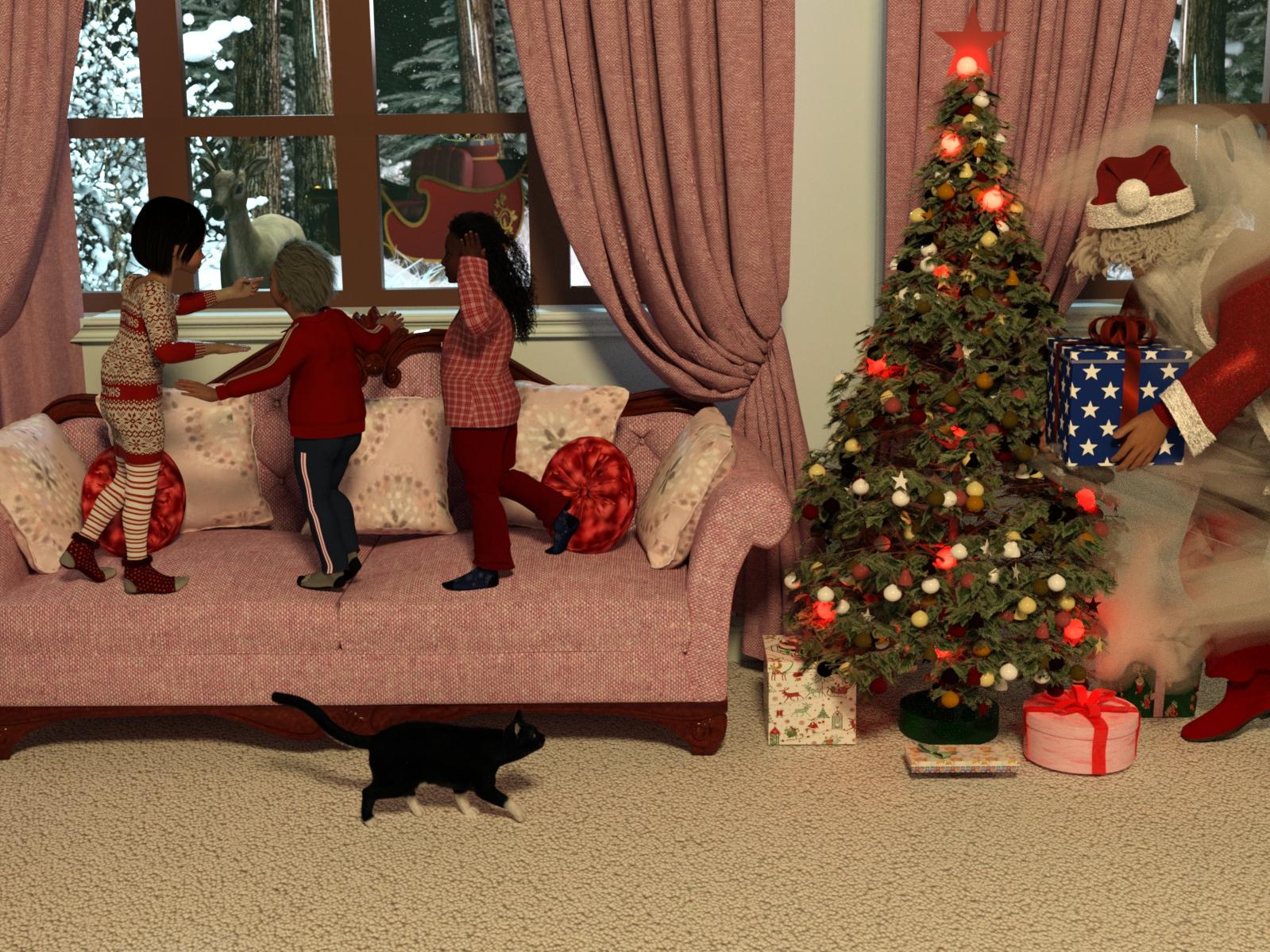
From the window, a reindeer and a sleigh can be seen. Could this be a sign of Santa Claus's arrival? Maybe he'll be visible? Maybe no one can see him, because he's hiding behind a mysterious cloud that obscures his view. Perhaps the cat, with his sense of magic, can... but he can't reveal it!
Freebies
Simple Reading Room for DAZ by Shreddder
https://www.renderosity.com/freestuff/items/95862/simple-reading-room-for-daz
https://www.renderhub.com/shredder/simple-reading-room-for-dazPETIT BOIS by chacornac
https://www.renderosity.com/freestuff/items/87535/petit-boisSAPIN_NOEL by chacornac
https://www.renderosity.com/freestuff/items/75869/sapin-noelAMV_Fawn by Luna_s20
https://www.renderosity.com/freestuff/items/99317/amv-fawn
https://www.renderhub.com/luna-s20/amv-fawnBuck Antlers for AMV_Fawn - DS by Luna_s20
https://www.renderosity.com/freestuff/items/99334/buck-antlers-for-amv-fawn-ds
https://www.renderhub.com/luna-s20/buck-antlers-daz-studioEVERYPlant Christmas Tree for Daz by EVERYPlant
https://www.renderosity.com/freestuff/items/98106/everyplant-christmas-tree-for-dazNOEL_DECORS_GUIRLANDES by chacornac
https://www.renderosity.com/freestuff/items/75863/noel-decors-guirlandesCute Kay Toddler Morph for G9
https://www.renderhub.com/undeadcrabb/cute-kay-toddle-morph-for-g9Vergil DMC5 Hair For Genesis 8 Male
https://www.renderhub.com/intheflesh/vergil-dmc5-hair-for-genesis-8-maleTraining Suit for G9 by yomiuri
https://www.renderosity.com/freestuff/items/98613/training-suit-for-g9KT Child G9 by katyee
https://www.renderosity.com/freestuff/items/98181/kt-child-g9Hair 1 for Daz 3D Genesis 9
https://www.deviantart.com/amyaimei/art/Hair-1-for-Daz-3D-Genesis-9-935744713Halloweeny Part 1 by Leilana
https://www.renderosity.com/freestuff/items/83564/halloweeny-part-1Halloweeny Fabric by Leilana
https://www.renderosity.com/freestuff/items/83581/halloweeny-fabricBettina G9 mn V2.0 by mininessie
https://www.renderosity.com/freestuff/items/94068/bettina-g9-mn-v20Pajamas for G9 by yomiuri (shirt)
https://www.renderosity.com/freestuff/items/98594/pajamas-for-g9London Streetwear Outfit for Genesis 9 (pants)
https://www.renderhub.com/kuraikya/london-streetwearJamesF for Genesis 8 Male
https://www.renderhub.com/ohnomen/jamesf-for-genesis-8-male-1Classy Sweaters for Genesis 8 Couple by Dingo
https://www.renderosity.com/freestuff/items/87321/classy-sweaters-for-genesis-8-coupleDingo's Wild Curls for Genesis 8 Female by Dingo
https://www.renderosity.com/freestuff/items/86422/dingos-wild-curls-for-genesis-8-femaleCaptain Barbossa by Paspu (Santa's pants and boots)
https://www.renderosity.com/freestuff/items/91488/captain-barbossaMist Walker G8F by pjz99
https://www.renderosity.com/freestuff/items/98656/mist-walker-g8fNo count
dForce Santa Costume Mega Bundle for G8F by Yashiro amamiya (Santa's coat and hat) no longer available
gift by kalhh no longer available
LF Lil Comfy cute socks by LilFlame it was a DAZ freebie last year, now no longer available.Paid
HS Kelly Messy Curves Hair for Genesis 9, 8, and 8.1 Females
https://www.daz3d.com/hs-kelly-messy-curves-hair-for-genesis-9-8-and-81-femalesDaz House Cat with dForce Hair
https://www.daz3d.com/daz-house-cat-with-dforce-hair
Difficult to classifySleigh
It was free when I downloaded it (Renderosity), now it's paid on another site (3d Shards)
I don't know how to classify it (doesn't count or is it paid?)Let's appreciate/discuss today's new releases - more ongoinger threaddaveso said:
I think this character has some great skin textures, Ramalus HD for Genesis 9 | Daz 3D The only thing it appears as if there is no morph for normal ears, only elf style. Its too bad if that's the case.
I am not buying it for the same reason. It's rather odd since elves, as popular as they may seem, are a niche.
Let's appreciate/discuss today's new releases - more ongoinger threadI think this character has some great skin textures, Ramalus HD for Genesis 9 | Daz 3D The only thing it appears as if there is no morph for normal ears, only elf style. Its too bad if that's the case.
Celebrity Look-a-Likes for 3D figures Part 4maikdecker said:
Gordig said:
druc said:
Has this been added Babydoll for Genesis 8 Female at Renderhub
It doesn't help your case that I can't even guess at who that's supposed to be.
Emily Browning was a girl called "Babydoll" in the 2011 movie "Sucker Punch" and wore an outfit kinda like the one shown. Good likeness, imho
The character morph, costume and hair are sold as a package deal, and sorry, I didn't name the character as Emily Browning from "Sucker Punch" The vendor is on sale at the moment, but as I own this, like Daz3d.com, I can't see the price of items I own.
(Released) - dForce Bombshell Hair for Genesis 9 [Commercial]nakamuram002 said:
Is there a morph to move the front left hair behind the shoulder? Is there a morph to move the front right hair (if any) in front of the shoulder? In other words mirror the default view.
Hello there,
no, there is no way to 'mirror' the hairstyle.
ToyenSWTrium's Guide for fine tuning Push+dFormer mapsThis was requested by a client who wanted some guidance on how to quickly fix poke-throughs caused by dForce fabrics on layered meshes (without going down the rabbit-hole of using ghost colliders or building extended morph/bone-chain stacks).
You can download / view the full over here : SWTrium’s Quickstart Guide for fine tuning Push / dFormer Modifier Weight Nodes for Daz3D Studio.
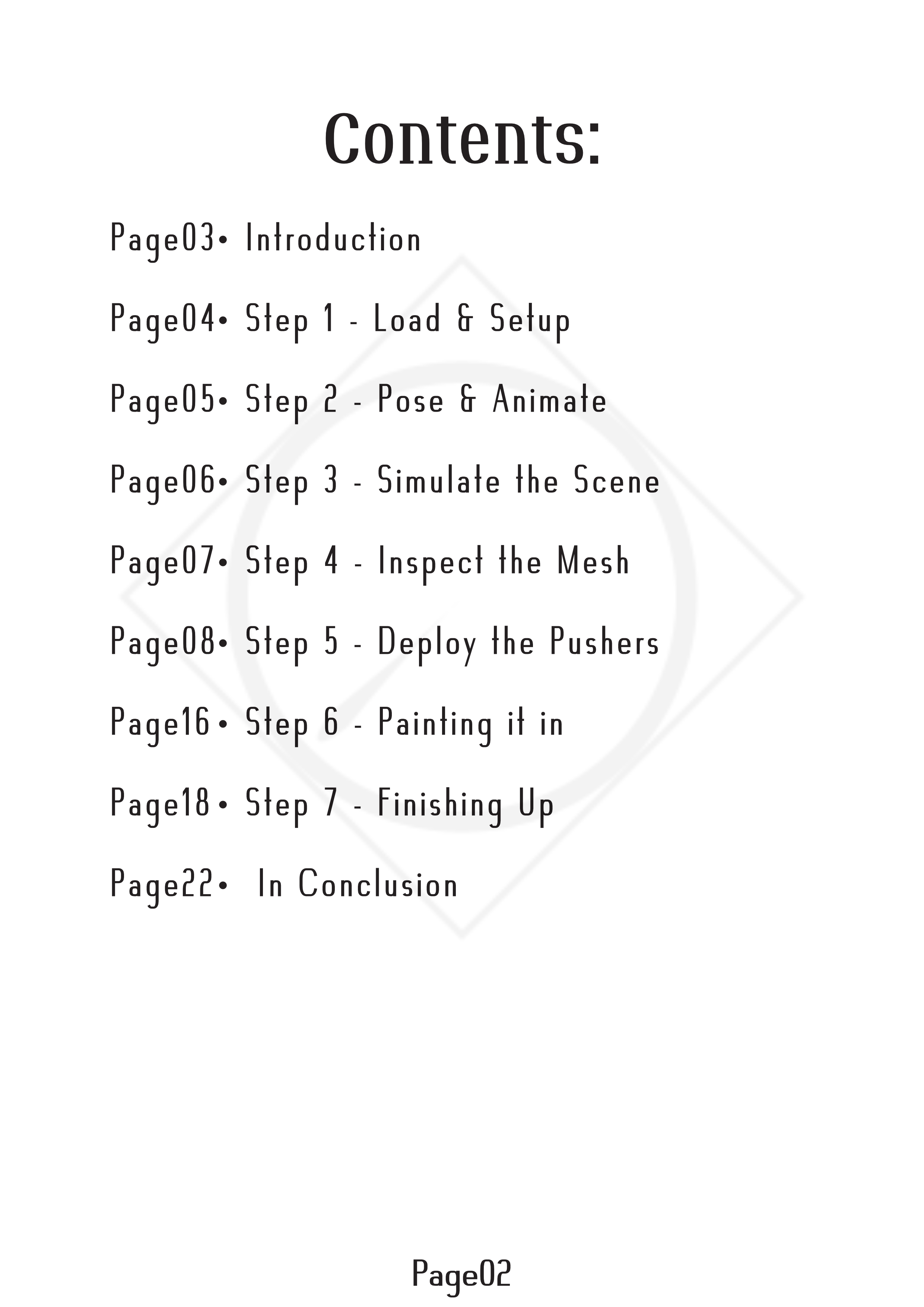
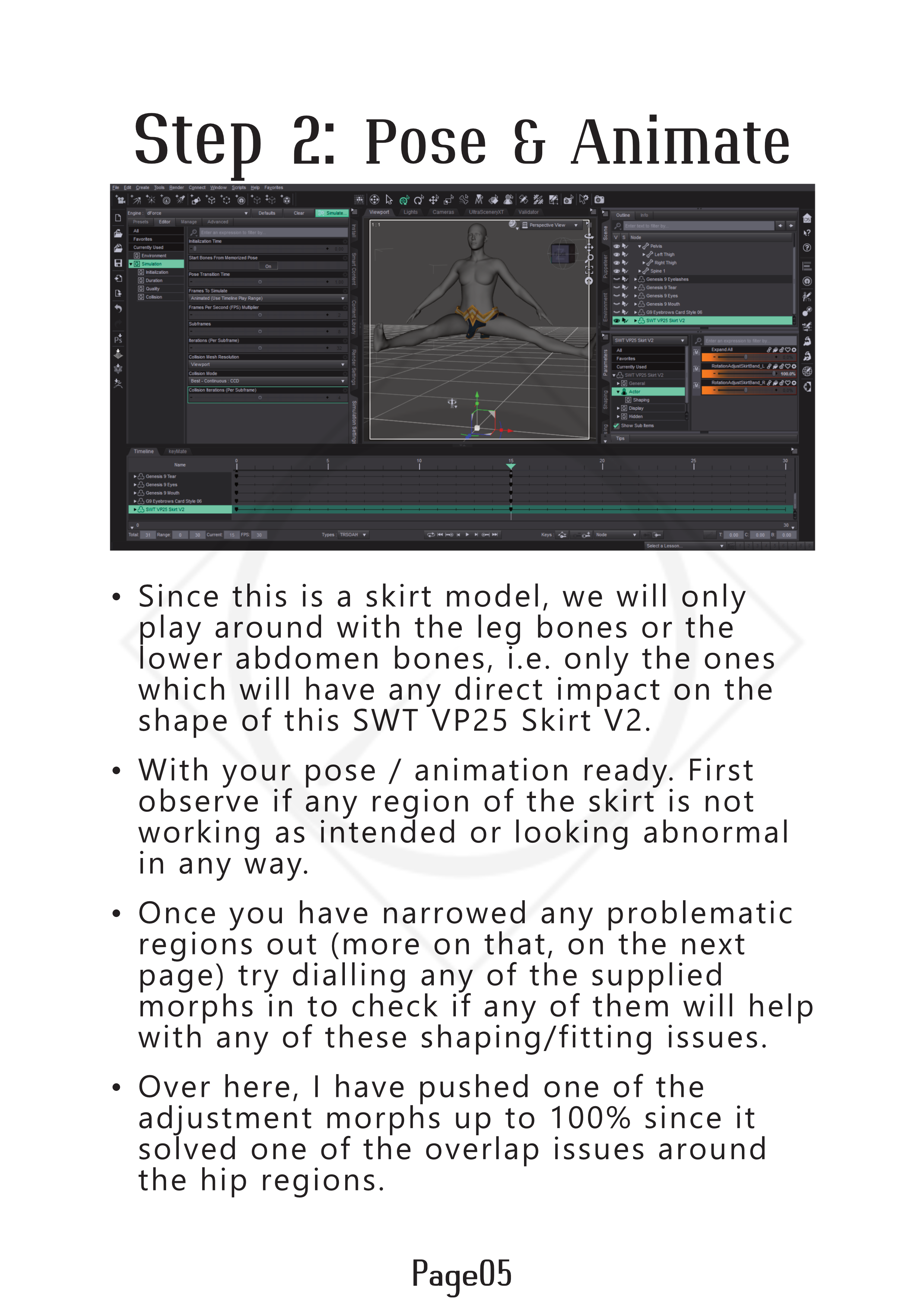
But a Page by page breakdown will also be added in this thread.
Page01:
Page02:
Page03:

Page04:

Page05:
 Daz Studio 2026 Beta - version 6.25.2026.6423! (Updated March 09, 2026)
I had the a crash on the latest version of Daz ALPHA.
This crash was bad, no crash report, it gave an error and I needed to force a shut down. Steps on repeating it below.
This seems to happen because of one addon, with a specific morph that I honestly never use at all (see attached image).
This is how I repeated the crash...
- Load Daz (Latest Alpha)
- Load default, Genesis 8 female with nothing else.
- Go to Parameters Tab for the character
- Click Actor
- Click Legs and it crashes with an error (see attachment)
- I have to force a shutdown, so no crash report is generated.I managed to easily recreate this crash doing the above so I cleared the log file, and then carefully recreated it with a fresh, empty log, and then saved the log before I clicked LEGS which crashes it. I attached the log.txt. (Crash log.zip).
Creating an injection dsxI did try that. I ended up with mixed results tbh. I put the head morph on but when I tried to modify or add a body shape the entire figure changed, like it was linked to the head morph.
I am not sure why that is happening. If I try to change a shape on the body it changes the entire body shape. If I try to modify anything it changes the entire shape of the figure.
(Released) - dForce Bombshell Hair for Genesis 9 [Commercial]Is there a morph to move the front left hair behind the shoulder? Is there a morph to move the front right hair (if any) in front of the shoulder? In other words mirror the default view.
The best way to smooth out wrinkles?I don't have geometry sculptur so I have no experience with that.
I would take it into a modeller and create a morph from that.
In geometry sculptur have you tried change radius and see what difference it makes.
Maybe try to show an image of what you are trying to adjust, best in wire texture shaded
Announcement about phasing out 3Delight - do we lose our 3Delight products?NylonGirl said:
I need a way to get the really old versions. I have old scenes I can't load because the characters just load as grey blocks with no texture, or completely invisible. It is my understanding there was an intermediary version of DAZ studio that created files to make those old scenes work with newer versions of DAZ Studio. I need that version or an older one.
Sounds like they might be the old .daz scene files.
DS1, 2, 3 and 4.0 a scene was saved as a .daz file, however everything in the scene was saved into the data folder as .dso (mesh), .dsd (morph) and .dsv files, lose those files and you get what you've described.
If you have lost those files then it's a bit of a pain to recreate them, for older content (ie Poser) DS3 is needed, but if your scenes use Genesis then you will need DS4.0.
How to transfer in Daz simulated cloth to blender?Import morph dbz does the trick for my project. Thank you.
Can't Load Materials for dForce Space Commander for Genesis 9Well, there was a LOT in that log file, but I copied all the relevant data, I think (still a lot, though).
Loaded the jumpsuit, tried to apply Neckline only material but failed. Tried Neckline and Short Sleeves material, but only sleeves was applied.
2025-12-28 02:18:13.828 [INFO] :: Prepare asset load (open): /People/Genesis 9/Clothing/!!Sci-Fi/dForce Space Commander for Genesis 9/Materials/Legion Space Commander/Legion Space Commander Jumpsuit.duf
2025-12-28 02:18:13.828 [INFO] :: Locking viewport redraw...
2025-12-28 02:18:13.828 [INFO] :: Viewport redraw locked.
2025-12-28 02:18:13.868 [VERBOSE] :: Native format content directories: 4
2025-12-28 02:18:13.868 [VERBOSE] :: Poser format content directories: 6
2025-12-28 02:18:13.868 [VERBOSE] :: Other import format content directories: 0
2025-12-28 02:18:13.869 [INFO] :: Begin asset load (open): /People/Genesis 9/Clothing/!!Sci-Fi/dForce Space Commander for Genesis 9/Materials/Legion Space Commander/Legion Space Commander Jumpsuit.duf
2025-12-28 02:18:13.881 [INFO] :: Clearing the scene...
2025-12-28 02:18:13.887 [INFO] :: *** Scene Cleared ***
2025-12-28 02:18:13.887 [INFO] :: Determining missing assets...
2025-12-28 02:18:13.927 [WARNING] :: Invalid node selection for "preset_material" type.
2025-12-28 02:18:13.927 [WARNING] :: Error loading asset: F:/My Secondary Library/People/Genesis 9/Clothing/!!Sci-Fi/dForce Space Commander for Genesis 9/Materials/Legion Space Commander/Legion Space Commander Jumpsuit.duf
Operation failed
2025-12-28 02:18:13.954 [INFO] :: Unlocking viewport redraw...
2025-12-28 02:18:13.954 [INFO] :: Viewport redraw unlocked.
2025-12-28 02:18:25.043 [INFO] :: Prepare asset load (open): /People/Genesis 9/Clothing/!!Sci-Fi/dForce Space Commander for Genesis 9/Space Commander Jumpsuit & Accesories.duf
2025-12-28 02:18:25.043 [INFO] :: Locking viewport redraw...
2025-12-28 02:18:25.043 [INFO] :: Viewport redraw locked.
2025-12-28 02:18:25.077 [VERBOSE] :: Native format content directories: 4
2025-12-28 02:18:25.077 [VERBOSE] :: Poser format content directories: 6
2025-12-28 02:18:25.078 [VERBOSE] :: Other import format content directories: 0
2025-12-28 02:18:25.078 [INFO] :: Begin asset load (open): /People/Genesis 9/Clothing/!!Sci-Fi/dForce Space Commander for Genesis 9/Space Commander Jumpsuit & Accesories.duf
2025-12-28 02:18:25.113 [INFO] :: Clearing the scene...
2025-12-28 02:18:25.116 [INFO] :: *** Scene Cleared ***
2025-12-28 02:18:25.116 [INFO] :: Determining missing assets...
2025-12-28 02:18:25.209 [INFO] :: Setting textures...
2025-12-28 02:18:25.210 [WARNING] :: \src\sdksource\fileinput\dzassetdaz.cpp(6486): Node parent not found.
2025-12-28 02:18:25.277 [INFO] :: Scanning for addons...
2025-12-28 02:18:25.310 [INFO] :: Creating node geometry...
2025-12-28 02:18:25.316 [INFO] :: Creating UV sets...
2025-12-28 02:18:25.316 [INFO] :: Creating materials...
2025-12-28 02:18:25.434 [INFO] :: Resolving legacy figures...
2025-12-28 02:18:25.434 [INFO] :: Preparing modifiers...
2025-12-28 02:18:25.435 [INFO] :: Creating modifiers...
2025-12-28 02:18:25.444 [INFO] :: Resolving 2 formulas...
2025-12-28 02:18:25.444 [INFO] :: Finding formula properties...
2025-12-28 02:18:25.445 [INFO] :: Sorting formula properties...
2025-12-28 02:18:25.445 [INFO] :: Creating ERC Links...
2025-12-28 02:18:25.445 [INFO] :: Finished resolving formulas.
2025-12-28 02:18:25.445 [INFO] :: Finalizing modifiers...
2025-12-28 02:18:25.445 [INFO] :: Sorting property groups...
2025-12-28 02:18:25.446 [INFO] :: Setting up follow targets...
2025-12-28 02:18:25.446 [WARNING] :: \src\sdksource\fileinput\dzassetdaz.cpp(2833): Failed to follow node.
2025-12-28 02:18:25.446 [INFO] :: Start following: Space Commander Jumpsuit << Space Commander Belt
2025-12-28 02:18:25.447 [INFO] :: Following started: Space Commander Jumpsuit << Space Commander Belt
2025-12-28 02:18:25.447 [INFO] :: Connect base morphs: Space Commander Jumpsuit << Space Commander Belt
2025-12-28 02:18:25.447 [INFO] :: Base morphs connected: Space Commander Jumpsuit << Space Commander Belt
2025-12-28 02:18:25.450 [INFO] :: Creating morph projection map: Space Commander Jumpsuit << Space Commander Belt
2025-12-28 02:18:25.450 [INFO] :: Start following: Space Commander Jumpsuit << Space Commander Epaulettes L
2025-12-28 02:18:25.450 [INFO] :: Following started: Space Commander Jumpsuit << Space Commander Epaulettes L
2025-12-28 02:18:25.450 [INFO] :: Connect base morphs: Space Commander Jumpsuit << Space Commander Epaulettes L
2025-12-28 02:18:25.450 [INFO] :: Base morphs connected: Space Commander Jumpsuit << Space Commander Epaulettes L
2025-12-28 02:18:25.451 [INFO] :: Creating morph projection map: Space Commander Jumpsuit << Space Commander Epaulettes L
2025-12-28 02:18:25.451 [INFO] :: Start following: Space Commander Jumpsuit << Space Commander Epaulettes R
2025-12-28 02:18:25.451 [INFO] :: Following started: Space Commander Jumpsuit << Space Commander Epaulettes R
2025-12-28 02:18:25.451 [INFO] :: Connect base morphs: Space Commander Jumpsuit << Space Commander Epaulettes R
2025-12-28 02:18:25.452 [INFO] :: Base morphs connected: Space Commander Jumpsuit << Space Commander Epaulettes R
2025-12-28 02:18:25.452 [INFO] :: Creating morph projection map: Space Commander Jumpsuit << Space Commander Epaulettes R
2025-12-28 02:18:25.453 [INFO] :: Start following: Space Commander Jumpsuit << Space Commander Chest Loops
2025-12-28 02:18:25.453 [INFO] :: Following started: Space Commander Jumpsuit << Space Commander Chest Loops
2025-12-28 02:18:25.453 [INFO] :: Connect base morphs: Space Commander Jumpsuit << Space Commander Chest Loops
2025-12-28 02:18:25.453 [INFO] :: Base morphs connected: Space Commander Jumpsuit << Space Commander Chest Loops
2025-12-28 02:18:25.454 [INFO] :: Creating morph projection map: Space Commander Jumpsuit << Space Commander Chest Loops
2025-12-28 02:18:25.454 [INFO] :: Finished asset load (open): 0m 0.376s - /People/Genesis 9/Clothing/!!Sci-Fi/dForce Space Commander for Genesis 9/Space Commander Jumpsuit & Accesories.duf
2025-12-28 02:18:25.512 [INFO] :: Unlocking viewport redraw...
2025-12-28 02:18:25.512 [INFO] :: Viewport redraw unlocked.
2025-12-28 02:18:25.730 [INFO] :: Loaded image: 02_Base_color_1001.png
2025-12-28 02:18:25.920 [INFO] :: Loaded image: 01_Base_color_1001.png
2025-12-28 02:18:26.130 [INFO] :: Loaded image: 01_Base_color_1001.png
2025-12-28 02:18:42.674 [INFO] :: Prepare asset load (merge): /People/Genesis 9/Clothing/!!Sci-Fi/dForce Space Commander for Genesis 9/Materials/Legion Space Commander/Space Commander Jumpsuit Neckline and Short Sleeves.duf
2025-12-28 02:18:42.674 [INFO] :: Locking viewport redraw...
2025-12-28 02:18:42.674 [INFO] :: Viewport redraw locked.
2025-12-28 02:18:42.719 [VERBOSE] :: Native format content directories: 4
2025-12-28 02:18:42.719 [VERBOSE] :: Poser format content directories: 6
2025-12-28 02:18:42.719 [VERBOSE] :: Other import format content directories: 0
2025-12-28 02:18:42.719 [INFO] :: Begin asset load (merge): /People/Genesis 9/Clothing/!!Sci-Fi/dForce Space Commander for Genesis 9/Materials/Legion Space Commander/Space Commander Jumpsuit Neckline and Short Sleeves.duf
2025-12-28 02:18:42.741 [INFO] :: Determining missing assets...
2025-12-28 02:18:42.812 [WARNING] :: Invalid hierarchy for selected node(s) and "preset_hierarchical_material" type; no root(s) found.
2025-12-28 02:18:42.812 [WARNING] :: Error loading asset: F:/My Secondary Library/People/Genesis 9/Clothing/!!Sci-Fi/dForce Space Commander for Genesis 9/Materials/Legion Space Commander/Space Commander Jumpsuit Neckline and Short Sleeves.duf
Operation failed
2025-12-28 02:18:42.849 [INFO] :: Unlocking viewport redraw...
2025-12-28 02:18:42.850 [INFO] :: Viewport redraw unlocked.
2025-12-28 02:18:46.375 [INFO] :: Prepare asset load (merge): /People/Genesis 9/Clothing/!!Sci-Fi/dForce Space Commander for Genesis 9/Materials/Legion Space Commander/Space Commander Jumpsuit Short Sleeves.duf
2025-12-28 02:18:46.375 [INFO] :: Locking viewport redraw...
2025-12-28 02:18:46.375 [INFO] :: Viewport redraw locked.
2025-12-28 02:18:46.416 [VERBOSE] :: Native format content directories: 4
2025-12-28 02:18:46.416 [VERBOSE] :: Poser format content directories: 6
2025-12-28 02:18:46.416 [VERBOSE] :: Other import format content directories: 0
2025-12-28 02:18:46.416 [INFO] :: Begin asset load (merge): /People/Genesis 9/Clothing/!!Sci-Fi/dForce Space Commander for Genesis 9/Materials/Legion Space Commander/Space Commander Jumpsuit Short Sleeves.duf
2025-12-28 02:18:46.422 [INFO] :: Determining missing assets...
2025-12-28 02:18:46.445 [INFO] :: Setting textures...
2025-12-28 02:18:46.445 [INFO] :: Creating materials...
2025-12-28 02:18:46.448 [INFO] :: Applying animations...
2025-12-28 02:18:46.468 [INFO] :: Finished asset load (merge): 0m 0.52s - /People/Genesis 9/Clothing/!!Sci-Fi/dForce Space Commander for Genesis 9/Materials/Legion Space Commander/Space Commander Jumpsuit Short Sleeves.duf
2025-12-28 02:18:46.505 [INFO] :: Unlocking viewport redraw...
2025-12-28 02:18:46.505 [INFO] :: Viewport redraw unlocked.
2025-12-28 02:18:46.688 [INFO] :: Loaded image: 02_Base_color_1001.png
How to transfer in Daz simulated cloth to blender?No diffeomorphic can't import dforce simulations, it's not its purpose. However you can import dforce clothes to simulate in blender. Also, if you need a single frame of the dforce simulation then you can export as dbz and load the morph from there, kinda like morph loader.
https://bitbucket.org/Diffeomorphic/import_daz/wiki/Setup/Morphs/Import DBZ Morphs
p.s. In general if you want to animate in daz studio then Sagan is the way to go. If you want to animate in blender it's Diffeomorphic.
[Released] ManFriday’s Figure Converter for Genesis 9 [Commercial]nemesis10 said:
AsuCafe said:
I've only just noticed this product (I joined relatively late). I've seen some people say it's already part of Premier. Where do I activate this product? Or can I find the tutorial PDF?
- Make sure you have the current version of Daz Studio Alpha 2025
- Install the Shape Transfer 2025 from DIM
- Open Daz Studio Alpha... load your Genesis 8 for example and the generic Genesis 9 from Genesis 9 Essentials
- Select them both and go to Top Menu>Edit>Figure>Shape Transfer
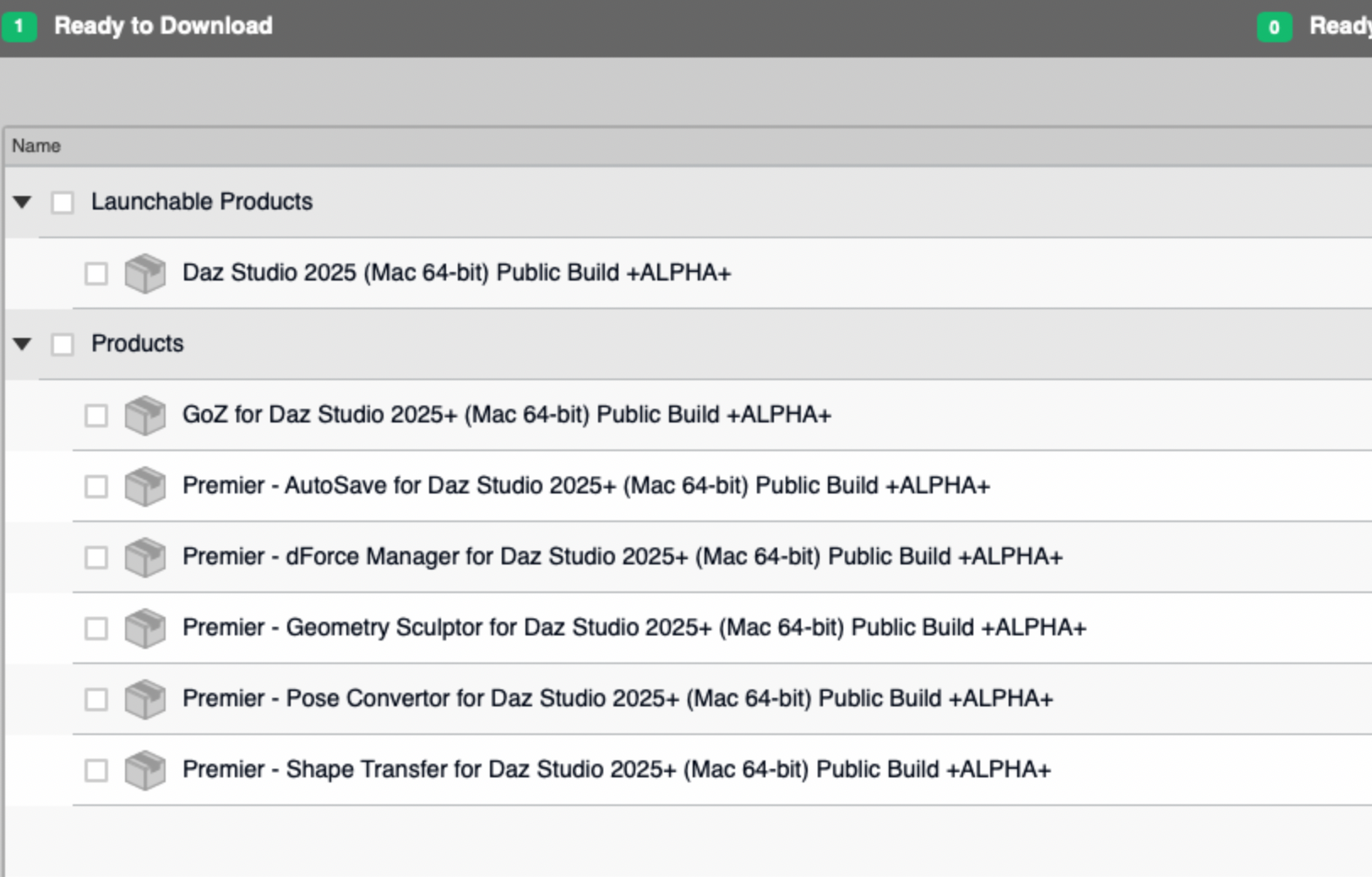
- Let it do its magic
Thank you! I've been looking for this feature for a long time, and I can't believe I'm only just now learning how to use it.
Announcement about phasing out 3Delight - do we lose our 3Delight products?memcneil70 said:
I have been downloading my installers and plug-ins today and only ran into one issue - Mesh Grabber. All the others, Mesh Grabber (Mac), the Mesh Grabber Bundle (Mac) and (Win), Mesh Grabber Morph Editor (Mac) and Mesh Grabber Rotations Add-On (Mac) and (Win) are missing the manual downloads.
Only the original Mesh Grabber (Win) and Mesh Grabber Morph Editor (Win) have an installer for manual downloads.
They won't be an issue anyway, sicne they are not compiled against a specific build of DS. It's only yhr Daz own-brand pl;ug-ins, the ones that get a new version with every build, that you should keep hold of installers for.
And yet my MacMini M4 does have the full suite installed. How can I make a copy of the installers?
And why have the installers disappeared from the Product Library pages?
On another subject, someone mentioned copying Genesis Starter Essentials, you might consider Genesis 2 Starter Essentials as well. Only a few at the end had Iray materials.
Daz 3D is part of

Connect
DAZ Productions, Inc.
7533 S Center View Ct #4664
West Jordan, UT 84084Licensing Agreement | Terms of Service | Privacy Policy | EULA
© 2026 Daz Productions Inc. All Rights Reserved.