-
FilamentMy understanding is Filament doesn't fix that.
You can render an animation in mere minutes, how doesn't it fix that? [assuming you mean making an animation viable to render]
FilamentDr. Peter Venkman: Egon, this reminds me of the time you tried to drill a hole through your head. Remember that?
Dr. Egon Spengler: That would have worked if you hadn't stopped me.For me this is one of those head scratchers from DAZ. People don't render animation in DAZ because both IRAY and 3dl take too long. My understanding is Filament doesn't fix that. But it does do a really good job of showing you what you still can't do in DAZ.
This is like that time they bought RuntimeDNA ..... then watched it die.
RSSY 3Delight And Iray To FilamentLeana said:
Official thread is here, there will probably be feedback posted there.
I saw that thread. But I was particularly looking for user comments unincumbered by posting on the PA's thread.
RSSY 3Delight And Iray To FilamentOfficial thread is here, there will probably be feedback posted there.
RSSY 3Delight And Iray To FilamentThis looks like it will be extremely useful. Howver, considering the price, I would be interested in comments and seeing renders from people who have purchased it. How well does it actually work and how easy is it to use, etc.?
[Released] RSSY 3Delight And Iray To Filament [Commercial]And it is released!
FilamentSpeed.
Filament is not for photorealistic rendering, it's a near real-time renderer. So if you can make a style work for you in Filament, there is nothing stopping you using it. Don't expect iray quality photorealism, that won't be possible (at least in the near future)
FilamentIs there any advantage for someone who does only still renders (single frame) to use Filament rendering?
Filament help please. Fixed by uninstalling everything and reinstalling.Richard Haseltine said:
Is there also a GPU on the i7? If so open the nVidia Control Panel by right-click on the desktop and make sure that DS is set to use the nVidia card.
Sorry, I didn't see this comment, Richard. It seems the problem was a manky installation and deleting everything and reinstalling got me going. I really do like Filament, it's now my go-to default viewport.
3D Print Questions - Differences in slicer software, cost of printer.richardandtracy said:
If you want to do HO models on it DO NOT GET A FILAMENT PRINTER. They simply don't give good enough resolution, a UV cure one like the Photon is needed.
I disagree. While an fdm printer won't give you as much detail as a resin printer They can get very close. I've got an Ender 3 and the prints are more than good enough for table top use. Detail is as good if not better than the pre-painted d&d or hero clicks figures.
Immutable Rules of the DAZ Universe - Add Your Own!Zilvergrafix said:
Cybersox said:
And that's only once you can find a vendor willing to sell it to you. Selling poo is apparently a crappy business to be in.
I know some business doing greatly selling that kind of...gotta figure!
In the Dazian Universe has 3 Suns, named 3Delight, iRay and Filament, first one is a giant red, the second one is the actual Yellow active and the third one is a little blue dwarf star...very dangerous if you have hair!
Yes indeedy! Not more than two miles east of here is a poo factory. They hire hundreds of bovines and milk them for all the milk and poo they can get. The factory sells both the milk and the poo, (and the bovines later). Great large tank trucks drive up to the nasty spigot that comes out of the side of the huge poo pond where the poo has been sitting for a week getting liquidized, and fill their tank and drive off to who knows where, to further process the poo for who knows what nefarious purposes. Probably make cosmetics or something. The bovines haven't unionized yet so they just work for the hay of it.
 3D Print Questions - Differences in slicer software, cost of printer.
kenshaw011267 said:
Monoprice makes a line of printers including a very low price one that has a self leveling print bed. It doesn't have the largest print volume but it is what I have and I quite like it.
Monoprice MP Select Mini 3D Printer V2, White - Monoprice.com
PLA doesn't need to cure. You can use acrylics with out any issue. You will likely want to sand down the piece at least a little before painting as paiting will tend to bring out the lines produced in the printing process. There are plenty of detailed guides on prepping 3d printed miniatures/models for painting which will show you the what this entails.
I looked into this one. It's a neat printer. It's out of stock now, though.
daveso said:
another place to buy less expensive but decent filament printers is Creality. They're having Christmas specials starting on the 17th. They have kits or some that you just have to assemble a couple of things.
I guess it OK to put link here?
There are a couple of sites that call themselves Creality ... the one you want is the "official" one. There is aslo a site that is mainly their company site.
https://www.creality3dofficial.com/
I have a Creality Ender 3 which is OK ..it is a kit and demands exact build. You can buy an auto leveler for it... under $200. They have others that are in the $500 range. Much larger build volume.
If you want to see what a Creality printer can do, check this out.... miniatures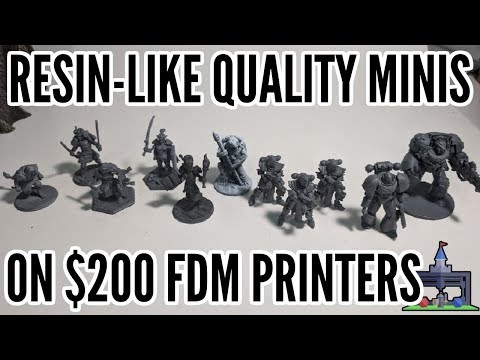
I've got my sights set on a Creality printer. I know that the cheapest one I'm after is around £250. If I manage to save a little more, then I'll consider an auto levelling bed. It just depends on the cost of the printer at the time.
richardandtracy said:
Filament printer, PLA needs no cure.
Filament printer PLA may need some post work to smooth off. It could be sanding or it could be wiping down with acetone.
No post cure. (Did say this in a previous post but it obviously got missed in my other verbal incontinence.)
Regards,
Richard
Apologies on my part. I was in a hurry, and I just couldn't find that part of your comment. I'll definitely be going with a PLA printer.
Melamkish said:
There is actually a site sponsored by Makerbot that has lots of free print ready models, and was on this morning trying to find a model that I might examine.
I know that it was in reply to someone else, but thanks for the link. I'm more determined than ever now to get a 3D printer. There is a figure on there from my favourite gaming franchise, and I've promised myself that it will be the first thing that I print (after a test print, that is).
- Just another n00b question. At which point is the height (plus width and length) worked out? Do you do it when modelling the item, when you slice it, or when you go to print it?
Immutable Rules of the DAZ Universe - Add Your Own!Cybersox said:
And that's only once you can find a vendor willing to sell it to you. Selling poo is apparently a crappy business to be in.
I know some business doing greatly selling that kind of...gotta figure!
In the Dazian Universe has 3 Suns, named 3Delight, iRay and Filament, first one is a giant red, the second one is the actual Yellow active and the third one is a little blue dwarf star...very dangerous if you have hair!
New DS Filament Render EngineWeird... I ran a primitive object through the engines & didn't even have to adjust the Ruins HDRI when I flipped from Iray to Filament this last time. The default intensity worked fine.
You aren't applying a Shader to your Primitive, are you? I didn't notice any surface settings that looked weird to me, though.
(I use the 4.14.0.8 Beta/public build for my Filament setup, myself. It works fine for me.)
Even with an all-white Viewport (turning up HDRI intensity to get overexposure), I still get a white render out of Filament.
Daz Studio Pro BETA - version 4.15.0.30! (*UPDATED*)WendyLuvsCatz said:
weird as it is in HDR format and Filament happily loads HDR I made myself from 360 and other images converted in Gimp
According to the web page DimensionTheory used HDR because the images have high dynamic range data, i.e. pixel values outside the range of sRGB, but the images are still rectangular (like my TIFF). The high dynamic range isn't necessary for an environment dome but the image does need to be spherical; when DAZ/Iray maps my Iceland TIFF to an environment dome it is making some totally arbitrary decisions about how to do it. So long as the rectangular images tile in X (horizontally), which of course my TIFF doesn't, the method I suggested will map the HDR rectangle to a seamless spherical HDR. The GIMP or PhotoShop can probably do that as well and would give you more control; since the images are actually square (2048x2048) a better mapping might be to join the corners together, i.e. map the center of the square be at (0,0,-inf) and the corners (all) at (0,0,+inf). I'm assuming the squares do tile on all edges so there won't be a seam, there will be distortion away from the center but it will probably be less obvious that the distortion which results from the default Iray behavior above (if you can see the images I posted; I should probably have re-encoded them as JPEG...)
New DS Filament Render EngineThanks guys.
Barbult, I added a Filament Draw Options in the Scene, and under Tone Mapping I dropped the ISO 0.5, but that did not make any difference in my viewport or when I clicked render.
Still stumped :)
New DS Filament Render EngineYou haven't added a Filament Draw Options singleton to your scene yet. Add it to your scene from the Create menu and then reduce the ISO in Filament Draw Options to about 0.5.
New DS Filament Render Engineno, it's not a ligting issue. I've added, removed lights, changed the lights. And when I try a viewport render, all I get is completely blank render.
I've attached a scene with a sphere with a simple blue color, lit by a distant spotlight. The images are the Iray Rendered viewport, the Filament rendered viewport, and the result when I render the viewport.
I am thinking something with my system? Windows 10, and twin Nvidia 980Ti video cards.
Daz Studio Pro BETA - version 4.15.0.30! (*UPDATED*)weird as it is in HDR format and Filament happily loads HDR I made myself from 360 and other images converted in Gimp
I can try saving it from Gimp of course
Facebook is fussy about the 2:1 ratio for 360 so that could be it
Daz Studio Pro BETA - version 4.15.0.30! (*UPDATED*)WendyLuvsCatz said:
what you describe is happening with most other HDR images but those particular ones are the problem it seems DTSS-Substance-#.HDR
I actually think they are meant to be textures but I have all my HDR files copied to one folder for ease of access
https://www.daz3d.com/strange-substances-pack-2
they render fine with iray but Filament just won't accept them at all, they show in the parameter thumbnail
I want them for scifi effects
I've not tried using a texture for an HDRI until now. I have used some of DimensionTheory's HDRIs. I just played with Platinum Pack 1, the room scene, and it seems to behave just as expected in Iray and identically with Filament. The camera seems to be set 140cm above the floor and I think the dome may be tilted wrt the horizontal plane; I had to tilt my camera -1.2 degrees to get the near verticals vertical (using an 18mm lens to get a 90 degree FoV).
When using a simple rectangular image Iray maps it in the [inverse of the] same way it maps a dome to an image with the lens distortion. I used a 5184x3888 TIFF I have of a picture of an ice flow in Iceland, it's not exactly 2:1 aspect ratio, so the Iray mapping squishes the image, but the spherical lens distortion does reproduce the original image (the dome is rotated 90 degress in all these examples, this is why the "join" is down the middle):
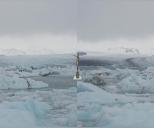
So that really is the original image demonstrating the transform Iray uses (by the absence of any net transform, other than the squish). When I render the scene in Iray using a 9mm lens (to get a 120 degree view) I get what I would expect. When I render with Filament I get Ruins; so Filament ignores the set dome and goes back to the underlying DAZStudio default:
Iray:
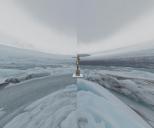 Filament:
 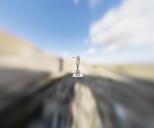 Iray rendering with the default (Ruins) background:
The difference in the last two renders is down to the 2EV difference in speed of Iray vs Filament; Filament is 2EV faster than Iray. (There were also issues with the falloff of DAZStudio lights in Filament vs Iray, but I have not checked if those have been fixed.) I guess just using a backdrop, not a dome, will probably work correctly although it won't provide any light. An easier approach is to convert the texture into an HDRI using Iray, spherical lens distortion (2:1 aspect ratio), no tonemapping and a canvas; that converts the TIFF/PNG/whatever from the dome into a .exr which Filament should load correctly.
Daz 3D is part of

Connect
DAZ Productions, Inc.
7533 S Center View Ct #4664
West Jordan, UT 84084Licensing Agreement | Terms of Service | Privacy Policy | EULA
© 2026 Daz Productions Inc. All Rights Reserved.