-
Daz Studio 4.12 Pro Morph Target bug on my model
I'm working on a game and need to make a low poly version of the Genesis Make and Female, but I also need the morph targets to work on the model so when I use the Transfer Utility do my models face break when I open the mouth on the model. Is it a way to fix this?
Clothing from Blender to DAZExport as OBJ, import into DS (making sure it lines up with the zeroed base figure as imported), Edit>Figure>Transfer Utility setting the Source as the base figure and the trget as the OBJ should get you started. You coudl also try using dForce - Edit>Figure>Geometry>Add dForce Modifier: Dynamic Surface - and run a simulation from the zero pose.
[Released] dForce Hair Oso Bob for Genesis 8 Female(s) [Commercial]Bought it today and impressed by the diversity. Good job.
But I wished the different hair styles would be moprhs wish could be mixed, but at least I can modify with scale length the length of the differen hair cuts.
A curly option and a behind the ear morph would be very usefuly for me too.
Looing forward to more hairproducts of you.
 Where is the transfer utility?Used to be under edit object or figure, but cannot find it anymore.Blender 2.8.2a is out
Bug fixes and a little more stable but now has udim support. I wonder if the scripts that let you transfer daz stuff to blender will support this feature?
My next product has... took... is, "Gutz" CommercialHopefully you do some pose configurations, like a pile or being pulled away/out of the body.
Or better yet, morph sliders to get some customization or go from one to the other.
How to script creation of an empty morph with specified name and path?After some extended use of this script, one issue that I'm running into is that the name being blank is causing some issues when goz overwrites it. Is there any way to set the name as well? I can't find any property that corresponds to that field that can be set through script.
Do these not do what you want?:
var myMorphName = 'My Morph Name'; newMorph.setName( myMorphName ); newMorph.setLabel( myMorphName ); curProperty.setPath( 'My_Stuff/'+myMorpName );What is your top favourite product at the moment?...crikey, I have to pick one item?
[looks over at gaming dice bag]
Rather than a single product I'll say it's more of a category which is utility/resource content, like morph, lighting, skin, and materials.
DAZ content in Maya, questionsI'm thinking a little bit about adding Maya Indie or Blender to my workflow a bit later this year, but the most important thing to me is that DAZ content work properly in them. I've used Diffeomorphic to import DAZ figures into Blender, but found it difficult to adjust morph and posing dials because of how Blender organizes parameters. There appear to be some very good importers for Maya as well (one is in the store here), but I've also heard they are not working properly with Maya 2020.
I'm more familiar with the current Blender importers than those of Maya, so could someone more knowledgable about the Maya process share any relevant information? Is there currently a working way to quickly get a Genesis 8 figure poseable and otherwise adjustable from Studio to Maya 2020? I'm not as concerned with material conversion, just if the figure, geografts, props, poses, and other stuff can be made to work without major headaches. Thanks in advance for any information.
Face Transfer Issue: One side of face looks darker than the otherI am wondering how I could make the darker side of the face, or the darker areas of one side of the face be consistent with the lighter side of the face?
Use a different skin material set for the morph that Face Transfer created. The problem is with that much of the likeness is gone too.
Do clothes have thickness?No, and in fact making clothes for dForce double-sided can be problematic. Non-dForce clothing should have turned edges, rather than raw polygons, however (and dForce clothing is sometimes given extra polygons along the open edges which can be folded over by a morph after simulation).
Face Transfer Issue: One side of face looks darker than the otherI am wondering how I could make the darker side of the face, or the darker areas of one side of the face be consistent with the lighter side of the face?
Josephene 8
Lana/Lanna says not to panic, wash your hands, and don't hoard stuff that your neighbors need!
(sorry for grainy render, old comp and no patience, heh)
PS... Lana doesn't use any Josephine morph. I really have no idea why she's in the bundle or why Daz keeps including non-related figures randomly in bundles. I don't know if its mistakes or what.. but if you don't have Josephine, YES Lanna works and you don't need JosephineSuperheroes Rebooted - Renders AssembleI've been neglecting Michelangelo. Not anymore!
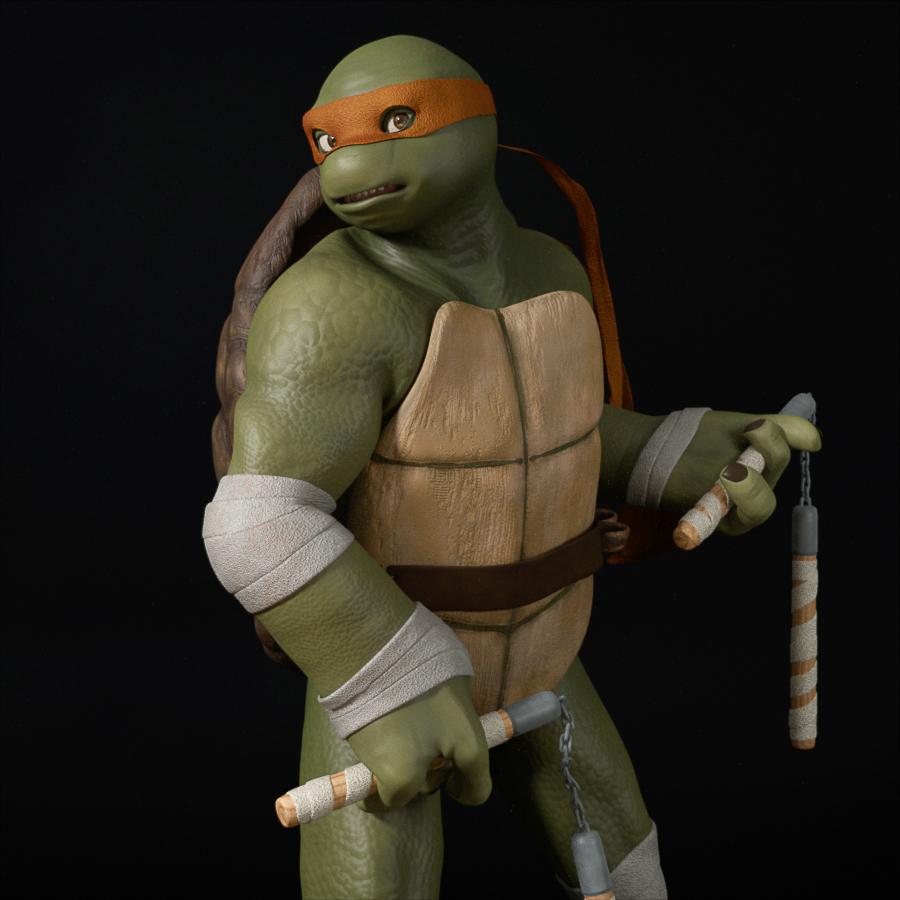
Joe, it may intersest you to know that I managed to make belts for Mikey and Raph. First, I took the plain belt from your Genesis 1 TMNT pack and morphed it to align with the belt part of your DStrap from the G3M version. Then, I duplicated one of the loops on the back of the G3M DStrap and positioned it onto the belt as needed. Finally, I used the Transfer Utility to turn the resulting combined OBJ into a clothing item that conforms to the shell, with a "Refit" morph added to compensate for overprojection (which was also in issue with the original DStrap, for some reason). With your permission, since the raw geometries are still yours, I'll happily share them on ShareCG or send them to you so you can do so as an add-on to your previous work. Mikey has four large loops for his nunchucks, and Raph has two smaller ones for his sai.
Emotiguy morph targets?I thought abet many moons ago there were morphs for the emotiguy to turn him into an apple and other such items. Does anyone have a link to a list of all the morph and Char's avaible for that mesh AMBROSEDidn't find an apple but did find several other shapes and a mallet :-)
https://sharecg.com/v/12855/gallery/11/Poser/Blood-Drop-Morph-for-Emotiguy
https://www.sharecg.com/v/12851/ Emoti-Mallet smart prop
https://sharecg.com/v/12852/gallery/11/Poser/Bump-Morphs-for-Emotiguyhttps://www.sharecg.com/v/91869/ Emotifolks2018
https://sharecg.com/v/91923/view/11/Poser/Emotifolks2018-update-fix
https://sharecg.com/v/91935/gallery/11/Poser/EmotiCards2018https://poserdazfreebies.miraheze.org/wiki/Emotiguy_Plane_Add-on
Emotiguy morph targets?I thought abet many moons ago there were morphs for the emotiguy to turn him into an apple and other such items. Does anyone have a link to a list of all the morph and Char's avaible for that mesh AMBROSEMod that increases thumbnail sizesJust create the image, 256 pixels square, and save as a PNG named filename.tip.png for filename.duf, in the folder with filename.duf
Does this apply to items in the content libraries only or also to the icons for the morph
There is a way to add icons to morph dials. You can find more info here: https://www.daz3d.com/forums/discussion/314691/adding-icons-to-morph-dials
It can sometimes be a little more complicated than described in that thread. There was another discussion about it here.
*Released* dforce Soft Curls {Commercial}I like that hair. But what I missing is a behind the ears morph. Would be such a morph possible?
Conver "Pose Control" to normal pose?Sometimes I use Pose Controls for quick an dirty adjustments. But when saving the pose I dont want the Pose Control settings saved with it.
Question:
Is there a way to transfer the values of the Pose Controls to the normal joint adjustments so that the pose remains but the Pose Control setting are back to zero?
Star Wars Renders 2013 +Hey RDuda (is RDuda in here anywhere? I'm just making assumptions about the local scifi fandom)
I'll make a Baby Yoda morph and texture set for G8M as well as the fabric elements of the Madalorian's outfit if you make the floating baby holder and hard surface mandalorian armor.
I will need a reference image for what the fabric elements under the Mandalorian Armor should look like.
WOOHOO! Starts a line here. The line forms behind me.
Can't wait to see what you come up with!Daz 3D is part of

Connect
DAZ Productions, Inc.
7533 S Center View Ct #4664
West Jordan, UT 84084Licensing Agreement | Terms of Service | Privacy Policy | EULA
© 2026 Daz Productions Inc. All Rights Reserved.