-
hair and elven type ears
if it's a part body morph the easy fix is show hidden and dial it down on the hair
full body morphs are more of an issue
meow?? come again? i need detailed info ^^ - i'm not the brightest in tech terms
if your morph is just an ear morph
tick the show hidden box in parameters on the hair and dial it down
hair and elven type earsif it's a part body morph the easy fix is show hidden and dial it down on the hair
full body morphs are more of an issue
meow?? come again? i need detailed info ^^ - i'm not the brightest in tech terms
hair and elven type earsif it's a part body morph the easy fix is show hidden and dial it down on the hair
full body morphs are more of an issue
hair and elven type earsi think this has been discussed somewhere at some point already... have absolutely no idea where tho.
a long while ago, i read this post/thread about how to deal with hair that cover ears... and continue following with long "elf" ears (or any ears but usually you don't see it). the result is a bunch of triangular hair sticking out of the head instead of the ears peeking out...
there was a simple manip to do on either the figure, or the ears (which wasn't possible by then since it was genesis i think), or the hair or some part of the hair.
or in the morph of the ear... or some morph of the hair.. in the parameter panel, edit (where you have those gears) and uncheck auto-following. NO IDEA WHERE. i tried a few possibilities, to not avail, and honestly, i have absolutely no clue what i'm doing and why.the only thing i remember was that you were supposed to have something stop auto-following something else.
Face Transfer, how to save as an adjustable head shape?In D/S bridge to Hexagon set at Advanced.
Load your Face Transfer figure, shoot it over the bridge to Hexagon.
In D/S clear the scene and load the BASE resolution [adjustment is on the Parameters Panel], NO eyelashes, Genesis 8 figure and select it.
From Hexagon, select the morphed figure and send it back over the bridge to D/S.
Make the morph.
It may be easier to leave it at Morphs/Morph Loader on the Parameters tab while making the morph. Then return to the Parameters Tab, right-click on the dial to Edit mode, right-click again and then select a better place for the morph to display.
When done, zero the morph, save this new morph. File > Save As > Morph asset ...Thank you Catherine.
Actually your idea is some kind complex for me, I will study it but temporarily I lost the Hexagon connection since long time didn't use it.
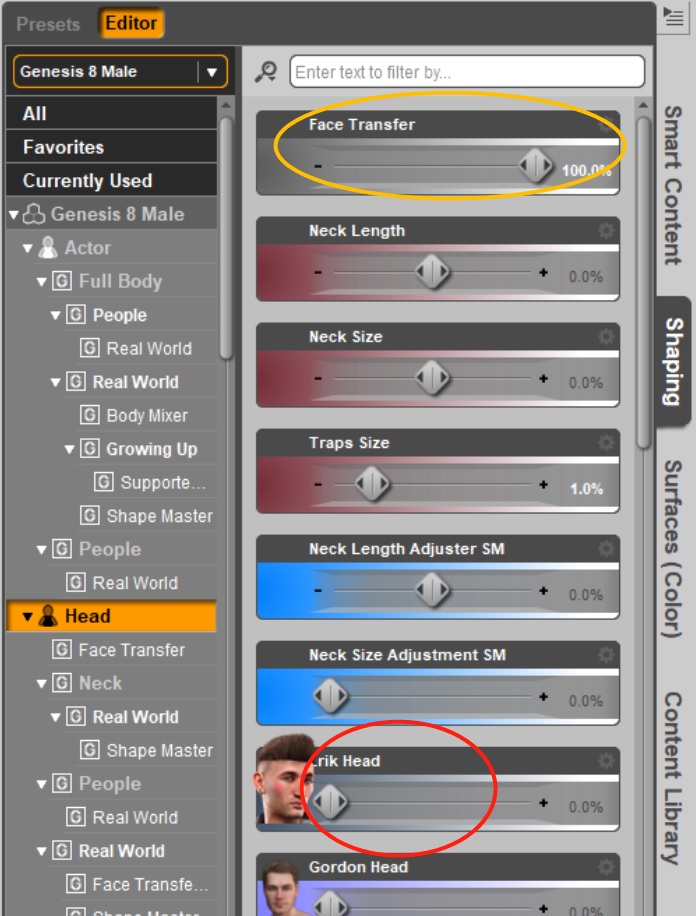
So far I found a tricky thing, the 'adjustable head shape' was there when using the Face Transfer or even reopen the saved Face Transfer scene, see the yellow cycle in the picture. Just don't konw how to save it as shown in the red cycle so that it can be used at anytime.
Thought it shall be a xxx.dsf file, do you have an idea to save that parameter? or find out where that .dsf file is?
"That parameter" is saved in the scenesubset that Face Transfer made.
To save it out "on its own" I explained. It's really not that complicated. Just follow step by step, it will happen.
btw - best to give each Face Transfer production its own recognizable [to you] name.
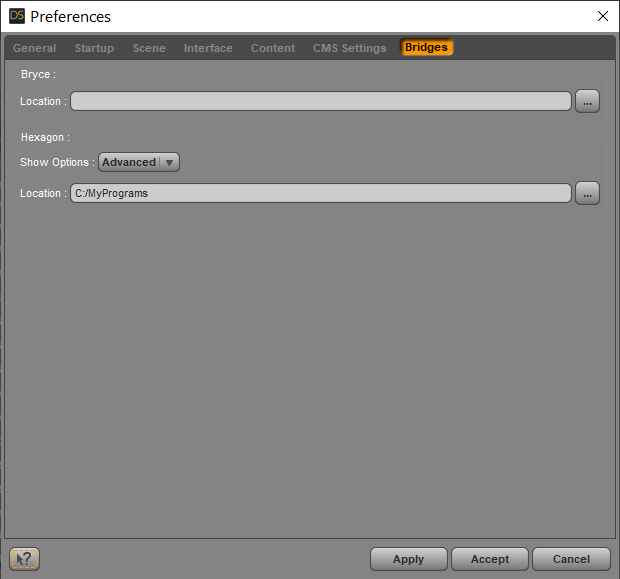
In D/S - edit > preferences > bridges > Advanced for the Hexagon bridge {gives the most options}
 Carrara Challenge # 51 - Here There Be Dragons! Folk/Fairy Tales WIP thread - Brilliant Images
Here is the current status of the witch morph for Veronika's Janna character. I used the 3d paint tool to create a bump map. I created a mixer to give the skin a green hue. Hair is Carrara dynamic hair grown on a hair cap.
 Problem with lip syncing
I am using DAZ 3D 32bit so I can use the lip sync capability. Is there a setting somewhere that can adjust the strength of the morphs being used? It almost looks like they are going at about 110% strength. I am using a Genesis 3 config file with a Genesis 8 character. I then export the animation out to FBX and import into Cinema 4D. The strength of the morphs are greatly increased during this process as well.
I am willing to try just about anything to get this to work. I can't use a Genesis 3 character as I am using the Face Transfer utility which only uses Genesis 8 characters. Does anyone know if there is a Genesis 8 DMC file for lip syncing or how I could modify the Genesis 3 file to work with Genesis 8.
Thanks in advance... Al
[Released] Character Converter from Genesis 2 Male to Genesis 8 Male [Commercial]I just tried a conversion of the Minotaur to G8 - the morph itself went very well. I'll probably have to edit the texture for the legs.
As a quick test, I added the fur from the Gorilla 8 to the Minotaur 8. Still needs some work, but I'm happy that this will work.
I did the same, although I'm using the Minotaur shape as a starting point for more of an anthropomorphic mountain goat. There's definitely some texture stretching on the snout, so I wonder if there would be a better choice for the skin texture.
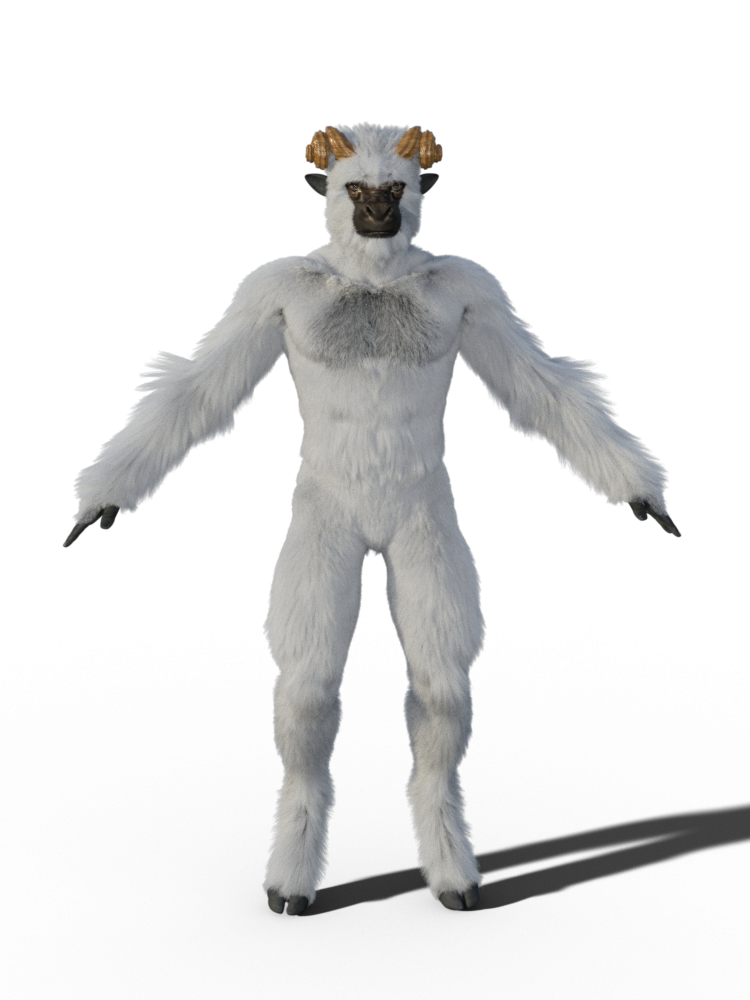
love this creation - beats a yeti ^^
That is what I thought too!
 [Released] Content Wizard [Commercial]
How is the testing\update going?
Slow, unfortunately.
We may have had a breakthrough in testing. If so, the duplicate product in LOCAL USER may have been solved by this upcoming patch too.
It will solve the wobbly limbs when transferring a G1->G3 morph too?
Are you sure you have the right thread :)
Oh, boy! I had two tabs opened and posted in the wrong one!


Sorry!
LOL
 [Released] Content Wizard [Commercial]
How is the testing\update going?
Slow, unfortunately.
We may have had a breakthrough in testing. If so, the duplicate product in LOCAL USER may have been solved by this upcoming patch too.
It will solve the wobbly limbs when transferring a G1->G3 morph too?
Are you sure you have the right thread :)
Oh, boy! I had two tabs opened and posted in the wrong one!
Sorry!
[Released] Character Converter from Genesis 2 Male to Genesis 8 Male [Commercial]I just tried a conversion of the Minotaur to G8 - the morph itself went very well. I'll probably have to edit the texture for the legs.
As a quick test, I added the fur from the Gorilla 8 to the Minotaur 8. Still needs some work, but I'm happy that this will work.
I did the same, although I'm using the Minotaur shape as a starting point for more of an anthropomorphic mountain goat. There's definitely some texture stretching on the snout, so I wonder if there would be a better choice for the skin texture.
love this creation - beats a yeti ^^
[Released] Character Converter from Genesis 2 Male to Genesis 8 Male [Commercial]Here are three quick renders - default, with horns and close up of the head.
wow looks excellent! thank you for the additional renders! didn't think the transfer'd go so well. wishlisted.
Unable to export and reload a morph targetI'm using Genesis 2 (and Poser 11), and switching a character I had made over to a fresh body because somehow, the character I had saved to the library (I load them up when I need to use them, with hair, morphs, clothes, etc) was missing a key morph I wanted to use. I tried to make it easy and at least export the head as a morph target and then put it back onto the fresh body but it kept telling me it had the incorrect number of vertices. I hadn't really changed anything. I didn't edit it in blender, I took it out and put it back in directly.
So I restarted Poser and tried it again. Made a new scene completely, new guy, tried it again. Both times failed. I went back and exported it again, tried it again, it failed again. Finaly I decided to try and put it back on the body I had taken it from. Even with no movement whatsoever, it still has the incorrect number of vertices. I don't know how I messed this up. I haven't exported a morph target in a while so maybe I selected something wrong...
Can someone please help me fix this? I am going to just copy and paste all the paremeters to the new body now because luckily that model hadn't had any external sculpting done and has no morph target loaded in it.
I did however do the same thing to another character just a few days ago and loaded a morph target I'd made ages ago onto the new body head and it worked perfectly. It was the exact same fresh copy of Genesis 2 I am trying to use with this one.
To reiterate they're both genesis 2, just one has more morphs available on it. Also, to be more clear if I can, I am exporting the morph targets and then loading then by clicking the head and then 'load morph target', then setting it all the way up. It usually works. I know it's not a conventional way of doing things but I have been doing it for a long time now. The biggest problem outside of vertices being messed up is how I accidentally broke one of my heads because I kept sculpting on it in Blender and eventually it messed it up beyond repair and has to be fixed. Also I exported it in the wrong pose and the eyes ended up in the wrong place (far back, for some reason?) but it has only happened on that one head.
edit: I just loaded the morph target from another character just fine onto both of these bodies. So I must have messed something up exporting it, I just don't know how.
edit 2: i tried it again, exporting just 'as morph target' but when i try loading it, it works but it's like there's absolutely no data in it and nothing happens.
The Marvelous Designer ThreadI`m trying to make JCM with MD. I'm doing pJCMAbdomenFwd_35 and with only this morph it looked great, but in any other position it has ugly poke through.
I wached tutorials, but everyone explain how to do one hand morph or one leg in pants, but no one explain how to make skirt with both legs used.
Can anyone help? or nudge me in right direction? Is it even posible at all?
pictures:
1 - without custom JCM
2 - with custom JCM
3 - different pose (Base Pose Sitting B from base poses)
[Released] Fashion Editorial Poses and Expressions for Genesis 8 Females [Commercial]FEP Pose 003 Mirror used to test out Soft Curls on a G8F morph mix.

Gorgeous render. I see a bit of Babina 8 in her.
Yes, and Babina's skin, too.Thanks for continuing to comment on user-submitted renders in your thread. I picked up another of your products in the recent sale.
Face Transfer, how to save as an adjustable head shape?In D/S bridge to Hexagon set at Advanced.
Load your Face Transfer figure, shoot it over the bridge to Hexagon.
In D/S clear the scene and load the BASE resolution [adjustment is on the Parameters Panel], NO eyelashes, Genesis 8 figure and select it.
From Hexagon, select the morphed figure and send it back over the bridge to D/S.
Make the morph.
It may be easier to leave it at Morphs/Morph Loader on the Parameters tab while making the morph. Then return to the Parameters Tab, right-click on the dial to Edit mode, right-click again and then select a better place for the morph to display.
When done, zero the morph, save this new morph. File > Save As > Morph asset ...Thank you Catherine.
Actually your idea is some kind complex for me, I will study it but temporarily I lost the Hexagon connection since long time didn't use it.
So far I found a tricky thing, the 'adjustable head shape' was there when using the Face Transfer or even reopen the saved Face Transfer scene, see the yellow cycle in the picture. Just don't konw how to save it as shown in the red cycle so that it can be used at anytime.
Thought it shall be a xxx.dsf file, do you have an idea to save that parameter? or find out where that .dsf file is?
 [Released] Content Wizard [Commercial]
How is the testing\update going?
Slow, unfortunately.
We may have had a breakthrough in testing. If so, the duplicate product in LOCAL USER may have been solved by this upcoming patch too.
It will solve the wobbly limbs when transferring a G1->G3 morph too?
Are you sure you have the right thread :)
Face Transfer, how to save as an adjustable head shape?In D/S bridge to Hexagon set at Advanced.
Load your Face Transfer figure, shoot it over the bridge to Hexagon.
In D/S clear the scene and load the BASE resolution [adjustment is on the Parameters Panel], NO eyelashes, Genesis 8 figure and select it.
From Hexagon, select the morphed figure and send it back over the bridge to D/S.
Make the morph.
It may be easier to leave it at Morphs/Morph Loader on the Parameters tab while making the morph. Then return to the Parameters Tab, right-click on the dial to Edit mode, right-click again and then select a better place for the morph to display.
When done, zero the morph, save this new morph. File > Save As > Morph asset ...[Released] Content Wizard [Commercial]How is the testing\update going?
Slow, unfortunately.
We may have had a breakthrough in testing. If so, the duplicate product in LOCAL USER may have been solved by this upcoming patch too.
It will solve the wobbly limbs when transferring a G1->G3 morph too?
Donna Summer hairstyle, circa 1983?I don't own this product so many someone who does could confirm for you, but Donna's fabulous tight afro/jerry curl in the provided image is similar to the texture of this product and it seems like a very "morphable" hair so maybe the morph dials would allow you to lengthen and create a fringe effect?? https://www.daz3d.com/big-afro-hair-for-genesis-3-and-8
This is a bit too short and no bangs but quite a good fit re the texture.. https://www.daz3d.com/lani-hair-for-genesis-3-female-s
Well, the shape of this hair and the bangs could work but the curl is a bit modern... https://www.daz3d.com/ayako-hair-bow-for-genesis-8-female-s
This is a very old morph but might look good with a hair shader applied to "update" it... https://www.daz3d.com/frizzed-head
And, lastly, not a match BUT this hair is pretty good for the era... https://www.daz3d.com/heart-breaker-hair-for-genesis-3-female-s
Sorry I could find anything that's an absolute 100% match for you, but I hope the above will help in some way maybe

Daz 3D is part of

Connect
DAZ Productions, Inc.
7533 S Center View Ct #4664
West Jordan, UT 84084Licensing Agreement | Terms of Service | Privacy Policy | EULA
© 2026 Daz Productions Inc. All Rights Reserved.