-
XTransfer Module 1- Genesis 3 to Genesis 8 Morph Converter (Commercial)
I tranferred some G1 chars today, all worked properly and they are perfect... But the "base" Genesis1 ( the original shape) is broken, when I bend the elbows or the knees the "flesh" bends abnormally, like if the corrective morphs aren't tranferred.

That way I can't fully use G1 shapes since the base is needed for some of them to look correct.
Is the G1 morph rigged? If not that is only reason why it distorts. Can I see a screenshot?
Novica & Forum Members Tips & Product Reviews Pt 13Awesome image @L'Adair! Going to go have a look at the full size here in a sec.
Taking a page from L'Adair's book because I wasn't going to post this here, to lazy at this time to look up all the links.
Full size image and all available links on the gallery page here
*updated to add links*
dforce Soft Curls for G8F G3F Babina 8 for G8F(texture only) BJ Amira HD for G8F (morph only) European Apartment Daz Dog 8 French bulldog
Fur Shaders by Oso Lacy Shirt is Angelically Naughty from the other store Pants and undertop are L2R for G8F Shoes are from Denim Jumper outfit G8F
Everything here is never been rendered by me except the hair and possibly the lacy top (cant remember).
 Muscle-Based Deformation take 2
Fantastic!
Just a curiosity, why haven't you used other softwares such as Blender? Wouldn't it be easier and faster to create an entire character there?
The model was created with Modo and ZBrush. Then rigged in Daz Studio. Daz has some prety unique tools for character creation and I don't think I could have achieved the same results in any other program. In theory it should be possible but even AAA studios didn't amanage to get even similar results and they have decades of experience in software packages like Maya and 3dsmax.
False. .. ..AAA studios have a acheived these results and much MUCH, more check 3:09 into this video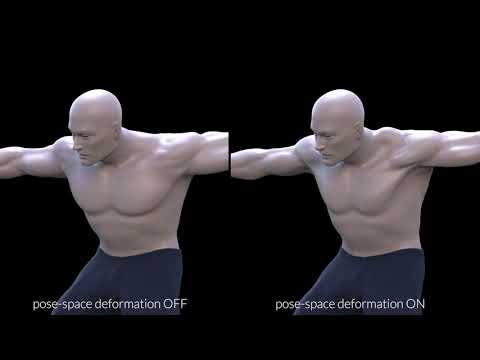
No. Please understand I have done extensive research on this topic and any link or video that just pops up on a basic search is something I have already checked out. I have only found 3 other sources which got the same idea as me. One is a dissertation paper which just talks about it in theory, and the others are 2 youtube videos with just a couple hundred views each. One of them applied the technique in Modo, the other in 3dsmax. They never got to where I am because Daz has unique tools as if created for this sort of thing.
You're looking at morph targets/ blendshapes (https://vimeo.com/157992898). Pose space deformation is a pretty old trick for Daz and Poser, it's just JCM's. AAA studios are now implementing it because they finally have the processing power to do it in real-time. Understand that game engines now can't even handle Daz's TriAx weight system which was and is far more advanced than anything that's currently used by any studio. Poser's proprietary weight-map system is more advance still.
Kratos from the new God of War game uses this pose-space deformation technique. The downside of this is that you need a ton of blendshapes for each character. Dozens of people worked on Kratos' model alone.
My method uses zero morph torgets/JCM's/blendshapes, which is something I mentioned before. Meaning it's an iterative base model which can be morphed into any sort of character without losing the realistic real-time muscle deformation. It can also be morphed into a dog if you have the patience. You don't have to model the blendshapes over and over again for each character. All you need is to create a fullbody morph for the new character itself and everything else is ready to go.
Help for a medical project^There's no 'body transfer', at least not yet. What you'd need to do is have a photo of the burn (or whatever) and use GIMP/Photoshop/etc to blend it with a skin-map that you've already got (this can be tricky if you also need the realism of lining up the roughness/bump/normal maps too). This would be fine for personal use (not for redistribution of the maps).
I know there are a few wound-packs for earlier generations and maybe even scars / bruises for G8 but I don't know of any burns. Using LIE (Layered Image Editor) in Studio can be useful for overlaying a png with a transparent background onto skin, or Iray's decal function (which you'd need to ask someone else about as I've not used it before).
For clothes, the only ones I know are for G3 but they might convert ok to G8 with the autofit:
https://www.daz3d.com/h-c-medical-scrubs-set-for-genesis-3-male-s
The G3 female set is perhaps more form-fitting than you want:
https://www.daz3d.com/i13-scrubs-for-the-genesis-3-female-s
but the male version might convert to G8F too.
There's this for G8M - it's an old style but parts of it might be useful:
https://www.daz3d.com/dforce-vintage-doctor-for-genesis-8-males
Otherwise there are these for G2M:
https://www.daz3d.com/doctor-s-coat-and-suit-for-genesis-2-male-s
and G3F
https://www.daz3d.com/doctor-coat-outfit-for-genesis-3-female-s
(I'm guessing they were released early in G3F's timeline before G3M was out.
XTransfer Module 1- Genesis 3 to Genesis 8 Morph Converter (Commercial)Ok So I actually didn't get round to using this product since it's release so I'm just catching up with everything since the update and have been transferring G3M characters and all was fine. I didn't transfer a batch but did them individually. Am I right in thinking that it should just be the base character that is favorited and not the HD versions of the character? Also is there a preferred place to store the morph folder, or does it not matter?...the reason why I ask is that everything was fine, morphs look amazing, but when I load the Genesis 8 male base figure I got the following error (attached), even though it appeared to load up properly and the morphs all worked. I deleted my X-Transfer folder (which was in the data folder Daz3d - gen 8 - male - morphs - Xtransfer) and the Gen 8 male base figure then loaded up fine. I followed instructions to the letter, and like I said, all the morphs look fine, but only the base male figure error upon loading.
POST EDIT - OK, found the culprit. It was Gianni 6 from the Legacies for G3M Heroes. https://www.daz3d.com/genesis-2-legacies-for-genesis-3-male-heroes ; For some reason, as well as creating the usual file for 'SLOSH' in the XTransfer folder, it also created one called 'Base' in the DAZ3D folder. In the Base folder was XT_PBMNavel.dsf and XT_PHMMouthRealismHD.dsf. Not sure if this 'base' file has anything to do with the causes of the error but it is definitely the character xtransfer that caused it.
Sari and the Under Eye Bulge.So I noticed on the page for Sari for Genesis 8 Female that there's an "Under Eye Bulge" morph included. Could anyone tell me if this can be applied successfully to another character, and perhaps show what difference the effect makes?
I'm interested in this morph for another character I'm working on, and this might be the secret sauce that could get her just right if it does what I think it does.
Thanks in advance. <3
Hiring Artists?Maybe I could pay them in Daz Giftcards, then the cash goes also to daz3d and so its more welcome ;)
I don't want it absolute free, I am willed to pay someone who can make it, so if you say its easy, can i hire YOU? :)
And I tested it, my hired Artists gave me an Top-Shirt as .obj and... I had no idea what to do, I did google and found the transfer utility but nothing did happen then :(
The shirt had a breast design :o and yeah I had no idea what to do with it :< it was just a object, without any secondary nodes.
Mod Edit :- Images removed due to nudity. Please add clothes or use smooth shaded mode
Yes you may send me the .obj file. Do NOT post the link in the forums ;-)
You can upload it to the place you used before and send me the link in a PM.
n.b. I have not yet seen the image that the mods removed but that's okay.
Precisely which base figure is this for? Genesis 8 F or ?
Help for a medical projectHello everyone
i need some advice, I recently graduated from med school and I'm in a proyect to create illustrations for patient education and as teaching tools and need a bit of help to find the proper products and add ons
first do you know any add on or software that acts like "face transfer" but for the body? I need to create diferent sorts of wounds, skin marks and details and scars, specially those of burn patients and can't seem to find a product that has the textures I need and creating a whole bunch of material from scratch with the proper textures will take several years :S.... with a program that copy the mat of the skin or body in general, even if the texture isn't completely 3D I can use other programs to simulate the effect.
also by any chance does anyone know where I can get a set of medical clothing? I found a sexy female lab coat or nurse clothes (which would be quite improper for this project) but I can't find a proper lab coat for G8 or scrubs
and finally and this is more of a personal proyect, is there a way to create a render of a pet as in face transfer????
thanksDoes Morph Loader Pro still work?It happened to me a few times as well.
This usually meant that the character was not at origin when exported or imported. The morph than tries to match position as well as shape so it moves the character from the origin.
Now I used the send to ZBrush button to export from DAZ, but saved to an OBJ rather than use GoZ to bring in the morph from ZBrush...
Is there away to have DAZ ignore the global position on import, and just accept the delta between the original obj and the new one?
JD
You can select the reverse deformations that Silas3D mentioned:
Center axes, BIT settings in IrayIs it the orignal figure, with a morph applied, or did you import a fresh model - if the latter how did you apply the materials?
Hi,
the base figure is "Evil Clown" then I applied Grave Ghoul to it. I don't see any shine on the skin here, but I don't know when it happened.
Thanks for your effortsDoes Morph Loader Pro still work?It happened to me a few times as well.
This usually meant that the character was not at origin when exported or imported. The morph than tries to match position as well as shape so it moves the character from the origin.
Now I used the send to ZBrush button to export from DAZ, but saved to an OBJ rather than use GoZ to bring in the morph from ZBrush...
Is there away to have DAZ ignore the global position on import, and just accept the delta between the original obj and the new one?
JD
Center axes, BIT settings in IrayIs it the orignal figure, with a morph applied, or did you import a fresh model - if the latter how did you apply the materials?
Hiring Artists?Maybe I could pay them in Daz Giftcards, then the cash goes also to daz3d and so its more welcome ;)
I don't want it absolute free, I am willed to pay someone who can make it, so if you say its easy, can i hire YOU? :)
And I tested it, my hired Artists gave me an Top-Shirt as .obj and... I had no idea what to do, I did google and found the transfer utility but nothing did happen then :(
The shirt had a breast design :o and yeah I had no idea what to do with it :< it was just a object, without any secondary nodes.
Mod Edit :- Images removed due to nudity. Please add clothes or use smooth shaded mode
Does Morph Loader Pro still work?Could try importing the morph OBJ into the scene with the same import settings as Morph loader uses. If it appears in a weird place then you know something is wrong with the settings.
Does Morph Loader Pro still work?Sometimes you also need to set reverse deformations to yes in order for the morph to be generated correctly. Also, depending where the morph was created, the scaling of the exported model may be bigger or smaller than what Daz expects.
Does Morph Loader Pro still work?It happened to me a few times as well.
This usually meant that the character was not at origin when exported or imported. The morph than tries to match position as well as shape so it moves the character from the origin.
Paige Dressus Buttus StickoutusHave you tried to apply a dForce modifier and run a simulation?
If it will drape nicely then the stretching matter should iron itself out. If not, one way to fix up a stretch is via making a morph on it to smooth out the uvmap over that area.
If it does not drape nicely, then again one could make a morph.
Thank you, Catherine. I fear you grossly overestimate my morph-making knowledge or skills. To answer your first question, yes, I did try to apply a dForce modifier and run a simulation on it. I got to watch a spinning beachball (it's a Mac thing) for 10 minutes, resulting in a frozen program and a spectacular crash. (So far, that pretty well sums up all of my very limited experience with dForce.)
I guess I'm going to have to turn to some other wardrobe choice.
Does Morph Loader Pro still work?It seems when I use it, rather than giving me a slider that alters the geometry based on the chosen obj file, the slider makes the object glide up and down my character on the Y axis...and I see no indication of the object being morphed as it was in zbrush.
JD
HeadShop 12 HelpAll these Face transfer Softwares are just horrible, I buy them all and they have no good tutorials Video or reading, Like WTF !!! for a newbie like me I am just wasting money and tons of time, if they come out with new stuff shouldn't they have "GOOD" reading material tutorials to learn about the software, they show these video's on youtube with very little about the software and thats it, I bought the Unlimted and upgrade to Face Transfer that came with Daz 4.12, then I bought FaceGen, everyone looks like a Monster in there, cant figure it out, no good tutorials to learn, now a new HeadShop 12 comes outr, I buy that , one again no Good Tutorials to learn, for a newbie to the PC world like me this is horrible, I don't mind reading and learning but THERE IS NOTHING TO READ !!!!!!!!
so I use this new HeadShop 12, and this is what I get, Take a look at the pic..... no where in the Help section, no where in tutorials no where at all does it tell you how to adjust getting the eyes to match up with the Morph on the right, so you export the morph and you have this FREAK LOOKING MORPH !!!!!!!!
So, Please tell me people, ...is it me, ...?? I mean should I not be doing this type of stuff, or should this stuff come with more directions and tutorials, am I just to dam stupid and can't find how to adjust this stuff..??
I am wasting so much time trying to figure this stuff out, I JUST WANT TO MAKE A F#$KING MORPH OF MY DAUGHTER SO I CAN PUT HER IN COOL FUN OUTFITS AND PRINT PICS OUT AND MAKE HER HAPPY !!!!!!!!!!!!
Jubie, the issue with G8 eyelashes is something of a DAZ problem (they made them separate for G8). What you can do is erease the eyelashes and load new ones that can be adjusted. And as the developer of HeadShop, we do bend backwards to explain how the app works (teach panels, how-to videos, 35 page manual). I am happy to skype/screen share with you and walk you through your issues. PM me.
A little FYI: we just released HS12.5 FREE update. You can download it at abalonellc.com, it has better blending and works better on HR screens.
Hello
Thank you for the reply about HeadShop, and sorry about what I said about HeadShop, but I just couldn't find out how to get it to work properly, I would love to do a Skype Tutorial with you if possible, that is very kind of you to offer that, I messaged you and sent over my info .................Thanks again
Problem with lip syncingCheck your exported morphs . They probably are doubled up. Click on C4D pose morph tag.
You might have head_eCTRLv* visemes, along with Genesis8Female.eCTRLv* visemes
You can set FBX export rules to ignore one set when exporting, or delete one set of entries in the pose morph tag if you don't want to re-export
Daz 3D is part of

Connect
DAZ Productions, Inc.
7533 S Center View Ct #4664
West Jordan, UT 84084Licensing Agreement | Terms of Service | Privacy Policy | EULA
© 2026 Daz Productions Inc. All Rights Reserved.