-
Problem with G8M Iris and Eyes
Redownload and install renshaw, or you can fix it yourself manually, go to data\DAZ 3D\Genesis 8\Male\Morphs\Hinkypunk\Renshaw\ in your library, open Renshaw Pupil Morph.dsf with a text editor. Scroll down to line 32, change "value" : 1, to "value" : 0, and save it.
Stop genesis from loading morphsSome poorly packaged morphs come enabled by default, to get rid of their unwanted effect on all of the related characters (genesis xxx), you have to zero the character, memorize it and save the changes into the default character (Save as... Shaping... Changed..., Someone having Studio open, could put the correct path here.)
Distributing morphs as enabled by default can result in for example all your genesis 8 characters to open with a huge horn on their forehead, all of them, the old ones included.
All the morphs include the information/mesh related to the morph, the more morphs you have installed, the more time (and memory) it takes to load that character. As opposed to the gen 4 and older characters, Genesis-characters load all the (generation-related) morphs together with the character, even though they are not used.
Help with Transfer Utility? [SOLVED]If the clothes were made to fit a morphed character you need to change a few settings:
- use "current" and not "default" for "item shape" in the "source" section
- check the "reverse source shape from target" box
With the options you have now DS considers it was made for the base G8F and so it will morph it automatically to fit your character, hence why it doesn't fit.
Bingo. Thanks so much for your explanation.
Mesh Grabber is AWESOME!So I love the Morphing Tool in Poser, it's simply the best feature in the program and I was quite surprised that DAZ Studio didn't have a native tool that could do something similar. I saw the Mesh Grabber and was going to get it on release but I didn't see any mention of being able to save the alterations as a seperate morph. In Poser you can make and name morphs out of your deformations, dial their intensity and even use the restore tool to restore whatever parts you want as precisely or as broad as you want. Is this something that Mesh Grabber can do or is that beyone the scope of its capabilities?
Really what I'm looking for is the same functionality of the Morph Tool in Studio.
Daz3d to Blender WorkflowSubd is completely up to you. I don't think I've ever gone above 2.
As for hair, yeah, a few of us are struggling with getting a handle on it. I've seen what competent people can do with it, and very quickly, though. If you're using 2.83, though, you can put the character in a collection and then set that collection as the collision collection. That should vastly improve penetrations and just look more natural.
As for the irises, you could fix it in Blender, there's probably an edge loop you could slide, but I think you should really find a morph in Daz for that sort of thing... stand on the shoulders of giants, ya know?
Thank you again! Is it possible to move a model from Blender back into Daz to edit or do I have to re import a new model and restart the shading process all over again?
Also should I make sure to import her as high res?I actually wouldn't know... there might be a way, but I'm sure it is not easy.
But if I were you, I'd copy the blend file before the export so you can just File/Append all your materials that you worked so hard to perfect.
And there are two ways to go about choosing what resolution to export at. If you want it EXACTLY how it is in Daz, export at High Resolution, and the file will be large. If you can deal with very slight differences, convert to base resolution and apply a subdivision surface modifier once in Blender. The file will be lighter. But for one character, and one frame, I'd just export at High.
Dial Control for Genesis to Genesis 8 (Commercial)Hi. If you hover over a morph it will show you the path\package it's from (I highlighted it in green). Then if you click on the jump button it will go to where that morph is located on the figure. Hope that makes sense.
OK, I see now where it shows the path, but does that tell me what "package" (I read that as product) it is from? If this is the same path information that I would get when I click the gear icon for parameter settings, it is not enough. I have lots of morphs that are ambiguous. They show only things like Actor/Head/Face/Eyes/Real World. There is no clue what product it came from. You have added extra path levels to some of your products that give product hints, but most vendors have not done that. So, I am looking for a way to solve that problem. Can Dial Control tell me what product a morph came from?
Less Morphs can be more when posingAre you saving your morphs prior to posing, Outlaw? The reason that I ask is because I have many custom morphs that I have made, including many for G2F, and most use quite a large number of morph sliders, but I have not really had any serious problems with posing them. However, I do tend to save the morphs as Morph assets prior to using them. I also tend to adjust the rigging to shape, especially if using any sort of scaling, and also use ERC freeze, all before saving them. That seems to work for me.
(I would certainly agree in principle that it is always preferable to use as few morphs as possible to achieve the desired results - it is certainly easy to get carried away and lose track of what has been used when dealing with more complex morphs.)
Toon Generation 4: request to 3DUniverseThere is a HeadSplit DFormer included with Genesis 8.
See this thread
The thread also has links to freebies for Gen2 & Gen3.
It looks intimidating, but if you follow it carefully it works.
Hi pwiecek, I went through that procedure very carefully. It works well when the size/proportions of the character are similar to G8 but in this case the Toon Gen 4 figures are so highly morphed that it has problems.
The head can be set to G8 default shape but the neck/head joint is then very distorted. I corrected that in Zbrush (could also be done in Sculptris or Blender which are free) but the neck head joint doesn't work well. The Adjust Rigging to Shape button helps but I still get a wrinkle under the chin between the head and neck that behaves strangely. When I make (another) correction morph for that distortion in Zbrush (so that the mesh looks perfect in Zbrush) and apply that correction morph in DS (using GoZ), the distortion becomes worse.
I think what is really needed here is probably not simply separate head and body morphs (that's probably why the figure was not supplied with them) but rather a Head and/or Body Neutralisation morph that would allow transition between the Toon Gen 4 shape and G8 shape so that we could mix in some of 3DU's other characters (or indeed other G8 characters) with the Toon Gen 4 characters.
Whilst the Toon Gen 4 characters are cute, the head morph is extreme and it would be great to be able to mix in other character faces.
I have come to the realisation that making Head and Body Neutralisation morphs for the Toon Gen 4 figures is not a trivial task because of the extreme nature of the Toon Gen 4 figure shapes, however perhaps 3DUniverse would release such morphs as an addon to his product. I would be happy to pay extra for that.
Star Wars Renders 2013 +here's some baby yoda morph work in progress
Help with Transfer Utility? [SOLVED]If the clothes were made to fit a morphed character you need to change a few settings:
- use "current" and not "default" for "item shape" in the "source" section
- check the "reverse source shape from target" box
With the options you have now DS considers it was made for the base G8F and so it will morph it automatically to fit your character, hence why it doesn't fit.
Dial Control for Genesis to Genesis 8 (Commercial)Hi. If you hover over a morph it will show you the path\package it's from (I highlighted it in green). Then if you click on the jump button it will go to where that morph is located on the figure. Hope that makes sense.
Daz3d to Blender WorkflowSubd is completely up to you. I don't think I've ever gone above 2.
As for hair, yeah, a few of us are struggling with getting a handle on it. I've seen what competent people can do with it, and very quickly, though. If you're using 2.83, though, you can put the character in a collection and then set that collection as the collision collection. That should vastly improve penetrations and just look more natural.
As for the irises, you could fix it in Blender, there's probably an edge loop you could slide, but I think you should really find a morph in Daz for that sort of thing... stand on the shoulders of giants, ya know?
Thank you again! Is it possible to move a model from Blender back into Daz to edit or do I have to re import a new model and restart the shading process all over again?
Also should I make sure to import her as high res?[Released] Character Converter from Genesis 2 Female to Genesis 8 Female [Commercial]Just bought the character converter and Keiko has been a total success at converting...this was the main reason for me to buy... thanks Riversoft for your work!
The first time I tried was with Juvi...the eyes were a problem... then I look at the video and I tried the tolerance (as I did the first time with Keiko...and I'm waiting...the process is about to finish after quite a little more than an hour )
) wondering though about the morph dials...I cannot find any of them on the shaping tab...what should I do?
Looking forward to a reply...thanks in advance
P.S. Will post the renderings when they're done...
edited P.S. II: Had already closed and reopened Daz a couple of times to check if that was the issue...I still cannot find the dials...
You're welcome!
When you load the character, you should be able to select the character, go to Shaping tab, and then currently used and they will show up.

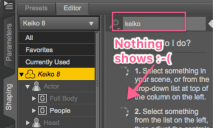
Had tried that every time (at least 4 times so far)... nothing shows... here there are a couple of screenshots... with sakura morphs dials and without Keiko dials on the shaping tab...
My bad. For me, it is showing in the Parameters Tab, Currently Used.

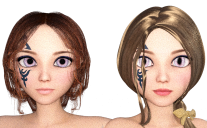
This is a test of both Keiko 6 and Keiko 8 (both utilizing Juvi's texture - Using Cayman Studio's Legacy UVcs G2 to G8; unfortunately though, this does not work with Keiko's UVc on G8)...So, I have Juvi's textures on Keiko 8... LOL... Except for the feline (otherworldly irises, she looks almost the same!) My guess is that dialing the morphs instead of loading the converted character will provide me with rounded eyes
 Yet as I cannot see any dials, I cannot try this...

Still, Juvi cannot be converted... tried with tolerance -1,8 this time and still, the eyes are a problem. Any suggestions?
Unfortunately, eyes are where the conversion process is most likely to have trouble. The tolerance is the best bet. You can also try playing with some iris morphs to reshape the ira. For G8F to G3F, a user found that using an iris morph helped a lot: https://www.daz3d.com/forums/discussion/comment/5482716/#Comment_5482716 ;
Thanks in advance
 I have several of your products Riversoft... very useful... particularly loooooooove Look at me... (you can see both models are looking at the camera
  ) Can't wait to have the Character conversions for Genesis to G8!!!!
Edited (added)
This is what I mean with the otherworldly eyes... which are magical, yep... still I would like also the rounded irises ones instead... (rendered at 5%)
 Help with Transfer Utility? [SOLVED]
So, I am trying to be braver about making my own clothes, or at least about modifying other products to more closely fit my needs. I fitted the Bandeau Tist Bikini's bra to my charcter, morphed it until is fit perfectly, exported it to Blender as an object, made my changes, and imported it back. It fits back on my character perfectly.
But when I invoke the Transfer Utility with the settings in the screenshot, and intruth, many other combinations, it stays fitting perfect for a split second, but then expands out as if a push modifier has been applied, ruining the fit.
Can anyone school me on why this would be happening?
Thanks
[Released] Character Converter from Genesis 2 Female to Genesis 8 Female [Commercial]Just bought the character converter and Keiko has been a total success at converting...this was the main reason for me to buy... thanks Riversoft for your work!
The first time I tried was with Juvi...the eyes were a problem... then I look at the video and I tried the tolerance (as I did the first time with Keiko...and I'm waiting...the process is about to finish after quite a little more than an hour) wondering though about the morph dials...I cannot find any of them on the shaping tab...what should I do?
Looking forward to a reply...thanks in advanceP.S. Will post the renderings when they're done...
edited P.S. II: Had already closed and reopened Daz a couple of times to check if that was the issue...I still cannot find the dials...
You're welcome!
When you load the character, you should be able to select the character, go to Shaping tab, and then currently used and they will show up.
Had tried that every time (at least 4 times so far)... nothing shows... here there are a couple of screenshots... with sakura morphs dials and without Keiko dials on the shaping tab...
This is a test of both Keiko 6 and Keiko 8 (both utilizing Juvi's texture - Using Cayman Studio's Legacy UVcs G2 to G8; unfortunately though, this does not work with Keiko's UVc on G8)...So, I have Juvi's textures on Keiko 8... LOL... Except for the feline (otherworldly irises, she looks almost the same!) My guess is that dialing the morphs instead of loading the converted character will provide me with rounded eyes
Yet as I cannot see any dials, I cannot try this...Still, Juvi cannot be converted... tried with tolerance -1,8 this time and still, the eyes are a problem. Any suggestions?
Thanks in advance
I have several of your products Riversoft... very useful... particularly loooooooove Look at me... (you can see both models are looking at the camera ) Can't wait to have the Character conversions for Genesis to G8!!!!Edited (added)
This is what I mean with the otherworldly eyes... which are magical, yep... still I would like also the rounded irises ones instead... (rendered at 5%)
[Released] Character Converter from Genesis 2 Female to Genesis 8 Female [Commercial]Just bought the character converter and Keiko has been a total success at converting...this was the main reason for me to buy... thanks Riversoft for your work!
The first time I tried was with Juvi...the eyes were a problem... then I look at the video and I tried the tolerance (as I did the first time with Keiko...and I'm waiting...the process is about to finish after quite a little more than an hour) wondering though about the morph dials...I cannot find any of them on the shaping tab...what should I do?
Looking forward to a reply...thanks in advanceP.S. Will post the renderings when they're done...
edited P.S. II: Had already closed and reopened Daz a couple of times to check if that was the issue...I still cannot find the dials...
You're welcome!
When you load the character, you should be able to select the character, go to Shaping tab, and then currently used and they will show up.
Less Morphs can be more when posingThis is just a quick post for the new to Daz, and a reminder for myself.
When creating a typical human-like character, remember that less is more with regards to morphs. Everyone has a tendency to add a morph, add a little more, another and another, and then you end up with a ton of morphs. The problem then surfaces when you try and use a pose. This is best demonstrated in a picture. I was making a Sakura morph that was based on Smart Doll dimensions (by Danny Choo), and ended up adding a lot of morphs.
As seen in the top left (1), the figure was what I intended, but the morphs failed miserably because of so many changes to the shape. This led to a lot of aggravation trying to correct the pose.
If I just used G2F without morphs (2), as seen in the right, the shape was NOT what I wanted, but the poses worked great!
So the solution was to re-create the morph trying to use as little morphs as I could (3). Scaliing the whole figure wont bother poses. So to get the petite size I scaled down, and then extended the legs. (legs are easier to correct than arms/shoulders/hands/fingers/etc) A waist and figure correction and was done. As you can see it was very close to my original and the pose worked much better.
So try and create character with less morphs, and your poses will work better!
 [Released] Character Converter from Genesis 2 Female to Genesis 8 Female [Commercial]
Just bought the character converter and Keiko has been a total success at converting...this was the main reason for me to buy... thanks Riversoft for your work!
The first time I tried was with Juvi...the eyes were a problem... then I look at the video and I tried the tolerance (as I did the first time with Keiko...and I'm waiting...the process is about to finish after quite a little more than an hour) wondering though about the morph dials...I cannot find any of them on the shaping tab...what should I do?
Looking forward to a reply...thanks in advanceP.S. Will post the renderings when they're done...
edited P.S. II: Had already closed and reopened Daz a couple of times to check if that was the issue...I still cannot find the dials...
How to save a pose from a fitted figure?I have 2 identical figures A1 and A2. Figure A2 has been modified through a morph then had an Adjust Rigging to Shape action done so the skeleton conforms to its new shape, then hit Memorize Rigging. I then fit figure A1 to figure A2, then hide figure A2. Is there a way I could save the figure's A1's pose as it looks while fitted to figure A2?
I'm doing some cloth simulation in Marvelous Designer on an item rigged in Daz Studio. In the attached image you can see my base figure, then the simulated figure in MD, then the fitted figure to the simulated figure. The simulated's figure's t-pose is what you see. The fitted figure's t-pose is identical to the original figure. In essence I'm using MD in conjuncture with the Adjust Rigging to Shape option from Daz in order to simulate physics on the rigging itself.
Dior HD & Nightmare FuelSo, I decided to check out Mousso's Dior HD (https://www.daz3d.com/dior-hd-for-genesis-8-female) I bought some weeks back and noticed that when I posed her, she turned into this horrible mess. I thought a re-install would fix it, but no luck. Then I re-installed the Genesis 8 Essentials to see if something was corrupted, but no luck again. Then I decided to see if I could dial her morphs into a base G8F and noticed that if I just used her 'Head' and 'Body' morphs, all was good. But if I used her entire character morph, it made her the stuff of nightmares.
Quick question to someone who has her - Can you please test out to see if this is just on my end? If not, I'll submit a ticket. Otherwise, I'd love to know if there's something corrupt on my end. Thanks!
Edited to fix image.


Daz 3D is part of

Connect
DAZ Productions, Inc.
7533 S Center View Ct #4664
West Jordan, UT 84084Licensing Agreement | Terms of Service | Privacy Policy | EULA
© 2026 Daz Productions Inc. All Rights Reserved.