-
Editing a .duf file
Richard Haseltine I see. Not sure why there isn't an option for it either. Yeah, it definitely is using the gzip format. What compression settings you use for it does not matter as Daz uncompresses the file before loading itself too. As long it's formatted with gzip format Daz will load it up (had to rename the file extension to duf once again)
Regarding the MDL, I did say I was referring to the modifier library inside the duf files. And, I think I did mean the second part only. If that's what the old *.dsf format used to do. I can imagine why it's not supported, but I had this one issue with the dials not being locked. (see here: https://www.daz3d.com/forums/discussion/409491/keeping-locked-dials-intact)
My point was, to fix that up above, I could delete the ERC freezing for the particular dials I want. But that's a little cumbersome. I can do it better and easily if i could access those things from a text editor. Let's say, I could delete that data directly from the morph but that would mean a permanent change, to those morphs unless I keep a backup. Daz may not allow saving it in *.dsf format anymore, but I noticed, once you delete a property (dial) controlled by some other dial (the actual, parent morph), daz wrote all the data present inside the morph to the duf file, while keeping the deleted data/dial out of it. So, I just thought there was a way to enable or force Daz to do that from the start, without having to remove any dials or so. I guess, I can imagine why the devs don't want to, but if they don't give better control within daz itself, I don't see any other options at all. It does kill a lot of expectations of mine at least.
Lower position nipple/areola in Genesis 2You can get some of the effect you're looking for by turning off limits on the Breasts Under Curve morph and using it in reverse - negative values. That takes away a lot of the flesh of the lower part of the breast. Combined with Breasts Natural, Breasts Upper curve, and Breasts Heavy you can make somewhat larger breasts with the areola lower down on the breast proportionately. In general you can get a lot of useful effects by turning off limits on morphs and using them in reverse. Click the little gear wheel on any morph and uncheck limits to allow this.
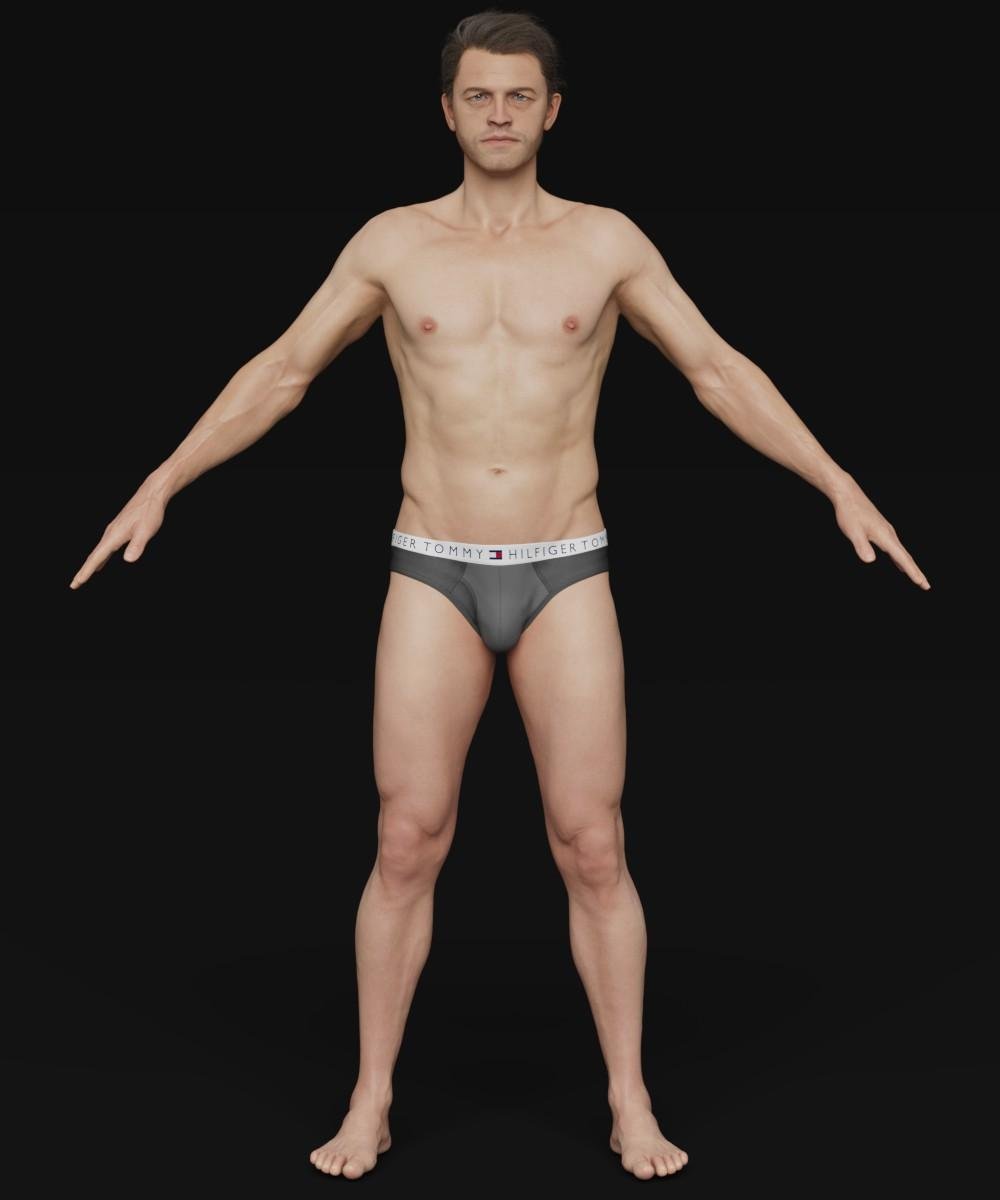
Help Identifying a (probably) Genesis 8 Male CharacterI've responded to your question on the Renderosity gallery, but its good you put it here as well just in case I didn't see it. As of right now, I've made this model strictly for personal use so he isn't available anywhere. He was heavily based off his video game appearance. I've actually spent a good amount of time perfecting his look, he was sculpted completely from scratch on G8M base, and didn't use any morph other then what I did in Zbrush, both head and body are completely custom.
ITF's version is a good substitute however, since my verison is not released. Same goes for the skin, everything you see in my model was done by me

@VincentXyooj I've been wanting to ask you when you are releasing a new character. It's been quite awhile. I like your characters because they are not typical models but they still look realistic.
I've been quite busy with IRL stuff as of late, but very soon :) , thank you for the compliment as well
Help Identifying a (probably) Genesis 8 Male CharacterI've responded to your question on the Renderosity gallery, but its good you put it here as well just in case I didn't see it. As of right now, I've made this model strictly for personal use so he isn't available anywhere. He was heavily based off his video game appearance. I've actually spent a good amount of time perfecting his look, he was sculpted completely from scratch on G8M base, and didn't use any morph other then what I did in Zbrush, both head and body are completely custom.
ITF's version is a good substitute however, since my verison is not released. Same goes for the skin, everything you see in my model was done by me
@VincentXyooj I've been wanting to ask you when you are releasing a new character. It's been quite awhile. I like your characters because they are not typical models but they still look realistic.
Help Identifying a (probably) Genesis 8 Male CharacterI've responded to your question on the Renderosity gallery, but its good you put it here as well just in case I didn't see it. As of right now, I've made this model strictly for personal use so he isn't available anywhere. He was heavily based off his video game appearance. I've actually spent a good amount of time perfecting his look, he was sculpted completely from scratch on G8M base, and didn't use any morph other then what I did in Zbrush, both head and body are completely custom.
ITF's version is a good substitute however, since my verison is not released. Same goes for the skin, everything you see in my model was done by me
Something big is coming!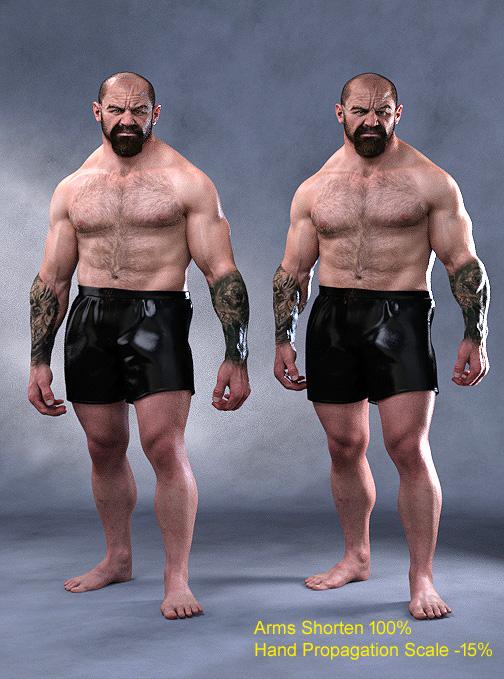 Adjusted Underbelly's arms and hands with morphs I had available to me.
Nice! Looks good with just two morph adjustments! :)
Help Identifying a (probably) Genesis 8 Male CharacterDid the image come from a store product? If so, which one? That might help.
EDIT: He reminds me somewhat of Andre by VincentXyooj, but not quite. https://www.daz3d.com/andre-for-genesis-3-and-8-male
Might be a mix of characters, depending.I clipped the screenshot from some website, but I definitely remember the name VincentXyooj was attached to it (for some reason). I have the Andre character, but it doesn't look like this, but maybe one of the other posters here who have made suggestions are touching on the fact that maybe it's some skin testure other than Andre. Thanks everybody for the help!
Edit: I just checked VincentXyooj's gallery on here and the character isn't there.
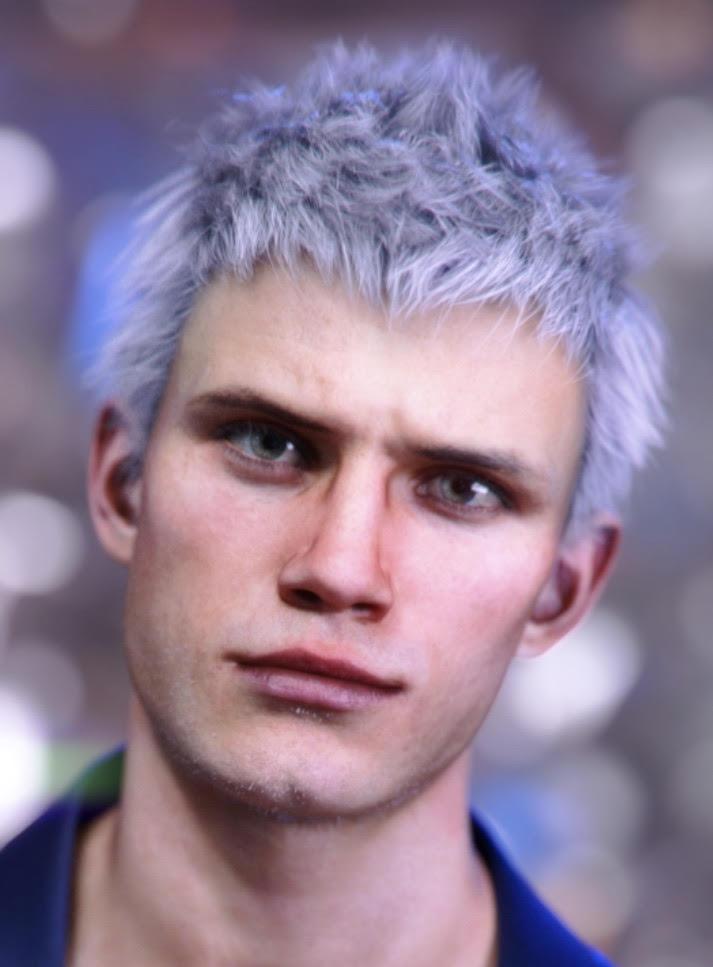
I think it might be Nero's morph, with perhaps a different texture. It's even the same hair.
 How to remove a head shape from a full character shape morph?
I am realizing that I am having to answer a lot of questions with Daz and I am new. Seems everyone here just relies on purchased items or other programs.
There are two ways to do it without purchasing anything or going to another program. Just scale things down to about 0.01% using the ActivePose tool to select areas and the parameters tab to use the scale option. If you actually scale things down to 0% sometimes things start to glitch out. Its not very easy because there are things that you have to scale to 0.01% that are not easy to select (like internal things e.g. tounge)...But it can be done....see the attached image...very very early concept I did just messing around...I made this using (2) Genesis 8 females...I scaled down the bottom of one and the top of the other to get that split body effect...Exported as a OBJ and give it new bones bada bing bada boom you have a new figure lol
You could also use tool settings and delete individual vertices but then you have a open space in your model/object.
Maybe I just need more coffee to follow... but I'm not sure how this fixes OP's issue.
Besides, I don't think he's been waiting since October 2018 for this solution.
ROFL ...Necro-thread shenanigans. I think someone must have been just hunting for a thread to show off his creation in. :P
How to remove a head shape from a full character shape morph?I am realizing that I am having to answer a lot of questions with Daz and I am new. Seems everyone here just relies on purchased items or other programs.
There are two ways to do it without purchasing anything or going to another program. Just scale things down to about 0.01% using the ActivePose tool to select areas and the parameters tab to use the scale option. If you actually scale things down to 0% sometimes things start to glitch out. Its not very easy because there are things that you have to scale to 0.01% that are not easy to select (like internal things e.g. tounge)...But it can be done....see the attached image...very very early concept I did just messing around...I made this using (2) Genesis 8 females...I scaled down the bottom of one and the top of the other to get that split body effect...Exported as a OBJ and give it new bones bada bing bada boom you have a new figure lol
You could also use tool settings and delete individual vertices but then you have a open space in your model/object.
Maybe I just need more coffee to follow... but I'm not sure how this fixes OP's issue.
Besides, I don't think he's been waiting since October 2018 for this solution.
Character Dial-Spinning Best PracticesYou could also try using Shape Splitter (formerly X-Morphs) to split specific parts of a morph from another. If you like a certain's character's nose, for example, you could totally use Shape Splitter to make a morph of just that nose and add it to your morph library. Its also great for splitting those characters that have head and body as a single morph (which I detest but thankfully is rare now). Its a very cool product to play with.
But yeah, like Diva said there is no right or wrong way to do anything, as long as you get to what you want it doesn't matter how you get there. I don't think there is any faster way if that is what you are looking for. I do think Rarestone's 200 shaping morphs are awesome. She made one each for male and female and they have a lot of unique and very specific morphs that nobody else has.
There is also a randomizer script product too. I do not have this myself, but it could be a fun thing to play with when you have no idea of what you want. It has some options in how you set it up.
I second that about the Rarestone packs. I've made a couple of really interesting looking characters and some that won't be seen for the safety of everyone's eyes- but had fun making them all. There is sooooo much there to customize- nose tip tilt, nostril arcs, cheekbones, eyelids, dimples, creases, face shapes, etc with nice pictures to give you an idea of what you'll be editing. I keep hearing good things about the Shape Splitter one and will definitely be checking it out as well. Personally I find that characters that are kind of similar or made by the same artist give me the best results dialed in less than 50%. It seems like every time I hit more than 50% blending different characters I start to get weird distortions (face sucks in, face shrinks, weird angles, etc).
Animation in DAZ@Ivy on pricing ,I agree completely
Reallusion is a confusing MONEY PIT!!
Yes there is a basic $200 version that comes with the free base CC3 Characters with all of the animation tools( except the curve editor) but you cannot import or export anything and can only use your own morph dialed CC3 Characters and render with the native Iclone Engine (that cannot even do Raytraced or screen space reflections!!) unless you buy the same Slow arsed IRay plugin that Daz inc. gives us for no Money
It would be a good alternative to Poser just for the animation & lipsynch tools for a total newbie with no existing hoard of legacy Daz/poser content.
Now if you are in the Daz ecosystem (which I still am for base Characters& clothing dev), the $600 USD Pipeline version with import export capability only makes financial sense if you make your own clothing and are experienced with one of the major Pro Apps/engines Like Blender,C4D, or Unity&UE4x for import& rendering.
If you do NOT make your own clothing, you still have to either buy the expensive Iclone store clothing, which is nowhere near the quality of Daz content, and pay an even HIGHER price for the "export versions" if you plan to send it out to any of the major Pro Apps/engines Like Blender,C4D, or Unity&UE4x.
Or buy Daz clothing and convert it with CC3 pipeline which is even more money. :-/
Now you see why people like myself (and perhaps wendy) put the brakes on at version 6.5 pipeline.
In my case, my 10 year old Maxon C4D software was too OLD to accept modern FBX & Alembic imports from Iclone, snd I even had to use( now defunct) paid third party plugins( Riptide&interposer) to get my animated ,lipsynced Poser& Daz figures into C4D for "Galactus Rising".
My ancient C4D is the only reason I was still using Daz studio,KeyMate ,GraphMate, optitex and two versions of Mimic to produce pre-animated Genesis Characters that could be rendered in C4D.
With Blender 2.8x supplanting C4D as the final scene rendering environment, I am finally able to consolidate All of the Character animation & Lipsync/Face puppet into Iclone that does these functions better than Daz studio even with imported Daz genesis figures
Create all of the clothing and props in Blender and fit them in Daz studio and import my Iclone animated customized Genesis 1-2 people from Iclone to blender via FBX or Alembic if Iclone cloth sims are used.
For someone like you however I can easily see why Iclone Pipeline cannot be justfied pricewise, just to import the limited BVH format into DAZ studio .AIUTO...CHI CONOSCE L’ITALIANO? PARTE DODICIL'ho visto anch'io. Il loro desiderio è farci usare tutti lo stesso metodo.
Ma fra installazione personalizzata, DIM, Connect, Central... stanno facendo un po' di casino. Spero almeno che Central per loro sia quello definitivo.
Comunque ho capito perché ci metteva generazioni a caricare figure G8F/M: più morph package e figure sono installati, e più tempo ci metterà a caricarli, in maniera direttamente proporzionale e quasi lineare.
Questo è dovuto al fatto che, anche se non stai usando un morph, Daz costruisce i rapporti fra tutti i morph disponibili installati per quel personaggio, ogni singola volta.
Mi è bastato disistallare un terzo delle G8F, e una ventina di morph package che non usavo spesso, e i tempi di caricamento si sono ridotti di più del 65%. Ma è sempre più di un minuto e mezzo.Non resta che fare un bell'upgrade di hardware, e ho cose interessanti in cantiere, vi dirò quando saranno montate nel PC! :D
Io spero di no, Central è terribile! Mancano un mucchio di funzioni del DIM tipo il link alle cartelle di installazione, export delle liste, verifica del tipo di installazione e via dicendo... Capisco che un buon 90% degli utenti di non vanno oltre il carica la figura nuda-metti la parrucca-metti la mutanda-applica una posa a caso-renderizza col primo set in lista.... Ma c'è anche gente che certa una certa professionalità.
Quanto ai morph, altro motivo per non usare G8 e amici belli, almeno fino a che non si decidono a sistemarlo un poco di più. Io ho qualcosa come 4000 e passa morph installati per G1, tra commerciali e custom, e il tempo di caricamento non cambia se aggiungo o rimuovo un pò di quei morph. Anche quando carico una figura con molti morph applicati non ci mette di più.
Lo avevo letto un paio di mesi fa sul forum e ho fatto una prova, il mio Genesis impiega quattro/sei secondi a caricare sulla scena sia con tutti i morph che totalmente senza. Oltretutto ha pure rallentato ulteriormente con l'ultimo aggiornamento per usare quel accrocchio di Face Transfer.
Più vanno avanti peggio fanno...

Sono funzioni di DIM che non ho mai usato, ma certamente meglio più funzioni che meno.
La mia intera libreria è basata su G8, sarebbe troppo un casino usare altro.
Poi non so nemmeno per quanto tempo ancora potrò continuare questo lavoretto part-time. Per ora va bene così.Peccato che abbiano cambiato sistema di gestione Morph rispetto a Genesis 1 allora. Mi piacerebbe molto riuscire a caricare i miei personaggi custom in 4 secondi.
In realtà no... E' molto più semplice convertire tutto da G8 a G1 rispetto a G1 a G8.
Io uso capelli, abiti e perfino morphs di G3/8 su G1 e funzionano correttamente. Penso dipenda dal rig più semplice e dal maggior numero di poligoni di G1.Per assurdo posso far indossare a G1 moltissimi abiti di G8 utilizzando l'opzione "Not Supported" senza distorsioni quando G8 con il Clone apposito di G1 storta tutto.
Custom morphs file pathsYou can't. You can save a preset to apply the morph wherever you want, but the technical morph data file must use that folder hierarchy.
Custom morphs file pathsUsing Daz Studio 4.10.0.123 Pro 64Bit
Looking for some help with the file path for custom morphs.
I'm able to create and save a custom morph just fine, it's the file path that is bothering me and while I can change the default directory, its all the other folder underneath I'd like to get rid of.
What I get: "3D Work\Daz Custom Files\Morphs\data\WillDupre\DH2_Tack\DH2_WesternSaddle\Morphs\Teigh\Saddle\Test.dsf"
What I'd like: "3D Work\Daz Custom Files\Morphs\Saddle\Test.dsf"
Any idea how I can go about doing this?
Many thanks.
GENERAL FREEBIE REQUESTS part 3I'm looking for a morph for Genesis 3/8 Male and Female to remove the nostril holes so I can get a manga/anime look for a character. Anyone know where I can find this? If it's only available in a paid package, I'm fine with that. I do have Sakura 8 and that has an option remove nostrils but it doesn't work on plain Genesis 8, so that's out. Ideas?
Help with bonesYou need to set up a custom morph in the tail to match the morph you are applying to the figure, adjust the rigging to match, and use ERC Freeze to link the adjusted rigging - DS knows to adjust bones in fitted items to folow the identically named bones in the base, but it doesn't know what to do with custom bones that don't have a match in the base figure.
Llola Lane’s RENDER A MONTH Challenge 2020 (CLOSED)@Zatetic Can't blame the fairy for being curious here. I would also want a closer look if I saw that on the beach.

@TristanQEverett You really nailed that dog's expression! And I see you managed to sneak in the chicken too.
Thanks but I don't have any dog product. Those dogs are static objects and I had to improvise the scene around his expressions. Since I didn't had much time, I couldn't improve the shader surface on dogs. This render can be done better. I will do it as a side activity some other day when I am free.
very nice and very well done to Zatetic and TristanQEverett.
Thank you!
Man, I was going to ask where you got that Bassett hound morph.
Celebrity Look-a-Likes for 3D figures Part 2Some work in progress test renders of my latest celebrity inspired comission. Might see if you can guess the actor to ensure I'm on the right path?
Hair and stubble are placeholders until I create some that more resemble the intended actor, and everything else is work in progress:
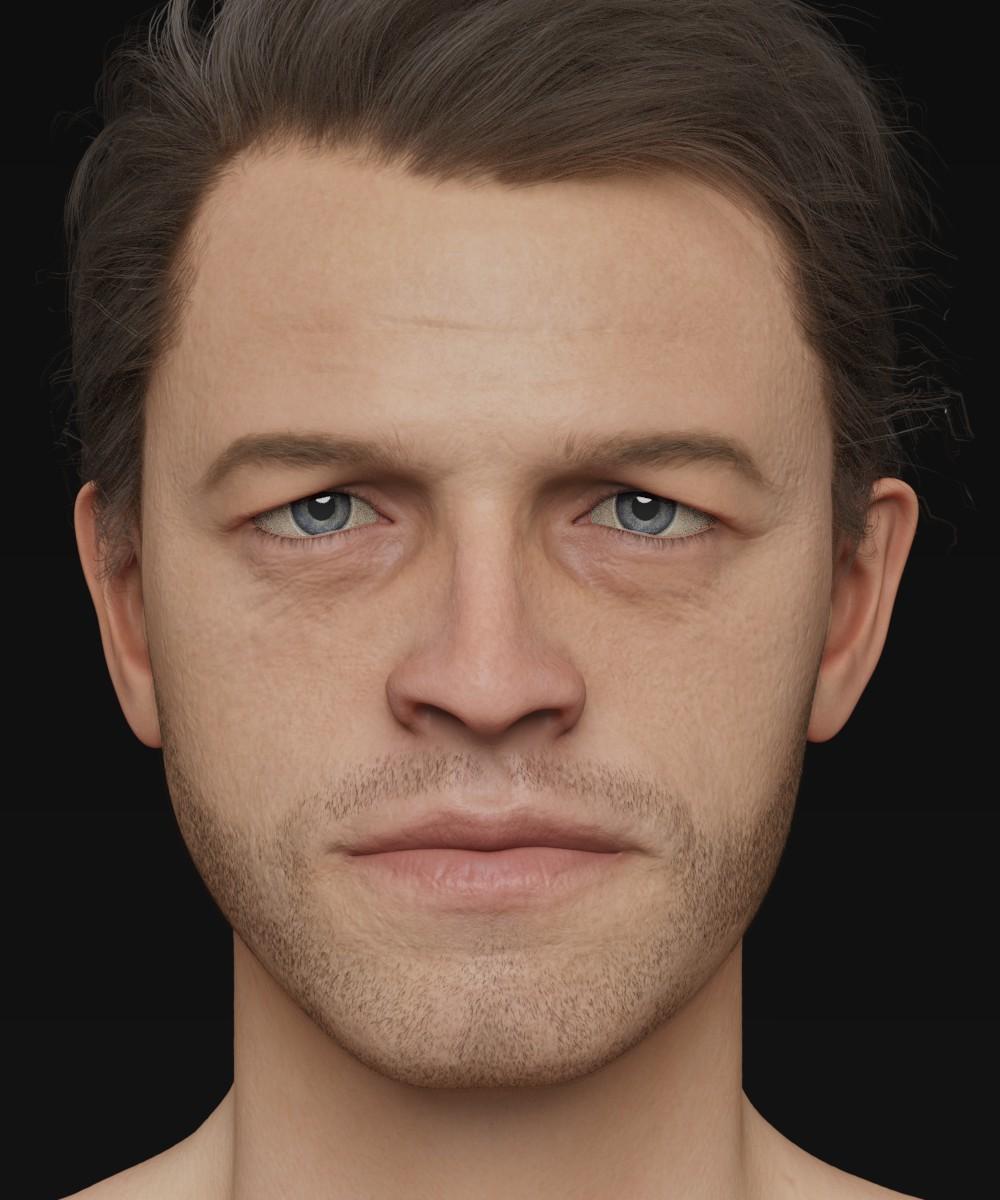
My hope is that Daz may be interested when I'm finished... He really would benefit from being a HD morph.
Cheers!
Daniel
Multiple collision object for DAZ figuresIn the Transfer Utility, choose Source figure your body suit for example, and the Target figure your gun belt (or vice-versa). Then hit merge hierarchies. Unches the Faces Transfer. Then fit the body suit to the gun belt. Then go to the Geometry Tool -> right click -> merge fitted figure's geometry.
The transfer utility merges the rigs (the bones setup), then the Geometry tool will merge the geometries.
Fit Control for Genesis 8 (Commercial)I mentioned a potential useful function in the Dial Control thread, in that not only would it show the paths for morphs on a character, but also the paths for clothing items?
Having thought about it, I added that it could be potentially more of a function of Fit Control.
You mentioned that because clothing typically had fewer morphs, it would be of limited use.
What I am thinking of though, is that I often, & I suspect others do too, save kitbash outfits as a wearable preset.
If the paths for clothing locations could be shown, perhaps via a seperate related script, it would ease finding installation of individual items to facilitate morph adjustments & texture changes.
Daz 3D is part of

Connect
DAZ Productions, Inc.
7533 S Center View Ct #4664
West Jordan, UT 84084Licensing Agreement | Terms of Service | Privacy Policy | EULA
© 2026 Daz Productions Inc. All Rights Reserved.