-
Daz3d to Blender Workflow
I have another weird question, hopefully someone can answer it whenever they have time. No rush.
Is it possible to export a figure (with clothing, hair etc) from Studio to Blender either poseable through Diffeomorphic or simply as a static OBJ, subdivide it in Blender and do detailed and high-res sculpting or morphing on it, and then send it back to Studio - and this is the important part - as a static OBJ (I know it can't be sent back as a morph) but with the UVs and surfaces intact so that textures can be reapplied? If so, could someone kindly describe any important steps for doing so? Thank you very much in advance.
Celebrity Look-a-Likes for 3D figures Part 2Some work in progress test renders of my latest celebrity inspired comission. Might see if you can guess the actor to ensure I'm on the right path?

Hair and stubble are placeholders until I create some that more resemble the intended actor, and everything else is work in progress:
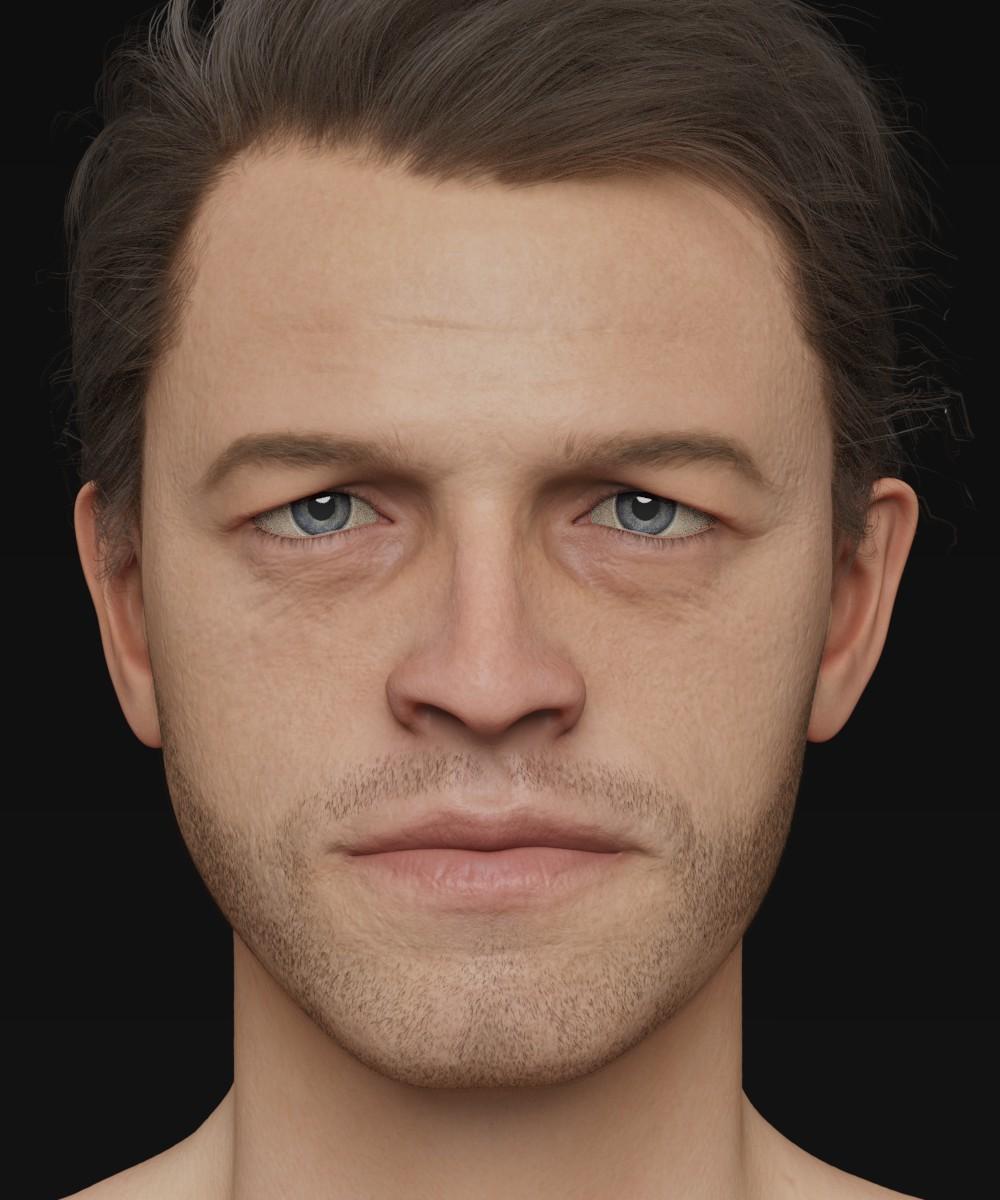
My hope is that Daz may be interested when I'm finished... He really would benefit from being a HD morph.
Cheers!
Daniel
My first and only thought is that he has to be Misha Collins, aka Castiel the angel from Supernatural.
G8F tongue will not zero no matter what!I've seen this before, when a morph is applied to a figure. You need to check the Parameters to see if any morphs are applied.
- Select the figure in the scene.
- Open the Parameters pane/tab
- There are a couple of ways to find the morph.
- First, click on the Currently Used option in the left column and scroll down the listed parameters, looking for any that apply to the tongue.
- If you don't see anything applied to the tongue, it may be that the morph(s) are non-zero by default. You'll need to drill-down the pose controls. With the figure still selected, in the left column click on:
- Pose Controls, then
- Head, then
- Mouth, then
- Tongue
- Depending on premium products you have purchased, you may see other options under Mouth for controlling the tongue.
- Look through all the pose controls for the tongue. If a morph has a default non-zero morph, the value will have the same text color as those around it with a zero value.
- If you find one like that, set it to zero.
Does this help?
ETA: Or as Leana suggested, it might be part of an expression dial. If so, that would show up under Currently Used, as mentioned above.
G8F tongue will not zero no matter what!It might not be a tongue morph directly, maybe a controller dial for an expression?
G8F tongue will not zero no matter what!Please see subject line.
The character's tongue is twisted and to the side for some reason, and will not zero no matter what. I have trried it globally and by node. Nothing. Ideas?
There might be a tongue morph saved with a non-zero value, so it is always applied automatically.
I've searched high and low and can't find it. All of the tongue nodes' values are zero when I check them.
G8F tongue will not zero no matter what!Please see subject line.
The character's tongue is twisted and to the side for some reason, and will not zero no matter what. I have trried it globally and by node. Nothing. Ideas?
There might be a tongue morph saved with a non-zero value, so it is always applied automatically.
AIUTO...CHI CONOSCE L’ITALIANO? PARTE DODICIEh... Limiti di G8.

Io credo che la prenderò (insieme alla sua base, deliziosa anch'essa) per trasferirla su G1. Come ti ho detto, G1 non ha limiti di alcun genere sul numero di morph installati.
Una figura così perfettamente in linea con quello stile non può essere casuale, il naso, la bocca, gli occhi e perfino la linea del collo sono inequivocabilmente ispirati ad Araki.
A questo punto adorerei vedere una donnina di Leiji Matsumoto e magari anche un assaggio di Osamu Tetsuka.
Comunque spero davvero che si decidano a correggere G8, è troppo una atrocità. Insieme ai bug di timeline, Puppeteer, slider, interfaccia, salvataggio, esportazione/esportazione... Insomma, tutti.
 MECK9 in stores now Commercial
Jakiblue, I looked under the toes (Click on toes with the arrow icon and in "parameters pane" currently used dials) I built this on the Dog 8 bones so other poses could be used to get you at least close to where you wanted to be and minor tweaks made. Sorry back to the point, I thought I might find a a corrective morph but looks like no. This is odd, they are all off by 30 degrees which means that is what is was. I will contact Daz and let them know we will fix and update the package. Adjusting the feet -30 degrees is all I can advise you to do right now. Why it is limited to just 3 of the 10 poses, ?. Human error is my guess.... my error I mean. Bad me.
I hope you still enjoy the MECK9 and all the wonderful texture add ons. Apologies for your inconvenience.
Using the timeline for dforce clothing simulation....QuestionOnce you have run the simulation and have the character pose and clothing drape you like, what is the best way to save the preset, without having all the timeline data, so you can bring the character into a future scene without having to play with the timeline scrubber?
JD
Hide everything in the scene except for that one item, set the resolution to base, export to .obj, and then re-import it as a morph. If you save the morph as a morph asset, you can use it again later, though obviously it will only work with the original simulated pose.
Ah...yeah that might be good, then I can set a new scene, pose the character, and save them both off as a subset....I think that will be fine...
Thanks!
JD
Using the timeline for dforce clothing simulation....QuestionOnce you have run the simulation and have the character pose and clothing drape you like, what is the best way to save the preset, without having all the timeline data, so you can bring the character into a future scene without having to play with the timeline scrubber?
JD
Hide everything in the scene except for that one item, set the resolution to base, export to .obj, and then re-import it as a morph. If you save the morph as a morph asset, you can use it again later, though obviously it will only work with the original simulated pose.
To Lyoness and other PAs: combined body-head morphsAppreciate the info. i agree, I hate when it's a single morph
To Lyoness and other PAs: combined body-head morphsOk, ok... :)
Like others the character has a "combined body and head morph" icon but in this case no icons for applying the head and body separately. I supposed that that meant there was no separated head and body morphs, but they do exist, you just have to look for the sliders in the parameters/shaping panel.
Dial Control for Genesis to Genesis 8 (Commercial)"option to select those dials would also be a good addition to the product"
We will only have option to display those morphs (coming in update). We will not add a morph property box in order to edit their min max value inside the script. That you can do inside studio itself. It is why we added alternative functions. EG click button to display those morphs with default values, a jump button to show where that morph is on the figure, minimize script so you can quickly edit the morph inside studio. The main complaint was that those morphs could not be seen. That is what we addressed. Editing them you can do inside studio.
Also there no need to display hidden dials. In nearly all cases they are dependant\linked to the visible sliders and should not be edited or touched. Those are all you need to worry about.
Morphing brushI would find it hard to believe that those arguing against the implementation of the Poser morph brush tool in DS have ever heavily used that tool in Poser.
I'm not sure you know what you're missing. There's no comparison between exporting back and forth to Zbrush or Hexagon (both of which I have) versus just having open the Poser morph brush tool to make edits all during the process of setting up a scene. It makes Poser really robust versus just a "drag and drop" software program. You can constantly edit morphs, joints, clothes, hair...moving and sculpting in real-time. It's amazing and so fast. And it's not just push/pull either. You can smooth, flatten, tighten and loosen clothes, etc. against a target figure. There are many tools, including morphing only by a material/group and you can pin down areas to be affected.
There's a lot I like about DS. And, I prefer the Genesis 3/8 content so I find myself going back and forth between Poser & DS for work flow...which is slow and annoying.
Once you heavily use the Poser morph brush tool, you'll understand why we want it in DAZ Studio so much.
MARADONA daz model/morph? any suggestions?Hi guys...i know this sounds weird but maybe anyone knows a morph close to Maradona looks? or a way to make a daz 8 male to look like maradona without going nuts? (me?) i would even pay for such help!
i dont need crazy accurancy just something to resemple him even from far...thanks in advance....
The Mac FAQTotte I installed the first set of content that Daz Studio needs from the DIM then I installed the content I have in my backup with rendoinstall. Saturday morning Genesis8female worked with no problem but after I installed my additional content is when it looks like my earlier post. I even tried to reinstall Genesis 8 female starter again with no help.
That sounds like you have installed a broken morph, probably from a non DAZ product or freebee. Did you install the "non DAZ" content into it's own Content Library? Best to do that, then you can disable that in DS and if it works, you know what the problem is.
Question on April YSH HairI was looking through the newest bundle release and saw this hair https://www.daz3d.com/peony-hair-for-genesis-3-and-8-females
It looks like a great hair product, but can the horn things be hidden?Yes, this would be interesting. I didn't find any 'off' morph in the list.
Face Tranfer for G8 m/fHello Folks!
Anyone some Experience with the Plugin 'Face-Transfer' of DS 4.12 for G8?
Made some nice Tryout with various Photos so I think, I will purchase it. But IRAY-Render seems to make the Eyeballs look like washed up with Tear-Gas.
Anyone an Idea how to fix it?
(Windows 10, x64 Bit, 4 GB RAM)
Screenshot attdWhy Does It Take So Long To Load Figures? ("Solved", with GUIDE)When tracking problematic morps, wanting to speed-up the loading process or save the RAM, you can go into the morph folder and make a zip-file out of the contents, the you can delete the morph-files. DS-doesn't find them in the zip-file and if you do need the files back, you can just unzip them back.
Whatever the reason for disabling morps, this is a good way to start, even if you wanted to remove them completely.
Another way is to rename the files individually with an extension you can easily find, ie. Sunshine.duf -> Sunshine.duf.xxx
Thank you for the info! :D
The fact is that I make stories, so I have created tons of characters, that I need to access sooner or later, and I have to have many morphs available to create new ones.
So that's not viable for me.
As I've said before, it took me days just to check if I needed the figures I had uninstalled, and I had to reinstall 1/3 of them.
Why Does It Take So Long To Load Figures? ("Solved", with GUIDE)When tracking problematic morps, wanting to speed-up the loading process or save the RAM, you can go into the morph folder and make a zip-file out of the contents, the you can delete the morph-files. DS-doesn't find them in the zip-file and if you do need the files back, you can just unzip them back.
Whatever the reason for disabling morps, this is a good way to start, even if you wanted to remove them completely.
Another way is to rename the files individually with an extension you can easily find, ie. Sunshine.duf -> Sunshine.duf.xxx
Daz 3D is part of

Connect
DAZ Productions, Inc.
7533 S Center View Ct #4664
West Jordan, UT 84084Licensing Agreement | Terms of Service | Privacy Policy | EULA
© 2026 Daz Productions Inc. All Rights Reserved.