-
Free Toon Characters coming July 1st, early download available now
wsterdan said:
nightwolf1982 said:
@CES3D The issue is essentially releasing the base figure geometry - which would be necessary when creating a clone of the figure. Character and part morphs don't include the geometry, just the vertex changes to create the new character/shape.
It isn't really necessary to include G3 and G8 clones with the figures, though, there are tutorials available for setting up clones in DAZ for non genesis figures.
Actually, the clones don't include any DAZ geometry; they're made by taking the Omnitoon mesh and reshaping it so that it matches the shapes of Genesis 3 and Genesis 8. It's only because it closely matches their shapes that there's an issue... which, of course, seems ludicrous when anyone can download a free copy of DAZ Studio and have the actual 3D mesh -- not just the shapes of them -- for both figures, for free.
Such is the world of intellectual copyright.
My proposal is to include a Morph of the Toon Character for G8, which end-users can then use as a base to create clones of other base figures, such as Genesis generations and V4/M4, for the Toon Character.
Of course, this process requires a certain level of expertise, so you need to include either a detailed manual explaining the steps or a script that automates the procedure.- You will create a Morph of the Toon Character for G8, based on the Clone of G8 for the Toon Character which you already have.
- You will distribute the Toon Character, and the Morph of the Toon Character for G8 created in step 1, along with either a manual or scripts to perform the following steps.
- End-users will utilize the provided manual or script to create a Clone of G8 for the Toon Character, based on the Morph of the Toon Character for G8 which you distribute in step 2.
- Based on the G8 clone created in step 3, end-users will then create G1 to G9 clones for the Toon Character (again, using the manual or script).
- Finally, based on the G1 clone created in step 4, end-users will create V4/M4/K4 clones for the Toon Character (using the manual or script).
DAZ's permission would be necessary if you were to distribute clones of G3/G8 for the Toon Character. However, distributing morphs of the Toon Character for G3/G8 should not require permission.
G8F Better Nipple Geograft
G8.1F Better Nipple, a geograft replacement nipple mesh for DAZ Genesis 8/8.1 Female, 360 quads. The original mesh is a little bit sparse in polygons for my preference and the DAZ morphs have always looked a bit strange to me so this version is a bit more detailed and includes three new morphs that can be blended with the existing morphs or used by themselves to give a completely new shape to the nipple. The UV map is identical to the stock G8F UV map, so textures and materials can be re-used. The model will automatically follow the morph dials used in the main figure and show roughly the same shape as the unmodified figure.
Dials for the new morphs can be found on the top level of the G81F_BetterNipple figure, under Actor/Chest/Real World/Excessive. NB: these morphs are not particularly intended to be used at 100%, feel free to experiment with a variety of values! See readme for more info!
Sample images available at the download site (login required).
Since this type of item seems to be doing super well in the store, and since I got forum moderation's blessing to post this type of content as long as it's sanitized and gated behind a login and content filtering options, I decided to offer it here. Enjoy :)
Download: Google Drive
Daz Studio 6 Beta - version 6.25.2026.19821! (Updated July 23, 2026)TimberWolf said:
Daz have said that Studio v.4.whatever will *always* be available for download and therefore anything we have bought and functions properly in that version will continue to do so. I see no reason to doubt that. As for the future my opinion is that software-as-a-service (i.e. a subscription model) is very much here to stay - read into that what you will.
There is nothing to stop you using Daz 4 to create a scene and drop-kick it over to 2025+ for rendering should you so wish. No one is going to try to recompile or re-jig plugins at this point and if I was the creator of one I would be loathe to say if it would even be possible until things have settled down. I wouldn't hold your breath waiting for a definitive answer this early in the process.
Without any hint of exaggeration I could also teach you, in less than 5 minutes, how to replicate all of the functionality in Mesh Grabber (and more), in Blender, even if you'd never seen it before, and that software is free. The Daz ecosystem is changing, that's for sure.
How did you integrate blender functionality into the Studio UI?
Or are you;
exporting obj from Studio
importing obj into blender
fiddling in blender
exporting new obj from blender
importing new obj to Studio
applying new obj as morph to clothes/character/whatever in Studio?
Don't get me wrong, I would be very interested in something like this
Right now, mesh grabber is the only tool of it's kind that I know of in Studio and it's one of the few on the "I can't live without it" list.
Ethin's Art and ... stuff.Ethin said:
Redfern said:
Ethin said:
Low effort "M'Ress" scene.
Yeah, something akin to that. Well, I have my own custom head morph I'd use, but yeah, something similar.


... However my aesthetic might not be the best for Trek art. lol
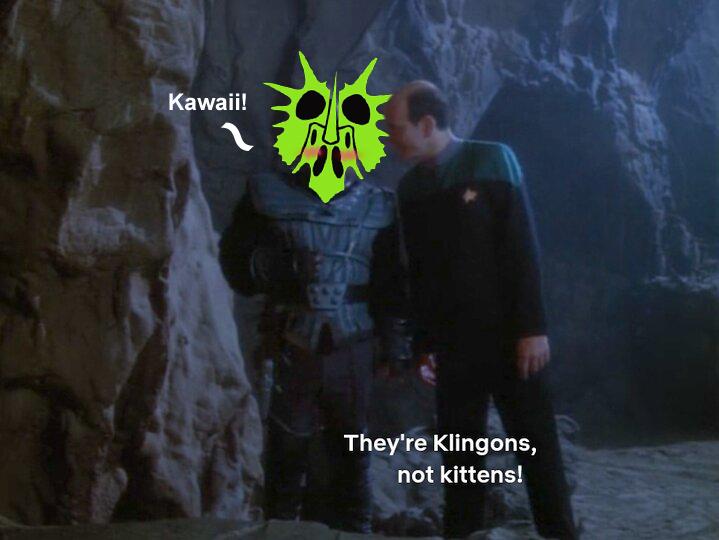
hahah Great meme!
Off Topic Thread #2
There were some plugins, like a fluid one there that looked interesting. Hopefully, they have been salvaged elsewhere.therixx said:Well, it seems that the hunt is over.
ShareCG is officially closed.
There were still lots of items I would have downloaded, but I cannot complain too much. I got most Carrara related stuff and a ton of other things.
I hope there will be a huge content transfer to other sites, as they suggest in their final message.Relaxing clothing on modelsIn addition to what Linwelly said, you can try to dForce it - just stopping the dForce early after it's smoothed just a little bit. You could also try using Mesh Grabber if you have it. But since you're porting over to Blender anyway, you could also do a little smoothing there if you prefer.
If you plan on using the uniform a lot, I recommend making any adjustments to it while the figure is in the default pose, and create and save a morph for the uniform.
Daz Studio 6 Beta - version 6.25.2026.19821! (Updated July 23, 2026)Ainm said:
Had a quick play around. Initial thoughts:
- Character load with a lot of morphs is quicker. Not lightning by any means, but a decent improvement nonetheless
- My viewport appears to be broken. I can only see a lit scene in filament mode and toggling preview lights does nothing
- My viewport navigation appears to be broken. Keystrokes don't repeat. I don't know if I turned that on somewhere in my Studio 4.X install, but if so, I can't find where I can turn it on in 5.X
These could be GPU related, I suspect. Certainly WASD navigation is working for me - but you are not the only one for whom it isn't.
- Restore pose makes me very, very happy. With a huge morph library, this was taking a few hours in 4.X and was unusable. It now takes a few seconds
- One of my biggest peeves with 4.X is how the smart content tree is deleted and rebuilt each time you select a new scene node with Filter by context checked. This behaviour is the same in 5.X. I'm hoping 5.X won't be a direct port of features like this and that time will be taken to improve the user experience too. For example, when a new scene node is selected, the tree ought to really be rebuilt in place, keeping nodes expanded that were already expanded and, if the context includes the same selected branch as the old context, that ought to also persist. I waste a lot of time in Studio re-exexpanding this tree - very frustrating
- The interface feels snappier
- On first startup, only one of my content libraries was automatically recognised. When I added the others and hit Accept, Studio crashed. On restart, my other content libraries persisted, but if I continue to go into the content directory manager and hit accept, the crashes continue
I had a crash exiting Preferences - I noticed that there is some activity (spinner next to mouse cursor, UI refreshes) as it updates the content panes. I didn't get a crash if I waited until that was done. Still, if you get a crash report please upload it (here or to a ticket) to prove I was not imagining the issue (Daz couldn't reporduce it).
Daz Studio 6 Beta - version 6.25.2026.19821! (Updated July 23, 2026)Had a quick play around. Initial thoughts:
- Character load with a lot of morphs is quicker. Not lightning by any means, but a decent improvement nonetheless
- My viewport appears to be broken. I can only see a lit scene in filament mode and toggling preview lights does nothing
- My viewport navigation appears to be broken. Keystrokes don't repeat. I don't know if I turned that on somewhere in my Studio 4.X install, but if so, I can't find where I can turn it on in 5.X
- Restore pose makes me very, very happy. With a huge morph library, this was taking a few hours in 4.X and was unusable. It now takes a few seconds
- One of my biggest peeves with 4.X is how the smart content tree is deleted and rebuilt each time you select a new scene node with Filter by context checked. This behaviour is the same in 5.X. I'm hoping 5.X won't be a direct port of features like this and that time will be taken to improve the user experience too. For example, when a new scene node is selected, the tree ought to really be rebuilt in place, keeping nodes expanded that were already expanded and, if the context includes the same selected branch as the old context, that ought to also persist. I waste a lot of time in Studio re-exexpanding this tree - very frustrating
- The interface feels snappier
- On first startup, only one of my content libraries was automatically recognised. When I added the others and hit Accept, Studio crashed. On restart, my other content libraries persisted, but if I continue to go into the content directory manager and hit accept, the crashes continue
Cloth not following breast graft pose morph.I have breast graft - breastacular for G9.
The pose is a character folding her arms, pushing big breasts.
Something like this: https://prnt.sc/aSVaBGauizY7
But the cloth doesn't follow the breast graft pose morph.
It seems ti follows the shape of morph of the original breast.
What is the solution?V3Digitimes Daz Studio 2025 (6) compatibility StatusGood morning,
this post will allow you to know the progress status of the updates or new builds of ALL my scripted products for Daz Studio 2025. As many of you know, many scripted products will not basically work with Daz Studio 2025 until they are updated, this is why I plan to update them all during the next weeks/months (depending on how difficult it is, I keep my fingers crossed it will only be weeks). After recent discussions with the Daz Team, it’s better to wait until the Daz Studio 6 scripting API becomes more stable before submitting the next round of builds, but that doesn’t prevent me from preparing everything in advance so things can move quickly when the time comes
IMPORTANT NOTE FOR USERS OF OLD DAZ STUDIO VERSIONS : I cannot test/check the compatibility below Daz Studio 4.22, and some reconnections of the connectors may be problematic for such old versions. So if you are using a Daz Studio version below 4.22, my recommendation is : do not update until someone can confirm if it works or not, and download a manual install zip now before the updates are live (so that you can restore in case of an accidental update). The only input I have is that a couple of wet and tanned skins were tested in older version of Daz Studio without issue.
Note concerning menu installations
For products that install scripts into menus, the updates for small products are working as expected, with one menu installation per session. The updates for large products (more than 27 scripts added to menus) are currently on stand-by. The reason is a limitation observed in Daz Studio itself: it does not seem possible to install more than 27 scripts into menus, while toolbar installations work correctly. This behavior is not caused by the scripts themselves. As a result, the only option at the moment is to wait and see how this evolves during the DS6 alpha phase. - Seems to be solved, but contact me or try this procedure in case of an issue -
So far, only two products are affected: 1. Ultimate Pose Mixer 2. Ultimate Pose Mixer Pro with Mega Pose Toolkit. More products could potentially be impacted if this limitation turns out to be per menu rather than per installation.
1. Already working in DS 2025
Wayfinder Sign Generator. Only limitation in DS 6 is the "style" of the font (italic, bold) which often cannot be chosen properly, and this is something I cannot solve on my side.
Write Anywhere Plus Advanced LIE and Aging Tools. Only limitation in DS 6 is the "style" of the font (italic, bold) which often cannot be chosen properly, and this is something I cannot solve on my side.
Wet and Tanned Skins for Genesis 2. (if used on starter base figures or figures without bump, please load one of the "Use Wetness Maps and Settings Of..." preset after conversion)
V3D Christmas Gifts and Tree (with log warnings, but ornaments loading or swapping work fine)
Snow Globe Your World (with the limitation of small "thumbs" for snowlfakes choice in the interface, waiting to see how DS 6 evolves, but scripts work anyway).Medina Cityscape Generator (with a couple of non dangerous log warnings)
XTreme Reshader for Iray Uber : works
Advanced Collective Transform Tools : works, The only thing to be aware of is the menu and toolbar installer: it must be run in a fresh session, before accessing or modifying any menus or toolbars. If menus or toolbars have already been touched during the session, the installer will fail in DS6.
2. Submitted, live, compatible DS4 and DS6 ! (please contact me if you see issues)
Texture Booster and Shader Converter : Update submitted, LIVE, along with enhancement features (such as the possibility to enter your values using keyboard).
Ultimate Iray Skin Manager : Update submitted, LIVE, along with enhancement features (such as a much faster launch speed).
Ultimate PBRSkin Manager : Update submitted, LIVE, along with enhancement features (such as a better handling of "off limits" starting colors).
Wet and Tanned Skins for Genesis 8.1 (Male and Female Version)
Wet and Tanned Skins for Genesis 3
Wet and Tanned Skins for Genesis 8
Wet and Tanned Skins for Genesis 9 The geograft transfer tool was completely rewritten for ALL Wet And Tanned Skins Generations
Iray Light Manager Pro: warning, updated script fails if you launch it without environment map, needs to be fixed on my side.
Scene Optimizer : along with enhancement features (such as the number of normal maps, the open doc button in the notes, two buttons to switch base or high resolution).
Ultimate Pose Master : done : so much faster and responsive on DS6...Removed function for DS6 : add script to menu (this is the G3 to G8.1 version)
Buildings And Skyscrapers Generator
Shader Rotator
V3Digitimes Hands Controls For Genesis 9
Face To Face Autopose Legs For Genesis 9
Face To Face Autopose Arms For Genesis 9
Face To Face Autopose Arms
Face To Face and Virtual Origin
Maps Copier, Gatherer, Renammer
3. Submitted, waiting for Daz Tests
Drops Generator
V3D HDR Manager
V3D HDR Creator
V3D HDR Add-On Tools
Super Save
Map Manager
A Touch Of Dirt For Iray
Fantasy Skins For Genesis 3
Fantasy Skins For Genesis 8
Fantasy Skins For Genesis 8.1 Males
Fantasy Skins For Genesis 8.1 Females
Universal Pose Splitter
Iray Converter For Genesis
Iray Converter For Generation 4
Iray Converter For Genesis 2
Iray Converter For Genesis 3
Ultimate Pose Master for Genesis 9 : done : SO MUCH FASTER AND RESPONSIVE on DS6, you cannot imagine! Removed function for DS6 : add script to menu (can be done manually in 2 clicks).
Ultimate Pose Mixer
Ultimate Pose Mixer Pro with Mega Pose Toolkit
4. Ready to submit(*) - waiting for beta testers, for more tests, or further enhancements... (*) almost
V3D Speech Bubbles Generator Pro : done. Beta tests required / Corrections active (font families and font styles)
5. Must be updated
--> Any script displaying a font family and font styles, in order to handle correctly the new way Qt handles this. (wayfinder generator, speech bubbles generator, eventually write anywhere TBC)
If some of you already had some of the scripts working or not working on Daz Studio 2025, please let me know here. The same way, if you see scripts having the status Submitted, live, compatible DS4 and DS6, and that you see that something does not work for you (once updated on your side), let me know here.
I thank you in advance for all the feedback and information you would provide to fasten and ease this update process.
Deforming a mesh using another objectRiversoft Art also have products to take care of hairs and hats:
https://www.daz3d.com/hat-check-for-genesis-9
https://www.daz3d.com/hat-check-for-genesis-8
https://www.daz3d.com/hat-check-for-genesis-3
https://www.daz3d.com/hat-check-for-genesis-2
And there is also a free solution for hat and hairs by @mCasual:
Based on smoothing modifiers, @matew has Morph Master:
https://www.daz3d.com/morph-master
Free Toon Characters coming July 1st, early download available nowStill waiting on permission to include clones with the Omnitoons, and waiting to check on rigging as well. Ten business days down...
If permission to use clones is denied, people might have to make their own clothing clones or make their own clothing.
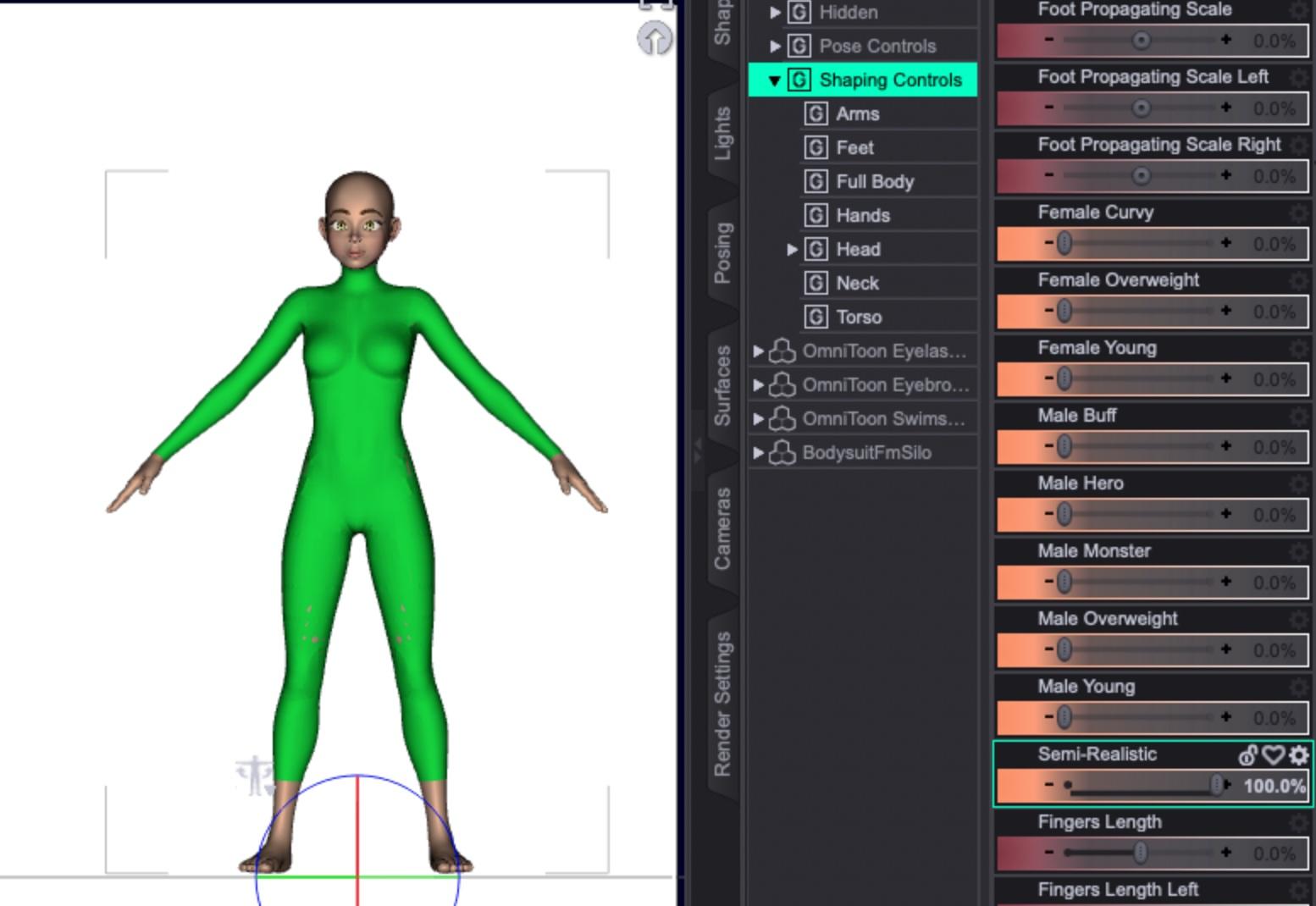
Here's a quick and only lightly-detailed example of how to make clothing from any figures. There are much better video tutorials on Youtube that you can check out for more details. This sample will use the female base Omnitoon figure.
First, load the female figure into a new scene, select the character, and make a standard geoshell:

I generally unparent the geoshell and move the actual character off to the side. I find this makes it easier to select and delete the character once we move to a modelling program, and by moving the character the geoshell stays in place.
Many people keep the character in place so that in the modeller they'll be able to get a better idea of how their clothing will fit and work. Because I'm just doing a basic bodysuit, I'm only going to want the geoshell. Use the base model without any morphs applied.
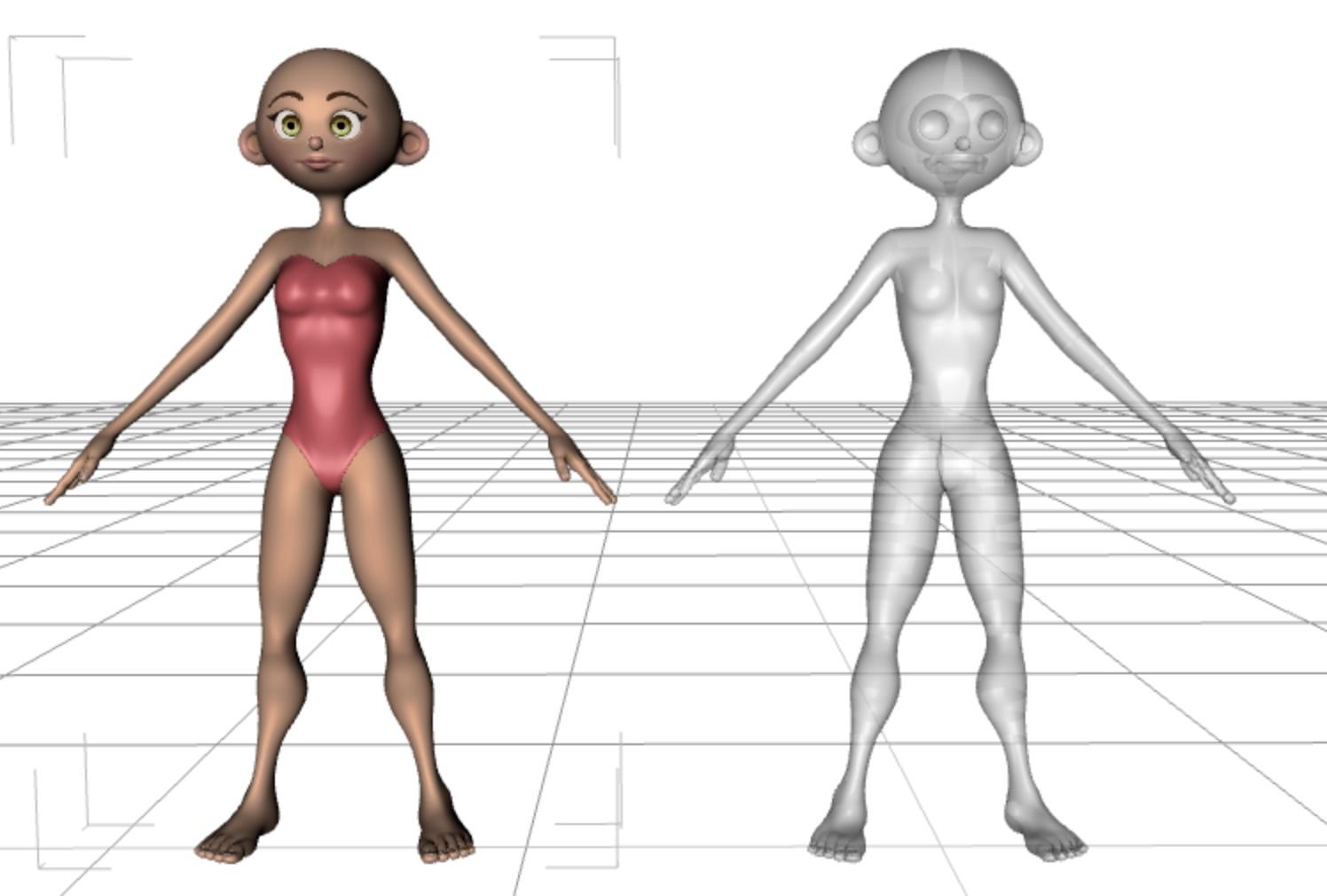
Export the scene in either .obj or .fbx format, either will work fine. It's important to note the settings you use, as you want to duplicate them when importing the geoshell back into DAZ Studio.
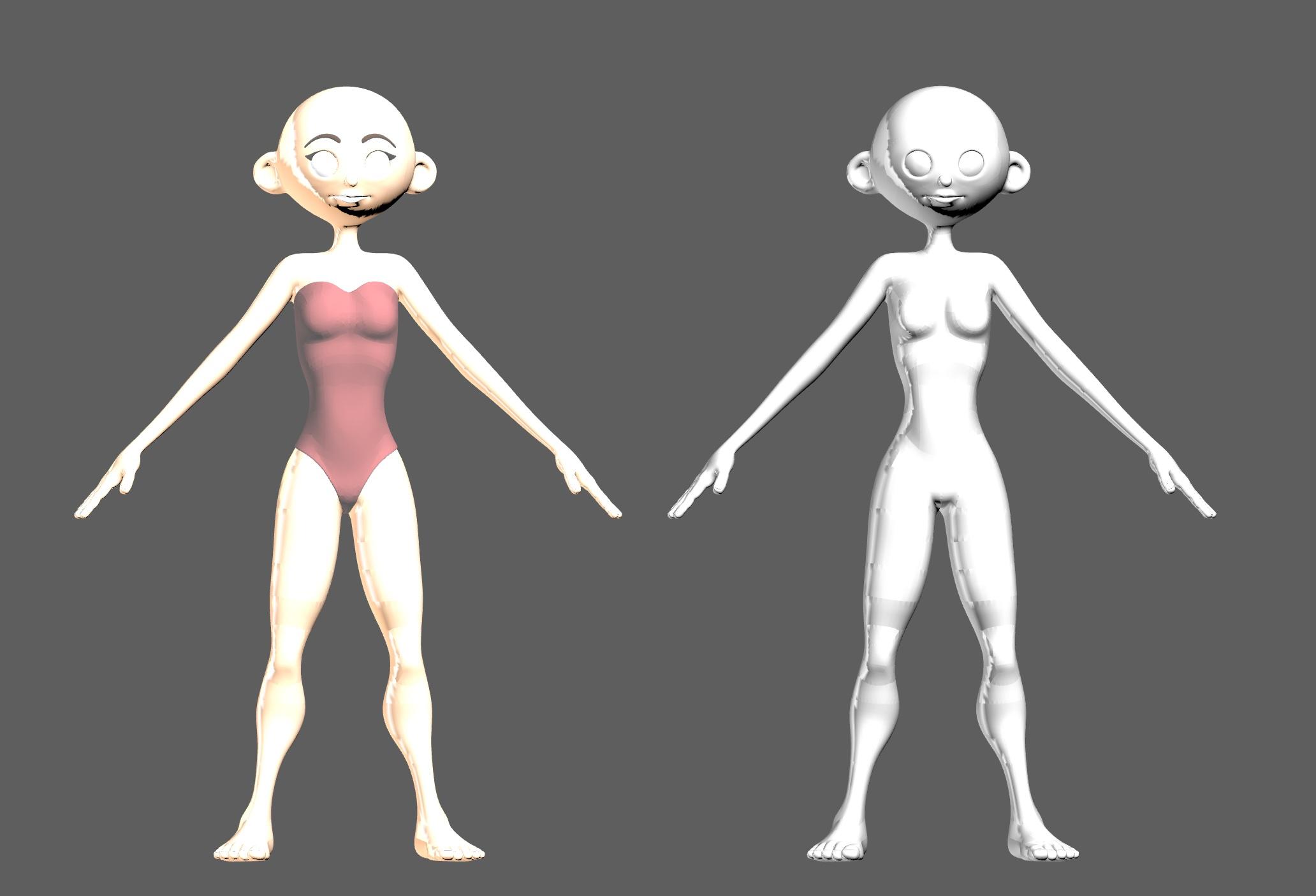
As mentioned, since I'm just making a basic bodysuit, I select the actual character and delete it.
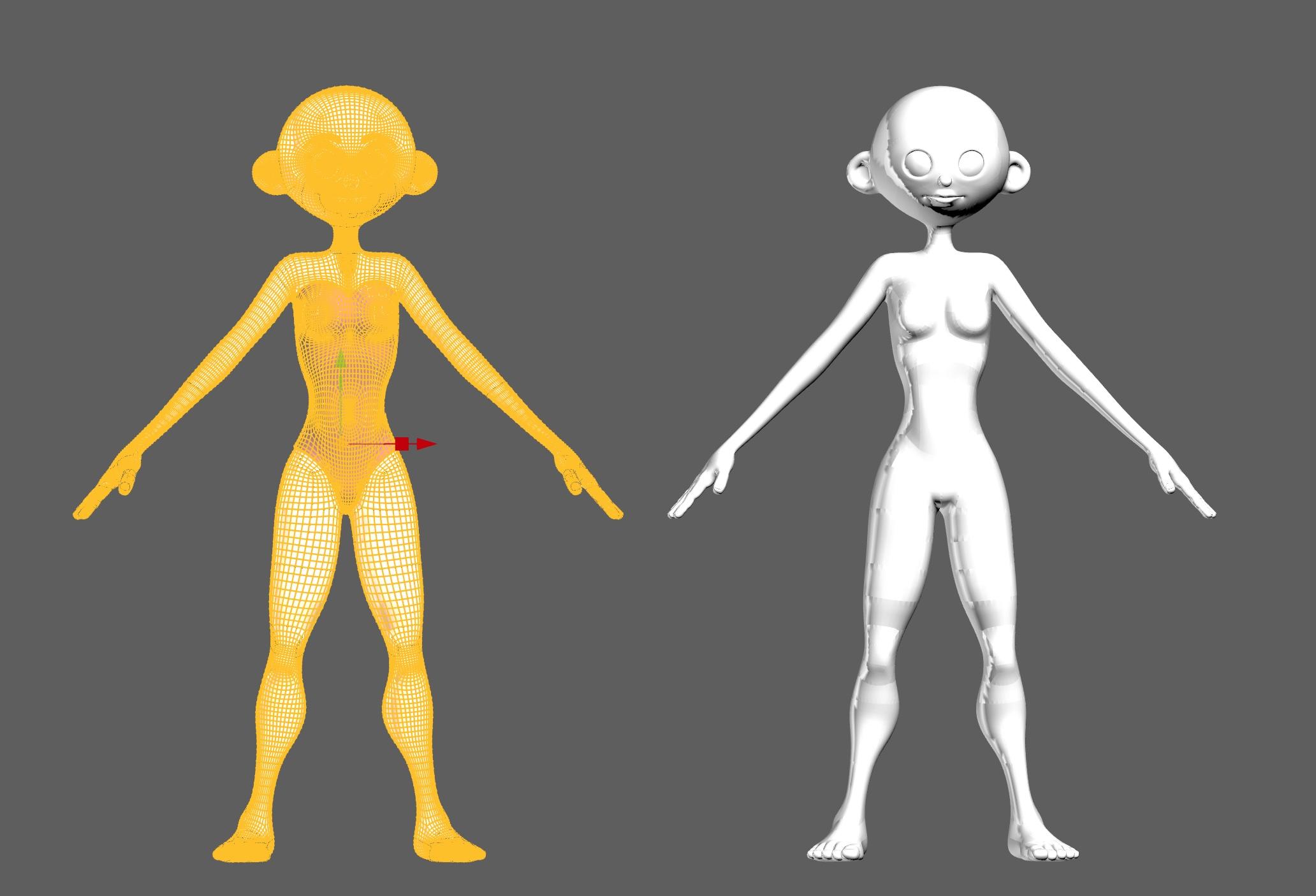
Once we have just the geoshell, I select and cut any parts I don't want, like the head, hands and feet. At this point, if you just want a shirt or pants, you can delete everything that's not part of the clothing you want. Here is where you can also edit your clothing to punch it up with details like trims, piping, seams, wrinkles, etc. As well, you can select parts of the clothing to create new shader or texture zones. When we're done, export the clothing as an .obj or .fbx file, whichever format you exported from DAZ Studio.
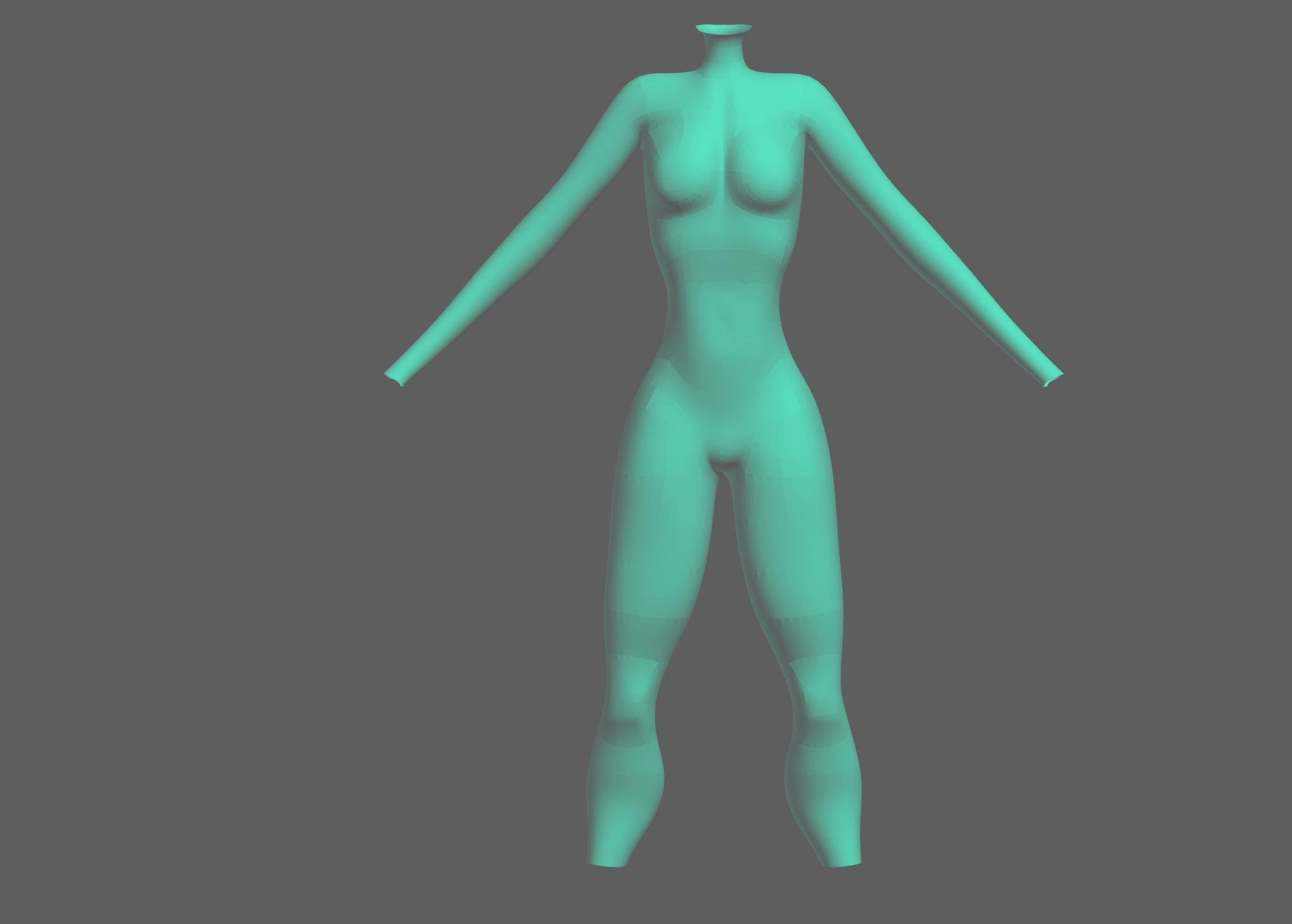
Back in DAZ Studio, delete the geoshell and move the base female back to the zero point.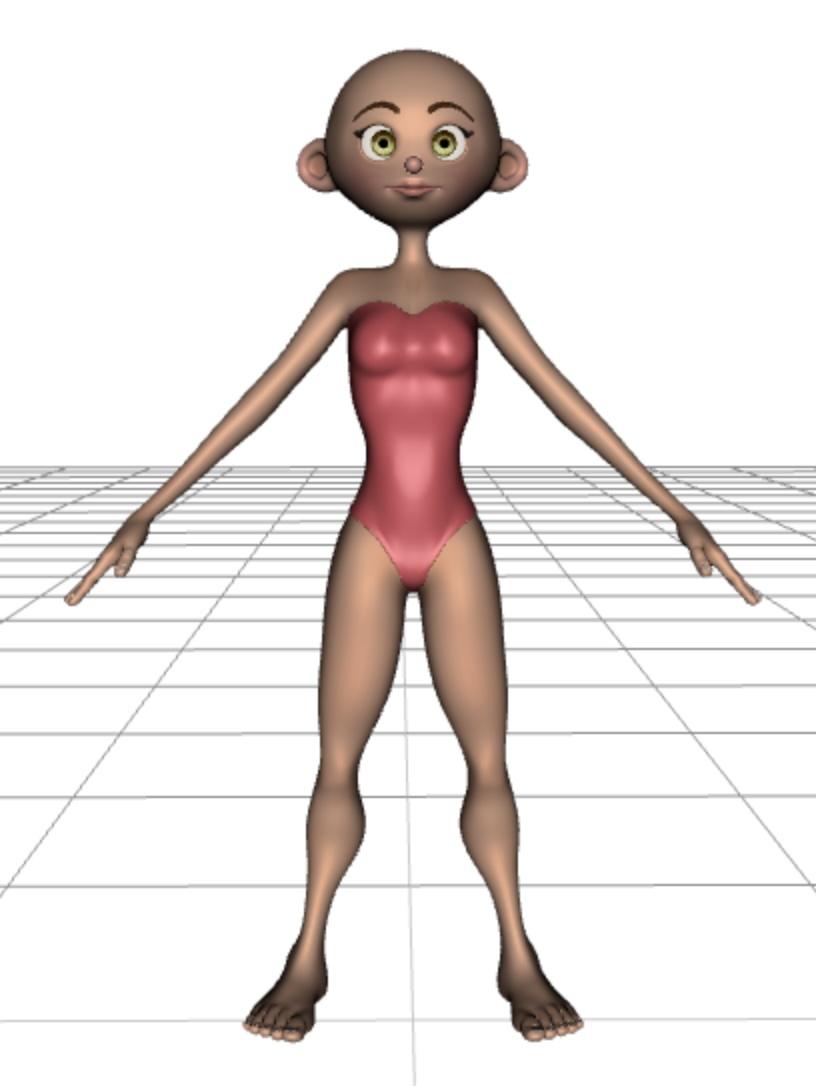
Import the edited clothing file using the same settings you used to export the file originally (e.g. 1 in = 1 cm)
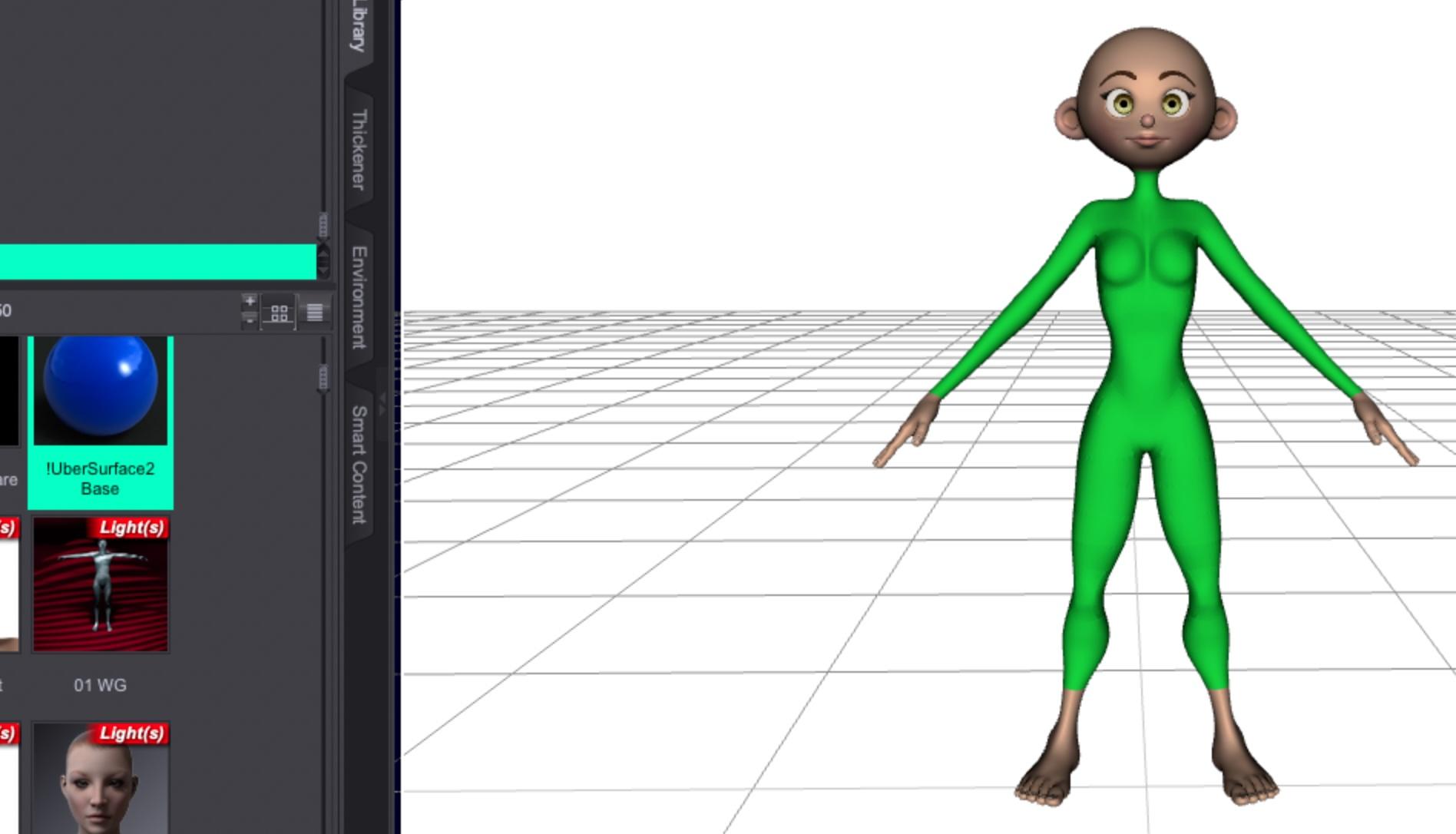
Once you've imported it, select the bodysuit and apply the DAZ Ubershader to it to make it view and render properly.
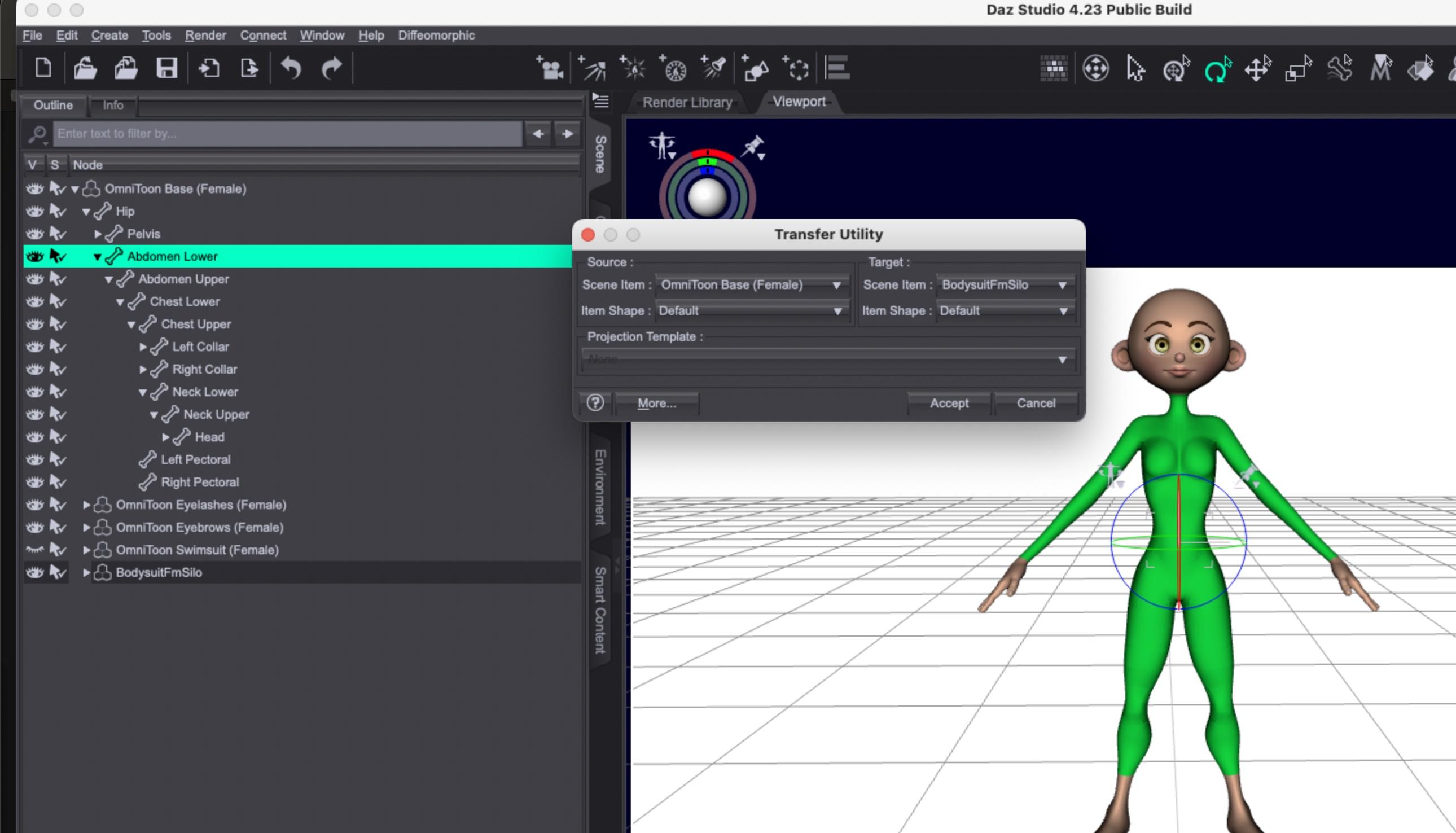
Using the Object Transfer Utility under the "Edit" menu, you can select the Omnitoon character and the bodysuit and transfer the rigging info.
If you find you run into any issues with body poke-through, you can experiment with adding a smoothing modifier.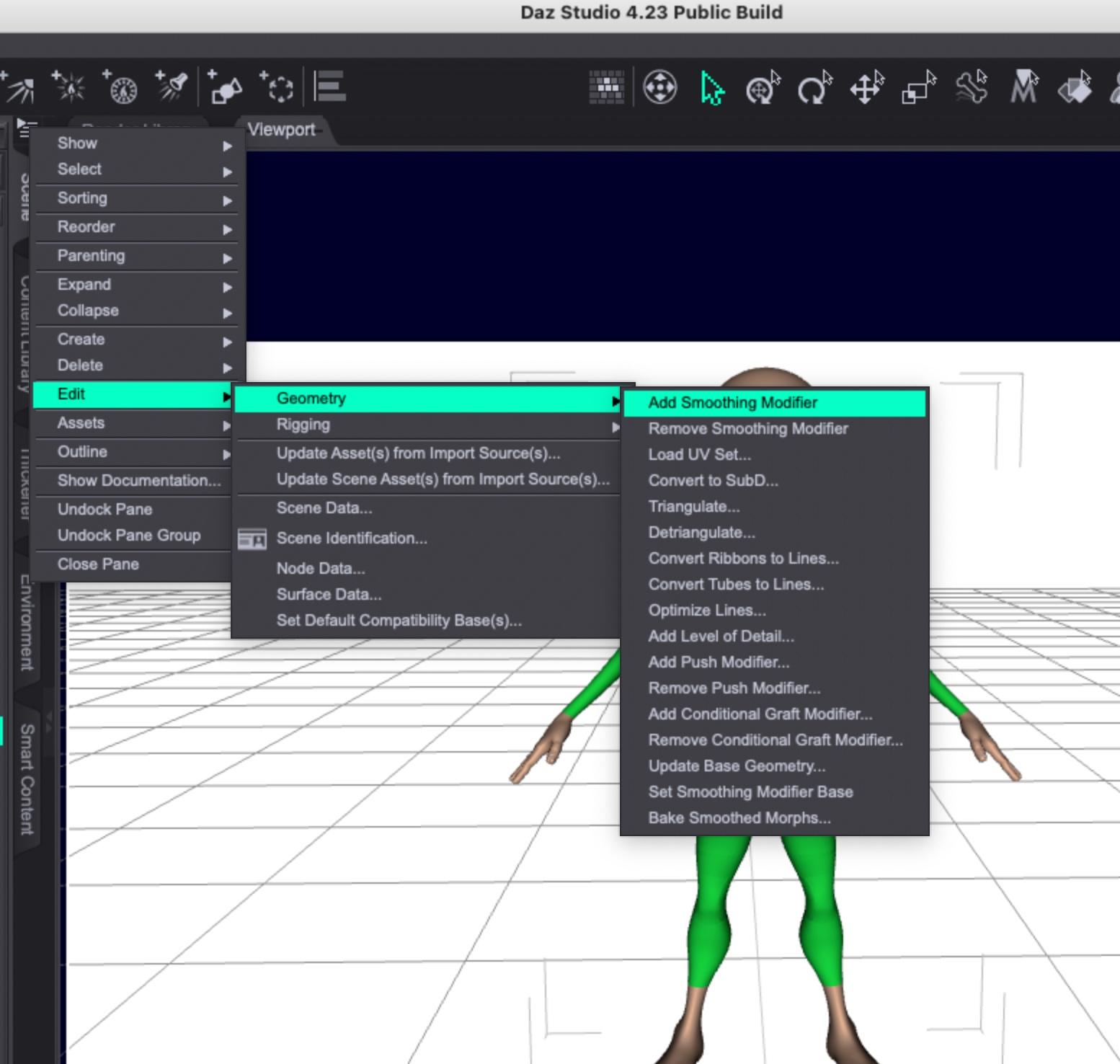
Once you've used the transfer utility, you should be able to apply morphs to the Omnitoon and the bodysuit should match it. Some very extreme morphs might require smoothing or, easier in some instances, hiding the body part poking through the clothing.
Here's the Young morph applied:
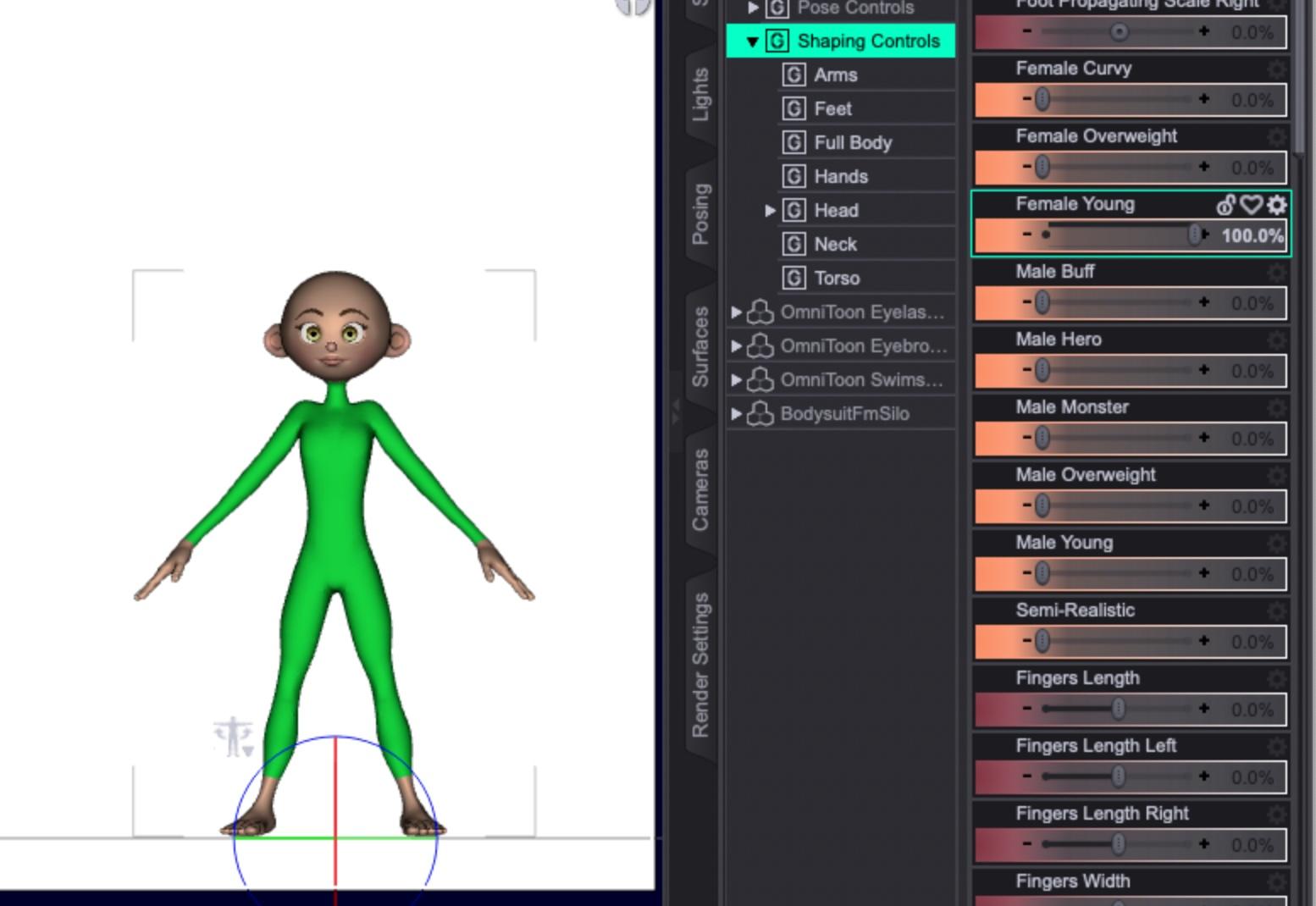
Curvy:
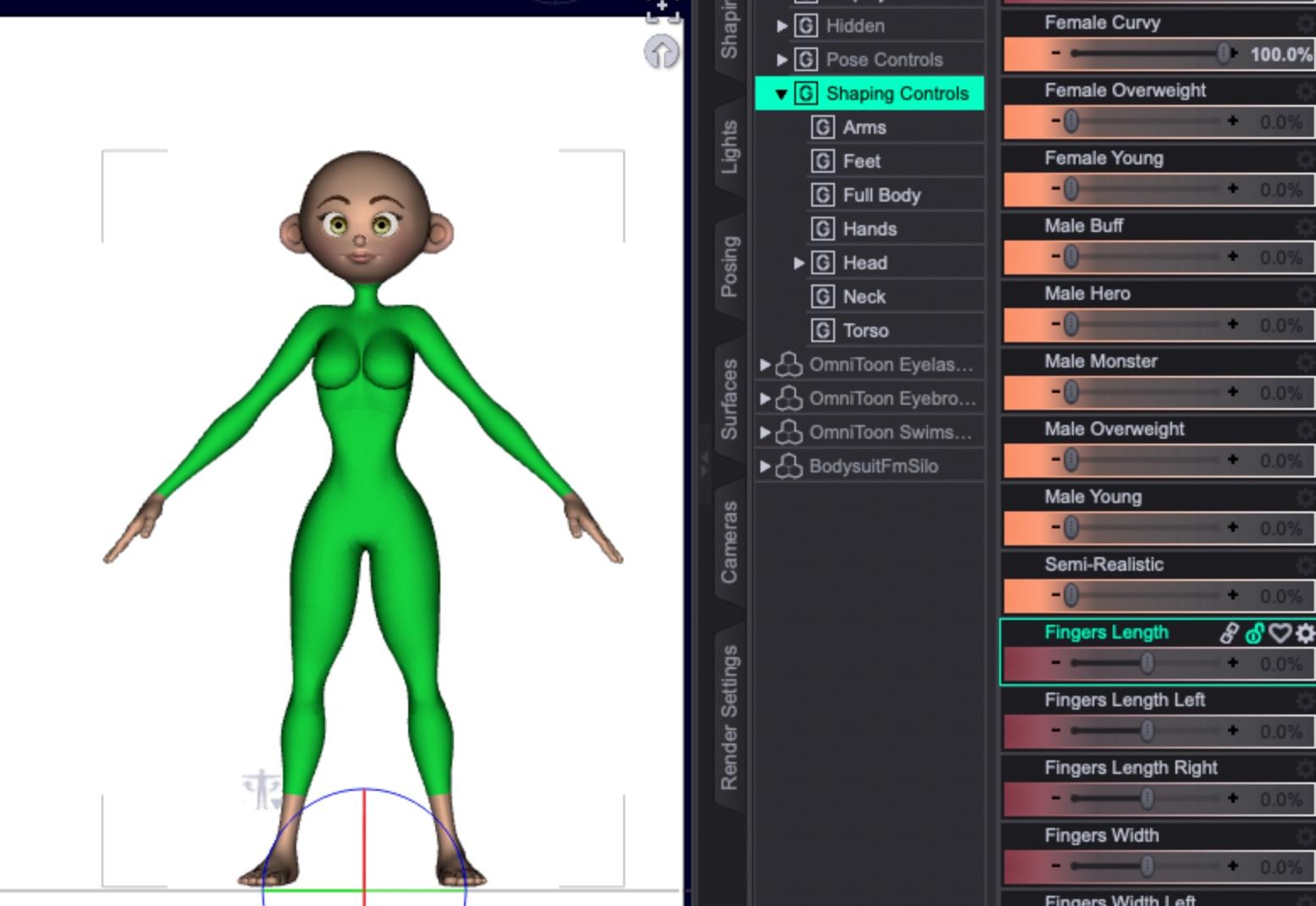
Overweight:
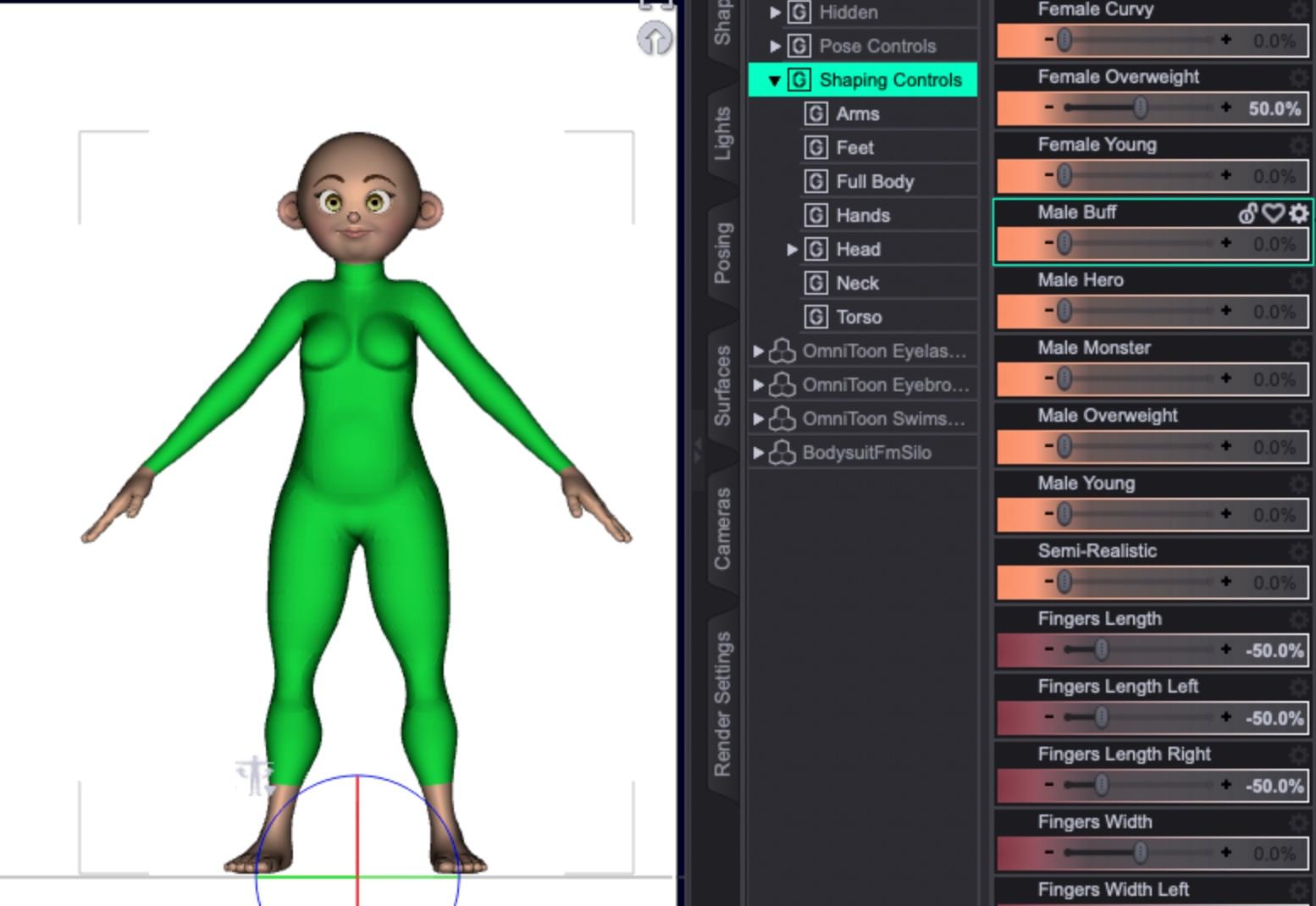
And semi-realistic, to try out a few.
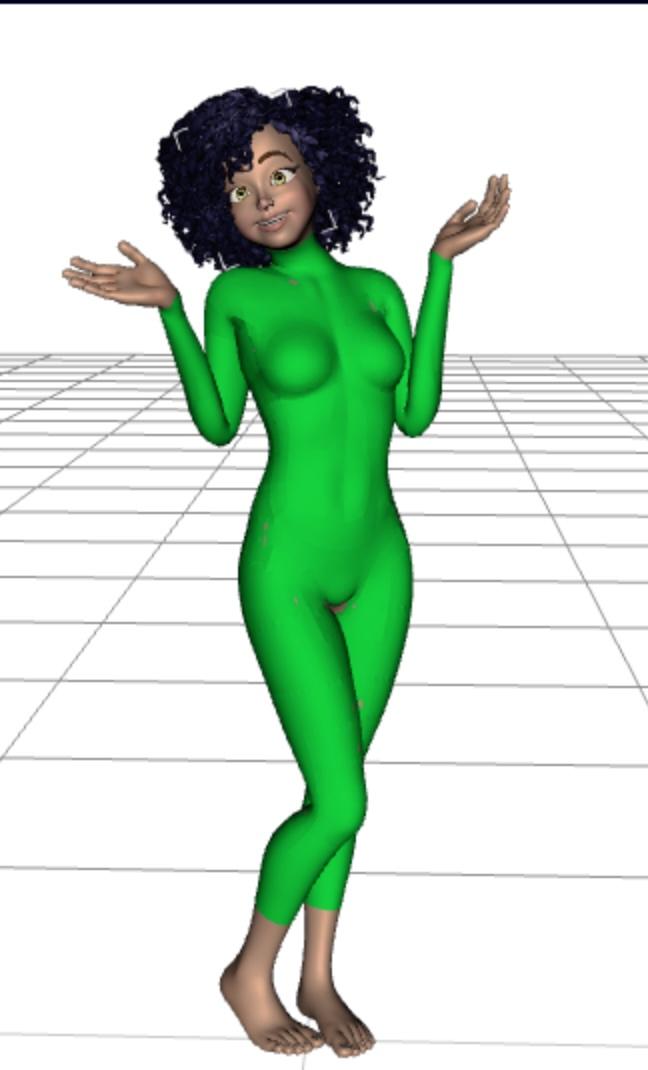
If I'm allowed to distribute the model without re-rigging, you can get close results using Genesis 8 poses:
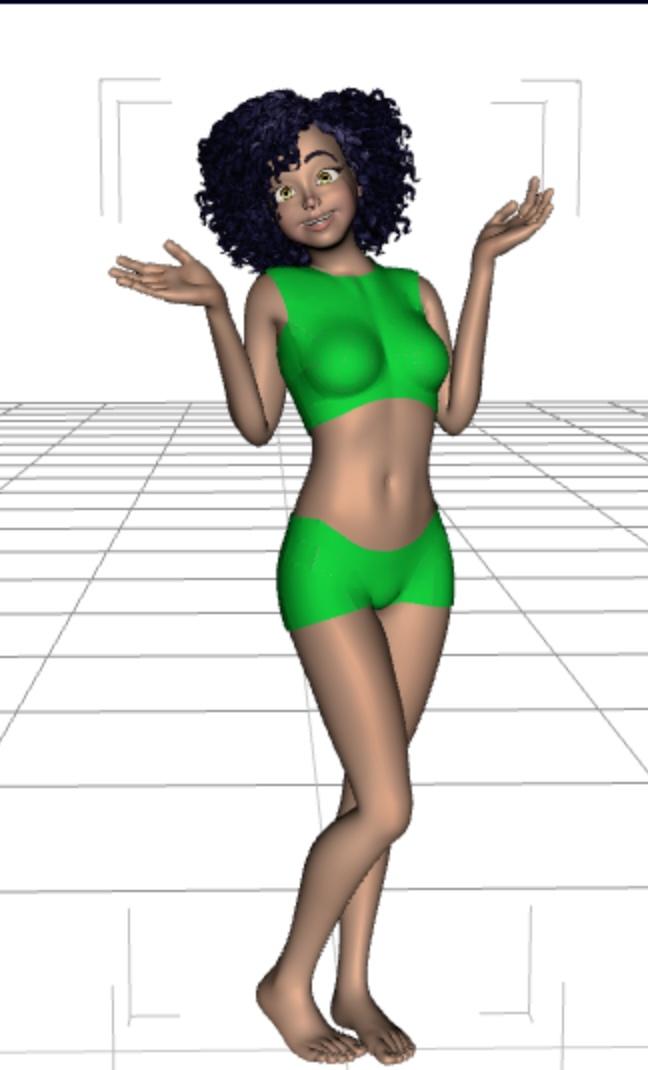
And if you just need some quickie custom clothing, you can just hide parts of the bodysuit:
 Let's appreciate/discuss today's new releases - more ongoinger thread
So here’s the Holy Family wardrobe with some different actors:
- Mary is D.E.M Rima with HS HoneyHeart Hair and a chest smoother morph (hard to tell with the shiny cloth glare)
- Joseph is Edan for Dasan 8 with the same M3D Victorian Hair that seems to be used on Walter in the promo; I’ve applied some aging morphs (I don’t remember which package exactly) and V3D Wet and Tanned Skins to get Edan’s skin tone close to Rima’s
- Baby Jesus is Baby Sam wearing Samuru’s skin from Small World for Caryn and Tobyn
- The poses are from Mix-n-Match Nativity Poses (with adjustments)
 Ethin's Art and ... stuff.
Redfern said:
Ethin said:
Low effort "M'Ress" scene.
Yeah, something akin to that. Well, I have my own custom head morph I'd use, but yeah, something similar.
... However my aesthetic might not be the best for Trek art. lol
The Sky is Falling Complaint ThreadNon-complaint: This week's mini-adventure is a trip to the laundromat tomorrow. Morning bus to laundromat, then deposit laundry into washers, then breakfast at Burger King. Then back to laundry to transfer wet stuff into dryers, then a visit to the CVS drugstore to snarf up some cheap post-Easter chocolate bunnies(or whatever's left), then a toddle to the grocery store for the last things on my grocery list, and then back to the laundry to fold clothes and call an Uber to go home. All within a one block radius. Wheee..., an easy and uncomplicated, and immensely satisfying mini-adventure.
After that, no scheduled doctor appointments or other necessary trips for three weeks. And then a trip to the dentist in mid May. Perhaps I can save a little money this month.
 Ethin's Art and ... stuff.
Ethin said:
Low effort "M'Ress" scene.
Yeah, something akin to that. Well, I have my own custom head morph I'd use, but yeah, something similar.
SOLVED - Carrara Not Loading getting MCX errorssearching for mine, I see you too have been here before
https://www.daz3d.com/forums/discussion/369756/problems-installing-plugins-vwd-bridge-hd-morph-gmic
the identifier was the problem with the Sparrowharke and Philemo plugins for me, cannot find my thread
A little help please.https://www.daz3d.com/gurumarra-the-australian-aboriginal
The product page doesn't mention an FBX file being included, and I can't think of a single character for DS that includes an FBX (though there are some Daz characters available in the store as FBX models). Sometimes environments include an OBJ, but generally speaking, content in the Daz store is made for use within DS. You can look at the Compatible Software listed on the product page, and sometimes that will list other programs (e.g. Blender, Maya, etc.), which means that the purchase includes native file formats for those; otherwise, if it just lists "Daz to ____ Bridge", as this product does, then you'll need to open it in DS and either export as FBX or use the free Daz to Unreal bridge to transfer it to Unreal.
tl;dr - yes, you'll need to export from DS first.
Hooking up a morph to a Bend rotation@ Richard .... hmmm, the bend under the Scruff's Head area is zeroed out so not sure if dragging the fix morph to that will do anything.
@ Barbult .... Yes, same sort of thing!
Hooking up a morph to a Bend rotationIs this technique something different than creating a hidden corrective morph for clothing when a character's bone bends?
Daz 3D is part of

Connect
DAZ Productions, Inc.
7533 S Center View Ct #4664
West Jordan, UT 84084Licensing Agreement | Terms of Service | Privacy Policy | EULA
© 2026 Daz Productions Inc. All Rights Reserved.