-
Question... what am I doing wrong? (Genesis 8 male Quinton character)
Well, I've downloaded your scene and tried it, and the issue really and truly is just that you don't have enough light in the scene. The question is, how much light do you need for the effect you're going for. Do you want a dimly lit night time scene? Is it meant to be sunset/sunrise? Full daylight?
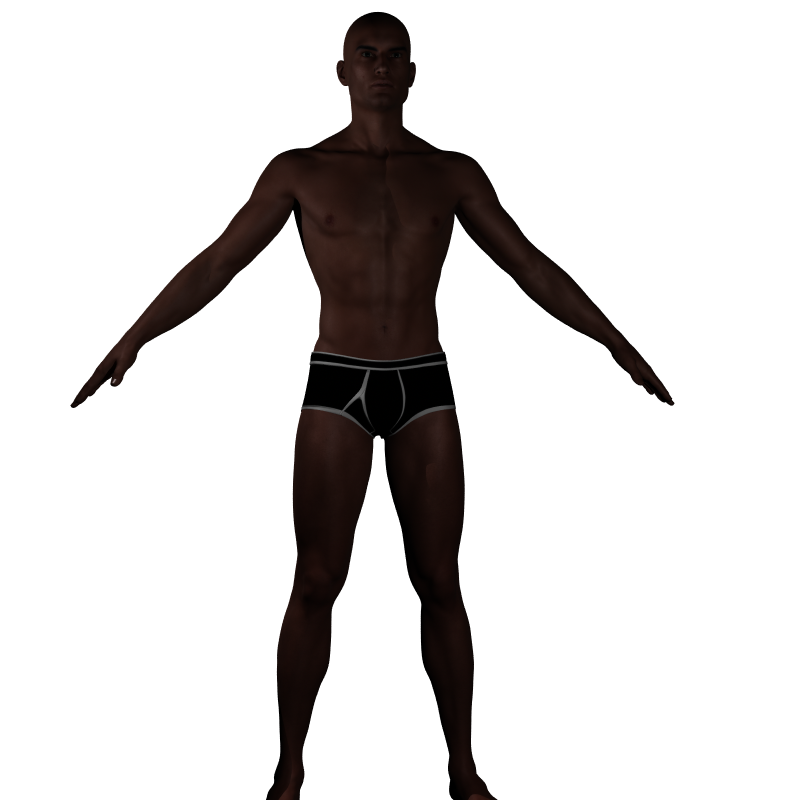
Below are three renders. The top render shows the results of the scene exactly as you posted it. The only change I made was to put Quentin's texture and morph on G8M.
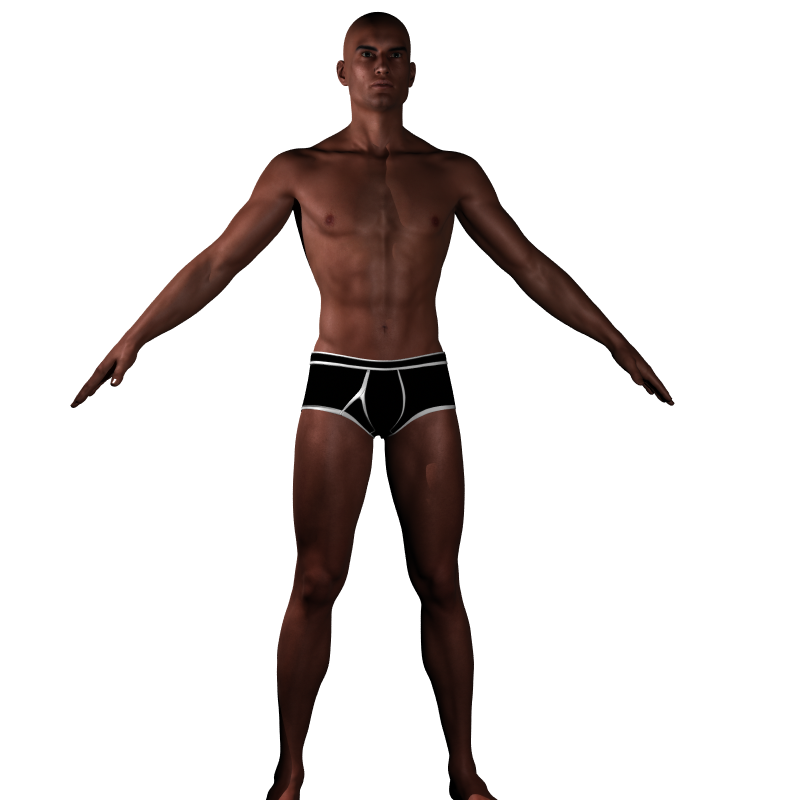
Second image is your scene, but with the intensity of the lights at 200%, intensity scale at 1. It's still pretty dim, but you can actually see him much better.
Third image is with light intensity still at 200%, and intensity scale at 2.
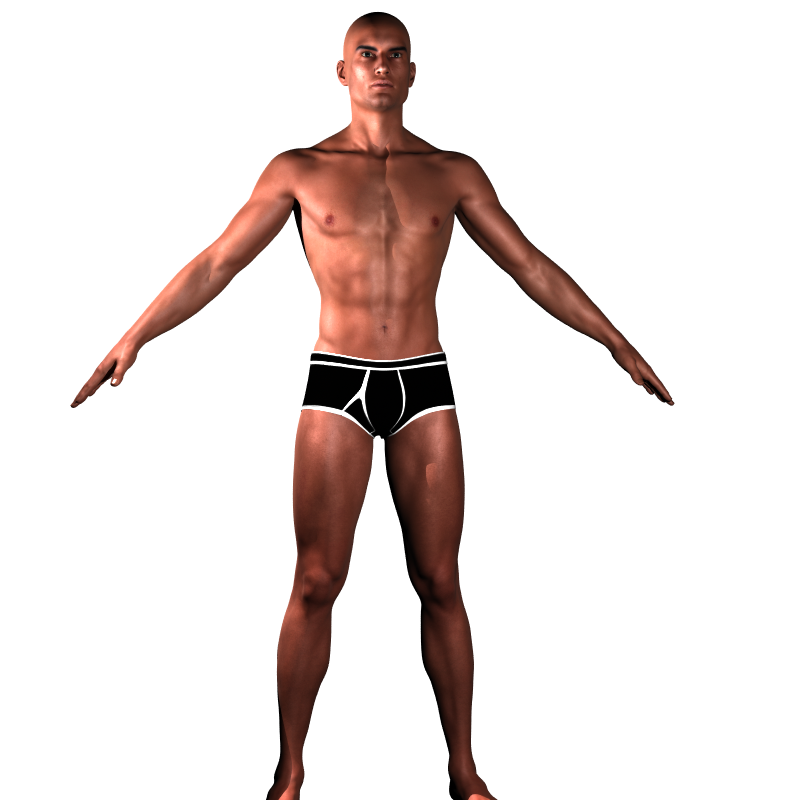
I didn't do anything to your scene lights other than change the intensity and scale. They're still in the same locations.
Depending on what exactly it is you're trying to accomplish, I might recommend aiming a spotlight at him, and then using a linear point as fill on his face, if needed. Or using an Advanced Ambient light, if you have that, to provide some global lighting. You just need something more in the scene than you have.
Need some help Baking my Squirrelmy rigged LAMH never goes well as I get stretched vertices
I understand what you are doing but it needs to be done on a zeroed figure not the load figure and you will get the stretched vertex issue
same as any DAZ figure conforming clothing with the transfer utility
I have done plenty critters with rigged fur myself but pretty much given up because of that issue
your cat looks cute
 Need some help Baking my Squirrel
I've been having really great luck converting & exporting via FBX furred, LAMH animals until I tried this older one with the European Grey Squirrel, or rather the Rodent Polymorph. The end result is the base figure isn't fitting to the fur items. Its some sort of morph or transformation issue though that just isn't getting baked, in that the result is the base rodent & not the breed initially selected. Figure is zero posed with the exception of the Jaw opened 1/2 range. OBJ export works fine in retaining the shape.
Here's a screen grab: OBJ in black wires, the FBX result in White.
It's not just a scaling factor; there are subtle morphs to a given breed as well. I'm not exporting any morphs though (can't use them), only baking. Wish I could use the OBJ but they have no weight map info as the FBX does.
In DS, I've tried every combo of selecting, baking, memorizing, etc. but doesn't seen to have any affect in this case as it has before. Not having proper docs for the process of course certainly doesn't help so flaying around with with trial & error.
Hoping someone might know what I'm missing here.
You might test it on the Daz poser squirrel if you have it. it already has included ik-chains too boot https://www.daz3d.com/daz-squirrel and see if you get the same issue. you might be able to trouble shoot the problem anyway. I haven't used any AM rodents for my animated projects. I bought one set & they do make nice renders in daz studio. but that all I can use it for . it didnt carry over into poser with DSON very well But posers all I ever tried using them in too so thats the extent of my exprience with AM rodents
I would join you in complaining about lack of documents for daz studio but it appears now when I do it gets my comments removed.
No, I don't have theDaz Squirrel. I might take a look, but what this is largely about is taking the figure + LAMH fur into a form that the fur responds to bone deformation. Don't think it has a preset.
And ya, I've severely reduced my forum participation for same reasons.
Are "HD" models exportable to Character Creator 3?I am only on iClone 7 etc but the way I do it with creatures at least (humans far harder) is do an obj export and reimport, delete parts with geometry editor and create skin outfit I conform, using the transfer utility then move eyes and mouth parts and use the rigging tool rightclick bake rotations.
So, in iClone7 you can import non-standar meshes and rig them in the application? I don't have iClone because I'm not doing animation, but I do use CC3 sometimes and it wants the vertices to be standard for any human it imports. I was kind of wondering if the HD system in Daz actually replaced the standard G8 mesh with one that had more polys, or if it was a kind of clone laid over the standard mesh like a suit. Then if the original mesh were invisible, the HD 'suit' could basically follow it around, but not break any rules for figure geometry, since it wouldn't actually be a figure. I came across a blog post about exporting figures from Daz, sculpting them in Blender and sending them back to Daz, but in it the guy just adds a subdivision modifier to sculpt in higher resolution, then removes it before sending it back to Daz. So, I guess from this, Daz definitely wants vertices to be in the right order and the right count, which makes me wonder how HD meshes work.
any idea how to remove this from her upper abdomen?It looks like it could be a morph to fit certain clothing. Did you look at the current parameters tab with 'show hidden properties' checked? Whatever it is should show up there.any idea how to remove this from her upper abdomen?Am working again with a G8F figure I did some time back and not sure what selection body morph change I did before but I see she has this like skin crease on her upper adbomen below her chest (see pic) . I forgot how I did it to begin with but it wasn't intentional, so any idea what simple morph adjust would remove it just so it looks like regular undisturbed skin? I've played around with the body changing morphs but with no luck so far.
Does DAZ Studio recognize edited Normals?Hi all, total noob to DAZ Studio, so please forgive me. Asking this question for a friend.

The goal: Import geometry into...that smoothie app that starts with a 'B' and use one of two Modifiers (Normal Edit or Data Transfer), then export using any of the three file format options that DAZ allows to import, and hope the edited Normals are not recalculated upon import.
I can do this in Carrara by exporting my edited Normals geometry as an OBJ, then importing into Carrara and, from the WaveFront OBJ import dialog box, selecting 'Facet Meshes'.
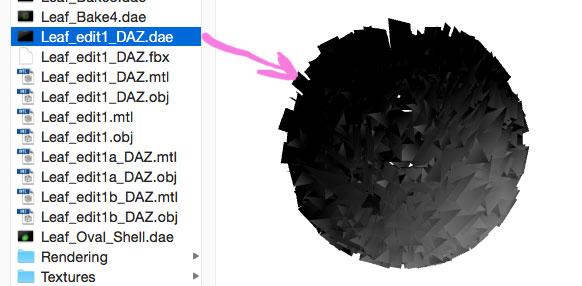
I see no such option in DAZ Studio when importing an OBJ file, even after clicking 'Show Individual Settings'.Curiously, the screen display of the geometry as a DAE file in the file browser looks like it is displaying the edited Normals, yet upon import into DAZ...no dice.
There are many uses for this that go way over my head, but one use is to create a stylized look and uniformity of edited normals for foliage. This is used a lot in video games (another area I have no knowledge unless we're talking 80's / 90's arcade games...)
Here are some pictures which I hope can clarify.
These first two are renders from Carrara: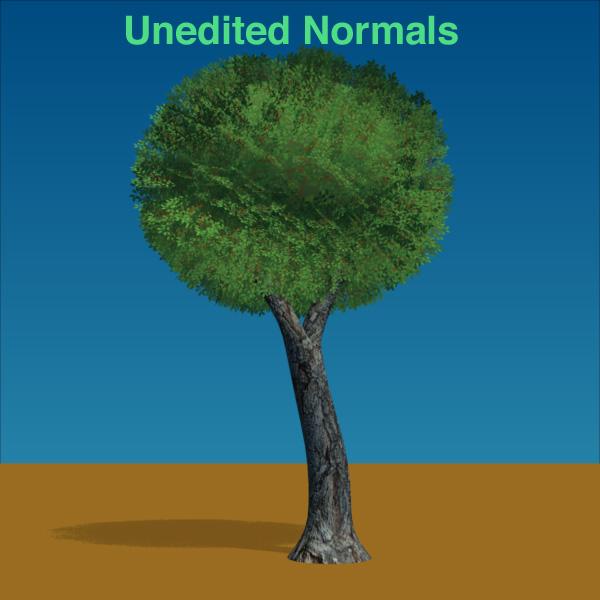
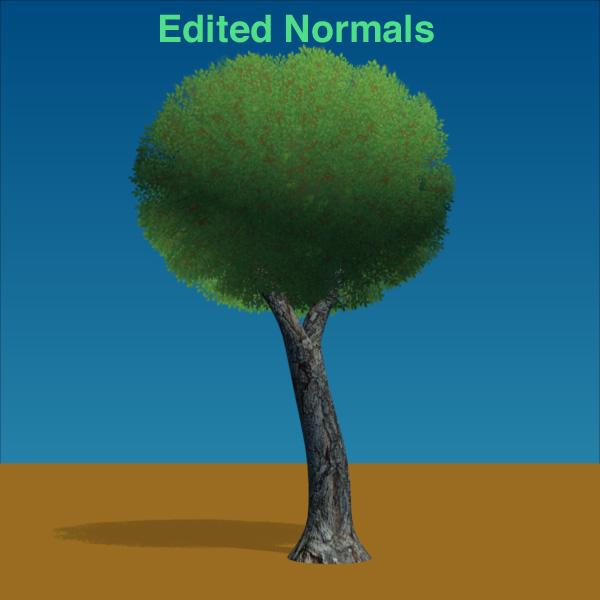
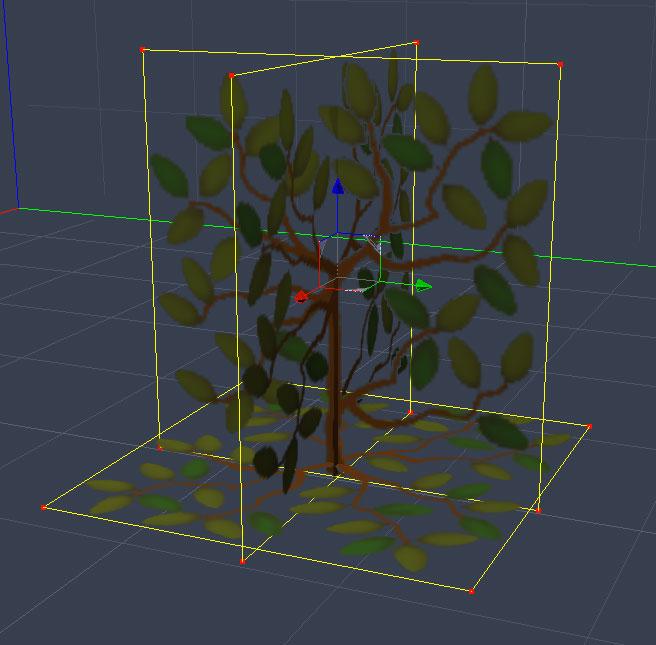
Here is the 'Leaf' object:
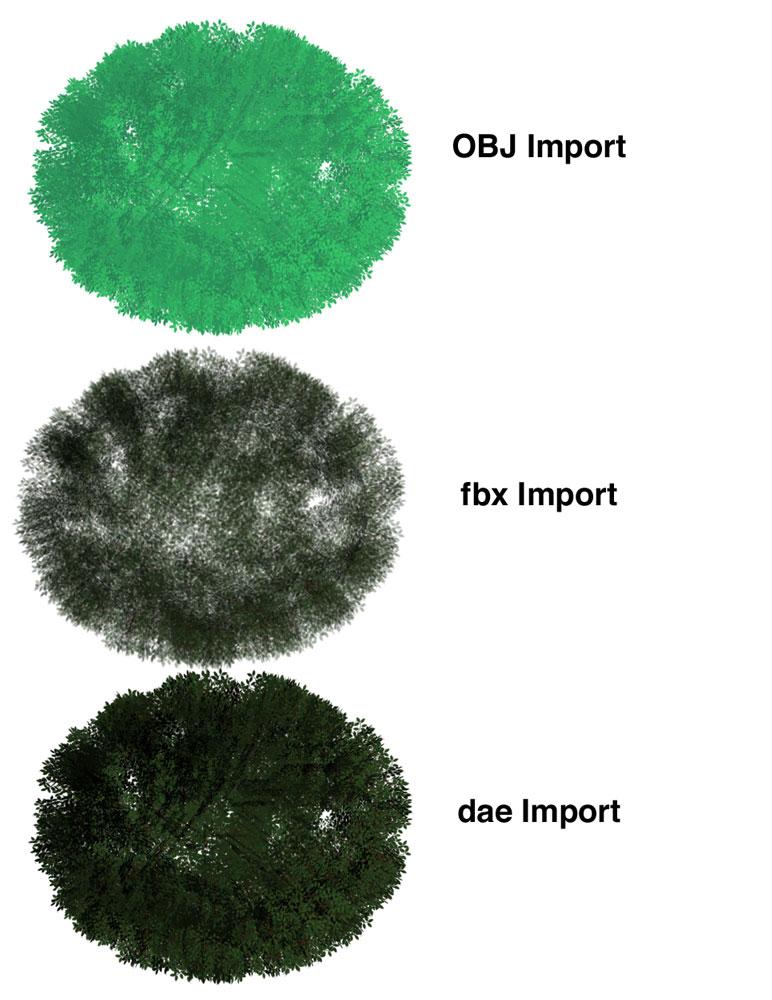
Here are my imports into DAZ Studio...I don't think it recognizes edited Normals...
Screen shot of file browser from computer...looks like edited Normals still
Screen grab of unedited Normals in 'B'
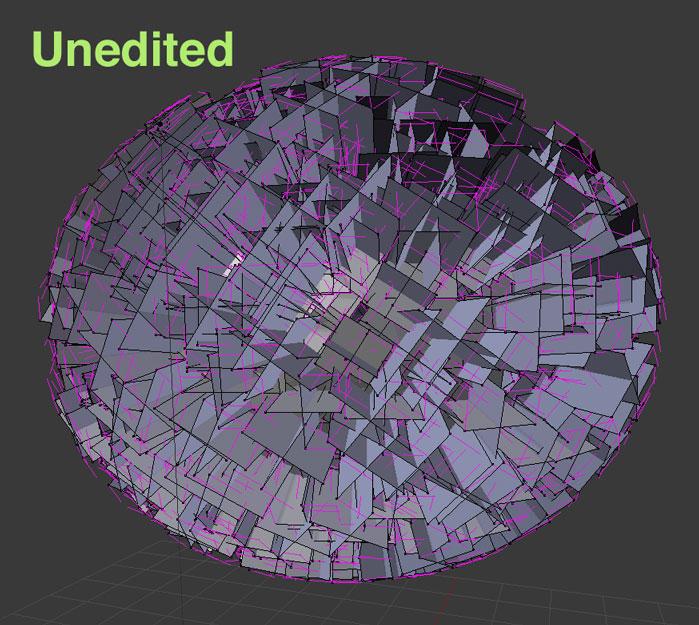
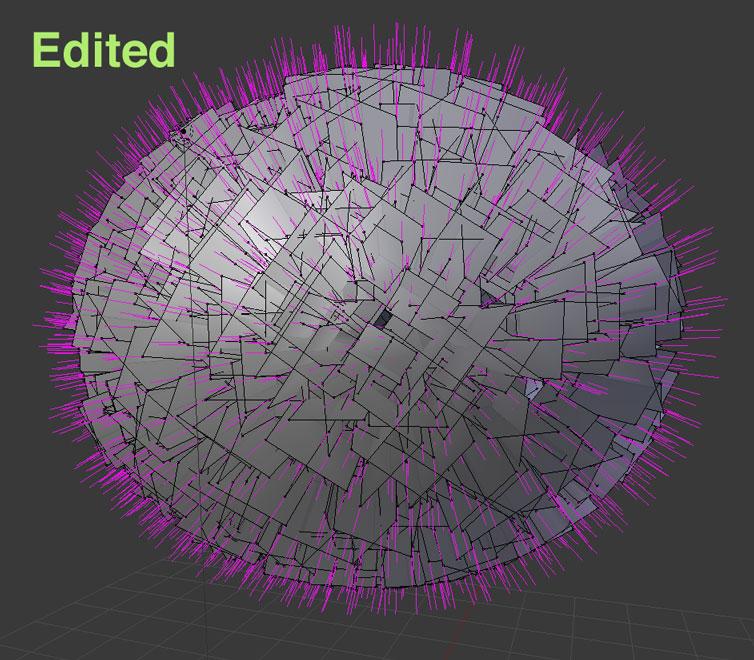
After applying Data Transfer Modifier, using an enlongated sphere. You can see the Normals popping out as if they were part of the same sphere.
 Are "HD" models exportable to Character Creator 3?
I am only on
sorry typo
iClone 6 pipeline
but the way I do it with creatures at least (humans far harder) is do an obj export and reimport, delete parts with geometry editor and create skin outfit I conform, using the transfer utility then move eyes and mouth parts and use the rigging tool rightclick bake rotations.
Are "HD" models exportable to Character Creator 3?The HD morph isn't exportable, but I'm sure you can export the HD geometry (the result of the morph).
Where is Genesis 8?Thanks for the input. It looks more and more like a one-way pipeline from Daz to Blender is what I need. I'm pretty sure this will mean having to rebuild the rigging in Blender, and maybe some other issues, but I'm seeing quite a few bits of funkiness in Daz, and it would be insane to render there, especially NPR stuff, which is what I'm after. It will probably take a while to work out a reasonable workflow, but the upside of a one-way flow is that I can resculpt meshes to my heart's content in Blender and not have to worry about the mysteries of Daz' morph targets- if there even are such things? Are all the characters basically hand sculpted?
Are "HD" models exportable to Character Creator 3?Are "HD" models exportable to Character Creator 3?
I see that some characters come with HD add-ons, but I know that some other software is finicky about having the standard vertex count and vertex order in order to preserve compatibility with their rigs and morph sliders. CC3 is supposed to be Daz-friendly, but can it use HD models? (I'll try to ask over at Reallusion, but they are very slow to respond).
Character / Clothing creation tutorials for using Blender 2.8 with Daz StudioAnd of course once you really Start deep diving Blender you may find it a
better environment for scene setup and rendering as Daz has been very generous
with their free export optionsThat is what I was thinking. Blender seems to touch upon many areas of 3D Art. Even my sons use it to animate 5 Nights At Freddy's figures. Also Blender came up when I was looking into Z-Brush for sculpting, so it seems like the program does quite a bit and it is a serious contender. And one of the best parts is that it is free!
I was speaking more of pinning a broach on a blouse and such things. Rigid buttons and buckles and such aren't exactly strong points on DAZ Studio products that I've purchased.
This is a pet peeve I have with many Daz Studio products...particularly earrings. Sometimes something that is supposed to be rigidly round and you know it to be round, ends up totally distorted. The same is true of rings and other pieces of clothing which might look fine in the static T or A pose, but just try and twist the body and the round ring becomes a parallogram! So creating a rigid item in Blender transfers over better to Daz Studio?
You can import hard surfaces as either 'avatar' or 'trim'.
'Avatar' will interact with your simulated cloth i.e., collide with it, but it wont follow your cloth. So you have to strategise around that limitation.
'Trim's will follow your cloth but will not interact with it*.
*Trims can be assigned a specific weight in grams, so they will pinch,pull, and drag down your garment accordingly. But they will have no physical geometry, they will just be a point weight.
Ok, this I don't know anything about.
So in all, being that I am mostly dealing with static pictures, I would be best off to start with Blender? So say if I create a skirt, I could create manual morph sliders for parts of it so I could adjust it for say a seated position or walking? If so, I am good with that.
I have seen some products in Daz that just alter a garments position. So I am wondering if I would take a skirt that doesn't have many options, bring it over to Blender and then add some more morph dials so it could better fit a character? Is it also possible to fix the armpit and crotch stretching issues when trying to use Gen 2 and 3 clothing on Genesis 8?
Could I create a complete outfit from scratch?
If that is a Yes, then it does look like Blender would be the road I will be heading down.
Thanks,
Geo
Yes, autofit has problems that DAZ 3D should add a parameter or two to their models capabilities such as to keep rigit objects rigid. I'd really like DAZ Studio to get to the point that it can animate as easy and dForce as easy as Blender but if they don't then at least the products I've bought/licensed are exportable to SW that can. As my licensed models from DAZ are must easily storyboarded in DAZ it makes sense to use DAZ so I wait. I'm not in a hurry either way.
HowieFarkes has done wonders for making DAZ Studio more usuable for nice storyboards.
Character / Clothing creation tutorials for using Blender 2.8 with Daz StudioAnd of course once you really Start deep diving Blender you may find it a
better environment for scene setup and rendering as Daz has been very generous
with their free export optionsThat is what I was thinking. Blender seems to touch upon many areas of 3D Art. Even my sons use it to animate 5 Nights At Freddy's figures. Also Blender came up when I was looking into Z-Brush for sculpting, so it seems like the program does quite a bit and it is a serious contender. And one of the best parts is that it is free!
I was speaking more of pinning a broach on a blouse and such things. Rigid buttons and buckles and such aren't exactly strong points on DAZ Studio products that I've purchased.
This is a pet peeve I have with many Daz Studio products...particularly earrings. Sometimes something that is supposed to be rigidly round and you know it to be round, ends up totally distorted. The same is true of rings and other pieces of clothing which might look fine in the static T or A pose, but just try and twist the body and the round ring becomes a parallogram! So creating a rigid item in Blender transfers over better to Daz Studio?
You can import hard surfaces as either 'avatar' or 'trim'.
'Avatar' will interact with your simulated cloth i.e., collide with it, but it wont follow your cloth. So you have to strategise around that limitation.
'Trim's will follow your cloth but will not interact with it*.
*Trims can be assigned a specific weight in grams, so they will pinch,pull, and drag down your garment accordingly. But they will have no physical geometry, they will just be a point weight.
Ok, this I don't know anything about.
So in all, being that I am mostly dealing with static pictures, I would be best off to start with Blender? So say if I create a skirt, I could create manual morph sliders for parts of it so I could adjust it for say a seated position or walking? If so, I am good with that.
I have seen some products in Daz that just alter a garments position. So I am wondering if I would take a skirt that doesn't have many options, bring it over to Blender and then add some more morph dials so it could better fit a character? Is it also possible to fix the armpit and crotch stretching issues when trying to use Gen 2 and 3 clothing on Genesis 8?
Could I create a complete outfit from scratch?
If that is a Yes, then it does look like Blender would be the road I will be heading down.
Thanks,
Geo
Bug Report: Animators Beware, DS 4.12.1.117 deletes values keyframes en masseYeah, there doesn't seem to be much urgency on Daz's part to fix this. Which is kind of surprising to me, since we're talking about actual *data loss* here. Bugs don't get more serious than that.
This is what it looks like to me. There seems to be a bit of "shiny new thing" mentality. I'm all for shiny new things, but I like to see existing features maintained and improved, too. dForce and Iray are features that seem to be continually updated. Others seem to languish after release.
- We got Daz Connect. Bugs I reported have never been fixed. I gave up and returned to DIM.
- We got Strand Based Hair but no new features have been added and I haven't seen any bug fixes for it in a long long time.
- We got Face Transfer, but it has only basic capabilities and does not seem to be getting any improvements either.
- Now we have the "new" timeline, which is buggy. The change log hasn't shown any work on it in recent weeks. And Keymate and Graphmate, which work pretty well, were removed from the store.
- We got Daz Central. During the beta phase, people complained loudly about big problems. They weren't fixed, but the software was released with big fanfare.
It gets frustrating, but we have no visibility to the Daz Studio roadmap or Daz3D company priorities.
What's the Difference Between Characters Based on Genesis 8 and Victoria 8?Characters "for V8" use the Victoria 8 morph as part of the morph mix to create the shape of the character.
They will work without V8 (you'll get a warning when applying the character) but will look different. How different depends on what percentage of the V8 shape they use.
What's the Difference Between Characters Based on Genesis 8 and Victoria 8?If you mean the "Key advancements with the Genesis 8-based Victoria 8" on her product page, those are features of Genesis 8. The same blurb is present on all core figures based on G8.
Perfect- thanks much. Is there something about Victoria 8 that is carried over into the characters that are listed as using V8 as a base, or is it just a different way of saying 'Genesis 8'? That is, will a character morph that lists V8 work on the regular G8 base?
Creating a created character as a dialable morph.Thanks for that link, BTW. It certainly is a lot simpler than trying to do it from the Morph Loader.
Geo
Glad it helped. Until the day that the scrooges at DAZ finally relent and give us a full, comprehensive manual for DAZ Studio, we've all got to do what we can... :)
Yes, it did! I just forgot to change the colors of the dials so I know it is my setting, so I had to go back and resave the morphs because just setting the colors will not help alone. Any changes disappear unless they are saved. As for the manual...well, right here...the forum is my manual! If I don't know something, the chances are good that someone here does!
You should be able to set up a morph control slider that will dial in all the morphs you've added. Try this tutorial: http://www.digi-dotz.com/index.php/tutorials/daz-studio-tutorials/193-create-single-dial-morph-control-in-daz-studio-4-9
I tried this out and after a couple crashes because I didn't have the head and body separated right in terms of the parameter selections, I DID manage to get it to work. However, I didn't try it on Anna yet, but on another Genesis 8 character, thus the end results were pretty strange. When I dialed down to "0", I was expecting to get the Genesis 8 base character shape back, but surprise! I used a different base for the body and head and I got the base figure I used back. So it looks like I have to give this another go using solely the Genesis 8 base figure from the start. I will give it a go on Anna as I know she was created solely from the base Genesis 8 figure. So it should work with her. So I'll be back!
Thanks for that link, BTW. It certainly is a lot simpler than trying to do it from the Morph Loader.
Geo
I think you can probably save the morphs that are dialled in as a Shaping Preset. Loading that Shaping Preset onto a fresh Genesis 8 Female might yield better results. I hope that you're able to get it to work for your Anna. I think Digi-Dotz does a good job of doing step-by-step tutorials. It's super generous of them to post their tutorials publically (and they also have some nice freebies as well!). That site is a treasure trove of great information. :)
That is a preset in which it is all or nothing. I usually save everything I do to a scene and that saves the whole kit and kaboodle. In this case I wanted to create a morph in which I can dial in the AMOUNT of the parameter on a figure. I do use shaping presets and pose presets for something I always use. For example, I almost always use the Collarbone Detail setting rammed up to max all the time. So knowing that, I have a shaping preset for all those items I know what I have a fixed setting for. This also goes for poses I use all the time as well. For example. I just got tired of putting the arms down and the hands in a relaxed position all the time, so I made a pose preset for that. One click and I am good to go. I also do it for kit bashing clothing as well with the Wearables Preset. If I create an outfit from others that I really like, I will make it a Wearable Preset so I can use it on other characters. I been doing quite a bit of this lately since I am stuck home due to this Covid crap floating around and I am attempting to streamline tasks in Daz Studio so this way I don't have to do so much work over and over again when I create a character. But sometimes I want more than what a simple preset offers and I want some adjustment over that, so that was when the idea popped in my head to create a single morph control that would control a bunch of existing morphs in one shot.
I am at the point where I have so many morphs (such as Genesis 8 Female) that it takes a long time to go through them all. Granted for some areas such as the facial features, that I usually like to go through individually, but the body I am more consistant with what I want. As I mentioned above with that Muscularity Pack, you have control over every single muscle detail on the body and for something like the forearms, it gets pretty lengthy if you want to set up some detail in that area. So with the help I garnered here in this thread, now I can set those forearm details to the max that I like and save it to a morph dial. Then I can dial all those details parameters in one shot with one dial. So this just gives me a bit more control over a preset.
Where is Genesis 8?Did you install the Genesis 8 Starter Essentials package(s)? If so, you should find the Genesis 8 Basic Female in your Content Library under People/Genesis 8 Female.
Victoria 8 is a morph of Genesis 8 Basic Female and she is not generally free. Occasionally she is offered free or highly discounted with some other purchase or sale deal.Need some help Baking my SquirrelI've been having really great luck converting & exporting via FBX furred, LAMH animals until I tried this older one with the European Grey Squirrel, or rather the Rodent Polymorph. The end result is the base figure isn't fitting to the fur items. Its some sort of morph or transformation issue though that just isn't getting baked, in that the result is the base rodent & not the breed initially selected. Figure is zero posed with the exception of the Jaw opened 1/2 range. OBJ export works fine in retaining the shape.
Here's a screen grab: OBJ in black wires, the FBX result in White.
It's not just a scaling factor; there are subtle morphs to a given breed as well. I'm not exporting any morphs though (can't use them), only baking. Wish I could use the OBJ but they have no weight map info as the FBX does.
In DS, I've tried every combo of selecting, baking, memorizing, etc. but doesn't seen to have any affect in this case as it has before. Not having proper docs for the process of course certainly doesn't help so flaying around with with trial & error.
Hoping someone might know what I'm missing here.
You might test it on the Daz poser squirrel if you have it. it already has included ik-chains too boot https://www.daz3d.com/daz-squirrel and see if you get the same issue. you might be able to trouble shoot the problem anyway. I haven't used any AM rodents for my animated projects. I bought one set & they do make nice renders in daz studio. but that all I can use it for . it didnt carry over into poser with DSON very well But posers all I ever tried using them in too so thats the extent of my exprience with AM rodents
I would join you in complaining about lack of documents for daz studio but it appears now when I do it gets my comments removed.
Eyelashes and character! SolvedHey Richard! Seems I have to make an hierarchical material preset of eyelashes than move a copy into the my morph data "Virginia" FBM folder. Then place the path into Post Load box script, so it can save custom eyelashes along with character! Only thing is that name of the lashes is "Genesis 8 Female Eyelashes", base name! I don't know if there is another way to do that for a sale product, or just make a Subset character, anyway seems it work. Let me know if there are other options instead that.
Daz 3D is part of

Connect
DAZ Productions, Inc.
7533 S Center View Ct #4664
West Jordan, UT 84084Licensing Agreement | Terms of Service | Privacy Policy | EULA
© 2026 Daz Productions Inc. All Rights Reserved.