-
Blender: How to?
Another how-to question:
How do I find the adjustment dials that I use in DAZ Studio after I transfer the scene to Blender (again, I use the diffeo add-on). Here are some examples of what I mean.
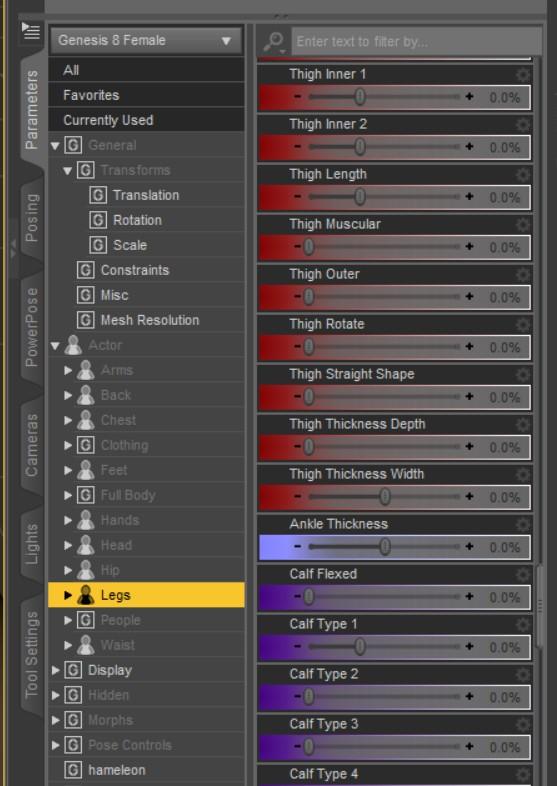
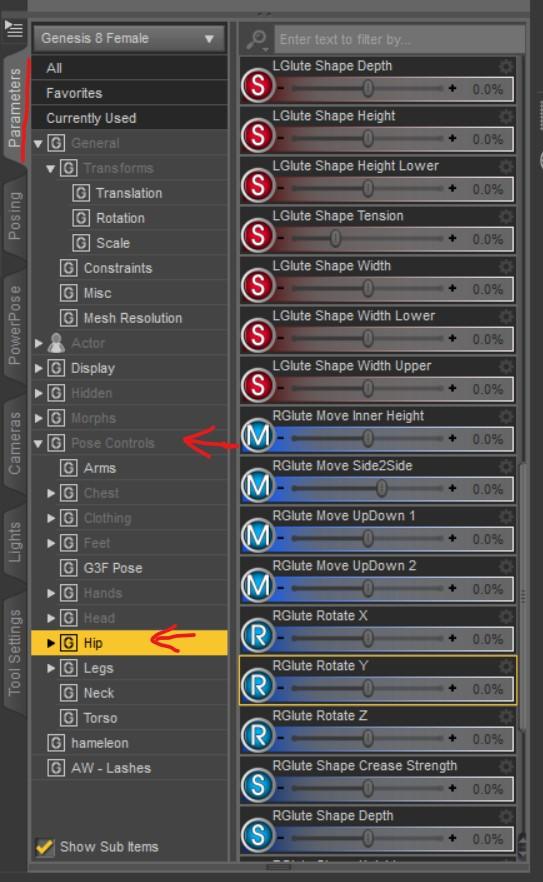
Anything like this I've been importing as "custom morph" in the Diffeo morphs tab. I don't know of any other way but it would be cool if there's an easy mode I'm missing?
Creating Twisting Leg Muscle MorphsA morph moves the affected vertices in straight lines from start position to end position. More complex deformations require multiple morphs working in conjunction.
looking for a hairstyleIt might be the hair that comes with Grace Yong: https://www.daz3d.com/grace-yong-and-grace-yong-hair-for-genesis-8-females
I wish, I have the Grace Yong model, so I was really hoping that it was just a morph setting.. but it doesn't look like it. Thank you for your reply either way!
Export user data ignores many itemsOK, that explains what I'm seeing. I think what's happening is that the "rename" function doesn't do the renaming as a form of user data that's backed up and restored along with the category information, but instead makes the changes right down at the level of file names. As a result, my backed up categories are stored as a collection of links to renamed files...and, since these files have their original names on freshly installed systems, this effectively means that all my user data related to any asset I've renamed is lost. This seems to me to be a very weird design (i.e. why would it not keep the .duf file identically named, so that everything works as expected, and simply rename a pointer to that in the user data so that the UI reflects the user's edit?)...and even weirder still is that, from a browse through the "My DAZ 3D Library" files (under "Public Documents"), it looks as though the files have actually been duplicated rather than just renamed (so for example if I've renamed something like "ABC Bob HD for Genesis 8" to "Bob", there are now two .duf files in the folder, both around a MB in size, one with the original and one with the new name!). If this is how it's meant to work rather than the result of something I've done wrong, it seems quite clumsy and inefficient to me (I had no idea I was making my data take up more disk space too, simply by renaming stuff)...but I assume there's a good reason for it.
Anyway, I'm hopeful now that simply copying across the whole "Public Documents/My DAZ 3D Library" tree (well over 100GB of data), and then re-importing the UserData backup, will magically make all the missing stuff reappear on the new system. It's a very long way from being an ideal scenario, because it means that I always have to have a local copy of my content backed up somewhere (I can't rely on a fresh install from the Install Manager to work with a backup of my user data), but if it works I'll have a look at scripting a better solution. It should be possible to identify all the renamed assets programmatically and then backup just those files (probably less than a thousandth of the overall data), in which case it should be possible to realise my goal of being able to reproduce a Daz setup on a new installation from just a small efficient backup. I'll have a go today and see if the documents+userdata transfer works.
Solved-Some Assets Suck-Need Tips for Expressive Iris & PupilsI have come to the conclusion that certain models simply suck and some PA's are much better than others.
That is obvious.
I do like the lashes and the increased pupils and higher subD level. No I have no idea how to transfer from one to the other. Remember when you render you'll get more detail as well.
Alembic ExporterYou are correct... you need to import with Diffeo first, which will create the materials.
Then, import the Alembic model, having used the Diffeo material slot naming method to export. Those material slot names in the screenshot you provided are the object#surface method, and so don't match anything that Diffeo would have created.
Let me know how it goes.
Edit: Also, avoid multiple imports in the same scene without having cleared out the materials from any previous imports. This will invoke Blender's numbering scheme, and then the material slot names will no longer match. You can clear the materials by deleting the object that use them, and then purging orphan data.
Right. So I still don't get what the Object#Surface option is for. If I understand you correctly, your Alembic exporter needs the Diffeo add-on to be able to transfer materials. If so, when you use it for Marvelous Designer, for example, do it export without materials?
First things first... did it work for you? I have only tested it with my own scene files; other scene files may have special cases that I haven't encountered.
In most instances, Object#Surface is more human readable that Material-1 :) Haven't you ever looks at a material slot, and wondered what the heck it was? In addition, after you've imported the Alembic objects, one of the scripts created in the scripts directory will rename all the materials to this Object#Surface format. So now, if you have to export again, you can select the Object#Surface method which avoids parsing the .duf file (I have some that take 3 minutes), and have the materials still match for subsequent imports. The idea, and something that I'm still working on to make as easy as possible, is to convert materials only once and store them in another .blend file, a compendium of all one's converted materials ready to be automatically appended/linked.
Alembic ExporterYou are correct... you need to import with Diffeo first, which will create the materials.
Then, import the Alembic model, having used the Diffeo material slot naming method to export. Those material slot names in the screenshot you provided are the object#surface method, and so don't match anything that Diffeo would have created.
Let me know how it goes.
Edit: Also, avoid multiple imports in the same scene without having cleared out the materials from any previous imports. This will invoke Blender's numbering scheme, and then the material slot names will no longer match. You can clear the materials by deleting the object that use them, and then purging orphan data.
Right. So I still don't get what the Object#Surface option is for. If I understand you correctly, your Alembic exporter needs the Diffeo add-on to be able to transfer materials. If so, when you use it for Marvelous Designer, for example, do it export without materials?
Solved-Some Assets Suck-Need Tips for Expressive Iris & PupilsEyes are the worst part of faces, IMO.
First try adding lashes to the render. Your actual photo has very distinctive lashes and that makes the other differences really stand out.
The eye lid shape looks good.
Is the character HD? Could you go up a SubD level to maybe get some more detail in the face?
On the irises themselves it's hard to say precisely because they are somewhat in shadow but they seem less dilated than in the photo. IIRC there is a dial for that.
First of all - thanks for taking the time to help. I know you are probably busy so I am posting a few shots in case this is some obvious error on my part or something easily seen, if not I'll tphotoshop the old versions eyes into a rendered image of this new lashless thing. I reworked Madeline G8F so much I can't remeber how I achieved these eyes attached.
Edit. OC froze while working with Daz -so here's rest of post. I managed to increase pupils and increased subDlevels(one without lashes)..The one with lashes is a tweaked and retweaked G8F and I cannot deconstruct how I created the eyes. The second did not improve even after trying natural eyes etc. Is there a way to transfer the lash eyeset to the lashless character. Each were saved as scenes, not scene presets. I'm wondering if I resaved in other presets and merged could I play opthalmologist? These shots are not rendered but from viewport- Nvidea Iray Preview
Daz Studio Pro BETA - version 4.12.2.60! (*UPDATED*)1) Kepler and Maxwell cards are currently supported but will probably be dropped soon; the 1080's are Pascal cards so they will still be supported in the latest DS (4.12.1.118)
2) Face Transfer requires 4.12.0.86 or higher and 64-bit Windows, which doesn't seem to be among any of the versions you have installed.
3) Install DIM on both systems. (Set any paths you want to be non-default.) Download the beta on the online system, copy it to the downloads folder on the offline system. Run DIM in offline mode on the offline system.
Please provide native formats for large environments etc. if possibleI hope P.A.s will end up more sales and we will get rid of transfer and conversion hassle. Specially for large environments and products with 4K and 8K maps are biggest issue for GPU while CPU denoising not available for Daz Studio.
Daz Studio Pro BETA - version 4.12.2.60! (*UPDATED*)I have read 100's of pages of gripes/praises and pros/cons for various verions of Daz and based on those reads made some choices I believed to be best for a system like mine. I understand that RAM and CPU components can make choices more narrow or broad and may or may not have affected some viewpoints of versions. I have two issues, using Face Transfer and having two Pro versions installed, and It's been a while since I griped about Daz Studio and I really don't want to go down that road again so I am asking for advice in advance of making changes.
Recently, while trying to fix Iris & pupil issues I created a post searching for help on Iris issues. Frustrated, I decided to try face transfer and that;s when I noticed that on my 2080 rig, Pro 4.12 version was not a beta, it was a 32bit Pro version. Somehow, on my 2080 rig I accidently installed a 4.12.0.86 Pro 32bit beta and a 4.11.0.383 Pro 64bit
 .
. On the rig with 1080 cards I have 410.0.123 Pro 64bit and 4.11.0.366 Beta 64bit. None of these seem to work with Face Transfer Unlimited. My rig details are in my sig.
Question 1. Does anyone know which versions are actually best suited for the 2080 cards and which is better for the 1080 rig? I do have a few restore points which may or may not come in handy.
Question 2. Does Face Transfer work on 4.12 beta versions (it doesn't seem to on 4.12 32bit or 4.11 4.10 versions). I do not seem to have a beta version on the 2080 rig.
Question 3 . The 2080 stays offline. Anyone know best way to install all components for curren Beta manually?
Thanks in advance.
Juanita
If you would design a core character and bundle, what would it be?Cat 8
Dragon 8 (with an actual wyvern morph)(yes I know HH released his own wyvern)
Horse 8 (with actual hair and feather)Count me in on all three.
Love the "mood board" for Yanshi 8 suggestion. I would buy that bundle in a heartbeat. Who the hell is that gorgeous blonde guy?
Would also like to add my votes for Lilith 8, Rune 8, and Merfolk 8, but please make them with great clothing/accessories that can be kitbashed?
Diffeomorphic DAZ-to-Blender@Mendoman Well shrinkwrap is the "standard" method and it works fine enough in most cases but it is always an approximation. Plus you have to shrinkwrap every disconnected mesh alone, think about HD teeth for example. The method by @jcade seems to get better and faster results that's all. Though personally I have some doubts about "rebuild subdivision", since of course multiple HD meshes can be derived by the same low poly mesh. But I didn't have time to test it extensively yet.
p.s. Another way to get exact results is to use the transfer ids plugin with the topology option to fit the HD mesh to the multires. But again this takes time and has to be done manually.
Anyone Know Which Character/Figure This IsI don't see anything wrong with asking to identify a character. It could be a character you missed or is in your wishlist but the promo render shows it in a different way that looks more appealing to you. At least finding out its availability helps you decide to buy the character or try to morph your own version if its unavailable.
I think I have made at least three character presets based on characters I've seen on promos, though they're my own takes and not exact copies. Two of the characters were for sale, but one was G3F which I don't use and the other looked like she could be made with what I own.
Asking about a character you see and like is perfectly fine. Where the problem comes in is demanding that the PA sell their own creation, especially when it's one that is used as their signature in their promos like the one in question here. It's entirely up to them wether they want to sell their creation or not.Sure, there's no reason not to ask, as long as you're prepared for the answers you may get. In the case of May, I couldn't see myself using the character, just because she's so strongly a part of Mattymanx's work. I kind of feel similarly about celebrity characters, too. They're cool, and all, but I'd find it really weird to set up and render a scene with a character resembling a known living individual. On the one hand, I'd fall short, and on the other, it's kind of creepy-stalkerish.
Anne for Caryn 8 (clothing costume added by elleque sep 27)Anne is a cute and more slender morph for Caryn hd for genesis 8 female
Only morphs, no textures.
Includes a full character slider, a body slider and a head slider.
She is a Sunshine and,i hope she can find a
loving home with you!https://sharecg.com/v/96182/view/21/DAZ-Studio/Anne-for-Caryn-8-mn
Anyone Know Which Character/Figure This Is
Asking about a character you see and like is perfectly fine. Where the problem comes in is demanding that the PA sell their own creation, especially when it's one that is used as their signature in their promos like the one in question here. It's entirely up to them wether they want to sell their creation or not.I don't see anything wrong with asking to identify a character. It could be a character you missed or is in your wishlist but the promo render shows it in a different way that looks more appealing to you. At least finding out its availability helps you decide to buy the character or try to morph your own version if its unavailable.
I think I have made at least three character presets based on characters I've seen on promos, though they're my own takes and not exact copies. Two of the characters were for sale, but one was G3F which I don't use and the other looked like she could be made with what I own.
3D Art Freebie Challenge-August 2020-"Cats, Cats, All Kinds Of Cats" -Main Thread OnlyHere's another NAE (Not An Entry) - although strictly speaking it does use the requisite 5 freebies to be a valid entry, I don't think that counting the two V4 body morphs and a the V4 texture as three separate freebies fits the spirit of the contest.
Something To Do With Cats...
This picture is rather unusual for me as I didn't start by loading a figure/character and applying a random pose. Instead I started by loading a column prop, and then did some playing with the atmospherics and lighting... and then I also duplicated the column a few times.
So when I did eventually get round to loading my leading (cat-)lady she already knew where she was and what she was doing - something to do with cats. Don't ask me though. I imagined there'd be tigers or leopards in the scene - apparently not.
She told me that she needed a pose from the Mystical Sorceress poses set - that's one of the very few non-free (although I picked it up when it was free of course) pose sets that I use a lot. She tried a few, but said they didn't suit her in this light. When she tried this one on she gave me a thumbs up and a big grin.But it's strange: When I look at the picture I have a sudden uncontrollable urge to look up over my right shoulder - sort of, well, just in case there is a tiger or something...
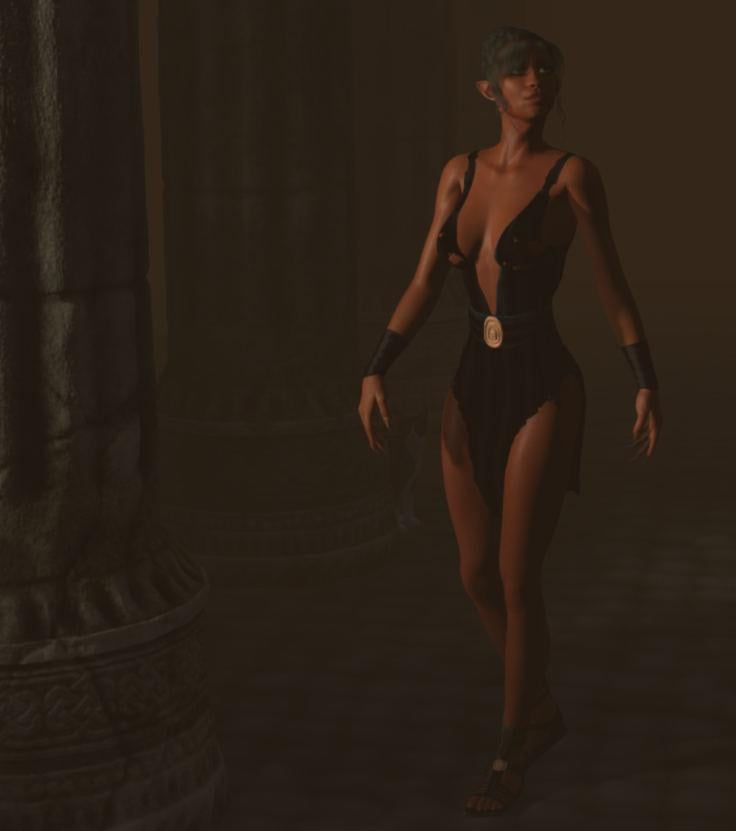
An earlier version that we like too. I think I prefer the shadows on her face and upper body in this one. If I recall corractly the main difference is that the below one uses an infinite light with mapped shadows while the above uses a spotlight with ray-traced shadows:
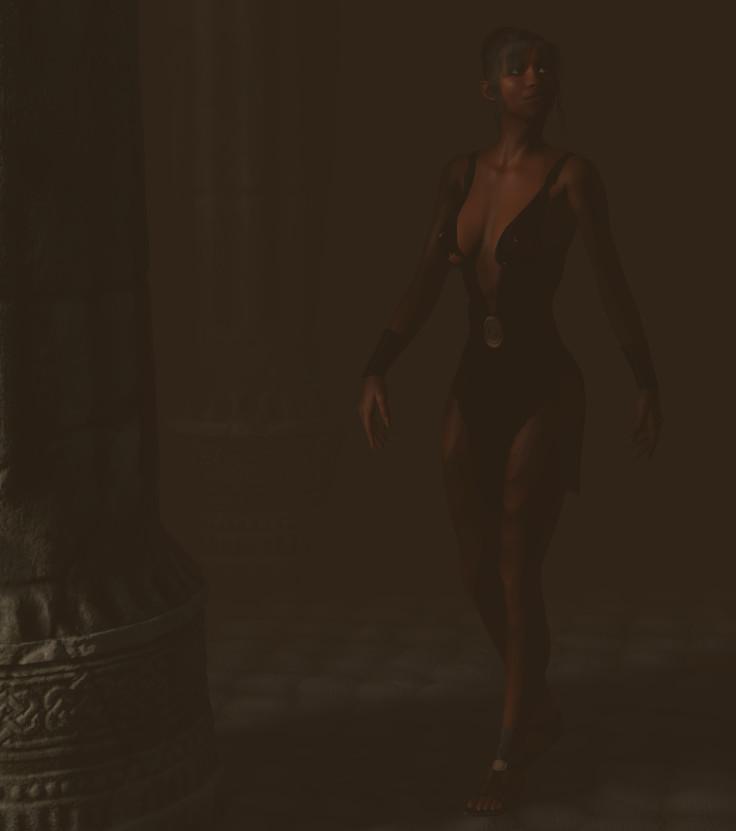
The JPGification of those seems to have messed them up about. I usually save at 75% but went higher for these, something in the 80s I think? Looks like I need over 90, or maybe use the PNG.
FREEBIES
1 Stefan Morell (Stonemason) Hell Column III (or II ?) - https://web.archive.org/web/20140430010149/http://stefan-morrell.com/downloadfiles/FreeHellColumn3-P5-P6-DS.ZIP
(link via https://poserdazfreebies.miraheze.org/wiki/Freebies_previously_hosted_at_stefan-morrell.com )
2 Rick Bridenbaker's V4 Fantasy Warrior Outfit & Props - https://www.sharecg.com/v/60308/related/11/Poser/V4-Fantasy-Warrior-Outfit-Props
3 Reciecup's Doll V4 (texture only) - https://fantasiesrealm.com/market/Designers/RenderCandy/Doll-V4-Exclusive
4 Naeima V4 (body morph only) - https://fantasiesrealm.com/market/Designers/RenderCandy/Naeima-V4-Exclusive
5 Shy V4 (head morph only) - https://fantasiesrealm.com/market/No-Longer-Available/RC-removed/Shy-for-V4-ExclusiveNO COUNT
V4, V4++ Morphs, V4 Creature Creator Morphs (cat nose, cat ears, fingernail claws)
Classic Elegance hair by Mint3D (no longer available - a search for Mint3D at https://poserdazfreebies.miraheze.org only finds Mint3Ds Caramel Hair, which I got at the same time. But that's no longer available either.PAID
DAZ Cat
V4 Mystical Sorceress Poses from the DAZ store(I resolved that pseudo-technical jiggery-pokery tricksiness that my TV was playing on me, so I've deleted the rubbish related to that from this post and the next)
Is it possible that my Genesis 8 figures aren't being transferred through the bridge because...It can take a while to get a response to technical Support tickets, especially on an issue like this that isn't just a matter of checking one piece of content.
Is the figure simply failing to import, or is it importing badly? Do you get an error message?
So... it's not just ONE figure... its the ENTIRE Genesis 8 library... male AND female characters. And no... I'm not getting any error messages. I'm not getting ANYTHING. I spend about 25 minutes waiting for the respective figure to go through the bridge while every single morph loads into it, then I open the corresponding 3D program (in this case, C4D), open the bridge, hit auto-import.... and nothing happens. It's like NOTHING was loaded into it. Just... nothing. No error message, no C4D crash... nothing.
And yes... it CAN take a while for technical support tickets... which is why you should at LEAST say "Thank you for your inquiry, we are working on it as fast as we can"... not completely ignore it.
Did you not get an auto-acknowledgement?
Is it possible that my Genesis 8 figures aren't being transferred through the bridge because...This tutorial ONLY applies once you get the Genesis 8 figure to import successfully into C4D. My issue is GETTING it into C4D. Once that happens, THEN I can follow this tutorial. However, this is not the issue. As stated, the issue is GETTING Genesis 8 figure to import AT ALL.
Is it possible that my Genesis 8 figures aren't being transferred through the bridge because...It can take a while to get a response to technical Support tickets, especially on an issue like this that isn't just a matter of checking one piece of content.
Is the figure simply failing to import, or is it importing badly? Do you get an error message?
So... it's not just ONE figure... its the ENTIRE Genesis 8 library... male AND female characters. And no... I'm not getting any error messages. I'm not getting ANYTHING. I spend about 25 minutes waiting for the respective figure to go through the bridge while every single morph loads into it, then I open the corresponding 3D program (in this case, C4D), open the bridge, hit auto-import.... and nothing happens. It's like NOTHING was loaded into it. Just... nothing. No error message, no C4D crash... nothing.
And yes... it CAN take a while for technical support tickets... which is why you should at LEAST say "Thank you for your inquiry, we are working on it as fast as we can"... not completely ignore it.
Daz 3D is part of

Connect
DAZ Productions, Inc.
7533 S Center View Ct #4664
West Jordan, UT 84084Licensing Agreement | Terms of Service | Privacy Policy | EULA
© 2026 Daz Productions Inc. All Rights Reserved.