-
Introducing the Daz to Blender Bridge & native Blender File Formats
I did discover that not every pose works yet
The official daz documentation states that poses are not supported so I'm not sure if they maintain the #get pose command. So technically this is not a bug but a feature request. Unless the daz docs are wrong that may be possible as well.
https://helpdaz.zendesk.com/hc/en-us/articles/360046244152-FAQs-for-Blender-Bridge
Poses will not successfully transfer to Blender.
Kwan 8Maybe I missed it, but what gpu do you have @divamakeup? Is it RTX? We have seen that RTX does better as geometry becomes more complex, which could explain why the HD rendered faster. It could also be how Iray calculates multiple surfaces. The fewer surfaces Iray needs to calculate for, the faster it will be.
I recall recently the Unreal 5 demo that Epic showed. They spoke about how it handles geometry, and that because it could handle geometry so well the environmental assets in the demo were not using normal maps. This may not relate to Iray, but it shows that technology is reaching a point to where we may not need normal maps much anymore. The same can be true of bump maps.NVIDIA GeForce GTX 1080 Ti
Very interesting. A powerful card but not RTX. I wonder if other weaker GPUs would get results like yours. I cannot say...I have two 1080tis, LOL. I could try this with other models and see if they get similar results. I may try some bluejaunte characters. I wonder if the file size of the normal maps have an effect. Some models have normal maps in less compressed formats that are huge.
Which brings up another question, how about VRAM use? Turning off a bunch of normal and bump maps may help VRAM, depending on how much VRAM each HD subdivision takes. There are lot of things to look at here. I am thinking we might be able to save VRAM skipping the normals and using HD. That could be a big win for those looking to squeeze as much into their scene as they can.
Yeah, it's an interesting topic, imo - it would be neat to do some more testing to see if there is a way to pin down "optimal" set up for speed for different types of renders. However, there are so many different variables that can factor in performance and render speed, that it might be difficult to pinpoint "optimal" setups that are "universal" across different machines and video cards (not to mention different versions of Daz Studio as well). Still, I find the subject pretty interesting and it would be nice to be able to pinpoint more optimal surface settings and HD vs Normals vs Bump usage that could make more clear what may be more useful for different types of scenes.
I did some testing with a bluejaunte character, and found some similar results. Using the normal maps took a few seconds longer. However, what I discovered with this character is that the HD shape is not a replacement for the normal maps. They work together to complete the character, so removing one or the other was not ideal. I imagine a lot of non DO characters are like that.
So for this to work, the characters in question must use HD as a full replacement for normal maps. It is likely that only Daz Originals do this, since the HD morph is usually sold as a separate product.
But I did get some data. Increasing the subD from 1 to 3 had almost no effect on render times, it didn't even effect VRAM usage much. SubD 5 however ballooned both quite a bit. SubD 5 used over 1GB more VRAM and took over a minute longer to render. I feel pretty confident that this trend would hold up for a lot of other characters. Deleting the normal maps improved render times by 20 seconds in a 2 minute render, and all levels of subD still rendered faster without normals, except for 5.
However, I don't have a ton of HD morphs for DO's. I have Zelara's. And looking at her, she has separate character presets. Zelara HD has her own preset, so I loaded both. It turns out that loading Zelara HD's preset contains no normal maps. I cannot believe I never noticed that. I made a render of her two versions side by side at 6000 pixels, and the difference is very hard to spot, if at all. I will try some more testing on her tomorrow to see if the HD renders faster.
I might make a separate thread to avoid cluttering this one. Or you can. Doesn't matter.
Yeah I believe all the Daz Original "Official 8" HD figures load without any normal maps. And I've tested the HD vs Normal Maps again and consistently keep seeing slightly faster render times with HD with No Normal Maps (or Normal Maps dialled to 0) vs NON-HD figures with Normal Maps. If you end up starting a thread about it let me know. I'd love to check it out. :) Maybe we could get people with other video cards to also do a couple of test renders. I find it pretty interesting since I always thought Normal Maps where a good replacement for HDs that gave faster render times vs HD. It would be interesting if that turns out not to be the case - with the tests I've done so far, it's kind of starting to look like that. lol So weird.
I could be wrong, but I think as far as VRAM is concerned, dialing a texture to zero may still load the texture in memory. I could possibly check that.
I think that we all just have normal maps so ingrained into model making that we probably do not consider the possibility of them no longer being necessary. For games, they do things differently. Like the new Final Fantasy 7 Remake, which has pretty nice graphics. The characters have 3 textures per surface at most. The face has the base color, a normal, and a gloss map. So no bump at all, the normal basically handles that. The face mesh is actually pretty high poly, more than a base Genesis, even though it is a PS4 game. However it is not as dense as a HD subD mesh. It is running on outdated hardware. There is going to be a massive polygon increase on the next generation consoles. We will soon see gaming models with significantly higher poly counts than Daz Genesis, even at HD subD.
I am thinking this change has come as Daz models use more and more maps. We used to see 3 or 4 textures per surface. But today that is shifting as people pursue more realistic skin. So now we not only have more textures per surface than before, but those textures are often larger file sizes. Even when we use the same texture, we may use it for different settings, like a base color is used in the translucency map. For ever new setting, Iray has to resolve these. And as has been pointed out in the past, ray tracing is only one short part of Iray rendering. Most of the render process is resolving the shaders. And what have we done? We have made shaders much more complicated today. So I think that is probably the big factor here. Perhaps testing out past generations of Genesis HD will see different results because those figures did not have as many surface settings and textures.
3D Art Freebie Challenge-July 2020 - "...Only at the circus" - Entries Thread Only Winners Announced3D Art Freebie Challenge July 2020 "...Only at the circus"
[Best watched at full size for details.]
"Ladies, Gentlemen, Girls and Boys..."
Starring: Linda and Walther
The tale:
"Ladies, Gentlemen, Girls and Boys, for the next three hours..."
Soundtrack:
Britney Spears - Circus (©2008) https://www.youtube.com/watch?v=lVhJ_A8XUgc
COUNTABLE FREEBIES: (Alphabetic order)#01! Background Curtains by ArtTailor
https://www.renderosity.com/mod/freestuff/background-curtains/81296 **#02! Ball Cane by AllenArt
https://sharecg.com/v/95943/browse/21/DAZ-Studio/Ball-Cane **#03! Border Tribe Outfit for G8M by ocelot1300
https://sharecg.com/v/94622/gallery/21/DAZ-Studio/Border-Tribe-Outfit-for-G8M **#04! Cute Boy/Girl Comic Tattoos for G8F & G8M by MysticArtDesign
https://sharecg.com/v/92173/gallery/21/DAZ-Studio/Cute-Boy-Girl-Comic-Tattoosby-MysticArtDesign-08-2 **#05! Dante DMC5 Free Stubble for Genesis 8 Male by InTheFlesh
https://sharecg.com/v/94752/gallery/21/DAZ-Studio/Dante-DMC5-Free-Stubble-for-Genesis-8-Male **#06! DOA 6 Marie Rose - Head and Body Morphs for G8F by TritiumCG
https://www.deviantart.com/tritiumcg/art/DOA-6-Marie-Rose-Head-and-Body-Morphs-for-G8F-825236730 **#07! ED's Brick Shader (Iray) by Edheldil3D

https://www.deviantart.com/edheldil3d/art/Freebie-ED-s-Brick-Shader-Iray-788871766 **#08! Eyes Dilate for Genesis 8 Female by felldude
https://www.renderosity.com/mod/freestuff/eyes-dilate-for-genesis-8-female/82869 **#09! Flo Makeup For Genesis 8 Females by AprilYSH
http://shop.aprilsvanity.com/flo-makeup-for-genesis-8-females.html#10! Iray car related shader presets 'megapack' by Tom2099
https://www.deviantart.com/tom2099/art/Iray-car-related-shader-presets-megapack-539622361 **#11! Iray Jewelry Shaders by AllenArt
https://sharecg.com/v/95893/gallery/21/DAZ-Studio/Iray-Jewelry-Shaders **#12! Kristen Stewart - Head and Body Morphs for G8F by TritiumCG
https://www.deviantart.com/tritiumcg/art/Kristen-Stewart-Head-and-Body-Morphs-for-G8F-841957993 **#13! Leotard for G8F VER2.0 by aemi1970
https://sharecg.com/v/95820/browse/21/DAZ-Studio/LEOTARD-FOR-G8F-VER2.0 **#14! Let's Put On A Show by Blondie9999 (DAZ3D Bi-weekly Freebie Jul 6 - Jul 20)
https://www.daz3d.com/let-s-put-on-a-show **#15! Linda - Character for G3F with texture maps by Edelzwicker
https://www.sharecg.com/v/89731/related/21/DAZ-Studio/Linda-Character-for-G3F-with-texture-maps **#16! Long Morph for Toulouse hair for G8F by DireWorks
https://www.renderosity.com/mod/freestuff/sometimes-they-come-back-long-morph-for-toulouse-hair-for-g8f/83745 **#17! Mic Set by MDP
https://sites.google.com/site/mdp6gdl/ (item 9)#18! My Heart Necklace for Genesis 8 Female by amyaimei
https://www.deviantart.com/amyaimei/art/My-Heart-Necklace-for-Genesis-8-Female-729010047 **#19! Mystical Flowers by MysticArtDesign
https://sharecg.com/v/95862/browse/21/DAZ-Studio/Mystical-Flowers **#20! Nero DMC5 Free Hair For G8M by InTheFlesh
https://sharecg.com/v/95400/view/21/DAZ-Studio/Nero-DMC5-Free-Hair-For-G8M **#21! Pretty Look for Genesis 8 Female(s) by zoro_d
https://www.renderosity.com/mod/freestuff/pretty-look-for-genesis-8-female-s-/83823 **#22! Realistic Curtains by Cherubit
https://www.renderosity.com/mod/freestuff/realistic-curtains/83637 **#23! Scottish Kilt for G8M by Wilmap's Digital Creations
https://www.wilmapsdigitalcreations.co.uk/view_product.php?id=476 **#24! Shimmery Sheer Fabrics II by AllenArt
https://sharecg.com/v/95898/gallery/21/DAZ-Studio/Shimmery-Sheer-Fabrics-II **#25! Shiny Wood Tiles Free PBR Texture by CGAxis
https://free.cgaxis.com/product/shiny-wood-tiles-free-pbr-texture/ *1#26! Spotlight Prop by DrBoots
https://www.deviantart.com/drboots/art/Freebie-Daz-3D-Studio-Iray-Spotlight-Prop-582958157 **#27! STRONG for G8M Character Morph & Pose by Mar3D
https://www.renderosity.com/mod/freestuff/strong-for-g8m-character-morph-amp-pose/82833 **#28! SY 200 Morphs for Genesis 8 Head and Body by SickleYield
https://sharecg.com/v/91888/view/21/DAZ-Studio/SY-200-Morphs-for-Genesis-8-Head-and-Body **#29! Vergil Devil May Cry 5 Hair for G8M by InTheFlesh
https://sharecg.com/v/93892/gallery/21/DAZ-Studio/Vergil-Devil-May-Cry-5-Hair-for-G8M **#30! Walther for G8M by Ruslanomar
https://sharecg.com/v/92848/browse/21/DAZ-Studio/G8M-Walther **Oops, and I would almost forget these three;
#31! dForce_French Twist Hair for Genesis 8 Female(s) by zoro_d
https://www.renderosity.com/mod/freestuff/dforce-french-twist-hair-for-genesis-8-female-s-/81937 **#32! Diamond Dome Earrings for G8F by AllenArt !
https://sharecg.com/v/95897/gallery/21/DAZ-Studio/Diamond-Dome-Earrings-for-G8F **#33! Suit for Genesis 8 Female by Most Digital Creations
https://www.most-digital-creations.com/g8f_suit.php *1
NO-COUNT ITEMS:++ Basic Wear for G8M by DAZ Originals
--- Bezel Cut Ring for Genesis 3 & 8 Female by AllenArt
--- Cute L.I.E. Makeup by Cherubit (The Holiday Loyalty Sale 2019 Free Item)
--- Free Iray Outdoor Lights by Dreamlight
--- IDG Vibrant Light Probes (The Holiday Loyalty Sale 2018 Free Item)
--- Iray Fabric Shaders by AllenArt
--- Nose Ring 01 for G2F, G3F and/or G8F by AllenArt
--- Sneakers for G8M by Tab
++ Toulouse Hair for Genesis 8 Female by Daz Originals
PURCHASED/PAID FOR ITEMS: Uhmm, let me see... no, none 100% Freebies :)*1 E-mail address required
** Registration required
#x! Countable Items (Bold ones are used by me for the first time I think.)
--- No longer available freebies
++ Free with DAZ Studio (or the Essentials)
$x. Purchased/Paid For Item
Rendered with DAZ Studio 4.10.0.123 (nVidia Iray)Other free software used: GIMP v2.10.18 and Irfanview 4.54
Postwork: used the AltaLux Image Enhancement Filter (Effect) by Stefano Tommesani that comes with Irfanview and some filters (oa) that come with GIMP.
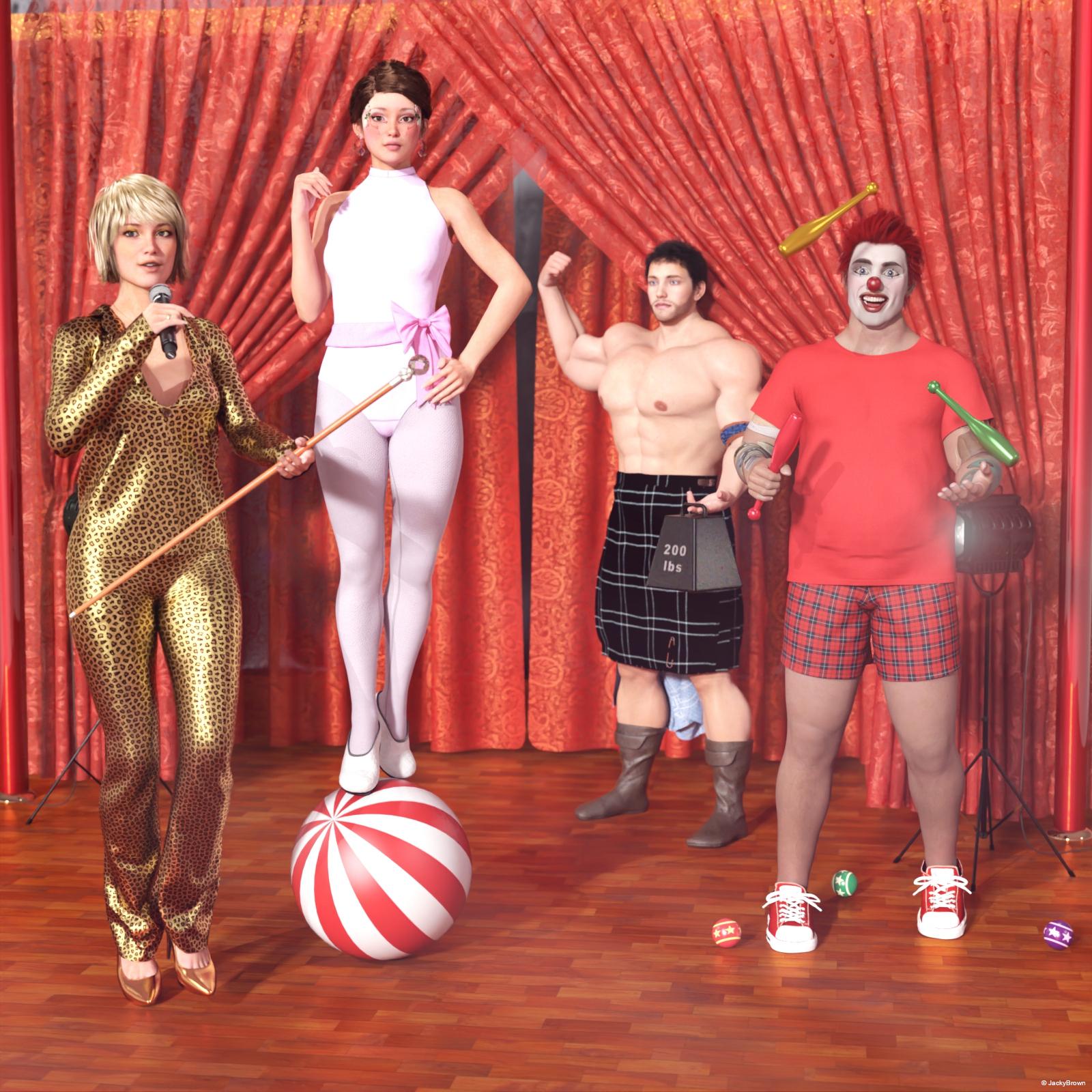
"Ladies, Gentlemen, Girls and Boys..."
Windows10 licensing questionTo all the respondants. Thanks for the information, I'm relieved might be able to transfer my license one way or another.

To Kenshaw...Um..., I know what "OEM" is but what is "CS"?

Yeah, I have a Microsoft account, several of them accidentally established over the years, but I hate the damn things cause I can never remember which one is which or which one I established last. I doubt that I've ever logged into a Microsoft account with this particular computer.
The whole concept of a Microsoft account has confused me from the beginning. Can I use 3rd-party mail domains? Do I have to use Outlook domain? And the way they nag you to establish an MS account when installing a system and setting up your user accounts without telling you that you don't have to have an MS account and that it can be bypassed if you find the teeny tiny print that says continue without one. It always seemed like slimy business practice and I feel like I'm being herded into the gas chamber.

I'll do it, and use one if necessary but just for the record it's under protest.

Meanwhile: COMPLAINT: I just got notice from USPO tracking that my package with my new CPU chip has been delivered, ... 1200 miles away from here. Grrrrr.
 Now I have to fight with Amazon or the vendor or the USPO to either find me another chip (relatively rare 2nd generation, refurbished) or get my package redirected to me, or get my money back. I should have payed attention when I noticed that the Amazon 3rd-party vendor had a 20% unsatisfactory rating.
Sorry about the screwup I had that happen last fall with a much less important part but it was still really annoying. It was like "How did you decide Chicago Il was Bangkok?"
I have my Microsoft account through a single 3rd party email, created just for the purpose. But it lets me move that license around as needed. Makes my life so much easier. This rig is the 4th or 5th mobo and the 6th, I think CPU, using it. I'm not really a fan of it and the way things are going I think in the not distant future Windows will just be full on free but till it is I'll deal.
Windows10 licensing questionA little off topic but I do DAZ work on the machine so. ...
BACKGROUND:I have a valid license for my existing Windows10-Pro machine. It was originally bought 10 years ago with Win7-home, then upgraded to Win7-Pro and recently (about a year ago) upgraded again to Win10-Pro. The original 1TB "C:\" hard drive has been replaced twice. First with a newer 1TB hard drive and then recently (about 3 months ago) with a 1TB solid-state drive. Licensing transfer from Win7-Pro to Win10-Pro was no problem, it just worked automatically as Microsoft said it would.
HOWEVER, I know that sometimes if too many parts of a computer are replaced, then the licensing can be a problem because they think you are trying to spread the same license over multiple machines.
MY QUESTION: I am currently ready to again upgrade this computer with a newer and better SSD, and a better CPU chip. The motherboard stays the same though. I plan on saving my files then removing my existing "C:\" SSD and archiving it just in case of disaster. At the same time, I'm replacing the CPU chip and installing a completely fresh download of Windows10 from the Microsoft website and then reinstall all my needed applications from scratch onto the new SSD (essentially discarding all the problematic baggage of old apps from 10 years of accumulation and iffy upgrades). Can I expect that the existing license will work on the upgraded system? If it doesn't work, then do I have recourse to petition Microsoft to let me license my system?
Howdy LeatherGryphon,
Asssuming you have an OEM licences, vices a retail license (OEM license would be on a sticker that is on the case, and have the letters OEM somewhere in it), as long as you keep the same motherboard, you are in the clear legally. You may have to activate by phone, one-time which is quick, usually automated and easy. When prompted, just say that the licenes is on only 1 PC. If that doesn't work, they would have you talk with someone, whom you can again explain that it is on 1 PC, and you have the same motherboard, and they should acitvate it for you no problem. Once you have succesfully activated on that system, you should be able to automatically activate again in the future.
Now if you have a retail version of Windows (7 Home, to 7 Pro, to Windows 10 Pro), then you can replace 100% of the PC, and as long as it s only on 1 PC, you are legally clear. You may have to go through phone activation as above, but as long as you have it on only 1 PC, you should be fine. Good luck!
Rich S.
How to Import Marvelous Designer Clothing to DAZSome key notes here: Exporting clothing from MD to DAZ, ensure two things. First, export as thin mesh, not thick. Also, export as quads as these smooth and collide better in DAZ. The transfer utility is helpful for initial setup, but you'll need to edit weight maps to get things moving just right. Last, design the clothing on the default pose. Export the figure from DAZ as an OBJ and import as an OBJ avatar. There's a good tutorial in one of the recent threads, so scroll or search through this forum.
"Scooby" Daphne outfitTJ I appreciate your vote of confidence on Velma. So you think I need to make her less busty? BTW, I tried my best to get Ruby like what you created to no avail, Could you possibly share your dial settings for your Daphne character?
I think her bust size may be fine, it's the spare tire that is distracting me. Velma is a bit stocky, but in the cartoon art she doesn't seem to be carrying a lot of extra weight on her belly...
As for my Ruby settings, that's a bit complicated, but off of the top of my head I narrowed up her torso/hip/chest area a bit to make her look more slender without making her arms too in (i.e. didn't use the 'thin' slider). I also reduced her breasts (breast smaller) by say 75% as Ruby is very busty.
The face involved adusting the 'round/square/heart' shape, dialing down the round/square-ness a bit, then increasing the jaw size a small bit, tweaking the cheeks, dropping the iris size a bit, and adjusting the eye angle and round-ness. I have a number of different morph packages for G3F, so you may not have all of the morphs I do. If I were to adjust her further, I'd probably tweak the cheeks some more (I shifted them down and adjusted the outer curve btw), as they are still looking a bit too prominent to me ATM, IMHO.
I also shifted the nose and mouth down a bit, thinned the lips slightly, 'un-flattened' the face using the 'flatten face' morph whatever that one is called at say -100%, and adusted the nose tip depth to bring it forward a small bit.
The big thing was swapping out Ruby's textures for Aiko 7's, and then giving the Aiko skin a bit of a 'tan' with the base, translucency and glossy color and such, she looks better with the Aiko textures in this case IMHO. Aiko's eye choices were all too light (I like them otherwise) so I tried a few other 'slightly darker purple' options, I picked purple because of the dress color... dark brownish eyes might be fine too.
There mey be other characters out there that'll work fine too, I just picked Girl 7 for my starting point as she's more stylized. Also, some might suggest going with Genesis 8 characters, so that choice will depend on what's in your library at the moment. I always have trouble with shoes going between Genesis 3 and 8 when it comes to shoes, and most of my library is older so Genesis 3 is my 'default' starting point.. Older shoes will sometimes autofit OK up to Genesis 3, but due to the pose change weird things can happen going to Genesis 8. There's a suggested workaround for this, but it's been more 'miss' than hit for me r.e. shoes. But that's a different discussion...
You could go with Genesis 2 characters as well, those characters seem to lend themselves to 'stylized' a bit better, I went with Genesis 3 as I have more morphs for G3F than I do for G2F, and Genesis 3 seems to be a 'happy medium' r.e. autofitting.
In any case, I'll have to look at the settings later to see what exactly I did, but that's what I remember off of the top of my head. Hopefully I put you on the right path in the meantime.
Feedback for the C4D BridgeSomeone asked why lots of morphs are exported. Because you can dial in Face Morphs in in C4D. Select the Pose Morph tag on the object and you get a lot of sliders to dial in facial expressions in the tag parameters ... wow ...
Note the Xpresso tag on the base mesh. The morphs on the face are linked to the morphs on the eyelashes. However, the morphs are also imported with EVERY other mesh as well, including clothing. These duplicate morph targets contribute to file bloat and can be safely deleted if the mesh in question has nothing to do with the face (the morphs on the hood for instance I would probably leave because the chin needs to morph). Of course, if DAZ does update to allow morphs other than just face morphs to import, we'll have to revisit then. I shudder to think what the file sizes would be if it tries to import every morph possible x however many meshes are attached to the figure.
It should also be noted that the file size bloat is because all the morphs are through morph targets, not vertex deltas. You can EXPONENTIALLY decrease file size and increase performance by converting all the pose morphs to deltas and deleting the morph targets.
DS to Luxcorerender?I used LuxRender for a while. The major issue was materials.
There are effectively no products in the Daz shop with Lux materials. So you can transfer the scene over no problem but then you need to walk through every surface of every object in that scene and assign materials to it. For me that took many times longer than setting up the scene in DS did. The results IMO were as good if not better than iRay, from 3 years ago, but the investment of my time just wasn't worth it.
With the Daz to Blender bridge being free I'd take a look at that before I'd buy anything. Cycles is very well thought of and will run on CPU just fine.
Precisely my experience too. I used Reality/Lux with my iMac for a few years but the constant grind of adapting materials wore me down and I eventually bought a PC with a Nvidia GPU so that I could use IRay. However, the Blender option is beginning to look attractive, especially if I can get some decent renders out of Eevee (for animations, mainly).
3D Art Freebie Challenge-July 2020 - "...Only at the circus" - Main Thread Only3D Art Freebie Challenge July 2020 "...Only at the circus"
[Best watched at full size for details.]
"Ladies, Gentlemen, Girls and Boys..."
Starring: Linda and Walther
The tale:
"Ladies, Gentlemen, Girls and Boys, for the next three hours..."
Soundtrack:
Britney Spears - Circus (©2008) https://www.youtube.com/watch?v=lVhJ_A8XUgc
COUNTABLE FREEBIES: (Alphabetic order)#01! Background Curtains by ArtTailor
https://www.renderosity.com/mod/freestuff/background-curtains/81296 **#02! Ball Cane by AllenArt
https://sharecg.com/v/95943/browse/21/DAZ-Studio/Ball-Cane **#03! Border Tribe Outfit for G8M by ocelot1300
https://sharecg.com/v/94622/gallery/21/DAZ-Studio/Border-Tribe-Outfit-for-G8M **#04! Cute Boy/Girl Comic Tattoos for G8F & G8M by MysticArtDesign
https://sharecg.com/v/92173/gallery/21/DAZ-Studio/Cute-Boy-Girl-Comic-Tattoosby-MysticArtDesign-08-2 **#05! Dante DMC5 Free Stubble for Genesis 8 Male by InTheFlesh
https://sharecg.com/v/94752/gallery/21/DAZ-Studio/Dante-DMC5-Free-Stubble-for-Genesis-8-Male **#06! DOA 6 Marie Rose - Head and Body Morphs for G8F by TritiumCG
https://www.deviantart.com/tritiumcg/art/DOA-6-Marie-Rose-Head-and-Body-Morphs-for-G8F-825236730 **#07! ED's Brick Shader (Iray) by Edheldil3D
https://www.deviantart.com/edheldil3d/art/Freebie-ED-s-Brick-Shader-Iray-788871766 **#08! Eyes Dilate for Genesis 8 Female by felldude
https://www.renderosity.com/mod/freestuff/eyes-dilate-for-genesis-8-female/82869 **#09! Flo Makeup For Genesis 8 Females by AprilYSH
http://shop.aprilsvanity.com/flo-makeup-for-genesis-8-females.html#10! Iray car related shader presets 'megapack' by Tom2099
https://www.deviantart.com/tom2099/art/Iray-car-related-shader-presets-megapack-539622361 **#11! Iray Jewelry Shaders by AllenArt
https://sharecg.com/v/95893/gallery/21/DAZ-Studio/Iray-Jewelry-Shaders **#12! Kristen Stewart - Head and Body Morphs for G8F by TritiumCG
https://www.deviantart.com/tritiumcg/art/Kristen-Stewart-Head-and-Body-Morphs-for-G8F-841957993 **#13! Leotard for G8F VER2.0 by aemi1970
https://sharecg.com/v/95820/browse/21/DAZ-Studio/LEOTARD-FOR-G8F-VER2.0 **#14! Let's Put On A Show by Blondie9999 (DAZ3D Bi-weekly Freebie Jul 6 - Jul 20)
https://www.daz3d.com/let-s-put-on-a-show **#15! Linda - Character for G3F with texture maps by Edelzwicker
https://www.sharecg.com/v/89731/related/21/DAZ-Studio/Linda-Character-for-G3F-with-texture-maps **#16! Long Morph for Toulouse hair for G8F by DireWorks
https://www.renderosity.com/mod/freestuff/sometimes-they-come-back-long-morph-for-toulouse-hair-for-g8f/83745 **#17! Mic Set by MDP
https://sites.google.com/site/mdp6gdl/ (item 9)#18! My Heart Necklace for Genesis 8 Female by amyaimei
https://www.deviantart.com/amyaimei/art/My-Heart-Necklace-for-Genesis-8-Female-729010047 **#19! Mystical Flowers by MysticArtDesign
https://sharecg.com/v/95862/browse/21/DAZ-Studio/Mystical-Flowers **#20! Nero DMC5 Free Hair For G8M by InTheFlesh
https://sharecg.com/v/95400/view/21/DAZ-Studio/Nero-DMC5-Free-Hair-For-G8M **#21! Pretty Look for Genesis 8 Female(s) by zoro_d
https://www.renderosity.com/mod/freestuff/pretty-look-for-genesis-8-female-s-/83823 **#22! Realistic Curtains by Cherubit
https://www.renderosity.com/mod/freestuff/realistic-curtains/83637 **#23! Scottish Kilt for G8M by Wilmap's Digital Creations
https://www.wilmapsdigitalcreations.co.uk/view_product.php?id=476 **#24! Shimmery Sheer Fabrics II by AllenArt
https://sharecg.com/v/95898/gallery/21/DAZ-Studio/Shimmery-Sheer-Fabrics-II **#25! Shiny Wood Tiles Free PBR Texture by CGAxis
https://free.cgaxis.com/product/shiny-wood-tiles-free-pbr-texture/ *1#26! Spotlight Prop by DrBoots
https://www.deviantart.com/drboots/art/Freebie-Daz-3D-Studio-Iray-Spotlight-Prop-582958157 **#27! STRONG for G8M Character Morph & Pose by Mar3D
https://www.renderosity.com/mod/freestuff/strong-for-g8m-character-morph-amp-pose/82833 **#28! SY 200 Morphs for Genesis 8 Head and Body by SickleYield
https://sharecg.com/v/91888/view/21/DAZ-Studio/SY-200-Morphs-for-Genesis-8-Head-and-Body **#29! Vergil Devil May Cry 5 Hair for G8M by InTheFlesh
https://sharecg.com/v/93892/gallery/21/DAZ-Studio/Vergil-Devil-May-Cry-5-Hair-for-G8M **#30! Walther for G8M by Ruslanomar
https://sharecg.com/v/92848/browse/21/DAZ-Studio/G8M-Walther **Oops, and I would almost forget these three;
#31! dForce_French Twist Hair for Genesis 8 Female(s) by zoro_d
https://www.renderosity.com/mod/freestuff/dforce-french-twist-hair-for-genesis-8-female-s-/81937 **#32! Diamond Dome Earrings for G8F by AllenArt !
https://sharecg.com/v/95897/gallery/21/DAZ-Studio/Diamond-Dome-Earrings-for-G8F **#33! Suit for Genesis 8 Female by Most Digital Creations
https://www.most-digital-creations.com/g8f_suit.php *1
NO-COUNT ITEMS:++ Basic Wear for G8M by DAZ Originals
--- Bezel Cut Ring for Genesis 3 & 8 Female by AllenArt
--- Cute L.I.E. Makeup by Cherubit (The Holiday Loyalty Sale 2019 Free Item)
--- Free Iray Outdoor Lights by Dreamlight
--- IDG Vibrant Light Probes (The Holiday Loyalty Sale 2018 Free Item)
--- Iray Fabric Shaders by AllenArt
--- Nose Ring 01 for G2F, G3F and/or G8F by AllenArt
--- Sneakers for G8M by Tab
++ Toulouse Hair for Genesis 8 Female by Daz Originals
PURCHASED/PAID FOR ITEMS: Uhmm, let me see... no, none 100% Freebies :)*1 E-mail address required
** Registration required
#x! Countable Items (Bold ones are used by me for the first time I think.)
--- No longer available freebies
++ Free with DAZ Studio (or the Essentials)
$x. Purchased/Paid For Item
Rendered with DAZ Studio 4.10.0.123 (nVidia Iray)Other free software used: GIMP v2.10.18 and Irfanview 4.54
Postwork: used the AltaLux Image Enhancement Filter (Effect) by Stefano Tommesani that comes with Irfanview and some filters (oa) that come with GIMP.
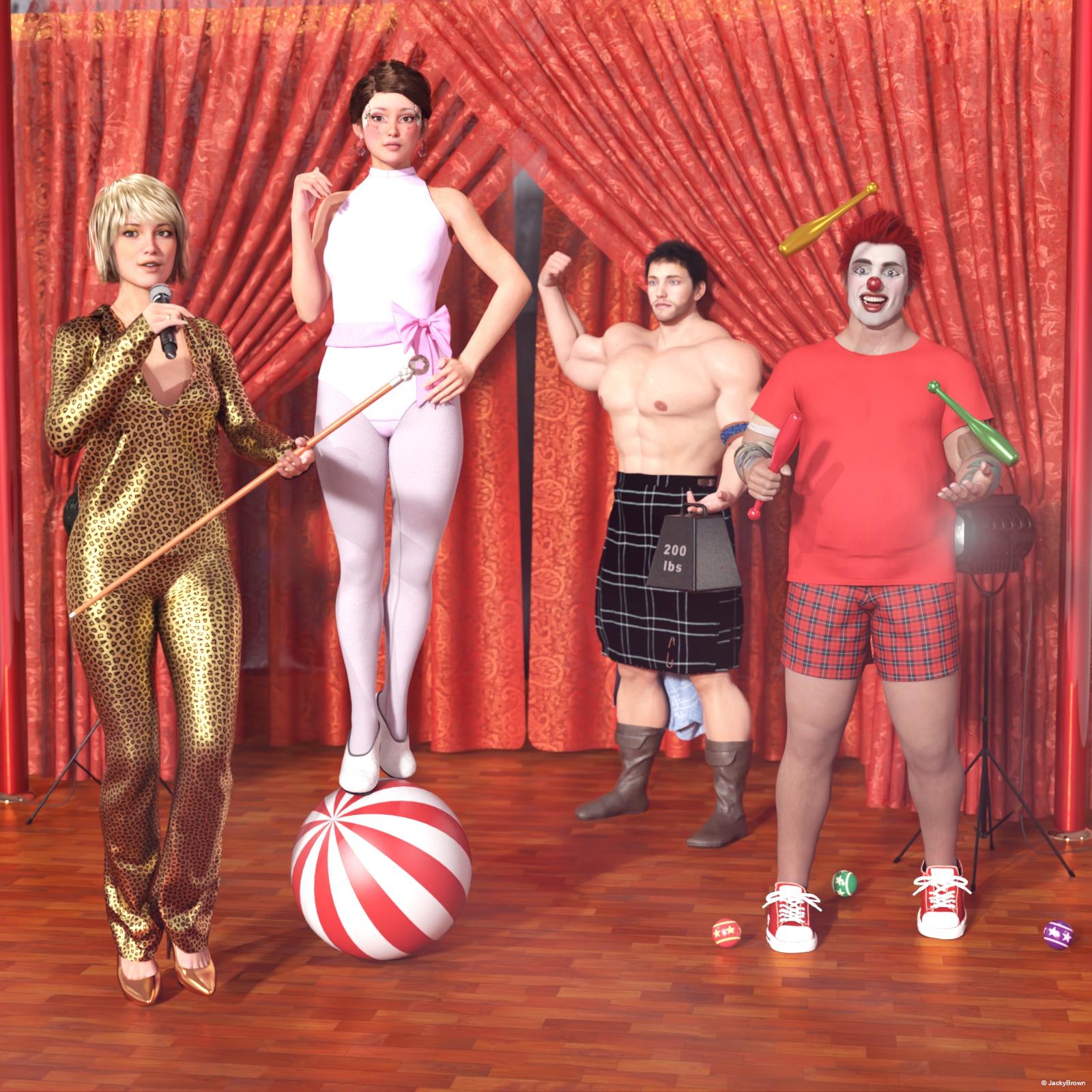
"Ladies, Gentlemen, Girls and Boys..."
You are good to go Jacky. Please transfer your image to the Entries Thread. Love the clown face and nose. You make them yourself? So did you like the results of the Mystical Flowers? I downloaded the package but have not installed it yet. Just love the sunflower image she has posted. I might have to buy Florabelle for G8F. I have moonbeam's graphics wishlisted and thought I might try and make more if I could. I am a sucker for Victorian scrap flower images and that would be amazing to put a costume together using them as Maddeliruim has done for the roses.
DS to Luxcorerender?Here is the link to the product: https://www.daz3d.com/reality-4-daz-studio-edition
I would recommend adding it to your wishlist because there will no doubt be a sale where you can get it for much less.
Nice! I didn't know it was still for sale. I tried searching the store and got nothing. To dj7r3kn0, I wouldn't advise waiting too long. Daz has a habit of removing items from the store without warning.
Alternatively, there's also the Diffeomorphic plugin to export to Blender. There's a bit of a learning curve involved with Blender, but I prefer it to Reality/Lux and you get lots of other effects too (physics, cloth, smoke, fire, liquid, motion blur, etc).
I tried diffeomorphic today in full force and it works great, aside from some products that gets all messed up in the transfer everything works great. Not to mention the total freedom to use blender to enhance the scenes quality. Thank you everybody for replying.
Does DAZ Studio Ever Create Files Automatically?DS will create files in the "data" folder when you save a new asset, or a scene using content which wasn't already in DS format.
.bak is usually used when people make backup of files.
ERC is Enhanced Remote Control, it's used when you have a property which "pilots" other properties, like for example a character dial which loads both a head and a body morph. Not sure what the "multiply" means exactly, but that slider seems to pilot 4 correction morphs.
Feedback for the C4D BridgeSomeone asked why lots of morphs are exported. Because you can dial in Face Morphs in in C4D. Select the Pose Morph tag on the object and you get a lot of sliders to dial in facial expressions in the tag parameters ... wow ...
 Nice first product by peache
The color palette i copied visually from your promos which I thought were gorgeously soft, so I did my best to make a tribute to your lovely color choice.
I am normally too into saturation so this was a unique challenge for me.The guys do need the lower waist since women's outfits tend to sit high on their hips well above he navel. They look nice and real though and the transfer wasn't bad at all.
Windows10 licensing questionTo all the respondants. Thanks for the information, I'm relieved might be able to transfer my license one way or another.
To Kenshaw...Um..., I know what "OEM" is but what is "CS"?
Yeah, I have a Microsoft account, several of them accidentally established over the years, but I hate the damn things cause I can never remember which one is which or which one I established last. I doubt that I've ever logged into a Microsoft account with this particular computer.
The whole concept of a Microsoft account has confused me from the beginning. Can I use 3rd-party mail domains? Do I have to use Outlook domain? And the way they nag you to establish an MS account when installing a system and setting up your user accounts without telling you that you don't have to have an MS account and that it can be bypassed if you find the teeny tiny print that says continue without one. It always seemed like slimy business practice and I feel like I'm being herded into the gas chamber.
I'll do it, and use one if necessary but just for the record it's under protest.
Meanwhile: COMPLAINT: I just got notice from USPO tracking that my package with my new CPU chip has been delivered, ... 1200 miles away from here. Grrrrr.
Now I have to fight with Amazon or the vendor or the USPO to either find me another chip (relatively rare 2nd generation, refurbished) or get my package redirected to me, or get my money back. I should have payed attention when I noticed that the Amazon 3rd-party vendor had a 20% unsatisfactory rating.Nice first product by peacheAnd another lovely new outfit from Peache, instant buy as always. :) I love how Peache includes accessories like the glasses or earrings in each set, gives them more character.
ah~ every comment of yours makes my heart so undeniably happy. I truly am grateful to be supported by wonderful people like yourself - thank you :^) ♡
Peache is back!
:)
j
it me! thank you for the warm welcome ~
This one went right in the cart. I love the lovely promos characters she uses. I wonder who the pale girl in the main promo for the midday outfit isthis is so sweet !! you are a treasure & thank you so much for your patronage ♡
pale girl is sadly just a placeholder until I finish up my new model. she holds no name and no story but now I kinda wanna give her one >:TThis artist is one of the few who I'll see a new promo for and then click the little cart icon without evening opening the product page or seeing subsequent promo pics for.
this is so nice & I cannot thank you enough. comments like these are what make me strive to do better - thank you ♡
Thank you, I had over-looked this so went back and looked again at new releases and snapped it up!

sending you one million virtual hugs. thank you ♡
I like the set. I do wish for some waist adjustment morphs for the sweats to tug them down a bit. They sit pretty high on some characters, there are adjustments but none to create a more lowrise look.
The pants and glasses fit the guys pretty well, with fit control, although there is a bit of a ballon quality in the thighs, and I dialed the pants a lot smaller. They were kind of voluminous even with dforce.
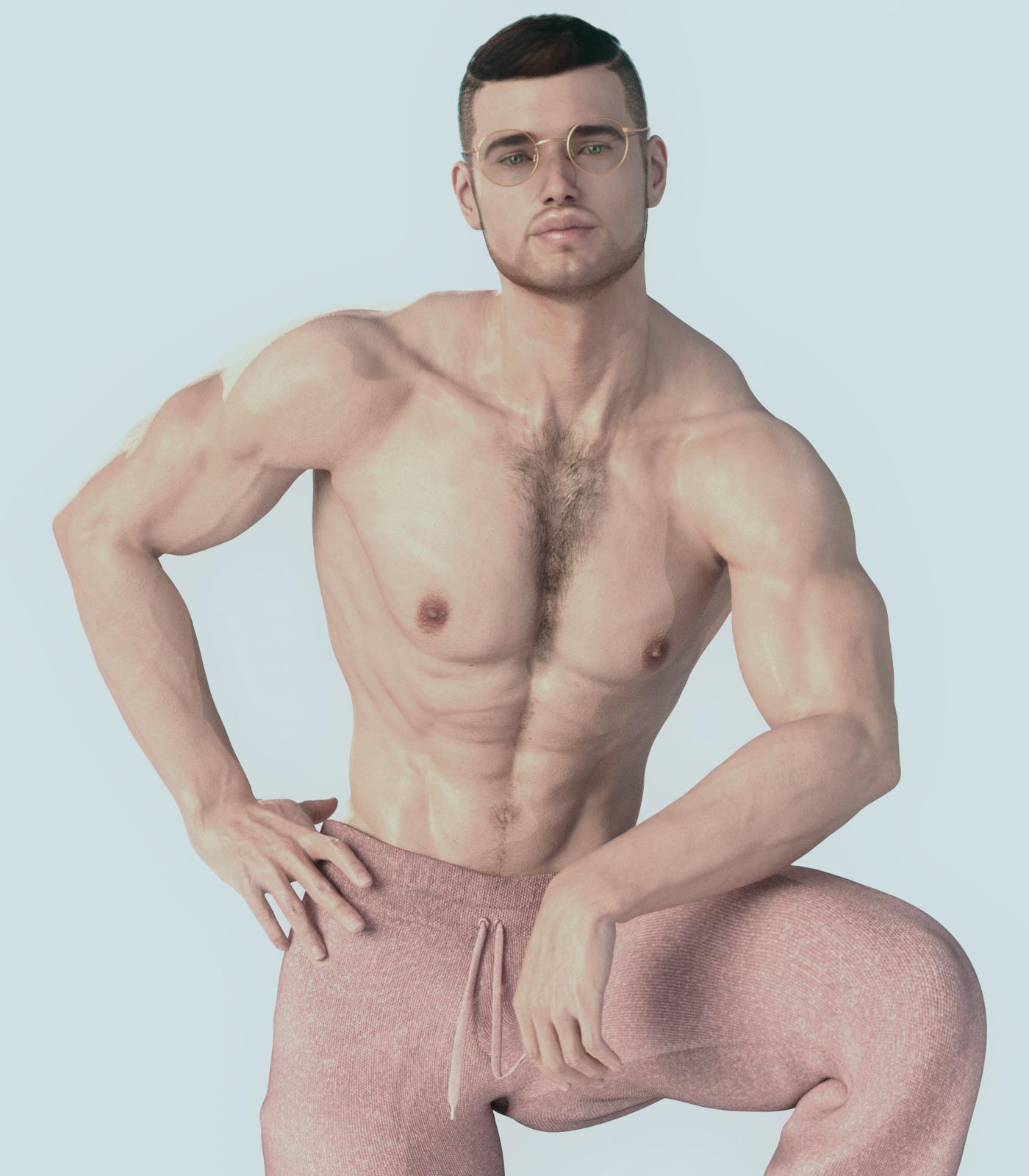
so much to say ~
- this is a gorgeous image & your eye for color is awesome.
my obvious bias for soft, unsaturated renders aside, this is just so pleasing to look at (kinda like how looking at the right shade of blue can give you a sense of calm). the gold, the pink , the nudes of the skin & hair, the everything is just so, so lovely~ - this almost makes me want to make clothing sets for guys because your character looks just absolutely amazing.
- WAIST HEIGHT ! YOU GENIUS ! it never occured to me to make a waist height adjustment morph & that would be so so helpful for even my own custom characters ! I will start doing that for every item that I can make it work with. thank you for the suggestion ♡
WinterMoon Wants Attention.This post is All About Aubrey. She's kind of unique (heh) among my characters in that she originates in DS. Most of the others have a background as original story characters or Sims, Aubrey doesn't. She came into existence because I was messing around in Studio two years ago, with very little content and even less experience.

Out of curiosity, and apparently a lack of better things to do yesterday(?), I extracted previous iterations of Aubrey from very old scenes. I was amused by how she got steadily taller with each new incarnation (inpixelation?), almost as if she were growing up.
Starting from the left, we have the first child character I ever dialed. I had no idea what I was doing, apparently, because her ribcage is... to put it bluntly, misshapen. This version wasn't even called Aubrey. Her name was "Lola," because I thought she was a creepy and wrong child so I named her after Lolita. Yes. She did appear in one render, but I'm not going to post or link it. The warrior outfit she wore isn't really appropriate child fashion, although it's perfectly SFW and all that jazz.
Next to her is the first "real" Aubrey. She's taller and has less warped proportions. (And she's sinking into the floor. I didn't notice that until after this set-up no longer existed.) You can see a couple of renders featuring this Aubrey on the first page of the thread. At that point I had collected some free clothing (especially from Wilmap) that was more child-friendly. This was when Aubrey's personality started emerging. I began thinking of her as a young girl who was in a situation where she had to make do with whatever she could get. My runtime was pretty much a barren wasteland at the time, and my fertile (hurr hurr) imagination started picturing a scenario that was more than just regular poverty. Aubrey lived in the aftermath of some kind of infrastructural breakdown. (Hellooooooo 2020!) She and the other characters were displaced, hanging out in woodsy and remote areas. Anyplace more urban must have been rife with death-viruses and riots. At this point I had started looking at DS content with desire of possession, and it was easy to imagine that Aubrey felt the same way. Uh, what can I say? My characters tend to become very real to me. I don't mean that I have lapses where I believe they exist, or anything to that degree. It's just always been very easy for me to start developing complex ideas of the characters' identities, almost by accident. To Aubrey, in her fictional pixel universe, the models in Daz Store and Rendo promos were glamourous celebrities. She wanted to grow up to be pretty like them, to wear the kind of clothes they did. Alas, she was just a homely child, leading an austere and rather unenviable life. It kind of struck a chord with me, I guess.
The third version is mainly different from the first in height, and it looks like her head is also a bit proportionally smaller. You can see she's also wearing PA clothing now. The 2018 PC+ sale broke my resolve to keep 3D as a free hobby, LOL! Some of the first paid content I owned were the Aussie Girl and Mall Girl sets, and I had everyone wearing different mix-and-match combinations of them for a while. Yes, I paid for Genesis 1 stuff. Have a moment to get that out of your system. x) It looks like Aubrey's life got somewhat better, though. If I accidentally predicted the predicaments of this year, maybe this is a ray of hope.
Aubrey number 3? 4? errr... the one on the right, was a radical redesign I made back in early 2019, after I'd had an involuntary break from DS'ing, due to installation troubles and crap. Aubrey got even taller, her headshape got a revision, and I did some adjustment on her features. When I tried Thorne's Wednesday's skin materials on her, something just clicked right, and I decided that this was how Aubrey was going to look from now on. Now she was pretty, transforming from a duckling to a young swan, to use an old cliché. She doesn't look like a 12-year-old anymore, so I suppose she needs an age-bump. Maybe she's fourteen now? I don't think she looks any older than that.

The previous versions of Aubrey all wore adult characters' materials, which contributed a lot to her looking homely and kind of just "off." Just for fun (I have low standards) I decided to see what her unintended age-progression would look like with materials that were meant for a young character. I plopped the Andrea for Julie skin materials on Lola and the smaller Aubreys, and voilá. She's still somewhat "homely," but all the creepiness is gone. And yes, I did fix "Lola's" ribcage expansion. Poor child looked like she was about to give birth to a Xenomorph.
Uh, WinterMoon (or TigerAnne, or whatever you're calling yourself right now), why don't you just transfer Aubrey to Genesis 8, if you like her that much?
Well, I could do that, obviously. But they way I see it, that would actually be counterproductive. The thing with Aubrey is that she's a Genesis 1 girl, with the limitations which come with that. Although she has a better selection of clothes and hair now, a part of her will always be that little girl from the wasteland, who couldn't go to school, who wore second hand clothing that smelled like desinfectants.
But Genesis 1 is totally outdated, and I don't understand what's going on in the heads of people who insist on using that, and V4, and other old stuff. You can transfer the clothes to G8, and then you just decide that she only wears that. Why are you making things so difficult????
Because I want to? And that concludes todays post. Wear a mask, eat your vegetables, spay and neuter your pets, and be nice to your family. Peace!
daz to blender bugsthis thread was about bugs and not being able to import poses and animations is certainly something needing addressing.
Hi @WendyLuvsCats, I don't know if you saw the manual I posted above near the top of the thread, but there is a way to import poses (just type #get pose in the command box and a new box opens up). Now I will say after playing around with it this weekend, it really is hit or miss. A ton of poses from sets I tried to import, the character just sat there, but like you're good on using the base poses for sure, I got Mei Lin 8's poses to work, and some others, so this definitely is a bug that needs to be addressed. I know the manual says which files can or can't be read, but all the ones I tried to open matched what was said to be accessible. So I don't know what's going on. But it would be great to be able to transfer over animations as well.
I will need to read more
Who is this character??Could it be she resembles someone from a popular show or game?
There is another thread somewhere on here with a discussion about how certain shots make her look like the actress Felicity Jones. There was at least one person working on a morph of her in there. I agree that there is a resemblance but it isn't a perfect one.
daz to blender bugsthis thread was about bugs and not being able to import poses and animations is certainly something needing addressing.
Hi @WendyLuvsCats, I don't know if you saw the manual I posted above near the top of the thread, but there is a way to import poses (just type #get pose in the command box and a new box opens up). Now I will say after playing around with it this weekend, it really is hit or miss. A ton of poses from sets I tried to import, the character just sat there, but like you're good on using the base poses for sure, I got Mei Lin 8's poses to work, and some others, so this definitely is a bug that needs to be addressed. I know the manual says which files can or can't be read, but all the ones I tried to open matched what was said to be accessible. So I don't know what's going on. But it would be great to be able to transfer over animations as well.
Daz 3D is part of

Connect
DAZ Productions, Inc.
7533 S Center View Ct #4664
West Jordan, UT 84084Licensing Agreement | Terms of Service | Privacy Policy | EULA
© 2026 Daz Productions Inc. All Rights Reserved.