-
MEC4D's celebration ( with freebies ) [commercial]
Oh really ? you should look one more time , there is coal on the bottom of the fire place , paper sadly burned out already, but the ashes will be there .. lol
you just reminded me to make matchsticks, firewall and some other things but that later . Definitely need the Firewall , so when Dana animate the fire with the morph it looks more realistic in animation ( taking the eyes away from the focus point) lol j/k
I don't see any coal or paper to get the fire started
 MEC4D's celebration ( with freebies ) [commercial]
Yes Dana you do
 , you can use Opacity slider to hide the fire from the rest of it if you like and put in whatever you like . The only separate things will be furniture so you can move it eventually if needed.
And of course I was thinking about the morph for the fire as I like to do animation myself but it sucks when have have to manually sliding morphs for making animated fire , but I wish there was animated surface option in place of a morph, D|S is long behind , even old Carrara could do that better . I could do running water or fire just with AVI map in old Carrara , now I have to sliding up and down morphs for 1000 frames , very advanced indeed . I set the fire this way that you can't see the geometry, the fire appear after 2-3 second of rendering in iray , looks like igniting
Anyway I am in the sitting-orangery section today doing furniture and plants , when time allow I may find something better for the animated fire option.
and as they say in my country : “don't look a gift horse in the mouth" lol it gonna be a superb freebie you ever got.
Thanks Richard, being busy cutting wood all day for the fireplace lol ,
Is the fire in the fireplace separate, so it can be made invisible? And is it separate from the logs in the fireplace? I think there is an iray flame product that can be used to make it different. Maybe I'm wrong about that. If I'm wrong, will the flame have morhps to change its shape? For variety, and possibly for those who like to do animations. Have I just made too much work for you? Am I asking too many questions?
Dana
No one asked me - Diomede screenshots on whatever - Warning AI Discussion OKTime for my annual Blender expedition. Each year for the last several years I have given Blender another try. I really hate being forced to use shortcut keys. In the past, that got in the way of using Blender. Between the BlenderForArtists initative and the change in the interface that came with version 2.8, I think I might have more luck this time.
I can report that I've already gotten further than the first time I tried (several years ago). I was able to delete the default cube, insert a sphere, select a vertex, and translate it - without having to remember a letter to hold down.
cool stuff Ted, I've adventured into Blender a few times now, mainly to get stuff to fit better on Genesis

haven't done much more than that though.
Yes, super cool work!
I have only jumped into Blender to use the Data Transfer Modifier, stumble around, and then get myself back into comfy Carrara, lol. Selecting a vertex and moving it is way more than I have been able to accomplish.3D Art Freebie Challenge-September 2020-"In the Sky" -Main Thread Only3D Art Freebie Challenge September 2020 "In the Sky"
Here is my entry for this month, lowest number of countable freebies ever used by me!
[Best watched at full size for details.]
"Was ist das?" ("What is that?")
Starring: Helena Harper and Jill Valentine by CheckerTooThe tale:
'Spezialagenten' (Special Agents) Helena and Jill received a call from headquarters to go immediately to Potsdamer Platz, there would be something strange in the sky, "Was ist los? Was ist das?" ("What's happening? What is that?") ...
Soundtrack:
Mo-Do - Eins Zwei Polizei (© 1994)
https://www.youtube.com/watch?v=dSy2DcATYUo
COUNTABLE FREEBIES: (Alphabetic order)#01! Benzo FULL (also for poser) by Elele
https://www.sharecg.com/v/53796/browse/11/Poser/Benzo-FULL-also-for-poser **#02! Earrings for G8F by Shonen_A
https://sharecg.com/v/96360/browse/21/DAZ-Studio/Earrings **#03! Helena Harper for G8F by CheckerToo
https://www.deviantart.com/checkertoo/art/Helena-Harper-For-G8F-848965118 **
[Free Download of Full morph, Materials, Hair, Cloths and Props.]#04! Iray car related shader presets 'megapack' by Tom2099
https://www.deviantart.com/tom2099/art/Iray-car-related-shader-presets-megapack-539622361 **#05! Iray Jewelry Shaders by AllenArt
https://sharecg.com/v/95893/gallery/21/DAZ-Studio/Iray-Jewelry-Shaders **#06! Jill Valentine for G8F by CheckerToo
https://www.deviantart.com/checkertoo/art/Jill-For-G8F-DL-852699253 **
[Free Download of 2 Head morphs, Materials, 2 Hair types, Cloths and Props.]
#07! Pearl Earrings for G8F by Shonen_A
https://sharecg.com/v/96388/browse/21/DAZ-Studio/Pearl-Earrings **#08! Potsdamer Platz by Greg Zaal on HDRIHaven
https://hdrihaven.com/hdri/?c=outdoor&h=potsdamer_platz#09! Super Morphing Tree 2020 by Design Anvil
https://www.daz3d.com/forums/discussion/379371/da-super-morphing-tree-2020-oak-tree **#10! Urban Streets Of Tomorrow by sfman
https://sfman.deviantart.com/art/Free-for-DAZ-Urban-Streets-Of-Tomorrow-by-sfman-723531345 **
[Scan Beam used only.]
NO-COUNT ITEMS:--- Free Iray Outdoor Lights by Dreamlight
++ Toulouse Hair for Genesis 8 Female by Daz Originals
PURCHASED/PAID FOR ITEMS: None 100% Freebies
*1 E-mail address required
** Registration required
#x! Countable Items (Bold ones are used by me for the first time I think.)
--- No longer available freebies
++ Free with DAZ Studio (or the Essentials)
$x. Purchased/Paid For Item
Rendered with DAZ Studio 4.10.0.123 (nVidia Iray)Other free software used: GIMP v2.10.18 and Irfanview 4.54
Postwork: used the AltaLux Image Enhancement Filter (Effect) by Stefano Tommesani that comes with Irfanview. Also used mcjDenoise by mcasual. (https://sites.google.com/site/mcasualsdazscripts9/mcjdenoise)
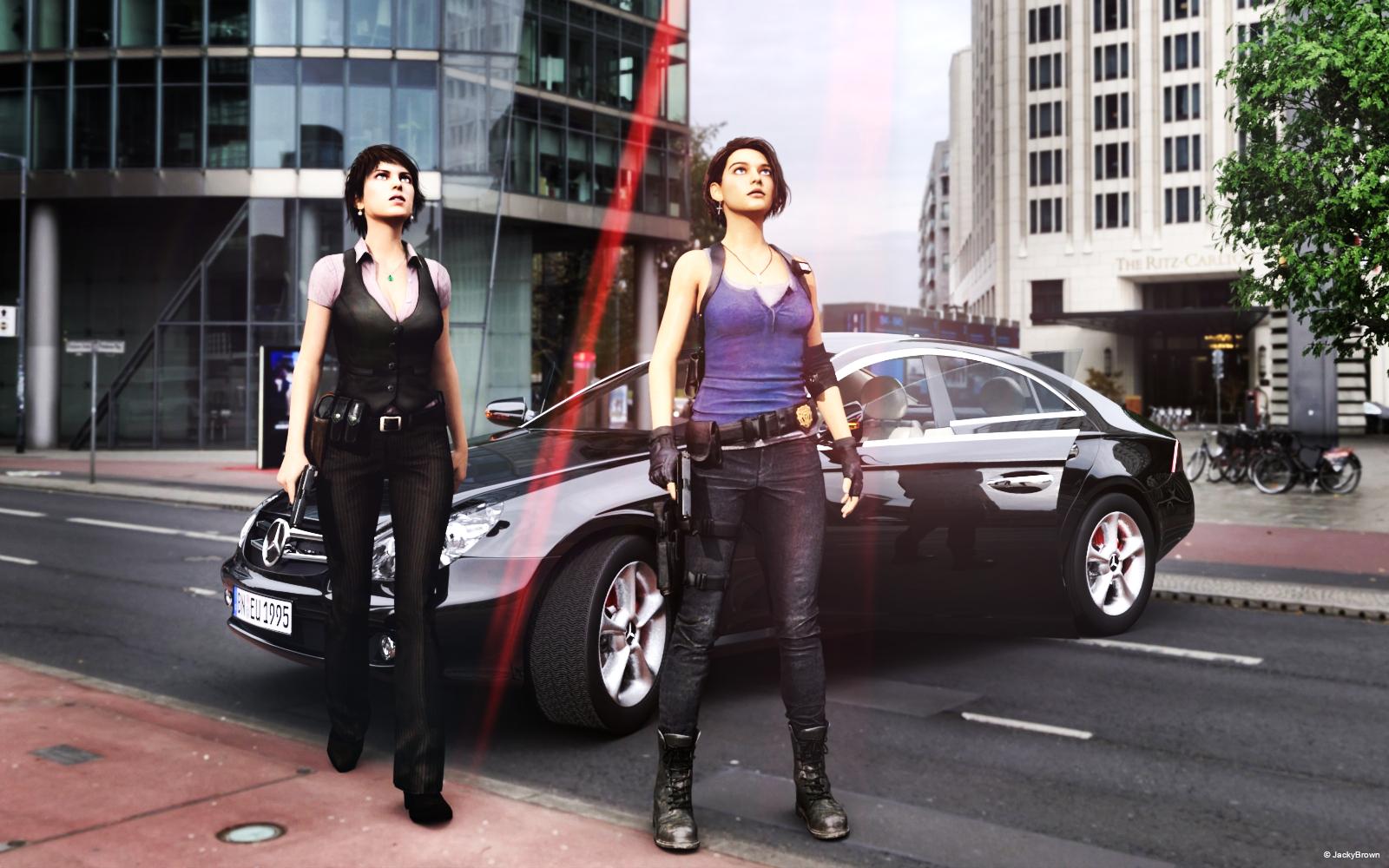
"Was ist das?" ("What is that?")
How do I repair the rigging on fingers that are morphed out of alignment?With the joint editor tool selected, right click in the window and click "Adjust rigging to shape".
Then ERC-Freeze the rigging to the new shape
Are we supposed to do this everytime we morph a character?
It depends what you mean by "morph a character".
If you mean "create a custom morph" then yes, rigging may need to be adjusted, especially if the morphed shape is very different from the default shape. You would do it once and then resave the morph with the adjustments, not every time you use the morph.
If you mean "create a character by combining existing morphs" then usually it's not needed as rigging adjustments should already be included in the morphs you used.
By morph i meant use morphs from the Daz store.
Using DAZ Store bought morphs is no insurance against this, especially if the character is changed significantly by the morphs.
FBM Expand does nothing"no subcomponents" simply means it's a parameter for a single morph, not a dial which controls several morphs.
but why does it not work? Its like I said not the first product with this problem, I have that really much times.
My Project: Brash Lonergan adventures - Warning AI Discussion PossibleNot Brash and Moxie (as of now)
Here is an example of a style which would move further away from the old newspaper Prince Valiant style comics. I did a comparison of rigging in Carrara and rigging in Studio. One advantage to rigging in Studio is that it can still be used in Carrara, and the Studio transfer utility can be used to aid the development of additional content.
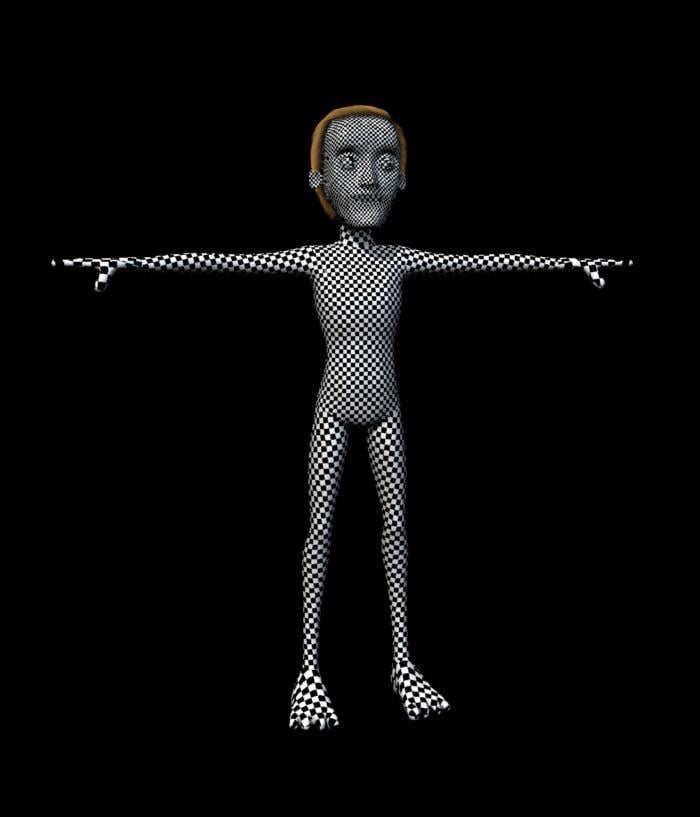
Diomede, all of this is looking so friggin' awesome!!
Thanks for all your detailed explanations. Love your characters and inspirations.How do I repair the rigging on fingers that are morphed out of alignment?With the joint editor tool selected, right click in the window and click "Adjust rigging to shape".
Then ERC-Freeze the rigging to the new shape
Are we supposed to do this everytime we morph a character?
It depends what you mean by "morph a character".
If you mean "create a custom morph" then yes, rigging may need to be adjusted, especially if the morphed shape is very different from the default shape. You would do it once and then resave the morph with the adjustments, not every time you use the morph.
If you mean "create a character by combining existing morphs" then usually it's not needed as rigging adjustments should already be included in the morphs you used.
By morph i meant use morphs from the Daz store.
Create your own "Expand All"?A possible solution ['cause I haven't actually tried this for shoes] would be to make a projection morph. Such could then be used for any pair of shoes as the morph applies to the figure, not the shoes.
How do I repair the rigging on fingers that are morphed out of alignment?With the joint editor tool selected, right click in the window and click "Adjust rigging to shape".
Then ERC-Freeze the rigging to the new shape
Are we supposed to do this everytime we morph a character?
It depends what you mean by "morph a character".
If you mean "create a custom morph" then yes, rigging may need to be adjusted, especially if the morphed shape is very different from the default shape. You would do it once and then resave the morph with the adjustments, not every time you use the morph.
If you mean "create a character by combining existing morphs" then usually it's not needed as rigging adjustments should already be included in the morphs you used.
How to replace Head form Blender FaceBuilder datahttps://www.youtube.com/watch?v=UbLMWUU_hNk&ab_channel=ParmyBaddhan
I find this vedio and follow it,I successed.I know how to import DAZ into Blender and then morph back into DAZ,not use "daz to blender" adds-on
now I need study how mix the imported obj and facebuilder obj,but it's too hard for me :(
No Pose Controls on Import [SOLVED]
Not the IK rig, but the pose morph tags. See the link above, this is what I'm looking for. My imports do not have any pose morph tags.
FBM Expand does nothing"no subcomponents" simply means it's a parameter for a single morph, not a dial which controls several morphs.
How do I repair the rigging on fingers that are morphed out of alignment?With the joint editor tool selected, right click in the window and click "Adjust rigging to shape".
Then ERC-Freeze the rigging to the new shape
Are we supposed to do this everytime we morph a character?
It's Here! First Live Product! [Commercial]Thank guys!
Here's the socks to pair with the outfit. It's in obj format so you'll have to import it. Leave the import options as default. Once imported use the transfer ulitity to conform the socks.
IMPORTANT: Please scale the shoes by like 2-3% to remove poke throughs.
File was to big here's external link to my stash: Dropbox Link Socks
If you got any questions feel free to ask. Enjoy!
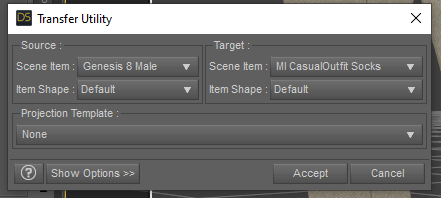
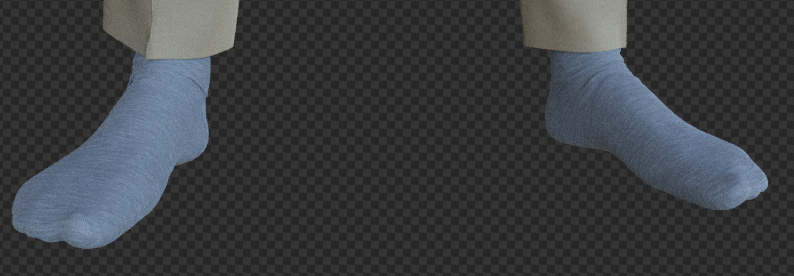
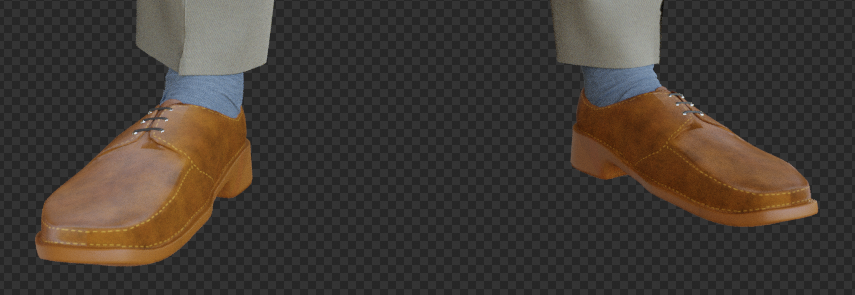
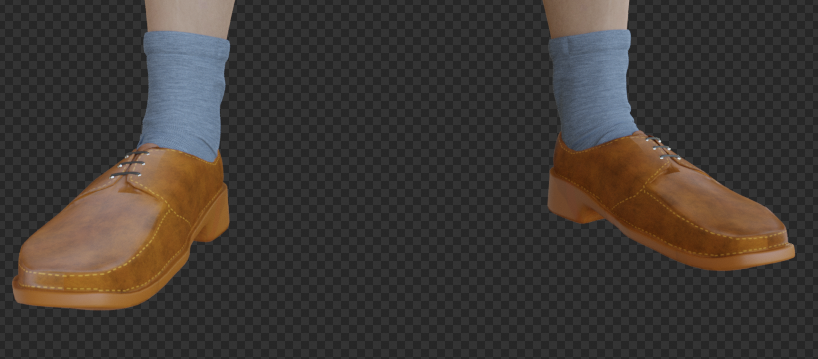
Just trying to add it and see this:

I saw it at someone others product too, I dont know what software you use, but there is a base "glowing" on the socks ;)
I will remove it, but just as feedback for your future clothes, to make sure they are not "shining in the dark" :)
Confusing ParameterNo, I just have 1 Lab Coat selected, which have a open/close morph I just wanted to set the max value correct for closing.
How to replace Head form Blender FaceBuilder dataI create a head which use blender fackbuilder https://keentools.io/download/facebuilder-for-blender
like this:
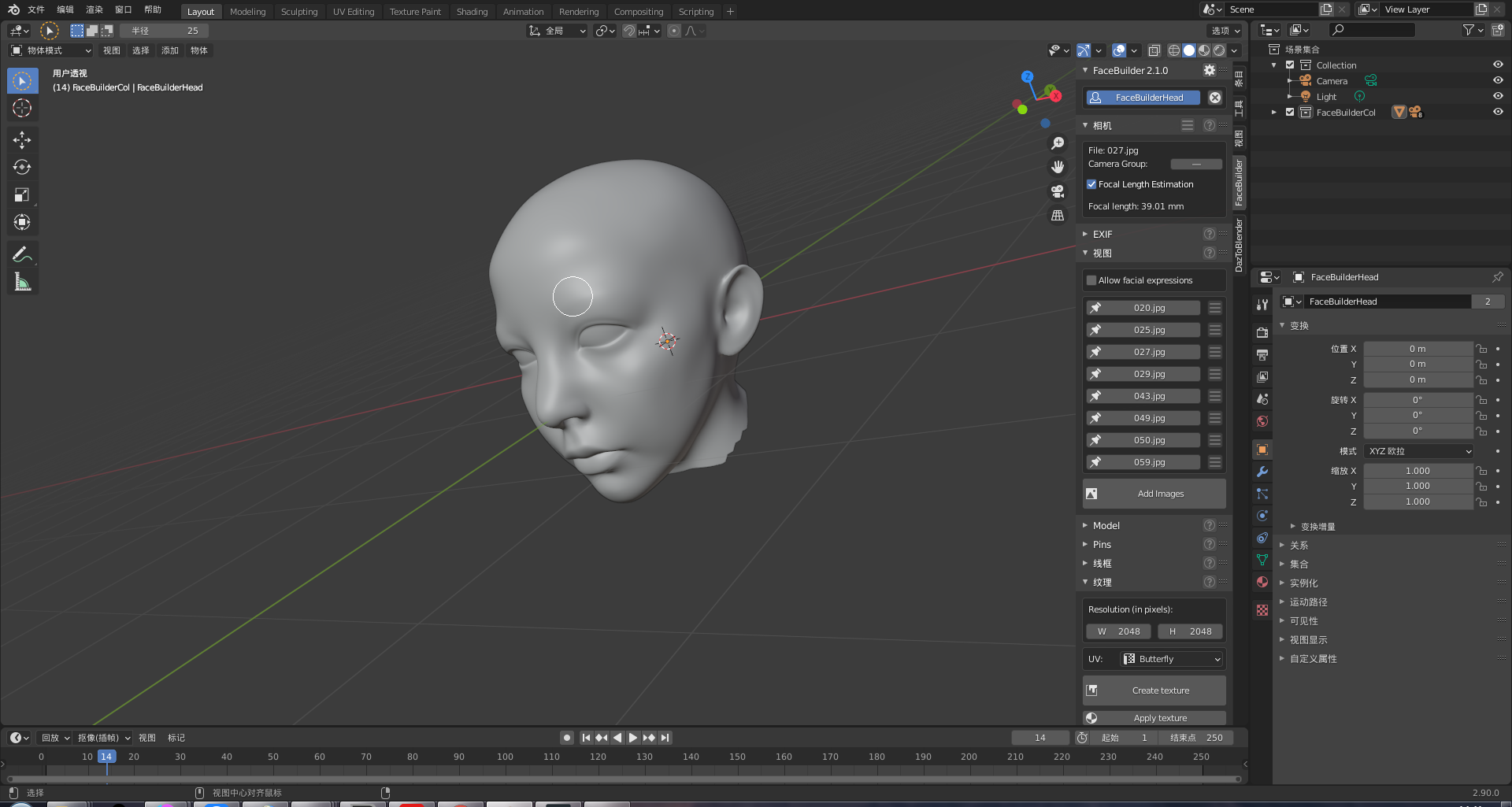
I want replace default genesis 8 male to this head or make a head morph to change default head,then move the full body with new head into daz.
I tried use "Daz to Blender" move genesis 8 male into Blender,but i don't known how mix the fullbody and this head
Is that possible? Is there a video tutorial?
I prefer blender because it can generate face data exactly
Are there any other ways to do replace head with face data exactly in daz studio?
how can i do,thx.
https://blendermarket.com/products/softwrap
This tool might help you. Use G8 as your base mesh. Or try Wrap from russian3dscanner. com, they're offering a 30 day test version of their wrap toolset.
Thank you for your answer. I got this↓ but I don't know what to do next。
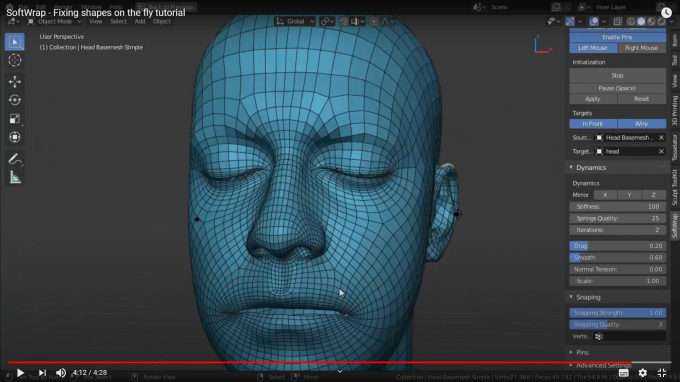
how to use this to make genesis 8 male face morph in daz. how transform.Could you please tell me the simple steps
How to replace Head form Blender FaceBuilder dataFirst I'd suggest you make sure you have the right import/export settings to and from Daz Studio to correctly create morph in Daz for the base figure. Otherwise you may do a lot of work and then find you can't import it into Daz. Just try and create a morph that gives a character a big nose or something to check it is all working. There must be tutorials out there for creating morphs in Daz.
As for facebuilder to Daz. I've done what you are trying to do with some manual effort, the shrink-wrap modifier and a little trial and error. In blender size the head from facebuilder to be the same size as the Daz head, and place the facebuilder head over the Daz figure's head. Use blender tools to scale the Daz head to better match. Try and match up the position of the main parts of the face, eyes, nose ears and mouth, trying not to distort the eyeballs or teeth inside the head but moving them If you move the mouth or eyes.
In the Daz figure create a vertex group of the Daz face but without the ears, lips and remove any faces that go inside the nostril from this group (they shink wrap to the wrong places), and some that are around the eyes. Apply a shrinkwrap modifier to the daz figure, targeting the facebuiler head and selecting your new vertex group. You might find you need to do a little more manual work after to get a good result, moving the facebuilder head or scaling it to line up the eyes and mouth and ears correctly. I found the area under the nose to be problematic. Then I'd use smooth tool in sculpting mode to clean up any lumps and bumps in the neck or around the ears.
Softwrap looks like an interesting tool.
thank for you answer. But I still have no idea to do this. I am a novice,it's too hard for me . I don't known something you tell like shrink-wrap modifier and a little trial. Where can I learn those skills you mentioned. If you can, can you record a video for me? I'll pay.
data/daz 3d/genesis2/base/genesis2.dsf?If the message also appears when loading a default Genesis it means you have installed a morph or character which contains a bad reference.
And the fact that Julie is applied by default means you have a character which uses Julie and is saved with a non-zero default value.
I wouldn't be surprised if both problems came from the same character.
Transfer Utility ProblemThe mesh you rig has to be in the right position on load, you can't reposition it before using transfer utility.
So you need to export your repositioned mesh as obj and then load and rig that version.
Edit: for the record, you're not allowed to post images with textured nude figures. Please set the viewport to smooth shaded before taking screenshots.
Daz 3D is part of

Connect
DAZ Productions, Inc.
7533 S Center View Ct #4664
West Jordan, UT 84084Licensing Agreement | Terms of Service | Privacy Policy | EULA
© 2026 Daz Productions Inc. All Rights Reserved.