-
[Released! HD Face Burns for G8F + Add-On] FenixPhoenix's Commercial ProductsI should also mention that I'm working in C4D, which has very robust hair creation tools, so I'm not limited to Daz assets. Even still, though, her hair is a lot to take on. Granted, I'm doing that thing I do where I make things unnecessarily hard on myself. It would be trivial to give her loose, wavy hair with hair loopies, but that's not the Gordig way.
Loved that! Meanwhile, when it comes to render for promo-work/products, the easy way is the Fenix's way, since I still need to accomplish a deadline! XD
----
Which reminds me, I have just started rendering the Raw & Carbonized textures for the HD Face Burns add-on (there are used for the icons and the "technical promos"). I'm hoping to showcase here some of them later today or tomorrow at the latest. I extended some of these beyond the morph, so people can either aim for Harvey Dent or Freddi Kruger. ;)
Eyebrow TransferCarabelle brows looks like they're painted of her texture map, not fibermesh brows shaped by a morph.
You can use Carabelle maps on any G8F character, but that will be the whole map, not just the brows.
Eyebrow TransferI don't think you can transfer over, unless you take it into some modeling app and reshape them yourself. Or you could try to redraw your eyebrows on the face texture (with another app like GIMP or Photoshop) and put those fibermesh brows over it for volume. As for refunds, that's up to you.
The eyebrows I use are AprilYSH's Christmas freebie, "OnFleek", because they have shaping options. (You can read more about it on this thread that also links to her site where she's hosting them now.) https://www.daz3d.com/forums/discussion/217576/onfleek-for-genesis-3-download
The Marvelous Designer ThreadLooks like this thread is dead as no one updates it anymore. Shame.Um it is dead but that's why bumping threads was invented.
I've just started using marvelous designer with my Patrick Troughton (second Doctor) model. I'm still learning to create clothes so hope to improve. I'm mainly using it for cloth sim in animation. Unfortunately as I have to export from MD using Alembic I then have to remap all the separate clothing, as Alembic doesn't export textures. I was wondering if there was a quicker way of doing this. If I export it as an object I can have uvmaps for each clothing, but don't know if I can somehow transfer the uv to the alembic?what software are you rendering in? Existing workflows might be applicable to speed up adding textures.
Alembic just exports one default map of all the clothing.default map?
Eyebrow TransferI've been trying to recreate myself using the Genesis 8 Female.
Progress has been good, but the default eyebrows are nothing like my own, and there don't appear to be many stock morphs to compensate.
I saw Carabelle and was sold almost immediately because her eyebrows are like an idealized version of my own (v thicc).
I heard that character morphs show up when editing our own Genesis models and assumed there would be an option for the eyebrows, but was surprised to find that this was not the case.
Does anyone know how I can transfer those eyebrows over to my own model, or should I seek a refund and make sure to research before purchasing in the future?
 Face Transfer
Oh I forgot to mention that when I do a face transfer, it says that I have 3 saves left. But when I go to about plugins, it shows the license key there.
Face TransferI bought Face Transfer and have the key. Maybe I am saving it wrong or I am looking in the wrong place. (I am looking in My Library) Or maybe I should choose the "head" when I save it as a subscene.
But I still can't figure out how when I load a fresh G8 figure, I have the first face transfer that I did as a morph (slider) when I didn't either export into Hexagon or export as a .obj file.Converting G1 Female UV to G3MThe DS Map Transfer utility did the trick!
There's a tiny offset on the thigh-hip, but I think that's more due to the Gen4 UV seams and can be easily fixed in photoshop post-render.
Thanks again Vwrangler!!
Converting G1 Female UV to G3MThanks so much Vwrangler!
This product uses the Genesis 1 female base UV. I tried all other UV's... V4, M4, David5, Mike5, Vicki5 and they all cause the stripes to get misaligned all over.
I'll see if I can use your MAP Transfer idea making the G1 Female Base to Mike4or V4 and see if I can go from there with one of G3M's legacy converted UV;s.
Thanks so much!!
Face TransferSaving a morph, yes well that is what your new face for Genesis 8 is ... except from Face Transfer's save it is on the subscene save. Not hard really. Remove any eyelashes [because they are geografts] and have the figure at base resolution. If you don't want to send it over the bridge to Hexagon you could export out an .obj [but that could take awhile to figure out the correct selection, possibly using the D/S setting, haven't tried it for sometime and things changed between editions]. Then load a fresh Genesis 8, remove the eyelashes and put it to base resolution. Then either from Hexagon or via import through Morph Loader, bring in the morphed shape and make the morph. After it is saved, it can be applied to any Genesis 8 figure [of the same gender]. In other words, this is "how" you get it to "show up on a slider when [you] open a new figure."
? Did you buy Face Transfer? What comes with D/S only allows 3 saves, requires a key to make it unlimited.
Converting G1 Female UV to G3MSince you have it, I would first recommend that you put it on Genesis to see what the UV actually is. There wasn't a single Genesis UV, there were several.
In general, the base female UV for Genesis 1 was identical to Victoria 4 UV by design. However, Catgirl says it's based on Hitomi shape, which may or may not mean that she uses Hitomi UV (if there was one) or that she has her own UV, which several unique characters did.
Assuming that she does use Victoria 4 UV, there are a couple of approaches.
For the first, you would need to use Map Transfer and a Legacy UV product. The Legacy UV product uses geografts to get around how the remap moved things. You'd need to do a full map transfer first to switch it to the default male UV for Genesis 1, which would be the Michael 4 UV. Map Transfer is part of Studio itself, so that first step is something you can do without buying anything; I *think* there may be a tutorial on that in the forum. Once you did that, you'd need to put the textures onto Genesis in the proper place, and save the result as a materials preset. Then you would need this: https://www.daz3d.com/legacy-uvs-for-genesis-3-michael-4
Approach 2: If Catgirl Genesis does use the Victoria 4 UV, you can also use the Texture Transformer 2 product from Renderosity, along with the V4-G3F addon; if you get them when they're at full price, the combination runs close to $80. The advantage is that at the end of the process, you would have the texture fully remapped to Genesis 3 Female. At that point, you'd need one additional product from here: https://www.daz3d.com/genesis-3-uv-swap-male-and-female-base would let you use a G3F texture on a male without doing another map transfer.
Unfortunately, there's no simple way to get from where you start to where you want end up, and if Catgirl has her own UV or the Hitomi UV, it may be so difficult that it can't easily be done at all.
How to add poser files to daz studioThat is a pretty lousy title. Since all I have now is Poser 9 but not installed since I don't have a way of getting the update, I been looking a some old zip files that I
have for Poser. They have cr2 files, geometry files, runtime files, texture files, etc. I know that Daz Studio has a place for Poser content but I do not know how to
get all these files into Daz Studio.On a different subject, I have been thinking of just installing Poser 9 and I think I can get a upgrade price for Poser 11. But I don't think you can import G8 figures into
Poser 11 (or so I have read) I have made a little army of face transfer people that I would like to try in Poser because I am more familiar with it.
Thanks.Face TransferI read the tutorial that you made but that was for making a morph. I guess that I worded my original post wrong. Let me try again if anyone is till paying attention
to this post. When I first used the full version I make a face that was okay but not great. I saved it as "face925" I do not remember doing anything different other
than "save face" and using whatever options that popped up. Now when I go and load a new G8 figure and then go to "Shaping" "Editor" "head" there is a slider
for "face925" That is great but I cannot get it to work again for other faces that I have transferred. For example, I created a face I called "face940". It is on my
figure that I used and I can save it as a scene subset, and it has the slider for "face940" After I create "face940" how can I get it to show up as a slider when I
open a new figure? I tried merging the scene subset figure but that just gave me two figures. I know it can be done because I have face925 slider for all new
G8 figures that I load. Thanks. And your tutorial was excellent for using the right photo. And I have no earthly idea how to use hexagon. The slider method
is a lot easier for me.How do I do this in Blender...?Hi Sphinx,
1) I'm not sure about the question, probably because I don't use DAZ much.
2) DAZ shaders are made and optimized for DAZ. Some shaders and materials may transfer well, some not. Metals are actually quite easy to make in Blender. You can also search on blendswap or the internet if you are looking for a particular shader for Blender.
3) The nice thing is that aside from base material settings (metals, plastic, glass, etc.), DAZ image maps will transfer over to Blender. The easiest way is to use the Diffeomorphic plugin. Thomas and Padone have done a great job with the material conversions. If you look at the first screenshot I uploaded it shows an object direclty imported from DAZ to blender (this is a freebie - Jeweled Sai by Echidnaean). As you can see all of the image maps are set up for you. In the second image, I set up the normal and bump (height) map like you asked. Using the Principled BSDF shader, I increased the 'metallic' slider to 1.00 since gold is a metal, reduced the roughness to 0.15 so it looks glossy, and changed the color based on some gold color samples found on Google.
Hope this helps. :)
Wacky Modelling ~ In Carrara ~Great modeling, Stezza. What did you use to create the shaders for the Speederbike? The worn edges are excellent.
Thanks for the baby Yoda. I did a quick rig with minor weightmapping. Should be sufficient to turn the head, bend the ears, and grasp things. Other poses would probably need some weightmap adjustments or a morph.
Thanks Diomede, for the SpeederBike I used anything goos

thanks my rigging went somewhat wrong and I gave up

Mixamo didn't like him either

good to see you gave it a go Wendy, thanks Diomede for starting the little fella off... I may try using morphs for some simple poses and see how that goes... experimenting is half the fun..
I didn't check, but I kinda of remember seeing an Ngon or two and thought I'd better fix that but don't think I did.... must check
Character Mixer for All Genesis Figures; If anyone buy it, I'd like to ask you one thingNow imagine the results when doing a mixture of only characters of certain PAs... and realising that they used some product like this for years do make their characters...

Remember that a character made this way would have all the morph/character sets used as required products - most PA characters are fresh sculpts, possibly on a specific name 8 character, or use the base Body Morphs (and possibly Head morphs) only.
Shapeshifting / TransformationI used this process
I did look at RawArt's store, thanks. The werewolf isnt werewolfy enough. Looking more at Herschel Hoffmeyer's Werewolf.
I will have to go back and make sure I did it right, and loaded it back in properly
3D Art Freebie Challenge-September 2020-"In the Sky" -Entries Thread Only3D Art Freebie Challenge September 2020 "In the Sky"
Here is my entry for this month, lowest number of countable freebies ever used by me!
[Best watched at full size for details.]
"Was ist das?" ("What is that?")
Starring: Helena Harper and Jill Valentine by CheckerTooThe tale:
'Spezialagenten' (Special Agents) Helena and Jill received a call from headquarters to go immediately to Potsdamer Platz, there would be something strange in the sky, "Was ist los? Was ist das?" ("What's happening? What is that?") ...
Soundtrack:
Mo-Do - Eins Zwei Polizei (© 1994)
https://www.youtube.com/watch?v=dSy2DcATYUo
COUNTABLE FREEBIES: (Alphabetic order)#01! Benzo FULL (also for poser) by Elele
https://www.sharecg.com/v/53796/browse/11/Poser/Benzo-FULL-also-for-poser **#02! Earrings for G8F by Shonen_A
https://sharecg.com/v/96360/browse/21/DAZ-Studio/Earrings **#03! Helena Harper for G8F by CheckerToo
https://www.deviantart.com/checkertoo/art/Helena-Harper-For-G8F-848965118 **
[Free Download of Full morph, Materials, Hair, Cloths and Props.]#04! Iray car related shader presets 'megapack' by Tom2099
https://www.deviantart.com/tom2099/art/Iray-car-related-shader-presets-megapack-539622361 **#05! Iray Jewelry Shaders by AllenArt
https://sharecg.com/v/95893/gallery/21/DAZ-Studio/Iray-Jewelry-Shaders **#06! Jill Valentine for G8F by CheckerToo
https://www.deviantart.com/checkertoo/art/Jill-For-G8F-DL-852699253 **
[Free Download of 2 Head morphs, Materials, 2 Hair types, Cloths and Props.]
#07! Pearl Earrings for G8F by Shonen_A
https://sharecg.com/v/96388/browse/21/DAZ-Studio/Pearl-Earrings **#08! Potsdamer Platz by Greg Zaal on HDRIHaven
https://hdrihaven.com/hdri/?c=outdoor&h=potsdamer_platz#09! Super Morphing Tree 2020 by Design Anvil
https://www.daz3d.com/forums/discussion/379371/da-super-morphing-tree-2020-oak-tree **#10! Urban Streets Of Tomorrow by sfman
https://sfman.deviantart.com/art/Free-for-DAZ-Urban-Streets-Of-Tomorrow-by-sfman-723531345 **
[Scan Beam used only.]
NO-COUNT ITEMS:--- Free Iray Outdoor Lights by Dreamlight
++ Toulouse Hair for Genesis 8 Female by Daz Originals
PURCHASED/PAID FOR ITEMS: None 100% Freebies
*1 E-mail address required
** Registration required
#x! Countable Items (Bold ones are used by me for the first time I think.)
--- No longer available freebies
++ Free with DAZ Studio (or the Essentials)
$x. Purchased/Paid For Item
Rendered with DAZ Studio 4.10.0.123 (nVidia Iray)Other free software used: GIMP v2.10.18 and Irfanview 4.54
Postwork: used the AltaLux Image Enhancement Filter (Effect) by Stefano Tommesani that comes with Irfanview. Also used mcjDenoise by mcasual. (https://sites.google.com/site/mcasualsdazscripts9/mcjdenoise)
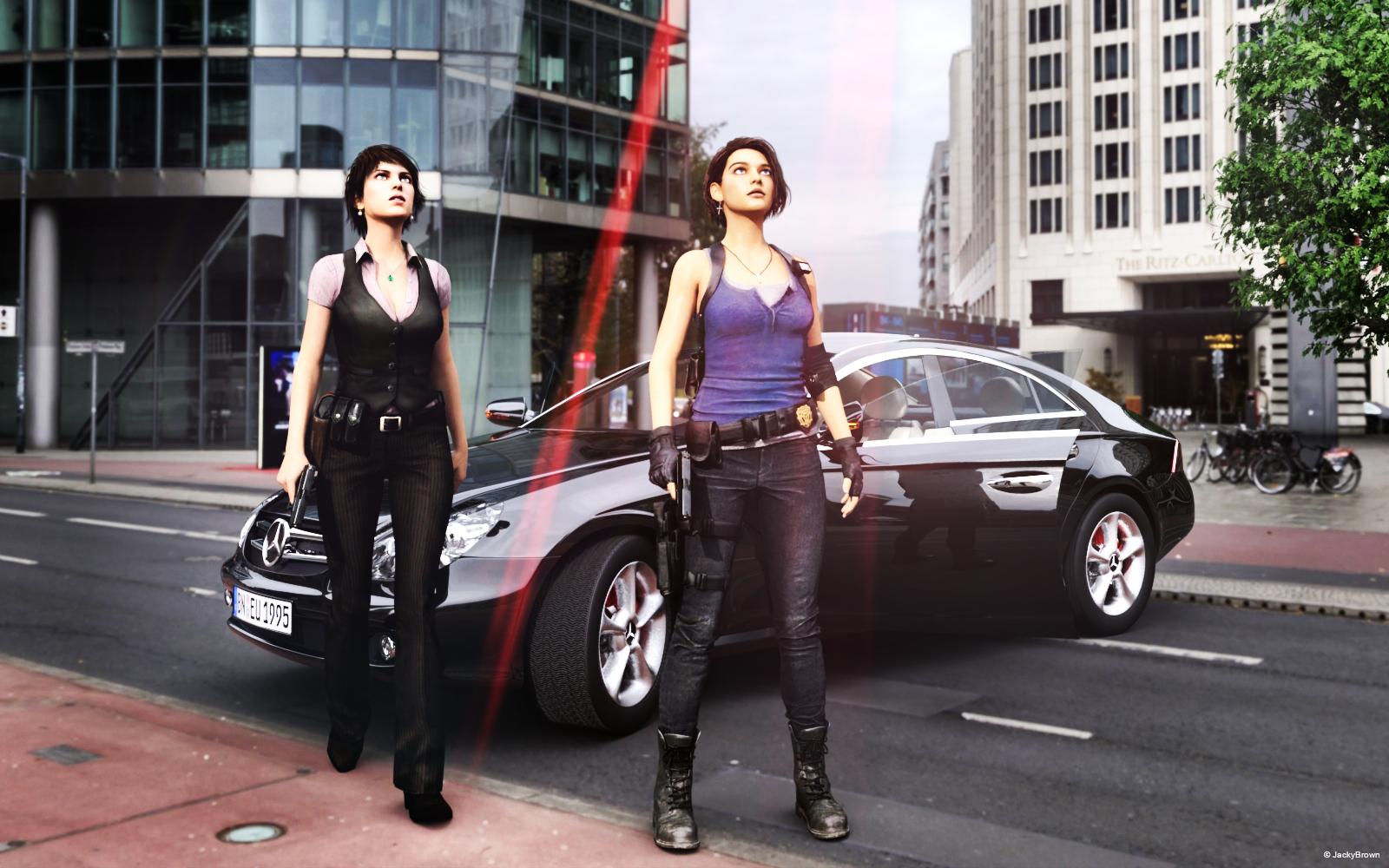
"Was ist das?" ("What is that?")
How do I fix a hair issue?Hair drives me crazy and I have so many issues with hair. Sometimes I get the black lines...others do not render (Sara and that ponytail style) I get the lines when i use say Georgia hair and use a different hair morph color (as the Georgia black hair never seems to come out right) as for the Sara and ponytail style ...when I purchased Sara a while back and noticed it did not render and tech support just left me with my boxers flapping in the wind) I stopped using it. Then one day I tried the Jolina color for the ponytail and BAM it renders. I went back and loaded Sara and tried the Jolina color and that rendered too (it has some minor issues but at least I'm able to use the Sara hair now. A issue not resolved by Tech support but by my own creativity.
To get rid of the black lines I just have to go in and physically take the lines out. Its a pain but less of a headahe than dealing with Tech support.
Fitting a Genesis 8 figure to another Genesis 8 figure issuewhy are you fitting one figure to another?
Because I want to.
In regards as to why you load another character onto another. I discovered this cool trick a while back. I load a Gen 3 Shania and then use a Gen 3 Brittney basic morph and I have created a totally different and unique character. I still have to do this with ohter Gen 3 espcially Hillary and Esme as they render all plastic and shiny looking (not very good ) so I find that when I use a Hillary or Esme (Kedra also) I have to use a Brittney skin morph to get the charactrer to look right. Just a trick I picked up as I adapt to things that just doesn't work right. Look at my attachments below. The one standing is Shania using a Brittney morph and as you see see the beautiufl result.
Daz 3D is part of

Connect
DAZ Productions, Inc.
7533 S Center View Ct #4664
West Jordan, UT 84084Licensing Agreement | Terms of Service | Privacy Policy | EULA
© 2026 Daz Productions Inc. All Rights Reserved.