-
Anime Toons and Filatoon Shader Q&A
ArtsyDragon said:
Where do we get the Premier Vicky Dark Elf?
Connect>Login..., if you aren't, and make sure you have Update metadata checked (if you are already logged in use Connect>Update metadata). In the Products tab of Smart Content click the magnifying glass icon at top right and select Premier>Exclusive. You will need to be using the Available or All Install State filters (the tabs at the bottom) to see things you haven't yet installed.
Premier Questionscrosswind said:
SnowSultan said:
Not quite, the upper arm still hangs straight down, but the forearm is bent 90 degrees, I guess more like how an old west cowboy would quickly draw a gun. Sorry for the vague description, when I get back to my PC, I will take a screenshot. Thanks.
So I don't continue to derail this thread, I did try the Premier Geometry Editor tool briefly yesterday. It's not bad, and decent if you want to make comically large morphs (like long ears or big noses), but it doesn't seem useful for many of things we've asked for in the past, like micropressure 'skindentations' for clothing. It seems OK for making impacts, like punches or objects colliding with skin. I'd say it's worth using if you don't want to use Blender or if you don't have Zbrush.
Okay, pls take your time. And I think you mean Geometry Sculptor tool ? I paid one month's Premier only for trying that tool. Well, though it's better than Mesh Grabber 3.0, but it's still limited... only with Draw / Smooth brush, still no Mask, Undo still doesn't work on the items with same Node Names... and Symmetry function has a big bug
 yada yada ~~
@crosswind I was interested in MeshGraber 4 (I wasn't so interested that I immediately upgraded to Premier!)
Could you tell me if you can "add" geometery to a model with the "Premier Hijacked Version" of MG4? Like add a pair of horns to a human head.
You can sort of do this in Hexagon (and Daz Bridge), by extending existing polys, but you can't add new polys (if you do, the Daz Bridge won't import it - Maybe you can do the same in Blender, and import it with MorphLoaderPro?)
If/when you've a little while, be great if you'd check on the functionality in Premier
 Anime Toons and Filatoon Shader Q&A
Wonderland said:
I can't find the whole product in smart content. It's in the content library but when I search for toon or anime in smart content, it doesn't show up....
Reimporting Metadata would be my first step to see if that helps it to show up :)
Installing, activating, and accessing Daz Studio Premier featurescarlrcox said:
Thank you for this DIM filter... but I am not seeing the Queue option :( Any advice?
Richard Haseltine said:
The plug-ins provided as part of Daz Studio Premier need to be installed, like any plug-in, through Install Manager with Daz Studio closed. In DIM pasting
rx::ci::^Premier -
into the filter box at top-right should show the Premier add-ons and allow them to be installed, assuming that you have the Download Filters set to include plug-ins.
Once installed, open Daz Studio and log in to your account (Connect>Login..., for the plug-in/feature activation you do not need to update metadata though you do if you also wish to download the content that is tied to your membership; that does not include the free bundles, which are not tied to remaining a member). You should then be prompted to restart Daz Studio.
Once DS is running you can find the new add-ons in the following locations:
- Geometry Sculptor shows up in the Tools menu (remember that, like other content creation tools, it disables any GeoGraft's mesh hiding and won't show interpolated hairs for dForce/Strand Based Hair)
- Pose Converter shows up in Edit>Figure>Pose
- Shape Transfer shows up in Edit>Figure>Shape
- DForce Manager shows up in Simulation Settings pane / Manage
- Render Queue shows up on Render Settings pane / Queue
Not seeing it to install, or not seeing it in DS? If it is installed and isn't shwoing in Render Settings you may need to click the arrow buttons on the right to scroll the list of page tabs sideways to show it, depending on your pane's width.
Hunter's moon bugged ?Could someone confirm this product has become incompatible with the latest DS version (4.23) ? Any props I try to import into my scene, it displays an error message with a list of missing files, like this :
https://www.daz3d.com/hunter-s-moon
Genesis 9 Starter Essentials Missing(ish) from StudioAs everyone probably already knows, this product has been updated with the toon starter assets: https://www.daz3d.com/genesis-9-starter-essentials. Or it may not have been - it's not very clear to me and the toon starter assets don't appear on the product page. In DIM, though, there were updates to the Genesis 9 Starter Essentials packages (1 and 2 of, now, 3). A new Genesis 9 Toon Starter Essentials package has also popped up in DIM, which I installed. Curiously, while having a different package name, it was suffixed with "3 of 3" in DIM.
In Studio, the new Toon Starter assets are there, listed under Genesis 9 Starter Essentials in smart content. All the previous Genesis 9 Starter Essentials assets are now missing from smart content. They appear to be still installed, although I can't find the files for the characters that were released as an update to the product (the 2 of, previously, 2 package). I assume they're there somewhere as, IIRC, Face Transfer 2 uses the materials in that update as its base materials and Face Transfer 2 is still working.
Also missing from Genesis 9 Starter Essentials in smart content is the expansion pack I purchased: https://www.daz3d.com/genesis-9-starter-essentials-expansion. It seems to still be installed, but I rely heavily on smart content (my library is ginormous and products get installed all over the shop - I save the content library pane for things I save manually and will know how to get back to).
I'm wondering whether there has there been an error in the release of the Genesis Toon Starter Essentials. Was that supposed to be released as a separate product and not bundled as a 3 of 3? It doesn't have the same package name as the other two packages and I'm assuming it's overwritten all the smart content metadata for those packages.
Or maybe I'm missing something obvious here? Can anyone else either shed any light on this or confirm they have the same problem?
[Released] Content Wizard [Commercial]RiverSoft Art said:
followme.kev said:
Hello !
I have trouble to find how to generate smart content without using a zip file.
Let me explain.
A few months ago, I bought more than a hundred products on Renderosity and I installed these products manually on a dedicated hard drive each time and then deleted the zip archives.
Recently, I wanted to generate the smart content of all the products on this dedicated hard drive with CW but I don't see how to do that without using the zip archives.
So I had the idea to create a zip archive including absolutely the entire folder of my special Renderosity library like it was a really BIG product and the archive looks like this:
G:\AllRendoLib.zip\Content\(All the files like Data, Runtime, People, etc).Maybe the archive is too heavy for CW (~450GB), but when I run the analysis, it tells me "No User Facing...".
I should point out that I took care to check that the SCI working directory is empty and that I have more than enough space to work (10TB).My question is: Am I stupid? Or is there a way to generate smart content directly from my already installed rendo library without going through any zip archive?
Thanks in advance.
Edit : Ok, i have found my answer in the comments section of your YT video tutorial.
The question was : "Sorry for this stupid question but is it possible to generate Smart Content Metadata right inside DAZ for installed content? I have a lot of products from sites like Renderosity and I don't want to redownload and reinstall every single product. That would be great, thank you!"
And your answer was : "You need the zip files as CW would have no idea what files are part of the product. You don't need to reinstall them necessarily as long as the paths don't change from the zip, but the zips are definitely needed."
I'm really sad... Look like i will have to redownload every single products :(
It would be great, in the future, to be able to tell CW to simply scan a specific pointed library or a specific pointed folder to generate SC.
If these are older products (V4 era), they might not have user facing files like later stuff. However, even if you got it to work, I would not recommend it as even if it worked, it would take forever. And more than likely, you would make a mistake somewhere and CW would generate metadata for an asset already in another Daz product, causing DS to get confused.
The zips are really needed to help CW figure out what refers to what. It was and is incredibly hard to figure out what files are since places like Rendo do not enforce the Daz rules. The zips made it easier.
Hello and thank you for your answer.
I have another question...
When BatchCW installs products that contain the "Manifest.dsx" file, does it rely primarily on this file to install the smart content?
Or maybe the "Manifest.dsx" files have nothing to do with the smart content?
If so, if BatchCW relies primarily on the "Manifest.dsx" files if they are present alongside the "content" folders, is it still a problem if the creator has not respected the daz conventions?
For example, I bought a lot of products directly from the DAZ store and some clothes are in a folder named "Genesis 8 Females" instead of "Genesis 8 Female".
Another creator sells his product on the daz store except that the path is "Enviroments" instead of "Environments".So, I end up with a library like:
Content\Data
Content\People\Genesis 8 Female
Content\People\Genesis 8 Females
Content\People\Genesis 8 Female\Character
Content\People\Genesis 8 Female\Characters
Content\Enviroments
Content\Environments
Content\Etc...
Everything is sold on the daz store and with the "Manifest.dsx" file.
I would like to know if there is no problem getting the smart content as long as the product has the "Manifest.dsx" file?Or do I need to manually fix all the wrong path event if the "Manifest" file is included ?
Thank you in advance for your insights.
Installing, activating, and accessing Daz Studio Premier featuresThank you for this DIM filter... but I am not seeing the Queue option :( Any advice?
Richard Haseltine said:
The plug-ins provided as part of Daz Studio Premier need to be installed, like any plug-in, through Install Manager with Daz Studio closed. In DIM pasting
rx::ci::^Premier -
into the filter box at top-right should show the Premier add-ons and allow them to be installed, assuming that you have the Download Filters set to include plug-ins.
Once installed, open Daz Studio and log in to your account (Connect>Login..., for the plug-in/feature activation you do not need to update metadata though you do if you also wish to download the content that is tied to your membership; that does not include the free bundles, which are not tied to remaining a member). You should then be prompted to restart Daz Studio.
Once DS is running you can find the new add-ons in the following locations:
- Geometry Sculptor shows up in the Tools menu (remember that, like other content creation tools, it disables any GeoGraft's mesh hiding and won't show interpolated hairs for dForce/Strand Based Hair)
- Pose Converter shows up in Edit>Figure>Pose
- Shape Transfer shows up in Edit>Figure>Shape
- DForce Manager shows up in Simulation Settings pane / Manage
- Render Queue shows up on Render Settings pane / Queue
Why can't DAZ prevent Duplicate Formula problems with products they sell?cubaconn said:
What I do (and no, this isn't an excuse for putting out subpar products) but if I really want to work with a character, I'll place it in an isolated content folder, clear out everything else, export just the character, and then re-import it as a single slider. If it's HD, I use my slider along with their HD morphs.
One from DAZ support also said that he tested a product I reported in a clean library, if that's what DAZ does in general, it's no wonder they don't catch these issues.
Why can't DAZ prevent Duplicate Formula problems with products they sell?cubaconn said:
What I do (and no, this isn't an excuse for putting out subpar products) but if I really want to work with a character, I'll place it in an isolated content folder, clear out everything else, export just the character, and then re-import it as a single slider. If it's HD, I use my slider along with their HD morphs.
I have to say one of them (at least...) most likely just did as you said with isolated or separate content set or folders ... then they didn't get duplicate errors reported but the errors did exist. You know what, normally we see duplicate ID errors from different vendors.. while in their case, the duplicate ID errors come from the characters just made by themselves...
I never bought a thing from them but only helped with a trouble-shooting months ago for a guy in here, found duplicate formula errors from five characters they made ~
Daz Studio BETA - version 4.23.0.4! (*UPDATED*)Richard Haseltine said:
oddbob said:
Is anyone finding that the smart content tab takes longer to populate in the last couple of versions or have I just hit critical mass of installed stuff?
I haven't noticed any change, and there isn't anything in the Change log that seems likely to cause that. It is always possible that there is a databse issue specific to you, so I would suggest making a point to export userdata - especially if you have added metadata yourself. Content Library option menu>Content DB Maintenance and check Export User data.
Done that, thanks. I've got a lot of stuff installed, some with content wizzard. And I've added metadata and fixed the occassional product along the way. Surprising it works at all.
Why can't DAZ prevent Duplicate Formula problems with products they sell?What I do (and no, this isn't an excuse for putting out subpar products) but if I really want to work with a character, I'll place it in an isolated content folder, clear out everything else, export just the character, and then re-import it as a single slider. If it's HD, I use my slider along with their HD morphs.
Coming soon: Mesh Grabber 4.0 [Commercial]Sorry if this has been asked before but I cannot find the information.
Does anyone know if the new MG4 (Geometry Sculptor) will work if the figure is set to high resolution? Is it capable of doing HD sculpting?
This would really be the only reason why I'd be interested in Premier, since I can already create base resolution sculpts in Blender using their extensive sculpting tools and import back into DS. But what's missing is the ability to do HD sculpting.
So does GS support HD sculpting in the Premier version of Daz?
Daz Studio BETA - version 4.23.0.4! (*UPDATED*)Dolce Saito said:
After upgrading to the new daz public build (the one with the new splash, without subscription), daz studio become slightly unstable on my side.
1 - I have a scene with 3 cubes and 4 cylinders. If I merge it, it opens. If I open it via "open recent" menu, daz crashes without any crash window:
2024-10-10 16:56:35.117 [INFO] :: Prepare asset load (open): ./temp.duf
2024-10-10 16:56:35.117 [INFO] :: Locking viewport redraw...
2024-10-10 16:56:35.117 [INFO] :: Viewport redraw locked.
2024-10-10 16:56:35.171 [VERBOSE] :: Native format content directories: 1
2024-10-10 16:56:35.171 [VERBOSE] :: Poser format content directories: 1
2024-10-10 16:56:35.171 [VERBOSE] :: Other import format content directories: 0
2024-10-10 16:56:35.171 [INFO] :: Begin asset load (open): ./temp.duf
2024-10-10 16:56:35.182 [INFO] :: Clearing the scene...
2024-10-10 16:56:35.192 [INFO] :: *** Scene Cleared ***
2024-10-10 16:56:35.192 [INFO] :: Determining missing assets...
2024-10-10 16:56:35.193 [INFO] :: Setting textures...
2024-10-10 16:56:35.194 [WARNING] :: QColor::setRgb: RGB parameters out of range
2024-10-10 16:56:35.200 [INFO] :: Scanning for addons...
2024-10-10 16:56:35.200 [INFO] :: Creating node geometry...
2024-10-10 16:56:35.202 [INFO] :: Creating materials...
2024-10-10 16:56:35.216 [INFO] :: Resolving legacy figures...Normal cubes and cylinders?
Daz Studio BETA - version 4.23.0.4! (*UPDATED*)After upgrading to the new daz public build (the one with the new splash, without subscription), daz studio become slightly unstable on my side.
1 - I have a scene with 4 cubes and 4 cylinders. If I merge it, it opens. If I open it via "open recent" menu, daz crashes without any crash window:
2024-10-10 16:56:35.117 [INFO] :: Prepare asset load (open): ./temp.duf
2024-10-10 16:56:35.117 [INFO] :: Locking viewport redraw...
2024-10-10 16:56:35.117 [INFO] :: Viewport redraw locked.
2024-10-10 16:56:35.171 [VERBOSE] :: Native format content directories: 1
2024-10-10 16:56:35.171 [VERBOSE] :: Poser format content directories: 1
2024-10-10 16:56:35.171 [VERBOSE] :: Other import format content directories: 0
2024-10-10 16:56:35.171 [INFO] :: Begin asset load (open): ./temp.duf
2024-10-10 16:56:35.182 [INFO] :: Clearing the scene...
2024-10-10 16:56:35.192 [INFO] :: *** Scene Cleared ***
2024-10-10 16:56:35.192 [INFO] :: Determining missing assets...
2024-10-10 16:56:35.193 [INFO] :: Setting textures...
2024-10-10 16:56:35.194 [WARNING] :: QColor::setRgb: RGB parameters out of range
2024-10-10 16:56:35.200 [INFO] :: Scanning for addons...
2024-10-10 16:56:35.200 [INFO] :: Creating node geometry...
2024-10-10 16:56:35.202 [INFO] :: Creating materials...
2024-10-10 16:56:35.216 [INFO] :: Resolving legacy figures...2- My fresh Gescon II plugin suddenly started crashing with the new build. Just previous day, before the upgrade, it was all fun and games. Now, can't do a difference operations bigger than 5-6 precision (with adaptability always 1.0, precision depending on object). On lower precisions, animation started crashing after 30th frame or so.
Always same crash (SS1).
What would be happening?
Premier Membership FAQ (Questions Only Please)Premier Membership FAQ:
Daz 3D Membership Tiers Page:
You can find an breakdown of each tier on the Membership Page
More info on Premier Membership
Daz+ to Premier Upgrade Forum Questions:
1. What happened to my Daz+ membership?
- It was a website visual glitch your membership is still there!
2. What happens to the Daz+ I've pre-paid for if I want to upgrade to Premier?
- It's a different offer for each person. We take what you paid for the membership you currently have, see how many months of Premier that equates to, then round up (so we give you a full month of Premier instead of a partial one.
- These custom/banner offers to switch from Daz+ to Premier are limited time offers.
3. Will there be Quarterly and Yearly Options for Daz+ and Premier?
- Annual Memberships have now been made available as an option. Note that purchasing an Annual Membership while another membership is active will reduce the Annual price in proportion to the amount paid for the remaining time, rather than adding a year to any remaining time.
4. What happens to my Monthly Coupons when I upgrade to Premier?
- Instead of the $6 coupons you now get $10 coupons.
- $10 off of Daz Originals (Excludes Daz+ items, Gift Cards, FastGrab, Licenses, & Memberships)
- $10 off of a $25 purchase (Excludes New Releases, Gift Cards, FastGrab, Licenses, & Memberships)
- If you have spent any of your Daz+ coupons prior to upgrading to Premier then you will still get the 2 coupons for Premier.
- Premier Coupons behave like the Daz+ coupons so all items must be in the same cart for the discount to apply.
5. Are there any membership restrictions such as specific countries or payment methods?
- Memberships can be paid for using Discover, American Express, VISA, Mastercard and Paypal.
- Store Credit is not available for use to purchase with memberships currently but may be added in the future.
6. Does Premier have its own version of Daz Studio?
- No. The Daz Studio Premier (Paid 3D Software) refers to the new plug-in tools that are exclusive to the Premier Members.
7. Will I be forced to join Premier after my current pre-paid Daz+ subscription expires?
- No. You still get to choose which level of membership you want to have.
8. If I click the 'remain Daz+' button, will my existing expiry date for my Daz+ membership still be honored? And will I NOT be billed $9.99/month until said expiry date?
- Correct.
9. If someone chooses to try out Daz Premier, perhaps taking advantage of the 'x months of Premier free' offer, but decide it's not for them and cancel Premier, will the previously existing Daz+ membership expiry date remain in force If someone then chooses to downgrads back to Daz+? I.E. if your Daz+ expiry date was say in 2025-2029, would said date still be honored as both parties, i.e. the customer and Daz 3D, have previously agreed to?
- No. By choosing to accept the offer you are essentially trading in your Daz+ months for Premier months. You will have Premier as active until its expiration date that is shown. You can choose to not auto-renew Premier, and go select Daz+ when your membership expires, but you can't trade Premier months in to get back to Daz+ months.
10. Can I subscribe for only a month? How can I cancel Premier if I don't want to keep it active?
- How long you subscribe will be up to you to decide. The way to unsubscribe should be the same with Daz+, there should be an option to cancel under your current membership tier on the Account / Membership Management page.
11. Can I pay for a Premier membership for a month while maintaining the Daz+ I currently have until June of next year?
- Only one membership can be active at a time.
General Content Questions:1. I already own 4 of the 5 plug-in that were converted to Premier Plug-ins. Will the versions I paid for be updated?
- No. The original versions of the plug-ins have been reworked and updated to intergrate into Daz Studio and the new versions are meant to be Premier Exclusive.
2. Is DAZ Studio Premier completely cross-platform with all the plugins or are Mac users missing out on something?
- MAC users have been asked to wait on downloading Daz Studio 4.23 as the new plug-ins need some more work to be used on a MAC.
3. Are PostGreSQL and Smart Content required for using the premier plug-ins?
- Since this concerns the PostGreSQL they would like to have a support ticket opened for this please.
Premier Content:
1. Do I have to be logged into Daz 3D while in Daz Studio to access my Premier Features/Content?
- You need to use the "Connect" option to log into Daz 3D to allow Daz Studio to register your Premier Plug-ins and the Premier exclusive subscription linked content.
- You do not need to remain logged once you have registered your Plug-Ins and gotten your Premier exclusive subscription linked content.
2. How exactly do I get access to Daz Studio Premier after subscribing?
- Download and install the plug-ins, use the Connect menu to get them activated and to access the subscription linked content which has to be installed through Daz Studio, which does require a metadata update.
3. Are all of the tools that are included already available on the DAZ Store? Or are they exclusive tools that the DAZ team made?
- The new geometry editor was never released in the store. Additionally, the other plugins were never released in the store in their current state. All of them have received additional integration and enhancements. The previous versions of the plugins are no longer sold in the store.
4. What are the Premier Plug-in Tools and how do I access them?
- Premier Plug-in Tools are new additions to the Daz Studio Suite of tools that are for the exclusive use of Premier Members and include the following:
- dForce Manager - Simulation Settings pane / Manage
- Geometry Sculptor - Main Menu Tools or Tool Settings Pane and Geometry Sculptor from top dropdown box
- Pose Converter - Edit / Figure / Pose
- Render Queue - Render Settings Pane under the "Queue" Tab
- Shape Transfer - Edit / Figure / Shape
5. What is the exclusive Premier Only content mentioned on the Premier page that is only available while you have an active Subscription?
- With each Character Bundle release (2-3 per month) there will be exclusive content that will be auto-added to the accounts of Premier members at that time. You can keep and use this content for as long as you have an active premier membership.
- Examples would be Aiko 9 and Dark Elf Shape for Vicky 9.
- Content that is removed due to letting a Premier subscription lapse is not guaranteed to be available on reinstating the membership at a later time.
- We currently do not plan to offer Add-on Licenses to the exclusive content. (3D Printing, Interactive etc.)
6. What are the "Free robust character bundles monthly"?
- Custom Tailored Character Bundles - https://www.daz3d.com/premier-characters this uses your Free Character Coupon on the Bundles in this section ONLY. New Bundles will be added throughout the month!
- The selection of characters that are available for use with the free bundle coupon monthly will change out constantly, but new character bundles are planned to always be included during their launch period.
- Pay for at a discount Add-on Bundles - https://www.daz3d.com/bundle-upgrades
7. What are the "new interactive tutorials"?
- There are a small set of new interactive tutorials to show you around the new premier features. This will be available shortly.
8. What does the "Free Legacy Content" consist of?
- The Free Legacy Content is the assortment of products available on the Freebie Page! This is still accessible to non-Premier Members.
9. Do I keep the assets as I do with the Daz+ ones, and lose only the add-on sofware features, should I decide to stop paying?
- Exclusive content that will release at the same time as each Character bundle, that will be free for Premier Members (even if they don't buy the bundle), but non Premier users cannot purchase it - Will only be active while your Premier membership is active.
10. How do the export options differ from the bridges? Or the scupting from Mesh Grabber?
- The current export options do not differ. The Sculpting is an entirely new version of mesh gabber with additional features which was never released in the store.
11. Will the HD Morph Creator be included in Premier Membership.
- No. This tool is exclusive to Daz PA's and only allowed to have the HD morphs released in the Daz 3D Store.
12. Will the Strand-Based Hair Tools be included in Premier Membership?
- No. This tool is exclusive to Daz PA's.
12. Will the Premier Character Converter actually convert Genesis 3 characters to Genesis 9?
- It is supposed to transfer the character shape.
13. "Export entire environment scenes directly from Daz Studio into Blender, preserving all your selected Daz props and assets for further refinement" Does this include things like dforce clothing, instancing, and strand based hair?
- This export function is geared towards Environment sets/scenes.
14. Will there be a way to purchase the Premier exclusive subscription linked content outright for Premier Members?
- No.
15. Where is Geometry Sculptor?
- After using the Connect option to log into Daz 3D and register your plug-ins
- Main Menu / Tools Menu / Geometry Sculptor
- Or from the Tool Settings Pane in the top dropdown box / Geometry Sculptor
16. How/Where do I find the "Premier Exclusive" Content?
- Added default Assets filters to footprint; Premier > Exclusive
- Added default Products filters to footprint; Premier > Exclusive
- I found an explaination of this feature from when it was added to the public build! It was originally designed to help you sort out which product had which License but the function of using it for Premier Exclusive Assets/Products has been added to it.
17. Does the Shape Transfer Tool work to transfer Genesis 9 Shapes to other figures?
- No it is Genesis 3, 8 and 8.1 Male/Female to Genesis 9 Only.
Please note this is a thread for QUESTIONS Only. Any discussions should be posted in the main Premier Questions Thread.
"My DAZ 3D Library" folder on a network hard drive (Mac version)I have a setup where I "replaced" the original DAZ My Network Library folder with a symlink to the appropriate directory on the NAS. It works both on Mac and Win10 PC, both machines accessing the same NAS storage. I did the same with the user specific content libraries.
For DS, the paths look like they are referencing a local directory. A note of caution: for MacOS, you need to connect to the NAS using the smb protocol. AFS is case sensitive and will break.
EDIT:
to use linking, you
a) mount the network drive (see note of caution above)
b) link the DAZ shared network library (you should rename the original one!). In the termial window, you execute the command:
ln -s "/Volumes/NAS DAZ Network Library" "/Volumes/Macintosh HD/Users/Shared/My DAZ 3D Library"
c) you add the network drive icon to your Autostart Objects. This way, every time you log on, your network drives will be mounted.
However, the SmartContent files are kept locally. I am usually installing content via DIM on my Mac (only Windows-only products are installed directly on the Win10 box), so I need to re-import the metadata ever once in a while on the Win10 box. I have not found a solution yet for having a central Smart Content database.
Chuck's AI Bumping ThreadControlNet Setup
- Open the ControlNet accordion tab.
- In ControlNet Unit 0, check Enable.
- Select IP-Adapter.
- From the model dropdown, choose either:
ip-adapter-faceid-plusv2_sd15, or- my preferred
ip-adapter-plus-face_sd15.
- The preprocessor should automatically update to ip-adapter-auto.
- Set the Control Weight slider to around 0.6.
- Check Pixel Perfect (this will remove your resolution slider, and I will need to do a full page guide and explanation on what this is and why later as pixel perfect is not always the best, but for now lets say it is)
- Check Upload Independent Control Image.
If you only have one control image, you can upload it now. For best results, select Multi-Images if you have a profile set of different face angles. Add them if available.
(I'll go over in the next post on ways to create profile packages like this)
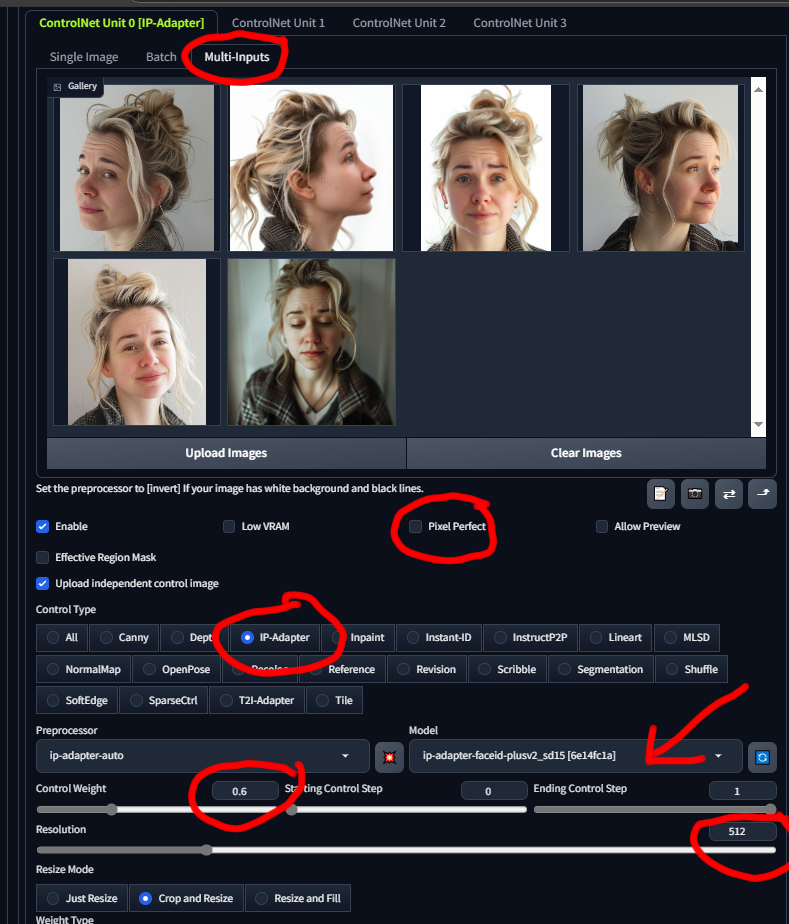
Click Generate to see the results.
Reactor Setup (Optional)
https://github.com/Gourieff/sd-webui-reactor
If you installed Reactor, you can further refine the face. Here's how:
- Enable Reactor from its accordion tab.
- Add one image — usually, an angled or side profile works better than a straight-on shot.
- Uncheck Swap in Generated Image and check Swap in Source Image. This swaps the face at the beginning of the process, allowing ControlNet to apply its effects properly. If you swap in the generated image, it will override the ControlNet details.
Click Generate to view the results.
FacePop (Optional)
https://github.com/TheCodeSlinger/FacePop
If you installed FacePop, enable it from its accordion tab. That’s all you need to do, but if you want to explore the masks and tweaks FacePop applies, check Enable Debugging. In your output folder, you'll find a subfolder called Debugging with useful images like landmark detections, mask creations, head orientation corrections, and final overlays before processing.
Note: The final FacePop image might not appear inside the WebUI. Instead, check the folder where the images are generated. I use a timestamp-based naming system instead of the typical seed and image count naming. Also, metadata reproduction in FacePop images isn’t fully implemented yet, but that should come in version 1.3.
What’s Working Together?
- Photo-realistic Model: I recommend EpicPhtogasm for great results. https://civitai.com/models/132632/epicphotogasm
- Sampling Method: Use Restart, a hidden gem for sampling.
- Denoising: I suggest a moderate setting of 0.4. You can adjust this, but keep in mind that higher values (around 0.5 to 0.6) will create more variation from the original image.
- CFG Scale: Adjust this depending on how much of your prompt you want to apply.
Adding Prompts
Don't forget to add a prompt to describe the image and character. Start with the character’s description, then add the expression, pose, action, and setting. Example:
Prompt:
young woman with blonde hair wearing a toga (flirty smile) standing in parking lot at nightFor the Negative Prompt, it's important to list things you don’t want in the image. Example:
Negative Prompt:
cartoon, painting, illustration, (worst quality, low quality, normal quality:2), necklace, lipstickI often include necklace and lipstick because models tend to add them automatically. Adjust this based on what you find appearing in your images that you don’t want.
Key Tools Working Together
- ControlNet: Using the Plus Face model with multiple input images from different profile shots.
- Reactor: Helps to reshape and refine the face.
- FacePop: Aligns and scales the face for optimal processing.
If anyone needs more detailed help, feel free to PM me for a Discord invite, and I can guide you through troubleshooting.
A request for a Daz USD exporter.This short gives a good idea about what it is (https://youtu.be/tH9_JaZs3-E?si=RudWXRcj0sexxDhm). I would love to be able to easily move any scene in DS to Blender or Unreal to take advantage of their faster render engines and animation systems. It streamlines the export/import process quite a bit. It would also make moving data from Blender, etc. much easier. When set up properly, it allows virtually seamless exchange of data (lighting, shaders, objects, skeletons, animations, etc.) between software environments. So we could also bring animations made in Blender back into DAZ (in theory).
Daz Studio BETA - version 4.23.0.4! (*UPDATED*)oddbob said:
Is anyone finding that the smart content tab takes longer to populate in the last couple of versions or have I just hit critical mass of installed stuff?
I haven't noticed any change, and there isn't anything in the Change log that seems likely to cause that. It is always possible that there is a databse issue specific to you, so I would suggest making a point to export userdata - especially if you have added metadata yourself. Content Library option menu>Content DB Maintenance and check Export User data.
Daz 3D is part of

Connect
DAZ Productions, Inc.
7533 S Center View Ct #4664
West Jordan, UT 84084Licensing Agreement | Terms of Service | Privacy Policy | EULA
© 2026 Daz Productions Inc. All Rights Reserved.