-
Celebrity Look-a-Likes for 3D figures Part 2

I thought with all the talk about Gregorius' morph, I'd give it a quick go. This is a quick and dirty WIP. Yes not happy with the lips. I'll let you know what she turns out like when I get around to finishing her.
Yeah, the lips are probably what needs the most work, maybe with the nose needing a bit too, but that's pretty darn good, especially for a "quick and dirty" draft.
Celebrity Look-a-Likes for 3D figures Part 2Thanks again for the comments, guys! Qazart, I actually have focused on the most neutral photos I could find for most of the process. My emulation of that one specific reference photo was just intended to provide a supplementary perspective to see if any insights could be gleaned from it. Once I re-consolidate all my dial spins into a single master parameter, I'll try dialing the morph back and see where I'm at then. I'm actually using Poser Pro 11, not Daz Studio.
Jabba, the image you linked to was one of the first I focused on, and I still revisit it from time to time, though I've found that the one on the right at least just might be a bit misleading due to the lighting, just from looking at what most other photos seem to be telling me. I'm not sure.
Here's what she looks like after some further tweaking of the nose and lips. I hope you don't mind the barrage of images, but I wanted to provide the most thorough impression yet of my morph as it currently stands. I welcome further thoughts as I keep honing it.
Natural:

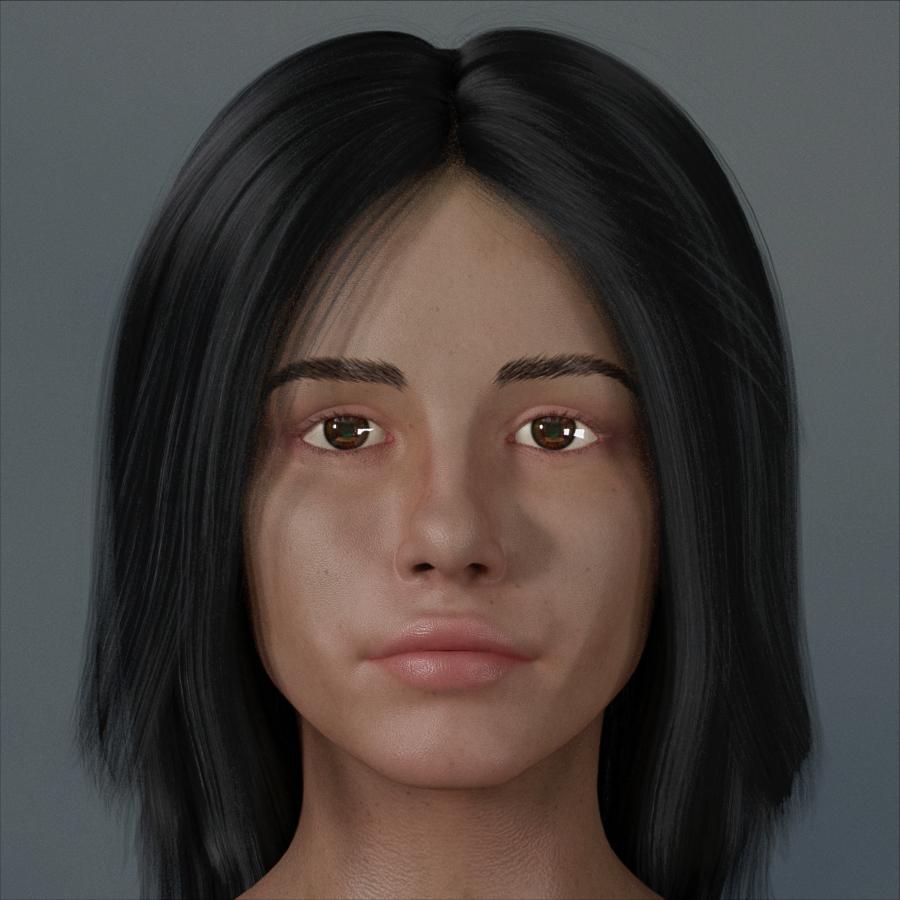
Make-Up:

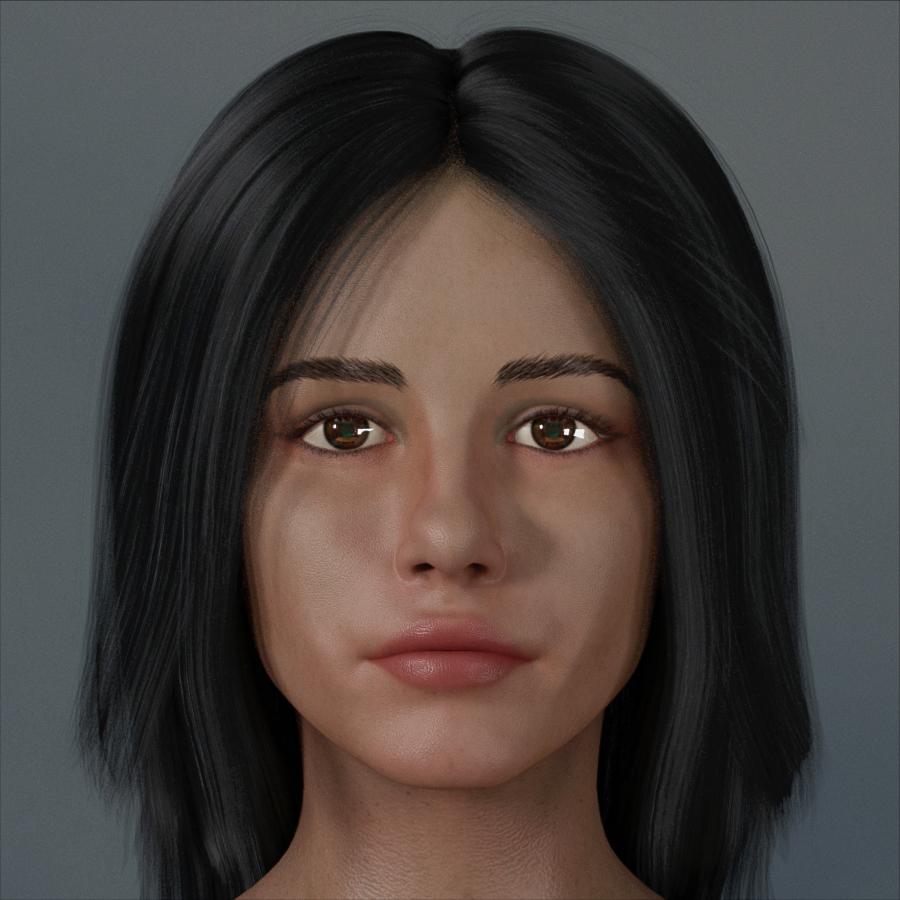
Clay:

 How to load a character faster? [solved with a workaround]
The thing is I would think that this is a problem for Daz. If the more a customer spends on products, the worse the customer's experience using the products becomes, then improving that experience should be a pretty high priority for Daz. It's not for no reason that Daz demos are done on systems with tiny libraries. Showing how long it takes a regular customer to load a character would look really bad. If my early experience using Daz had been like my current experience, I probably would have given up on it back then.
This. Exactly!
This is a solvable problem. The fact of the matter is that nobody uses more than 1% of their morphs at any one time. At least I don't. I don't need Daz to load morphs for 400 characters so they can be on "hot-standby", ready in case I want to dial in some Victoria8. Daz can load them when I want to use them. I'll wait the extra 20 seconds.Daz could have 2 modes, the "heavy" mode that loads everything and people expect to wait 10 minutes to load a character and the "light" mode where Daz loads nothing other than what's being used in the scene, so every time you access some morphs, you take a hit waiting for them to load.
While all these workarounds are nice, I keep thinking "don't we have computers to do that?".
That wouldn't work as DS needs to read all of the morphs and set up their links (which is, I think, the tiem consuming bit) so that when morph A iss et it knows what else needs to be set.
The thing is I would think that this is a problem for Daz. If the more a customer spends on products, the worse the customer's experience using the products becomes, then improving that experience should be a pretty high priority for Daz. It's not for no reason that Daz demos are done on systems with tiny libraries. Showing how long it takes a regular customer to load a character would look really bad. If my early experience using Daz had been like my current experience, I probably would have given up on it back then.
This. Exactly!
This is a solvable problem. The fact of the matter is that nobody uses more than 1% of their morphs at any one time. At least I don't. I don't need Daz to load morphs for 400 characters so they can be on "hot-standby", ready in case I want to dial in some Victoria8. Daz can load them when I want to use them. I'll wait the extra 20 seconds.Daz could have 2 modes, the "heavy" mode that loads everything and people expect to wait 10 minutes to load a character and the "light" mode where Daz loads nothing other than what's being used in the scene, so every time you access some morphs, you take a hit waiting for them to load.
While all these workarounds are nice, I keep thinking "don't we have computers to do that?".
I can understand why it has been made the way it is, but planning ahead has been forgotten... It's like Poser Content Management... Works as long as you don't have too much content.
The solution could be one text file which contains the dial labels for installed content and when loading a character, DS would read the dial labels from that file instead of searching through each and every morph-file for the dial label and possible references to other morph-files to read.
The actual morph-files would not be read until the user tries to use one.That sounds like the ExP system used for Victoria and Michael 4, keeping the list updated was a pain for many users.
I don't know why Daz doesn't fix this issue. I now literally think twice before buying a new character or morphs because I know that every purchase slows things down a little bit more.Fix how? It isn't that something isn't working, it's a matter of managing a large volume of data.
Instead of loading everything every time, DAZ Studio should only load things as they are accessed. The morphs should load the first time somebody slides one of the dials. It would create latency the first time somebody slid one of the dials, but the overall amount of time waiting would be decreased.
It has to load everything to know which sliders to offer, and which sldiers should trigger other sliders.
How to load a character faster? [solved with a workaround]The thing is I would think that this is a problem for Daz. If the more a customer spends on products, the worse the customer's experience using the products becomes, then improving that experience should be a pretty high priority for Daz. It's not for no reason that Daz demos are done on systems with tiny libraries. Showing how long it takes a regular customer to load a character would look really bad. If my early experience using Daz had been like my current experience, I probably would have given up on it back then.
This. Exactly!
This is a solvable problem. The fact of the matter is that nobody uses more than 1% of their morphs at any one time. At least I don't. I don't need Daz to load morphs for 400 characters so they can be on "hot-standby", ready in case I want to dial in some Victoria8. Daz can load them when I want to use them. I'll wait the extra 20 seconds.Daz could have 2 modes, the "heavy" mode that loads everything and people expect to wait 10 minutes to load a character and the "light" mode where Daz loads nothing other than what's being used in the scene, so every time you access some morphs, you take a hit waiting for them to load.
While all these workarounds are nice, I keep thinking "don't we have computers to do that?".
I can understand why it has been made the way it is, but planning ahead has been forgotten... It's like Poser Content Management... Works as long as you don't have too much content.
The solution could be one text file which contains the dial labels for installed content and when loading a character, DS would read the dial labels from that file instead of searching through each and every morph-file for the dial label and possible references to other morph-files to read.
The actual morph-files would not be read until the user tries to use one.Seeking the Guy 4 (or his creator)Guy 4 requires the M4 Shapes (used to be called Morphs ++) The character uses some of those dials in addition to the Guy 4 morph injection.
First, load up Michael 4 and select the Guy 4 and Morphs++ boxes on the Power Loader. Then navigate to wherever your Poser runtime is installed, go to Pose, and find the DAZ's Michael 4 folder. In the Morph Injection subfolder, click on the INJ The Guy (it might be named something else; I sometimes rename files but I don't think I did so with this one.)
Next, select Michael 4 and go to Parameters, Morphs | Shapes, and Guy 4. There are four bodies to choose from.
Finally, select Michael 4's head, go to Parameters, Morphs | Shapes and chose which head shape you want -- and other options, if any -- and then you're good to go.
A few screen shots:
How to load a character faster? [solved with a workaround]in Carrara we have thanks to Alberto, a morph eraser to overcome this exact issue using Genesis+
Carrara saves stuff in a complete file so you get huge files of 2GB or more for these figures if you own lots of morphs
the morph eraser removes all the unused morphs and lets you keep additional selected ones before doing the save resulting in files just a few 100MB in comparison
so
I was thinking maybe someone can create something for DAZ studio, a script that saves the desired scene as a complete standalone maybe renaming all the base content in that scene so it won't reference the Data folder etc creating it's own temporary data folder you can erase if you erase the self contained scene.
Celebrity Look-a-Likes for 3D figures Part 2I thought with all the talk about Gregorius' morph, I'd give it a quick go. This is a quick and dirty WIP. Yes not happy with the lips. I'll let you know what she turns out like when I get around to finishing her.
Diffeomorphic DAZ-to-BlenderI find the eyes, mourth, fingers and toes can cause issues with the sim in Blender
For blender simulations it is generally better to use proxies. That is, you simulate a cage mesh then transfer the simulation on the hi-poly mesh with a deform modifier. Same for collisions. Then the daz figures base meshes may be good or not, depending on your needs.
Thanks, I have added cubes and adjuted them to shape around hands, and it worked quite well - so will check out proxy simulation as an alternative.
Diffeomorphic DAZ-to-BlenderI find the eyes, mourth, fingers and toes can cause issues with the sim in Blender
For blender simulations it is generally better to use proxies. That is, you simulate a cage mesh then transfer the simulation on the hi-poly mesh with a deform modifier. Same for collisions. Then the daz figures base meshes may be good or not, depending on your needs.
How to load a character faster? [solved with a workaround]I hated this issue with G3 so I decided to install a new base G3 m/f in a different data folder and with different user facing files to load them. No vender morphs other than expressions. Any new character I decide I like enough to use on a regular basis gets all its tweaking done on the regular G3 full everything install, then exported as an obj, Morphloadered back to the clean G3, erc frozen and saved at a morph asset for the clean G3. Saves so much time loading characters without a massive kludge of morph dials that I'll never use, after setting up a character, being read. If I decide some new morph is needed I copy it from the 'vendor touched' G3 and move it to my clean install myself.
I've never transistioned to G8... any characters for G8 I decide to buy, I just do the same thing, convert them to morphs for G3.
@Gazzalodi:
Sounds interesting. Could you elaborate a bit more on the process you are using. Might want to adopt ;-)Diffeomorphic DAZ-to-BlenderNot sure why the dress came in looking that mangled
It's because DAZ Studio may use auto fit and/or smooth and/or custom morphs to fit an outfit to the figure. So you need to do the same in Blender. The easy way is to use a shrinkwrap modifier and see if it works fine enough. Then you can use the import and transfer morphs tools provided by diffeo. Another way is to avoid importing jcms so the deformations will be the same for the figure and the outfit. But this also means to lose custom deformations.
Personally I try to import as few jcms as possible to optimize the figure, then first I try a shrinkwrap that is often enough especially for tight outfits, then I transfer jcms if needed.
https://diffeomorphic.blogspot.com/p/morphs-section-version-15.html
I think I may have to uninstall and reinstall all my product filesYou say "nearly all your content". You moved whole libraries, right, not just folders of stuff? What did not move? That folder is only needed for Poser formats, so how many of those do you have? Might it still be in the original location?
I moved them by using DIM to uninstall them from my C drive and then had DIM download them and install them on my H Drive; so, the libraries were created as needed on the H drive. A bout the only things I didn't move were M4 , V4 and their various morph packs as well as things essential to DS like Postgre
I may be able to save some time by skipping the uninstall step and renaming the DIM Manifest folder instead. Even so, downloading and ind installing 23 thosand products is daunting.
How to load a character faster? [solved with a workaround]I hated this issue with G3 so I decided to install a new base G3 m/f in a different data folder and with different user facing files to load them. No vender morphs other than expressions. Any new character I decide I like enough to use on a regular basis gets all its tweaking done on the regular G3 full everything install, then exported as an obj, Morphloadered back to the clean G3, erc frozen and saved at a morph asset for the clean G3. Saves so much time loading characters without a massive kludge of morph dials that I'll never use, after setting up a character, being read. If I decide some new morph is needed I copy it from the 'vendor touched' G3 and move it to my clean install myself.
I've never transistioned to G8... any characters for G8 I decide to buy, I just do the same thing, convert them to morphs for G3.
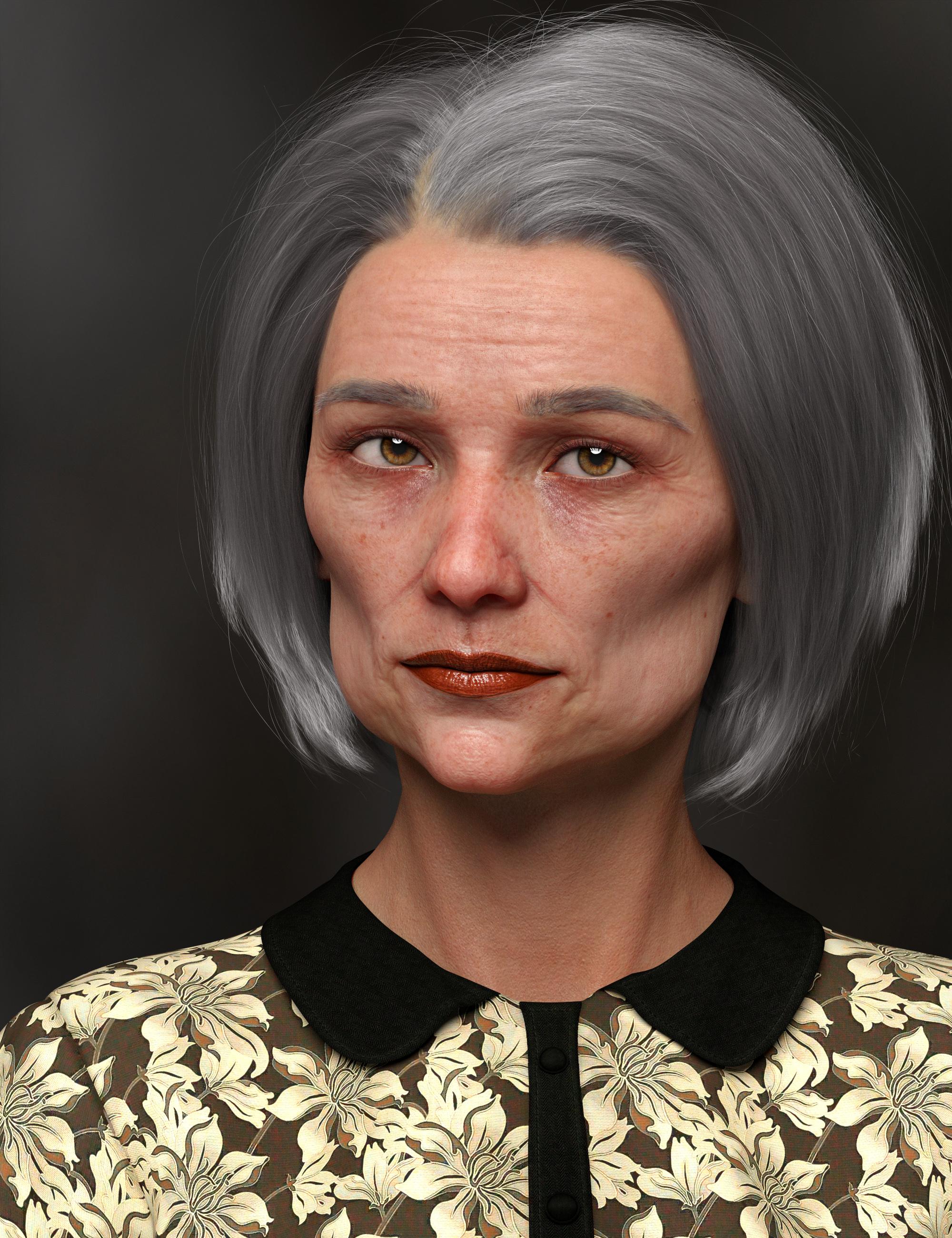
Shape Gen & Shape Gen Plus for Genesis 3 & 8 (Commercial)I did a search for HD and built this character from those morphs. Then I looked at the result to see which character's head morph had the highest percentage and used her skin (Edie 8). I used Brow Remover to remove Edie's reddish painted eyebrows and gave her some other fibermesh eyebrows.
Edi: Hmmm. I see I have some other morphs in there, too, besides the HD morphs. I'm not sure how they got selected and used. Operator error most likely. I still find the result very interesting.
 Product Cross Gender/Transgender -Transfer morphs (feature suggestions)
I also eagerly await this product! In fact it can't come soon enough for me, since the scifi project I'm currently working on requires me to make opposite gender versions of alien characters which were only released for one gender base. As has been mentioned before, the ability to transfer associated geografts would also be rather critical for me, since the characters I'm hoping to expand into a more-than-one-sex-species all have geografts which are highly distinctive and defining for their appearance. Currently I'm trying to make do by using transgender morphs and/or transfering the texture over and parenting the geografts to the "wrong" base without autofit, to maintain the bones and other needed features in the graft, but this still leaves a lot to be wanting. I'd also use a product like this to transfer morph kits that were only released for one gender to expand my shaping options equally to both genders; usually that'd mean F->M morph transfer, so a script or optional additional morph adjusting for the different nipple placement would be most helpful too.
Thanks for the comments, help to improve the next product.
Unwanted morph adding upHey guys, i am having this morph issues whenever i add a model on scene, the LY Rory morph keep on adding on my models I have added an attached picture of the problem. Any help would be appreciated thank you.
Delete Temp files created by DAZ to Cinema 4D BridgeC:\TEMP3D. Hopefully you're also following this tutorial to get your actual C4D project down to a reasonable file size.
Its time for new Cat and Dog models!Just for general information, Sparky, over on Philosopher's Egg has added bears to her collection of morphs for the Hivewire dog. Including a bearskin rug morph.
They all take the LAMH preset (and look even better with it) that is somewhere on Hivewire.
Shape Gen & Shape Gen Plus for Genesis 3 & 8 (Commercial)I attached a few of the screenshots. I don't have an image hosting account anywhere, sorry for the inconveniece! The GC Morphs don't load where they should and that solves the issue of why they don't show in the search bar. The folder structure matches other morphs but they load outside of the actor, and that is a vendor issue. So, you are golden there. I've included a few screenshots to show that male body morphs load with the female ones, as I meantioned. Not sure if it has something to do with how the morphs are tagged but those were my main two concerns. I willl probably just end up selecting morphs manually rather then letting it decide randomly and this will advert any issues.
That is very strange....Can you show me the male morph path location on Genesis 8 Female on your hard drive? I want to see why they are populating under Genesis 8 Female. Do you have Dial Control? I only ask because with that you can browse to exact install location of a morph. I wanted to see it's path in data folder.
Shape Gen & Shape Gen Plus for Genesis 3 & 8 (Commercial)I made a couple. Both stated with basic G8F. One got some 3DU Toon morph in it, so I went with the toon theme on that one. The expressions were also mixed by Shape Gen.

Daz 3D is part of

Connect
DAZ Productions, Inc.
7533 S Center View Ct #4664
West Jordan, UT 84084Licensing Agreement | Terms of Service | Privacy Policy | EULA
© 2026 Daz Productions Inc. All Rights Reserved.