-
Fit Control for Genesis 8 (Commercial)
Thanks. So it crashes after you hit ok?
Yes. Immediately after.
I'm seeing exactly the same crash as Mathias. I'm running 4.12 on Windows 10.
The issue seems to be related to the set of installed g8f character morphs. If I go into data\DAZ 3D\Genesis 8\Female\Morphs and move all the folders to another directory, except DAZ 3D and Zev0, then I can successfully add the fit control morphs. I then start moving the folders back into the morphs folder in small groups. It continues to work for the first few groups of folders that I add back, but eventually it reaches a point where it starts failing again.
If I then move all the folders out again, but keep the group that caused it to start failing (and DAZ 3D and Zev0), then everything works ok. So that suggests that the problem isn't specific to those morph folders.
I guess it's either an issue with the number of morphs, or some problem with certain combination of morphs.
It seems you have both ends of the spectrum in terms of technology: me with Windows 7 and Daz 4.11 and nyrx99 with Windows 10 and Daz 4.12.
I may test to see what morphs are causing it for me. to maybe dial it down more specifically.
EDIT: I just did some extensive testing. it's currently crashing with roughly 33,300 morphs installed in that folder. I'm gonna swap some out like nyrx99, see if i can't confirm it.
EDIT 2: nyrx99 is correct- it crashes after so many morphs have been added. I had around 33,400 files in the fold before it started crashing constantly.
Reconstruct Subdivision in ZBrushHello! I'm hoping somebody out there has more success with something than me... I'm trying to sculpt some morphs into some characters in ZBrush, and running into a few problems.
Specifically, I would like to run a dynamic simulation on the mesh HOWEVER Zbrush has a 250K poly limit. In order to sculpt and render this character at SubD 4, I need to export it as an OBJ and re-import into DAZ this way because we are unable to sculpt HD morphs and load them back in natively. That's fine, but in order to drop the mesh below 250K polys I need to use the "reconstruct subdivision" feature in ZBrush which caculates the opposite of subdividing the mesh and making it lower poly.
My issue, is that when I create my morphs at that new lower subdivision level and then bump it back up to the origional poly count and export, the thing explodes in DAZ when I import the morph. The morph, itself, loads fine (as teh vert count never changed considering I dropped the SubD, made the morph, and then put it right back where it started), but when I use the slider all of the polygons go everywhere and it's a big mess.
Does ANYBODY have success using the reconstruct subdivision function in ZBrush while still being able to import a morph indo DAZ?
It's a shame we have to pick either high-res or lo-res sculpting when trying to do something like this. In a REAL workflow, I would start my scupting as a lo res mesh and then bump up as I go, but sadly that's not possible as far as I can tell. I hope I'm wrong, though. Anybody?
Fit Control for Genesis 8 (Commercial)I'm seeing exactly the same crash as Mathias. I'm running 4.12 on Windows 10.
The issue seems to be related to the set of installed g8f character morphs. If I go into data\DAZ 3D\Genesis 8\Female\Morphs and move all the folders to another directory, except DAZ 3D and Zev0, then I can successfully add the fit control morphs. I then start moving the folders back into the morphs folder in small groups. It continues to work for the first few groups of folders that I add back, but eventually it reaches a point where it starts failing again.
If I then move all the folders out again, but keep the group that caused it to start failing (and DAZ 3D and Zev0), then everything works ok. So that suggests that the problem isn't specific to those morph folders.
I guess it's either an issue with the number of morphs, or some problem with certain combination of morphs.
Nvidia Ampere (2080 Ti, etc. replacements) and other rumors...1080ti for your desplays with a dedicated render card is, imo, the way to go.
And because I'm not a gamer it wouldn't matter if the 1080Ti was in a x8 slot...
Although looking at the AMD motherboards it would appear they can only drive one x16 slot at x16, the other x16 slot is driven at x4 unless you go to a threadripper TR4 motherboard but then the cheapest threadripper CPU is £1200...I use a Threadripper, but I'd put the render card in a x8 if I didn't have x16 available; I believe it doesn't make a difference over the actual render times, but only the initial data transfer; I could however be remembering wrong.
Let's talk about Daz's animation feature@benniewoodell
Good to see you are using the powerful motion tracker in your pipeline.
Diffeo is good for reliable transfer of sets& props from Daz studio but yeah,.. it is not really useful for DAZ genesis Character animators.
I demand Facial animation & lipsync because I work with Dialogue driven sci-fi narratives and any character animation system that does not include at least a decent Audio based lipsync tool with phoneme editing is a non starter.
We have the optional Iphone based "Live face" plugin for facial performance capture Iclone but I am in the Android eco-system and wont be buying an Iphone just for one program feature.
Thankfully the CC3 Blender export preset sends over my iclone lipsync and face puppet animation as vertex animated Blend shapes to Blender so when it is time for a new animation/dialogue I can just copy the face keys from a new FBX import and paste/overwrite on to the current actor in the Blender Dope sheet.@wolf359 yeah I hear ya. I just had to get a new phone a few weeks ago because my Google Pixel stopped ringing and the speaker phone wouldn't work. I was going to get a different android until the guy told me an iPhone 11 was going to be five bucks less a month than what I was looking at, I had just seen the youtube video about facemotion 8 and was like well, I'm here, it's actually cheaper and I can use it for animation, I'll switch. Otherwise if it wasn't going to be cheaper monthly, I wouldn't have switched to another apple product.
I'm glad to hear though that the CC3 Blender export sendds over the keys so you can copy everything to use in Blender! Your stuff looks great, excited to see more!
Shape Morph can't be saved with project .duf and will delete previous morphs tooThank you very much Richard. Other types of keyframes are okay. For me it's just keyframes of shape morph.
Do all clothing need morphs?Skirts are usually not rigged to follow the legs, because that leads to unnatural skirt pose. They use specific bones to pose various sections of the skirt (usually there are at least front, back, left and right handles).
Products like SY Ultra templates provide various custom templates to use with autofit or when rigging clothes like dresses with the transfer utility. The weight maps created might still require adjustments but the templates will give you a good starting point.
Cool! And how would those adjustments be made?
Show us your 3Delight rendersA morph for Genesis and I don't have it? Inconceivable! :-D Well, now it can live in my wishlist for ages!
So far, I\m using IBL largely as a replacement for my ambient... at some point, I'll see what it's like on an outdoor scene as the primary source. Not soon, though... the other place has a Hallowe'en contest, and I might try to scrape up an entry ;-)
Do all clothing need morphs?Skirts are usually not rigged to follow the legs, because that leads to unnatural skirt pose. They use specific bones to pose various sections of the skirt (usually there are at least front, back, left and right handles).
Products like SY Ultra templates provide various custom templates to use with autofit or when rigging clothes like dresses with the transfer utility. The weight maps created might still require adjustments but the templates will give you a good starting point.
Let's talk about Daz's animation feature@benniewoodell
You may Already know that Diffeo ,as good as it is, Does not support export of morph based facial animation to Blender and its animated body pose import is very hit or miss(being charitable) and the official Daz "bridge" does not export animation either AFAIK thus you see very few Daz to Blender animations posted over in the new Blender forum.
If ,for whatever personal reasons,you dont care for animated FBX export from DS to Blender (which exports body and facial for genesis 1,2,3,8)
You may wish to investigate Blenders powerful motion tracking system which is designed to make your blender camera track the motion of animated elements/figures imported from elsewhere to match move with your Blender environment@wolf359 Oh yeah, those are two of the three reasons why I decided to stick to animating and rendering in Daz, on top of power pose. I just picked up Facemotion 8 and it's awesome. I didn't realize I'd have to spend an extra 58 bucks for an app on my iPhone (I ended up spending 66 bucks because I tried the cheaper 8 dollar app first that does not work with it) but after the first shot of just my character looking around I saw a huge difference from what I had originally keyed, and the lip syncing is obviously quicker than Anilip 2 which requires a lot of tweaking. It's a shame that through Diffeo, none of the keys will transfer over to Blender for the facial animation. Padone said it worked for him back in like May when I was doing my short film, but I could never get it to work so I had to use Papagayo and it worked fine with Diffeo, but left much to be desired. If Diffeo could get the facial animation to move over correctly, I'd be a little more inclined to give it a whirl again. And every time I've tried to bring in an animation over through the pose buttons in Diffeo, the arms and legs always cross and I have to go through and reset everything and by the end I pretty much find I'm redoing the animation itself. I'd love to see more of what people are doing animation-wise in Blender, but you're absolutely right about seeing very few renders being posted there.
And the Blender tracking system is exactly what I'm using to comp the camera movements in Daz in Blender! Look up IanHubert on Youtube if you haven't watched his videos, he has a couple of absolutely amazing motion tracking tutorials, as well as a bunch of other amazing tips like how to make buildings in like a minute using project from view in mapping, that made me realize I needed to work in this manner to get the absolute best of both worlds with Daz and Blender. I do set up a bunch of tracking marks as well to help Blender out as if I was shooting on a green screen in real life. Lots of good stuff.
The best tip that I got this summer from watching an animator's Youtube channel, Sir Wade is his name and he mainly uses Maya but a lot of the principles apply, was to use reference video. He did a whole video on it and I so just to give it the old college try, I recorded myself doing the movement that I wanted to animate and I went through the footage and blocked out where every pose changed, I counted the frames and matched the poses precisely in Daz exactly how I acted it out and the animation looked so fluid and lifelike, that it showed me how good Daz really is. I don't know if many people use reference video, I never thought to, so I figured I'd throw that in here as well since that has really upped the quality and realism of my animation here in Daz. I did get the IK chain to work really well, but it's nowhere near as intuitive as it should be and the amount of time to set it up is a lot to go through. I do think that could still use some work.
Daz Studio Pro BETA - version 4.12.2.60! (*UPDATED*)Favorites saving were not working 2 versions before, that was also a problem as rendered favorittes nearly useless. One version ago they were fixed, and was possible to do something in animation. Now the current version breaks a basic animation feature, save morphs.No sure a new key editor should have been added when breaks a core feature that makes impossible many types of animation, specially when the version before was working fine. Feels rather a downgrade.
I have spend several hours tryign to figure out why was not saving the morphs . At least I know now.
I feel you. I spent a lot of time trying to see why it wasn't saving the morph animations and ended up giving up. it wasn't anything wrong from what I was doing, it was the recent daz version that has a bug of not saving custom morph animations. Which for now makes it impossible for me to use it for character animation. I have to downgrade to older version which is fine in that regard. oh well.. we will just wait. : )
Any recent builds with fix for morph not saving available yet? (I'm not checking every new build)
Is it correct that there is still no change to the animation issue even in the private beta? http://docs.daz3d.com/doku.php/public/software/dazstudio/4/change_log
It kinda feels like they don't really care about it.
"Working on it" is not something that will appear in the change log.
and that's not what I was saying. After such a long time with several updates in between I would've expected to see a fix at least in the private build. There's some nice new stuff in the current version, nice new features and improvements, but a lot of ppl can't use any of it because we're stuck on .86 because of the animation problems.
I can imagine that you must be sick of reading such comments over and over again, and I understand that you probably can't do anything about it, but reading the changelog you can see how much other stuff has been improved, changed, implemented, etc, pp, and yet the biggest problem still persists, so you might understand that we're sick of it as well after months with no solution.
and you might also understand that for us it feels like it has absolutely no priority for Daz/Daz devs after such a long time.
If you check the change log http://docs.daz3d.com/doku.php/public/software/dazstudio/4/change_log#4_12_2_40 there is a fix for the saving issue listed
Shape Gen & Shape Gen Plus for Genesis 3 & 8 (Commercial)Hi Guys. Shape Gen Plus has been submitted.
Key feature is using studios favorite morph system.
It also has a memorize state so when you randomize you can always revert back to the one you last liked. This feature will work with the original Shape Gen product as well.
If you own the original Shape Gen product it will be fully intergrated into Shape Gen Plus.
Shape Gen Plus can work on it's own and the original Shape Gen is not a requirement, but if you get both then both systems play very nice together.
SereneNight's Sci-Fi Fun Thread 2Lol! G8m survivor! Who next is going to get voted off? You can just chuck those sad undesirableables and the aliens in another directory you just map when needed. That is the end goal for me. But I also may simply just download them when needed.
unfortunately everything is a morph these days...expressions, weird things. While there is still a slight lag applying some poses, now my machine doesn't shudder when I have the Boys in my scene.
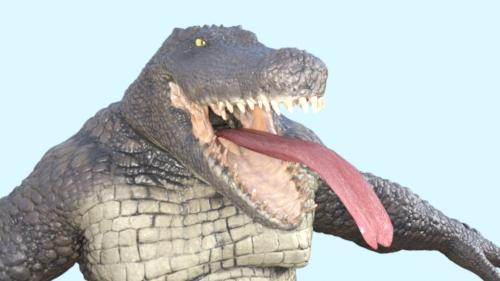
More versatile tongue for Sobek and Bullwarg?My first attempt at using lickalicious with Sobek...
uhm, yeah, gonna need some work cause this definitely does not work out of the box.
Off the top of my head I suspect this is some weird glitch due to how the Sobek HD morph crushes and distorts the base tongue rig.
Any suggestions on a quick fix? I suspect if there was just some easy way to tell DAZ Studio, "hey, when dialing in the sobek hd morph, leave the tongue alone" that would be most of the way to fixing it.Load the tongue twice, once grafted which you hide to get rid of the original tongue. Then a second just parented to head or jaw, which you use for posing. Remember even with the extra bones, you're still stretching this way more than in a standard character. Turn off limits on length and other parameters.

Flattening segment Tongue 01 makes it look more natural in the back of the mouth.
 *Released* Porefectionist for Genesis 8 Females- Commercial
Thanks guys :)
Zelara right out of the box. Didn't remove any maps.
Thanks for the comparison. It looks like it doesn't add much visually if you already have the HD morph, but looks to be worthwhile if you don't.
That's exactly it. You will get the most bang for your buck using these on charcaters that are lacking some detail.
Great idea! And one I have long desired: SEPARATE lip, nose, eye, & pore HD morphs. One area I have challenges with are achieving a convincing lip edge line/define/crease. I have all the morph packs, but they all seem to be limited to a thin line (and the SAME polygons) rather than a more realistic edge. I've tried dialing negative values on one morph combined with others positive, but I can't get the edge fat enough to look sumptuous. I can get this effect using Monique 8, Twosret 8, Teen Raven 8, or Darcy 8 HD Add-Ons, but this dials in unwanted nose or eye or smh nasolabial details. If single lip morphs were displayed and numbered in the promos, I could see if this product will solve this problem for me.


I will try and get you some renders today for just the lips but the details definitely add a little volume/edge to the lips when they are turned up.
Do all clothing need morphs?you can adjust the weight maps in daz studio too, useing the node weight map brush tool.
you'll need to open the tool settings pane (if you haven't already) to see the settings and available maps after you select a bone on the clothing.
weight maps alone are generally not enough for most outfits to look good, hence the JCM things.
you could also add a dForce modifier and use the built in cloth simulation to smooth out and drape the posed outfit, but if you rely on this rather than jcm's you'll have to run a simulation pretty much every time you pose the figure and clothing for it to look ok.
as for what a JCM is, it stands for Joint Controlled Morph, its a morph with its percentage slider conected to the movement percentage of a bone or group of bones so that, for example, as the bone is rotated on the y axis the morph is dialed in the correct amount for that movement.
*Released* Porefectionist for Genesis 8 Females- CommercialGreat idea! And one I have long desired: SEPARATE lip, nose, eye, & pore HD morphs. One area I have challenges with is achieving a convincing lip edge line/define/crease. I have all the morph packs, but they all seem to be limited to a thin line (and the SAME polygons) rather than a more realistic edge. I've tried dialing negative values on one morph combined with others positive, but I can't get the edge fat enough to look sumptuous. I can get this effect using Monique 8, Twosret 8, Teen Raven 8, or Darcy 8 HD Add-Ons, but this dials in unwanted nose or eye or smh nasolabial details. If single lip morphs were displayed and numbered in the promos, I could see if this product will solve this problem for me.
Rigging of V3 & V3 clothingif you have D|S 3 you could use figure mixer and morph between the two on the timeline
then use that rightclick option to fit the clothes that is now called transfer active morphs but it had a different name
then save that as a daz file
D|S 4 should open it
Rigging of V3 & V3 clothingI wonder if someone might be able to help me.
Explanation of source of problem: One of my preferred characters is Jim Burton's Glamorous Vickie 3 (GV3), a version of Victoria 3 sold with an entirely separate CR2 file. Jim Burton added various ERC morphs so the hip joints would bend better etc. Anyway, because the character is separate from V3, it's difficult to get clothes to fit because of her shape (far from the short, dumpy, clumpy shape of V3). In the past (2005) I used 'Clothes Converter 2.0' (CC2) to do this. That worked fine when I had a machine with Poser on it, as all my Poser files were in the Poser directory structure. Now, many years later, the directory structure is fine for 64 bit Daz Studio (DS), but I think CC2 must be running out of filename characters as it cannot recognise the V3 or GV3 CR2 files as unimesh characters (I've checked and they both go above the 80 character filename limit of some of the older 32bit compilers - and as CC2 dates to 2004? it's possible it was compiled with one of those compilers). So, I can't use CC2 easily, and possibly not even with difficulty.
Then I thought.. 'How about adding the GV3 shape as a morph to V3 and using that as a shape to create a clothing morph for GV3?'
So, I saved GV3 as an obj file in the zero pose for GV3, and loaded her shape as a morph using menu option 'Edit| Figure| Advanced Morph Loader' (the simpler one as I there is no documentation on the more sophisticated one & I cannot figure it out by simple guesswork - also my rendering PC is not attached to the web, which makes proper on machine documentation vitally important - and DS has exactly none, pfft).
I got the GV3 shape in as a 'GV3' whole body morph into V3 and she worked. Clothes stayed attached to the original V3 shape.' Ah ha', says I, 'Need to change the rigging'. So, I switch the 'Bones Visible' parameter to on in the root node of V3, and the problem becomes visible. GV3 is taller than V3, and now the arm bones are a long way below the GV3 arms, as in the image below, and you can imagine, the further the arm bends down, the worse the distortion.
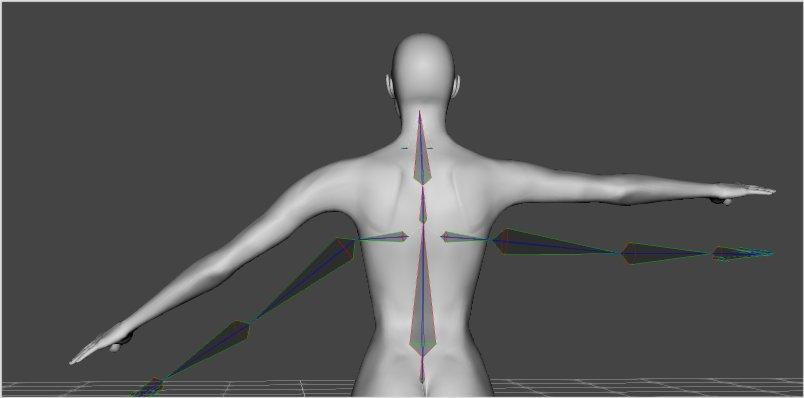
I then go to menu option 'Edit| Figure| Rigging| Adjust Rigging to Figure' which according to Sickleyield's tutorial on DeviantArt works for G1-G8. And... Nothing.
The Problem: I presume the problem is that V3 is just too early to be covered by the 'Adjust Rigging to Figure' option. So, I probably need to manually edit the rigging.
Could someone point me to a step-by step description of how to do this or write a method how I could do it. (I'm sorry, I find video tutorials long winded, skimp on the bits I need to understand and cannot be easily referred to - I need to print a list of instructions out so I can follow them one by one, go back as necessary etc. Often a 10 point list can summarise a 30 minute video with precision and no havering/wavering/unintelligable accents). It seems to me that each end of the bones visible in the 'Bones View' needs to be edited somehow to match the ends in the GV3 character and then that saved with a reference so it is linked to the GV3 morph. Then (hopefully) the clothing would then fit the GV3 morph on V3, next step is to save the new clothing shape as an obj file. Then load the clothing again, add the obj file as a 'GV3 fit' morph, and then edit the clothing's rigging in the same manner to end up with a proper GV3 fit morph that would do the job CC2 cannot do any more. It is long winded, but I am fond of the character & it's a challenge.
I look forward to any suggestions anyone can make. And even if I am barking up entirely the wrong tree with making the clothes fit, it'll teach me a great deal about rigging and how to modify/adjust/play with it.
Regards,
Richard.
SereneNight's Sci-Fi Fun Thread 2I think starting small and moving the monsters and the less desirable guys to the shame zone folder and see if you like the speed once you decide..then you can be meaner and either just remove all their data and leave skins and such behind or banish them all to the shame zone.
That's actually what I just did. I left the front files -- presets -- alone, and just went into the data directory and pushed things out. I put everything into a backup folder, so if something complains about not being able to be found, it's easy enough to copy back into place.
I had a weird fit of buying aliens, for some reason. No idea why. I think it was maybe during a holiday sale, or else they were freebies or something. Or else I had a plan for something that didn't happen when I bought them, and then completely forgot what it was.
Anyway, just doing that cut loading time for base G8M about in half, which isn't bad. For some reason, it doesn't seem to make a huge difference for clearing the scene and deleting objects, but it makes a big difference in loading time.
And this was just in time to add two more guys! Maybe what I'll need to do is to try to maintain some sort of stasis -- for every guy/morph set bought, someone gets voted off the island.
Daz 3D is part of

Connect
DAZ Productions, Inc.
7533 S Center View Ct #4664
West Jordan, UT 84084Licensing Agreement | Terms of Service | Privacy Policy | EULA
© 2026 Daz Productions Inc. All Rights Reserved.