-
Khemsit 8...
Well, so far I'm dissapointed. The eye makeuo and lipstick load together (I pulled a different lip color from files), no fibermesh brows and as usual, I had to make the eyelashes longer with other PA morphs. But what really surprised me was that the Nirv hair looks nothing like the promos! Instead of a morph for length, there are style morphs and just combining the morph for curliness with a style morph that makes it longer, it gets all jaggedy! I haven't tried a smoothing modifier yet, but this looks like really old hair! Going to play with everything more to see if I can make things look decent, but I'm not happy with it so far.
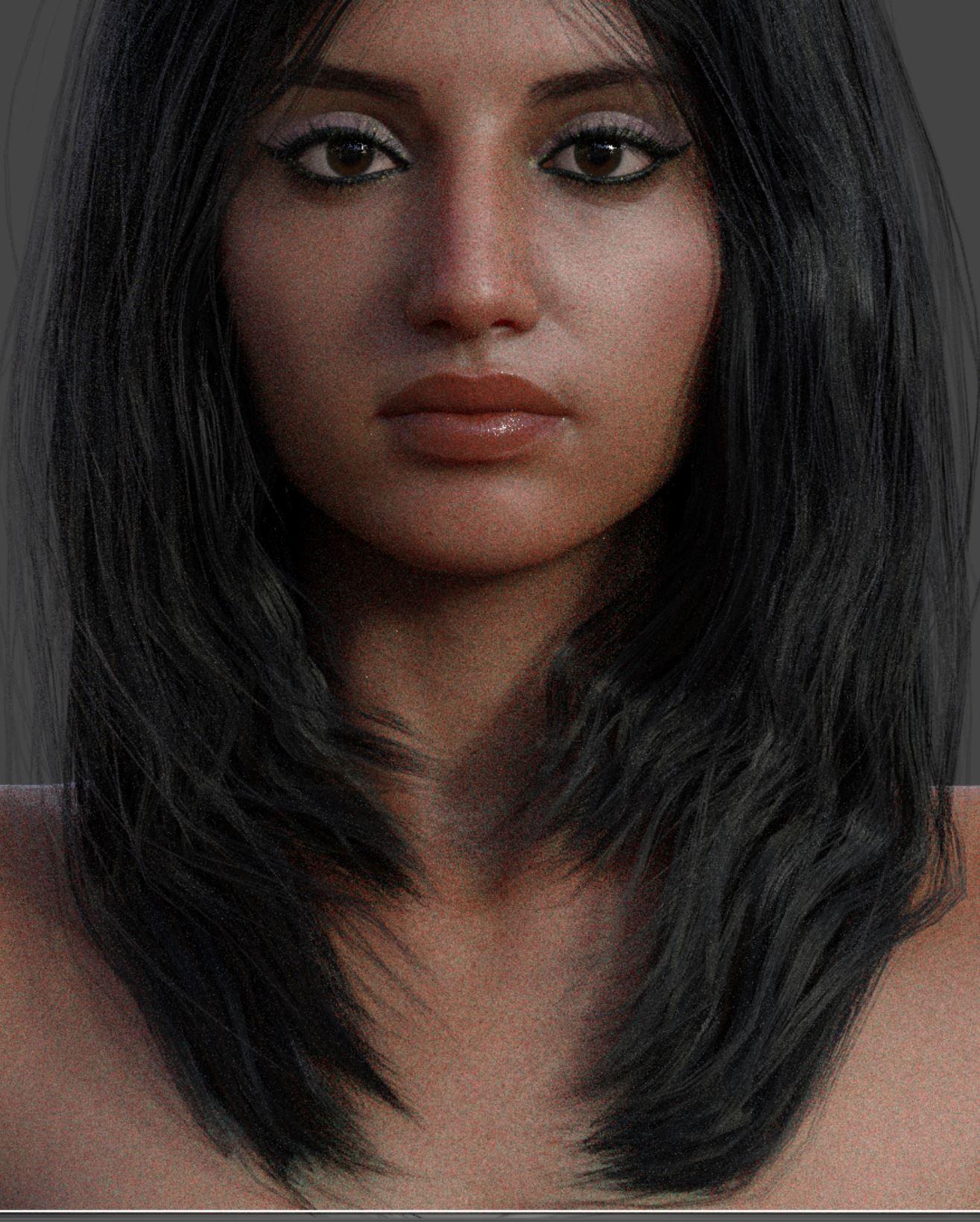
So close to clone Lana Rose,a youtuber
 Khemsit 8...
Well, so far I'm dissapointed. The eye makeuo and lipstick load together (I pulled a different lip color from files), no fibermesh brows and as usual, I had to make the eyelashes longer with other PA morphs. But what really surprised me was that the Nirv hair looks nothing like the promos! Instead of a morph for length, there are style morphs and just combining the morph for curliness with a style morph that makes it longer, it gets all jaggedy! I haven't tried a smoothing modifier yet, but this looks like really old hair! Going to play with everything more to see if I can make things look decent, but I'm not happy with it so far.
*Released* Porefectionist for Genesis 8 Females- CommercialThanks so much! "Volume" is EXACTLY what I've needed on the edges of the lips (and if I had thought of that word, I would've used it in my verbose mis-explanation). The other morph packs give me a polygon wide edge with no volume. This will hit the spot! I've needed it since earlier this year. It can't come out too soon.
I was kinda pissed when you stopped making characters, but you have really carved out a niche for yourself fixing problems for us. And you even threw in the incomparable Oshun a while back.
Finally, please consider religiously adding the word "hair" to your forthcoming hairs. Thanks for making the effort to show me what I needed!
You are very welcome!!!
I do wish I could have continued with characters but its just too much for me. I enjoy it so much, but, I get hung up on details that set me back weeks. Financially, it makes zero sense when I do this full time . So this little niche Ive carved out kinda screams me. I get to, get the whole character creation desire out of my system while still continuing to keep my head financially above water. It all thankfully, pans out :)
As for the hair, In my older age certain things seem to slip a little more often. Particularly words. I believe all the submitted products missing the word "hair" have worked their way through the system, so future hairs will have the word hair in them now! YAY!
Morph importing problemyou have to make your morph at base resolution or subd 0 unless you are a daz store vendor. only they get the privelege of hd morphs apparently.
Khemsit 8...Okay, since Khemsit is still all messed up for me, this is Khemsit morph with Twosret textures.
 Morph importing problem
Hi :)
I'm experimenting an issue when I want to import my morph from Blender.I'm relatively new to Daz to Blender workflow so for sure I made something wrong.
I exported my genesis female 8 mesh with daz to blender bridge as usual but in the subdiv menu I checked "subdiv 1" in order to have more polygon to play with in Blender.
Now when I'm trying to import back my morph in daz studio, in the debug console I have this message "geometry did not match, failed to create morph."
No matter what I select in the subdiv slider in my parameter tabs of my figure, I keep getting this message.
I don't have any issue if I select "subdiv 0" when I export my model with daz bridge. Is it because of that ? Is there any solution on how to solve this problem or do I have to make my morph only with the "subdiv 0" option ?
Thanks for your help :D*Released* Porefectionist for Genesis 8 Females- CommercialThanks so much! "Volume" is EXACTLY what I've needed on the edges of the lips (and if I had thought of that word, I would've used it in my verbose mis-explanation). The other morph packs give me a polygon wide edge with no volume. This will hit the spot! I've needed it since earlier this year. It can't come out too soon.
I was kinda pissed when you stopped making characters, but you have really carved out a niche for yourself fixing problems for us. And you even threw in the incomparable Oshun a while back.
Finally, please consider religiously adding the word "hair" to your forthcoming hairs. Thanks for making the effort to show me what I needed!
beginner questionsOkey I really dont understand this, at all.
First of all, the directory seems so chaotic. If I am going to put the morphs of Alysha in my library folder, the directory is as follows:
C:\Daz 3D\Applications\Data\DAZ 3D\My DAZ 3D Library
And in this folder is another folder named data, among alot of other folders. So for example Alysha's morph, where do I put the files for them to work? in the zip file there are first several folders. Should I take what is "deepest" in the data folder, and extract it to C:\Daz 3D\Applications\Data\DAZ 3D\My DAZ 3D Library\data? Or try to make the path as similar to the zip file as I can? Could you try to download the alysha morph to see if it works, or if it is just something I do wrong. When I am trying to apply the morph, I have already loaded a female gen 8, and selected her. Then I click on for example alysha body, and drag it onto the gen 8 female I have already created. Should she then immediately look like Alysha? Or should some other menu show up on the right hand side, where the shaping and tool setting menu is? I have no clue about this.
There is already a folder with the directory:
C:\Daz 3D\Applications\Data\DAZ 3D\My DAZ 3D Library\data\Daz 3D\Genesis 8\Female\Morphs\DAZ 3D
In here I find many other folders, like clone, base, body, head etc. Do I put it in this folder, or even deeper?
See how silly that directory is though, three of the folders inside each other are named daz 3d, and two data folders. I believe it is even more data folders deeper in there.
Thanks for your patience
Character used in new Nirv Fashion Stylized Bob Hair?Certainly looks like a Mousso skin.
Yes, you are right : the skin looks like it.
The morph must be a custom, then.
thank you
Horse2GoatI also converted the presets into morph sliders, and just for goofs, here is both morphs dialed to 100, with a default DH2 for scale.
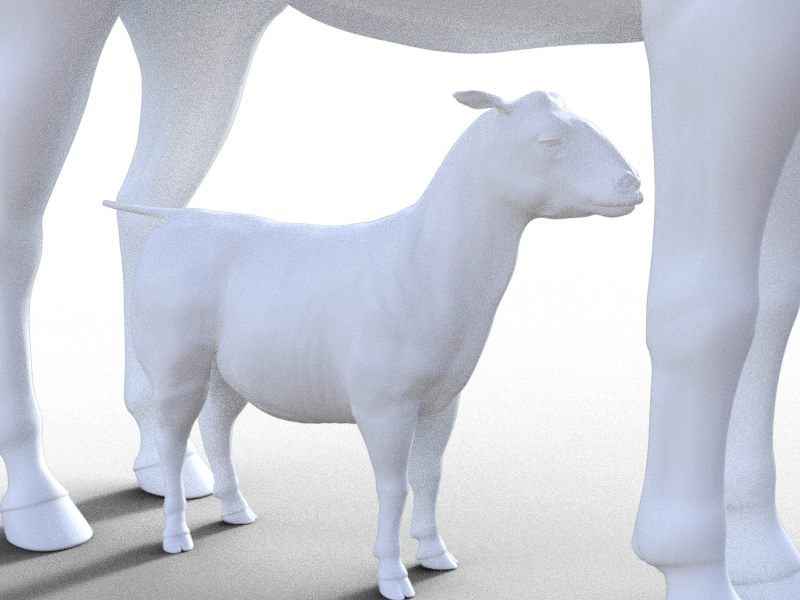 Horse2Goat
That's weird as I thought I had zeroed any morphs not related to the products listed above. Doubly weird in that the Llama and Unicorn morphs should load if you have both Lovable Llamas and SF Unicorn for DAZ Horse 2 in your library. I'll try to correct the error and fix the issue. Apologies for the inconvenience and thank you for making me aware of it.
I should probably have mentioned that I don't own those, but thought I'd see how they looked anyway.
Thanks for clarifying. I thought I really messed something up. How did the morphs turn out without those products, BTW?
I picked up the llamas in today's sale, but I still don't have that unicorn, and don't think I'll be buying it. Without whatever morphs you were using from that, they look like this:
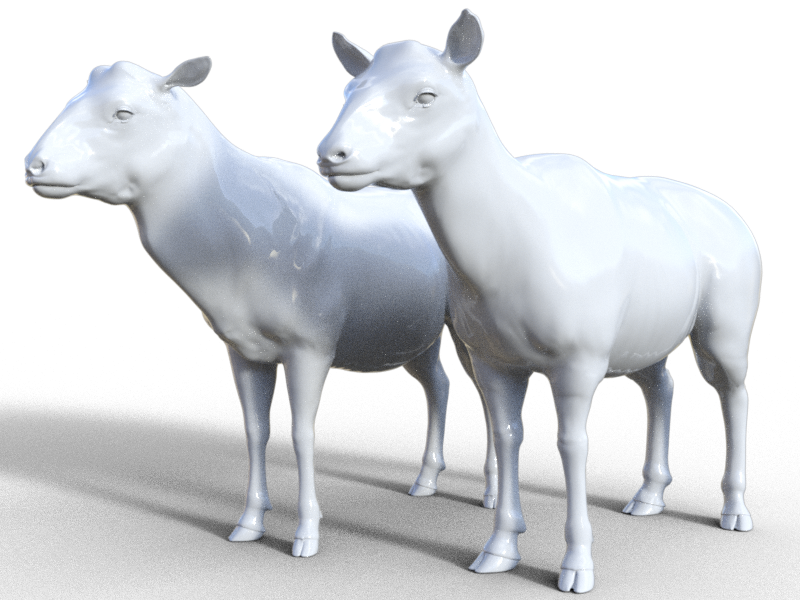
Which is to say, pretty good. Thank you for making these. I'd been wanting a goat/ram for quite some time.
Awesome! Thanks so much!
+1!

Thank you! Mind if I ask which combinations of fur/textures you used in your renders?
If I owned Gnu for DAZ Horse 2 by AM, I definitely would have utilized either it's LAMH of dForce fur for my renders. If I ever get the GNU, I'd love to try morph/ kit-bashing Mouflon and Marco Polo sheep.
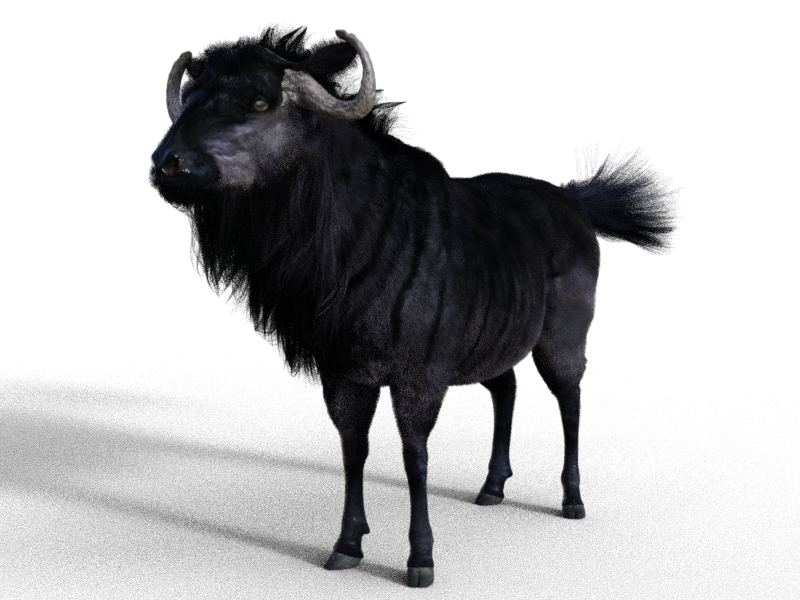
Incidentally, I do own the gnu, so here's what that looks like. Strangely, the gnu doesn't have texture presets, so I just loaded a gnu into the scene and copied its surface settings.
 Khemsit 8...
I installed Khemsit, but nothing works except the morph dial. I think the textures are actually there, but I can't be arsed to open them all by hand.
Maybe I can locate the main Khemsit character file, double click in Windows Explorer, and load her that way. Otherwise, the install is still all messed up.
Four (4) Arms for Genesis 8Centaur is a geograft. If you want it like a geograft, it's not a figure parent, it's a geograft. Centaur 7 and 8 work specifically because the range of morphs is fairly limited. If somebody came out with a new horse morph, it's not going to work on Centaur body. (Like Tane, the cow, and the gnu)
So what you are asking for is impossible, thus what I laid out above.
Either you go with a geograft and limit the range of morphs and skins, OR you go with a parented option and have to deal with limitations of the seam and flow of the figure.
Four (4) Arms for Genesis 8The 2 parts would be fully compatible with any morphsExcept that it's not possible. If you add a morph to the original figure you need to create a matching morph for the geograft, it can't "inherit" it automatically to get the same result as on the original arms.
Genesis 8 figure parent of Genesis 8 figure isn't possible ?
Four (4) Arms for Genesis 8The 2 parts would be fully compatible with any morphsExcept that it's not possible. If you add a morph to the original figure you need to create a matching morph for the geograft, it can't "inherit" it automatically to get the same result as on the original arms.
Four (4) Arms for Genesis 8I think about something like 2 Genesis 8 figures
- Part 1 : Head, neck, shoulders and arms
- Part 2 : Shoulders, arms, body and legs
It would need a morph and an opacity map for the transition and porbably some adjusted JCM for the pectoral and back muscles.
The 2 parts would be fully compatible with any morphs, poses and skin maps.
My Project: Brash Lonergan adventures - Warning AI Discussion PossibleHoliday Special Heads, Mouths, and Eyes
Frankly, I am not happy with the base stylized head above or the Heat Miser morph because of the mouths and eyes. The look that I think I want to hearken to for my extremely unrealistic project could have two base eyes and two base mouths.
- Base eye 1 - a large flat white oval plane over which a black pupil (and sometimes iris) translates.
- Base eye 2 - no eye white - just small black eye-specs that are morphed to mimic eye movement.

- Base mouth 1 - a black and white plane covered by a panel that extends down to include the chin like a ventriloquist's wooden dummy. The chin slides down to open the mouth and the black/white
plane is adjusted for phonemes and expressions.
- Base mouth 2 - a torus widened in the horizontal direction and smashed down in the veritcal direction. Torus is morphed for phonemes and expressions.
Here are some examples of Rankin Bass characters with combinations of each
Gerry Anderson's amazing marionettes had a really cool speech facility. Like it was latex skin over a mechanical lower lip plate on a hinge or something. Amazing!
I messed something up and now Genesis 8 always loads with preapplied morphs.To fix any ill-behaving morphs, do as follows;
1. Load your base figure or the developer version to an empty scene. ("Genesis 8 Basic Female" or "Genesis 8 Female Dev Load")
2. Select the figure
3. Select "Show Hidden properties" in the Parameters-Tab, drop down menu (right-click)
4. Zero the figure (Found in Parameters-Tab, drop down menu)
5. Memorize the figure (Found in Parameters-Tab, drop down menu)
6. File->Save As->Support Asset->Save Modified AssetsThis procedure will zero the default value in the ill-behaving morph/morphs, and while saving DS also shows you a list of the morphs it is changing.
How to Zero all JCMs?If the processing of JCMs is causing a slow down (and it may well be) then zeroinf them isn't the answer, you would need to remove their links (which might break the morphs, if in use) or simply unisntall the character or morph product that introduced the JCMs.
I messed something up and now Genesis 8 always loads with preapplied morphs.I was trying to learn how to make a save a custom morph slider last week and when I went to play with Daz this week, I noticed that Genesis 8 Female always loads with a character morph applied. How can I undo that? I don't recall what I did since it was last week. I just need her to load without any morphs applied anymore.

Daz 3D is part of

Connect
DAZ Productions, Inc.
7533 S Center View Ct #4664
West Jordan, UT 84084Licensing Agreement | Terms of Service | Privacy Policy | EULA
© 2026 Daz Productions Inc. All Rights Reserved.