-
Albert Mansion
For under USD 14 (with PC+) I think it's fine, if it suits your theme, and probably worth the time spent tweaking if it's just a little off. Other than Vicky with no clothes on, I don't think there's anything Daz sells that's appropriate for absolutely every render.
Managed do create a Clean version - hope it's ok to post the Material preset
That looks nice, although you see the problem with all the columns looking the same even more with a clean version.
...I wonder if you could use a different shader on each or are all the columns a single material zone?
They're 1 mat zone... you could always go into the geomety editor and create new matzones for them. But I prefer to avoid that as the any previously made material presets leave the new matzones blank and it annoys me
Thus alternate uvs
I agree with the columns looking a bit repetitive but it looks fantastic otherwise so blender to the rescue! now I have some alt uvs
some things I do realy like about the set
Its pretty well optimised. The foliage in particular is some really convincing low poly foliage. I 100% plan to use it a bunch in all sorts of scenes
Its organized nicely. I love groups. having the lights all in a nice group so you can turn them on and off with a click is nice. I am a fan. I do wish the occult stuff were in its own group so that would also be one click to turn on and off, but its still not hard to so since there are lots of materials: 30 seconds rather than 1 second. I can live
aestetic crows! aestetic crows on a dilapidated building! Is there anything better in this world?
real quick render showing off the new uvs and the file if you want to try them out and make sure I set up the file structure correctly
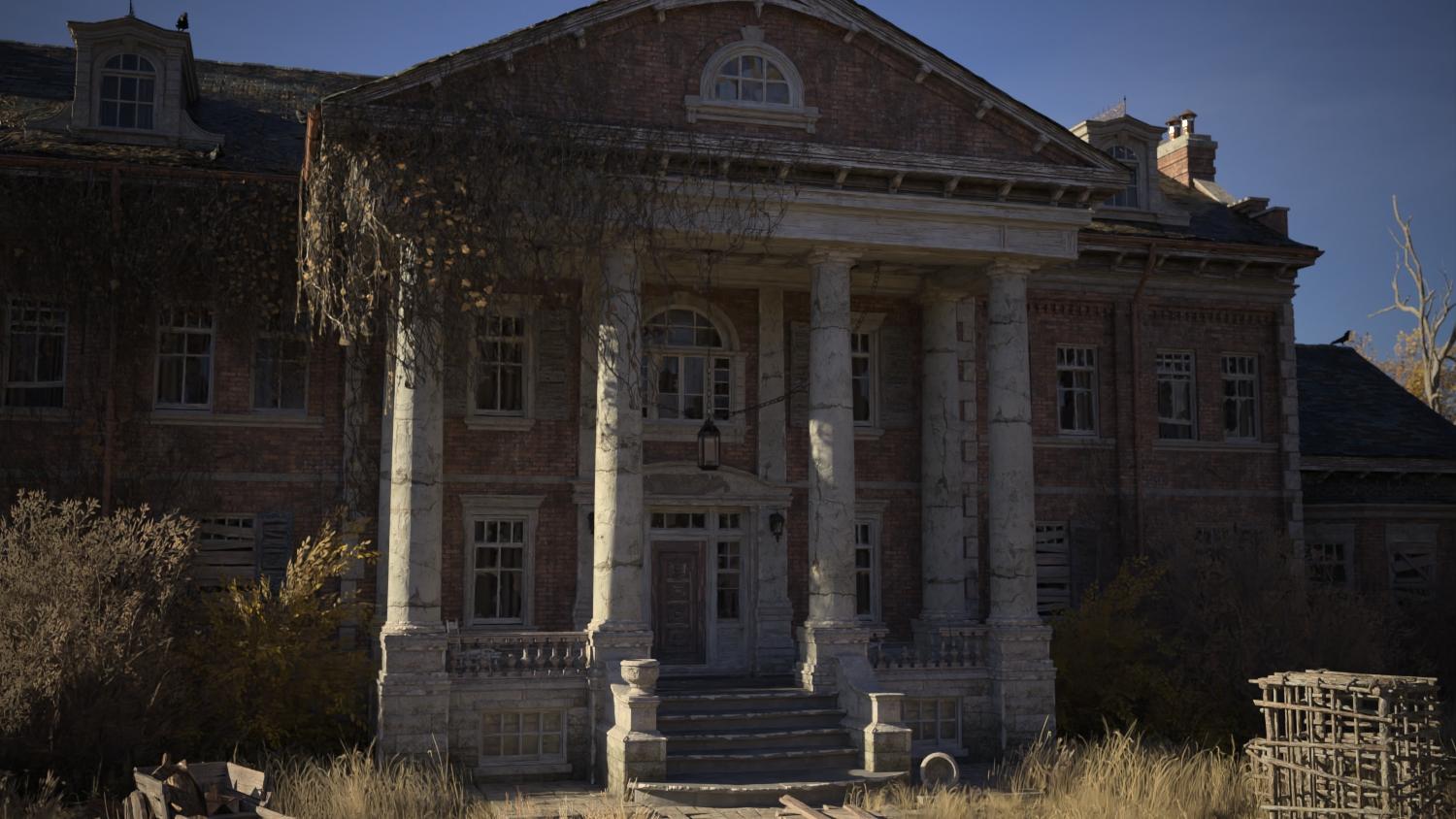
(also the columns with either uv set use a tiling texture so if it would be very easy to switch in something with less cracks)
I got so excited for this forgot this noob don't know how to do this. So will someone be so kind to explain how to get the new UV map on the Mansion?
you instal them as you would any other zip
and then you select the mansion go to the materials tab and there should be a new uv set that you can switch to. (easiest way to get to it is to type "uvs" in the material editor tabs search bar)
..thank you was sort of on the fence after Lothar posted his "clean" materials preset, but the geometry editor can be real tedious on itemslike this, particularly trying to get to the backsides as I'd have to turn off visibility for the rest of the model.
another way could be to create a morph in Hexagon by rotating two of the pillars opposite ways 90° and a third 180°
...wouldn't you still have to get around the backside of the columns to select the hidden polygons?
Albert MansionFor under USD 14 (with PC+) I think it's fine, if it suits your theme, and probably worth the time spent tweaking if it's just a little off. Other than Vicky with no clothes on, I don't think there's anything Daz sells that's appropriate for absolutely every render.
Managed do create a Clean version - hope it's ok to post the Material preset
That looks nice, although you see the problem with all the columns looking the same even more with a clean version.
...I wonder if you could use a different shader on each or are all the columns a single material zone?
They're 1 mat zone... you could always go into the geomety editor and create new matzones for them. But I prefer to avoid that as the any previously made material presets leave the new matzones blank and it annoys me
Thus alternate uvs
I agree with the columns looking a bit repetitive but it looks fantastic otherwise so blender to the rescue! now I have some alt uvs
some things I do realy like about the set
Its pretty well optimised. The foliage in particular is some really convincing low poly foliage. I 100% plan to use it a bunch in all sorts of scenes
Its organized nicely. I love groups. having the lights all in a nice group so you can turn them on and off with a click is nice. I am a fan. I do wish the occult stuff were in its own group so that would also be one click to turn on and off, but its still not hard to so since there are lots of materials: 30 seconds rather than 1 second. I can live
aestetic crows! aestetic crows on a dilapidated building! Is there anything better in this world?
real quick render showing off the new uvs and the file if you want to try them out and make sure I set up the file structure correctly
(also the columns with either uv set use a tiling texture so if it would be very easy to switch in something with less cracks)
I got so excited for this forgot this noob don't know how to do this. So will someone be so kind to explain how to get the new UV map on the Mansion?
you instal them as you would any other zip
and then you select the mansion go to the materials tab and there should be a new uv set that you can switch to. (easiest way to get to it is to type "uvs" in the material editor tabs search bar)
..thank you was sort of on the fence after Lothar posted his "clean" materials preset, but the geometry editor can be real tedious on itemslike this, particularly trying to get to the backsides as I'd have to turn off visibility for the rest of the model.
another way could be to create a morph in Hexagon by rotating two of the pillars opposite ways 90° and a third 180°
IRAY Photorealism?Your Minka's renders are absolutely remarkable !

Quite often, with various daz lookalikes, we struggle to recognize them, but with your model, it was identifiable instantaneously. Great job.
Here is a small preview in different light situations. The morph is updated and so are some textures.
I think a lot of people morph or draw what they want to see not what they actually see. Also i often see the models are extremely symmetrical, don't have pores or wrinkles and if they do they often are not like the famous person. It really is very difficult.
Michael 4 / Victoria 4 to Genesis 8 ConverterOk I bought the Legacy UVs for Genesis 8: Michael 4 Sku: 47965 and am trying to transfer the texture from this free Vincent model by hellboy soto (it's totally awesome from the old 1990s TV series very life like).
Here's the link if you'd like to get it too: https://www.deviantart.com/hellboysoto/art/SOTO-s-Vincent-for-The-Freak-4-278560825
and an alternate link: https://www.sharecg.com/v/48588/view/11/Poser/SOTOs-Vincent-for-The-Freak-4
Initially I think Soto made the model with Freak 4 mods in mind but changed it so you only need michael 4. I loaded the genesis 8 model, double clicked the prep script, then attempt to apply the textures and double click the apply script but nothing is happening. Also the Morphs don't load either, they give the body the "physical appearnce" of the beast, I think they are freak 4 based, but I'm not sure.
1. Can anyone test this out for me and see what I'm doing wrong? Perhaps I'm using the wrong type of converter? or maybe it's not compatable with the morph/injection and if so what can I do about this, perhaps a different converter?
I'd really like to move this character over to the genesis 8 model. Any asistance would be greatly appreciated.
Thank you for your time.
Novica & Forum Members Tips & Product Reviews Pt 13I love Moshi. That cat is so cute. However, I really wish the PA had included the folded ears to go with the big eyes. I know not all Scottish Fold cats actually have the folded ears, but they are so cute! I haven't purchased Moshi yet, so I haven't been able to check the five shape presets. Maybe one of those includes the folded ears…? Regardless, it would have been great to have the folded ears as a separate morph.
https://www.youtube.com/watch?v=q6SOXDN5uZo
I watched the above video without sound, so I don't know what is said, if anything. But it really shows just how cute these cats are, and how close Moshi is to the breed.
He's pretty close, but for me he hits the uncanny valley spot rather than the 'cute' spot.
Maybe with slightly smaller eyes. I'm going to make time to play with my new kitty.
Novica & Forum Members Tips & Product Reviews Pt 13I love Moshi. That cat is so cute. However, I really wish the PA had included the folded ears to go with the big eyes. I know not all Scottish Fold cats actually have the folded ears, but they are so cute! I haven't purchased Moshi yet, so I haven't been able to check the five shape presets. Maybe one of those includes the folded ears…? Regardless, it would have been great to have the folded ears as a separate morph.
https://www.youtube.com/watch?v=q6SOXDN5uZo
I watched the above video without sound, so I don't know what is said, if anything. But it really shows just how cute these cats are, and how close Moshi is to the breed.
He's pretty close, but for me he hits the uncanny valley spot rather than the 'cute' spot.
Novica & Forum Members Tips & Product Reviews Pt 13I love Moshi. That cat is so cute. However, I really wish the PA had included the folded ears to go with the big eyes. I know not all Scottish Fold cats actually have the folded ears, but they are so cute! I haven't purchased Moshi yet, so I haven't been able to check the five shape presets. Maybe one of those includes the folded ears…? Regardless, it would have been great to have the folded ears as a separate morph.
https://www.youtube.com/watch?v=q6SOXDN5uZo
I watched the above video without sound, so I don't know what is said, if anything. But it really shows just how cute these cats are, and how close Moshi is to the breed.
ETA: I just checked out with Moshi and the Albert Mansion. Used my Oct PlatClub coupon on the mansion…
AIUTO...CHI CONOSCE L’ITALIANO? PARTE DODICIScusate, come faccio a salvare un morph in modo da ritrovarmelo come slider? Ho modificato genesis 8 di base, mescolandolo con qualche altro carattere, ma riesco solo a salvare il character preset, non il morph.
Grazie.
Curious: Why using the blender (What are the advantages)?I import JCMs as part of the import process; I transfer as needed to clothes.
I have done, but rarely do now, import pose sets and single poses. I transfer props and scene elements as required. I never transfer ready-to-render complete scenes as that is a waste of time. Transfer a vignette for example, and save it seperately; re-use as needed just by Appending.
I don't use materials, lights, cameras and other items. I create my own lights and cameras; Diffeo converts shaders from Studio to Blender very well - I tweak as required.
Thanks for the advice!
Best Method of Posing Human Figures?How much do those suits cost that Hollywood movie studios use on human actors to transfer poses and movement when they are animating something?
I did a quick look and you could get the suit (the cheapest part under $500), sensors, cameras, and cables under $20,000 Us if you are trying to capture complex things like facial expressions. This is assuming that you have the computer hardware, techs to run the software etc...
I think the new MAC iPhone does it just by converting a video of a person moving around into an animation. https://www.youtube.com/watch?v=3kzaFxqgxpo
Is there any reason that stick figure couldn't be a DAZ figure?
The short answer is "no", but you'd have to do some retargeting and save it out as a BVH in order to apply the animation to a Daz figure within DS, if that's your goal.
Best Method of Posing Human Figures?So has anyone tried the “AI posing from photographs” feature of Clip Studio Paint? As with Design Doll, I don’t think there’s a way to transfer poses from CSP’s 3D mannequins to Daz Studio, but it would be great if somebody could come up with a plug-in for DS that would take a reference photo as input and output a corresponding figure pose. So instead of mo-cap from video, it would be pose-cap from image ????
It doesn’t even have to be exact – something that got you pretty close to the final pose could be a real time saver.
you could create an obj and then use that as a 3d reference to manually pose
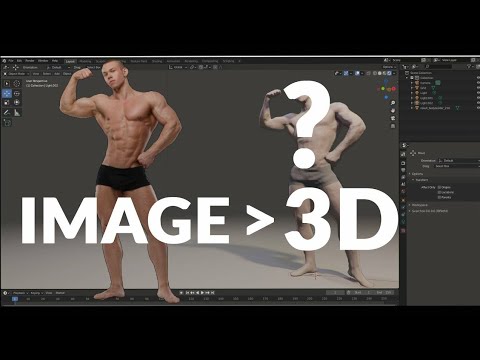 Curious: Why using the blender (What are the advantages)?
I import JCMs as part of the import process; I transfer as needed to clothes.
I have done, but rarely do now, import pose sets and single poses. I transfer props and scene elements as required. I never transfer ready-to-render complete scenes as that is a waste of time. Transfer a vignette for example, and save it seperately; re-use as needed just by Appending.
I don't use materials, lights, cameras and other items. I create my own lights and cameras; Diffeo converts shaders from Studio to Blender very well - I tweak as required.
Investigating Character Load TimeI have been digging into daz character load process to try to make loading character faster. It is widely know that the more morphs you install the slower daz will load a character.
Character load process:
Using process monitor from Microsoft, it is possible to get a log of files daz accessed during the character load process with timestamps.
Here is a rough break down of the character loading process. I have tried to start this load on the hour to make the timestamp calculation easier. My computer is a bit slow but the sequence of events are good illustration of the process
0-46s unknown need to investigate further.
46.35s-52.19: start loading base character file, textures, uv ect
50.42s: access windows registry and a bunch of tcp call (accessing daz database?).
52.19s-141.89s: processing G8F cache file located at "AppData\Roaming\DAZ 3D\dson\cache\DAZ 3D\Genesis 8\"
141.89-148.90s: querying and access morphs located in"\data\DAZ 3D\Genesis 8\Female\Morphs\" in your content library
148.90s-151.07s loading 3rd party UV files.
151.07s-236s maining loading eyelashes.Daz might also be doing other things here since loading G8F dev load doesnt really reduce the amount of time needed.Daz log report around 202s loading time, so its about right.
Cache file:
As you can see bulk of the time is spent processing G8F cache. That file is a json text file containing prepossessed morphs value, see also DAZ dson file spec for asset_info, modifier, and scene object. Because the file is in text format, the text parsing process is a lot slower that the file read speed. It should be CPU limited rather than SSD speed limited.
When adding new product or first installing daz, that file need to be generated and the character load process will be a lot slower as daz need to do a complete write.
By using some scripting, its possible to parse that file and count how many morphs a particular product have and uninstall the worst offenders. Note size of the json for each morph is variable. Factor include the number of formula it have. Just counting the number of asset in the json file is not sufficient. I used the number of characters for each product as a rough guide on the load time cost.
Improving loading time:
Uninstalling 4 of the most slowest to load product cut the load process by almost 1min from 202s to 148s. The cache file is reduced from 165MB to 129MB. Unfortunately some of the most expansive package to load left for me are zev0's morphs that I actually use. Note currently I dont have many characters installed.
Uninstalling package with HD morphs will might speed up with the morph loading phase as they end to be very large.
Might eventually write a python script to help find packages that are slow to load, or maybe someone else could share one. Currently my script is written in matlab and not founding the characters very accurately.
Daz dev could probably improve the character load time by improving the json parsing time. Maybe switching the cache to binary rather than text format.
process monitor: https://docs.microsoft.com/en-us/sysinternals/downloads/procmon
dson objects:http://docs.daz3d.com/doku.php/public/dson_spec/object_definitions/startEdit: Dev load.duf is slightly faster than normal Genesis 8 basic female.duf. By installing a few more packages, managed to reduce the load time to about 1min.
Attaching an ERCFreeze to an Existing Morph [Solved]Thanks for responding Richard. =) I'm not sure what you mean by channel.
oProperty.getName() will return "Value", but after just checking, .getLabel() will return the Label of the modifier/morph but thats not helpful since the name and label can be different.
The Antenna are a Geograft attached to a G8F. The antenna will always be oTrgtNode. Whatever G8F figure I attach it too will generate a Morph/Modifier on oTrgtNode, like FHMTika8, This Generated Morph contains the Deltas for the antenna to fit the new head, but of course it doesn't have the Bone Deltas.
I have isolated that FHM morph, which becomes oProperty, by looking at .oProperty.getOwner(), which holds the true name of the property. But when I use that Property as oControllerProperty for the ERCFreeze, it changes the name of the modifier/morph from FHMTika8 to Value.
I can make a completelty new Morph, with all the right names, and the ERCFreeze data, but it is missing the Deltas from the Generated Morph, so the geometry distorts.
[Mesh Grabber] Where is the Morph Editor?The Morph Editor will come out soon. I had planned the Mesh Grabber update for the same day but Daz released it a bit early. :-)
Thank you so much, ManFriday.
Your product made possible a whole project that I'm doing right now. What I do with Daz is extremely specific and this tool was really amazing to add to my workflow.
For others who are still on the fence with Mesh Grabber I'll tell you this: With a bit of patience you can even model some assets with it! That's how good this is.
It's really simple to use and once it has the full option of saving as morphs it'll be even better.
I hope Daz3d adopts your solution as the standard way of making any deforms in their software.
Cheers,
.p[Mesh Grabber] Where is the Morph Editor?I'm not sure what Morph Editor you are referring to, but there's a support thread for this product over here.
https://www.daz3d.com/forums/discussion/372546/released-manfriday-s-mesh-grabber-commercial
Thank you!
most popular types of character?...
Also with the release of new generation, your old characters will gradually lose their usefulnessClothing has a bit longer lifetime as you can usually fit or make them fit several generations of figures.
Have to disagree with that. I'm running several 'old' V4s that are now living out their lives as G3. Converting a V4-Genesis2 character with all morphs and skins to Genesis 3/8 takes 5-20 minutes, depending on the number of makeup options (after you get your morph clones made and Blender set up to rebake the textures). Going back and forth between G3/8 takes seconds once you have the clone models set up. There are really good tutorials out there that give all the steps necessary.
Can you point me in the direction of some of the 'tutorials' to transfer a V4 material/skin to a Gen8 figure?
Importing altered OBJ to DazImportant step: delete the eyelashes before you export a G8 figure. After that, you can use morph loader to import the new model as a morph. I don't know how GoZ works, so I don't know whether that will import the new model as a morph, but you don't have to do that in order to bring it in as a morph.
Thanks very much! I appreciate your taking the time to answer my question as asked!
How much is it normal to spend when starting out with Daz Studio?There is no normal. It depend person to person. There are those deep poketers who even do not care $266 or without any second thought they can spend this tiny or atomic size $ .
Requirement is also a factor how much anyone will spend. What kind of render he want to achieve etc.
For a starter I will recommend.
For Iray users: Select Genesis 8 and their morph, expression and few characters stylize and realistic and you are ready to go.
For 3delight users: Select Genesis 1 or 2 or 3 with morph and expression.
[Released] Faber Inc - Yousef for Genesis 8 Male [Commercial]Hey Guys! this post is to announce my upcoming character Yousef, who will be available very soon :)
Description
"Yousef is a new hunk for Genesis 8 Male with big piercing eyes, athletic body shape, with Middle-Eastern and North-African heritage.
Explore his sensuous, powerful, or tender side. He can be an ancient Egyptian ruler, a businessman from the Emirates, or the lead portrait of survival and hope in turbulent times -- the possibilities are unlimited.
Yousef for Genesis 8 Male comes with 3D mesh eyebrows, HD sculpted face and body shape, custom Anatomical Element morph*, photo-realistic skin textures, and many eye color materials to play with.
Get Yousef for Genesis 8 Male, shape his story and bring it to life!
Note: Anatomical Elements Prop not included."
Thank you for all your support and I'll let you know once he'll be available!

PS: There will be another surprise this month! :O
Daz 3D is part of

Connect
DAZ Productions, Inc.
7533 S Center View Ct #4664
West Jordan, UT 84084Licensing Agreement | Terms of Service | Privacy Policy | EULA
© 2026 Daz Productions Inc. All Rights Reserved.