-
Freja 8 Viking maiden Bundle
I can get the total cart price down to 57.57 by adding the fantasy horns (Freja 8 price down to 53.83 and fantasy horns 3.74 within the cart).
Admirable sculpting and character development. Kudos! Personally, I don't know if I would use Freja 8 as is unless I was doing a pro wrestling project or something similar, but I rarely use characters as is. I suspect the figure would mix well as a full-body fitness/muscularity morph.
Like others, I am waiting to see if there is more to the sale. Purple banner? Related bundle? For the moment, I will pass.
- NOTE to Mods - there appears to be two Freja 8 threads, perhaps combine them?
Freja 8 Viking maiden BundleMy god she makes Abby from The Last of Us Part 2 look small
And yet, she's still very beautiful. She has a really nice face/head morph
How do I freeze a smoothed bit of clothing as a morph?I'm afraid that cannot work either. To avoid exporting the character in the obj file, I have to hide the character, which means the smoothing modifier shape reverts back to zero. So, the exported obj file mesh would be identical to the original AS Elvenstrapped mesh.
My problem is that if GV3 is visible when the obj file is created, GV3 exports too. If she is invisible, the smoothing modifier final shape disappears. In neither case can I create the morph I'm aiming for.
Regards,
Richard.
Tried it last night with V3 and even though the smoothing disappeared when I hid the figure, it came back after a while just like the figure was visible.
There was an option to bake the smoothings, which I tried, but the process was slow and I fell asleep before it got anywhere.
Where? How to bake? That's the sort of thing I am probably looking for. The terminology is wierd, I associate baking with cooking & getting cakes to rise and change shape. Changing shape is what I don't want it to do, which is why I asked about freezing it, because movable things cease to move when frozen.. The terminology for accepting a design, stopping the designers changing anything for production is 'freezing' in the engineering field i work in. Baking seems to be the absolute opposite of what I wanted, but if it does the job, it's what I want.
Anyway, how is it done? It is something I am sure is built in, just have to know where to look & understand backwards terminology without an adequate guide/phrase book.
Regards,
Richard
Trying to remember the menu-path as I don't have DS at work [bummer]... Edit->Figure->Geometries...?
How do I freeze a smoothed bit of clothing as a morph?I'm afraid that cannot work either. To avoid exporting the character in the obj file, I have to hide the character, which means the smoothing modifier shape reverts back to zero. So, the exported obj file mesh would be identical to the original AS Elvenstrapped mesh.
My problem is that if GV3 is visible when the obj file is created, GV3 exports too. If she is invisible, the smoothing modifier final shape disappears. In neither case can I create the morph I'm aiming for.
Regards,
Richard.
Tried it last night with V3 and even though the smoothing disappeared when I hid the figure, it came back after a while just like the figure was visible.
There was an option to bake the smoothings, which I tried, but the process was slow and I fell asleep before it got anywhere.
Where? How to bake? That's the sort of thing I am probably looking for. The terminology is wierd, I associate baking with cooking & getting cakes to rise and change shape. Changing shape is what I don't want it to do, which is why I asked about freezing it, because movable things cease to move when frozen.. The terminology for accepting a design, stopping the designers changing anything for production is 'freezing' in the engineering field i work in. Baking seems to be the absolute opposite of what I wanted, but if it does the job, it's what I want.
Anyway, how is it done? It is something I am sure is built in, just have to know where to look & understand backwards terminology without an adequate guide/phrase book.
Regards,
Richard
How do I freeze a smoothed bit of clothing as a morph?I'm afraid that cannot work either. To avoid exporting the character in the obj file, I have to hide the character, which means the smoothing modifier shape reverts back to zero. So, the exported obj file mesh would be identical to the original AS Elvenstrapped mesh.
My problem is that if GV3 is visible when the obj file is created, GV3 exports too. If she is invisible, the smoothing modifier final shape disappears. In neither case can I create the morph I'm aiming for.
Regards,
Richard.
Tried it last night with V3 and even though the smoothing disappeared when I hid the figure, it came back after a while just like the figure was visible.
There was an option to bake the smoothings, which I tried, but the process was slow and I fell asleep before it got anywhere.
CC#54 WiPs ~ What is it that you truly desire? after party Chit ChatTerrific modeling and render. Love the shaders. Goya never looked like this.

What is a depth matte?
Thanks for the nice words UnifiedBrain.
A depth matte is a grayscale image of your scene where objects closest to the camera are dark and as objects recede in the scene, they become lighter in value. Carrara can create one automatically using the MultiPass options in the Render room:
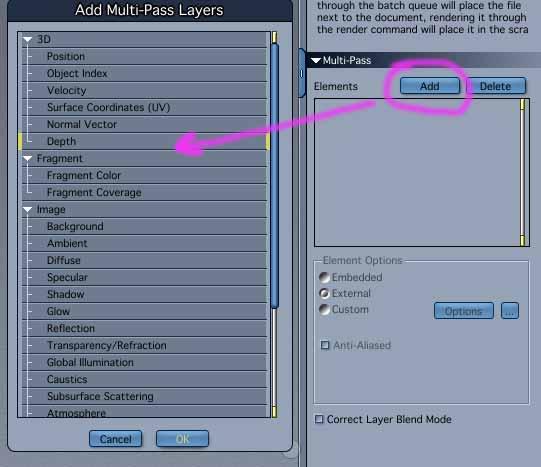

You can then take that and use it to drive other effects in post. Here is a screengrab from After Effects using an Adjustment Layer and the Depth Matte as a Luma Matte. Darker values receive less effects and lighter values receive more. You could also invert the matte if you want effects on the closer objects and less on distant objects. And of course, you can adjust/ fine tune the matte itself or totally crush the values depending on whatever 'look' you are after.

Here is the 'Beauty' pass unaltered for comparrison:

Another use is you can drop it on top of your image and set the Layer Transfer Mode to 'Screen' and adjust the tranparency to taste and it will create a sort of 'foggy' effect (see same screengrab where the top layer is set to Screen with the Opacity adjusted.
Lastly you can even cook your own matte using the Distance Fog in Carrara which will allow you to have more hands on control to dial in the values of the matte using the Start Radius and Extent Radius. Just turn off your lights.
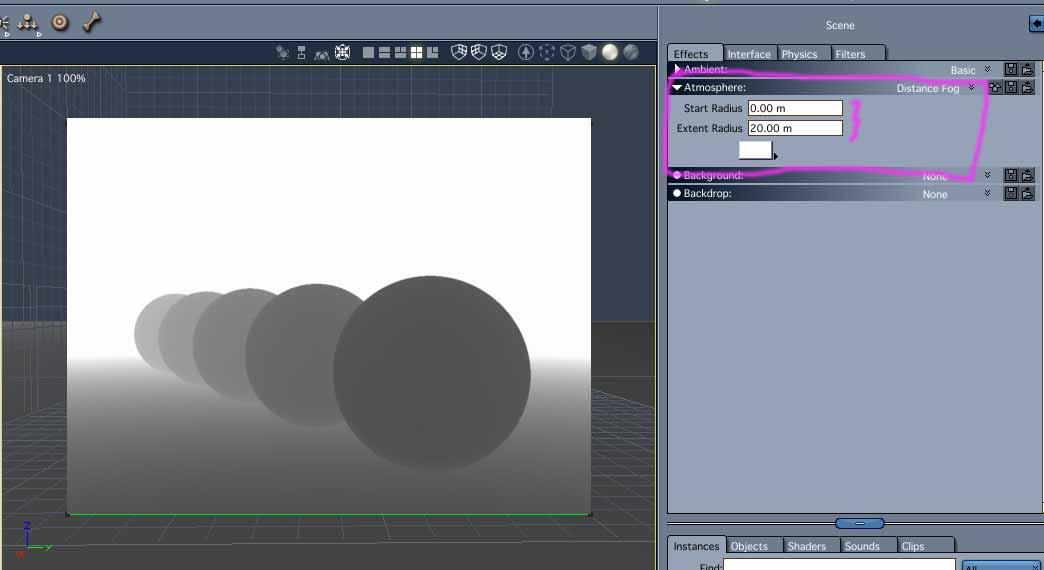
Oh, and of course you can use it to add Depth of Field in post. I used Carrara's native DOF, but for animations or if you want more control or don't want to add such expensive render options it can easier to apply in post.
Those are just a few examples for which I use a depth matte. Hope that makes some sense.
edited: to add Beauty pass and some more clarifications
Diffeo Hair Conversion Example - Monica HairWhat steps do you tend to do? Convert using Diffeo and then chaning the shader in Blender to principled hair?
Yup. Also changing the particle settings for hair size, clumping, child particles, etc.
Ok. I soon will be trying another V8 transfer. Let's see if I can follow along in the song book... :-)
Louisiana QuestionsDid anything get resolved with this issue?
Nope.
Did they respond at all? Say they are looking into it? When I’ve reported bugs, it has often taken as long as 6 months for them to fix them.
I did get a response on 28 July, which I responded to, directing the support person to this thread. I got a second response on 30 July. My original concern was not just that the second morph didn't trigger Darcy at all. It was also that the face of the character didn't seem to have the same shape as the character in the promo pictures. I had read somewhere that DAZ doesn't like people posting in forums about customer support responses, so I don't know how much I can say about it before somebody heaves a bosom. But the support person did seem to agree there was a problem. As far as I know, the case has not been closed yet. And maybe the character has been updated since then. Neither Sevrin's example renders nor the ones I did myself today, exhibit the worst problems I remember seeing before. But the change log doesn't list any updates.
FLUIDOS II plugin for CarraraI was confused by those releases. I purchased Fluidos II for Daz Studio and was wondering if this was some sort of super-Fluidos II.
Anyway, good luck to Alberto with these releases. I've thrown together some odd props that could be paired with Fluidos. I could transfer them to Daz Studio versions and offer them as freebies to encourage Studio people to buy Fluidos. The biggest problem thus far for me to offer Daz Studio freebies is the shaders. If you check my ShareCG stuff, most of the Studio-compatible items don't have good shaders.
Fluidos II for Daz Studio is the complete edition, the new Fluidos II Lite edition for Daz Studio is a limited edition. It's similar to Carrara Pro and Carrara standard.
The shaders, especially the liquids, smoke and fire, are difficult for me too!
FLUIDOS II plugin for CarraraI was confused by those releases. I purchased Fluidos II for Daz Studio and was wondering if this was some sort of super-Fluidos II.
Anyway, good luck to Alberto with these releases. I've thrown together some odd props that could be paired with Fluidos. I could transfer them to Daz Studio versions and offer them as freebies to encourage Studio people to buy Fluidos. The biggest problem thus far for me to offer Daz Studio freebies is the shaders. If you check my ShareCG stuff, most of the Studio-compatible items don't have good shaders.
Attaching an ERCFreeze to an Existing Morph [Solved]If it's possible, I'm trying to automate the process of linking the ERCFreeze to the autogenerated Transitory projected morph, just like if you were to have right clicked on it in the Property Hierarchy Pane and selected ERCFreeze. Then I'll figure out how to save that morph (making it permanent), so that it will load the next time the antennas are added to that figure. I've done this manually before, to make FHM's for the Antenna.
With every method i've tried so far it changes the Morph Class from DzMorph to DzFigure.
IRAY Photorealism?We have a winner, in Japan, meet Imma, a virtual human.
It says, "Imma was created by CG company ModelingCafe, who transposes her 3D animated head onto a real-life body and background.".
https://interestingengineering.com/meet-imma-the-worlds-first-computer-generated-model
They don't go into specifics but I'm willing to bet they used deep fake video stransposing technology only to transfer those 3D artists modeled face geometry onto existing video. Once you realize that's how they done it it's much less an impressive 3D modeling feat.
Doubt they used deepfakes for this... Looks just like standard photoshop or video editing or w/e to put a digital face on a real body. The same thing they did with lil miquela.
Ladies AND Laddies of Mousso appreciation threadSome great renders there, guys! Lots of awesome scenes and poses and compositions!
I'm still plugging away on Romina lol
I don't think I'll ever get to a point where I call her done - I always keep finding something else I want to tweak a little bit. This version only has VERY minor surface adjustments, this one is more about the morph. As much as I love Romina's head shape, I find it really difficult to find expressions for, particularly the mouth area. She's great in a neutral expression, or something very slightly dialed in, but not so much anything beyond that, so I tweaked away at her head morph to find something that still looks like her, but can more easily use expressions.
That being said, the render I chose to check out her new shape of course ends up using a very slight, neutral expression that I probably could've applied on the base Romina just fine lol. I gave her a different hairstyle for this one at least!

Full size in the gallery
Celebrity Look-a-Likes for 3D figures Part 2I tried out the Nicole Kidman head for G8F from TritiumCG...
https://www.deviantart.com/tritiumcg/art/Nicole-Kidman-Head-Morph-for-G8F-857009491
The texture I used was Bridget 8... the actual face sculpt is pretty close but it needs a dedicated texture to bring Nicole to life.
That said, it's still a very nice shape to use for that classy vibe.
IRAY Photorealism?We have a winner, in Japan, meet Imma, a virtual human.
It says, "Imma was created by CG company ModelingCafe, who transposes her 3D animated head onto a real-life body and background.".
https://interestingengineering.com/meet-imma-the-worlds-first-computer-generated-model
They don't go into specifics but I'm willing to bet they used deep fake video transposing technology only to transfer those 3D artists modeled face geometry onto existing video. Once you realize that's how they done it it's much less an impressive 3D modeling feat.
Attaching an ERCFreeze to an Existing Morph [Solved]I'm still not quite sure what you are doing - are you trying to link to the transitory projected morph from AutoFollow, rather than to a permanent morph you've created yourself (possibly by exporting the model with the Tika 8 morph projected in), then set up the ERC to control the custom bones as normal?
Vampire Morphs - Before G8 ends...!Now, you would lose detail in the transfer. That's sort of unavoidable, based on my own experience; Geordig also posted a conversion of an extreme fantasy morph over in this thread that shows how much you might lose. But it could be worth a shot and if it doesn't work out you could always return XTransfer if you've no further need for it, assuming that you don't own it already.
You're just linking to this thread; here is the thread you're describing.
Oh lord, thank you. My computer's been super laggy lately, it looks like I copied the link thinking it had swapped tabs before it actually had. That's what I get for not paying closer attention.
Updated my comment with the right one.
Another "Who is this model" postAttaching an ERCFreeze to an Existing Morph [Solved]you are correct, the link i gave is a stripped down version of the official version that you linked. Sorry for the ugly code snippet that i presented, it's quite long. Thanks for the correction, I forgot about using a for arrays.
In essence, I'm trying to duplicate the process of clicking on FHMTika8Head in the property Hierarchy pane, and ERC freezing on it. Doing it manually results in the ERC information being added to the DzMorph (FHMTika8Head). I've acquired the Property that is attached to FHMTika8Head with no problem, but using that as the ControllerProperty erases the morph Deltas, and converts the class from DzMorph to DzFigure, and the owner from FHMTika8Head to Antenna (which is the ControlNode)
ideally, the ContollerNode should be the FHMTika8Head morph, but it seems like it has to be a Node (Antenna) that the morph is attached too. Might you have suggextions as to what I can be using for ContollerNode and ControllerProperty? Might using DzERCLink instead of ERCFreeze be a better solution?
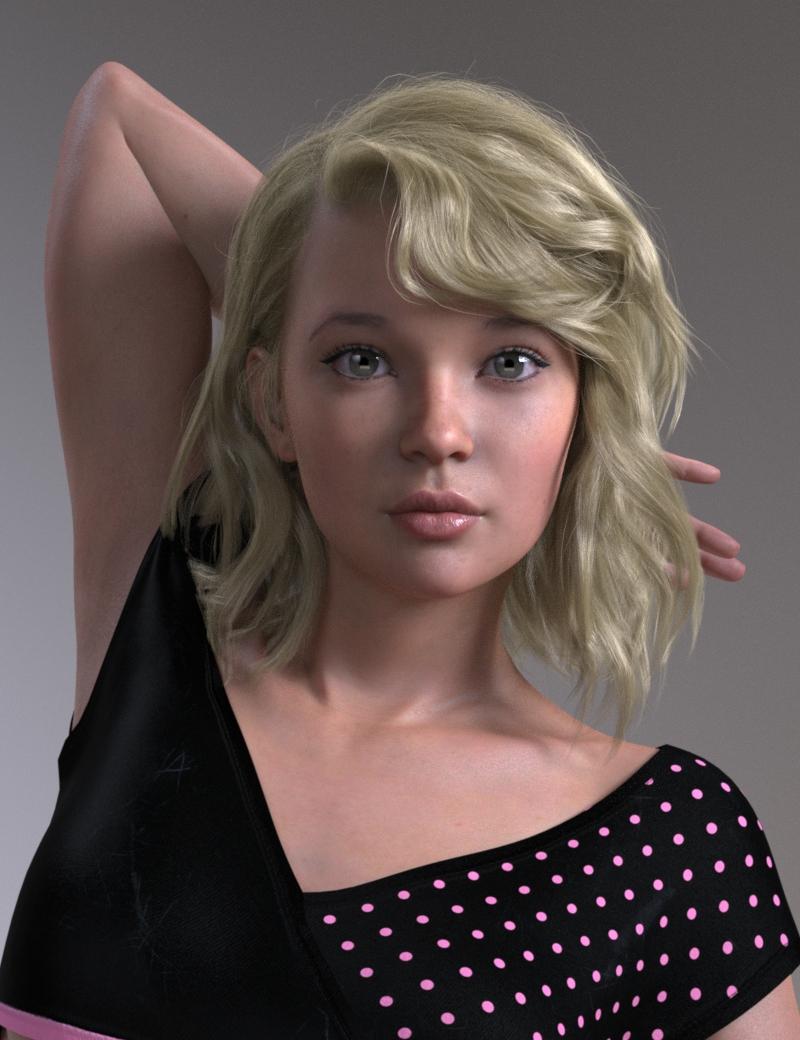
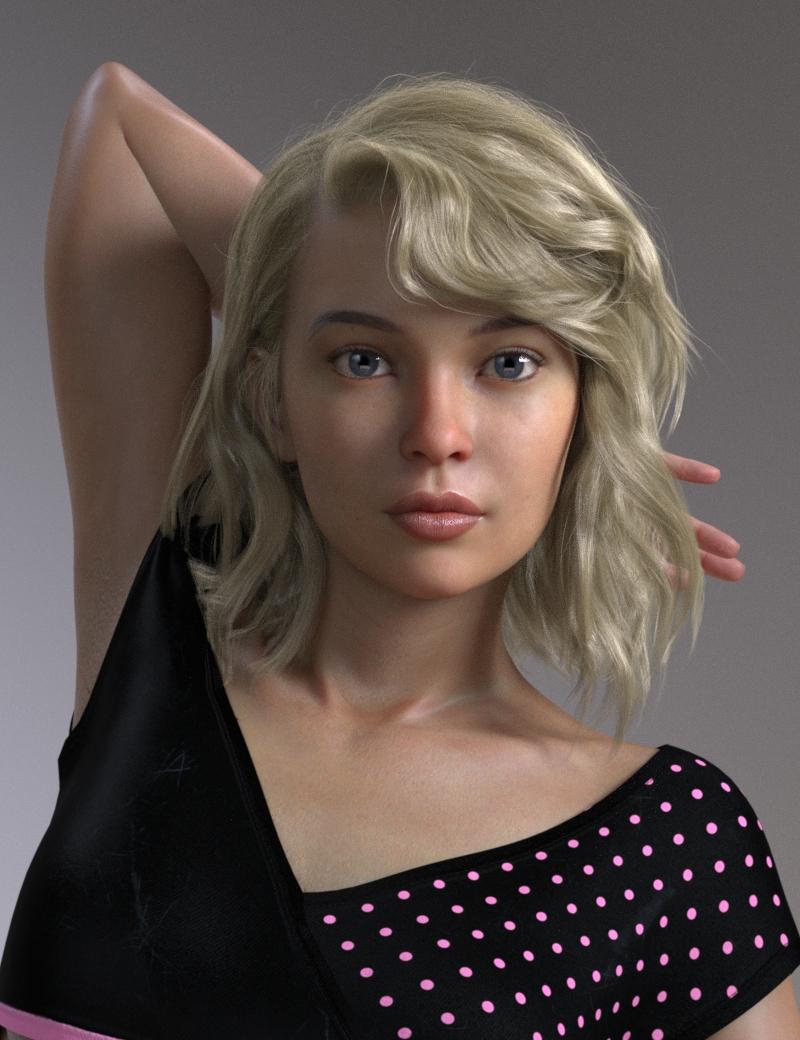
DELETEKalaa's morph is pretty realistic. It's the materials that aren't. One problem with her is that she has no Preferred Base, so that, in Smart Content, she matches no wardrobe items and only herself in materials. The character needs to be edited in Scene Identification to set G8F as the Preferred Base for her to work with Smart Content.
Anyway, with a different skin she's no less realistic than most other characters.
Daz 3D is part of

Connect
DAZ Productions, Inc.
7533 S Center View Ct #4664
West Jordan, UT 84084Licensing Agreement | Terms of Service | Privacy Policy | EULA
© 2026 Daz Productions Inc. All Rights Reserved.