-
New Parameter Property
Ah, base just means the morphs that are part of the base product rather than an add-on, morph expansion product - if anything I'd be surprised at those which don't have the sub-folder.
Ah! So those are nothing to worry about? And as long as the morphs are functioning, I can just ignore??
If that's the case, I'll just tell my OCD meter to sit down?New Parameter PropertyAh, base just means the morphs that are part of the base product rather than an add-on, morph expansion product - if anything I'd be surprised at those which don't have the sub-folder.
Anne for Caryn 8 (clothing costume added by elleque sep 27)I made a mini cat morph to use as Anne companion,perhaps will try the same for a puppy
http://mininessie-art-gallery.blogspot.com/2020/10/minicats.html
[Mesh Grabber] Where is the Morph Editor?I'm confused. Is the Morph Editor already included in the original Mesh Grabber for Winows, or does it still need to be released for Windows?
[Released] ManFriday's Mesh Grabber [Commercial]@manfriday I've made some morphs with mesh grabber, they look good as static morphs but when you add others like move up or down, it deforms in a bad way, will the morph addon help with this and adding correcting morphs.Well, every morph should get its slider and when you try out some pillows with morphs you will realize when you move 2 sliders (which arent made to work together) they will not work correct.
It depends on how big the changes are, I am not sure if Meshgrabber will improve that...
but what can help then with meshgrabber but also without, move the morph from like slider 1 to 50% then make the meshmovement and add it then, instead of zeroing the last morph.
But... I am still new to making morphs (but getting better!).
So Slider 2 can maybe work better when it starts at the start position from slide 1 at 50%.
I have created for one product 2-3 morphs which will stretch, rotate up down and I think something other, that works all fine
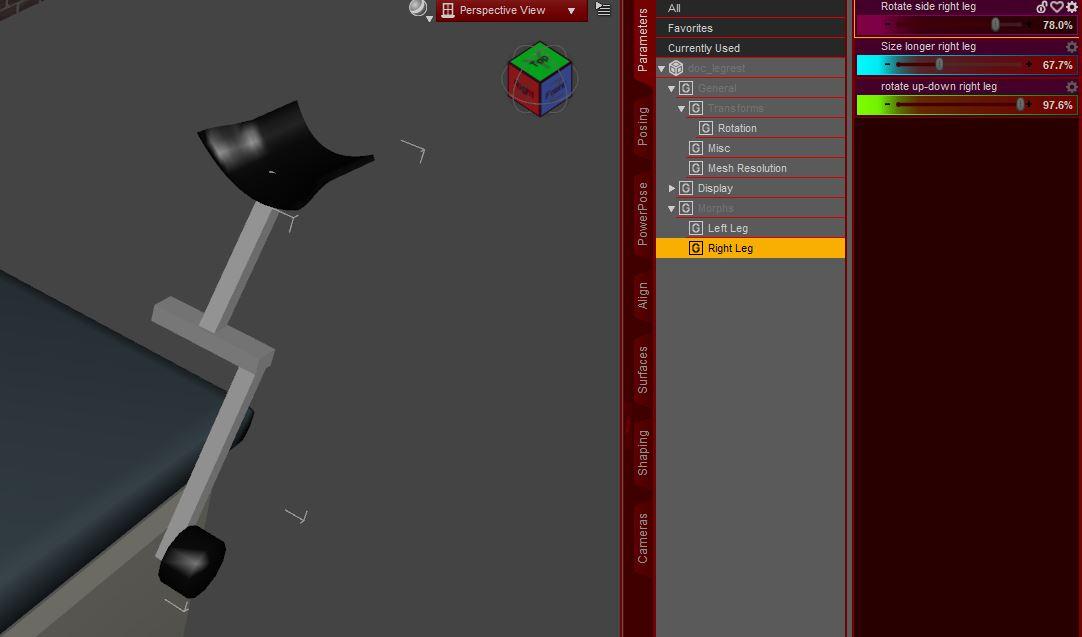
The product didnt had any morphs initial. Its very important to zero things correct and export correct to let them work good together.
That is 1 prop, not different elements, everything done by meshgrabber.
[Released] ManFriday's Mesh Grabber [Commercial]@manfriday I've made some morphs with mesh grabber, they look good as static morphs but when you add others like move up or down, it deforms in a bad way, will the morph addon help with this and adding correcting morphs.Mesh grabber morphs windows versionJust curious if it was an oversight. Very interested in this. I've used the mesh grabber to make some morphs. But when working with other movement sliders it alters the morph in a undesirable way. I have a product on hold because of this and very interested in seeing if the morph addon will help the process of correcting other morphs working with the one I made.ID of face/morph?[ID of face/morph] From here: https://www.daz3d.com/fg-fantasy-pose-pack-for-genesis-8-female


I think it's the same face. I could be wrong, and if I am, they both look great and I'd love to know who they both are.
Thanks!
Edited for Please put your question in the post body and the title - Daz 3D Forums
A couple of things.OK so are all genesis models compatible with each other and by that I mean can say a G8 and a G2 model be used together in the same project for instance, an animation, movie or game?
If you meant "can I use a product for <one version of genesis> with <another version of genesis>" then the answer is "yes and no" ;)
Products made for one version of genesis can only be used directly on that version of genesis. There are however ways to convert products between versions, some included directly with the base figure and some not.
For example, G8 comes with autofit clones which enables you to convert clothes from G1, G2 and G3 automatically. If you want to go back from G8 to an earlier figures you'll need to buy additional clones. There are also batch converters available in the store to make that easier.
G8 can also use textures made for G3 directly, and vice versa. However for textures from earlier figures you'll need to purchase conversion products.
Morphs also require purchasing conversion programs.
Also am I correct in saying that models cannot be created from scratch as one would do with Blender?
DS is indeed not a modeling application. It includes a few primitives that you can edit with deformers or geometry editor tool, but that's very basic. You can model items in blender and import them in DS, though.
Is it the case that you buy them pre-made and manipulate them to suit your need aesthetically and fuctionally?
You can use tools in DS or external programs (like an image editor to edit textures, or a modeling app to morph the mesh) to modify products you buy. You can also combine products from various sets (what we call "kitbashing").
Also If one bought a model does this come with a license giving right to use it independently on your own project elsewhere?
What do you mean by that exactly?
The licence you get with a product allows you to create images and videos using that product (whether they've been rendered in DS or in another program), and to sell those images and videos. For games, it depends if it uses pre-rendered sprites and animations (which is covered by the standard license), or if it needs to include the 3D mesh itself (in which case you'll need to buy the additional interactive license for the products used).
None of the licenses allow you to take a product, modify it and then distribute or sell your modified version.
DAZ to CLO3Dthe whole workflow depends on where the clothes come from- are they from daz or are they from CLO3D?
It's better to use MD rather than CLO3D, in my opinion. But if you need to use Clo3d, im sure it's possible.
I only used clo3d for 2 months (free trials) and now i cant remember if it supports alembic & MDD. If it supports either alembic or MDD, then you can export a pose-transition animation from Daz via one of those.
If not, you can do one with a Morph target, or series of morph targets. (For morph targets, basically you load the obj and then select morph target, and your avatar will transition to that pose. It is not an ideal solution, because the transition will use an algorithm that wont work well if you have two extremely different poses to transition to. So might need to do intermediate morph targets.)
As i recall, the UV editor of Clo3d sucks compared to the UV Editor for MD, so probably best to use shaders in Daz to texture the different materials, rather than a texture map.
AIUTO...CHI CONOSCE L’ITALIANO? PARTE DODICINon cpaisco come si fanno a vendere degi shape preset a questi prezzi
Body By Sublime Series 8 Female | 3D Models and 3D Software by Daz 3D (daz3d.com)
"Con 10.000 lire il mio falegname la faceva meglio" cit.
Perché $3.26 ti sembra molto?
Io ho finito (tranne rare eccezioni) di installare morph, per non rallentare Daz, ma altrimenti mi sembrerebbe anche molto conveniente!
Non sono morph quelli ma shape preset. In pratica sono delle "ricette pronte" per dei personaggi creati con i morph base e altri morph già esistenti, ti basta leggere la lista dei prodotti necessari.
E sono solo le "forme", non include nessuna texture per i personaggi.
Mesh grabber morphs windows versionIs the Mac segment of DAZ larger than the Windows user base? I always thought it would be the opposite, so I was kind of surprised the there was no concurrent Win version released. The 5% off the cart total was a good deal, but the MG add on was the only thing I was interested in but I guess I'll have to wait for tomorrows new releases and hope it's out and the 5% sticks around.
Look for the commercial thread. There is the explanation: ManFriday did the Mac version of MeshGrabber and the AddOn and while doing so added the Morph Editor. So this addon will be coming a little later for windows it seems. But hey, I've waited for the Mac version for almost a year so a couple of days should do no harm, right.
Mesh grabber morphs windows versionIs the Mac segment of DAZ larger than the Windows user base? I always thought it would be the opposite, so I was kind of surprised the there was no concurrent Win version released. The 5% off the cart total was a good deal, but the MG add on was the only thing I was interested in but I guess I'll have to wait for tomorrows new releases and hope it's out and the 5% sticks around.
Look for the commercial thread. There is the explanation: ManFriday did the Mac version of MeshGrabber and the AddOn and while doing so added the Morph Editor. So this addon will be coming a little later for windows it seems. But hey, I've waited for the Mac version for almost a year so a couple of days should do no harm, right.
Geo-Graft head QuestionDoes the head actually share vertices along its edge with the base figure? If not it won't actually graft.
As for rigging, you really need to set it up with the Transfer Utility and then add custom bones/edit the weight maps
Investigating Character Load Timewell actually there is a way to check how much time conflicts waste. not 100% accurate because it's based only on daz studio log and I'm not sure everything is logged..
I am sure everything is not logged.
When I had problems with loading times, I first eliminated the warnings and then started removing characters and morphs that I wasn't using.
Every now and then I got a new warning that wasn't related to anything that was removed, for example typing errors inside the remaining morph files.
[Released] ManFriday's Mesh Grabber [Commercial]The Morph Editor for Windows is not released yet. Give it a few more days. :-)
DS UI weirdness, list items re-orderedhello. yesterday i bought and installed a couple of items, a G8F outfit and a freckles LIE tool. ever since then my UI has shown things in a different (and unwanted) order.
e.g. my Smart Content pane used to show Saved Files at the bottom, with my custom z_junk folder below it as the very last item.
now, Saved Files is halfway up the list, under Render Settings and z_junk isn't shown at all.
Wearables now appears as the first item in Saved Files, it used to be last.
same thing for the Render page; Saved Files is now above Scene Builder, it used to be at the bottom.
and now i find after buying/installing two new items, a face morph kit and Jay HD G8F figure, the morph kit is there but Jay doesn't show up, i even filtered 'Jay' in the search box, no show (i manually confirmed that her files were installed)
so... how do i get this back to normal? everything was easy to find in the old layout, it isn't now
if i do a reinstall, will it find all my custom content or will i have to re-add everything manually?
does DS have a hard content limit, do i need to delete a few things before Jay will show?
-----> ok i found Jay, she's in 'lost and found' - i hope that's not her normal installed location.
------> thought of something else - windows 10 did an update around this time, could that be the cause?
How to Edit High Res Morphs on G8 FiguresNo.
You can create your own and then create normal, bump and/or displacement maps.
You can import the figure as an obj in the pose you want back into Studio and then copy accross materials.
You can use Blender and transfer using (IMO the best) Diffeomorphic plugin, which you then might get to work with the HD morphs you created.
Celebrity Look-a-Likes for 3D figures Part 2Latest from my Misha look-a-like, now with iris and sclera textures based on high resolution photographs and 3d scan data for the iris displacement. Combined with a custom eye realism morph that bulges the cornea, adds an inward curve to the iris and adds actual depth to the pupil. Custom transition mask for the sclera helps blend into the hevily tweaked eye shaders that also provide realistic cornea refraction.
Also shows off the combination of texture and fibermesh stubble and eyebrows, as well as a layer of fine vellus hair / peach fuzz on the face.
Textures are 4K, but the Torso is 8K for more even detail across the chracter. All textures were originally authored in 8K, so an additional 8K option could be provided if the demand was there to justify the extra effort. I've seen this previously requested on the forums a few times.
I'd like to replace the default texture mapped eyelashes with a fibermesh version, but I may need to settle for fixing the penetration in the current eyelash morph and release some freebies later on. Been working on this one way too long

Anyway, a face shot, some closeups and a fully body shot. Open images in a new tab for full resolution:


Already done some significant shader tweaks to the hair to blend better and added additional shaping morphs, but these are the latest full renders.
Hope you like him so far!
Cheers,
Daniel.
[Released] ManFriday's Mesh Grabber [Commercial]Where's the morph addon for Windows??????
You noticed that, too.

Daz 3D is part of

Connect
DAZ Productions, Inc.
7533 S Center View Ct #4664
West Jordan, UT 84084Licensing Agreement | Terms of Service | Privacy Policy | EULA
© 2026 Daz Productions Inc. All Rights Reserved.