-
Creature creator add-ons for genesis 8?
I've found that with things like hoof morphs or other extreme body-shape adjustments, on any of the Genesis series, I have to zero the auto-ported FBMs on long tails unless the tail came with the morph set I'm using (like the Krampus tail and FBM for Genesis3 Male). You'd think you were borrowing the graft-piece from Wile E. Coyote, after another attempt at ACME Corp. roadrunner traps.
Facebuilder to DAZ charactersFor a morph to transfer between characters they have to have the same base geometry/mesh. So unless facebuilder uses the same base geometry as a Daz character or if there is an app that can translate the facebuilder mesh into being a Daz mesh (similar to how character creator recreate Daz meshes to be Reallusion meshes) I don't think it's possible. But I could be wrong.
Sales thread: Report Issues Here. & "There's Always Another Sale™"The PC coupon just worked for me. I had the new pro bundle and the HD morph in the cart.
Yes they should be fixed now.
Sales thread: Report Issues Here. & "There's Always Another Sale™"The PC coupon just worked for me. I had the new pro bundle and the HD morph in the cart.
Facebuilder to DAZ charactersI would like a script or program that creates a morph of a head from facebuilder for use on DAZ.
for the moment it is not possible and there are no solutions
if someone gets to work don't forget to make sure that we can convert the texture as well ^^Facebuilder to DAZ charactersHi,
I have searched the net a lot before asking my question but I can't find any solutions.
how to replace the head of a DAZ charctarer by that of facebuilder coming from blender? I'm talking of course of a morph and not just to put the fbx on the body of G8
i tried Zwrap but it doesn't work because G8 is a whole body
I tried the Zbrush projection but it's not good
Do you have any ideas please?[Released] ManFriday's Mesh Grabber [Commercial]Smoothing is the big one for me. A quick way to fix the awful crinkles in clothing and hair when they are autofitted or saddled with auto-generated morph-following? Yes, please.
Millawa Cyber MissionNice morph. I have no use whatsoever for the bizarre makeup, or facial etchings. But the basic morph is very nice. Attractive bundle for people who do SF. Which I don't. Absolutely do not need another partially shaved hair, either.
I'll be giving the bundle a hard pass. But I may pick up the character. So far the DAZ base characters have always shipped with 3DL materials, and that's something worth encouraging.
Using morphs for rotation in DAZYou may be overthinking it. It's a little hard to tell from your description what exactly you're trying to do, but it doesn't seem like you need to do anything more than apply transforms within DS, then ERC freeze those transforms to a new parameter.
Say I have a dial object, and using morphs I want to give it the ability to rotate 180 degees. If I only use one morph to get the dial to its 180 degree position, it won't look like it's turning when the morph is dialed; it'll be more like it's melting from side to side or whatever. What I want to do is make that dial look like it's rotating, but only using a series of morphs controlled by one slider.
If I understand you right: you're saying I could do an ERC freeze at, say, every 10 degrees, using multiple dials, into one dial? I know how to freeze, but not how to collapse many different ones into one control. That sounds like something to try, though.
Why would you want to do it with multiple 10 degree dials, when you can rotate the object with one dial from 1 degree to 10000+ degrees? You don't need a morph for it. Just look how the movement of the eye is handled with whatever character you have.
I know what I what to do isn't practical. I just want to know if it can be done.
Using morphs for rotation in DAZYou may be overthinking it. It's a little hard to tell from your description what exactly you're trying to do, but it doesn't seem like you need to do anything more than apply transforms within DS, then ERC freeze those transforms to a new parameter.
Say I have a dial object, and using morphs I want to give it the ability to rotate 180 degees. If I only use one morph to get the dial to its 180 degree position, it won't look like it's turning when the morph is dialed; it'll be more like it's melting from side to side or whatever. What I want to do is make that dial look like it's rotating, but only using a series of morphs controlled by one slider.
If I understand you right: you're saying I could do an ERC freeze at, say, every 10 degrees, using multiple dials, into one dial? I know how to freeze, but not how to collapse many different ones into one control. That sounds like something to try, though.
Why would you want to do it with multiple 10 degree dials, when you can rotate the object with one dial from 1 degree to 10000+ degrees? You don't need a morph for it. Just look how the movement of the eye is handled with whatever character you have.
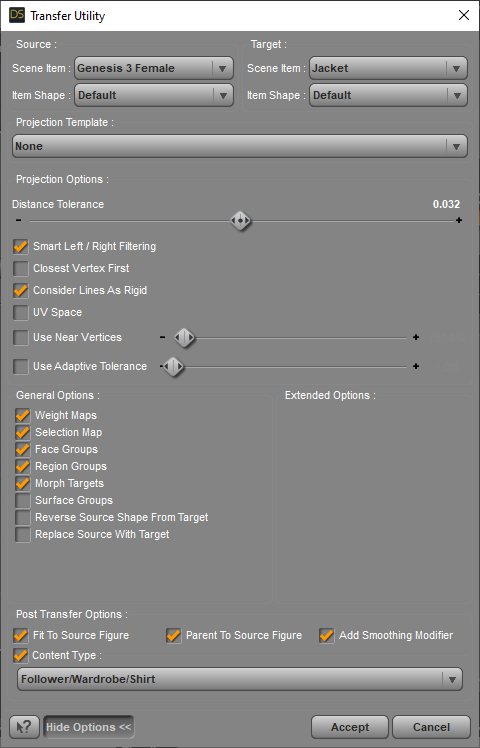
Power Suit for G3FUsing the Transfer Utility to turn the .obj files into clothing files, I've attached 2 images. One has the default G3F and shows the settings I used. The other image is G3F with a character shape dialed and shows the settings to use in those situations.
I ran the simulation only on the skirt, stopping it when it looked okay for this pose.
Just did a quick material surface job there - after clothing items are made, there can be more work to be done such as for morphs to enable for eg., the skirt to fit under the jacket or the jacket to fit over the skirt. [and after running the simulation this model was only usable from the front view 'cause I hadn't done any weight map painting which yes, is a great feature to make use of ;-)


And I've discovered all kinds of cigarettes, ashtrays, etc. in some of the products in the store - notably stuff to do with spys and detectives, etc.
Power Suit for G3FI used the "shirt" option in the transfer utility's projection option for the jacket and the "none" option in the Transfer Utility for the skirt. Then I lowered the arms of the model to an A position (the sleeves folowed the models arms very nicely and the rest of the jacket conformed to this new position too). Then I did a dForce cloth simulation for both the skirt and the jacket starting from that A position and moving to a modified Fashion Model walking position, so the change was only slight and only allowed the cloth to drape without getting torn or turning all baggy.
To have the cloth simulation start from the "A" arm position you have to switch off the default "On" mode of "Start Bones from Memorized Pose" that you will find in the simulation settings. Otherwise at the beginning of the simulation the model's arms will jump back to the "T" position. Starting from the "T" position results in the cloth not working correctly under the armpits and other nasty problems with the jacket.
I also "painted out" from the dynamic simulation weight map the area of the jacket around the neck (so it wouldn't stretch) and the waistband area of the skirt, so the skirt wouldn't fall down onto the model's hips during simulation.
Don't forget to hide the buttons (rigid objects) during the simulation. If you don't, the cloth will tear around them.
Hope this helps!
AOBB
Power Suit for G3FThank you. This looks like a very nicely made design. I like loose clothing in general instead of skin-tight clothing.
However, I wasnt able to get it to work. I tried using both the "Full Body" and "Dress > Knee Length" options under the Transfer Utility dialog, and neither one of them worked. The arms are parented to the figure, but they hang loose. Is this normal? Do I need to learn how to set up clothing to attach to individual bones before I can use items like this?
Thanks,
Soap
Who's Next to Join the G8 Family?If they do bring out a G9, I hope the spine has more bones. You ever try to do a properly looking belly roll (bellydance style) on any version of Genesis. Of course if not bones, then definitely muscle movement, without having to buy a specialized morph pack to be able to do it, should be included with the standard body morphs you buy.

A lot of that seems to be muscle moves, which would be ebst handled with morphs anyway I suspect.
Using morphs for rotation in DAZYou may be overthinking it. It's a little hard to tell from your description what exactly you're trying to do, but it doesn't seem like you need to do anything more than apply transforms within DS, then ERC freeze those transforms to a new parameter.
Say I have a dial object, and using morphs I want to give it the ability to rotate 180 degees. If I only use one morph to get the dial to its 180 degree position, it won't look like it's turning when the morph is dialed; it'll be more like it's melting from side to side or whatever. What I want to do is make that dial look like it's rotating, but only using a series of morphs controlled by one slider.
If I understand you right: you're saying I could do an ERC freeze at, say, every 10 degrees, using multiple dials, into one dial? I know how to freeze, but not how to collapse many different ones into one control. That sounds like something to try, though.
Sagan: A DAZ Studio to Blender Alembic ExporterCan sagan do geographs and geoshells yet, or no?
I think so, but you may have to play around with ignoring certain surfaces, or delete them in Blender until I figure out that facet flag business. And of course, there is no documentation for it. So you may end up with geometry that you don't want. Just try it.What's the status of Sagan at the moment? The geograft question is critical for me because all of my characters include them. Just to explain: the first thing I do when I buy a figure or character is to morph it to my own preference, add the geografts, run it through Scene Optimizer to reduce the texture sizes and save as a scene or Scene Subset.
I haven't been able to play with Blender for a while because I have a non-graphics related project which is taking almost all of my computer time. Actually not a bad time to be somewhat removed from DAZ Studio considering the debacle happening with the store right now.
@marble I haven't figured this out yet, it's undocumented, but I was able to get what I wanted with a geograft by simply ignoring the extraneous surfaces and saving that configuration. Does this workaround not work for the time being?
Dunno, it might if I knew what you mean by the extraneous surfaces. You overly-clever guys tend to assume that we mere mortals have the same level of knowledge that you have. Just to be clear - I know what the word "extraneous" means and I guess you mean I need to select and ignore them in the Surfaces tab within Sagan? If so, which surfaces are considered extraneous?
extraneous surface = the one that is duplicated. I.e., the one that appears twice in the list.
Ignoring duplicate surfaces works for anatomical elements. Im not so sure it works very well with other geografts - like the metal arm example i posted a while ago (it was either in this thread or some other related thread).
I'm looking at the surfaces list now but I don't see any duplicated surfaces.
Ah, wait a minute ... I see surfaces under the main figure and also surfaces on the geograft objects. OK, right - so which of those do I ignore? Either?
dont remember. i assume the one by itself - i.e., not the one that's with the figure surfaces.
I'll give it a try when I have a few minutes. But thanks for pointing me in the right direction - I had not noticed those duplicates in the expanded surfaces in the Sagan utility.
Using morphs for rotation in DAZI want to try out a method for controlling an object's rotation using a series of morphs driven by a single ERC dial. The problem is I have no idea how to implement it. I know this isn't the most practical thing, I'm just curious if it can be done.
What I though of was to export a bunch of incremental rotations and import them as morphs, then have them instantly "switch off" once a certain percentage on the master ERC dial is reached and go to the next. For example, if I had a 10 degree morph, it would be set at 100% when the ERC dial hits 2.77%; when the ERC dial starts going above 2.77%, it instantly sets the 10 degree morph to 0 and begins driving the 20% morph, and so on.
How would I go about this?
Sagan: A DAZ Studio to Blender Alembic ExporterCan sagan do geographs and geoshells yet, or no?
I think so, but you may have to play around with ignoring certain surfaces, or delete them in Blender until I figure out that facet flag business. And of course, there is no documentation for it. So you may end up with geometry that you don't want. Just try it.What's the status of Sagan at the moment? The geograft question is critical for me because all of my characters include them. Just to explain: the first thing I do when I buy a figure or character is to morph it to my own preference, add the geografts, run it through Scene Optimizer to reduce the texture sizes and save as a scene or Scene Subset.
I haven't been able to play with Blender for a while because I have a non-graphics related project which is taking almost all of my computer time. Actually not a bad time to be somewhat removed from DAZ Studio considering the debacle happening with the store right now.
@marble I haven't figured this out yet, it's undocumented, but I was able to get what I wanted with a geograft by simply ignoring the extraneous surfaces and saving that configuration. Does this workaround not work for the time being?
Dunno, it might if I knew what you mean by the extraneous surfaces. You overly-clever guys tend to assume that we mere mortals have the same level of knowledge that you have. Just to be clear - I know what the word "extraneous" means and I guess you mean I need to select and ignore them in the Surfaces tab within Sagan? If so, which surfaces are considered extraneous?
extraneous surface = the one that is duplicated. I.e., the one that appears twice in the list.
Ignoring duplicate surfaces works for anatomical elements. Im not so sure it works very well with other geografts - like the metal arm example i posted a while ago (it was either in this thread or some other related thread).
I'm looking at the surfaces list now but I don't see any duplicated surfaces.
Ah, wait a minute ... I see surfaces under the main figure and also surfaces on the geograft objects. OK, right - so which of those do I ignore? Either?
dont remember. i assume the one by itself - i.e., not the one that's with the figure surfaces.
Who's Next to Join the G8 Family?If they do bring out a G9, I hope the spine has more bones. You ever try to do a properly looking belly roll (bellydance style) on any version of Genesis. Of course if not bones, then definitely muscle movement, without having to buy a specialized morph pack to be able to do it, should be included with the standard body morphs you buy.
Sagan: A DAZ Studio to Blender Alembic ExporterCan sagan do geographs and geoshells yet, or no?
I think so, but you may have to play around with ignoring certain surfaces, or delete them in Blender until I figure out that facet flag business. And of course, there is no documentation for it. So you may end up with geometry that you don't want. Just try it.What's the status of Sagan at the moment? The geograft question is critical for me because all of my characters include them. Just to explain: the first thing I do when I buy a figure or character is to morph it to my own preference, add the geografts, run it through Scene Optimizer to reduce the texture sizes and save as a scene or Scene Subset.
I haven't been able to play with Blender for a while because I have a non-graphics related project which is taking almost all of my computer time. Actually not a bad time to be somewhat removed from DAZ Studio considering the debacle happening with the store right now.
@marble I haven't figured this out yet, it's undocumented, but I was able to get what I wanted with a geograft by simply ignoring the extraneous surfaces and saving that configuration. Does this workaround not work for the time being?
Dunno, it might if I knew what you mean by the extraneous surfaces. You overly-clever guys tend to assume that we mere mortals have the same level of knowledge that you have. Just to be clear - I know what the word "extraneous" means and I guess you mean I need to select and ignore them in the Surfaces tab within Sagan? If so, which surfaces are considered extraneous?
extraneous surface = the one that is duplicated. I.e., the one that appears twice in the list.
Ignoring duplicate surfaces works for anatomical elements. Im not so sure it works very well with other geografts - like the metal arm example i posted a while ago (it was either in this thread or some other related thread).
I'm looking at the surfaces list now but I don't see any duplicated surfaces.
Ah, wait a minute ... I see surfaces under the main figure and also surfaces on the geograft objects. OK, right - so which of those do I ignore? Either?
Daz 3D is part of

Connect
DAZ Productions, Inc.
7533 S Center View Ct #4664
West Jordan, UT 84084Licensing Agreement | Terms of Service | Privacy Policy | EULA
© 2026 Daz Productions Inc. All Rights Reserved.
















