-
From a Die Hard Carrara User
...Dartanbeck.com continued
Carrara CG Workshop
Carrara CG Workshop - In addition to being a landing page for all of the pages within, this page also explains the goal for this section
-
Story - It all begins with one of these, right?
-
Pacing and Rendering - A discussion regarding common film practices as well as render outputs for animations
Pre-Production Phase
Pre-Production Phase - The things we do to prepare for Production
-
Concept Art - I have a few of my designs in here. I'll be adding more along with descriptions of them... eventually
-
Concept Art > Kitbashing Marcoor - The process of making my cool Marcoor Hunter space vessel
Scene (stage) Setup - Currently only has one offering: Volumetric Lighting, which is an early hybrid video/written article. It doesn't have much of a written version yet - but does include a Base Scene Download
Character Setup - This seems to be my main interest lately, as it has quite a few articles. Don't worry, I'll be getting on to other stuff soon!
-
Introducing Rosie 5 - I needed to get something started to find a focus toward developing this web site. This was it
-
Making Rosie 5 - Developmental information on creating my main protagonist - to be developed further
-
Using Genesis in Carrara - A work in progress that will explore many ways to use various Genesis generations within Carrara
-
Genesis Morph Reduction - My method of not only reducing the weight of a Genesis figure, but also the number of available sliders in the Parameters tab
-
Dynamic Hair - One of the parts of the Hybrid Video/Written article for Introducing Rosie 5
-
EYEdeas 3+ - A look at using Arki's amazing 3D eyeballs! Another part of Introducing Rosie 5
-
Millennium Teeth - Using third-party teeth to get what my character (Rosie 5) needed to complete her ultimate look. Another part of Introducing Rosie 5
-
Character Transfer using NLA - I often like to update/upgrade my character to a fresh base figure with a different set of morphs (often when I buy new ones) - here's how I transfer the shape over
-
Character Design - With its Character Template Scene download, this video/article demonstrates how I build each of my characters, monsters, animals, etc., It also covers the basics of creating shaders for Genesis (or any other figure, for that matter)
-
Modeling for Genesis - A fresh look, rejuvenating an article I wrote here quite some time ago. The video I made then is still helpful in how to send models from Carrara into Daz Studio, rig them to conform to the intended figure, and save back into the library.
-
Character Shader Basics - Explore the absolute quickest and simplest way to get a Daz Figure's materials up and running in Carrara! A very basic approach with no frills for speedy renders
Production Phase
Animating - This is where my animation articles will continue. I placed some useful info in here to get it started
-
Hybrid aniMation - another hybrid article I'm working on now. Currently contains much of the info from aniMating in Carrara
-
aniMate 2 - Daz Studio comes with a free version, but when we buy the full version we get some really great bonus features!
DAZ ZONE
DAZ ZONE - This is an exciting page full of my love for Daz 3D with a stroll back in time to when Genesis came out and then even further down is this wonderful video I posted years ago - Daz 3D as it was when I was an aspiring young PA here! (the face you see there (video's thumbnail) is Kevin, who was my boss! :) )
Daz Content
Daz 3D Content - Mainly just a container/landing page, but will eventually be really cool!
-
Daz 3D Bundles - A look at the amazing wealth of content to be found in Bundles at Huge savings
-
Genesis 1 ROCKS!!! - I really dig into what I love about this amazing figure generation
-
Victoria 4 - A look at what is still (by far) the absolute Most Supported 3D articulate human figure on the planet
-
Some Personal Favorites - Kind of the opposite of "Buy something that doesn't work", this is stuff that I love, and it does work! I'll be adding a LOT more to this one as I've only just begun
-
Character Packs - a look at some of the cool Character Packs for our figures
-
Carrara 8.5 Pro Content - This page shows the massive bundle that comes with Carrara 8.5 Pro. The price of Pro includes all of this plus Carrara Pro? Very Cool!
Daz Studio
Daz Studio - I've started this page to help gather information towards learning this amazing suite called Daz Studio. As I learn I'll be expanding this whole section, but I like this page now already. I update it when I can - several times so far.
Daz Studio Page Quick Map
-
Daz Bridges - Maya, Blender, C4D, 3ds Max, Unreal and Unity
-
Daz Bridges How To - Steph, from Daz 3D, shows you how to use them
-
Content Creation Tools - Oh Yeah! This is what I mostly use DS for now - and even in that I've only been scratching the surface!
PC + Experience
Platinum Club + Experience - It's amazing how much value we can get from this service if we check in often! Even with little internet time I've been able to really fill up my library over the years - and the yearly membership cost is tiny comparatively
-
PC+ Cloth Frenzy - I've only just started this page. Since I started using VWD and removing rigging from figures so that I can add/delete polygons, change domains, etc., stuff in the low-price range in the PC+ catalog looks great and is fun to model with! I am working on a tutorial on how I make the clothing into static prop objects and then model them to fit the morphed figure, then run them through VWD as if using them as conforming clothes. It's really neat!
DO IT IN POST
VFX Zone > Fusion - Movie Magic at its Finest! Hollywood-grade compositing software
Editing Zone > DaVinci Resolve - This page contains the Resolve Training materials I'm using to learn this Hollywood-grade Non-Linear Editor - and the free version also includes Fusion, built right in! (along with Fairlight Audio and Resolve's high-end color corrector)
-
A Quick Look - This is my short demonstration of some of the techniques I used to create the "Introducing Rosie 5" video
GALLERY
Gallery - This landing page also has a carousel of some of my images you've all seen before. The Still Images and Video pages are very much incomplete still
Inspiration
Downloads
Carrara EnvironKits
Base Scenes
THE SOFTWARE
The Software - I've included most of what I'm currently using and more. I still have plenty of stuff to add though. HitFilm will be coming to this page, and getting its own but I haven't used in yet in my current workflow - but its coming! Some software is just linked to from this page, others have their own as well:
-
Cyberlink Software - Great setups for video production and a lot more. Philip Staiger (PD Howler) uses this to make his awesome videos
-
Autodesk - With as little time as I have to use software, this high-end stuff isn't the practical choice. But when you want to go pro....
-
PD Howler - Oh yeah!!! My favorite image editor to date!
-
Particle Illusion - amazing particle effects simulator/recorder, now from Boris
Whew! So that's the current list of pages. While a few of them are rather bare, currently just containers or landing pages, they have a lot of content in the works for them and the other pages are looking pretty cool, I think.
...and some of my Carrara forum friends have asked my to put up a "Donate" button of some sort, so I reluctantly made a Donate page. I don't really have a method for taking donations, as such, so I offer some examples there ;)
pose not zeroing at all [solved-sort off]You can fix any ill-behaving morphs (non-zero default value) with this procedure;
1. Load your base figure or the developer version to an empty scene. ("Genesis 8 Basic Male/Female" or "Genesis 8 Male/Female Dev Load")
2. Select the figure
3. Select "Show Hidden properties" in the Parameters-Tab, drop down menu (right-click)
4. Zero the figure (Found in Parameters-Tab, drop down menu)
5. Memorize the figure (Found in Parameters-Tab, drop down menu)
6. File->Save As->Support Asset->Save Modified AssetsThis procedure will zero the default value in the ill-behaving morph/morphs, and while saving DS also shows you a list of the morphs it is changing.
New Updates: the Daz to Blender Bridge 2.0!Hi, after updating to 2.0 version of the Daz to Blender bridge, I've got this problem: whenever I create G8F morphs in Blender and export them into DAZ, the figure gets dramatically reduced in size proportionally to the percentage of the newly created morph. To have an idea of what I'm talking about, I'm attaching three pictures (Fig 1: imported morph 0%; Fig. 2; imported morph 50%; Fig 3: imported morph 100%). This happens any time, independently of the figure and the morphs already in use.
Has anyone experienced anything similar? Can anyone help me with this?
Thanks!
PS: Posting here as I didn't find any already existing thread on this issue
Seven year old's face & body onto Genesis 8 FemaleIf it doesn't have to look absolutely like her:
https://www.daz3d.com/growing-up-for-genesis-8-female-s
I really want it to look like her..
I think she meant that the BODY can be somewhat close, but not exact. The face can be done, but aside from FaceShop (a 3rd-party app) or Face Transfer (which is a DS plugin, if memory serves)? Duplicating the face is going to take a bit of time and effort.
There are numerous tutorials on YouTube that can help teach you various ways to pull this off - I found this one in pretty short order:

will do.. I am still hopeful
Seven year old's face & body onto Genesis 8 FemaleIf it doesn't have to look absolutely like her:
https://www.daz3d.com/growing-up-for-genesis-8-female-s
I really want it to look like her..
You will need the product Kerya linked or something similar, which does include 7 in the age ranges. I don't know if Face Transfer would work with it though.
thanks for your input
Seven year old's face & body onto Genesis 8 FemaleIf it doesn't have to look absolutely like her:
https://www.daz3d.com/growing-up-for-genesis-8-female-s
I really want it to look like her..
I think she meant that the BODY can be somewhat close, but not exact. The face can be done, but aside from FaceShop (a 3rd-party app) or Face Transfer (which is a DS plugin, if memory serves)? Duplicating the face is going to take a bit of time and effort.
There are numerous tutorials on YouTube that can help teach you various ways to pull this off - I found this one in pretty short order:
Millawa Cryomancer BundleAs far as the hair fitting, I have used Genesis 3 hair on G8 figures before with no difficultyMe too, but I've had issues in the past autofitting AprilYSH hair to Genesis 8 and losing some of the morph functionality.
Oh, I thought those wings looked familiar! Wow, the new Daz is becoming shameless.
Don't use autofit for long G3 hair, it results in ugly bumps around the neck, even if you select the "Shoulder Length Hair" option.
(A problem that I don't usually observe on G2 and Genesis hair, strangely.)
Either parent it or use a converter. And I think there's a trick to make DAZ Studio think your G3 hair is G8, but I have yet to research this further.
ETA:
I got curious about that "trick" and looked it up, I had meant to look into this for a long time anyway:Load the hair into the scene, making sure NOT to autofit it. Click the “hamburger” icon in the Scene tab, then go to Edit - Change Scene Identification. At the botto, change “preferred base” from G3F to G8F. Afterwards, you can “fit to” the G8F character natively, without the Autofit dialogue popping up.
I’m telling you all this from memory, so some of the terminology may not be correct, but hopefully you can figure it out from here. There are plenty of tutorials on the forums and online if you’re still having trouble.
I didn't find the "Hamburger symbol", but you can change the Scene Identification by going Edit -> Figure -> Scene Identification.Works like a charm!
Seven year old's face & body onto Genesis 8 FemaleIf it doesn't have to look absolutely like her:
https://www.daz3d.com/growing-up-for-genesis-8-female-s
I really want it to look like her..
You will need the product Kerya linked or something similar, which does include 7 in the age ranges. I don't know if Face Transfer would work with it though.
Seven year old's face & body onto Genesis 8 FemaleAlthough there are tools which will try to generate a fae to match a photo I'm not aware of anything that will do the same for a body. You could try the Face Transfer pane in DS - it is limited to three actual finished transfers for free but you can try it out without saving the face as much as you like, which should give you a warermarked idea of whether it's worth using one of the full shots here. Getting the body shape, even a generic child shape, is not possible without buying add-ons as far as I know - and I'm not sure how much support there is for the age range you want even then.
Millawa Cryomancer BundleAs far as the hair fitting, I have used Genesis 3 hair on G8 figures before with no difficultyMe too, but I've had issues in the past autofitting AprilYSH hair to Genesis 8 and losing some of the morph functionality.
Oh, I thought those wings looked familiar! Wow, the new Daz is becoming shameless.
!! Store Issues - Known Problems - Please Read !!i'm not getting any reciept of purchase sent to my email boxYes, there's a problem with email receipts for some people.
and the number in my order list has changed,That one is normal, order number format for new system is different.
it also states all my previous orders made are Unknown,, why?I see the same, so probably linked to data transfer between the old an new store system.
None of those points are linked to using Edge.
Thanks for helping :D
!! Store Issues - Known Problems - Please Read !!i'm not getting any reciept of purchase sent to my email boxYes, there's a problem with email receipts for some people.
and the number in my order list has changed,That one is normal, order number format for new system is different.
it also states all my previous orders made are Unknown,, why?I see the same, so probably linked to data transfer between the old an new store system.
None of those points are linked to using Edge.
Fit Control for Genesis 8 (Commercial)I'd think the crashes would have to be due to a certain combination of morphs rather than the number of morphs---if even the former is the cause---as I own every G8F morph pack/kit in this store and many from Renderosity as well as having at least 650 G8F characters installed.
Contradicting statements. I don't think it's a combination of morph kits, but sheer number as my content library 'character' section exceeds that 650 by more than double, and that's not including the "HD" versions.
I counted characters as morphs (which they are); hence, no contradiction. But over 1,300 G8F's was not a number I considered. It's a wonder you can even load G8F.
*Raises Brow* I'm not following or maybe I haven't read over this enough to understand it. Do you own all the morph kits that aren't specific to characters but simply helper morphs?
Millawa Cyber MissionI do really like Millawa's morph and texture.

a quickish blender test (technically i was testing the hair actually)
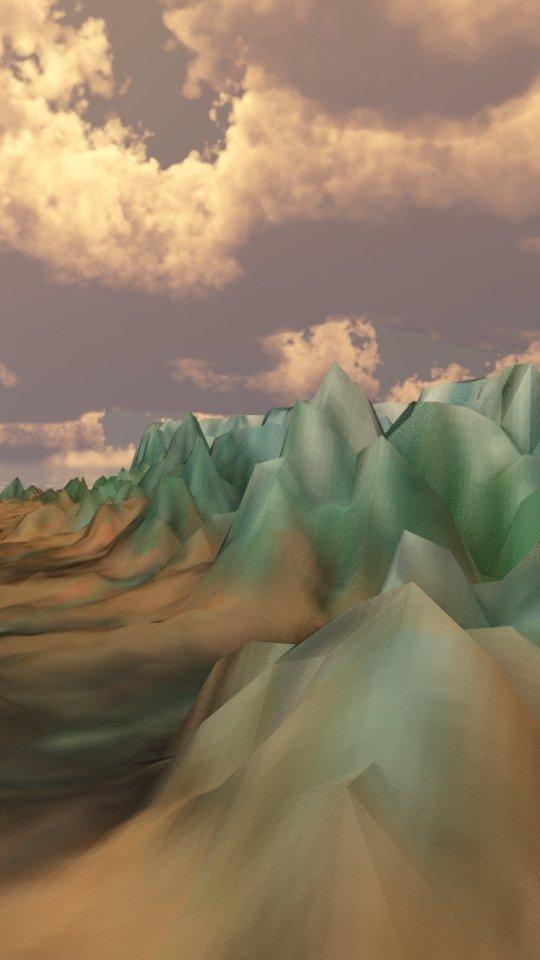
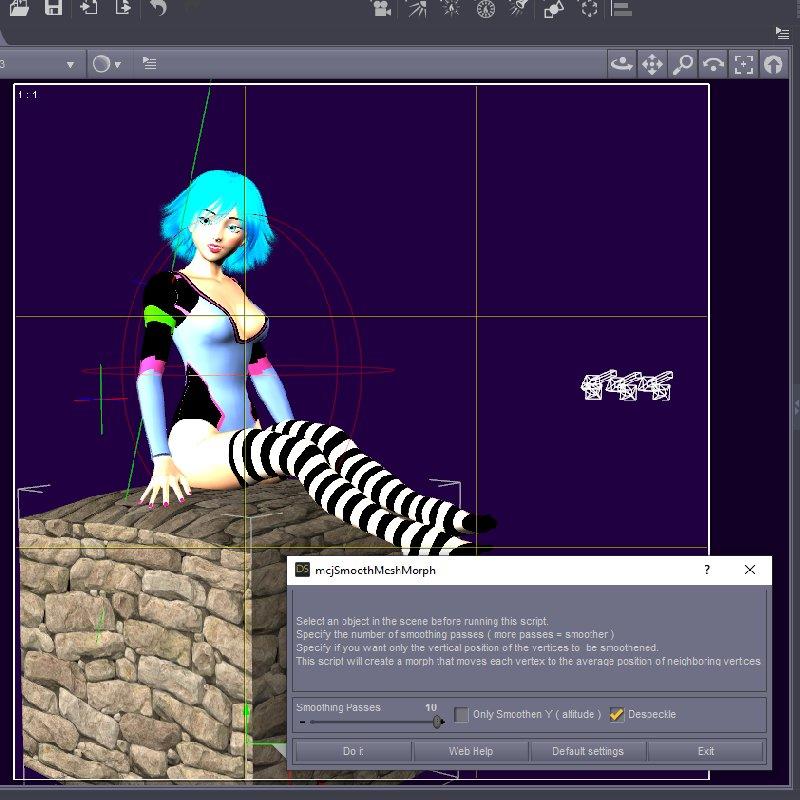
Script: Smoothen Meshes without SubDividing themhttps://sites.google.com/site/mcasualsdazscripts9/mcjsmoothmeshmorph
This script will create a morph that moves each vertices of a mesh to the average position of each neighboring vertex


 Diffeomorphic Morph Drivers
Hello, I hope someone might be able to help me out with Diffeomorphic shape key drivers.
I want to import the JCMs from the Daz addon "Auto Shape Enhancer" and have their values controlled by the current pose like how the standard JCMs are when imported into Blender.
In Daz, these corrective morphs are initally enabled via a main parent slider - so when imported into Blender, the morphs do not import with driver values.
Please, is there a way to make these custom JCMs behave the same in Blender? It seems like these correctives are multiplied on the corresponding standard correctives in Daz.
My apologies if I've misunderstood the feasiblity of this and any insight would be greatly appreciated - thank you!
OK Who snuck 377gb daz content onto my drive?I've had the same issue - and that unexpected Legacy stuff did wipe out a lot of my free space - and am currently researching external SSDs (I have a current thread on this). I've discovered that redirecting Daz to install in an alternate drive is very simple via Daz Connect, plus re redirecting DIM to install to the new drive I found this link yesterday - read the GGlover instructions:
https://www.daz3d.com/forums/discussion/57719/move-daz-library-to-external-drive
These links may also be useful:https://www.daz3d.com/forums/discussion/98681/moving-content-to-new-computer
https://www.daz3d.com/forums/discussion/128146/how-to-transfer-daz-to-a-new-pc
!! Store Issues - Known Problems - Please Read !!I just successfully completed my first checkout on the new Daz store... a few things I noticed:
1. Store is saving my Credit Card number, although I did not check the box to "Save this credit card".
2. I did receive the email confirmation... in the past I recieved it immediately after placing my order, now the timestamp shows it arrived 13-minutes after my order was placed.
3. On the My Orders page, my newest order shows "Order Status" as Complete, but all my prior orders show status of Unknown... apparently the Payment Method did not transfer over to the new shop.
4. Newly purchased items do not show up at the very top of my Product Library page where recent purchases normally show, but they do show mixed-in near the top, and I can find them via the search filter.
5. While the Cyber Mission Bundle orange banner was showing, it also appeared in both my Inbox and Exclusive Offers (under Messages), but when I closed the orange banner, the offer vanished from both my Inbox and Exclusive Offers.
Other issues:
1. Every product in the Daz Documentation Center is missing the product documents, for example, the page for: Kayo 8
"This is a placeholder for the product Read Me - this product has not yet been publicly released."
http://docs.daz3d.com/doku.php/public/read_me/index/70231/start2. Filters still stuck on "Loading" in Edge browser on Win 10 PC.
3. Product Library:
* Missing SKU number - (necessary, espeically for products no longer in the store, so you can still look them up in the Daz Documentation Center).* Manual Downloads - Several times I get "Couldn't download - Network issue" (note: this never happened with the old store).
P.S. Jack Tomalin, thanks for the continued updates and the hard work you and the entire Daz team are doing... much appreciated!
Power Suit for G3FI used the "shirt" option in the transfer utility's projection option for the jacket and the "none" option in the Transfer Utility for the skirt. Then I lowered the arms of the model to an A position (the sleeves folowed the models arms very nicely and the rest of the jacket conformed to this new position too). Then I did a dForce cloth simulation for both the skirt and the jacket starting from that A position and moving to a modified Fashion Model walking position, so the change was only slight and only allowed the cloth to drape without getting torn or turning all baggy.
To have the cloth simulation start from the "A" arm position you have to switch off the default "On" mode of "Start Bones from Memorized Pose" that you will find in the simulation settings. Otherwise at the beginning of the simulation the model's arms will jump back to the "T" position. Starting from the "T" position results in the cloth not working correctly under the armpits and other nasty problems with the jacket.
I also "painted out" from the dynamic simulation weight map the area of the jacket around the neck (so it wouldn't stretch) and the waistband area of the skirt, so the skirt wouldn't fall down onto the model's hips during simulation.
Don't forget to hide the buttons (rigid objects) during the simulation. If you don't, the cloth will tear around them.
Hope this helps!
AOBB
Thank you, but I think Im going to have to give this up and work on other things.
I dont have the "shirt" option, so I tried using Full Body and Knee-Length Dress instead. That may or may not be the problem. Bending the model's arms didn't work, whether I did it before or after the transfer. I appreciate your help, and I imagine I can't be literally the only one with this particular problem, but my eyesight isn't that great and my computer is a bit slow, so I want to work on simpler things for the time being.
Best regards,
Soap
Check the first image in my post a bit above this one. I ignore the projection part, many do.
Power Suit for G3FI used the "shirt" option in the transfer utility's projection option for the jacket and the "none" option in the Transfer Utility for the skirt. Then I lowered the arms of the model to an A position (the sleeves folowed the models arms very nicely and the rest of the jacket conformed to this new position too). Then I did a dForce cloth simulation for both the skirt and the jacket starting from that A position and moving to a modified Fashion Model walking position, so the change was only slight and only allowed the cloth to drape without getting torn or turning all baggy.
To have the cloth simulation start from the "A" arm position you have to switch off the default "On" mode of "Start Bones from Memorized Pose" that you will find in the simulation settings. Otherwise at the beginning of the simulation the model's arms will jump back to the "T" position. Starting from the "T" position results in the cloth not working correctly under the armpits and other nasty problems with the jacket.
I also "painted out" from the dynamic simulation weight map the area of the jacket around the neck (so it wouldn't stretch) and the waistband area of the skirt, so the skirt wouldn't fall down onto the model's hips during simulation.
Don't forget to hide the buttons (rigid objects) during the simulation. If you don't, the cloth will tear around them.
Hope this helps!
AOBB
Thank you, but I think Im going to have to give this up and work on other things.
I dont have the "shirt" option, so I tried using Full Body and Knee-Length Dress instead. That may or may not be the problem. Bending the model's arms didn't work, whether I did it before or after the transfer. I appreciate your help, and I imagine I can't be literally the only one with this particular problem, but my eyesight isn't that great and my computer is a bit slow, so I want to work on simpler things for the time being.
Best regards,
Soap
Daz 3D is part of

Connect
DAZ Productions, Inc.
7533 S Center View Ct #4664
West Jordan, UT 84084Licensing Agreement | Terms of Service | Privacy Policy | EULA
© 2026 Daz Productions Inc. All Rights Reserved. -