-
Just a quick (stupid) question
The tattoo looks like Fred Winkler's work, the skin and morph possibly also?
Can't pinpoint which figure exactly.
The new "Break the Binary" releasesI've spent a lot of time poking at what I can swap between the two model bases, and the two things that would make a unified figure almost totally unnecessary for me are the ability to transfer HD morphs and some way to easily swap geografts. The former I understand we'll probably never get for business reasons. The latter can probably be done by the end user in modeling software, but because there's often an aesthetic split along gender lines for Genesis-based fantasy/creature characters I can think of about 20 sets I'd pick up for kitbashing purposes if I could easily move their tails/wings/etc over to another figure.
I think this concept would've worked out better if the character morphs were for both G8F and G8M, like how they sell G3 and G8 versions. It would've been handy for those who want to make siblings in their projects.I've considered trying to make character morphs that work on both models! It'd be interesting seeing how flexible that could get. Leyna is gorgeous and I hope Daz is open to picking up more trans characters.
Niko 8 -Cyber Funk Bundle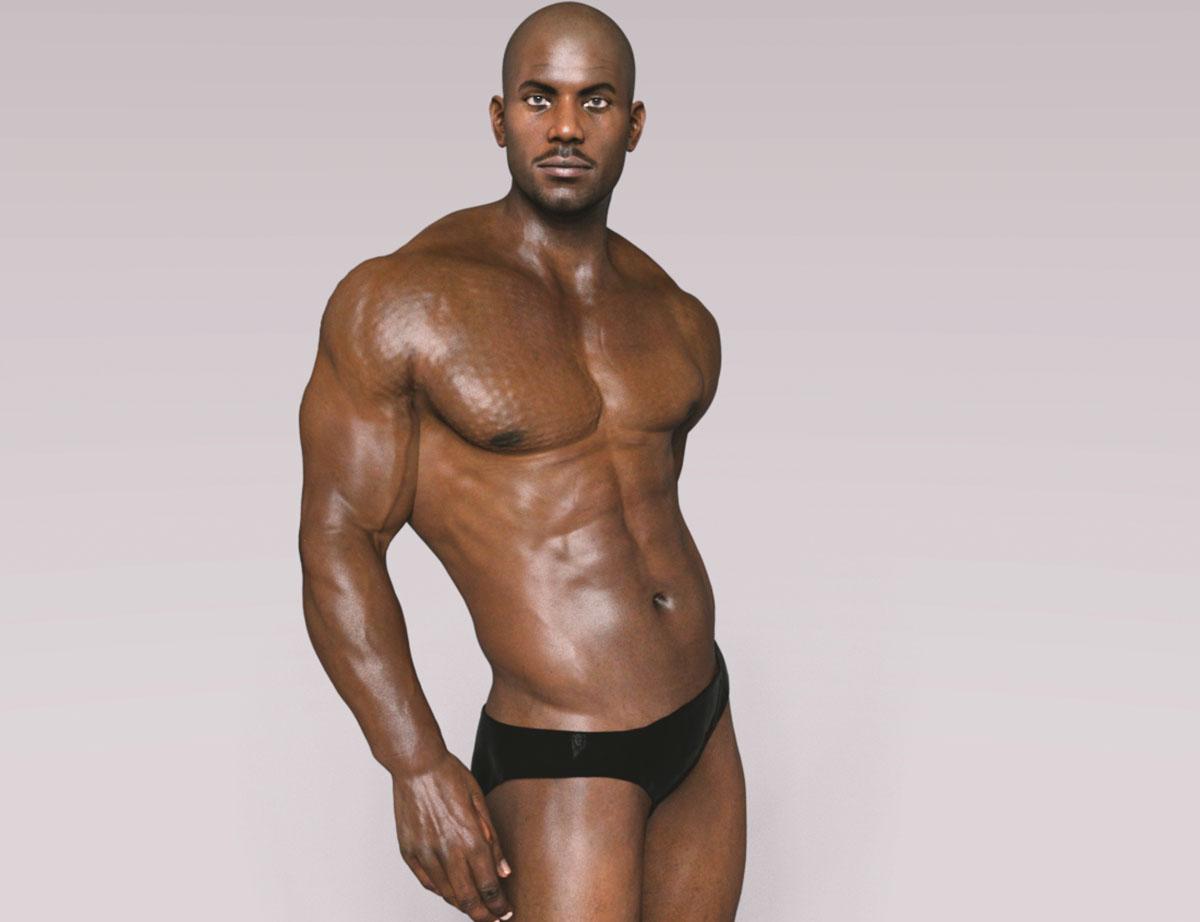
The bundle...litle pricey I must say. But Nico's morphs, very very happy to add them.
EDIT: The problem you see w the hands is all my fault for not resizing correclty. Nothing wrong with the hands of the actual model.
His morph looks a little wonky to me but his skin looks great!
The new "Break the Binary" releases
They can still do this with unified figure, and add base male and base female morphs, and allow development of clothing for base female morph shapes. Warn people that clothing might not fit on base male morphs.If I recall the reason they broke genesis into two was because of clothing creation.
The reality was female characters then became the store focus. So it may have benefited the pas but for buyers of male content it was a bummer.
How many people are still using Genesis 2?Hmmm ... I agree with the things stated above ... you can use all generations ... and sometimes it is easiest not to transfer things but to work with what is made for each generation within that generation.
What I will add (did not see above quickly) is that the newer generations are less friendly to 3Delight rendering (also Reality 4.3). Also, as an animator, the original aniblocks basically work for generations 3,4,5,6 but have great difficulties with 7,8.
So ... it really is a big jump. If you are after photogrealism, it is probably worth it. If you tend to have a more cartoony style, it may not be worth it.
Genesis 8 and Cloth Weavercould you do it on Genesis 3 then transfer it to 8 (or choose 8 in the Transfer Utility)
Auto Muscle Enhancer HD [Commercial]No worries, I have found that the auto-fit function works about 80% of the time and often use products from either the male or female versions. Clothes usually need the smoothing modifier put on and increased to at least 3 iterations, and I usually add the Push Modifier set at between 0.05-0.15. That usually covers most push thru issues when cross gendering items. Flat style shoes usually work with the above tweaks, but heels are very dependent on the product developer. Sometimes it is just to much work for my patience, so I switch to ones that I have seen work. TD
I use these tricks as well. Good to know, though. I have found myself wishing that some skilled soul would just develop and market a realistic split bicep morph to equal D Master's. I'd buy it in a second.
[Released] Character Converter from Genesis 2 Female to Genesis 8 Female [Commercial]No. It is just a face morph. Sorry for the delay in response, I don't get on here as much as I would like these days. I think that there are discrepencies created in the teeth by how your script takes data from the custom character morphs. It could be because of the morphs that I used, but for consideration please look at these three pictures. You can see that the G8F conversion of my Custom character has teeth that have altered geometry, but it isn't even symmetrical which is wierd. The bottom teeth are no longer straight. One of the front upper teeth has a sharper edge than the other. Etc. If you can, you should update your script with an ignore teeth option. There are morphs within G8F that would allow me to fix any size issues in the teeth after the conversion.
That is not really possible through the script. The script takes what morphs are active. And as far as I know, the teeth are part of the head morph usually. If you can find such a separate teeth morph active, you can dial it out and the script will ignore it.
Please give Poses & Expressions Names!I always wondered why DAZ doesn't use easy identifiers, like
Generation- Male/female -Name of figure morph/Pose/Expression/Hair/Outfit -Name of texture oder color, if provided - 3DL and/or Iray
Like: G2M-Michael-poses-sitting-posenumber (if there are several sitting poses)
Would make life easier for users, would make cataloging easier for PAs and users and Smart Content.
But no, probabely too easy. We would have far too few forum threads if we had no reason to complain anymore.
Genesis 3 & 8 Face ControlsHowever, used completely in isolation it is operating at the base res so for things like smiles where in the real world we get all sorts of creases and crinkles its not going to capture that like an hd morph.
I will be releasing an add-on with corrective morhs + HD morphs. Here is a sample. Normal results on the left and on the right same pose but with corrective morphs.
Now we're talking! I'm excited for this!
Just a quick (stupid) questionDoes anyone know what figure was used in the promos for Hyansel King hair? He's pretty darn close to a morph I wanted to do.
Where are the directions for manual offline install?Here's the follow-up comic. I'm making simple scenes in Studio 4.12, two figures with clothes and hair, an apartment setting with a few props and added lights, nothing extraordinary. When I open a file in my workspace (Windows 10), morphs are present in the parameters pane, but not in the timeline, even with all the visibility checkboxes enabled. Now if I toggle a checkbox off and on again, then the morph channels suddenly decide to appear in the timeline and function as they ought, but all my camera lines vanish!
 The cameras still exist, but no longer generate auto-keyframes when tweaked. I can get the camera lines to show by closing and reopening my scene, but then morphs are gone again. I can timeline either cameras or morphs but not both. Anyone else seeing this? It really slows down production.
Oh, of my modest library of G8F characters, about 2/3 of them load with their face rigs missing, while none of my G8M characters do. The two-step workaround takes care of it, but thought I'd post the update.
Anyway, the comic. Thanks for reading.
Hallelujah!
Disciple
Update | The Daz to Maya BridgeI shared a post about Bridge Morph Problem and fixing.
LGBTQ* content appreciation thread!Not sure why the vendor names were left out, but I'll say that I did one of the characters. I made DD Blake, and they were fun to make. They also have a slight projection morph to help ease clothing fit in the chest area.
As for the transgender shapes- I tried to get them to work as nicely with clothing as possible.Daz Studio 4.14 Pro, General Release!This post in there seems to have a clue to the answer, but how did it happen in the first place? I used the actual File > Save As > Character Preset option!
I'll dig through my data folder and see if I can find culprits. The tough part is that I don't really know which Controler files are actually supposed to be there!
I've quickly made a test with my Genesis 8 Female and created a character shape controller called CTRL_Aiko8_ElfCharacter that was saved as Morphs Asset intentonaly with a default value of 100%.
Then I've loaded my default base genesis 8 female figure from the Content Library and the Elf Character shape was applied by default. The next thing I did was making screenshots how I found the CTRL_Aiko8_ElfCharacter with the Parameter Settings and the Parameters pane even though it is not showing up in the Currently Used list.
In the first screenshot I was selecting the figure and the "Currently Used" property group where I found the morphs that are now applied by default if I load the default genesis figure from the library. Next I was clicking the gear icon on the Ears Elf Long morph to show the Parameter Settings and I found the CTRL_Aiko8_ElfCharacter in the Controllers tab.
In the second screenshot you see I've selected the "All" property group and entered "elfchar" into the search filter box at top of the Parameters pane and the CTRL_Aiko8_ElfCharacter was showing up. Then I clicked the gear icon on this morph and in the Parameter Settings I saw that this morph is set to 100% at default.
[Edit]: To add information on how to ged rid of the corrupted morph.
To delete the corrupted morph you have to open up your file browser navigate to your Content Directory and search for the CTRL_Aiko8_ElfCharacter file. My morph with the fielname "CTRL_Aiko8_ElfCharacter.dsf" was saved into this path: My Library\data\DAZ 3D\Genesis 8\Female\Morphs\Syrus_Dante\Test Morphs
I've deleted the CTRL_Aiko8_ElfCharacter.dsf file closed the scene and loaded my default genesis 8 female figure from the Content Library again into the scene and as suspected the figure loaded with the default base shape again.
Saving a character as a morph asset is different from saving a character preset, the first one will appear in every character/figure if saved with a non-zero value, character preset essentially just stores the values of the different dials needed in creating the character.
To fix any ill-behaving morphs, do as follows;
1. Load your base figure or the developer version.
2. Select "Show Hidden" in the Parameters-Tab, drop down menu (right-click)
3. Zero the figure (Found in Parameters-Tab, drop down menu)
4. Memorize the figure (Found in Parameters-Tab, drop down menu)
5. File->Save As->Support Asset->Save Modified AssetsThis procedure will zero the default value in the ill-behaving morph/morphs, and while saving DS also shows you a list of the morphs it is changing.
Genesis 3 & 8 Face ControlsHowever, used completely in isolation it is operating at the base res so for things like smiles where in the real world we get all sorts of creases and crinkles its not going to capture that like an hd morph.
I will be releasing an add-on with corrective morhs + HD morphs. Here is a sample. Normal results on the left and on the right same pose but with corrective morphs.
Genesis 3 & 8 Face ControlsIt seems to work better for stylized characters than for more realistic ones.
I wouldn't necesarily say that - I find it very useful for modifying the daz hd expressions, I personally find it more intuitive than powerpose
However, used completely in isolation it is operating at the base res so for things like smiles where in the real world we get all sorts of creases and crinkles its not going to capture that like an hd morph.
pls ignore bald head examples, but daz Smile open full face dialed in to 100%
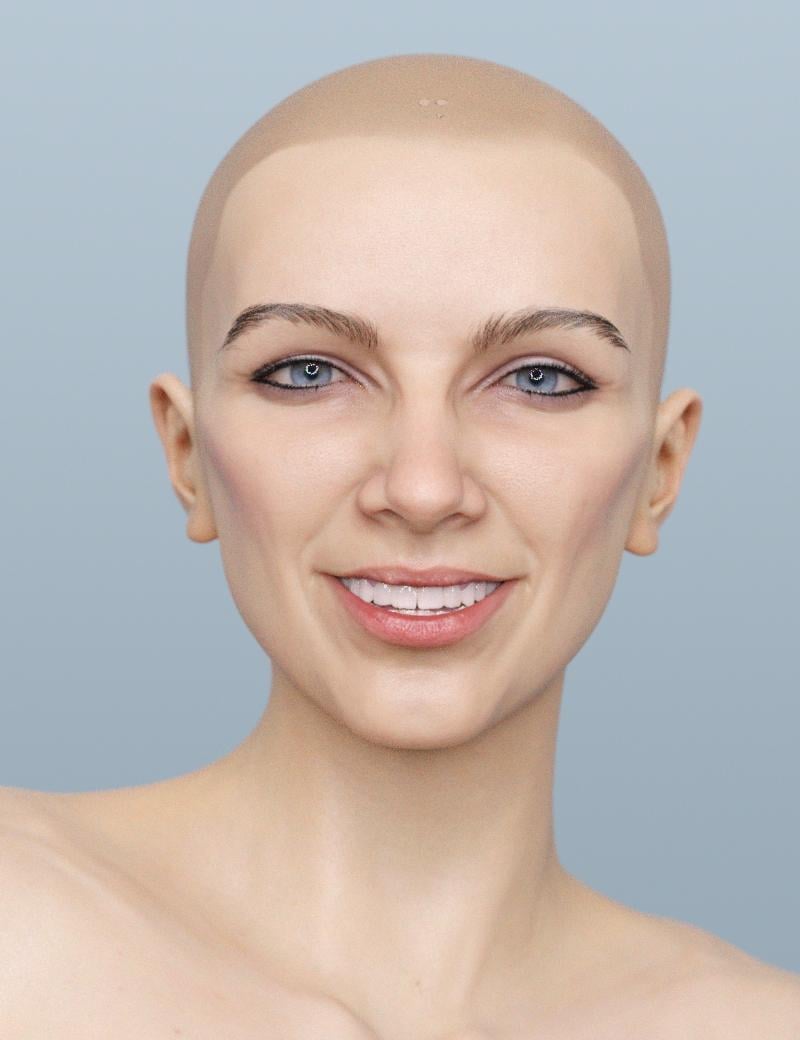
vs smile open full face at 80% modified with the face controls
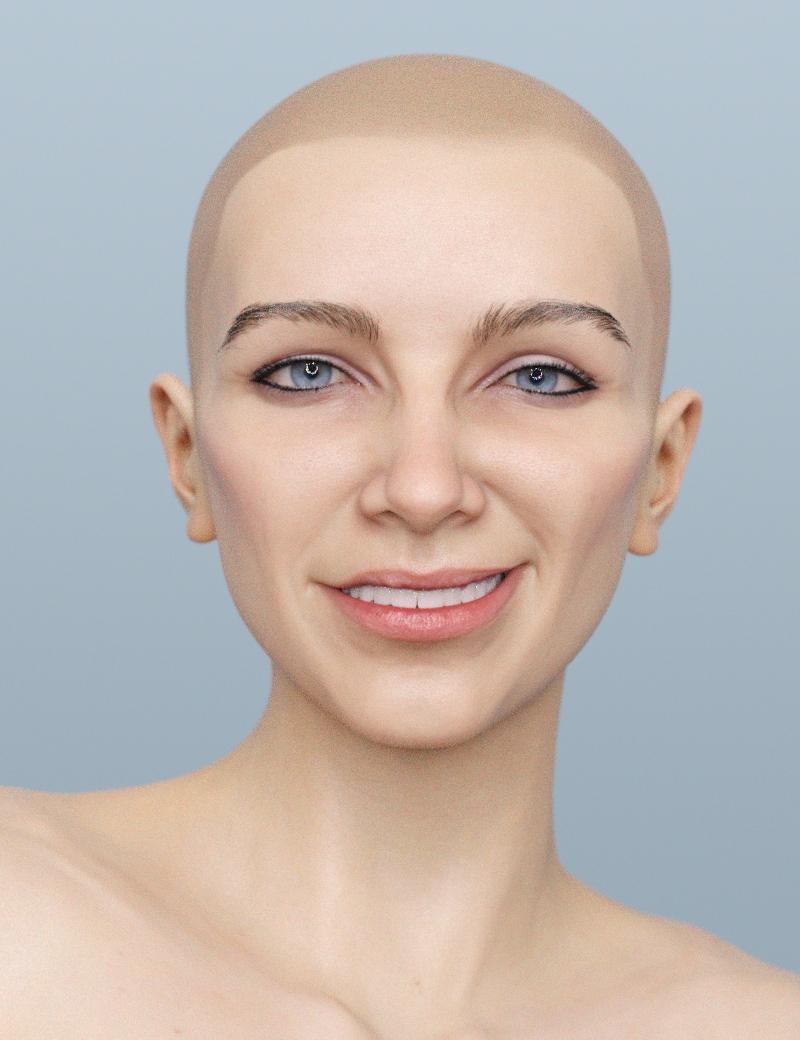
now I could theoretically do the same without this tool using a combination of dials and powerpose and it is but this I find faster and easier to get something that looks less painful. Being able to select the corner of the mouth pull it in any direction and have the rest of the mouth and cheeks follow it is nice
Daz Studio 4.14 Pro, General Release!This post in there seems to have a clue to the answer, but how did it happen in the first place? I used the actual File > Save As > Character Preset option!
I'll dig through my data folder and see if I can find culprits. The tough part is that I don't really know which Controler files are actually supposed to be there!
I've quickly made a test with my Genesis 8 Female and created a character shape controller called CTRL_Aiko8_ElfCharacter that was saved as Morphs Asset intentonaly with a default value of 100%.
Then I've loaded my default base genesis 8 female figure from the Content Library and the Elf Character shape was applied by default. The next thing I did was making screenshots how I found the CTRL_Aiko8_ElfCharacter with the Parameter Settings and the Parameters pane even though it is not showing up in the Currently Used list.
In the first screenshot I was selecting the figure and the "Currently Used" property group where I found the morphs that are now applied by default if I load the default genesis figure from the library. Next I was clicking the gear icon on the Ears Elf Long morph to show the Parameter Settings and I found the CTRL_Aiko8_ElfCharacter in the Controllers tab.
In the second screenshot you see I've selected the "All" property group and entered "elfchar" into the search filter box at top of the Parameters pane and the CTRL_Aiko8_ElfCharacter was showing up. Then I clicked the gear icon on this morph and in the Parameter Settings I saw that this morph is set to 100% at default.
[Edit]: To add information on how to ged rid of the corrupted morph.
To delete the corrupted morph you have to open up your file browser navigate to your Content Directory and search for the CTRL_Aiko8_ElfCharacter file. My morph with the fielname "CTRL_Aiko8_ElfCharacter.dsf" was saved into this path: My Library\data\DAZ 3D\Genesis 8\Female\Morphs\Syrus_Dante\Test Morphs
I've deleted the CTRL_Aiko8_ElfCharacter.dsf file closed the scene and loaded my default genesis 8 female figure from the Content Library again into the scene and as suspected the figure loaded with the default base shape again.
Daz Studio 4.14 Pro, General Release!So, I read something about this in another post that I found via a Google search.
Is it common that, when we File > Save as > Character Preset borks the Genesis 8 Female preset?
The solution offered to the author of the post was to find the culprit morph dial, go to its settings and make sure that its Default value is 0%
My own character preset has a Lot of morph dials set, and every one of them stuck to Genesis 8 Female, so I had to go through the base file and find every change I've made to create my own preset character. It was horrible.
Before that 'fix' I just mentionned, I have never before written over my Genesis 8 Female file - ever! Just made some custom character presets in the Characters folder.
So saving a preset changes the default values of the underlying morph assets, such that every character preset - including the base - loads with the morphs set?
Found it!
Here's the thread I'm taliking about. Same thing happened to me but not with just one morph - all of the morphs I used for shaping my Character Preset
[Released] Character Converter from Genesis 2 Female to Genesis 8 Female [Commercial]No. It is just a face morph. Sorry for the delay in response, I don't get on here as much as I would like these days. I think that there are discrepencies created in the teeth by how your script takes data from the custom character morphs. It could be because of the morphs that I used, but for consideration please look at these three pictures. You can see that the G8F conversion of my Custom character has teeth that have altered geometry, but it isn't even symmetrical which is wierd. The bottom teeth are no longer straight. One of the front upper teeth has a sharper edge than the other. Etc. If you can, you should update your script with an ignore teeth option. There are morphs within G8F that would allow me to fix any size issues in the teeth after the conversion.
-DrDrk
Daz 3D is part of

Connect
DAZ Productions, Inc.
7533 S Center View Ct #4664
West Jordan, UT 84084Licensing Agreement | Terms of Service | Privacy Policy | EULA
© 2026 Daz Productions Inc. All Rights Reserved.