-
Auto Muscle Enhancer HD [Commercial]
I'm not sure if anyone has tried using AME on Leyna, so I gave it a go. AME Body set to 50%, AME Flex Size 50%, AME Muscle Definition 100%, and AME Veins 50%. Snuck in my starter morph parameters, but dialed out Cartoonized. Her outfit is one for G8F and autofitted.
Render straight out of DAZ Studio with none of my usual contrast/tone enhancements.
Leyna for Genesiis 8 Male might be of use for those wanting a quick way to get AME abilities on a female character without a lot of effort. :)
Here's the store link for Leyna:
https://www.daz3d.com/leyna-for-genesis-8-male
Lee
That's actually a great idea. However, is there a product that allows the use of female genitalia on a G8M-based character for situations such as studio nudes? If so, your idea would have even more merit. Thanks for this suggestion!
Thank you, RenderPretender. I would suspect that there are such products on more mature themed 3D websites. Let us know if you find something that works!
Lee
Most-Digital-Creations has a very nice (to this day) V4 prop and textures called Anatomically Correct that can work convincingly with some tweaking. I was hoping for a geograft, though, of female gens for G8M. Still no luck. I'm still deciding whether to buy the G8M versions of ASE and AME and the other tools I'd need to start working with G8M in the absence of the G8F version. That could get pretty pricey just to achieve a realistic split bicep.
DELETEshe looks good yeah I was looking at v2 and 3 too, v2 has some nice poses with the figure but no expressions and you can't open the mouth unless there was a morph you hadto buy youget three versions well 2 really as one with skin is standard and light edition the other is the silver no skin which is taller for some reason.oh no clothing. V3 at least has expressions and sort of clothing. Trying to think how could use her maybe as a synth droid, humanoid but not too real looking or a Auton
From my review of the Victoria 2.0 product 83 it comes with three actors. The Poser 4 Female shaped LE, the Poser 4 Female shaped high res version and the standard Victoria 2 high res version. In my reply about expressions above the image is of the P4F high res version. You can think of this version and the P4F LE as a clone version. Lets V2 wear all of P4F's clothing.
Also included are a set of poses for hands and full body. There are no textures included with the 83 set. There are textures included in item numbers 95, 96, 97 and 98, which you could buy seperatly. They are light and medium, low and high res textures sets. AprilYSH has a remapped version of Victoria 2 that allows her to use P4F textures. I am thinking about making a morph from the P4F Victorias to make Victoria 2 completely P4F just for fun. Then Victoria can have textures of P4F and her clothes.
The Victoria 3 product. 1098, comes with an actor shape of V3 allowing her to wear V2 clothing. The V3 version is based using the SAE version of V3, which is the latest version of V3.
Pax's Pretty Boys ThreadDid you do something special with the 2nd picture re pose and morph? Whenever I do a pose like that - really anything with lifted arms - I get wonky biceps and triceps, sometimes wonky traps and lats.
(Why do those subtle scars on his torso make me feel... excited?)
The pose is from Composed Poses for Genesis 8 Males ('Pose 01M', descriptively), but I rearranged the right arm a lot and the left a bit because they were not having a nice time with the hood at all. Also, I have both Ultimate Natural Bend Morphs on (I totally forgot that was its name until I had to make an educated guess at what the U of UNBM meant...), which does a lot of heavy lifting with some poses. And in part I think it's because a lot of his right arm got obscured by the hood anyway.
 I usually avoid poses like this like the plague (same problem, I spent longer sorting out Alex's arm in one picture than I did setting up the rest of the scene and it still looked iffy) but this one worked out surprisingly well.
I'll admit to getting a bit... uh... distracted by his stomach as well...
Do you feel like Ultimate Natural Bend Morphs is worth it? Does it help with posing buff characters? I look at the promos and it doesn't seem like it makes that big a difference...
I tend to apply it on every character I render (but I need to render more really buff guys
). I didn't think initially that it made that much difference either, but I do seem to notice it when it's off. It gives Alex in particular some really nice shoulderblades (he's kinda semi-buff) and it's why Yve has those nice neck muscles in the last picture. You've still got to tweak stuff a little (like his pecs needed some assistance), but that's more down to Genesis than the morphs imo. If you've got a similar product already, it might not be worth doubling up, but I'm glad I've got it. Combined with the Skin Folds and Creases I like the look a lot.I'll give it a play with Steffan, who's built a bit more heavily than Yve. You can't see it at all in most neutral poses so I'll need to do a new one. (I'm not complaining. :p )
Pax's Pretty Boys ThreadDid you do something special with the 2nd picture re pose and morph? Whenever I do a pose like that - really anything with lifted arms - I get wonky biceps and triceps, sometimes wonky traps and lats.
(Why do those subtle scars on his torso make me feel... excited?)
The pose is from Composed Poses for Genesis 8 Males ('Pose 01M', descriptively), but I rearranged the right arm a lot and the left a bit because they were not having a nice time with the hood at all. Also, I have both Ultimate Natural Bend Morphs on (I totally forgot that was its name until I had to make an educated guess at what the U of UNBM meant...), which does a lot of heavy lifting with some poses. And in part I think it's because a lot of his right arm got obscured by the hood anyway.
I usually avoid poses like this like the plague (same problem, I spent longer sorting out Alex's arm in one picture than I did setting up the rest of the scene and it still looked iffy) but this one worked out surprisingly well.I'll admit to getting a bit... uh... distracted by his stomach as well...
Do you feel like Ultimate Natural Bend Morphs is worth it? Does it help with posing buff characters? I look at the promos and it doesn't seem like it makes that big a difference...
DELETEshe looks good yeah I was looking at v2 and 3 too, v2 has some nice poses with the figure but no expressions and you can't open the mouth unless there was a morph you hadto buy youget three versions well 2 really as one with skin is standard and light edition the other is the silver no skin which is taller for some reason.oh no clothing. V3 at least has expressions and sort of clothing. Trying to think how could use her maybe as a synth droid, humanoid but not too real looking or a Auton
V2 has expressions and can open the mouth ... you have to buy nothing, just select the head and there they are.
Forum page gives security warningWith Chrome any web address that starts "http" is flagged as un-secure, data transfer on those sites aren't encrypted, while sites that use "https" are encrypted, and classed as secure by Chrome.
I suspect Chrome has added some kind of new security "feature" that is coded (badly) to be Hypervigilant to Alarmist. For the past couple months (& this definitely started before Store Changeover), I've been getting this official Chrome warning off and on. It says I should check &/or change my passwords for everything because they have detected breaches on multiple sites. If I open my Chrome password/site list, there's nothing recent. All the flags are for sites I haven't visited in years &/or have login credentials--usernames,PWs, email addresses--I also discarded long ago. This happens on sites of all levels of security. Only Chrome, and the last time I had any sort of security problem online was 1 nasty bit of malware over 10 years and 2 or 3 computers ago.
Chrome does that when it feels that your login details have been compromised, usually because the site in question has been hacked, and your login details have been put up for sale somewhere.
It gets worse if you happen to have used the same login details on more than one site, one gets compromised and it wants you to change all of the others.
Why do YOU use DS instead of something else?...well said.
A major part of being in this for myself relates to the fact I used to paint in watercolour and oils which due to worsening arthritis I no longer can do. While the primary reason was for RPG character & setting as well as story illustration, I also enjoy just creating works at like I did when could still sit at a canvas on an easel or watercolour paper and deftly manipulate a brush for hours. I approach pretty much all my scenes wither as I would as if I was still painting or using a camera (replacing the old 35mm film camera kit I have with comparable digital gear is beyond my budget these days).
For rendering I use both Iray and 3DL as they each have their own strengths (though with new tools for 3DL like IBL Master and the AweShader system, it can approach a very stunning level of realism as well that reminds me of the "photorealism school" of painting). I do like Carrara's render engine (as well as it's ability to do network rendering and it's material building system) but without a true bridge between it and Daz, importing my custom designed characters over is, to say the least, disappointing as most of the resource utilities I use do not transfer over very well or at all. I also considered Octane because of it's out of core rendering until Otoy went full subscription. I haven't looked into Filament yet (haven't installed 4.14) but from what I gather, it is a viewport based render engine which seems more suitable for animation than single frame rendering and it would be yet another learning curve to throw onto an already overloaded plate (currently in the thick of learning modelling in Blender).
Recommended specs for running DAZ on a new laptop?So - forgot something... what to look for.
When I went to buy a laptop (well, just did), my priority list ran like this, after I set a budget max:- A decent GPU - not bleeding-edge (because only suckers buy bleeding edge), and not ancient. Today, this means the RTX 20xx series for iRay and such. They have RTX 30xx, but hoooly crap it costs a mint. Now if you;re on a budget, you can still do just fine with a lower-end GTX 1080 or better.
- More than one drive. This way I park all my runtimes and content directoris on that fat second drive (a 2TB SDD), that I was able to easily drop into the new laptop; all my files kept their references, and no transfer times.
- CPU. Yeah, #3. Why? Because an i7 10th-Gen isn't really too awful faster from the i7 8th-Gen I just replaced it with. Now if you exclusively use 3Delight or a CPU0intensive render engine, then okay, go for the gusto and get the latest/greatest CPU, maybe even spring for a mobile Xeon if you have the budget for it (yes, they make those).
- Look for "Gamer" laptops - you don't pay as much as you do for a "mobile graphics workstation" or similar claptrap.
- Manufacturer reputation: MSI is a solid and known quality to me. So is Apple (which has slipped of late... urgh). So is Acer. Believe it or not, I avoid Dell (because their Alienware brand is way overpriced and usually outdated), and I'm okay with HP and their products are generally solid, but they tend to charge a bit more than they should IMHO, so unless there's a great deal on one, I don't bother.
- Weight. In my case it's a bit low on the list because I'm buying 17" beasts. That said, my new baby is a full half-kilo lighter than the old Aspire 7... which is pretty nice.
My budget max was $2k, and I wound up paying $1200 (after rebates and price-codes. Note that I also paid $200 above that for a two-year SquareTrade warranty (because the missus had to use them once after dropping her laptop, and it was IMHO well worth the $200 for a two-year coverage period. Cheaper than AppleCare too.)
HTH a little.
I don't think any laptop I've had has ever been as heavy as my first one - this thick boy
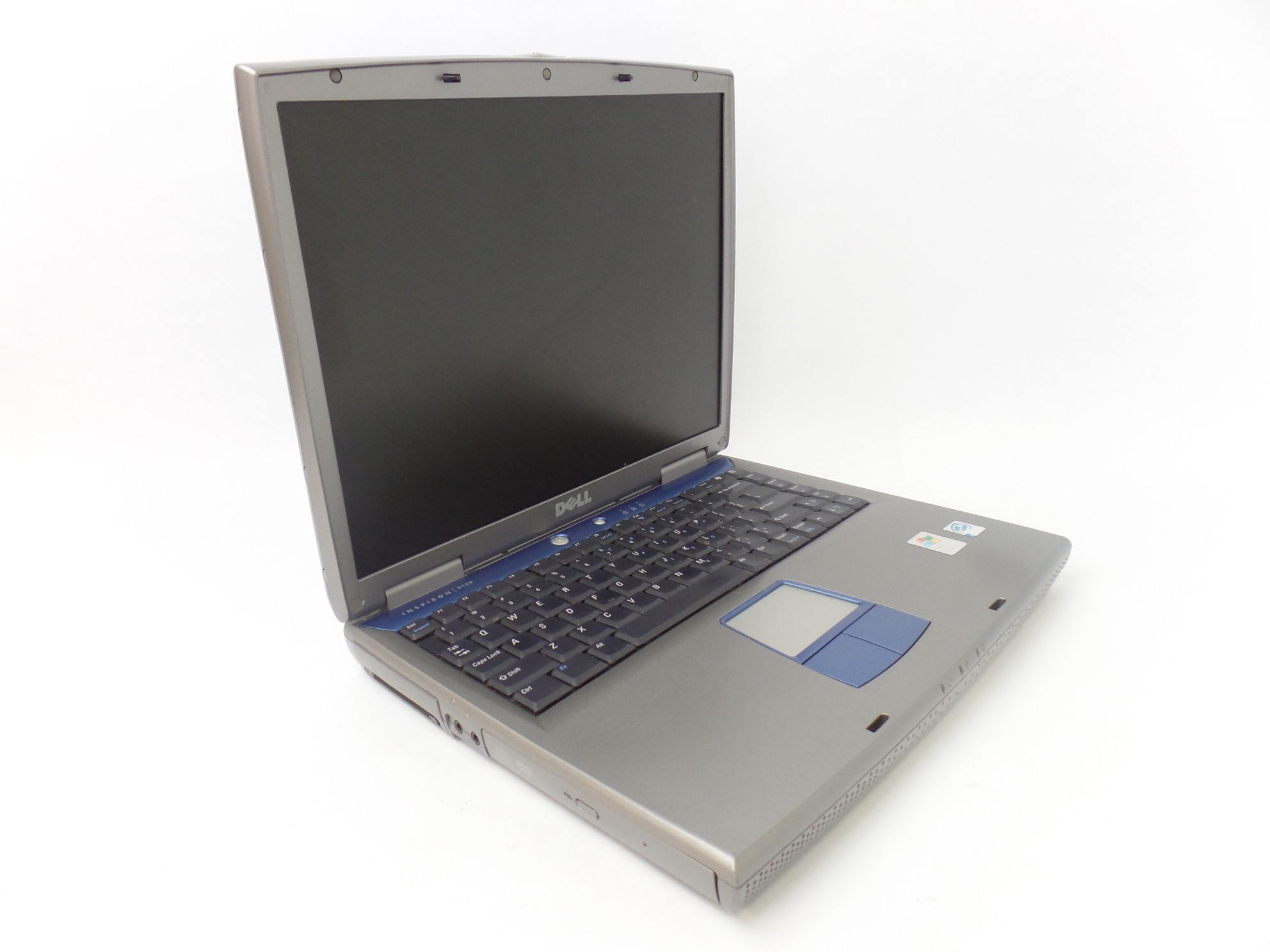
Even my current one which isnt exactly slim and has a much larger screen is way lighter (I looked it up and according to the internet it weighed 7.18 pounds which...)
Incidently the last time I checked it still worked, the bottom 3rd of the screen doesn't but that happened while I was using it - Somehow managed to use it like that for actual years.
Oooo, I remember those horrible monsters. Mine had a Pentium 4 with Hyperthreading and a Geforce 5200. It would overheat and shut down if you did any multi-core aware workloads.... Like World of Warcaft for example. Shut off Hyperthreading in the bios and the thing could still double as a furnace and the WASD keys would still get too hot to touch.... But you could actualy play WoW without shutting down!
Recommended specs for running DAZ on a new laptop?So - forgot something... what to look for.
When I went to buy a laptop (well, just did), my priority list ran like this, after I set a budget max:- A decent GPU - not bleeding-edge (because only suckers buy bleeding edge), and not ancient. Today, this means the RTX 20xx series for iRay and such. They have RTX 30xx, but hoooly crap it costs a mint. Now if you;re on a budget, you can still do just fine with a lower-end GTX 1080 or better.
- More than one drive. This way I park all my runtimes and content directoris on that fat second drive (a 2TB SDD), that I was able to easily drop into the new laptop; all my files kept their references, and no transfer times.
- CPU. Yeah, #3. Why? Because an i7 10th-Gen isn't really too awful faster from the i7 8th-Gen I just replaced it with. Now if you exclusively use 3Delight or a CPU0intensive render engine, then okay, go for the gusto and get the latest/greatest CPU, maybe even spring for a mobile Xeon if you have the budget for it (yes, they make those).
- Look for "Gamer" laptops - you don't pay as much as you do for a "mobile graphics workstation" or similar claptrap.
- Manufacturer reputation: MSI is a solid and known quality to me. So is Apple (which has slipped of late... urgh). So is Acer. Believe it or not, I avoid Dell (because their Alienware brand is way overpriced and usually outdated), and I'm okay with HP and their products are generally solid, but they tend to charge a bit more than they should IMHO, so unless there's a great deal on one, I don't bother.
- Weight. In my case it's a bit low on the list because I'm buying 17" beasts. That said, my new baby is a full half-kilo lighter than the old Aspire 7... which is pretty nice.
My budget max was $2k, and I wound up paying $1200 (after rebates and price-codes. Note that I also paid $200 above that for a two-year SquareTrade warranty (because the missus had to use them once after dropping her laptop, and it was IMHO well worth the $200 for a two-year coverage period. Cheaper than AppleCare too.)
HTH a little.
I don't think any laptop I've had has ever been as heavy as my first one - this thick boy
Even my current one which isnt exactly slim and has a much larger screen is way lighter (I looked it up and according to the internet it weighed 7.18 pounds which...)
Incidently the last time I checked it still worked, the bottom 3rd of the screen doesn't but that happened while I was using it - Somehow managed to use it like that for actual years.
DELETEshe looks good yeah I was looking at v2 and 3 too, v2 has some nice poses with the figure but no expressions and you can't open the mouth unless there was a morph you hadto buy youget three versions well 2 really as one with skin is standard and light edition the other is the silver no skin which is taller for some reason.oh no clothing. V3 at least has expressions and sort of clothing. Trying to think how could use her maybe as a synth droid, humanoid but not too real looking or a Auton
V1 with Mimic lite certainly opens her mouth
I am pretty sure my V2 does too
Bunny's nightmare Outfit problemI've contacted the vendor, Blue Rabbit, via Deviantart. They say the outfit works fine for them, but has also said they have contacted DAZ for a fix and offered a temporary solution for those who can't wait. (Note: The "Transfer Utility", the circle-arrow thing, is under Edit -> Object or Figure).
1]) load the genesis 8 female model, without any morph and with the base pose.
2) you load the bodysuit on your model, as if you were going to use it, selectin your model before load de cloath.
3) On the right hand side there should be the transfer icon, which is a circle with an up arrow, if you don't have it, look for it in windows - panels.
4) Execute it.
5) in source you choose genesis 8 female, and in target, you select the bodysuit and accept.After it is bound, it should work, and you can overload the base Genesis 8 Female with a character of your choosing. However, this is a temporary fix; you will have to do this with every character you want to load with the outfit, unless you can "save" the outfit:
If you want to save it so you don't have to do it over and over again, it's a bit more complicated because you have to know in which folder the file is stored, but if you still want to save it, let me know and I'll give you directions.
One last, unrelated thing; In case you haven't figured it out already, the stockings isn't part of the bodysuit piece, nor is it in the base Wardrobe tab. Instead, look under Materials -> Iray -> Wardrobe while the character is selected.
Michael 3 to any Genesis Figure texturewas going to say Texture converter to get from M3 to M4 but seems missing from the store
otherwise if you have clones texture baking and transfer in Blender (I have never tried that) free option
repaint in Ultimate Unwrap 3D ( I have done)
Zprojection in Zbrush ( I also have done)
Drutherson 8The beard looks really familiar. Actually, it looks rather like some of the morph possibilities in Mec4D's Unshaven set. Possibly even the older G2 set.
Genesis 8 - what i needJust an example (because my English is not fluent)
Even though I know that all the products are excellent, this one, in particular, without disparaging the others, could you give me this wide variety of face customization?
1-200 Plus Head and Face Morphs Bundle for Genesis 8 Female (s) and Male (s)
2-Shape Gen for Genesis 3 and 8
3-Shape Rigger Plus
(I am impressed with the quantity and quality of these 3 products, the elasticity that we can achieve in making different models)
Those products do 3 totally different things.
- "200 Plus Head and Face Morphs Bundle" is a set of morphs.
- "Shape Gen" is a randomizer. It doesn't include new morphs, it uses all morph sets you have and creates combinations of morphs.
- "Shape Rigger Plus" is a tool for people who create morphs, it makes creating the rigging adjustments for the new morphs easier.
Ty for explanation :)
Cannot create keyframeI am trying to change the parameters of a morph from timepoint A tp timepoint B in the timeline, however it never automatically creates a value in the timeline like it did in previous versions of Daz. I cannot go back and change the morph value because there is no keyframe there to change. How do find/create it? Thanks.
Genesis 8 - what i needJust an example (because my English is not fluent)
Even though I know that all the products are excellent, this one, in particular, without disparaging the others, could you give me this wide variety of face customization?
1-200 Plus Head and Face Morphs Bundle for Genesis 8 Female (s) and Male (s)
2-Shape Gen for Genesis 3 and 8
3-Shape Rigger Plus
(I am impressed with the quantity and quality of these 3 products, the elasticity that we can achieve in making different models)
Those products do 3 totally different things.
- "200 Plus Head and Face Morphs Bundle" is a set of morphs.
- "Shape Gen" is a randomizer. It doesn't include new morphs, it uses all morph sets you have and creates combinations of morphs.
- "Shape Rigger Plus" is a tool for people who create morphs, it makes creating the rigging adjustments for the new morphs easier.
Why won't these dagnabbit morphs move!!You are going saving the morphs themselves after you make the changes right (Files -> Save As -> Support Asset -> Morph Asset)
Genesis 8 - what i needhi lovely comunity - I will expose the situation and ask what I need (knowing that I will have to pay for licenses to use in-game models):
I need a Genesis 8 (female) but with ample capacity for body / face customization (it doesn't matter, here, the amount of polys, because I think about redoing possible topologies for different in game situations - lods, etc.) and for the little that I know, Genesis 8 would already have versions with relative polys for games, right?). Which products would you recommend me (morph)?
Ty so much :)
"There's Always Another Sale™" Sales thread: Report Issues HereFace Transfer Unlimited is in the list of Daz Select items available as part of the Drutherson double bundle $100 free deal but does not discount in the cart. (Other items only seem to grudgingly discount after repeated cart refreshes).
I will make an inquiry.
"There's Always Another Sale™" Sales thread: Report Issues HereFace Transfer Unlimited is in the list of Daz Select items available as part of the Drutherson double bundle $100 free deal but does not discount in the cart. (Other items only seem to grudgingly discount after repeated cart refreshes).
Daz 3D is part of

Connect
DAZ Productions, Inc.
7533 S Center View Ct #4664
West Jordan, UT 84084Licensing Agreement | Terms of Service | Privacy Policy | EULA
© 2026 Daz Productions Inc. All Rights Reserved.