-
Released: Auto Rigging Pipeline [Commercial]
barbult said:
N-RArts said:
So let me get this straight. I import a piece of clothing that has been fitted to a Genesis figure, import it to Daz, and use this. Then it'll be completely rigged?
Does it cut down on the need to make JCMs?
The first post in this thread says:
A very important note: This does not do auto weight mapping/jcms etc.Unfortunately, the images that advertise the product don't explain this very well... or at all. What I infer from the imagery is that it is rigging a skeleton (rig) to a figure and then allowing it to be posed. From reading this thread I understand that it's entirely not for that purpose, but now I've put it back on my wishlist a second time simply due to the fact that I didn't remember reading about what it did or didn't do in this thread but instead was once more suckered into being interested in something that is really of no use to me. So back out of the wishlist it goes, before I accidentally buy it.
another obj mtl file questionBejaymac said:
Just to add that this isn't new behavior by DS, I've been using DS for roughly 20 years at this point and it's always hated spaces, and not just in pathways and file names, spaces in mesh group names and in Surface names have the same effect.
That is, as I said, part of the OBJ definition - space is a separator. I wasn't aware it affected pathnames too (though they would require quotes even in an OS command line to avoid their being treated as separate entities).
Some programs give you generic surface names like Material 01, Material 02, Material 03, all DS sees is Material and lumps them all together as one surface at import.
Daz Studio 6 + Diffeomorphic 5.1 + Bforartists Blender fork 5.1.2 workssidcarton1587 said:
Valiska said:
Daz Studio version: 6.25.2026.14722
Diffeomorphic version: 5.1.0
Bforartists Blender fork version: 5.1.2
I'm on Windows 11 Professional.
I have successfully installed Diffeomorphic in Daz Studio v6. The extra file menu items installed successfully. I have exported a landscape successfully (ShaaraMuse3D Rusty Blue Rockscape).
Bforartists is a Blender fork that closely tracks Blender but alters the interface. I've just started checking it out. Diffeomorphic installation is as normal and the import worked fine.
I've been exporting my Daz library as a long-term project, but I've been doing the non-figure parts first. I haven't done more than simple test exports in earlier Daz-Diffeomorphic-Blender versions either. So I'm not commenting on the figure exports, particularly. Just noting that the export workflow is working for me, with the new Daz & Diffeo versions and the Bforartists fork.
Is there a specific workflow that you are using to export your Daz library? I've been looking for more use cases for my Script Server project and this sounds like something that is open to automation.
(I'm having trouble pasting this in where I want it. I hope it comes out formatted OK.)
First thing: I divided my libraries into about a dozen so I had some hope of finding products and the parts thereof.
- Smart Content is useless for these purposes because too many items are missing or miscategorized or uncategorized. I use the Content Library.
- PA-named folders: the organization of Daz content as installed is often markedly unhelpful, since stuff gets stuffed under the Published Artist's name instead of under a name that tells you what it's a model of.
- There is some consistency in where different kinds of items end up, but not a lot. Settings, usually the simplest kind of item to move, may be stored under Architects, Environments, Environments/Architecture, Props, Props/Architecture, or occasionally Scenes. Vehicles are likely be in Props, Figures, or Vehicles.
- The relatively recent items are still decidedly better than the old items. In recent years, texture sets and add-ons have mostly been designed for Daz libraries, which means they are right there with the item they belong to. Easy to find once you find the item itself.
- Poser era stuff is really, REALLY bad.
- The Poser library organization forces you to break a single product into multiple top-level categories. This sounds like a better idea than it really was. The pieces of products are scattered through multiple high-level directories. The subdirectories they're actually in could be named blasted near anything: the item itself, the figure they belong to, the artist who made them, the figure they belong to THEN the artist who made them then the item itself, etc.
- The texture setters might be in Poses or Materials and if they're in materials there's a good chance they don't work in Daz Studio, because for some benighted reason, in spite of the fact that it's a simple script conversion, Daz never made the later Poser material setters work. And the subdirectories they're in might, as usual, be named anything.
- PA names are used but they don't stick to a single version of the name. One PA might have three different spelling-forms of their name, and other products not in any PA folder anyway.
- Add-ons to products include both texture sets, and additions to the product itself not necessarily produced at the same time. The texture-set maker may well not be the modeller. So you get stuff like:
- Original models and supplied textures.
- New texture set for original model, the setters for which may be located practically anywhere a texture-setter could conceivably be found.
- Add-on for the models including new models.
- Texture set for the original model *and* the add-ons. May be anywhere.
- Yet another add-on with more models.
- Texture set for original model and both add-ons which also may be anywhere.
- Now here's the fun part of this: once you manage to track down the texture setters, nothing in the Daz library itself that tells you immediately what variation of the original model set and its add-ons it applies to. In fact, there is nothing to tell you, just from looking at the library with everything installed, that there even might be such a source of confusion.
- Unlike Renderosity, Daz rips down the original page for any item that's no longer sold or any PA that's no longer selling, and leaves you with a skeleton page with part of the information about what it does and what it's for missing.
- If the product page still exists the software it's useful for gets updated in a fashion that's not very accurate or very useful, being a blanket update to newer versions even when old content has a tendency to break over time.
- The chaos of bad Poser organization is at its worst for the Millennium figure eras. I have enough for/made at the time of Victoria 4 and Michael 4, and a few things for Millennium 3, to have plenty of examples.
- It starts getting better some time for Genesis 1/5, but there's still a lingering habit of putting things that belong to a particular item in another high-level directory in a Daz Studio library, as if it were Poser. Mercifully the very worst of tendency mostly dies with Generation 5, except in the case of the PA folders, which persist and ruin organization to this day.
- You export the products whose pieces you can easily find first. Then you uninstall each product as you export it. (If you still want to use it in Daz Studio, install it in another library.) So, as you remove the simpler-to-understand products, you are gradually left with fewer and fewer directories you have to understand and keep track of, in a given library, in order to find and understand the pieces of the insanely disorganized products. By the time you get down to the worst of the worst, there are only a few directories left in the whole library and only a few products they could possibly belong to.
- Enough of the products are borked, one way or the other, that I wouldn't want to attempt to export a large range of products at once. It'd probably be handy to batch some of what I describe below, but you have to take a look at the results after every set, to make sure you got exports you can use.
My general procedure for Daz to Blender exports:
- Install characters or items for characters in a Daz/Poser library for that generation, or for that kind of item. (I have Millennium 3, Millennium 4, Genesis generations, Main (Settings and general), Nature, Vehicles, Animals 1 (old animals), Animals 2 (newer animals), Hivewire, etc.
- Use Daz Install Manager if possible. Don't try to change where DIM puts anything, except make sure it ends up in the right library. Remember old stuff is mostly going to be in Poser libraries, except for some texture-setters that ended up in Daz Studio libraries.
- In the case of items that belong to multiple generations, like sets for Victoria 4 and Michael 3, install it in the library of the generation you're working on first. Then you can uninstall it and reinstall it in the other generation's library, to get the other half.
- Find an item you think you've found the pieces of.
- Load a version of it you want to save. Save it as a full Scene File.
- Save it as a Diffeomorphic *.dbz. No advice from me on options for figures yet, because I really have only done the simplest tests. I almost always export with rigging, no matter what the item is. Clothes of course need the rigging.
- Load the exported item in Blender.
- If no model appears, you can try a Diffeomorphic import into another version of Blender. Occasionally that works.
- If that doesn't work, try an FBX export from Daz Studio.
- If that doesn't work, try a Wavefront object export from Daz Studio. You will lose any rigging, but you might get the geometry and the textures.
- If that doesn't work either, you're probably not going to get that model. But you could try some of the newer formats I haven't done anything with.
- If you get a model with warnings, it's probably complaining about something you can cope with. Save it in Blender.
- Blender will show Z-fighting with models where it doesn't show in Daz Studio. You may have to nudge some surfaces or resize something very slightly to stop this.
- Find the textures in the Daz/Poser libraries and save them in a subdirectory with the Blender model. Occasionally textures don't show up, or look bad, when they look OK in Daz Studio. You want them handy if you need them. Textures are usually stored under vendor directories in Runtime/Textures. The catch is, they're not necessarily always in one subdirectory. Sometimes the vendor uses some of their own textures from another product which is not in the same directory with the main set. Sometimes some or all of the textures are provided by another PA altogether and her textures are under her name. The easiest way to find all these is to have installed the product and its add-ons with Daz Install Manager. In DIM you can right-click on the product to see the Installed files, and that will show you if you have textures to grab from multiple directories.
- DIM is also usually the easiest way to find any UV maps. Otherwise they tend to show up under the product directory, in a high-level directory called Templates then named by vendor or product or vendor/product, or sometimes in Documentation with a similar range of variations.
- Put the now-Blender models, textures, uv-maps if any, web pages, add-ons, their web-pages together in a directory. Put one of the best illos for the product at its top level. Set the directory to display the illustration instead of just the folder icon if that works in your system. (It doesn't work reliably in Windows, so I use Directory Opus instead of File Explorer. I use it for everything but it was inspired by the need to be able to tell what's in my graphics folders.)
- If the product has multiple textures, or multiple configurations, load up the next configuration, texture set, etc. Export the variation to Blender, save it if it worked well enough as above.
- For exporting clothing for most generations, you can just load the clothing and export that.
- But Genesis 1/5 and Genesis 9, the unisex base figures, are a pain because the base form of the clothing is usually conformed to the epicene base that is not usually directly useful. In this case you have to load the figure, add the clothing to the male or female version of the figure, and export clothing and figure together. (The clothing will usually revert to epicene base if you remove the male or female version of the figure before you export.) Then, in Blender, you can eliminate the figure itself before saving the clothing, if you don't want large numbers of copies of Genesis 1/5 or 9 stored with the clothing. (I suspect it would be more convenient in the future to keep the model and the clothes together, but this devours drive space, so I don't.)
- The most likely thing to be broken in Daz Studio is texture-setters. Sometimes these can be fixed in Daz without too much difficulty (it usually involves Notepad++ and the setter files). Sometimes it's just mislabelling/duplication of colors or something easy to correct. Sometimes it's worse and I figure I'll deal with it manually in Blender.
I would like to stop saving variations of the same model with different textures, as that takes up a lot of drive space and is tedious. But in the past it's been obvious that I wouldn't be likely to get much use out of the models if I always had to apply the texture variants manually, as that's time consuming. The first time I tried Blender's asset manager for anything, it was more nuisance than help and I abandoned it. I'm going to try it again to see if it'll allow me a reasonably easy way to make texture-setters in Blender. In that case, I could export only variations of products that involved altered geometry, instead of exporting for texture variants.
[Resolved] Geograft hiding base polygonsStan Nice said:
using a geoshell with a cutout.
you technically dont need to use a geoshell. There are multilayer shaders too, and also LIE. But geoshell with opacity mask is a common approach if you dont want to deal with multilayer shader or LIE.
That would allow me to directly copy and paste the Genesis 8.1 shaders onto the geograft. Is that correct?
Yes that is what they might be telling you to do, but take any advice from Daz forum posters with a grain of salt. I assume this is for a personal project? You dont need this super complicated solution and there is a much more standard solution that doesnt involve any such impractical and convoluted steps.
Much easier solution for creating new textures:
Export the Character + Geograft as obj.
Import this mesh and the base color textures into Substance Painter or another 3D texture painting software which supports a multi UDIM texture painting workflow.
Blend across the region. E.g., in Substance Painter, use the clone stamp tool or some such to create the blending.
Export the updated base color textures (for the body and the geograft) and load them onto your figure + geograft in Daz.
[Released] Bone Minion Batch Converter for Genesis 8 Poses [Commercial]Thank you for the prompt response, and for the possible workaround. I have just a couple of further questions: if I do use another machine to do the conversion, how would I then transfer the metadata back to my main computer? The way that the batch converter makes new G9 pose products is great and I would like to keep that benefit. The other question is more of a tangent: I have experienced a lot of lagging when posing G9, and now I'm wondering if there's anything that a huge library may contribute to that. Would using turbo loader be recommended? Also, just a side note: there are a few complaints about how the PA ATrillionGames makes posing products that rely on scripts rather than pose files. Batch converter has been perfect to get the actual pose files out of these products.another obj mtl file questionJust to add that this isn't new behavior by DS, I've been using DS for roughly 20 years at this point and it's always hated spaces, and not just in pathways and file names, spaces in mesh group names and in Surface names have the same effect.
Some programs give you generic surface names like Material 01, Material 02, Material 03, all DS sees is Material and lumps them all together as one surface at import.
All Genesis 8 male figures have lost their compatibilityI don't have that product, but a mistake was made while creating the metadata for it.
To solve the problem on your end:
- Click on the three dot
- In the search field, type Starter, there is a fair chance it'll select Genesis 9 Starter Essentials (it's the fastest way I have found to get back near every Genesis figures Compatibility Base). If it does, click on the magnifying glass to cycle through all products with Starter in their name.
- Open 'Genesis 8' and select 'Male'
- Click accept.
It should fix the problem.
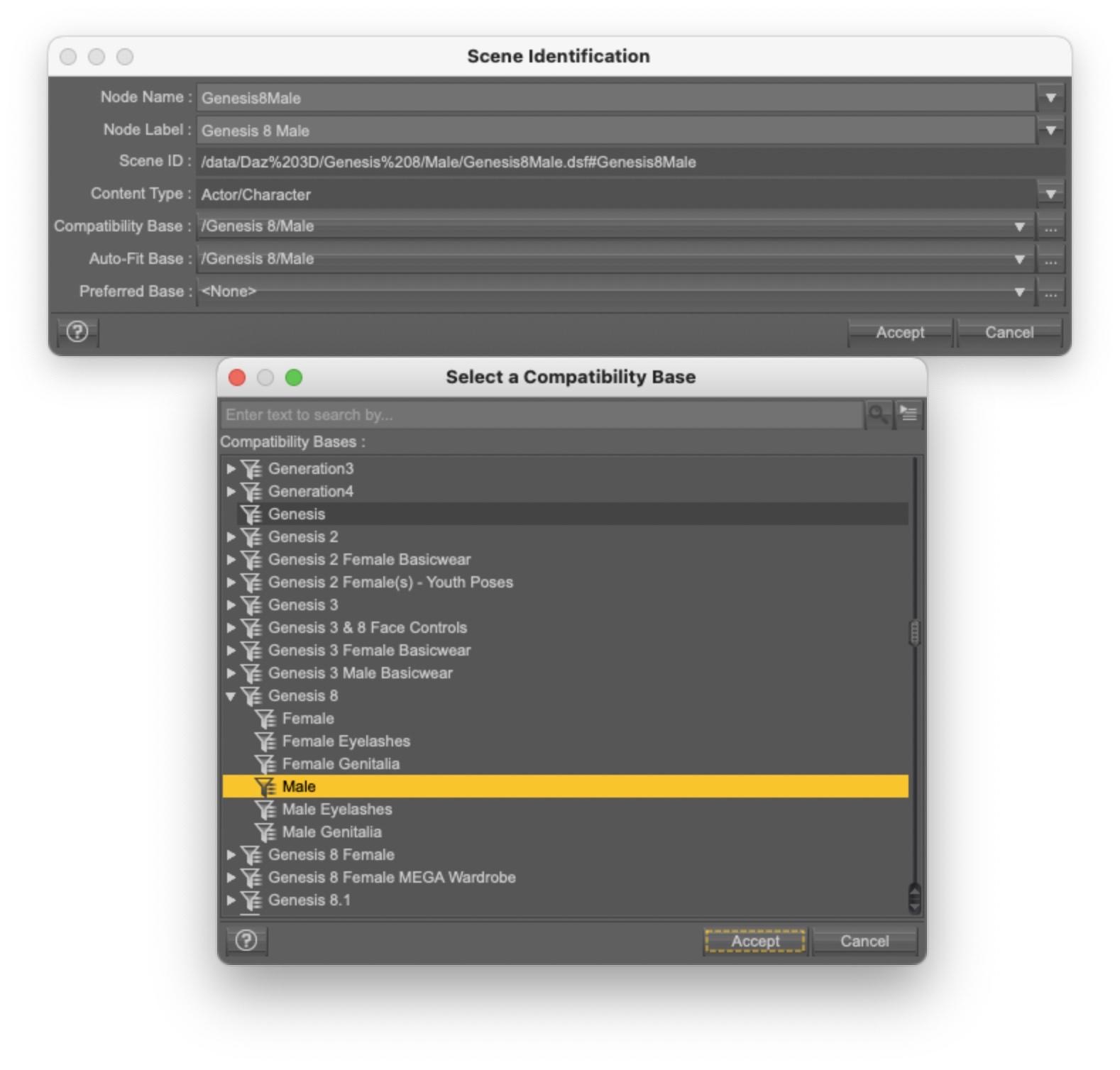
If you feel lucky, you can open a ticket with Daz, hoping for a fix: metadata are Daz responsability.
The strangest part in your problem is that re-installing Genesis 8 Starter Essentials should have fixed it as far as I know.
Does Daz 6 use 3 Delight items?Just wondering if Daz Studio 6 can no longer support any 3 Delight items? If I try to load any of my Worldbase XT 3 Delight lanscapes, I get an error message that says Daz doesn't have an import filter for this file type.
Single & Multi UV SetDiffeomorphic will import the uv sets available in your scene, if they're used in any material. While in daz studio you see all the uv sets available for the figure that you installed, as uv sets for custom characters for example. If you want a specific uv set to be imported just use it in any material. It wouldn't make sense to import all the uv sets available if they're not used. For example G3 figures get a separate uv set for every custom character, G8 less but still.
p.s. Of course as an alternative you can always export a uv set in obj format, then load it in blender.
object > transfer > uv map
Single & Multi UV SetHello,
Is there a way to make it so that whenever I import a model from DAZ to Blender, the model is imported with both the Base Single and Base Multi UV sets?
I can obviously create a second UV map manually and switch it to Base Multi, but I figured there must be a way for Diffeomorphic to handle that automatically.
Thanks!All Genesis 8 male figures have lost their compatibilityHi.
I think the problem started after downloading some free content from RenderHub, but I'm not 100% sure.
Anyway, all the Genesis 8 male figures don't show their compatibility with clothing, poses, and expressions when selected. They end up looking like creatures.
I processed and reimported the metadata, and I reinstalled Genesis 8 Essentials, but nothing.another obj mtl file questionOK
my meshes created by Hunyan 3D AI and converted fron glb to obj with PConPlanner the other day, import into DAZ Studio textured
today's batch don't
both sets are in runtime textures folder so D|S can refind them after saving duf files
# created with pCon.planner
newmtl mat__473a7d2e
Ka 0.41350016 0.35234278 0.35280597
Kd 1 1 1
map_Kd f60c08f32dbc1722.png
Ks 0 0 0
Ns 0
illum 2works
# created with pCon.planner
newmtl mat__3118bd15
Ka 0.46559992 0.38622758 0.34440079
Kd 1 1 1
map_Kd fa22843a1b20b130.png
Ks 0 0 0
Ns 0
illum 2doesn't
can anyone see what I am missing?
[SOLVED] Creating symlink from script on Windows 11You said symlink, but would a Daz JSON Link work for what you're doing? They have the advantage of referencing the original thumbnail and metadata.
Introduced in Daz Studio 4.9.4, they can be created via the UI, or through script - Script Sample
Daz Studio 6 Issuestdc said:
I can't even post the number of issues I've encountered. I do know this much: I will NEVER update Daz ever again. It's almost like the developers forgot about certain extensions or couldn't care less. Scripts don't work. NONE of my costly purchases weren't found or won't load. I have spent days trying to find answers.
No one should be expected to waste a week to figure out what's gone wrong. No update on any software should have issues finding its own files. Why do DAZ scripts not work? Get this (see attached) every time I try to use a DAZ script.
- SEARCH DRIVE (s) for Files... does not work - get error
- Scan Known Directories for Files... does not work - says can't find any
- Migrate Old Content Database... Not sure what this does, seems like nothing
- Import Mapped Directories... Does not work, though I have mapped directories; there is none in the list.
Using the AI to find answers? Good luck with that. It literally contradicts itself and - for example - says to go to a menu item, then to a submenu item that is not even listed. It's like it doesn't even know what software I'm in!
GOOD WORK! Maybe invest in some QA? You know... test it out before release? Never have any other issues with any other software updates. Updating Daz is extremely HIGH risk, and you must expect MONTHS of downtime.
The only solution is to uninstall Daft6.
Different versions of Daz Studio do not share settings, so you will have to tell it where your ciontent 9and database) are in Edit>Preferences>Content>Content Directory Manager. This is not new behaviour.
Daz was up-front that plug-ins will need to be modified and recompiled to work in DS 6, this has been reiterated in alomst every discussion and I thought was in the release notes. Scripts may or may not work, depending on what they do and how they do it. That chnage is unavoidable if Daz is to move to a newer, still supported version of the Qt framework (which will then open up the path for other much requested features).
Can I change the sort order of the content library?The CMS has nothing to do with the links within the file, as long as you don't move things in the data and Runtime folders they should be fine - breaking the CMS will effect features that rely on metadata rather than the data in the file itself (e.g. any content pane except the Content Library>Daz Studuio Formats, Poser Formatss, or Other Import Formats).
Daz Studio 6 IssuesI can't even post the number of issues I've encountered. I do know this much: I will NEVER update Daz ever again. It's almost like the developers forgot about certain extensions or couldn't care less. Scripts don't work. NONE of my costly purchases weren't found or won't load. I have spent days trying to find answers.
No one should be expected to waste a week to figure out what's gone wrong. No update on any software should have issues finding its own files. Why do DAZ scripts not work? Get this (see attached) every time I try to use a DAZ script.
- SEARCH DRIVE (s) for Files... does not work - get error
- Scan Known Directories for Files... does not work - says can't find any
- Migrate Old Content Database... Not sure what this does, seems like nothing
- Import Mapped Directories... Does not work, though I have mapped directories; there is none in the list.
Using the AI to find answers? Good luck with that. It literally contradicts itself and - for example - says to go to a menu item, then to a submenu item that is not even listed. It's like it doesn't even know what software I'm in!
GOOD WORK! Maybe invest in some QA? You know... test it out before release? Never have any other issues with any other software updates. Updating Daz is extremely HIGH risk, and you must expect MONTHS of downtime.
The only solution is to uninstall Daft6.
Daz Studio 6 + Diffeomorphic 5.1 + Bforartists Blender fork 5.1.2 worksValiska said:
Daz Studio version: 6.25.2026.14722
Diffeomorphic version: 5.1.0
Bforartists Blender fork version: 5.1.2
I'm on Windows 11 Professional.
I have successfully installed Diffeomorphic in Daz Studio v6. The extra file menu items installed successfully. I have exported a landscape successfully (ShaaraMuse3D Rusty Blue Rockscape).
Bforartists is a Blender fork that closely tracks Blender but alters the interface. I've just started checking it out. Diffeomorphic installation is as normal and the import worked fine.
I've been exporting my Daz library as a long-term project, but I've been doing the non-figure parts first. I haven't done more than simple test exports in earlier Daz-Diffeomorphic-Blender versions either. So I'm not commenting on the figure exports, particularly. Just noting that the export workflow is working for me, with the new Daz & Diffeo versions and the Bforartists fork.
Is there a specific workflow that you are using to export your Daz library? I've been looking for more use cases for my Script Server project and this sounds like something that is open to automation.
What went wrong?Padone said:
Here is a simple scene I used for comparison, similar in theme as a gunned fighter in a sci-fi room. I met two difficulties, first the DOF in blender is off, this is a bug now reported to Thomas. The f-stop in daz studio seems off compared to a real camera, while blender does it right. As a result we have to divide by ten, blender f-stop = daz f-stop / 10. The second issue is the default iray tone mapping is very different from the khronos blender view, so I used a standard view with mid-low contrast instead. Other than that the scene compares quite fine.
Test scene provided.
https://github.com/Diffeomorphic/import_daz/issues/43
steps:
- import the test scene in blender, using bsdf materials
- change the camera f-stop to 2.2
- render
- change the color management to standard mid-low contrast to better match the iray default tone mapping
https://www.daz3d.com/sci-fi-corridor-b
https://www.daz3d.com/monique-8
https://www.daz3d.com/pony-knots-for-genesis-8-females
https://www.daz3d.com/shadow-thief-outfit-for-genesis-8-female-s
I appreciate all your input and your work. The problem here is me not knowing how to render it properly so my finished product is presentable. You've given me much to think about and explore, thank you for that.
What went wrong?Here is a simple scene I used for comparison, similar in theme as a gunned fighter in a sci-fi room. I met two difficulties, first the DOF in blender is off, this is a bug now reported to Thomas. The f-stop in daz studio seems off compared to a real camera, while blender does it right. As a result we have to divide by ten, blender f-stop = daz f-stop / 10. The second issue is the default iray tone mapping is very different from the khronos blender view, so I used a standard view with mid-low contrast instead. Other than that the scene compares quite fine.
Test scene provided.
https://github.com/Diffeomorphic/import_daz/issues/43
steps:
- import the test scene in blender, using bsdf materials
- change the camera f-stop to 2.2
- render
- change the color management to standard mid-low contrast to better match the iray default tone mapping
https://www.daz3d.com/sci-fi-corridor-b
https://www.daz3d.com/monique-8
https://www.daz3d.com/pony-knots-for-genesis-8-females
https://www.daz3d.com/shadow-thief-outfit-for-genesis-8-female-s
What went wrong?Yes you're right the rifle gets much more specularity in iray. As for the skin if we look at the ear there's much more sss in iray. Again if you're using principled this is expected as principled is approximated compared to iray, you have to use bsdf for a quality conversion.
Of course the lights must be the same, I'm assuming that. If you use different lights in daz and blender then we're talking of nothing. Diffeomorphic should import fine both the HDRI and standard iray lights and emissives. You may have problems with custom lights and ghost lights. Make sure world is "dome" in the global settings to import the HDRI.
- in the addon global settings set world as "dome" and skin method as "iray"
- in easy import set "bsdf" as material method
- in the blender render tab set "full global illumination" as light paths
- render and see how it goes
- eventually try "filmic" as color management in the render tab, that's more similar to the default iray tone mapping, if you didn't change it
edit. important. If the scene is using custom shaders or 3delight shaders then they are approximated in cycles, and will not look the same as iray. For 3delight shaders you can convert to uber before exporting, this sometime works with custom shaders too. You will receive a warning on import if there's custom shaders. The standard iray shaders as uber and pbrskin are converted fine.
https://github.com/Diffeomorphic/import_daz/wiki/Material_Methods
Daz 3D is part of

Connect
DAZ Productions, Inc.
7533 S Center View Ct #4664
West Jordan, UT 84084Licensing Agreement | Terms of Service | Privacy Policy | EULA
© 2026 Daz Productions Inc. All Rights Reserved.