-
What's her name?
I suspect that she is a custom morph, as FSMC says. My best guess would be that Mei Lin 8 may be the starting point. Maybe even Kayo 8, unless these products were in the store before Kayo's release date. Take a look at both of them, as they would make good starting points for trying to duplicate this face, if that's what you're wanting to do. As far as the skin textures go, it wouldn't surprise me if this one is using the Osuine character skin like the other character in the promos. That other character, known as The Goldtassel Girl, gets a lot of attention in the forums, and the consensus is that her skin textures are from a character called Osuine by Sangriart.
XTransfer Module 1- Genesis 3 to Genesis 8 Morph Converter (Commercial)I'm having an issue that it's crashiing once I try to load a G8M (after I export a G3M morph). I'm just exporting the morphs of Kenji and Sasori, so not a lot of morphs. 4.14
G8M to G8FInquisitorOnyx said:
@ Cora Regina
Thank you for your reply, I really appreciate it. I followed the tutorial posted by jcade, but unfortunately, yeah, while the morph transfers over to the opposing gender, it only works if the figure is static. Any posing causes weird deformities in the figure.
Oh well, it was worth a shot. :)
Did you do an Adjust Rigging to Shape, and an ERC Freeze on the transfered morph, and then saved the morph as a morph asset? Without this you will see massive deformations when the figure is posed.
G8M to G8Fyou have to auto rig the morph, than posing will work again
G8M to G8F@ Cora Regina
Thank you for your reply, I really appreciate it. I followed the tutorial posted by jcade, but unfortunately, yeah, while the morph transfers over to the opposing gender, it only works if the figure is static. Any posing causes weird deformities in the figure.
Oh well, it was worth a shot. :)
Novica & Forum Members Tips & Product Reviews Pt 13The Bianca Morph product has quite a few variations of poses, and if your loyalty is 30% it's 72% off (includes the stool) Showing 6.99 for me. I think I would use these as a starting point and put her on something other than that teeny, tiny stool. I do like the variety, even with the following noted. (And these are just me being nitpicky.)
That said, I noticed a few things in the thumbnail promos-
Row 1
Image 1, man her heel would hurt, and it's barely on the chair. All these barefoot poses with her foot on the edge of the stool makes the bottom of my foot hurt LOL.Row 2
Image 2 Her hand is floating instead of resting on her thigh.Image 3 The quad- look at the first one in the upper left. Her hip barely touches the stool and she's going to lean and put all her weight on that itty bitty stool? That pose looks SO uncomfortable!
Image 4 (last one) The quad- look at the bottom left. That leg is crossing up SO high on the thigh it doesn't look normal to me. Cross your leg over your thigh and you'll see what I mean. Your kneecap is by your other kneecap, or just slightly above it. Why the heck is her bent leg up in the air like that?
The expressions show very little variation. With those, however, you never know until you apply them how they'll look. I stopped buying expressions a LONG time ago but I do use slider ones to mix them up. If expressions come with a product, so be it, but unless deeply discounted (and I mean deeply) I don't buy them. If you have some favorite expression products, feel free to mention the ones you've had good luck with :)
Now here's a great deal, and look at the variety in this one- Secrets of Danaides Poses and price starts at 1.60, then your loyalty discount. Goes to 1.12 and 93% off with 30% loyalty. Can't beat that price. (LOL it looks like that military dude decided he didn't want to be their friend after all.)
@xmasrose mentioned being the beta tester for Cosmetics And Poses Nail Set back on July 22nd (love the app showing forum references. Wow, this thread comes up a LOT! Ya'll do a great job of covering products- kudos and thanks for contributing!) and it's 9.98 and 60% off then further discounted (Showing 6.99 and 72% for me.) I love the spilled liquids, the chipped nails, and the dirty nails. You can use the chipped nails as bitten nails too.
How would you get an interactive license for base G8 character?I'm a programmer, but don't really do 3D games, but it is something I could see might be fun and is always something that I say I may want to play with. Most of the ideas I have would work fine for 2D, but having a few assets that would be suitable for inventory and character screens could be useful. However, when I search for Genesis 8 Male or Female, everything under the sun from the last couple of years shows up and, since those base figures were free with DS, I doubt they'd even be listed. I see you can get a license for those initial morph packs. Are these sufficient?
Also, does anyone have any experience with those reduced res figures from ages back? I remember preferring those to the standard vicky/michael back in the day when the character I wanted to render was just dialed in. So, those would probably do just fine for my needs. At least the V3/M3 version is available in a bundle with a few other figures, which would be a very economical way to start (probably would want to get a few textures, though)
Anybody recall the Poser fix to get Freak 4 working without that dent in his biceps ?That worked.

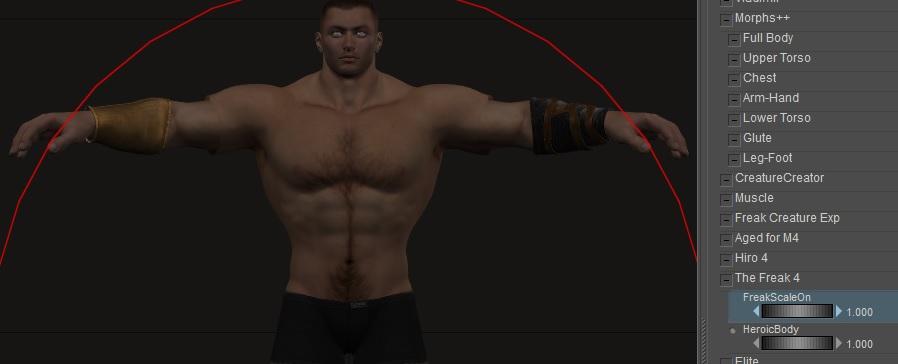
(Just in case - the sequence I used: Load M4 (no morphs applied), Load bracers, tick Include Morphs and Include Scales for the bracers, Conform the bracers, set M4's F4Heroic morph = 1, set M4s FreakScaleOn morph = 1)
Note to self:This thread and my "Converting old conforming clothing to superconforming" thread are starting to overlap now.
Note 2 to self: Over on the corresponding Renerosity thread raven pointed me at an old 2012 thread that's set lots of bells ringing loudly - Solution for Freak4 scaling problem in [PP2012] SR3 .
Applying a face morphRichard Haseltine said:
For non-HD morphs Shape Splitter https://www.daz3d.com/shape-splitter will do the job, but I would imagine this is an HD morph
Shape Splitter can also do negative morphs, thus keeping the head, for example, while dialing everything out, and this does preserve the HD details.
How does Official Bridge Select what Morphs can be exported?DaremoK3 said:
It's a shame that Daz could not persuade Thomas to make Diffeomorphic the official D-2-B Bridge, but this is where we are...
The D-2-B Bridge has it's shortcomings, but I believe it is still workable, and with a little help, could grow into something useable/more user friendly.
* Qualifier for below : I am currently working on this with my GoB_DS addon, and am studying this right now in a couple of different addons/scripts to see how to implement my design...
@ Jeff : Do you mean how are the 'extra' morphs propagated to the export list that you can choose from to add if the 'Include Minimal Morphs' checkbox is not checked?
According to the manual, if it is not checked, the rest (basic head and body) are 'forcibly' exported (and could slow down Blender with the myriad of morphs purchased).
However, this does not seem the case, because I don't see even the basic body morphs that come standard with G8 (Bodybuilder, Emaciated, Pear) exported over, and unless you have all your morphs literally listed in the morphs parameter paths as 'Morphs', they will not propagate to the Morph List so that you may manually add them to the 'silent' FBX export.
Adding "Actor" to the variable array 'aTops' on line 284 in the D-2-B Daz Studio script will allow for this (which I have done, exported, confirmed) -- Only 'Morphs', 'Hidden', and 'Pose' with non-ERC controllers are being propagated to the morph list.
Though, it seems that even this has it's shortcomings, since I selected around 20 Actor morphs, and only 7 are available in Blender with the rest of the auto-exported min. morphs (min morph export NOT checked).
I found a work-around for now to export another FBX (2014-Binary [to match]) with same name to same folder -- overwriting D-2-B export, and setting the export rules to export all morphs which start with 'Genesis8Female.' to give me most of the morphs in my Actor path. They are all available in Blender using D-2-B, so there is probably an issue with the script export.
Wow! That is great to know that you can export your own FBX with the morphs you want in the temp folder. Seems so workable that it's surprising it's now built into the Bridge already...
How does Official Bridge Select what Morphs can be exported?DaremoK3 said:
It's a shame that Daz could not persuade Thomas to make Diffeomorphic the official D-2-B Bridge, but this is where we are...
The D-2-B Bridge has it's shortcomings, but I believe it is still workable, and with a little help, could grow into something useable/more user friendly.
* Qualifier for below : I am currently working on this with my GoB_DS addon, and am studying this right now in a couple of different addons/scripts to see how to implement my design...
@ Jeff : Do you mean how are the 'extra' morphs propagated to the export list that you can choose from to add if the 'Include Minimal Morphs' checkbox is not checked?
According to the manual, if it is not checked, the rest (basic head and body) are 'forcibly' exported (and could slow down Blender with the myriad of morphs purchased).
However, this does not seem the case, because I don't see even the basic body morphs that come standard with G8 (Bodybuilder, Emaciated, Pear) exported over, and unless you have all your morphs literally listed in the morphs parameter paths as 'Morphs', they will not propagate to the Morph List so that you may manually add them to the 'silent' FBX export.
Adding "Actor" to the variable array 'aTops' on line 284 in the D-2-B Daz Studio script will allow for this (which I have done, exported, confirmed) -- Only 'Morphs', 'Hidden', and 'Pose' with non-ERC controllers are being propagated to the morph list.
Though, it seems that even this has it's shortcomings, since I selected around 20 Actor morphs, and only 7 are available in Blender with the rest of the auto-exported min. morphs (min morph export NOT checked).
I found a work-around for now to export another FBX (2014-Binary [to match]) with same name to same folder -- overwriting D-2-B export, and setting the export rules to export all morphs which start with 'Genesis8Female.' to give me most of the morphs in my Actor path. They are all available in Blender using D-2-B, so there is probably an issue with the script export.
Wow! That is great to know that you can export your own FBX with the morphs you want in the temp folder. Seems so workable that it's surprising it's now built into the Bridge already...
Scene Subset and duplicating formulas error?Whatever morphs you have installed for Genesis 8 Female resulting in conflicts and or duplicate formulas etc. will effect any and all characters that are based on Genesis 8 Female, no matter if the character is in a previously saved scene or loaded into an empty scene - The Characters you are buying and installing for Genesis 8 Female are just morphs like any other morph.
Every time you load a Character that is based on Genesis 8 Female, DS reads all the morphs (including character morphs) and if there are conflicts and/or warnings DS writes them to the logfile, this happens also when opening a previously saved scene that has Genesis 8 Female based characters in them.
Aiko 8 is just another character morph for Genesis 8 Female.
The easy option is to remove the characters that are causing warnings, write a ticket and wait if the conflicts will be fixed, in this case the character would be Rin.
Daz Studio MorphsJust a quick line to say thank you for fixing the morph issue in the .14 release
They are now saving, appear and can be edited Keymate OK
I did notice heavy delays in editing, and moving keys, however this was because I was saving everything in the keys frames and I had way to much content installed.
I decided to keep everything I have purchased for Genesis 3 and 8, Dragons an alike , the rest of the models I hardly use, have been uninstalled and hidden, they are still there if i need them in the future, It's reduced the installed content from 3600 + items to 1200 this removed a large number of morphs I rarely use.
Even after this, there is still a large number of morphs installed
Whilst animating a number of frames
I found out if you keyframe say a Genesis 8 figure for example, it saves every Morph that's available to it. Where as if you just keyframe the morph you want for that model, there is a considerable reduction in the number of key frames laid down
Hence editing is much better.
G8M to G8Fgerster said:
The transfer util works fine for bringing g8m morphs to g8f, as long it's not HD.
The Cross-Figure Resource Kit's is only for conforming stuff like cloth.... or do I miss something?
That's what it's for, as an end goal. But you don't have to go that far, and the shaping can be dialed in along with any extreme characters, like the ones that RawArt does. It's basically a quick and dirty way to avoid running into issues with changed rigging, HD morphs that can't transfer, etc. None of that matters if you do all the work on the figure the character was meant for, and the CFRK itself plus UV Swap allows access to outfits and materials.
It's not perfect, for instance on bare-chested characters who go from female to male and are left with weird lines if the PA "helped" us by baking the skin creases under the breasts into the texture maps, but it's got a lot of potential and has saved me some headaches with really extreme or HD characters.
For non-HD stuff and things that don't change the rigging, I still use Transfer Utility. The Cross-Figure Resource Kit trick is one I use explicity for extreme, full-body characters that either have changed rigging or HD features that don't transfer, where I literally just want "what if but male" or "what if but female" and don't intend to spin dials on it. I'm sure there are full-body base male and female morphs for the opposing characters available somewhere that could do the same thing, I just already have the Resource Kit so I use the one that comes with it.
Obviously it won't legitimately transfer the morphs to the other figure, but it's a workaround for situations with things that can't be transferred, or where my skill level is unequal to the task.G8M to G8FThe transfer util works fine for bringing g8m morphs to g8f, as long it's not HD.
The Cross-Figure Resource Kit's is only for conforming stuff like cloth.... or do I miss something?
G8M to G8FYou can give it a shot using the Transfer Utility, though there's no guarantee it'll turn out quite how you want it to depending on how extreme a character is and if anything has been done to the rigging. j cade has written things out very clearly here, and while the instructions specify G3, they also work for G8 (just use G8M/F anywhere it specifies the G3 version): https://www.daz3d.com/forums/discussion/comment/1866876/#Comment_1866876
For full, extreme characters and ones with geografted parts, I just use the Cross-Figure Resource Kit's "Transfer To: ..." morph on whichever figure the character was designed for, which will dial in base G8M and G8F shaping on the opposite figure. It's meant to help generate morphs for clothing, hair, etc. but you could use it to load Dragkon with G8M or Medusa with G8F, and then dial in the CFRK to 100% to add sex-specific shaping in addition to whatever the character is. This can cause some distortion with geografted parts, but if it isn't too bad then textures, accompanying HD morphs, and judicious lighting can often hide the crimes.
You won't have access to the opposite sex's shaping morphs, but if there are a few that you really do want, you can always try transferring them over using the above guide.
How does Official Bridge Select what Morphs can be exported?DaremoK3 said:
It's a shame that Daz could not persuade Thomas to make Diffeomorphic the official D-2-B Bridge, but this is where we are...
The D-2-B Bridge has it's shortcomings, but I believe it is still workable, and with a little help, could grow into something useable/more user friendly.
* Qualifier for below : I am currently working on this with my GoB_DS addon, and am studying this right now in a couple of different addons/scripts to see how to implement my design...
@ Jeff : Do you mean how are the 'extra' morphs propagated to the export list that you can choose from to add if the 'Include Minimal Morphs' checkbox is not checked?
According to the manual, if it is not checked, the rest (basic head and body) are 'forcibly' exported (and could slow down Blender with the myriad of morphs purchased).
However, this does not seem the case, because I don't see even the basic body morphs that come standard with G8 (Bodybuilder, Emaciated, Pear) exported over, and unless you have all your morphs literally listed in the morphs parameter paths as 'Morphs', they will not propagate to the Morph List so that you may manually add them to the 'silent' FBX export.
Adding "Actor" to the variable array 'aTops' on line 284 in the D-2-B Daz Studio script will allow for this (which I have done, exported, confirmed) -- Only 'Morphs', 'Hidden', and 'Pose' with non-ERC controllers are being propagated to the morph list.
Though, it seems that even this has it's shortcomings, since I selected around 20 Actor morphs, and only 7 are available in Blender with the rest of the auto-exported min. morphs (min morph export NOT checked).
I found a work-around for now to export another FBX (2014-Binary [to match]) with same name to same folder -- overwriting D-2-B export, and setting the export rules to export all morphs which start with 'Genesis8Female.' to give me most of the morphs in my Actor path. They are all available in Blender using D-2-B, so there is probably an issue with the script export.
Hmm, thanks for the reply. Interesting info. And yes, I just mean that the D2B plugin pulls up a list of 'morphs to export' but it certainly is not the full set of Morhphs available in the Paramters or Shaping tab. Also, i notice even if I select many of them, they do not export, particularly the awesome Autoface Enhancer Expressions. I'll give a shot at your work-around...creative approach, so, thanks.
Jeff
Applying a face morphFor non-HD morphs Shape Splitter https://www.daz3d.com/shape-splitter will do the job, but I would imagine this is an HD morph
How does Official Bridge Select what Morphs can be exported?It's a shame that Daz could not persuade Thomas to make Diffeomorphic the official D-2-B Bridge, but this is where we are...
The D-2-B Bridge has it's shortcomings, but I believe it is still workable, and with a little help, could grow into something useable/more user friendly.
* Qualifier for below : I am currently working on this with my GoB_DS addon, and am studying this right now in a couple of different addons/scripts to see how to implement my design...
@ Jeff : Do you mean how are the 'extra' morphs propagated to the export list that you can choose from to add if the 'Include Minimal Morphs' checkbox is not checked?
According to the manual, if it is not checked, the rest (basic head and body) are 'forcibly' exported (and could slow down Blender with the myriad of morphs purchased).
However, this does not seem the case, because I don't see even the basic body morphs that come standard with G8 (Bodybuilder, Emaciated, Pear) exported over, and unless you have all your morphs literally listed in the morphs parameter paths as 'Morphs', they will not propagate to the Morph List so that you may manually add them to the 'silent' FBX export.
Adding "Actor" to the variable array 'aTops' on line 284 in the D-2-B Daz Studio script will allow for this (which I have done, exported, confirmed) -- Only 'Morphs', 'Hidden', and 'Pose' with non-ERC controllers are being propagated to the morph list.
Though, it seems that even this has it's shortcomings, since I selected around 20 Actor morphs, and only 7 are available in Blender with the rest of the auto-exported min. morphs (min morph export NOT checked).
I found a work-around for now to export another FBX (2014-Binary [to match]) with same name to same folder -- overwriting D-2-B export, and setting the export rules to export all morphs which start with 'Genesis8Female.' to give me most of the morphs in my Actor path. They are all available in Blender using D-2-B, so there is probably an issue with the script export.
G8M to G8FIs there any way to transfer G8M morphs to G8F and vice versa? For example, is there a process I can follow that would allow me to use Dragkon (G8M) with G8F? Or Medusa (G8F) with G8M?
Daz 3D is part of

Connect
DAZ Productions, Inc.
7533 S Center View Ct #4664
West Jordan, UT 84084Licensing Agreement | Terms of Service | Privacy Policy | EULA
© 2026 Daz Productions Inc. All Rights Reserved.