-
question about creating clothes
Thank you very much! Here is what it looks like in A pose:
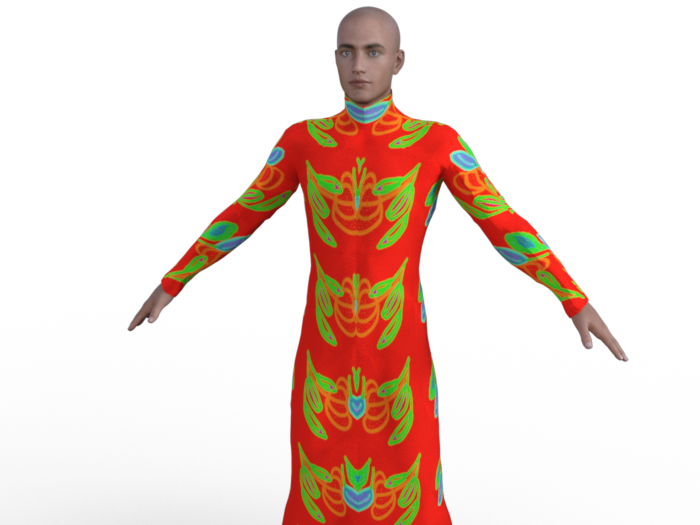
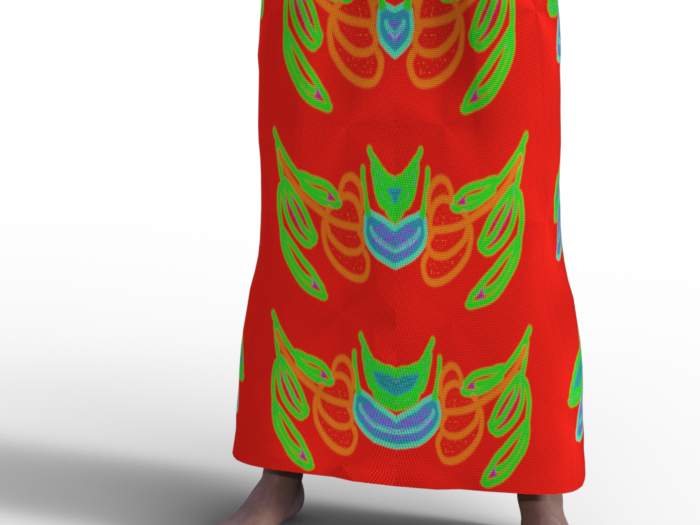
I is needed to zoom to see the normal map effect. Even here, it may be difficult to see...
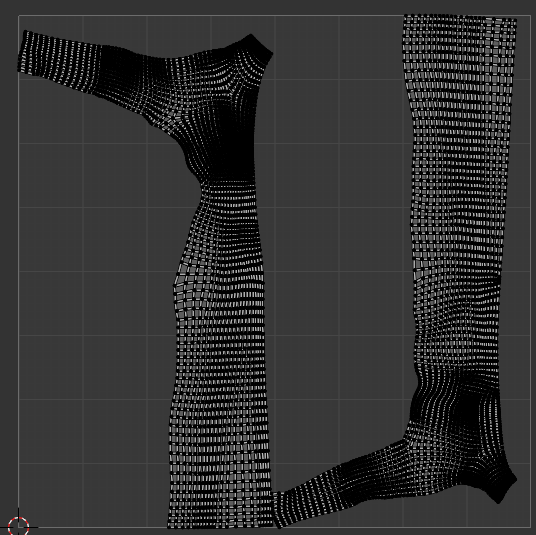
Here is screensjots og thje geometry and tghe UV (I din't know why, but I can't see the UV in DS, only in Blender):
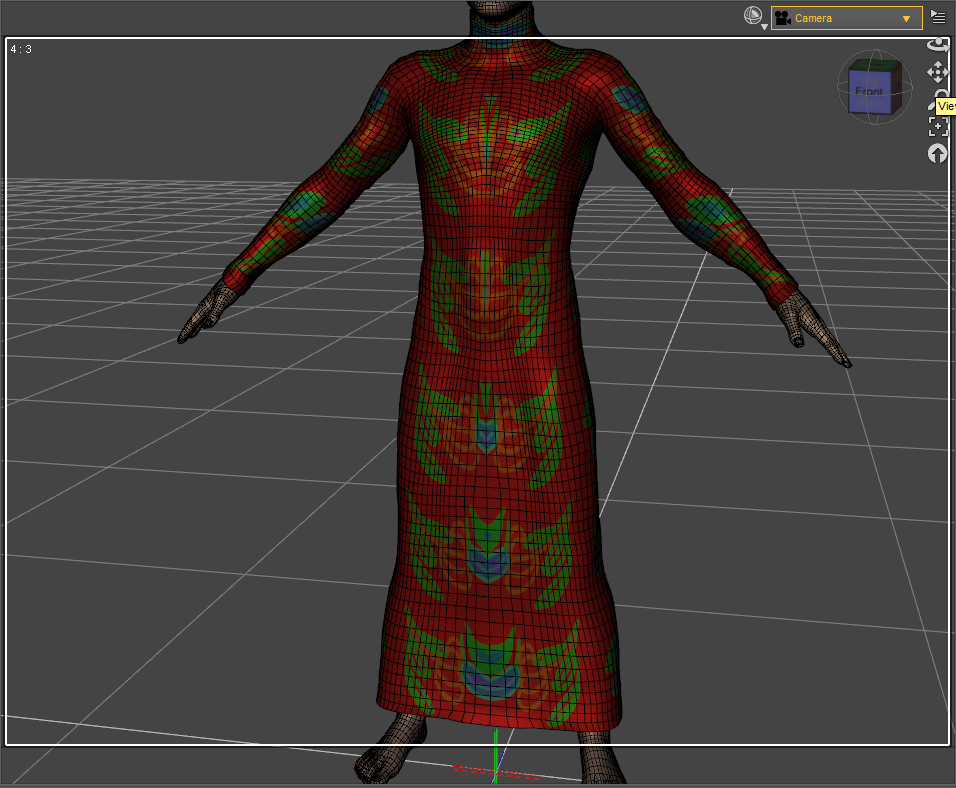

The "broken" part looks like a rigging issue, that might be as simple as hitting it with the smooth brush to correct.
You mean I should import back the cloth to Blender with the pose and correct the default directly on this pose? After that, would I have to import back to DS on this pose as a morph with Morph loader Pro?
1. With poses, you need to necessarily fix corrective morphs on the dress, like the "broken issue / mesh deformation" issue in your 1st screenshot... when Collar / Shoulder bend up, and/or add dForce capability as needed.
Could you tell me how to create a corrective morph, please? I never did that, so I don't know haw it wrks... For the Dforce, I tried to add Dynamic Surface, but it didn't fix the issue. What should I have to do?
3. As for the texture issue, where did you do UV Unwrap... Blender ? Better show its UV map, as well as how the texture looks in A-Pose...
For now, i didn't unwrap by myself, I let the default UV in Blender. More precisely, I don't know if it can help, but I originally create this cloth for MakeHuman, from the MakeCloth helper by combining the t-shirt and the skirt, and making some changes. But in fact, I had never been able to make it work in MH because the mesh was broken (much more than that!) already in the T-pose, and I had no knoledge enough to fix it. To use it in DS, I used the Wrap lattice node to adapt the shape to G8M (that is why I first used a T-pose on G8M). And to obtain the A-pose, I re-used again a lattince node to convert T-pose into A-pose. After that, I used a brush node in Wrap and I sculpted a bit in Blender to fix some issues from the conversion...
I don't know if it could explain the issues that I have now in DS...
Besides, I recommend a tutorial series from Mada: https://www.youtube.com/watch?v=Ii16tUmLzD8&list=PL2SdKrOTXeXA1qMgNE84AsM8_Wq63gOBF You better first of all understand the typical workflow of make clothing in DS...
Edit:
I am testing different pose, and I can see that there are iisues for many of them; for example:
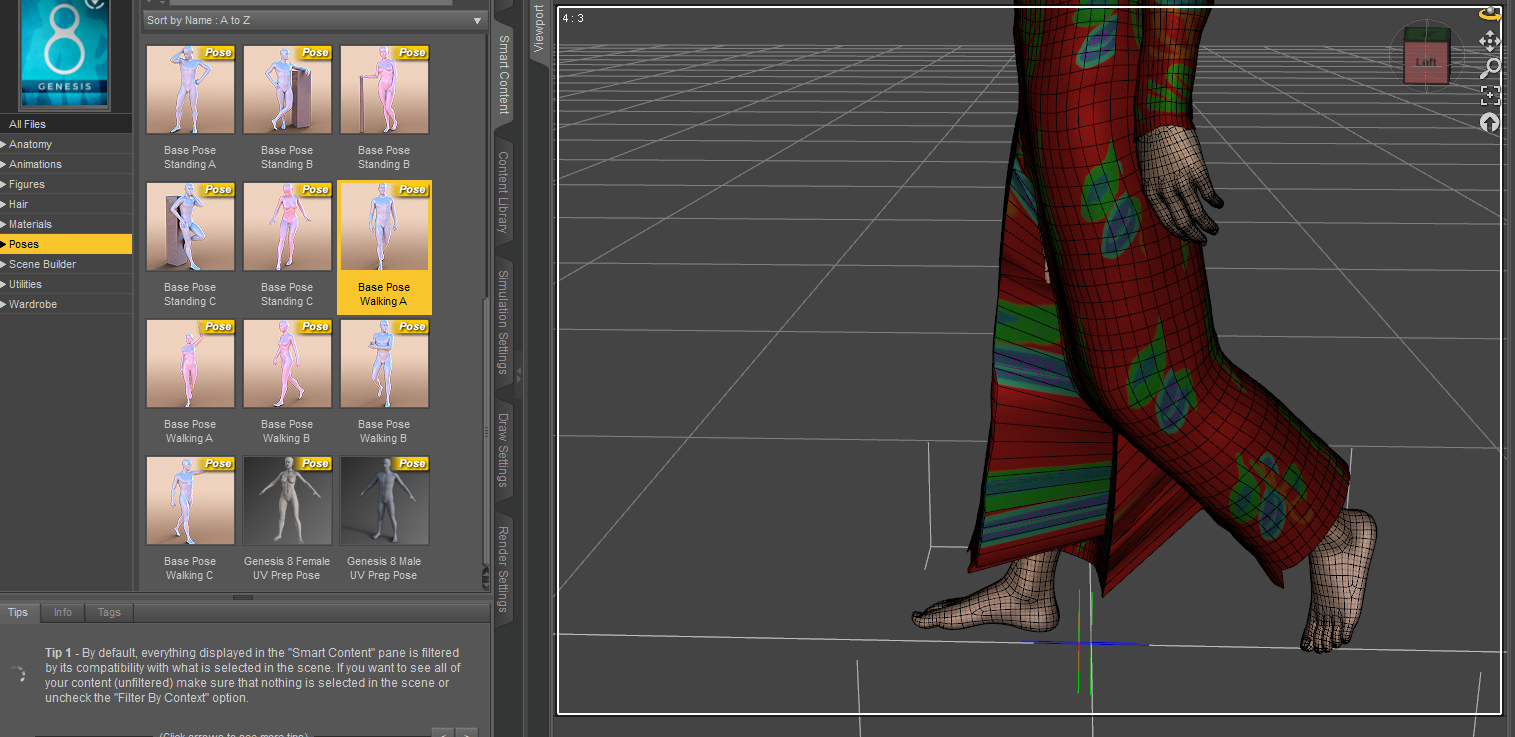
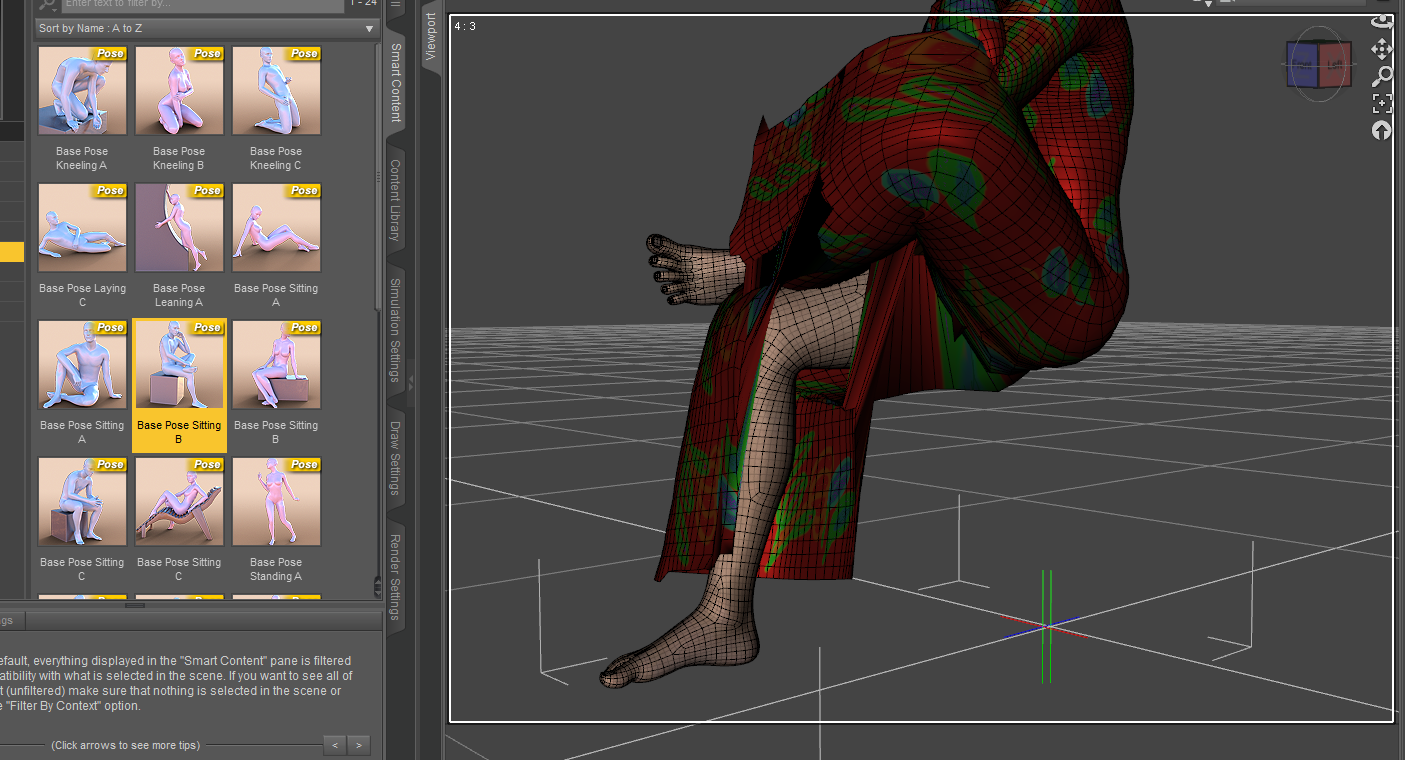
Do you think that i should create one corrective morph by pose, or would it be possible to fix all the issues in the same time?
Thank you very much! I will look at here!
I'm having problem with Importing obj from Marvelous Desginer as MorphDoing export from daz and import back (morph loader) immediately results no problem.
-----
The number of vertices of obj imported from MD to DAZ, is the same to the original.
The only difference is the number of total faces, which is double as the error suggested.
I'm having problem with Importing obj from Marvelous Desginer as MorphI realise the morph loader error mentions facet count, but does facet count even matter? I thought all that matters was vert count. (Edit: I tested by exporting primitive to blender and triangulating it and morphing it and it still loaded into morph loader pro, so triangulation is not inherently an issue)
Export obj from Daz
Import the exported obj into Daz
Check vert count in Node info - Are they the same? If not, you did something wrong.
If same, proceed to import into MD.
Immediately export from MD
Import the obj into Daz
Check vert counts in Node info - Are they the same?
[Genesis 9] Characters staying white when exported to BlenderAs for diffeomorphic. From the product description it seems to me that toon custom shaders are provided, so they can't import, only standard shaders are imported. Anyway, you can try to convert to uber before exporting. Another thing is to set "build unused textures" in the global settings, this way at least all the textures are imported, then you need to connect the shaders by hand.
Looking for a default folder for Smart ContentIf you didn't create your own metadata inside DS then going to the Content Library option menu, selecting Content DB Maintenance, and checking Reimport Metadata, then selecting your products in the next dialogue should do it. If you had exported userdata from the ame dialogue on the previouss et up then you would also be able to reimport that through the same dialogue.
[Genesis 9] Characters staying white when exported to BlenderSo I use this pack : https://www.daz3d.com/fpe-toon-textures-for-genesis-9 (that I find absolutely amazing) and decided to create a POC character. Unfortunately, when I import it to blender, the characters keep their white skin. It is almost as if the pack didn't come with any other skintone.
First file is from Daz and the second one is from Blender.
How to use hair on another character?yuyu.atem said:
Thank you very much! I have these options before to save it; could you tell me what is the difference between the Product Name and the Item name, please?
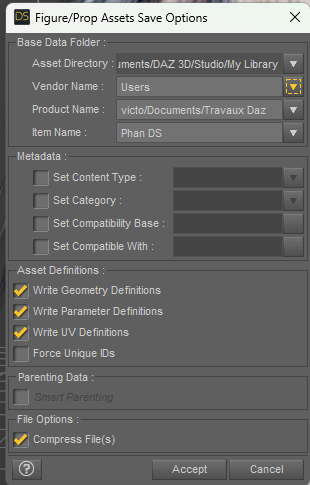
Product Name, Item Name, actually they're just file paths (folders), so technically you can define whatever you want as along as it's easy to memorize and manage. A commonly-used way is to define then hieararchically, e.g: the product is an Outfit, then items are Top, Skirt, Shoes, Necklace, etc. You can add "/" to add more sub-folders if needed.
Further, is there some tab I should check or uncheck before saving? For example, if I do that, could the hair appear in the smart content?
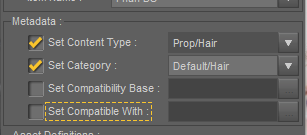
I heard it was difficult to create metadata, so I don't know if what I checked is correct...
The above metadata is just for the user-facing DUF file, so with defined Content Type, you can see the Type Icon in the upper right corner of the file thumbnail; with defined Category, you can filter the file in Smart Content > Files tab, by Categories. But this DUF file does not belong to any Product in Smart Content.... If you need to assign it to a Product, you have to use the action: Create a Product from... and type in the prodcut name.
Thank you in advance!
The Mac FAQI just have to turn it on, move my cursor over the screen and it will crash. I have to have the cursor on the opening image to avoid (mostly) a crash. So I start with opening, pause to let everything settle down, then click on the viewport. But yesterday a new way happened. I was putting in metadata and checking other files, and put my cursor over a line, then moved it down the line of products to see what might be triggering a 'ghost' Lost in Found issue. After a few hours, it started to crash when I used my down/up arrow keys. Rebooting did not clear it up. So I had to manually do that line movement with my mouse. Today, no issues. No idea what went on yesterday. But if I touch the mouse to the top line of options, without touching the viewport, without fail, D|S will crash.
Figuring Out DzSetting keys/properties for DzActionI know how to find the names of DzActions and also how to trigger the actions. For example, using triggerWithSettings method - but that requires a settings object. I need to be able to find out the name of the settings properties.
For example, in the Silent OBJ Import script sample on the daz website, a DzFileIOSettings is created and some settings are set with it. "Scale," "LatAxis," "InvertDepth," "RunSilent" etc are some of the keys shown in the sample script.
What I need is to be able to find the key names for the DzAction I want to use. For context, one of the actions I am trying to use is DzJECreateBoneAction. But I also use other actions, so I need a way to figure out how to populate DzSetting objects for those actions as well, by finding out the key names. Ideally, I want to be able to automate things as much as possible, silently running these actions and being able to populate the settings files as much as possible without manual input by the user.
Huge Opportunity for the Future of DAZ if they are bold enough to embrace it.a MetaHuman in Unreal, I have to:
go to a website
build a character off an existing base
open the Quixel Bridge
download the MetaHuman to my hard drive
import it into the scene
Even after all that rigamarole, I'm left with a figure that is a well-designed but very limited face (no option for non-human features, for example) on a body over which you have almost no control, with relatively few choices for hair and even fewer for clothing. That is Epic's native workflow for their own character design system, and it SUUUUUUUUUUCKS.
@Gordig
I don’t use UE5 but I am sure there are more options now for customization of the Metahumans
(Not free though)
I'm also not talking strictly about drawing in existing Blender/Maya/Unreal etc. users, but more for keeping existing Daz users in the Daz ecosystem when they "outgrow" DS instead of switching to the ecosystem of their current program.
which is a fools gambit because people eventuality realize that in ecosystem content is the best option for their production pipelines as opposed allowing third parties(WHOM THEY DO NOT CONTROL) to be the single point of failure in their productions& business models.
Look at what happen to the poser market after Daz stopped producing the.CR2 based figure formats.

Or more recently ,look at what is happening to Insydium now that Maxon finally created a production quality native particle VFX system for C4D.
Reallusion wisely realized the folly of such extreme dependency on third party figure content years ago
hence the creation of Character creator and at present the majority of the Iclone user base uses
the native CC4 figures despite the fact that CC4 “imports”
Genesis 1,2,3,8,9 and their clothing.
I really only touch DS these days to build characters and export characters and other assets out, so the ability to do that natively in Houdini, for example, would be a massive improvement for my workflow. Daz doesn't make money off of me using DS; they make money selling content, which I have continued to buy despite DS being reduced to a necessary evil for me..
I get it.. you do not want to give up the “Daz studio experience” comfort bubble when creating characters for Houdini.
However you seem to be ignoring the burden that Daz would have to endure trying to replicate the “ Daz studio experience” in external programs, that could release a update at any given moment that breaks compatibility.
(do the Daz “bridges” even support the latest version of Maya,C4D or Blender, as July 21 ,2024??
and even where they do you always get a compromised version of genesis in the external app due to proprietary Daz figure tech with DS dependencies.)This typically forces users to stay with older versions of their main 3DCC (if possible) and forego the latest new features of Maya, Houdini or C4D just to maintain that “ Daz studio experience”.
I'm not saying this is the direction Daz is likely to go, or should go, or that they would be successful if they did. It's just what I want.
Fair enough, But this thread was started ,by the OP, on the premise that Daz is somehow missing out on some great
“untapped market/huge opportunity"
I think this is a flawed premise.And your personal “Ideal scenario” is based on the notion that Daz should try to prevent people from completely migrating away from buying Daz content when they become fully steeped in other Eco systems.(Blender,Maya,C4D,Iclone)
Hobbyists usally cannot afford to tinker with anything other than Blender so their buying habits are likely not affected any way
Professional studios for games & films will want to own ALL of the rights to their assets for further IP monetization in future,
So trying to keep them on the “content reservation” is probably a wasted effort IMHO as clinging to the Daz content eco system is more of a hinderance than an advantage due both licensing and the
long term compatibility maintainance issues I outlined earlier.How to use hair on another character?Thank you very much! I have these options before to save it; could you tell me what is the difference between the Product Name and the Item name, please?
Further, is there some tab I should check or uncheck before saving? For example, if I do that, could the hair appear in the smart content?
I heard it was difficult to create metadata, so I don't know if what I checked is correct...
Thank you in advance!
Searching for a Molotov Cocktail prop, does anyone where I can get one?Faeryl Womyn said:
Here you go and you don't have to import it, just manually install, tho I believe there's a script somewhere so DIM can be used
https://www.renderosity.com/freestuff/items/67775/cybertenkos-molotov
Cybertenko's MC is excellent; I own it.
Huge Opportunity for the Future of DAZ if they are bold enough to embrace it.@wolf359 Your argument is circular. You keep bringing up entrenched pipeline habits, but what I'm talking about is specifically an improved pipeline. I'm also not talking strictly about drawing in existing Blender/Maya/Unreal etc. users, but more for keeping existing Daz users in the Daz ecosystem when they "outgrow" DS instead of switching to the ecosystem of their current program. I really only touch DS these days to build characters and export characters and other assets out, so the ability to do that natively in Houdini, for example, would be a massive improvement for my workflow. Daz doesn't make money off of me using DS; they make money selling content, which I have continued to buy despite DS being reduced to a necessary evil for me. If I want to use, for example, a MetaHuman in Unreal, I have to:
- go to a website
- build a character off an existing base
- open the Quixel Bridge
- download the MetaHuman to my hard drive
- import it into the scene
Even after all that rigamarole, I'm left with a figure that is a well-designed but very limited face (no option for non-human features, for example) on a body over which you have almost no control, with relatively few choices for hair and even fewer for clothing. That is Epic's native workflow for their own character design system, and it SUUUUUUUUUUCKS. Even if Daz operated a website for character creation that functioned largely the same as MetaHuman Creator, you would have far more options for customization and far more control over what your character looked like.
There's also something more basic that you're missing, which is that I'm not saying this is the direction Daz is likely to go, or should go, or that they would be successful if they did. It's just what I want. DS is REALLY, REALLY GOOD for character creation and customization, arguably best-in-class, but other programs are better at basically every other part of a 3D workflow, so why not take what makes DS good and port it into other programs?
Huge Opportunity for the Future of DAZ if they are bold enough to embrace it.Gordig said:
Honestly, what I want most from Daz is a system where you have access to your entire Daz library to assemble whatever character you want and import that directly to whatever program you want, whether that's a separate program like Kitbash3D's Cargo or a plugin you can use in the host program. To be able not only to get Daz content into other programs easily, but to have Daz's ease-of-use for editing morphs, changing clothing etc without having to completely re-export it.
Well the part about having everything available is what I think would be the best use of "the cloud". It would be nice if every time a scene was loaded or something was added to a scene, those things were downloaded from a remote server if they're not installed locally, and then they disappear again after the scene is closed. Then there would be no issue wih having a million things installed and most of them forgotten, and less issues with conflicts between installed items. And for the people who are concerned about bandwidth, maybe those items could be stored in a cache so frequently used items don't have to be downloaded every time.
Creating a custom image for Smart Content productIt's not a matter of editing the metadata, just of putting the file with the right naming structure in the right location. Wherever your Daz content is, find the product you're looking to edit in Library/Runtime/Support, put your desired thumbnail in that folder, then copy/paste the full name of the product to your thumbnail, deleting/overwriting the thumbnail that's already in there.
Picking a random example from my own runtime, DAZ_3D_66337_Ocean_Wonders.dsx is the product, and DAZ_3D_66337_Ocean_Wonders.jpg is the thumbnail.
Creating a custom image for Smart Content productHi, I would like to change the standard Smart Content icon with a different image .png. I am trying to use the option "Edit Metadata", but I cannot seem to find a way to do it. Do I need to convert my .png in a .dsx file? Could anyone help please?
Looking for large McMansionAlthough it may only be good for exteriors, if you are willing to import an obj model and work with the resulting textures there is this:
https://free3d.com/3d-model/mcmansion-house-7268.html
Also check out the 'single home' models by DreamlandModels over at Renderosity.
Searching for a Molotov Cocktail prop, does anyone where I can get one?Here you go and you don't have to import it, just manually install, tho I believe there's a script somewhere so DIM can be used
https://www.renderosity.com/freestuff/items/67775/cybertenkos-molotov
Let's appreciate/discuss today's new releases - more ongoinger threadbarbult said:
tsroemi said:
barbult said:
If you bought Cybertenko items, check them carefully. I bought the Retro Biker for G8M, which I used in the image above with Fabianas great new chains. The jacket has unwelded parts that separate and curve unnaturally and make holes in the garment, because of the smoothing that is applied by default when the item is loaded (screenshot). There is only one morph in the jacket (to fit over a thick T-shirt). There are no JCMs to help adjust to posing. I had a horrible time in Blender trying to make this thing look decent for my render. I don't believe this particular item is Daz ready at all. Of course there is no metadata, since it is imported from another store in a big batch of stuff. Buyer beware applies here.
Thanks, that's good to know. I still have some items of his in my wishlist at Rendo, stuff that nobody else seems to make (like accurate nuns' headwear from different orders and such). Will be extra careful with what I choose. Hope you still managed a good render in the end for all your troubles!
I bought it to discount other items in the cart, so I feel morally obligated to keep it. I've now spent most of a day welding the loose pieces in Blender, adjusting some weight mapping, and adding some JCMs to make it more usable for me. The texturing looks pretty nice, I think. This product makes me wonder what, if any, QA checking is done on these imported products, and what their standards are. Are the Rendo items you are interested in advertised as DS items?
I think they must be, since they're for G8. Will better check again though. I guess I won't mind that much if the clothes don't work all that well because I'm mostly after the headwear in each case, and these will probably not pose much of a problem. But these unwelded bits and pieces just shouldn't happen in general, that is just sloppy modelling.
Distorted feet, high heelsI'd like to export my Genesis 8 character (wearing heels) to Blender 3.6. If I send them to Blender together, the heels and the shoes get distorted. They're fine if I export/import just the G8 only. But, I'm hoping not to have to do that. Is there a way to fix this? I exported with default Daz to Blender bridge settings.
Daz 3D is part of

Connect
DAZ Productions, Inc.
7533 S Center View Ct #4664
West Jordan, UT 84084Licensing Agreement | Terms of Service | Privacy Policy | EULA
© 2026 Daz Productions Inc. All Rights Reserved.


















