-
[Released] ManFriday's dForce Companion [Commercial]
Richard Haseltine said:
videoninja719 said:
is this a dforce maker or something. i am looking for something that can make a cloth from marvelous designer into dforce
With the imported item selected, Edit>Figure>Geometry>Add dForce Modifier : Dynamic Surface. Optionally you can rig it by having the item and the figure loaded (the clothing has to fit on the figure without modification) and using Edit>Figure>Transfer Utility, setting the Source to the figure and the imported object as the Target.
Thank you sir. This really helps!!!
Are there any actually good face cloning tools out there? (E.g. not Facegen or Headshop)If you are looking for celebrities you can goto https://www.renderhub.com/search-for-3d?s=bust or equivilant, grab a bust obj import that into Daz, scale it to your g8 head morph it till it's close, export g8 to blender and along with the bust align them very close, vertex group select just the g8 face and apply shrinkwrap. Export from blender and reimport back into Daz using Morph Loader Pro.
Sculpting male and female anatomical elements in ZBrush workflow suggestionsThis is actually a prety serious problem with grafts, as you cant work on the full model. you will have to work on them as on separate models.
if you want to edit anatomical elements you need to select and edit exactly that in the ZBrush then import changes a morph.
if you export the full model you will no longer be able to reimport it back as morph and lose all rigging and morphs
there are no problems if changes are confined to the geograft area but if changes go beyond the geograft it becomes pretty troublesome.
Feedback for the C4D Bridgemmdestiny said:
If anyone is interested, I can put together a tutorial for how to convert pose morph target meshes into simple vertex delta morphs in the pose morph tag. Again, this is much more performance friendly and in my opinion much more versatile.
I'm interested as well if you haven't done so already.
Unreal Engine 4.26 is Oùt!!!metaside said:
Quick question: I'm still on 4.25 right now because of some plugins, but how would I update the bridge? I noticed that in DIM it still seems to be an old version "Packaged Date: Monday, August 24, 2020 11:22:44 PM (2020-08-24T21:22:44Z)".
Oh and merry xmas / happy holidays everybody!
Here is an article : https://www.daz3d.com/forums/discussion/452926/daz-to-unreal-bridge-plugin-showing-problem-morph-exporting-fix
Scaling issues?Genesis 8 has lots of morphs available for body shaping. It will cost a bit to get the majority of them, but it is worth it. There are also some free ones but, caveat emptor, so to speak. Using the "x,y,z scale" dials is definitely not ideal for individual body parts and will lead to all sorts of distortions which will not look good in your renders. Some Morph Packs have specific "scale" morphs available which also take in to account the movement of the joint positions. You can also make your own morphs if you want to invest the time, using programs such as ZBrush or Blender (this is freeware). DAZ Studio has a function called GoZ which is used for transfering figure/objects between DS and ZB without the need to change overall scale.
Spin those dials!!
Good luck and have fun :)
RareStone's Face Morphs Collection for Genesis 8 Femaleclivewil2 said:
The Blurst of Times said:
The set is excellent. Good variety, dials with actual helpful descriptions in general.
However, from a non-artistic standpoint, there were issues with the set when it was released
the only issue i've found so far is with irises, and a grey smooth-group or shader glitch if i scale them up too far. otherwise, i was completely blown away when i bought what i thought was 'just another morph kit' - this one gives me a lot finer control than any of my other kits, and i just want to say thanks to Rarestone. good job.
@clivewil2, If I may, I suggest you also purchase/investigate EJ Face Morphs and Details (there's also a male version), which provides HD level morphing covering many areas that are inaccessible by the Daz Originals, 200 Head Morphs, and Rarestone packs.
RareStone's Face Morphs Collection for Genesis 8 FemaleThe Blurst of Times said:
The set is excellent. Good variety, dials with actual helpful descriptions in general.
However, from a non-artistic standpoint, there were issues with the set when it was released
the only issue i've found so far is with irises, and a grey smooth-group or shader glitch if i scale them up too far. otherwise, i was completely blown away when i bought what i thought was 'just another morph kit' - this one gives me a lot finer control than any of my other kits, and i just want to say thanks to Rarestone. good job.
Shrinkwrapping a custom head to G8?Hi all,
I did use Wrap3D after all, but I need one final piece of the puzzle: I have morph now, but I want it to affect just the head... Now it affects the entire figure. Is tehre a way in Daz Studio to limit the effect of the morph to the head only? Thanks a lot!!! Also, I have found that when applying the moprh to an already posed figure, the figure reverts to the default pose and to the center of the scene... How do I get rid of that?Thanks a lot,
Kind regards,
Me
Request for more polygonal dforce hair.WendyLuvsCatz said:
we we have Carrara

just a shame DAZ don't want to develop it anymore, since Octane was added seamlessly integrated with hair I am sure iray could be
we already have offsite solutions for Genesis 3 & 8 too and a HD morph import option
<Sigh> Carrara ...
Imagine, what would it be by now under constant development and progressing....
<sigh>Are there any actually good face cloning tools out there? (E.g. not Facegen or Headshop)stephenschoon said:
Paradigm said:
What if I have neither?
Commision TritiumCG to create a morph for you ?
Seasons greetings from Steve.Thanks for the tip, TritiumCG on dA has a very well Aiko3 full morph on G8F for free!

https://www.deviantart.com/tritiumcg/art/Aiko-3-Reimagined-for-G8F-861367761
IRAY Photorealism?j cade said:
charles said:
My bad 2019 looks like, had to find the original. 2020 has seemed doubly long. The chracter is Bridget HD so wasn't availble that long ago either. I hadn't heard of this Affinity Photo before but I'm looking at it now. The shadows and color variation is excellent. I haven't seen many good closeups of fingers with g8. Is part of your morph from the g8 the fingers? I see what you mean about the eyes. Maybe take the eyes from a standard g8 and replace them? I've been considering a test to replace the G8 eyes with something like this but haven't gotten to it yet. https://www.turbosquid.com/3d-models/human-eye-3d-max/747725
IMO the problem with Genesis eyes is less the geometry and more how iray handles refraction and shadows -
this model would not behave like this in iray
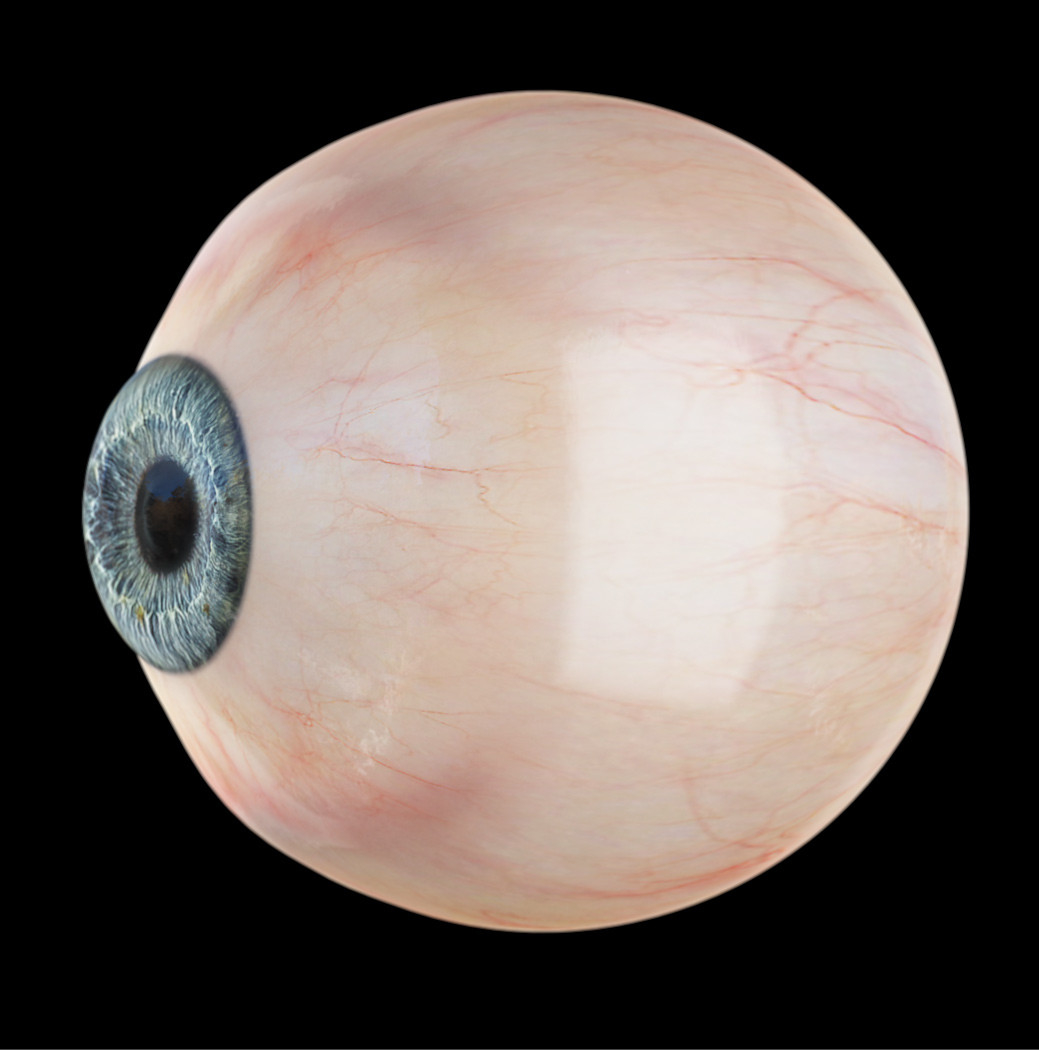
to get this sort of refraction in Iray you have to turn thinwalled off - at which point the cornea and eyesurface will cast massive shadows on the eye
thinwalled on
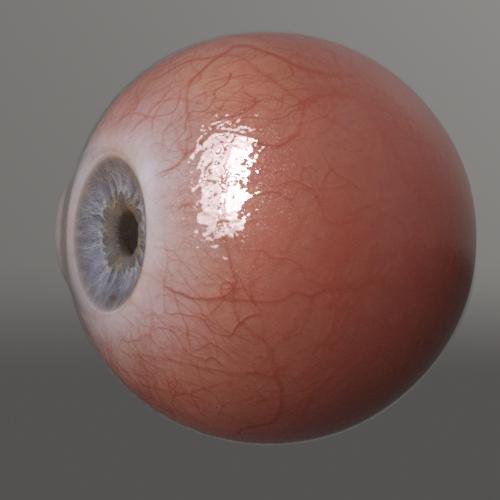
the refraction is sad
thinwalled off
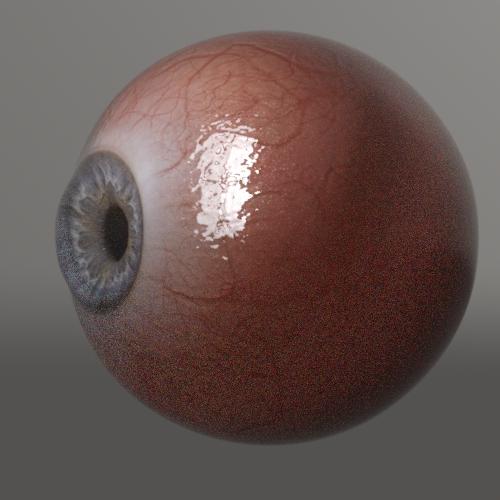
proper refraction but massive shadowing issues, and I swear it messes with the sss somehow (also it takes way longer to render)
Thinwalled on/off also effects how the light hits the iris proper refraction tends to make the eye look less flat and dead even when you're looking at it from the front
honestly I preferred the g3 eye setup with the cornea and sclera sharing a surface. You could turn thinwalled off and you got weird shadowing on the cornea but at least it wasn't also on the sclera
Wow thank you for the tests and info on those alternate eyes!
Help with 3D Universe's Character MixerThe short: Need help with adding morphs to randomize list, and how to mass set new defaults to current values.
Not all head/body morphs show up on the list (Marcius's Dao for example) despite showing in the same category as others. Is there a way to manually edit its info so it shows? As far as I can tell. Morphs that also have FBM or FHM do not show on the list to be randomized.
The "Reset Head/Body" checkbox is a major bane whether it is on or off. It should be separated like "Reset Head" or "Reset Body"
Having that on resets the entire figure. So if you only randomize the head, it resets the body and vice-versa.
Having that box unchecked has a compounding effect. Say I have 4 Heads selected and limit the Total Morphs to Include to 3. It is not uncommon for events to play out as so.
Round 1 (A=20, B=50, C=30); Round 2 ( C=60, D=40); Total morph values (A=20, B=50, C=60, D=40)
The only solution I have found is to manually change each affected morphs default values to there new setting once I have found something I like. This becomes annoying when I have a number of morphs randomized or if I use a pre morphed model and neglect to reset defaults to 0 before randomizing.Edit: Found a better solution for the Head/Body resetting. Simply lock the morphs. That stops them from resetting.
Error About "Golden Palace For G8F"I just tried it and GP works fine for me.
Here are some things that can cause problems-
1. If you have deleated a previous anatomical element product, the geoshells (effect layers) for them don't get deleted and mask the material transfer. Delete these manually in the scene tab (see picture).
2. If you have a wet skin (or any) geoshell applied it does the same. There is a script on the forum where you bought GP to fix that, or I could give you a link.
3. Make sure you have the main figure selected (not the gen) when applying the shell and running the material transfer script.
Hope this helps celluloidliu.
 How to make a morph for blender in zbrush for a non-zero pose?
A character in a blender, I set a pose, and send a mesh to zbrush, create a morph, send a mesh to the blender, and create a Shape key.
If the character was in zero position, then everything is fine, Shape key (morph) works correctly. But if the character was in a pose, then the Shape key adds morph relative to the zero pose, and not the one that I set. (That is, incorrectly creates a shape key(morph))
How do I fix this?
So far, I can create a morph in any position directly in the blender in sculpting mode, but I'm uncomfortable with what I want in zbrush.
I do not know, there is for Blender, something like Morph Loader Pro from Daz?So, How do you organize your Custom Characters and Render assets?For my custom characters that I use, I do a total of 4 things. First I save a scene that has the full morph and skin setup. Then I save a material preset for the skin. Next I save a morph preset and lastly, I save a scene subset. The scene subset usually has a hair model or two that I like on the character in it as well along with fiber mesh eyebrows and eyelashes. I use the scene subset whatever I want to use that character again. It's a lot more convenient then having to load the base and apply the morps, skin and such.
ORK Rocks!!!Thanks V. I've been playing around with the NodeGraphEditor and just love it!
Coming from Carrara, I'm used to having to tweak my shaders when I'm introducing new products to my library, then I save them with my new settings.
I am still having a bit of difficulties with eyes. The Irises just seem to glow flat, with no apparent sparkle to the outer layers. I started adding some of my Carrara shader techniques to the irides, and I've been finding success. I just have to figure out how to get the moisture and cornea to glisten.
Here is the test bed scene I was using to work on these things - as well, I had a real blast tweaking the shaders for the incredible Aeon Soul "The Legend" armor that she's wearing. I added my own twists by texturing their AlphaKini to match The Legend. I'm also really loving Linday's awesome hair and Thorneworks/Handspan Studios' Lara, whom she is based on.
In all of this, I ended up dialing back significantly on the stylized look at bring her back closer to reality. Just a taste thing. I don't really care how "Real" she looks! ;)
The HDRI is from one of Horo's packs. I love that guy!
The Octane Render Kit is a real time/life saver! Not only that, but it's a great learning tool - comparing what the plugin itself creates as an automated conversion compared to V's amazing preset enhancements - try different material options and compare, etc., She really packed the ORK with a plethora of great tools! Those incredible Mesh Lights, for example... I love those things! She put a morph slider on them to recess the light back into the fixture to vary the effect... Genius!
...and those lights work in Iray too!!!
To the Blender usersgregsgraphics_cafd0962a0 said:
????? or you can export genesis, sculpt it however you want, and import it back as a morph. You aren't limited to dial spinning. you could also paint textures on a morphed shape, make new uvs, create a different rig if you feel like it - now some of these things you need an external program (tbf if we're talking texture painting odds are you're using an external program for blender too - blender's texture painting tools are less than great) but you need external programs to do stuff is very different than "can't be done" if you're completely excluding external programs then the real problem is that you can only render primitives morphed with dforms as ever mesh was imported from another program.
You don't even have to start with the same geometry - you could import a completey custom figure rig them etc (there are several non genesis figures right in the store)
edit: I would say access to the sort of equivalent of being able to make HD morphs for non-pas in blender (via multiresolution sculpting) is a tick in blender's favor on the character creation front
you can definitely do custom uvs for genesis though - I've even made some
Exporting Genesis and sculpting however you want then importing it back as a morph is still starting out with the same mesh, manipulating the mesh, and using a morph to change that same mesh. No matter how you look at it, making new characters from a base mesh via morphs is still being limited to the given number of polygons. In other words, you need a lot of polygons to shape a base mesh into a completely new character, and in some cases not all of those verts or polygons are necessary to the shape. In other words, there are often extraneous polys on the character that aren't doing anything but taking up resources. If you model a character the way you want it to begin with, this isn't usually a problem, if you know what you're doing.
you could also paint textures on a morphed shape, make new uvs, create a different rig if you feel like it - now some of these things you need an external program (tbf if we're talking texture painting odds are you're using an external program for blender too - blender's texture painting tools are less than great) but you need external programs to do stuff is very different than "can't be done"
Very true. However, where do you do all that work aside from rigging? Probably you'd need something like Blender. So again, modeling and making a character the way you need it to begin with is probably more efficient, and you can be very specific with polygon count. If you're going to go through all that trouble of making completely new UV sets and rig on a high poly character morph, it seems to make sense then to just create a new one from scratch. I'd have to assume you would if you can do all that anyway. Making one from scratch allows you to be much more efficient with polygons and UV's anyway.
I didn't mean to suggest stuff like this can't be done with DS, but most of this type of work would require an app like Blender anyway. And sure, texture painting is often done in other packages with Blender but it doesn't have to be. That's just an option and a choice. Are there texture painting options built into DS that equal those available in Blender? I honestly don't know that answer, I'm not being a wise guy there.
DS can absolutely create characters. No doubt about it. However, the efficiency and specificity of character design in Blender (or other software packages like Blender) are what makes it stand apart. Maybe I don't need a character with 19,000 polygons (or whatever Genesis is these days) for a particular project. With DS, I'm kind of stuck with the Genesis base mesh no matter what amount of morphing I do to it unless I turn to an outside application like Blender and generate a brand new base mesh. Then you are correct in that I can import that back into DS and rig it, etc.
All my custom figures were modeled in Blender and rigged in Daz Studio. I tried different software for rigging including Blender, but found that Studio was the most useful for that purposes. At least for me.
PS: Genesis consists of between 16000 and 17000 polygons these days.
IRAY Photorealism?j cade said:
Thinwalled on/off also effects how the light hits the iris proper refraction tends to make the eye look less flat and dead even when you're looking at it from the front
honestly I preferred the g3 eye setup with the cornea and sclera sharing a surface. You could turn thinwalled off and you got weird shadowing on the cornea but at least it wasn't also on the sclera
Oy, eyes definitely cause problems outside of the morph-induced problems I have. I have a few renders where the skin/figure looks fine, but the eyes look 2D. On the other hand, I rarely zoom up close enough to faces to have the problems be too noticeable.
PS, the lipstick is actually a red tint applied to…something in the lips, along with reducing the thin coat roughness. So, for that render, I kind of did just put red in the lips. I just didn't do too much of it.
IRAY Photorealism?charles said:
My bad 2019 looks like, had to find the original. 2020 has seemed doubly long. The chracter is Bridget HD so wasn't availble that long ago either. I hadn't heard of this Affinity Photo before but I'm looking at it now. The shadows and color variation is excellent. I haven't seen many good closeups of fingers with g8. Is part of your morph from the g8 the fingers? I see what you mean about the eyes. Maybe take the eyes from a standard g8 and replace them? I've been considering a test to replace the G8 eyes with something like this but haven't gotten to it yet. https://www.turbosquid.com/3d-models/human-eye-3d-max/747725
I have another character with problems eyes. Massively problematic eyes, where the eyesockets have a fold in them—the eyes are where my G3 to G8 transfers have failed. When I tried to zero out the eyes from the morph, it didn't work because they weren't in the right place an the eyelids didn't work right. Which means it's likely even brilliantly modeled external eyes won't work. It might be that the morph for this character (LY Jessenia HD switched to a G8 morph using Sickle Yield's technique) isn't so far removed from the character minus that morph that I can't fix it that way. I can probably change the morph tolerances to fix it. I hope :)
The hand/finger detail comes from a Daz base character HD pack, I think. The skin is also a Daz base character, one of the G8 East Asian/Polyneasian characters. I don't know about the northern European characters, but the darker skinned characters from Daz have outstanding skins, provided you don't want many "imperfections." I don't think they render/tone them in a way that shows off how much detail there is sitting there for extraction with the right lighting and postwork to bring it out*. Affinity Photo has some 32-bit-related bugs and a sometimes non-intuitive workflow coming from Photoshop, but I LOVE, LOVE, LOVE the toning workflow. You can really dial in the detail without it looking etched.
*Oh, wait, I do: I changed my shader settings a lot, in part using learnings from @JCade's work along with my own brown-skinned character expiramentation. Not that they couldn't adopt those settings.
Daz 3D is part of

Connect
DAZ Productions, Inc.
7533 S Center View Ct #4664
West Jordan, UT 84084Licensing Agreement | Terms of Service | Privacy Policy | EULA
© 2026 Daz Productions Inc. All Rights Reserved.