-
Daz Studio Pro BETA - version 4.15.0.30! (*UPDATED*)
Public Beta (4.15.0.12)
-
Source maintenance
-
Setting the maximum number of recent open files (via API) now persists between sessions
-
Updated public API documentation; DzContentMgr
-
Explicitly enable Iray instancing shift (Render Settings > Optimization > Instancing Optimization) for “auto” (Auto) and “on” (Memory) states instead of relying on default/initialized value
-
No material impact on precision issues with close surfaces on objects positioned far from world origin
-
-
Force update of scene shift for each frame of an NVIDIA Iray render
-
No material impact on precision issues with close surfaces on objects positioned far from world origin
-
-
Force update of scene shift if the camera moves for the NVIDIA Iray DrawStyle
-
No material impact on precision issues with close surfaces on objects positioned far from world origin
-
-
Fixed FBX exporter support for text actions in morph rule settings; Bake == 0; Export == 1, Ignore == 2
DAZ Studio : Incremented build number to 4.15.0.12
Cool. Anyone dealing with anomalies regarding large camera/figure distances from scene center should definitely try this latest beta as this should clear most things up.
Instancing optimization is an interesting point -- I just tested this case of artifacts I was seeing at -415 ZTrans with 4.15.0.9, and it turns out that if Instancing Optimization is set to Auto there are artifacts. However, setting explicitly to either Speed or Memory appears to fix the problem.
However, further testing with a scene where the figure is at -6565.896 XTrans shows that actually only Instancing Optimization set to Memory fully fixes the problem.
Here is the official Iray explanation for why playing with that control does what it does:
3.6.2Increasing computational precision and accuracy
When instancing mode is set to “on”, “auto” or “user”, the scene is automatically shifted in space. This increases the precision and accuracy of rendering computations and reduces precision artifacts that originate from self-intersection. To disable this behavior, set bool instancing_shift_camera to “false”.
It is also possible to force an update of the scene shifting by calling the API method IScene::set_dirty at the beginning of a frame with a flag value that marks the instance transforms as dirty. This is recommended if the camera was moved a long distance (like when rendering new frames of an animation, or the user interactively changing it over time), as there is no automatic update of the shifting in order to avoid unexpected stutter through scene updates when moving the camera.
In other words, the act of switching Instancing Optimization between its possible options triggers an invisible scene space shift - thereby fixing (in most cases) the problem. It isn't any one value of Memory/Speed/Auto that does it. Having said that, this latest beta should make it all automatic now.
Daz to Blender Bridge - Meet the Teamendlessloving said:
HI there,
it's great to know that there is a bridge now. I tried it and after the "transfer" blender showed the hands of my G8M figure totally messed up, with fingers about a meter long.I used power pose to adjust the hands and fingers before I used the bridge and it seems that there is an issue with rigging.
Is there any way to make sure that the rigging works properly when using the bridge? I only need one pose and not an animation.
I don't actually need the rigging in blender, I just want to make sure that I can import an exactly posed figure into blender, including the materials from DAZ.Is there maybe a tutorial on how to use the bridge? I guess to make this work a figure needs to be prepared in a certain way or just in a default posture?
Right now there isn't a simple way of doing this in the bridge. But, it is a great idea for a tutorial. As the bridge team is small I will add to a list of many things we need to do. We will look into power pose though, and see why this is occurring thanks!
Daz Studio Pro 4.15 - Highlights4.15.0.12 (February 19, 2021)
- NVIDIA Iray
- Explicitly enabled a (non-user-facing) option that causes (the renderer's perception of) the scene to be automatically shifted in space to account for camera position in order to improve the precision/accuracy of rendering computations and reduce precision artifacts when the Render Settings > Optimization > Instancing Optimization property is set to Auto ("auto") or Memory ("on")
- The option is not applicable when the property is set to Speed ("off")
- The option is enabled by default, but is also now discretely set
- Setting the option (to the same value as the default) does not make an improvement to precision errors between close surfaces (e.g., eyes, geometry shells, etc) on objects positioned far from the world origin
- A scene shift update is now forced for each frame of a render
- Discretely marks the scene shift as needing an update
- Unnecessary step because of when/how each frame is created
- This change does not make an improvement to precision errors between close surfaces (e.g., eyes, geometry shells, etc) on objects positioned far from the world origin
- Discretely marks the scene shift as needing an update
- A scene shift update is now forced if the camera is changed (moved, switched, dimensions, etc) for the DrawStyle
- This change does not make a discernable improvement to precision errors between close surfaces (e.g., eyes, geometry shells, etc) on objects positioned far from the world origin (causes a fatal error - refer to next post)
- Explicitly enabled a (non-user-facing) option that causes (the renderer's perception of) the scene to be automatically shifted in space to account for camera position in order to improve the precision/accuracy of rendering computations and reduce precision artifacts when the Render Settings > Optimization > Instancing Optimization property is set to Auto ("auto") or Memory ("on")
- Morph Loader Pro
- Extended/Fixed scripting API support for loading morphs from another mesh
- Fixed memory leaks
- FBX Exporter
- Fixed API support for text actions in morph rule settings
- "Bake" is equivalent to 0
- "Export" is equivalent to 1
- "Ignore" is equivalent to 2
- Fixed API support for text actions in morph rule settings
- Preparations toward migration to a considerably newer version of the application framework (i.e., Qt)
- Changes made should have no discernible impact on use of the application
- Scripting API
- Made additions or fixed issues in various areas; see the Change Log for more detail
- Fixed bugs and/or made improvements in various areas; see the Change Log for details
Tank Thong for Genesis 8 FemaleStarkdog said:
Ok, well I couldn't wait. I used the transfer tool, and saved as a clothing item. Here are a few screenshots in various athletic poses. Although I haven't seen any breakthrough with somewhat extreme poses, I won't post those extreme shots, as they seem more sexual rather than athletic/artsy. Please let me know what you think. -David
Looking good!
 hear ye hear ye HD morphs for diffeo
This is exciting news thanks to an amazing addon by Xin that works together with diffeo.
With diffeo we already can import the HD shape, it is converted to multires so to get HD quality together with animation speed. What we can't do, or couldn't, was to import HD morphs, because the blender multires doesn't support HD shapekeys, that is, we can only morph the base resolution mesh.
Now Xin provides an addon to convert HD morphs to vector maps, normal maps, or true HD morphs. This is a work in progress so you can help testing and/or providing your suggestions for things to be improved. We do not want to miss suggestions from the talended daz artist out here.
https://bitbucket.org/Diffeomorphic/import_daz/issues/357/it-is-possible-to-read-dhdm-files-directly
Vector maps are good to be used with multires to get real displacement, so details will bump out of the mesh, and it is good for animation because it's fast. But it only works in cycles because eevee doesn't support true diplacement.
Normal maps are good for eevee, the HD morph will not have true displacement, but the result is good enough for HD expressions and skin details. Of course this is also so good for animation and you get the amazing speed of eevee as an added bonus.
True HD gets the true HD geometry the same as daz, it is also what the daz bridge does. It is not good for animation because it is so heavy, the same as daz. But it gets the maximum quality and can be good to render still pictures and comics.
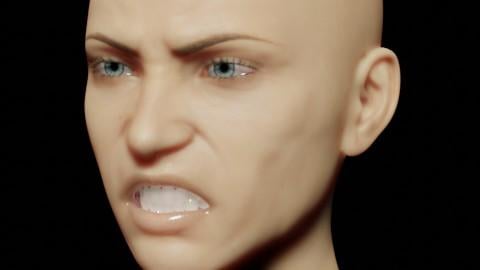
Below a little example it's G8F with the Angry HD expression in eevee, with normal maps.
 Is there a way to prevent Morphs from loading?
PerttiA said:
Unless you remove the morphs from the morph directory of the base figure, there is no way to prevent them from loading.
I think a bad morph got loaded onto some of my saved characters. I had and solved a similar problem with a bad morph by deleting it completely, but I knew which asset to delete.
How do I find the morph directory of the base figure?
Is there a way that I can edit which morphs are being applied?
The problem also hides the golden palace product and I have to reload it.
Facial Morphs AGAINI thought I had this solved yesterday but that was temporary. The old problem is back.
I save a customized object as a Scene Subset as per people's advice.
Sometimes I can save a figure and have it load precisely as I saved it.
Not this time and not quite a few other times as well.
The face morph/customizations seem to go on strike at random. I'm missing something. What the heck is it though?
I've included pictures.........on the left - what I save. In the middle - how I do it. On the right - what actually loads after being saved.
Michael 8.1Hey there,
I also have the problem, that my G8 expressions do not work on G8.1.I read this thread, but do not understand what to do... Maybe anyone can explain, what
When you remove the expression placeholders that G8.1F installs into Genesis 8.1 female, DAZ 3D morph folders, all the expressions do start working, also the PA made ones that are calling those expressions which were made non functioning by the placeholders.
or
removing the Base Pose Head folder
means? What exactly do I have to do to get the G8 expressions to work?
Thanks :)
I am searching a packet/set with these 4 Thighs Gap Morphs to buy.What I did for my guys/girls with no GAP was create my own simple morph in Hexagon - which is free and has a Daz bridge. The work flow is Export a base resolution model to Hexagon > reshape it > export back to Daz creating a morph > save the morph
One version I selected the groin/crutch area and used soft selection while I generally expanded the zone - result a slider where a want a little more room.
Another more radical one pulled both legs out wider in effect making a wider hip. Then I might use this control on 10% where a character had no inner thigh gap.
Some early attempts impacted the inner thighs etc but with practice I got them fit for use.
Genesis 8 loading with wrong shapekelly_mcallen_7bae4ac2a7 said:
It didn't work. She still looks wrong. I followed your list step by step twice and no change. I attached log file below.
Ok, but at least there is now some information on, which products are to blaim and with that information, we can check if the actual morph file does have the correct information and if it does, the only possible culprit would be the trigger file for loading Genesis 8 Female (One you see in your product library), which should have been overwritten with the reinstallation of the Genesis 8 Female Starter Essentials...
Just realized that you haven't told us, how your content is installed, is it installed with, DIM, DAZ Central, DAZ Connect (within DS product library) or manually or have you used several methods?
I ask this because apparently DAZ Connect and maybe even DAZ Central are installing the products in non-standard locations and when installed, they steal priority over the DIM and Manual installed files in standard locations. The fixes were written to standard locations, so there is a possibilty of DAZ Central/DAZ Connect installed files overriding them.
K.H.Image studios please update V8.1!I would love to see an ultimate bend morph product for V8.1, but also understand just how hard it would be to make due to V8.1's asymmetrical body shape, here's to hoping that you're currently working on it!
What is your favorite 3Delight character skin texture.kwannie said:
Willow how well do v4 skins transfer to G3 or G8? I have seen some amazing v4 skin and I think it is always rendered in 3DL in DAZ
I'm as interested as you are in the answer, lol. I haven't been interested in investing in genesis figures until the most recent release and haven't much because I wasn't sure if or how my V4 skins would translate. I have thousands of dollars in V4 materials that I won't just ignore. And since my needs are NPR, I've gotten away with it. But I like how V8 looks, so if I can still use my characters ... game changer.
What is your favorite 3Delight character skin texture.Willow how well do v4 skins transfer to G3 or G8? I have seen some amazing v4 skin and I think it is always rendered in 3DL in DAZ
Tips to make iClone Renders AcceptableIf you are ok with a bit of a weird workflow, you could try this idea here. I have found it to work well in some scenarios.
You can use EBsynth to do a style transfer of an IRAY rendered frame on top of something that is animated in any other render engine. openGL, whatever. Any real time engine. An animation with 100 frames typically will only need 3 of those frames to actually be rendered by a ray-tracer. the other 97 frames can be rendered far faster by style transfer. It's weird, and a bit buggy sometimes, but worth trying out.
The essential problem is matching up frames from one application to another for precise frame syncronisation.
So, render your frames in Daz studio (some of them). Do animation in iclone. Then use EBsynth to apply the render style to the animation from iclone.
While it is currently impossible to get animation from iclone to Daz with the required precision. Getting animation from Daz to iclone is possible.
Purchased products not available in Studio libraryRichard Haseltine said:
Have you checked the log file (Help>Troubleshooting>View Log FIle) to see if there are complaints about bad formatting or the like after trying to load the content? Wheree xactly are the files, and what is the content directory they are in?
There are no error messages. These morph options for these charactes simply don't exist in the shape parameters for these Genesis characters. They were all avaiable and usable in the various other Studio intallations but not now with this bootcamp Windows set up, even though they show as having been installed by Connect and Central, they're unavailable in the shaping pane under Actor, Full Body, Real World drop down menu. These would include individual settings for legs, head, face, torso, glutes, young, old, etc.
Clarity Genesis 8.1All the expressions can be made to work (as in, they appear in parameters tab and the dials will have an effect)
The installation/update of Genesis 8 Starter Essentials adds dummy/placeholder expressions in the G8.1 morph folders that prevent the G8 base expressions from loading.
These placeholder expressions can be found in "...\Data\DAZ 3D\Genesis 8\Female 8_1\Morphs\Daz 3D\Base Pose Head\" (255 files) and "...\Data\DAZ 3D\Genesis 8\Female 8_1\Morphs\Daz 3D\Expressions\" (24 files) - The same goes with male also "...\Data\DAZ 3D\Genesis 8\Male 8_1\Morphs\Daz 3D\Base Pose Head\" (255 files) and "...\Data\DAZ 3D\Genesis 8\Male 8_1\Morphs\Daz 3D\Expressions\" (24 files)
If you remove those placeholder files, the G8 base expressions appear in parameters tab working and the other G8 expressions that didn't work because they were looking for the G8 base expressions, start working too.
Need help with the Hellenic ensemble..so it can only be used on the base G3F, not any other G3F character as they are all basically "morphs"? Kind of limiting it's use.
Richard Haseltine said:
Check Tool settings with the Geoemtry Editor active - I suspect there's a rigidity group on the skirts, to stop them going lumpy when the legs morph.
...but wouldn't it then do the same on the character's left side as well?
Is there a readily installable script to fix this?
Genesis 8 loading with wrong shapeOk, tried the procedure myself to check and wrote it again while doing it...
1. Open DS 4.15 and load "Genesis 8 Basic Female" (to an empty scene)
2. Help->Troubleshooting->View Log File (clear the log, close it and select "Save" when asked)
3. Left Click at "Active Pane Options" tab->Preferences->Choose "Show Hidden Properties" (part 4 zeroes only 'visible' dials)
4. Right Click at Parameters Tab->Zero->Zero Figure (Zeroes the value of all the 'visible' dials)
5. Right Click at Parameters Tab->Memorize->Memorize Figure (Sets the current value of all the dials as their default value)
6. Edit->Save As->Support Asset->Save Modified Assets (Writes the changed default value to the morph files that were changed)When saving "Modified Assets" DS shows a dialog and asks for confirmation;
"The following file(s) will be permanently modified:" - "Accept/Cancel" - Choose "Accept"Close DS and wait -> Open DS again and load "Genesis 8 Basic Female" - Does the G8F look right now?
Help->Troubleshooting->View Log File (Save the logfile somewhere you can easily find it)
Attach the log to your post with the "Attach a file" under the "Leave a Comment" window, that way we can have a look at it.Torment 8.1the dog is hivewire dog. The morph is the chihuahua from philosopher's egg. The newborn puppy morph there has a overlay that makes the muzzle and ears pink.
Thanks!
All these renders look amazing!
Genesis 8.1 / Victoria 8.1TheKD said:
Surprisingly, that does work, though the effects and color layer do not transfer directly. The texture seems intact, though. Thank you.
Did you visit the forums at that site? Meipe has given a free update to a lot of his products in his forum section.
I'll check that out! Thank you!
Daz 3D is part of

Connect
DAZ Productions, Inc.
7533 S Center View Ct #4664
West Jordan, UT 84084Licensing Agreement | Terms of Service | Privacy Policy | EULA
© 2026 Daz Productions Inc. All Rights Reserved. -