-
Daz to Cinema 4D Update 1.1
Rezca said:
DAZ_sam said:
Rezca said:
Good to see it naturally works in R23 now without manual workarounds; but now Morphs won't import :(
I've tried six different figures, not a single Morph is carried over and no Pose Morph tag is created.
With the new fix. You need to make sure the figure is selected before you run the script or the morphs will not attach.
That's good to know!
Is there any plan to improve how the rigs are imported? Right now any character that's imported has every joint aligned exactly the same - Y up, etc. Which is a "Very Bad Thing" for about 90% of the models I've imported. They're almost unusable in the state that the Bridge imports them in and I have to go in to the rigging tab to manually re-align leg and arm joints and then Re-Weight others. As an example, The Morphing Python, Constrictor, and Digi-I's T-Rex all import with the jaw weights assigned horribly (So it tugs half of the head and the eyes with it)
Maybe this sort of import is fine for T-posed human characters but its a massive pain for pretty much everything else.
It's definitely on our list of fixes. https://github.com/daz3d/DazToC4D/tree/develop that is our develop branch and is accessible by anyone. Right now there's a lot of work needed to the plugin so, please be patient with us :) If you do want the most up-to-date plugin though I recommend following here.
Daz to Cinema 4D Bridge - Meet the Teamscobb3_60a649a03a said:
DAZ_sam said:
scobb3_60a649a03a said:
I hate to say it... now the plugin will not show up for me in R21. If I put back the last version, it's there.
Please look into it! It's getting worse, not better!
Sorry about the delay. So it working now! Shouldn't have to grab it from the GitHub even. You should have an update in Install Manager to be able to grab the newest version.
Thanks for the update! Auto-IK is working for me now. Unfortunately, the C4D plugin is not importing ANY morphs now. There's not even a morph tag. If we can just get those two things working at the same time, I'd be set!
One little update - the morph tags disappear when auto-IK is applied. The morph tags are there ad work fine before auto-IK is applied, and afterwards they are simply gone. Any thoughts on why that would happen? Anybody else having this issue?
Morphs are still a wip but, there is a small update. Let me know if this helps your issue. Just make sure you select the figure you wish to export in Daz before export.
https://github.com/daz3d/DazToC4D/tree/develop
Daz to Cinema 4D Update 1.1Rezca said:
DAZ_sam said:
Rezca said:
Good to see it naturally works in R23 now without manual workarounds; but now Morphs won't import :(
I've tried six different figures, not a single Morph is carried over and no Pose Morph tag is created.
With the new fix. You need to make sure the figure is selected before you run the script or the morphs will not attach.
That's good to know!
Is there any plan to improve how the rigs are imported? Right now any character that's imported has every joint aligned exactly the same - Y up, etc. Which is a "Very Bad Thing" for about 90% of the models I've imported. They're almost unusable in the state that the Bridge imports them in and I have to go in to the rigging tab to manually re-align leg and arm joints and then Re-Weight others. As an example, The Morphing Python, Constrictor, and Digi-I's T-Rex all import with the jaw weights assigned horribly (So it tugs half of the head and the eyes with it)
Maybe this sort of import is fine for T-posed human characters but its a massive pain for pretty much everything else.
Definitely is a goal of ours. There is a lot that needs to be done with this plugin. We are a very small team so, please be patient with us :) Our develop branch is accessible to every one so, if you want the most up to date versions I recommend following here: https://github.com/daz3d/DazToC4D/tree/develop
We are also open to people in the community helping us out. We are developing for all the bridges and also open to looking at code created by the community to get out features faster.
Dynamic Clothing for Genesis Not LoadingIt's still in the store: Supersuit World's Finest I have it installed and it's stil working for me (I'm also on DS 4.15.0.2). I loaded a Genesis male, dialled up his M5 Hero morph, loaded the "Shadow Cape M5 Hero", posed him a little (just the arms for the purpose of my test) and ran the dynamic drape.
Now I did used to get crashes trying to load any dynamics saved as .daz files (like these) in an earlier version of Daz Studio (I can't remember which, but might be able to find my forum posts about it) - but I'm not having that problem in DS4.15 at all.
EDIT: Actually I mis-rememberd - I didn't get crashes as such, the clothes just failed to load in DS4.11.
The completely gratuitous complaint threadMcGyver said:
Is it wrong of me to want to kick the makers of zip lock packaging in the nethers because most ziplock packages suck... do they realize that if the preforated line is a millizillionth of a centimeter from the ziplock detail, you have nothing to pull on to open the damn thing... why put a ziplock detail on a bag if it doesn't work?
That was a trick question because it's definitely okay to want to kick someone when I can't access my figgin' ham.
...frustrating indeed particularly if you have arthritic hands. If you try to open from below the ziplock, you can succeed in tearing it open underneath (while the ziplock remains sealed) and then it's useless. I usually have a box of storage bags with the slider on the open end so when this happens I cut the original package open and transfer the contents.
My other bane are those inner "safety seals" on which there are tabs so tiny that a human's big fingers can't get a grip on and then also often have a tonne of glue securing them to the opening of the bottle or container.
I still firmly believe packaging engineers have a sadistic streak when it comes to us older folks.
Tenley for Genesis 8.1 Female loads with Genesis 8.1 FemaleApparently Tenley has been distributed with a non-zero default value, which means that it will be activated everytime you load a G8.1F based figure.
To fix any ill-behaving morphs, do as follows;
1. Open DS and load "Genesis 8 Basic Female" (to an empty scene)
2. Help->Troubleshooting->View Log File (clear the log, close it and select "Save" when asked)
3. Left Click at "Active Pane Options" tab->Preferences->Choose "Show Hidden Properties" (part 4 zeroes only 'visible' dials)
4. Right Click at Parameters Tab->Zero->Zero Figure (Zeroes the value of all the 'visible' dials)
5. Right Click at Parameters Tab->Memorize->Memorize Figure (Sets the current value of all the dials as their default value)
6. Edit->Save As->Support Asset->Save Modified Assets (Writes the changed default value to the morph files that were changed)When saving "Modified Assets" DS shows a dialog and asks for confirmation;
"The following file(s) will be permanently modified:" - "Accept/Cancel" - Choose "Accept"Close DS and wait -> Open DS again and load "Genesis 8 Basic Female"
Help->Troubleshooting->View Log File (Save the logfile somewhere you can easily find it)
If this procedure doesn't work, you probably have Tenley installed in multiple locations.
"Slenderpants" Thong Pant G8/8.1FDid this item to relearn how to make conformer stuff in all the new versions.
A model of the classic ladies' thong pant, rigged in DAZ Studio for Genesis 8/8.1 Female. 978 polys. A good assortment of Iray materials are included, as well as some shaders that allow for various degrees of transparency simulating thread weave.
NB: the thread weave shader (used for bump and transparency cutout) is intended to be used with "flood fill" materials that don't care about UV scale, the bitmap is 512x512 scaled waaaayyyyyyy down via UV tile settings to allow for reasonably good detail. If you want to mix this idea with any other scale-dependent surface settings you would need to use a different set of bitmaps, with much higher resolution. Not hard to do but texture file size and memory usage at render will be much larger. The Texture Shaded preview mode is not too bad, but you can switch the viewport render mode to Iray if you want to see a high quality preview before final render.
NB: the morphs, weights and JCMs are in a "good enough" state and work fine in a big variety of poses. If you find a position or shape that makes the mesh break, try dialing up the "FBMExpandAll" morph, or the other usual methods of dealing with pokethrough etc.
https://sharecg.com/v/97233/view/21/DAZ-Studio/Slenderpants-Thong-Pant-G8-8.1F
Daz to Cinema 4D Update 1.1DAZ_sam said:
Rezca said:
Good to see it naturally works in R23 now without manual workarounds; but now Morphs won't import :(
I've tried six different figures, not a single Morph is carried over and no Pose Morph tag is created.
With the new fix. You need to make sure the figure is selected before you run the script or the morphs will not attach.
That's good to know!
Is there any plan to improve how the rigs are imported? Right now any character that's imported has every joint aligned exactly the same - Y up, etc. Which is a "Very Bad Thing" for about 90% of the models I've imported. They're almost unusable in the state that the Bridge imports them in and I have to go in to the rigging tab to manually re-align leg and arm joints and then Re-Weight others. As an example, The Morphing Python, Constrictor, and Digi-I's T-Rex all import with the jaw weights assigned horribly (So it tugs half of the head and the eyes with it)
Maybe this sort of import is fine for T-posed human characters but its a massive pain for pretty much everything else.
Diffeomorphic DAZ Importer Version 1.5.1Padone said:
@craddockcmnsmaureen Just tested it and seems to work fine here. Since necksize is an actor morph you have to import it as custom morph. Usually I bake actor morphs to dbz though, since we can't morph armatures in blender.
That is, actor morphs may also morph armatures, that blender can't. This is why dbz is provided.
Then pose morphs, as jcms and face expressions, can be imported in blender and used with drivers in animation.
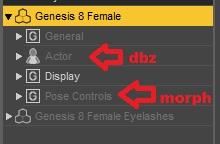

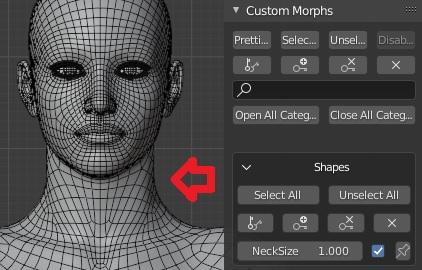
Thank you so much padone! very helpful.
my second and last problem please is when i import a pose sometimes i have this issue with the legs..they dont pose correctly any idea?
 Content cannot be imported
You are trying to apply materials or shapes to nothing. You need to have something in the scene to apply the material setting or morph to.
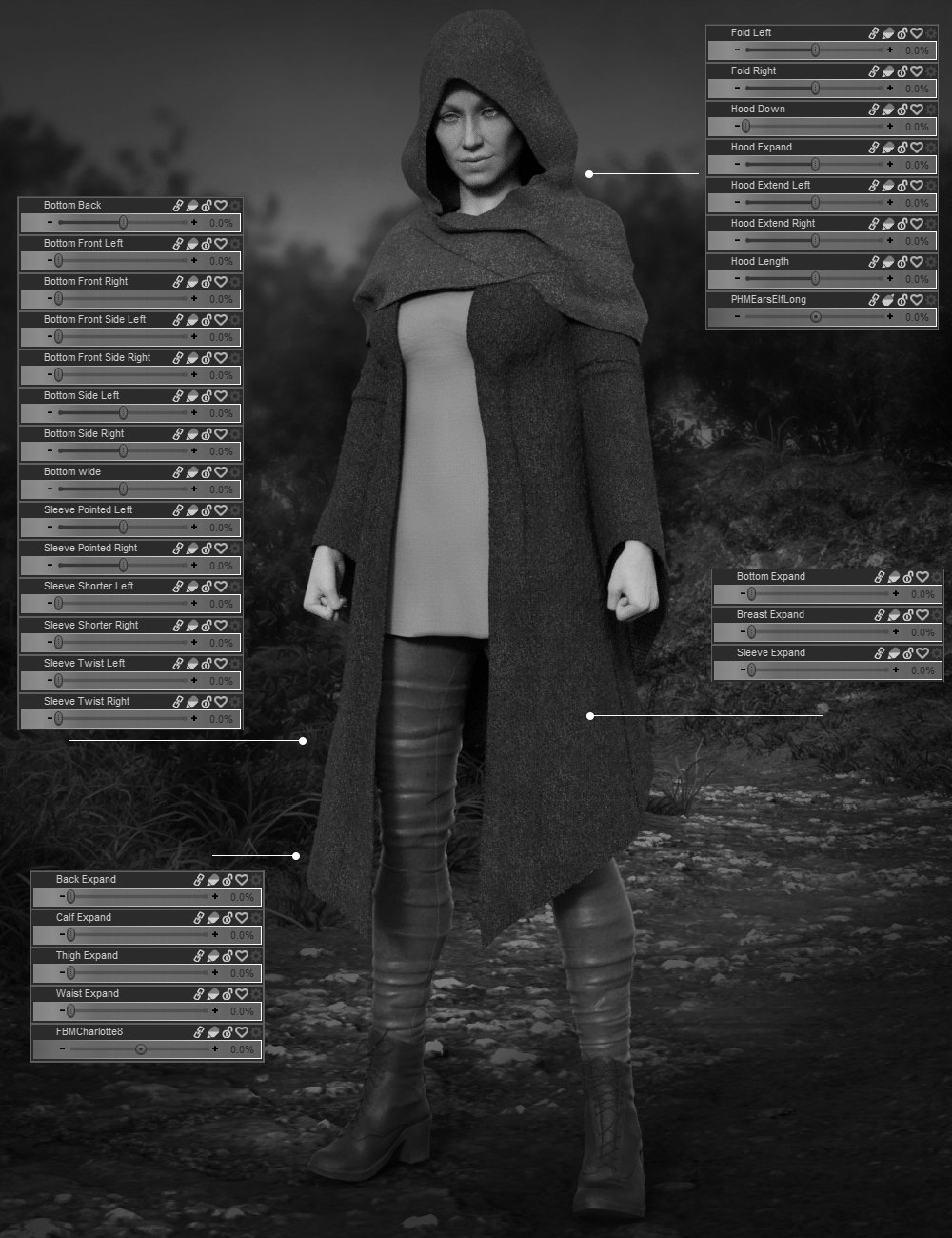
Every clothing product should show morph parameters like thisI cannot stress enough how helpful an image like this is in deciding if I can use a product. It also clearly indicates what part of the item is affected by the morph. If vendors added more promos like this it would take out so much guesswork.
 MetaMorpher for Daz Studio (work in progress)
Frinkky said:
Faux2D said:
Frinkky said:
This looks really quite cool. How does it handle rigging? More extreme morphs will have had rigging adjusted to shape - cam it pull the rigging for the brow from one morph, the mouth from another, for example?
Rigging will have to be adjusted in most cases but it only takes 5 seconds using the Adjust Rigging to Shape feature in Studio.
I'm familiar with the tool. Thank you.
How would it cope with situations where morphs introduce an elongated neck or some other extreme where a feature, say the nose, is in quite a different place that the other morphs. I'm trying to think of a specific example off the top of my head but am unable to at the moment. There are some head morphs that bring the face forward and/or downward.
Sorry to bombard you with these questions :D
No problem, I like questions.
As far as the face goes it will have an extra panel where you can adjust a specific face area in XYZ, as well as a scale feature and a gender feature.
This targeted morphing technique can be applied to the body as well but right now I'm focusing only on the face. The tool works by mixing premade shapes so it requires a large large database of sculpts for the user to choose from. I'm planning on creating 50+ sculpts but haven't reached that stage yet.
MetaMorpher for Daz Studio (work in progress)Faux2D said:
Frinkky said:
This looks really quite cool. How does it handle rigging? More extreme morphs will have had rigging adjusted to shape - cam it pull the rigging for the brow from one morph, the mouth from another, for example?
Rigging will have to be adjusted in most cases but it only takes 5 seconds using the Adjust Rigging to Shape feature in Studio.
I'm familiar with the tool. Thank you.
How would it cope with situations where morphs introduce an elongated neck or some other extreme where a feature, say the nose, is in quite a different place that the other morphs. I'm trying to think of a specific example off the top of my head but am unable to at the moment. There are some head morphs that bring the face forward and/or downward.
Sorry to bombard you with these questions :D
MetaMorpher for Daz Studio (work in progress)Frinkky said:
This looks really quite cool. How does it handle rigging? More extreme morphs will have had rigging adjusted to shape - cam it pull the rigging for the brow from one morph, the mouth from another, for example?
Rigging will have to be adjusted in most cases but it only takes 5 seconds using the Adjust Rigging to Shape feature in Studio.
MetaMorpher for Daz Studio (work in progress)This looks really quite cool. How does it handle rigging? More extreme morphs will have had rigging adjusted to shape - cam it pull the rigging for the brow from one morph, the mouth from another, for example?
Diffeomorphic DAZ Importer Version 1.5.1@craddockcmnsmaureen Just tested it and seems to work fine here. Since necksize is an actor morph you have to import it as custom morph. Usually I bake actor morphs to dbz though, since we can't morph armatures in blender.
That is, actor morphs may also morph armatures, that blender can't. This is why dbz is provided.
Then pose morphs, as jcms and face expressions, can be imported in blender and used with drivers in animation.
Character presets with a modifier_library ignoring it entirely on loading@Catherine3678ab I assume you already know Daz used to save assets within the scene itself once upon a time, and since stopped doing that so people wouldn't be able to share the assets without being able to buy them. Same concept, except that Daz only does that now only when an asset is actually changed, else it would just include a reference to that morph. It does not mean that there are two morphs/assets now, just that there's this morph by this name and these are the modified formulas, that's all. Unless I am wrong, in case point me out.
Richard already confirmed with his question that that should be working. And it is not, now. I feel like we're drifting away from that though, I don't usually take a look at changelogs but I could to verify whether it's a bug or a recent change.
About the workarounds you specified, again, if you didn't read I asked Richard how exactly should I formalize that up. To have the dials 0. And you've only mentioned your own tests, but could you kindly provide an actual way to replicate what you are doing because I can't figure it out on my own.
hear ye hear ye HD morphs for diffeoPadone said:
This is exciting news thanks to an amazing addon by Xin that works together with diffeo.
With diffeo we already can import the HD shape, it is converted to multires so to get HD quality together with animation speed. What we can't do, or couldn't, was to import HD morphs, because the blender multires doesn't support HD shapekeys, that is, we can only morph the base resolution mesh.
Now Xin provides an addon to convert HD morphs to vector maps, normal maps, or true HD morphs. This is a work in progress so you can help testing and/or providing your suggestions for things to be improved. We do not want to miss suggestions from the talended daz artist out here.
https://bitbucket.org/Diffeomorphic/import_daz/issues/357/it-is-possible-to-read-dhdm-files-directly
Vector maps are good to be used with multires to get real displacement, so details will bump out of the mesh, and it is good for animation because it's fast. But it only works in cycles because eevee doesn't support true diplacement.
Normal maps are good for eevee, the HD morph will not have true displacement, but the result is good enough for HD expressions and skin details. Of course this is also so good for animation and you get the amazing speed of eevee as an added bonus.
True HD gets the true HD geometry the same as daz, it is also what the daz bridge does. It is not good for animation because it is so heavy, the same as daz. But it gets the maximum quality and can be good to render still pictures and comics.
Below a little example it's G8F with the Angry HD expression in eevee, with normal maps.
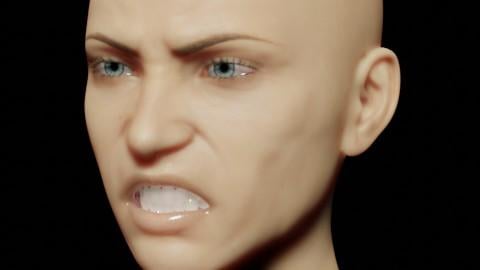
why is tue hd not good for animations? If the hd is multi res, the animation could be done with the basemesh?
Or is it about render performance? Multires renders slower than vector or normal maps?
The completely gratuitous complaint threadComplaint: Great reinstall runtimes of 2021 taking long time. Just finished the last of the "hard part", the morph sets. I had to unzip and rearrange a lot of stuff in there, as I am adopting a new orginization method. The rest should be 98% of just unzipping. I am sure 2% I screwed up and must fix lol.
Noncomplaint:
2021-02-24 17:44:24.698 Finished Loading Character Addons
2021-02-24 17:44:24.754 File loaded in 0 min 44.0 sec.Loading my G8F Is not taking 10 minutes anymore lol
Daz to Unreal Bridge - Meet the Teamrmandese said:
Hello,
I buyed this plugin for facial animations: https://www.daz3d.com/face-mojo--facial-mocap-retargeting-for-genesis-8-males
It works fine in daz3d, but when I use dazToUnreal for export skeletal mesh and animations, the animations in Unreal not function. I notice that the problem are the plugin "mojo facial mocap"'s morph target that doesn't export with dazToUnreal plugin, but if I simply export in fbx and import the file in Unreal, morph target are present and animations works great! The problem is that with the simply export to fbx and reimport in Unreal I lost the root bone, that renamed in Genesis8Male.
I use Unreal Engine 4.26.1 and daz studio 4.15. Any ideas how can I fix this problem?
Thanks a lot for the support.
I will give it a shot today. I will let you know what I find.
Update:
Without some facial animation I won't be able to test the export but, from what I can see with this plugin.
What is happening is it is animation the morph targets on the character. In Laylo3D's documentation he says you do not need to export out any extra morphs.
If you can share some sample animation I can run from start to finish to verify but, this is the workflow you will need to do on your end for this process to work.
1. Run Daz to Unreal and Export out as Skeletal Mesh in Daz with all the Head morphs.
2. Bake the Animation with Face mojo.
3, Run Daz to Unreal and Export out as Animation in Daz and make sure you have all the head morphs selected still.
4. It should now have an animation asset in Unreal that you can target to the Skeletal Mesh import first if you would like to see it in run time.
If it does not work please share a sample fbx and I can test it out for you.Daz 3D is part of

Connect
DAZ Productions, Inc.
7533 S Center View Ct #4664
West Jordan, UT 84084Licensing Agreement | Terms of Service | Privacy Policy | EULA
© 2026 Daz Productions Inc. All Rights Reserved.