-
Is There A Plan To Speed Up G8 (and future generations) Loading Times?
onix said:
I think Daz already have those infomation stored with the formula, but the question is what would be the trade off. A system that delay load everything would have less consistant performance when applying a pose or expression as daz have to find missing morphs. It could be slower for people with fewer morphs installed as it makes harder to cache things, resulting in more file I/O that would be slower. Should Daz scan all morphs files to create all the sliders for shapes and poses, because this is very useful for novice user to find things they need. But scanning all those files and creating slider might be half of the required work already and might just as well go ahead and finish creating the formulas so it will just work.
Richard explained that all this scanning task is not really that time-consuming to care about and it can be multithreaded easily. also it can be safely deferred and just continued after your scene is already loaded.
I interpret Richard's comment as saying reading the file from disk is not the bottleneck, which I think is correct, it is converting from the text file to objects that Daz can use that is slow. Put it another way, reading file not slow, scanning the content of the file to figure out what to create slow. Daz would need to parse all the formulas to figure out what the figure would finally look like. Because there is no mechanism for Daz to figure out if a formula is active or not (my limited understanding is a formula can either by an input like a dial or applying the dial to something so daz need to figure out the value of all dials and apply all the formulas even if most inputs by default are zero). This is also the reason for morph corrupting the default figure. Now I think about it, this part what is what is causing the load time to be slow cannot be skipped unless there is a way to tell Daz don't load this morph (currently done by hiding it from daz). Why this is not trivial to multithread is addressed below.
Hiding stuff from Daz wont fully fix the issue because then you can't use an expression or morph that is not loaded until you reload the character / scene. Some sort of load formulas used by this character / expression / shapes function would be super useful.
Of course, you cant use what you hide, but the reason to hide things I precisely because they are not required in that scene
No what I mean is if I have a figure loaded and then I unhide a character preset or morph set, I can't use it unless I reload the figure because there is no other way to get new shape dials and pose dials to appear.
The senario I want to be addressed is this: I have a figure loaded. I install zev0's Shape Shift, how do I use it without reloading.
Getting a way to delay load morph / reload morph contained in a base directory would really improv
With regard to multithreading I can see how to figure out if a formula referenced in another formula already exist or being made in a thread safe way being a difficult problem to tackle and have potential to accidentally make everything single threaded.
If you think more actually there is no reason why multithreading cannot be implemented even now.
My guess in how Daz works is that first, it loads a full list of morphs then it iterates through every one of those morphs and populates controllers and subcomponents lists. so every correction morph that has controllers has to scan at least half of the full list every time to find where it will inject references to itself.
This process can be easily multithreaded as you can process multiple morphs at the same time
I agree its possible to multithread, just the implementation will be non trivial. The issue to consider is: thread 1 load morph A which reference morph B, at the same time thread 2 is loading morph B. How can thread 1 figure out morph B has been loaded or not. Its solvable but care must be take to ensure the solution dont accidentally end up being single threaded. Another issue: thread 1 create morpha A with name X, thread 2 create morph B also with name Y, how does Daz ensure the names are unique because duplicate formula is an issue that need to be detected.
In short, any way to solve a complex problem will have advantages and disadvantages. I would prefer things to work correctly over being fast, and beginner friendly over complicated to use but faster for advanced user. But there are definitly still rooms for improvement. For example some sort of rescan a selected base directory to add newly installed morphs functionality would be useful.
In my understanding, the main problem here is with correction morphs as this functionality srews up everything and possibly can be the reason why loading times are so long in the first place (unless Daz actually spends most of the time allocating memory for formulas and inserting them into the table)
Correction morphs are the reason why you can't know in advance what files you need to load because any of those new files may decide to hook up on something random in your existing system. And if you are very paranoid about not missing any of those correction morphs you have to rescan everything every time you load a new file as you probably can not even know if some of the correction morphs wanted to reference your new file and did not find it at that time.
What do you mean correction morph, I guess you are talking about erc formulas? Can you give some concrete example? I find all the talk so far about high level concept a bit confusing and too much guess work. I think what is slow is loading formulas, but a lot of formulas are actually morphs and expressions. For example, Victoria 8 have something around 60-70 morph file, each file contain around 2 formulas. Whereas eJCMSilly_HD_div2.dsf from Genesis 8 Female Expression pack can have 100+ formulas.
Now a formula looks like this:
{
    "output" : "Genesis8Female:/data/DAZ%203D/Genesis%208/Female/Morphs/DAZ%203D/Base%20Pose%20Head/eCTRLNostrilsFlex.dsf#eCTRLNostrilsFlex?value",
    "operations" : [
    { "op" : "push", "url" : "Genesis8Female:#Z%20FO%20Angry?value" },
    { "op" : "push", "val" : 1 },
    { "op" : "mult" }
    ]
},
As you can see, Daz know where to find the formula it references. So that is no a problem. One problem would be in a multi thread safe way to figout out if the output it refernces already exist or is being created by another thread or it need to create it. Again now I have think about this a bit more, the issue is Daz dont know if this formula will result in no change at all or cause some morph changes until Daz parsed the formula and applied it, which is the slow process we are trying to avoid here. There is no mechanism to tell Daz to skip formula in this folder until I tell you to load it functionality. I think something like this for advanced user would be useful.
Another problem, for example I like to use Zev0's shape shift which contains lots of formulas, but I use it often when creating a character so I would like Daz to always load it. How would Daz know which morph need to be loaded? Currently the only way is to selectively add base folders, this is almost workable with manual curation of installed files, or program to automate it, maybe Daz can come up with a better approach (maybe by reworking the way files are installed).
In short we need a better way to optionally tell Daz skip loading certain folder until it is needed by some file.
The Newest Evolution Is Here: The Daz Season Pass!Well I bit the bullet. When I started, in the middle of G3M/G3F, and was not a PC+ member, my first purchase was the Lee 7 Pro Bundle for the full cost of $134.95. Since then, having joined PC+, I have bought most Pro Bundles, except the Vampires/Horror ones and Centaurs, except Centaur 7M. Never used them, wasted my money. Horror characters just look plastic to me.
I am hoping that with the addition of the HD Add-on that means the characters will be realistic, not pretty, pretty, fairies, pixies, goulish babies or animals. I would love to see more ethnic/age diversity to expand my morph library. But pretty white girls I don't need, I just removed almost 200 G8Fs from my DS library because of slowing down load times.I would prefer not to have that 'flair' as I see it as an advertising gimic and tells others what I have purchased. I consider that personal information. (As I write that I have! )
Render contests, well never participated in them. Of the renders I have posted in the forums, I think I have had maybe three that were liked, most are ignored or I am told how to improve and one I got serious kickback on. So I don't post as many as I might. Tutorial, might help me, but when do I have time? Scads to work through still.
But Daz, I really would love it if you would instead invest in more Quality Control of products before release. I am tired of actors, hair or clothes with no or partial metadata, or a character that was advertised as a 'young adult' who is three feet tall and squashed up and after a year and a half, no fix yet.
Or fix my dates in DS to reflect the actual date a product was released and when I bought it and installed it, like it was before you 'fixed' the store in November. My sorting of products is a mess now in Smart Content.And yeah, I am fixing my thumbnails as I buy. And I have two systems, so I transfer my thumbnails with Google Docs.
For those who are not buying into this, cool. No judgement, I was on the fence too. I just decided to take a risk. My tax return came in, I have some cash to loose. Daz don't make me regret this please.
Is There A Plan To Speed Up G8 (and future generations) Loading Times?PerttiA said:
It's not only JCM's, but also morphs and characters from some other PA, as one cannot copy the work of someone else to one's own product.
If you make a character that is built on top of Victoria 8, then the dial for your character should activate the Victoria 8 dial as well. The same with products like "Growing Up" or even the DAZ Head and Body Morphs.
I was talking about different issues here. Building your morph on top of another morphs is normal.
Let's say you want to create a smile expression morph for your character which will reference victoria 8 smile.
normally you would just create an expression folder for your character and populate it with your custom expression morphs that refer to morphs of other vendors.
but some perverted vendors rather do this:
They insert extra logic into the genesis 8 smile expression morph which tells it that if character X morph is activated activate Smile correction morph for character X. You will not even be aware that you got a custom expression morph along with that character.
So if you will ever install this character it will be sucking your CPU power forever because every time you use smile morph that formula for character X (which you maybe never even used) will be executed.
And how many vendors may have JCMs that are constantly hooked to character joints and every time you change your pose Daz has to process hundreds of those parasitic formulas that do nothing else but just check if character X is loaded?
What if the vendor screws up and makes that his JCM gets activated all the time not just when their character is loaded? Now your figure will be screwed up forever because you have no way to even identify buggy JCM
How to export custom morphHey guys! I have a question , I created a custom morph that is saved in daz as character preset , my question is how can i export this new character along with textures so I can easily import it into daz on other computers? Thank you!
Is There A Plan To Speed Up G8 (and future generations) Loading Times?thenoobducky said:
I can see this be very useful for things like clothing fixers or conversion tool.
Those same things still can be done but rather than doing them secretly, vendors should be required to ask users if they want those fixers to be turned on.
The current situation is very strange to say mildly when things are done backward for an unknown reason.
I think Daz already have those infomation stored with the formula, but the question is what would be the trade off. A system that delay load everything would have less consistant performance when applying a pose or expression as daz have to find missing morphs. It could be slower for people with fewer morphs installed as it makes harder to cache things, resulting in more file I/O that would be slower. Should Daz scan all morphs files to create all the sliders for shapes and poses, because this is very useful for novice user to find things they need. But scanning all those files and creating slider might be half of the required work already and might just as well go ahead and finish creating the formulas so it will just work.
Richard explained that all this scanning task is not really that time-consuming to care about and it can be multithreaded easily. also it can be safely deferred and just continued after your scene is already loaded.
Hiding stuff from Daz wont fully fix the issue because then you can't use an expression or morph that is not loaded until you reload the character / scene. Some sort of load formulas used by this character / expression / shapes function would be super useful.
Of course, you cant use what you hide, but the reason to hide things I precisely because they are not required in that scene
With regard to multithreading I can see how to figure out if a formula referenced in another formula already exist or being made in a thread safe way being a difficult problem to tackle and have potential to accidentally make everything single threaded.
If you think more actually there is no reason why multithreading cannot be implemented even now.
My guess in how Daz works is that first, it loads a full list of morphs then it iterates through every one of those morphs and populates controllers and subcomponents lists. so every correction morph that has controllers has to scan at least half of the full list every time to find where it will inject references to itself.
This process can be easily multithreaded as you can process multiple morphs at the same time
In short, any way to solve a complex problem will have advantages and disadvantages. I would prefer things to work correctly over being fast, and beginner friendly over complicated to use but faster for advanced user. But there are definitly still rooms for improvement. For example some sort of rescan a selected base directory to add newly installed morphs functionality would be useful.
In my understanding, the main problem here is with correction morphs as this functionality srews up everything and possibly can be the reason why loading times are so long in the first place (unless Daz actually spends most of the time allocating memory for formulas and inserting them into the table)
Correction morphs are the reason why you can't know in advance what files you need to load because any of those new files may decide to hook up on something random in your existing system. And if you are very paranoid about not missing any of those correction morphs you have to rescan everything every time you load a new file as you probably can not even know if some of the correction morphs wanted to reference your new file and did not find it at that time.
Looking to buy medieval dforce long shirt - see imagesThe suggestions above are all great pieces. In the end I didn't find anything "close enough" to what I needed. I have a passing skill with Marvelous Designer and was pretty good with Poser Cloth back in the day... I'll take a crack at designing what I want myself and if anyone is interested, I can post some snapshots. They'll be partially-conforming dForce cloth long shirts for G8F.
One of the shirts has will have a laced neckline. Does anyone know if Daz has a way to make the laced section into a morph target? So that if you choose the "Top-unlaced" morph, you can tell Daz to include the top flaps in the simulation instead of conforming them to the figure?
export "ALL" Morphs...? HOW..?You must add empty name in morph name and select export to column 3. And daz send all morph to fbx export. you're welcome.
How good are the G3 to G8 converters?margrave said:
PerttiA said:
Character converters and Clothing converters are different products, using Clothing converters does not increase the loading times of your characters.
The user I referred to said it was only the character and hair converters:
I've slowly been uninstalling characters and morph packages over the last 48 hours - no change. I then removed the morphs and data associated with 2 character conversion tools from G3F, by Riversoft. Bingo - everything is working *very* fast again. Neck bends are ok, setting a pose is 100x faster - takes a second or less instead of a minute or more. The products that produced this apparently problemmatic morph data are https://www.daz3d.com/hair-converter-from-genesis-3-female-to-genesis-8-female and https://www.daz3d.com/character-converter-from-genesis-3-female-to-genesis-8-female both by Riversoft - generally, I've loved his products, so not blaming anyone - maybe I just reached a tipping point removing stuff, but it was a drastic change when I removed these conversion morphs.
-https://www.daz3d.com/forums/discussion/355541/laggy-genesis8
There is no need for hair converters between G3 and G8/G8.1, when you load the hair into the scene without having character selected, you can change the "Scene identification" from G8 to G3 and vice versa and you don't even loose the original bones
How good are the G3 to G8 converters?PerttiA said:
margrave said:
onix said:
Usually, you don't need any converter to use G3 item on G8 that functionality is included by default into G8 fitting g8 on g3 is a bigger problem.
Although fitting some of those items messes up their rigging considerably. and I have to fix their weight maps manually to make them work again
this does not make any sense how it cour do that because the converter is a script that you run to create a copy of the item. it cannot affect posing or anything like that. It can only produce a bad result in general
Another user reported they spent months going through their entire content library, uninstalling products one-by-one, and determined the RiverSoftArt converters were the bottleneck. After I heard that, I uninstalled them, and it seems that my G8 characters pose quicker now as well.
Character converters and Clothing converters are different products, using Clothing converters does not increase the loading times of your characters.
The user I referred to said it was only the character and hair converters:
I've slowly been uninstalling characters and morph packages over the last 48 hours - no change. I then removed the morphs and data associated with 2 character conversion tools from G3F, by Riversoft. Bingo - everything is working *very* fast again. Neck bends are ok, setting a pose is 100x faster - takes a second or less instead of a minute or more. The products that produced this apparently problemmatic morph data are https://www.daz3d.com/hair-converter-from-genesis-3-female-to-genesis-8-female and https://www.daz3d.com/character-converter-from-genesis-3-female-to-genesis-8-female both by Riversoft - generally, I've loved his products, so not blaming anyone - maybe I just reached a tipping point removing stuff, but it was a drastic change when I removed these conversion morphs.
-https://www.daz3d.com/forums/discussion/355541/laggy-genesis8
Random Missing File Notification Help!First make sure that DS is not running, then if you start from the base folder of your content library in Windows Explorer (File Explorer) and navigate to;
...\data\DAZ 3D\Genesis 8\Female\Morphs\
Do you remember the name under which you have saved your own morphs?
That name is the name of the folder that contains morphs and characters that you have saved as assets. Choose that folder and right-click to get a menu, choose "Properties" and change the attribute to "hidden" - Some have said this is enough to hide the morphs in that folder from DS and if it does work, it's easy to change back.Now with the morph folder hidden, start DS and when it's open go to "Help->Troubleshooting->View Log File", select everything and press "Delete", close the logfile and choose "Save" when asked.
Load the "Genesis 8 Basic Female" and once it has loaded, open the log file again and save it somewhere you can easily find.
Did DS complain about the missing file?If DS still complained, attach the log to your post with the "Attach a file" under the "Leave a Comment" window, that way we can have a look at it.
Carrara Challenge #57 - Album Cover (WIP thread)Animals before and after
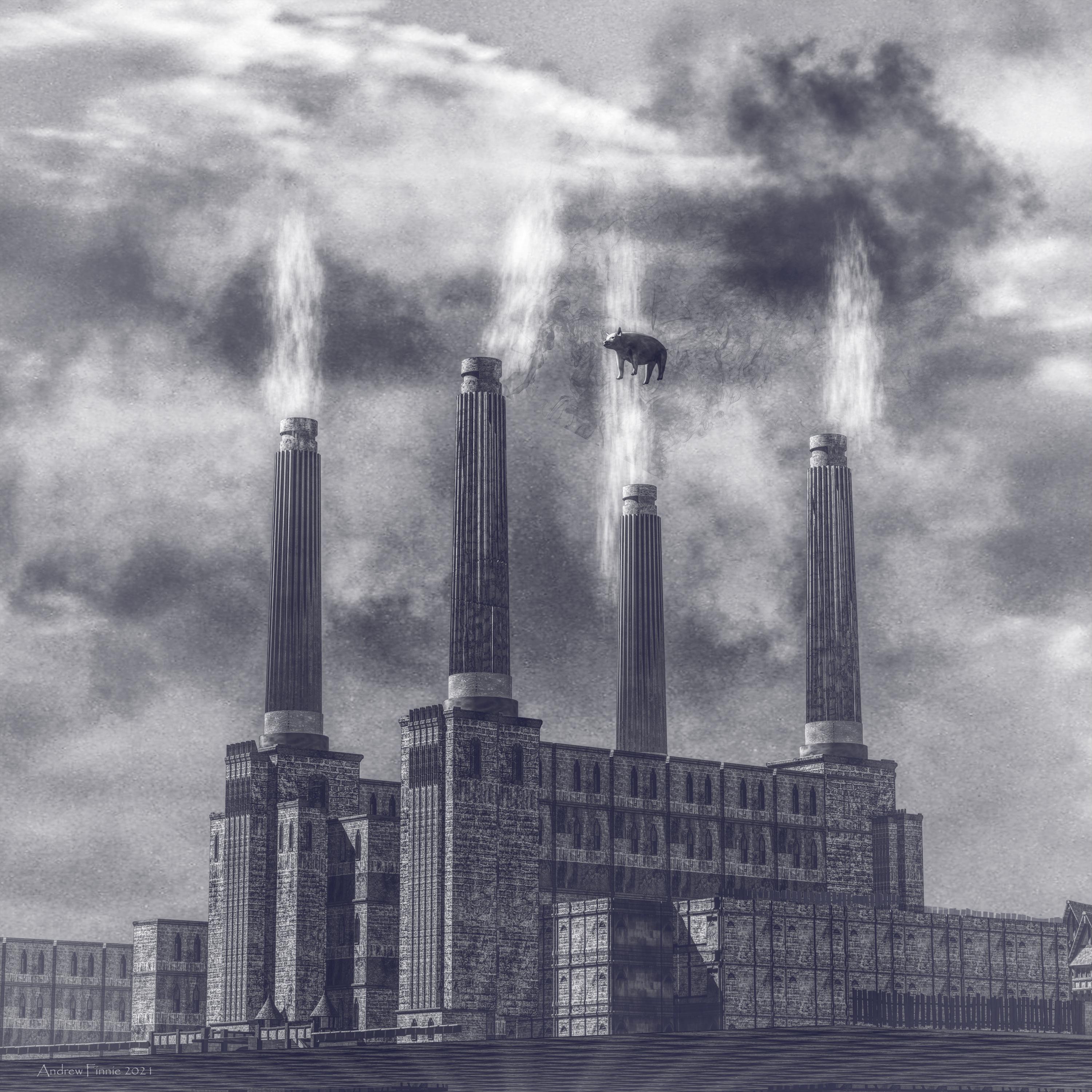
Never knew how much batter sea power station looked like a cathedral. Built this from kit bashing daz medieval buildings. Made the chimneys myself - whoo hoo.
Smoke - carrara cloud primitifs.
Pig daz piglet with a shperical morph.
Clouds in the no post work shot were a texture applied to background.

 Is There A Plan To Speed Up G8 (and future generations) Loading Times?
onix said:
Also, not every character is the same. I just now noticed that some very clean and contain just one of a few morphs while others litter everything with correction morphs for an unknown reason. Probably some creators believe that they are super smart when they inject correction morph into existing morph from another vendor rather than inserting that existing morph of another vendor into their own morph.
It's not only JCM's, but also morphs and characters from some other PA, as one cannot copy the work of someone else to one's own product.
If you make a character that is built on top of Victoria 8, then the dial for your character should activate the Victoria 8 dial as well. The same with products like "Growing Up" or even the DAZ Head and Body Morphs.
The Newest Evolution Is Here: The Daz Season Pass!nicstt said:
I don't need more characters - especially as I'll put money on them being merchant resource textures.
So... Pass.
...+1
As I primarily dial spin most of my own characters, unless I see a new character base that will add something unique to what I refer to as the "gene pool" (like custom sculpted facial details or a unique base shape that isn't just another "supermodel" or "hunk") I'll pick it up.
I work so heavily with morphing (I have lots of morph resource kits for both G2 & G3 which I can combine through GenX2) tothe point that sometimes clothing will not autofit well on some characters.
AbyssalEros said:
Up to Victoria 8.1, I bought every single Pro Bundle since I joined DAZ. Although, the buying enticements for them have deteriorated bundle for bundle while at the same time the quality of the included assets deteriorated noticeably.
Since Genesis 8.1, the bundles are even more expensive with near to null buying enticements at all.
While I was initially curious about 8.1, I read about enough issues with 4.15 to keep my distance from it.
Many creators who depend on a working DAZ Studio installation recommended me not to upgrade, as they regret having done it or have fallen back to an older version, where possible. Thus 8.1 is no question for me before DAZ Productions, Inc. is able to fix all the know issues.
Therefore I have not bought a single 8.1 bundle, and I do not see myself buying one soon.
For not having bought any of those new bundles, even though I own all Genesis 8 Pro Bundles and most of the Genesis 3 ones, and many more assets worth several thousand dollars, DAZ is not offering me anymore "Loyalty" banners on new bundles. I do not count those bundles where DAZ graciously offers me a 70%+ discount when I own every single asset or only miss one.
I really see no good in this Season Pass at all.
And "loyal" but somewhat unruly customers like me that do not have embraced Genesis 8.1 or even Genesis 8 cannot feel differently than feeling affronted by this season pass.[bold ephasis mine]
...+1 as well.
I have very few character bundles, several of them only because they were offered for free on a banner (or extremely discounted) or, as in the case of V5/M5, was a bonus offer with my purchase of Carrara 8.5. In the few bundles that I actually purchased, I pretty much everything that was included had a use (which is a rarity).
Future of Daz characters in UE4You can tessellate the mesh to a higher resolution via materials.
You can add JCM's when sending to Unreal 4 as part of the morph export option. There is a ABP example included as part of the installed plugin kit that you can use to inject JCM's based on joint rotation.
You can edit the project file to target to custom materials instead of using the default import version.
As it stands the current bridge version is the second iteration and has already improved in 4.26. I would expect that improvements will be on going but in most cases any solution will need additional work to get the desired result based on personal requirements.
I morphed a piece of clothing, but now the rig is weirdjust to be clear, the problem with moving the feet making the pants deform oddly does not have anything to do with your morph does it?
No there's not a really simple way to something like this but it's not incredibly hard either. There are a ton of little finnicky steps and I recommend you find a solid, thorough video tutorial over the specifics of rigging clothing in D|S - and no unfortunately I don't have one I can recommend, although I'm sure there are others who can suggest something specific.
Why hasnt the ancient Daz Studio got Soft Body Physics like Blender?melissastjames said:
How did you accomplish this? Paint a dForce weight map on the figure (obviously) and then reduce the size of the garment on the timeline?
More or less; I've got a dForce weight map that entirely paints out any sufficiently bony bits that shouldn't squish, and the dForce strength is set very low on the rest of the body. A partial dynamic strength appears to be achieved by a spring that pulls the vertices back into their unsimmed positions, so if you get the strength and other parameters right it is actually not terrible at representing elastic materials like skin.
Part of the reason I'm doing the pressure with dForce in the first place is that this is part of an underwear set I've created to be dForceable - as the elastication can pull it around into different positions depending on pose, I can't just do one fixed pressure morph and need to generate them based on how the figure is posed in that scene. But it does actually work reasonably well. This was an early effort and I've created better contract morphs for the clothing now, but it's the example I had a reference available for.
TEETHI seem to have solved the teeth problem. I apprecite all the feedback but none of it seemed to work. I discovered aquick and very simple fix:
Load the model, use another model body morph (I find that Gen 3 Brittney works the best but any Gen 8 or 3 will do). .Load that morph onto your LY model and it does not change the appearance and VOILA. teeth appear after render.
My life has meaning now! LOL
The image is of Gen 8 Bodhi figure on left I used a Gen 3 Eliza skin while right figure I used a Isabelle Gen 8 morph. Look at those Pearly whites.
LOL
Is There A Plan To Speed Up G8 (and future generations) Loading Times?I think a short tutorial on ERC formula and how Daz store / find / load / use those formula would be beneficial in this discussion. That way people would understand how things work, why it work that way, the benefit and limitation and possible alternatives.
onix said:
Because of that behavior, I potentially could create a morph that turns on morph A from vendor X if Morph B of vendor Y is activated without the user even being aware of what is happening which is a huge security issue.
I can see this be very useful for things like clothing fixers or conversion tool.
Also, it seems that the loop could be formed when CM's start correcting each other
This is a bad design in principle which was not that visible in the beginning but now manifesting itself and pretty hard to fix. Probably it would be still the best idea to get rid of all those correctives entirely. There are better ways to get the same result.
Daz have logic to detect circula references as can be observed by reading log file.
" If you hide morphs how do you know you are dealing with all the associated files? "
Now I understand what you mean because by the Daz architecture if I load Victoria morph Daz is supposed to load a Corrective for the smile expression which will change the way how "smile" works specifically when Victoria morph is activated and since this Corrective is not mentioned anywhere in the Victoria morph it cannot be loaded.
Although when we hide files manually this is not an issue.
The most obvious solution would be to add an extra file to each morph which will list all dependencies of what else should be loaded when this morph is activated.
I think Daz already have those infomation stored with the formula, but the question is what would be the trade off. A system that delay load everything would have less consistant performance when applying a pose or expression as daz have to find missing morphs. It could be slower for people with fewer morphs installed as it makes harder to cache things, resulting in more file I/O that would be slower. Should Daz scan all morphs files to create all the sliders for shapes and poses, because this is very useful for novice user to find things they need. But scanning all those files and creating slider might be half of the required work already and might just as well go ahead and finish creating the formulas so it will just work.
Hiding stuff from Daz wont fully fix the issue because then you can't use an expression or morph that is not loaded until you reload the character / scene. Some sort of load formulas used by this character / expression / shapes function would be super useful.
With regard to multithreading I can see how to figure out if a formula referenced in another formula already exist or being made in a thread safe way being a difficult problem to tackle and have potential to accidentally make everything single threaded.
In short, any way to solve a complex problem will have advantages and disadvantages. I would prefer things to work correctly over being fast, and beginner friendly over complicated to use but faster for advanced user. But there are definitly still rooms for improvement. For example some sort of rescan a selected base directory to add newly installed morphs functionality would be useful.
Is There A Plan To Speed Up G8 (and future generations) Loading Times?marble said:
I can see why the OP, as a content creator, needs so many characters and their morphs installed. My load times, by comparison, are very short - <10 seconds for a G8 character. I assume that is because I have only around 20 characters in my library. I do have a lot of morph packs though - mosty from Zev0. So maybe the solution is to buy less pre-made stuff and dial-in more shapes using the morph packs? I know that some people have hundreds of characters and that they have excruciatingly long load times.
That would be a good idea, but the problem is that you usually try something and then you cant even get rid of it easily because it is scattered around the content directory everywhere and all that trash just accumulates forever until you experience HDD crash LOL
Also, not every character is the same. I just now noticed that some very clean and contain just one of a few morphs while others litter everything with correction morphs for an unknown reason. Probably some creators believe that they are super smart when they inject correction morph into existing morph from another vendor rather than inserting that existing morph of another vendor into their own morph.
Is There A Plan To Speed Up G8 (and future generations) Loading Times?In my opinion, MorphSoandso should contain references to JCMSuchandsuch, and BendThatone. If not, they should not be loaded.
But by your explanation, it seems, that's exactly what is happening. This JCM gets loaded then it monitors morph changes and possibly does some corrections by itself without getting permission from the user.
Since this JCM can't be aware when a certain morph will be activated until it gets activated, Daz creates some kind of complex structure of signals to trigger appropriate CMs which still slows down everything and takes lots of time to load. (which would explain why you don't want post-loading. as that would require a lot of time again to rebuild all that complex structure)
I would guess that Daz reads all morph files first then it will parse everyone of them and fill the list of controllers and subcomponents for each of them
Because of that behavior, I potentially could create a morph that turns on morph A from vendor X if Morph B of vendor Y is activated without the user even being aware of what is happening which is a huge security issue.
Also, it seems that the loop could be formed when CM's start correcting each other
This is a bad design in principle which was not that visible in the beginning but now manifesting itself and pretty hard to fix. Probably it would be still the best idea to get rid of all those correctives entirely. There are better ways to get the same result.
" If you hide morphs how do you know you are dealing with all the associated files? "
Now I understand what you mean because by the Daz architecture if I load Victoria morph Daz is supposed to load a Corrective for the smile expression which will change the way how "smile" works specifically when Victoria morph is activated and since this Corrective is not mentioned anywhere in the Victoria morph it cannot be loaded.
Although when we hide files manually this is not an issue.
The most obvious solution would be to add an extra file to each morph which will list all dependencies of what else should be loaded when this morph is activated.
And actually just now, I noticed what kind of mess is happening with parameters and how some vendors could be potentially screwing up things accidentally or on purpose by adding CMs to various base morphs without me being even aware of that. Many Daz-provided base morphs are littered with various irrelevant CMs that are not going to be used ever. Nobody even knows what effect they may have.
All that stuff could be safely removed without any loss and may even speed up everything.
Daz 3D is part of

Connect
DAZ Productions, Inc.
7533 S Center View Ct #4664
West Jordan, UT 84084Licensing Agreement | Terms of Service | Privacy Policy | EULA
© 2026 Daz Productions Inc. All Rights Reserved.