-
Daz To Blender Bridge 2.1.0 --- NOT Exporting selected Morphs!
Hi. I found a working solution. Use the "Daz Studio (1 unit = 1 cm) setting. Click "show individual settings" . Set the scale to 10000% (yes, 10,000)
Load your morph.
Worked for me.
Best of luck!
Real Faces and Bodies for Juan Carlos 8@MimicMolly @DarkStarr42 Here's Ashan, Darius, & Diego (I pre-empted Edward & Landon since you've already purchased Real Faces)
For all renders: default HDR, Environment Dome Rotation 100, Subdivision Level 2, Core Figure Head Morph 100, Cornea Bulge 100
Ashan 8 (Tjark Short Hair)- Andres, Eduardo, Jules, Lucio, Marcus, Matias
Darius 8 (Stylish Hair)- Andres, Eduardo, Jules, Lucio, Marcus, Matias
Diego 8 (Carlos Hair)- Andres, Eduardo, Jules, Lucio, Marcus, Matias
NFT and the Future of Digital Contentallenfesler_2df6b6e506 said:
Confused old fart here ...
For the moment let's not worry about how much energy it takes to make a PoS/PoW 'coin'; I'm more interested in what it will (or won't) do for me as a semi-artist/scifi-writer.
As I semi-understand things, to play this NFT game you have to generate or buy/convert enough cash to whatever coin is needed to make the NFT (well over $100 from what those in the thread were saying).
Then you have to 'sell' the NFT - and there's a transfer fee! (also over $100 I believe someone said).
And then you have to cash out the coin - hoping the value hasn't dropped to a point less than you paid to play this little game. (may be another converter fee?)
So a person has to believe that there's someone else out there willing to pay hundreds of dollars for a 'link' to their art/story - because it will have to sell for hundreds just for you to break even, more if you were hoping to make a profit.
Did I miss something big? Because it looks like the only sure winners are the ones selling the NFTs to the artists and the ones collecting those transfer fees. If the artist doesn't charge enough they lose money, if it doesn't sell they lose money, and the buyer buys proof that they bought proof of a link - which can go down or the contents change at any time.
I know there are a few others out there that remember 'War Games' - where the only winning move is a nice game of chess ... ;-)
What you are missing is that NFTs haven't been properly explained to you. NFTs are basically digital contracts that are unique. The contracts get executed and pay out in the particular cryptocurrency they are part of, and can be programmed to do so in the future based on certain events (like your art re-selling and you get 10% of the sale). So its a contract and payment system all in one.
All the other stuff about marketing, transfer fees, etc. that you mention are only after-effects of some hyped transactions and services. These problems are temporary and just part of the developing nature of the technology. NFTs can potentially replace banks and lawyers to a large degree, giving artists a more streamlined way of getting paid directly from their fans or businesses.
NFT and the Future of Digital Contentallenfesler_2df6b6e506 said:
Confused old fart here ...
For the moment let's not worry about how much energy it takes to make a PoS/PoW 'coin'; I'm more interested in what it will (or won't) do for me as a semi-artist/scifi-writer.
As I semi-understand things, to play this NFT game you have to generate or buy/convert enough cash to whatever coin is needed to make the NFT (well over $100 from what those in the thread were saying).
Then you have to 'sell' the NFT - and there's a transfer fee! (also over $100 I believe someone said).
And then you have to cash out the coin - hoping the value hasn't dropped to a point less than you paid to play this little game. (may be another converter fee?)
So a person has to believe that there's someone else out there willing to pay hundreds of dollars for a 'link' to their art/story - because it will have to sell for hundreds just for you to break even, more if you were hoping to make a profit.
Did I miss something big? Because it looks like the only sure winners are the ones selling the NFTs to the artists and the ones collecting those transfer fees. If the artist doesn't charge enough they lose money, if it doesn't sell they lose money, and the buyer buys proof that they bought proof of a link - which can go down or the contents change at any time.
I know there are a few others out there that remember 'War Games' - where the only winning move is a nice game of chess ... ;-)
That's how I understand it works, too. Some NFT services, such as the one DAZ is moving to, charge a lot less to create and sell the token/NFT. It is still a lot like gambling or speculating on the stock market, if the stock market were completely unregulated. To make it even more exciting, the media are talking about how it looks like the NFT bubble either has or is about to burst. Doesn't mean it will burst, but it does add a further layer of uncertainty.
NFT and the Future of Digital Content
I think you pretty much nailed it. But I'm no expert, I'm just going on the duck theory.allenfesler_2df6b6e506 said:Confused old fart here ...
For the moment let's not worry about how much energy it takes to make a PoS/PoW 'coin'; I'm more interested in what it will (or won't) do for me as a semi-artist/scifi-writer.
As I semi-understand things, to play this NFT game you have to generate or buy/convert enough cash to whatever coin is needed to make the NFT (well over $100 from what those in the thread were saying).
Then you have to 'sell' the NFT - and there's a transfer fee! (also over $100 I believe someone said).
And then you have to cash out the coin - hoping the value hasn't dropped to a point less than you paid to play this little game. (may be another converter fee?)
So a person has to believe that there's someone else out there willing to pay hundreds of dollars for a 'link' to their art/story - because it will have to sell for hundreds just for you to break even, more if you were hoping to make a profit.
Did I miss something big? Because it looks like the only sure winners are the ones selling the NFTs to the artists and the ones collecting those transfer fees. If the artist doesn't charge enough they lose money, if it doesn't sell they lose money, and the buyer buys proof that they bought proof of a link - which can go down or the contents change at any time.
I know there are a few others out there that remember 'War Games' - where the only winning move is a nice game of chess ... ;-)
NFT and the Future of Digital ContentConfused old fart here ...
For the moment let's not worry about how much energy it takes to make a PoS/PoW 'coin'; I'm more interested in what it will (or won't) do for me as a semi-artist/scifi-writer.
As I semi-understand things, to play this NFT game you have to generate or buy/convert enough cash to whatever coin is needed to make the NFT (well over $100 from what those in the thread were saying).
Then you have to 'sell' the NFT - and there's a transfer fee! (also over $100 I believe someone said).
And then you have to cash out the coin - hoping the value hasn't dropped to a point less than you paid to play this little game. (may be another converter fee?)
So a person has to believe that there's someone else out there willing to pay hundreds of dollars for a 'link' to their art/story - because it will have to sell for hundreds just for you to break even, more if you were hoping to make a profit.
Did I miss something big? Because it looks like the only sure winners are the ones selling the NFTs to the artists and the ones collecting those transfer fees. If the artist doesn't charge enough they lose money, if it doesn't sell they lose money, and the buyer buys proof that they bought proof of a link - which can go down or the contents change at any time.
I know there are a few others out there that remember 'War Games' - where the only winning move is a nice game of chess ... ;-)
New! Novica & Forum Members Tips & Product Reviews Pt 14Well, I tried to render Futura Techwear for G8M. Nightmare. It does simulate very smoothly with a cross-armed pose and muscles, but a hair with writing on the forehead only visible in the render, a skin choice that was weird and too dark on the body, too light on the face, and I had put a Sci-Fi city in the background of a window and then forgot to close things not visible! I stopped the render halfway through. Saved it as lesson. I also tried out Variations for G8.1M with the first morph. Presets and sliders available. The face was interesting.
But I did get some Oatmeal and Rum-Raisin Cookies baked today. So not a complete loss.
Oh, for the record, I actually hate 'Hammer' pants, or what I know them as, 'Skater' pants, as my son wore them during his high school years. The crotch gives enough room to crouch down on the skateboard and manuever.
Is There A Plan To Speed Up G8 (and future generations) Loading Times?thenoobducky said:
In other words, if you look at the parameter settings sub-components and controllers you will see that those are fully populated in advance and you cannot change them without reloading the figure.
Under my proposition, those lists would be pretty much totally empty when you load base G8 character and they would only get populated on demand when you activate appropriate top morphs. This is why loading time would be near to instant (if you load from SSD).
Activating morph for the first time would take some extra time, but not that much because only very few files have to be read and parsed in a very straightforward way.
This also allows easy installation of new morphs anytime just in the same way as you install new figures, you just refresh the list, new morphs appear and you can apply them.
Ok yeah I kinda agree this should be the approach but not fully. It need to address the following issues:
1. It should be for advanced user only. Why? Because it will break shaping and posing pane. Being able to find all the poses and shapes applicable for the figure is very useful for a beginner. It is also the quickest way to find things when you want to modify a body part.
2. It doesnt work for dial only shapes or expression. For example Zev0's shape shift are a bunch of shape dials. It is not a character so there is no file to apply it. This goes to reason 3
3. There need to be some way to select contents that should be loaded with base figure. For example, I want the shape shift dial to be populated when I load the base character.
4. This need to be backward compatable with exisitng content. How do you propose to make it backwards compatable with existing contents? At least work with stuff bought via Daz store, custom work is less of a problem.
What you are propossing can already be achieved currently by going around the daz install process and creating virtual file links, but I dont think it is the solution that Daz dev will want to adopt.
1 it does not need to be any different experience for the user just for the content vendor
2 it works fine with all that it would rather have problems to work with nondialable correctors like if you create a custom figure and want to add JCMs for its joints those morphs have no user-initiated sliders and under my system cannot be activated. to work around this problem a single slider has to be added which will turn on all JCM morphs for that figure and that slider has to be set to 100% when you load the figure.
3 shape dials will be always populated for all morphs and you can use any of them anytime that have file just their formulas will be empty until you turn them on
4 this is a big problem and more or less cant be done effectively. one of the solutions is to create morph relationships files automatically however they need to be regenerated every time new content is installed to rebuild all dependencies. For the same reason, it may be not possible to install new content on demand. Current daz architecture was a mistake from the beginning because nobody imagines that thing can get to this point
This is why all this discussion is no more than a theoretical exercise
The more reasonable thing to do at this time may be to implement multithreading for different figures because even if G8 takes a long time to load it is not the only thing that has to be loaded scene can contain hundreds or other props textures and morphs which still need to be loaded and it may even happen that G8 is not even main time waster.
This is what I want implemented first, but in a way that is faster and more convinent than reloading the character. Everything else already be worked around.
I think this can be done with a script or plugin because morphs technically can be loaded on demand. Daz developers just don't want to do that because of the fear to screw up something and because this loading may not always work as intended. maybe there is even some kind of API available to ask Daz to load the morph file?
I see daz can load OBJ morph anytime from the script http://docs.daz3d.com/doku.php/public/software/dazstudio/4/referenceguide/scripting/api_reference/samples/file_io/import_obj_morph_loader_silent/start
But the possible problems here is how Daz will later save that kind of morph? ideally, it will include it into your scene file or it can create another copy of the existing morph file
Duplicate formula found in files errorrrmail62-shop_f8aab4387b said:
Okay, I checked the log file. What I found was dozens of warring notices, like a dozen pages. The warnings were all the same, something finding a duplicate link with DF-Face Transfer. Is this a known bug with Face Transfer?
Not as far as I know. Would you post a few of the warnings, please.
Real Faces and Bodies for Juan Carlos 8I have Juan Carlos but I tried the morph for Andres on G8M, since everyone has him. Nice. The sliders are under the morph character's individual name. I found them after I applied the thumbnail. I am using Juan Carlos's skin and eye materials, but he looked fine with the default mats too.
 Duplicate formula found in files error
Okay, I checked the log file. What I found was dozens of warring notices, like a dozen pages. The warnings were all the same, something finding a duplicate link with DF-Face Transfer. Is this a known bug with Face Transfer?
Daz to Blender/Zbrush work flowonix said:
You will not necessarily lose the ability to pose the character if you do not move things away too far.
In essence, if your new character at the default pose closely fits the G8 character template you can just fit your character on the G8 like some kind of clothing and all rigging will transfer perfectly. This way you can make HD characters as well.
Also, you can make legs as geograft if you do not change the upper half at all.
Do you know of any Youtube tutorials that cover porting Daz to Zbrush for further sculpting and posing?
Half-human/werewolf morphreine_law_0cc9bf9349 said:
I know there are some morphs for full on werewolves, Im looking for a partial morph that will let me have human figure with wolfish features. Kind of partial morph, midchange look.
Thanks
I know this post is way old, and you have most likely found the solution to what you were searching for, but I have the exact thing you're looking for. If you search for "Skinchangers", you'll find a product that lets you succinctly dial-in to whatever part of the transformation you wish. It's made for Genesis 3 Male and a separate one is for Genesis 3 Female as well. Hopefully, this is helpful in the event you haven't found what you were looking for all of those years ago lol.
Basic male/female poseable dummyAre you looking more for something like a department store mannequin along the lines of those creepy all white glossy plastic ones with no joint seams and no face?...
Something like this?
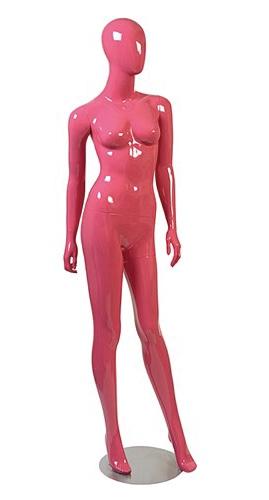
Edited to add... I thought I saw something more like the above, but couldn't find it... the first link of Chohole's seems to have a smooth morph for the head, so that's probably close if you want something like that.Help with a morph pleaseIs your original object at 100% scale before you load the morph? Ideally it should be , but if it isn't you can get around the problem by importing the morph with morphloader pro, and turning on 'reverse deformation'.
Help with a morph pleaseOK, so do the settings in the OBJ import dialogue match the settings in the morph loader dialogue?
Morphing male characters - What to buyFor a basic understanding, there are two main components (simplified) to a character in Daz Studio.
Shape is one. So when you load in a basic G8M (male character of the latest generation) , it is morphs that make it into the unique shapes. Morphs move the surface to come to the shape of a new character. Furthermore the detailing of the shape can be more or less defined by it's subdivision level (which you can control in Studio and if the morph supports it) The base morphs you describe are more than fine to start with, as it gives you a wide range options to make new characters. You can always buy a distinct character, or certain morph packs if you need a certain style or facial feature you don't have yet.
Skin is the second. So the surface of the character. Some are more stylized, some are very realistic. If you buy a character, you can use its skin with all the morphs in your library, giving you more versatility in creating your own character. Or you can use a character out of the box and don't tweak it all. It's all possible.
How to export custom morphRichard Haseltine said:
What do you mean by custom - hand sculpted uisng no existing moprhs?
I used FaceGen to generate morph for Genesis 8 Male , then I exported it to blender sculpted it a bit and then I reimported it to daz as a morph for G8 male which then I saved as Character Preset with the corresponding textures. I need to know how to save this character so I can import it as easily as possible on other computers.
Is There A Plan To Speed Up G8 (and future generations) Loading Times?Bejaymac said:
https://www.daz3d.com/forums/discussion/comment/6537556/#Comment_6537556
^^^ That is a link to a small PoC I did a few weeks back, one of the things this shows is that DS has a built in asset INJection system.
Basically the devs are going to have to setup DS so it doesn't load every asset with the figure, either that or people are just going to stop buying characters/morph sets, which will hurt DAZ financially.
Which ever way they do it I suspect there is going to be one hell of a mountain of content that needs reworked, as just stopping assets being loaded with the figure is going to break everything.
Checked it out, nice find. I think the injection system is actually just the normal character load system, except being redirected to file outside of the /data/ folder.
You method also work with hiding/unhiding file method. Basically have each character install into a seperate folder. Add character folder as base directory as needed and load character. This way you dont have to manually edit any files. But getting DIM to install to seperate folder is going to be a pain.
Do you know of a way to get it working with shape morphs. Otherwise having too many of those can also make loading super slow. That was way I was interested in a system that can handle more than just characters.
Is There A Plan To Speed Up G8 (and future generations) Loading Times?https://www.daz3d.com/forums/discussion/comment/6537556/#Comment_6537556
^^^ That is a link to a small PoC I did a few weeks back, one of the things this shows is that DS has a built in asset INJection system.
Basically the devs are going to have to setup DS so it doesn't load every asset with the figure, either that or people are just going to stop buying characters/morph sets, which will hurt DAZ financially.
Which ever way they do it I suspect there is going to be one hell of a mountain of content that needs reworked, as just stopping assets being loaded with the figure is going to break everything.
Daz 3D is part of

Connect
DAZ Productions, Inc.
7533 S Center View Ct #4664
West Jordan, UT 84084Licensing Agreement | Terms of Service | Privacy Policy | EULA
© 2026 Daz Productions Inc. All Rights Reserved.