-
Anatomy Bundles, do they work with G8? Still worth getting?
Thanks for the reactions folks, considering the age of the product and as I don't have the wear them all autofit clone product I'll wait until a deep sale before trying one of these bundles. I guess the starter bundle + Iray shaders would suffice follwowing Richard's method, or even odbob's method, no need to get Victoria 4 and Michael 4.
Anatomy Bundles, do they work with G8? Still worth getting?These are for Victoria 4/Michael 4. You could AutoFit the figures to Genesis, then AutoFit the results to Genesis 8 - but you would then losde the ability to adjust the bones separately and, asi recall, there iss ome noticeable distortion. Using the muscle maps would require a tool to enable fourth geneation maps to work, and there are no Iray settings.
Anatomy Bundles, do they work with G8? Still worth getting?So I've been looking at the anatomy bundles for a while, both the starter and the pro: Do these work with G8 and can I just get the Starter Bundle, or should I get the Pro as they were meant for Victoria 4 and Michael 4? Are these still worth getting? I find most assets that old aren't for me, but I've seen the Iray Shaders for the bundle so I guess it might be different with these items.
Using V4/G3F Morphs on a G8FPlease put your question in the post body and the title - Daz 3D Forums
Clones shapes, like the SY product, enable converting clothes and hairs (fitted items in general) from the cloned figures (Vistoria 4 and michael 4 here) to the figure with the clone (the Genesis 8 figures here). It is not, directly, a tool for morph transfer. The other products do transfer shapes, as far as possible, from one figure to another - note, however, that HD morphs will not transfer. The older Generation products can handle getting a Victoria 4 or Michael 4 morph onto a later figure, then newer tools can transfer that to Genesis 8 (the Genesis Generation X creator died before the release of Genssi 8 so there is no direct tool). https://www.daz3d.com/shop/
Using V4/G3F Morphs on a G8FI've found some products pertaining to [Using V4/G3F Morphs on a G8F] this, but I'm unclear on the exact function of each product, and some of them seem like they do the same thing.
In general. If I want to take a morph intended for Victoria 4 or Genesis 3 Female and apply it to a Genesis 8 Female, how many products do I need? Can this be done with a single product, or do I need one product to get the morph file to work at all on a G8F, and another one to get it to work properly by morphing the G8F to be shaped like a V4/G3F? (Or is neither of those descriptions accurate?) Does converting a morph for V4 take more steps/products than for G3F?
In specifics. For V4, is this all that I need, or does that only serve the second function in the latter scenario? For G3F, is this all that I need, or does that only serve the first function in the latter scenario? If it only serves the first function, then I haven't found anything to serve the second function for G3F. Also, either way, I don't understand the difference between this product and this product. Do they in fact do the same thing, and I would only ever need one of them?
Thanks in advance for the clarification.
Unable to add material to my skeleton.Frequent confustion. You click on an icon with a heart, that states clearly : material.
So you apply a material made for a 3D heart, but you didn't load that mesh in the scene yet. So : nothing happens.
On your screenshot I don't see the folder structure of this bundle you bought, so I can't really help. But search for another series of icons that will load the 3D Object "heart" in the scene. Then select this heart object. And click on that icon in your screenshot that'll apply the material on it.
I purchased apackage
Please, always post the name of the Daz bundle you are using (Michael 4 Internal Organs) when asking for help. You'll way more likely receive precise answers from people who also own that bundle than from others who can only guess ;)
Lab CoatI've used these two lab coats by Wilmap on a book cover.
Wilmap’s Mad Scientist Coat for Genesis – Citsa and Ossy [background]
https://www.wilmapsdigitalcreations.co.uk/view_product.php?id=94
Wilmap’s Doctor’s Coat for G2F - Adia [red hair]
https://www.wilmapsdigitalcreations.co.uk/view_product.php?id=268
The two male figures' coats in the foreground are just the bodysuit I used colored white. Same as the Zheien holding Adia's wrists. This was the M4 Epsilon outfit, which I had to manipulate to Genesis, then convert to G8M, and used two different converters, which you aren't supposed to do to get good results. This render is from 2018 so I have better converters, but the file can't find all the stuff I put in there and I didn't feel up to redoing the entire mess. I'm 64 and disabled, so, health happens LOL.
https://www.daz3d.com/epsilon-for-michael-4
Hope this is helpful!
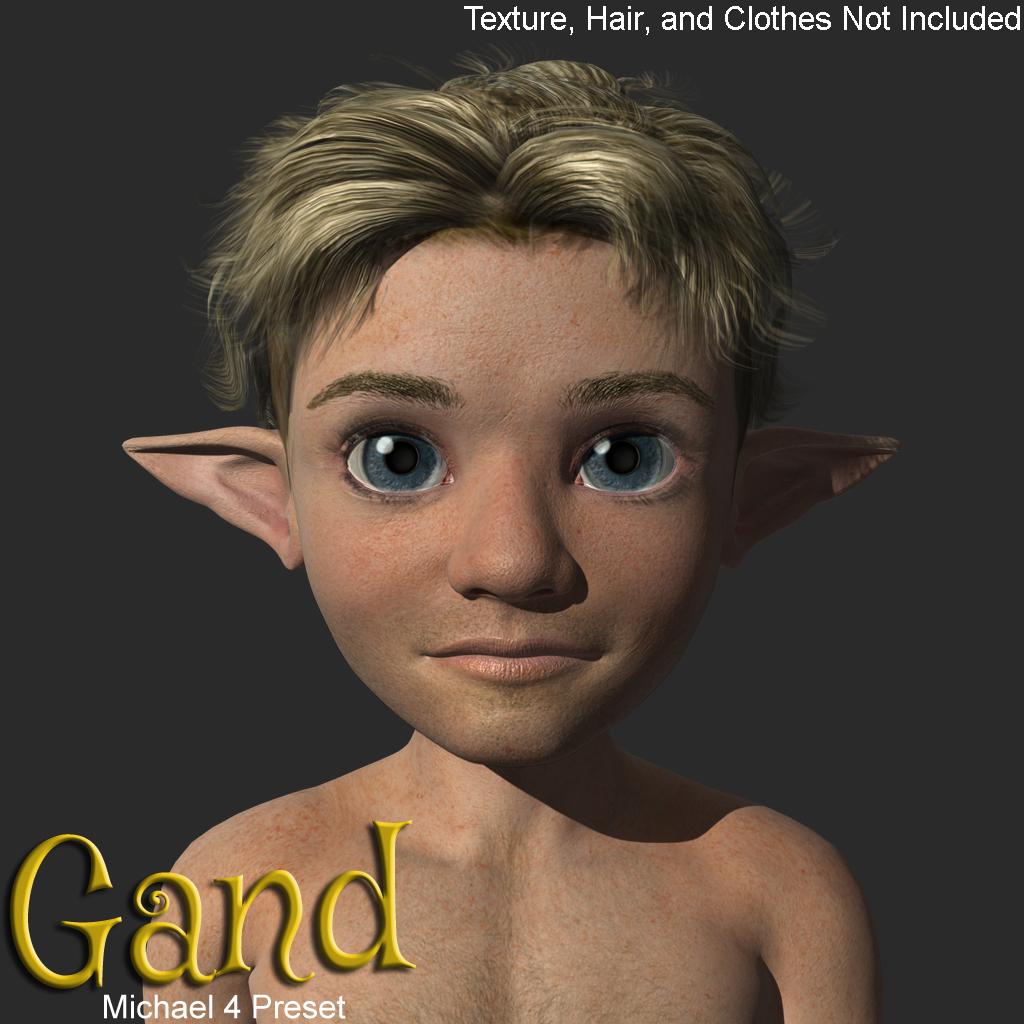
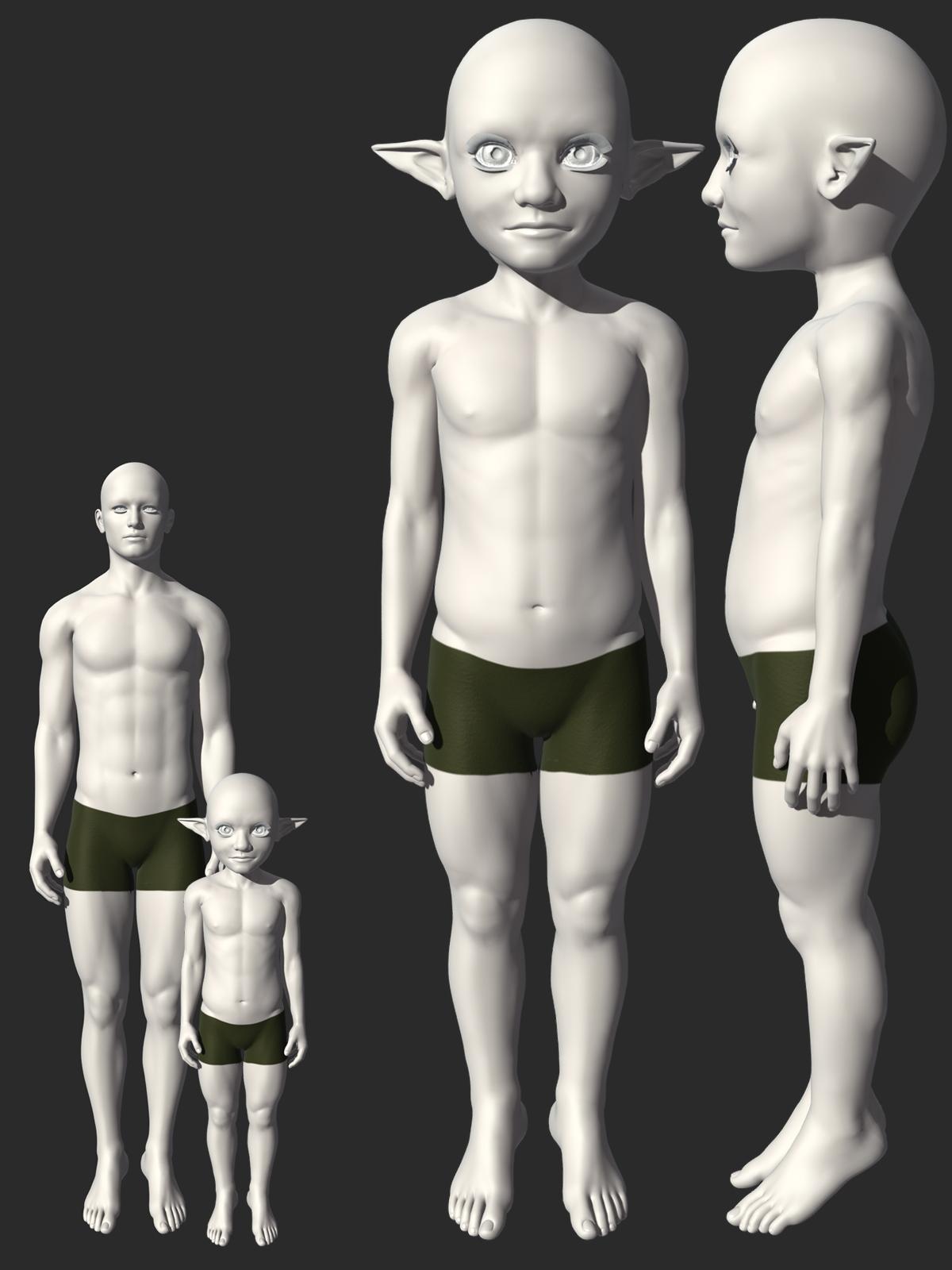
Gand Morph Preset for Michael 4Gand Morph preset for Michael 4.
Texture, Hair, and Clothes Not Included!
Requirements:
Michael 4 Base
Michael 4 Shapes++
Hiro 4 Base
Michael 4 Muscle Morphs
Michael 4 Creature Creator Morphshttps://sharecg.com/v/99715/view/11/Poser/Gand-Morph-preset-for-Michael-4
https://www.renderosity.com/freestuff/items/93641/gand-morph-preset-for-michael-4
 how to convert Michael 4 morphs to genesis 2?
Leana said:
From memory, for V4/M4 you don't have them in the list of source figures in GenX2 like Genesis figures, you need to use the "load files" option to load the cr2 and the various morphs you want to transfer.
There's a lot of information about transferring morphs manually in this thread: https://www.daz3d.com/forums/discussion/24093/transferring-morphs-from-genesis-to-g2m-g2f-and-from-g2m-g2f-to-genesis-now-with-clones/p1
it warked!
I dragged Michael 4 figure to genx and it got loaded after that i did the same for the morphs i didn't know it was posable and so easy too.
thank you very much for the help!
how to convert Michael 4 morphs to genesis 2?Leana said:
For autofit and to use M4 textures on G2M you will need this: https://www.daz3d.com/michael-4-for-genesis-2-male
To convert M4 morphs to G2M you can use GenX2. You would need the base program and the G2 add-on:hi thanks for replying,
I already have genx for genesis, genesis2 and genesis 3 but there is no option for Michael 4 and those morphs don't appear in genesis 2 the only morph I have is Michael 4 base figure
do you know of a way to copy the shape of the morphs like using auto fit and transfer utility? I use those to convert g8 to g2
how to convert Michael 4 morphs to genesis 2?For autofit and to use M4 textures on G2M you will need this: https://www.daz3d.com/michael-4-for-genesis-2-male
To convert M4 morphs to G2M you can use GenX2. You would need the base program and the G2 add-on:how to convert Michael 4 morphs to genesis 2?hi,
I was wandering how to convert Michael 4 morphs to genesis 2?
I tried transfer utility but Michael 4 isn't even there and auto fit doesn't work I wanted to convert this product https://www.daz3d.com/ape-world-gorilla to genesis 2 male is it even posable?
can I maybe copy the shape or something?
No thread on Michael 9. Really?Oso3D said:
Re: Price for the bundle
It's a lot of money, but it's on par with past generation bundles. And unlike past generation bundles, many of the assets will also work on feminine characters!
Dark Assassin for M9? Also for V9 and ... heck, my corgi...
Explorer Sci-Fi outfit? Male, female, nonbinary... all of it.
Captain outfit, Marty Mane? Both!
I mean, I'm honestly thrilled at not having to pine and hope that PAs put out a version of an outfit for the other gender, or wrestle with trying to get autofit not to do V crotches.
So, yes, it's a big chunk of change to buy in. But you get a LOT for it.
It's really not on a par with previous bundles price wise, i checked what i paid for Michael 8 pro bundle it was listed full price of $134.95 the deal i got discounted the bundle to $66.13 and included michael 5,6 & 7's pro bundles for free Michael 9 mega bundle is $270.99 discounted to $132.78 and you only get Michael 4 pro bundle free as a bonus, this is in no way comparible it is twice the price no matter which way you look at it with less bonuses, i understand inflation happens but this is rediculous for most people this is a hobby but these are not hobby prices anymore
No thread on Michael 9. Really?markgoode77 said:
I very much like the character, and I like most of what's in the 'big' bundle. It's a lot of money though. I don't want the Michael 4 and 5 bundles, I already own bundles 6 & 7, and any parts of 8 or 8.1 that I like I've already bought - so there's not much to sweeten the deal. I need to think on this.
As for the weapons, they're shown as being included in the King's Guard outfit, which is part of the bundle, as well as being sold separately - which confused me a bit. They look good though. If I were to nitpick I'd say the pistol is wrong, the rolling block pistol was patented in (I think) the 1860s. I still want it though.
Yeah, I saw the part about the weapons just after I poseted this. It's a weird choice, you'd expect them to be presented as breakout items in this case. Those old bundles would have been enough for me to get the Intro bundle, even if they're not terribly exciting. But with no incentive, I'll just wait.No thread on Michael 9. Really?ioonrxoon said:
Such a poorly handled release. The first part of the mega bundle is outstanding, but the second.... I don't care for a single item there. Getting just the intro bundle separately is a no go, the price is terrible compared to the mega bundle and you don't get the free m4 - m5 bundles.
But then I saw the weapons separated from the outfits in the add-on section (which don't even activate the extra 10% like the other new releases in the next section), so I just stopped bothering to find a combo that works for me and cleared my cart.
I very much like the character, and I like most of what's in the 'big' bundle. It's a lot of money though. I don't want the Michael 4 and 5 bundles, I already own bundles 6 & 7, and any parts of 8 or 8.1 that I like I've already bought - so there's not much to sweeten the deal. I need to think on this.
As for the weapons, they're shown as being included in the King's Guard outfit, which is part of the bundle, as well as being sold separately - which confused me a bit. They look good though. If I were to nitpick I'd say the pistol is wrong, the rolling block pistol was patented in (I think) the 1860s. I still want it though.
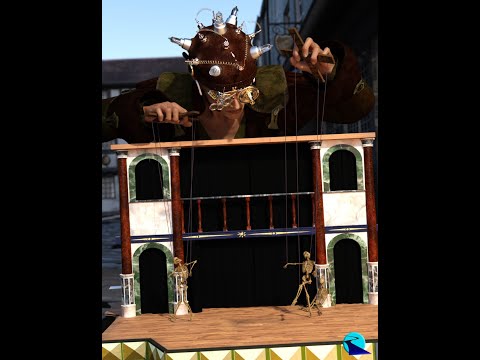
[Released] Ultimate Pose Converter Bundle for Genesis 9 [Commercial] Stop wasting time and hard drive space converting pose presets, just use them! Bone Minion will do the hard work for you by acting as a bone “catcher” for a pose and then do a just-in-time conversion of the pose to its parent Genesis 9 Figure*. You can directly use ANY pose (from Victoria 4 and Michael 4 to Genesis 8) with your Genesis 9 Figures. Simply load the desired Bone Minion (i.e., Genesis 8 Female Bone Minion for Genesis 8 Female Poses) on your target figure (Genesis 9), select the Bone Minion, and start applying poses!
- On-the-fly conversion of poses to your target figure
- Directly convert from the source generation to the target generation without converting to intermediate generations
- Works with full poses, partial poses*, hierarchical poses**, and even AniBlocks!
- Automatically applies full poses when they are loaded*
- Cross-gender pose conversion
- Supports pose properties, e.g., Right Hand Grasp poses (using the Create Heavyweight Bone Minion script)
- Use pose details on the Bone Minion to apply partial poses
Note that converted poses (and especially props if they are hierarchical poses) may not be perfect and may require tweaking. Facial bones (i.e., expressions) except for the eyes are not transferred.
* Any pose that sets the hip of the Bone Minion will be automatically converted on the fly and applied to the target figure. The Apply Changes script can be used to transfer any pose (including partial poses) on the Bone Minion to its target figure.
** Hierarchical poses require the props loaded on both the Bone Minion and the target figure. For Genesis 9, the bone names ARE VERY DIFFERENT and you will need to move the props to the correct bones manually. The prop will be properly rotated for the pose but may need to be manually translated to the correct location.
Tutorial
What's Included and Features
- Bone Minion for Generation 4 Poses for Genesis 9
- Bone Minion for Genesis Poses for Genesis 9
- Bone Minion for Genesis 2 Poses for Genesis 9
- Bone Minion for Genesis 3 Poses for Genesis 9
- Bone Minion for Genesis 8 and 8.1 Poses for Genesis 9
General question about how to shop on Daz3dHello all,
General questions about how to shop on Daz3d. I am new to this and use Poser 12.
1. If I want to buy Victoria 4 or Michael 4 would I go to Shop/ 3d Models or Shop/ People and Wearables?
2. Next step on the Figure pull down I'm seeing check boxes for Michael 4 and Michael 4 Elite. What's the difference and why is it that when I choose Michael 4 I don't see anything that looks like a basic male figure?
3. Once I have bought these 2 figures, what is the best way to find clothes for them. Let's say I want a wedding gown for Victoria 4. How would I go about doing that?
Thank you!
Blunt QuestionVictoria 4 and Michael 4 are very good Poser figures sold here at DAZ, with an incredible amount of content available. Keep an eye out for Legacy sales; there was recently a 90% off sale on a lot of this content. Buy at least the base and Morph++ packages for each.
If you have them, I could point you to improved weightmapped versions of each which give improved bending......
Blunt QuestionI appreciate your patience with this but I just want to be sure: If you've got Michael 4, would the clothes available for Michael 5 work with it? And vice, versa: If you've got Michael 5, would any of the clothes made for the previous incarnations of Michael work with it?
Blunt QuestionVictoria 4, Michael 4, and their companions are Poser figures. Genesis was the first Daz Studio figure. Check the Compatibility and What's Included sections of the product page if in doubt - CR2, PP2, HR2 and so on are Poser-format files, .duf and .dsf are Daz Studio.
Daz 3D is part of

Connect
DAZ Productions, Inc.
7533 S Center View Ct #4664
West Jordan, UT 84084Licensing Agreement | Terms of Service | Privacy Policy | EULA
© 2026 Daz Productions Inc. All Rights Reserved.