-
Daz to Blender - Morph update - “Spring Cleaning Update” (2.3.1)
The new build is nice but seems to have an issue with the Eye poses for 8.1 characters; i.e., the Eye Look morphs. If I export a basic 8.1 character along with the Eye Look morphs (needed to actually move the eyes side to side or up and down), when imported into Blender and using the morphs in the Morph List section the eye balls will come out of the socket when looking left or right. Unfortunately, makes it unusable for my purposes. Anyone else have this issue?
Thanks - Jeff
Bluejaunte appreciation
This is kinda pointless though, as Gaia uses G8 textures. Only the eyes use 8.1. Or maybe the point was just show the texture transfer workflow in general?outrider42 said:
If you are wondering how, you can do this all inside Daz itself by baking the textures. When I did this, the resulting renders for Gaia look exactly the same with the new 8.1 converted textures as they do with her out of the box textures.
Bluejaunte appreciationIf you are wondering how, you can do this all inside Daz itself by baking the textures. When I did this, the resulting renders for Gaia look exactly the same with the new 8.1 converted textures as they do with her out of the box textures.
There is a tutorial somewhere in the forums, but here are highlights for those who don't know, and tailored to this specific task:
1- Load a basic 8.1 figure
2- Load your Genesis 8 material preset. Before going further, double check your default templates that everything is in place and note what surfaces are under which template. Since this is just for the torso, it is pretty easy.
3- Go to the surfaces tab. Locate the menu, the triangle with lines at the top left or right depending on where your surface tab is docked.
4- From this menu, locate Map Transfer. You will see two fields here. On the left there is Templates, and this will be blank. On the right you have Surfaces. Hover your mouse over the Templates field and right click. Pick the option to create a new template.

5- Template 1 is for the face and related textures. You can leave this blank because there is no change between 8 and 8.1. Template 2 is for the new Head texture. Template 3 is for most of the old torso texture. If this is all you want, you can stop creating templates right here. If you wish to try baking the eye, you can go further to the template for them. However I don't see a point in doing that. All you do is click on the surface and drag it to the template it goes to. You will notice that the surface you dragged is now missing from the surfaces section. That means you are doing it right.
6- To get going, you need to highlight the Default Templates. We want the torso, so we highlight BOTH templates 2 and 3. Doing this will allow us to continue. If you do not highlight the templates, you cannot proceed. Do not highlight the surfaces! You will see the target template is 8.1, and the source is "current". This is what we want. You can select where to save. Saving in the same location as the original textures makes sense, but you can do whatever you want here as long as you can find them.
7- I suggest keeping the file types the same, Gaia has JPGs. Crank the baking quality up to the max of 10. Hardware Cutoff was already maxed, I changed the bleed factor down a bit.
8- Then just hit accept.
9- Your new textures will have generic names. So it is a good idea if you do this a lot to save in new locations to not overwite previous convertions. This is where saving new files in the location of the original folder probably works better. All textures associated with Templates you chose are converted.
10- So for this character, I now have "Template2 Detail Normal Map", "Template2 Diffuse Color", "Template2 Normal Map", and "Template2 Specular Lobe Roughness". I also have these same maps for Template3. SInce the torso map for G8 already covers Template 3, there is no need to replace Template 3. You only need to go to Template 2 in your surface settings and replace the torso map with the equalivant texture you just created. Then go down the surface settings for the Head and change it to Base 8.1 Female.
11- You are done. You can do a test render to see if it looks ok. You can also save this as a material preset for future use. If you like messing with textures, you can now use your favorite blejaunte and other PA textures from 8.0 and mix them with native 8.1 textures.
12- Celebrate your bad self. WHOOO!
FYI this same process is also how you convert the unique UV maps from Victoria 7 and friends to standard Gensisis 3 (as well as Victoria 6 to Genesis 2.) So with this you can also convert any of the 7 series models that have unique UVs all the way to Genesis 8.1 by first converting them to Genesis 3. If you own the Gender swap UV product, then can also use this technique to convert textures from one sex to the other. This is how I cretaed a set of bluejaunte MALE textures. MWAHAHAHA!.
If you do see a seam, it is more likely do to the material settings using the new tiling feature in PBR Skin. How many times the tiles repeat can be adusted in the settings. This is a potential downside to using any kind of tiling for skin details if you like to do extreme close up pictures. But this is Gaia skin using newly converted head textures. There is no seam.
 Casual Outfit Issue with shoulder
This happens with mal3imagery's other item dForce MI Autumn Outfit for Genesis 8 Male(s) | Daz 3D, as well. I had all kinds of problems fitting these items to female characters, but, since I've not done a lot of cross-gender conversions, I thought it was just me screwing up, but it's a matter of the shirt just not working with certain shapes.
There's not a lot of nice looking clothing for males, so maybe people didn't want to complain too much, so as not to discourage the PA. It's too bad, because this type of wardrobe is just as lacking for female characters as it is for male ones.
Thanks for the helpful information, Richard, but I couldn't get it any better than this, and it's This is August 8.1 Male. All simulated in A-pose separately for each morph change. Ignore the loose pants, since that's not hard to fix.
Base August 8.1 Male - Not great

August 8.1 Male 100 pct More Masculine - Much better, could probably pass

August 8.1 Male 100 pct More Feminine - Unusable

There's also weirdness with non-contiguous face groups, but I don't know if that affects this.
Casual Outfit Issue with shoulderThe issue is that the top has a Rigidity Group, which limits the way that morphs can affect it, so that those areas are getting left static while the reset of the outfit follows the morph. I suspect part of the issue may be the rather odd selection of vertices thata re acting as a reference (the shirt's rigid areas will follow the way those areas are affected by morphs) so you might try:
- select the top
- Tools>Geometry Editor
- In the Tool Settings pane (Window>Panes(Tabs)>Tool Settings, if it isn't open) click the Vertex Selection radio button at the very top
- Click the + next to the References group, right at the bottom of the list in the pane
- Right-click on the References>Remove Selected vertices from Group
Does that help? If not you may need to selet the sticky out areas of the shoulders by dragging over the mesh with the tool, or switch to marquee select fro right-click in Viewport>Selection Mode (it doesn't matter if you get more than the area that is being problematic, but I think you want to avoid selecting the detailed areas of the collar) then right-click on the Participants entry in the Tool Settings pane>Remove Selected Vertices from Group.
Rigidity groups help to avoid the emsh getting lumpy when multiple morphs are applied, or clinging too closely, but they can be a problem when you do want the model to follow the morph.
Daz to Unity not workingmjdj1999 said:
Artini said:
You need to save the scene in Daz Studio before using Daz to Unity bridge.
Choose item/character in Daz Studio, open Unity Hub, create or open the project, preferably with High Definition RP.
Go back to Daz Studio, be sure that the item/character is still selected.
Go to: File, Send To, Daz to Unity
Put checkmark in "Enable Morphs" if you wish to send morphs over the bridge
During first transfer put checkmark in "Install Unity Files"
In the field "Unity Assets Folder" click on ... and browse to the Assets folder of the project in Unity, to select it.
Click "Accept", wait until conversion is finished in Daz Studio, then switch to Unity editor view.
Click on "I made a backup..." in Unity, if you get such pop up.
Wait until transfer is finished and enjoy your item in Unity.
Still doesn't work. I saved the item then saved as "Scene" as well and still no Unity option.
Sorry, but I do not know, how to help you. I am just a hobbyist.
Casual Outfit Issue with shoulderit's usually down to the morphs used in the figure. I just checked it out myself and the lithe morph causes this also on my end. Either don't use the lithe morph or put in a support ticket to get it fixed. really sad that it has been out for awhile and noone has seemed to have reported this.
Daz to Unity not workingArtini said:
Just tested with Sluggo - https://www.daz3d.com/sluggo-for-bullwarg-hd
and it still works for me.
Actually, I did not know, that Daz to Unity bridge transfer posed characters,
so I can render them in Unity directly - how cool is that.
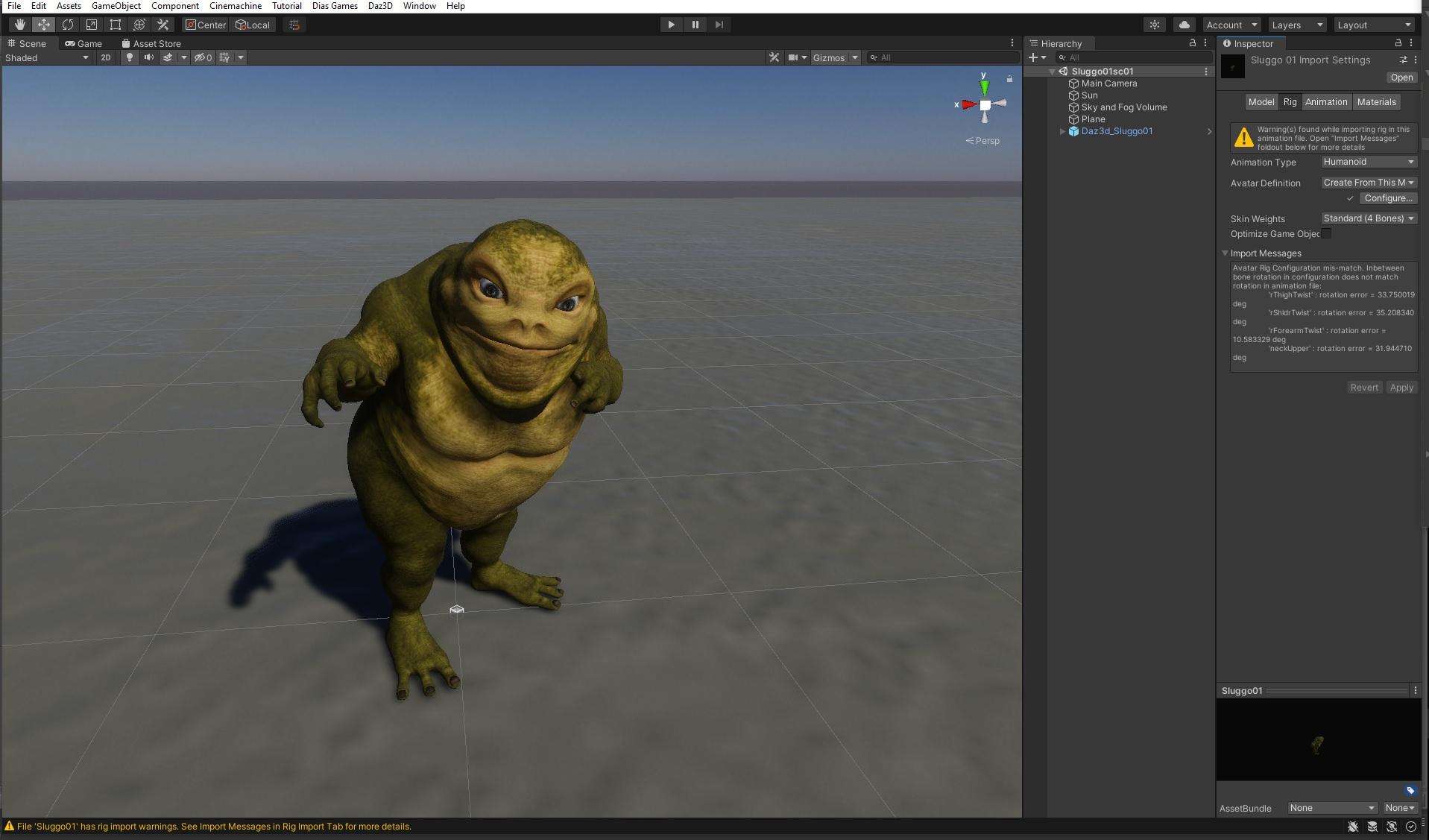
Artini, what version of Daz Studio are you using? Are you seeing the normal maps etc being attached to Sluggo's character materials?
BD Oshunmargrave said:
Ascania said:
Has anyone bought that product yet? The morph looks interesting but I'm uncertain about the maps. The pore structure and colour variation just seems too uniform, like the skin of the cheek has been cloned all over the face with little regard for the different skin structure. Also the lips seem to have been hit with a random noise layer.
Or is it just the promo images?
https://www.daz3d.com/bd-oshun-and-her-outfit-for-genesis-8-female
You'd probably need to fiddle with the SSS quite a bit too. In some of those pics, she looks like a blob of molasses.
Point. Lighting her might be a nightmare.
BD OshunAscania said:
Has anyone bought that product yet? The morph looks interesting but I'm uncertain about the maps. The pore structure and colour variation just seems too uniform, like the skin of the cheek has been cloned all over the face with little regard for the different skin structure. Also the lips seem to have been hit with a random noise layer.
Or is it just the promo images?
https://www.daz3d.com/bd-oshun-and-her-outfit-for-genesis-8-female
You'd probably need to fiddle with the SSS quite a bit too. In some of those pics, she looks like a blob of molasses.
BD OshunHas anyone bought that product yet? The morph looks interesting but I'm uncertain about the maps. The pore structure and colour variation just seems too uniform, like the skin of the cheek has been cloned all over the face with little regard for the different skin structure. Also the lips seem to have been hit with a random noise layer.
Or is it just the promo images?
https://www.daz3d.com/bd-oshun-and-her-outfit-for-genesis-8-female
How to use Face Transfer with Genesis 8.1 CharactersI'm not especially familliar with Face Transfer, but assuming that it doesn't work normally with 8.1, then the thing to do would be to use it as directed with 8.0 and transfer to 8.1 the same way you would transfer any other character.
GenX2 Update / Genesis 3 Add-On [Commercial]Hello fellow renderers, I am completely aware of the reasons why it will be hard to get support on this product but unless there is an alternative it is the only hope I have. While I have created successful transfers of characters scultped from G3F morphs to G3M I recently stumbled into the "circular" problem.
I gathered some morpphs I had transferred from G3M to G3F but even afetre disabling all morphs from the GenX tab as well as moving the folder from the morphs location the problem persists. What i have found is tha not only my created characters are listed as cicular, it also applies to Littlefox' Star2 which is the main reasin going through all this as I am creating toon characters. But that was a dead end, too as even afeter saving a character without any Star related dials it would show up as circular morph. Loading a saved character and reading the values from it will throw the "not all morphs were found on this figure" error. The only solution would be to export via morph loader Pro - but iunfortunately this will lose the neccesary JCMs on reimporting. So i am somewhat stuck with creating skins, assets and all that pesky work each time I create a character, any hint would be highly appreciated.
Daz to Unity not workingJust tested with Sluggo - https://www.daz3d.com/sluggo-for-bullwarg-hd
and it still works for me.
Actually, I did not know, that Daz to Unity bridge transfer posed characters,
so I can render them in Unity directly - how cool is that.
Daz to Unity not workingArtini said:
You need to save the scene in Daz Studio before using Daz to Unity bridge.
Choose item/character in Daz Studio, open Unity Hub, create or open the project, preferably with High Definition RP.
Go back to Daz Studio, be sure that the item/character is still selected.
Go to: File, Send To, Daz to Unity
Put checkmark in "Enable Morphs" if you wish to send morphs over the bridge
During first transfer put checkmark in "Install Unity Files"
In the field "Unity Assets Folder" click on ... and browse to the Assets folder of the project in Unity, to select it.
Click "Accept", wait until conversion is finished in Daz Studio, then switch to Unity editor view.
Click on "I made a backup..." in Unity, if you get such pop up.
Wait until transfer is finished and enjoy your item in Unity.
Still doesn't work. I saved the item then saved as "Scene" as well and still no Unity option.
Daz to Unity not workingYou need to save the scene in Daz Studio before using Daz to Unity bridge.
Choose item/character in Daz Studio, open Unity Hub, create or open the project, preferably with High Definition RP.
Go back to Daz Studio, be sure that the item/character is still selected.
Go to: File, Send To, Daz to Unity
Put checkmark in "Enable Morphs" if you wish to send morphs over the bridge
During first transfer put checkmark in "Install Unity Files"
In the field "Unity Assets Folder" click on ... and browse to the Assets folder of the project in Unity, to select it.
Click "Accept", wait until conversion is finished in Daz Studio, then switch to Unity editor view.
Click on "I made a backup..." in Unity, if you get such pop up.
Wait until transfer is finished and enjoy your item in Unity.
The best way to bring Iclone 7 and Character Creator 3 content to Daz Studio@kevinsanderson,
Compositing as you describe is not really a good solution for a variety of reasonsThe native Iclone render engine is frankly rubbish compared to Iray unless the OP $$$Purchases$$ the Iray plugin for Iclone..another expense.
And even then matching the lighting, cameras etc will be a compositing nightmare hardly worth the effort IMHO.
That said, it is possible to mix two similar Character eco systems like Iclone/CC3 and Daz if you are willing to combine them in a third environmmentfor final renders, such as a Game engine or another 3DCC, Like Blender.
Both Daz studio and CC3 have dedicated exporters for Blender now.
Daz studio has Daz2Blender and Thomas Larsons "Diffeomorphic"and DS default FBX export.
CC3 pipeline has an FBX to Blender export preset and there is a free addon by a Reallusion user
( Victor soupday),That imports animated FBX figures into Blender and auto sets up the skin shader nodes and recreates the skin paramters interface ,from Iclone, inside Blender.And we all know about the excellent Genesis import /conversion capabilities of the Daz2Blender and Diffeo addons
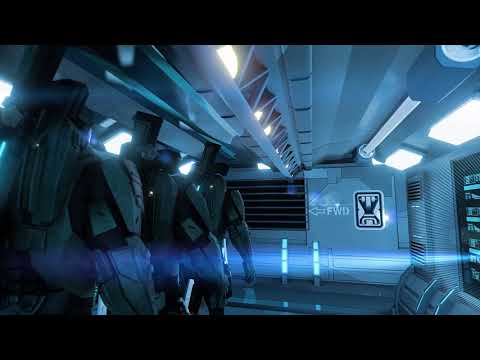
Now to show that I am not a person who comes into threads and offers theoretical solutions that I have not actually tried myself, I present this video.The armed guard on patrol is a legacy Daz millenuim man 3 (Mike3 reduced resolution) .
as well as the Figure who runs around the corner and is Blasted back into the corridor.Both imported to Blender via Standard FBX from Daz studio because they are very low poly and are covered
head to toe so good skin detail etc is moot.Also Daz Mike 3 accepts BVH files directly from my Old but powerful ,Endorphin ragdoll simulation software,
instead of the complicated multi-step process that would be involved in converting Endorphin motion Data to Iclone via 3DXchange retargeting.
The "hacker" seated at the terminal is imported from CC3 as well as the armored "Spartans"
the environment, I built in Blender( like all of the CC3 clothing /armor weapons)However the environment/props could all have been easily imported from Daz studio content ( via Diffeo etc )
for those who are not skilled content creators like myselfSo yes... the OP has viable pathway for leveraging his Reallusion investment as well as his Daz content investments
If he/she is willing add the mighty Blender to the Pipeline

because trying to bring usable Iclone/CC3 assets back into Daz studio is frankly a non starter IMHO
What if I used Poser as an intermediary between Reallusion and Daz Studio?
I have no knowledge about Poser 12's ability to import the FBX Avatars from Iclone3DX or CC3 pipeline but you could ask over at Renderosity or the poser forum here at the Daz site.
But if you do not already have Poser it will be at least another $250 USD on top the money you have spent on Reallusion and be assured poser has ZERO support of facial mocap ( Rokko etc) and its animation tools are a decade behind the Default options in Daz Studio to say nothing of Iclone
But understand this:
FORGET any notion of transferring Character morphs from CC3 Avatars to Genesis 8 short of reproducing them in a sculpting/modeling program and loading them with the morph loader tools in Daz studio proper.
@kevinsanderson honestly, no false modesty, but Blender does not need me to make it "look good"
it only needs users to learn its powerful,professional toolset and it will easilyimpress.Blender is extremely stable and major gaming companies , (like Ubisoft),have adopted it as their game asset creation tool.
Anyone seeking to completely re-create the Daz Studio user experience in Blender is going to be frustrated.
but that mindset will cause frustration if trying to migrate to ANY major 3DCC or game engine.Even Daz Does not promise this with their various export plugins
They ,Rightly, assume that the various end users are reasonably knowledgable in the target programs(Blender,Maya,UE4,C4D etc)After installing Mabel 8, loading every other character, is loaded Mabel 8 too. SOLVED !I tried 2 ways:
1) load Chamelon Rose, zeoing Mabel, then saving as character preset, with a new name, in a folder where i save my assets, clear the scene and load the new preset. It works, the character is loaded correctly.
2)load Chamelon Rose, zeoing Mabel, then saving as Support Assets>Morph assets (with all properties selected) with new name. It doesn't work. There is a new directory with my name in the path C:\daz-studio-4.12\data\DAZ 3D\Genesis 8\Female\Morphs, but in the menù i find same characters that behave in the same manner, they load mabel too. (The name of the directory is Daz-studio-4.12, but sotwaRE I USE IS DAZ Studio 4.15.)
The first way works, but it means that i have to do this for every character and then keep the new and old presets (I don't know how to uninstall safely a character, having fear to do disaters).
How to save the assets that works to correct the damaged preset?. For example I used Chamelon Rose for this test and now i have the original one, with property (skin colour etc) that appair damaged, and another that load correctli, but is the base complete character, without choses (but appling them after, behave correctly).
How i can "transfer the corrected parameters on the original character, to "clean" it and set to its original parameters.?
I think I did something wrong saving work, because the characters are beautiful and loaded correctly first time. Then, maybe saving scene or pose presets or other, i have involuntary mixed characters.
There is a way to reset any character to original assets, deleting changes? Reinstall them could work?
Thank you
emanuela1
Morph Loader Pro Not Working... Suggestions?Hmmm... I just managed to successfully import a morph into DAZ with Morph Loader Pro. I still need to do further testing, but here is what I did to get this to work finally...
- I removed the geografts as suggested by Leana. (Thank you Leana!)
- I then realized that DAZ was automatically adding two items to my scene, named "Tonemapper Options" and "Environment Options". I removed them from the scene so that I was left with only the Genesis 8.1 Female. I was erroniously thinking that DAZ would only export the items I had selected in my scene, but DAZ instead exports everything in a scene regardless of what is selected. Feeling stupid I am.
- I made sure to select again the "Import as morph target only" option when importing the figure mesh (OBJ) into Rhino 3D. This imports an entire OBJ file as a single mesh and ignores grouping, texture coordinates, and normals included in the file. It maintains the vertex and face counts and orders. In the past I've been able to leave this option unchecked. ...Part of the further experimentation needed.
Script / report on which morphs are used in a custom character?HamEinar said:
I am surrendering to the bog-down of investing too much money in assets and was wondering if it is possible to see which morphs are used in any given custom character (i.e. when I load one of my characters I can get some kind of list of morphs used) to be able to remove excessive morphs not used? I know I can go into shaping and look at "currently used" - but this is not very intuitive when it comes to some muscle morphs etc. which are not labelled "XYZ Muscle Morphs: Arm size".
Many times I buy a new character simply because I like the materials, and thus I can live without any morphs from said character as long as I still keep the materials.
If I understand the issue correctly, character morphs (including some expressions and poses) are the reason Studio is crawling to a halt.
The older D3D (Dimension 3D) 'content gatherer' utility from the DAZ Store might help you in a couple of ways, as it will not only help you identify morphs that are used (non-zero) in a custom DS figure, but it will also let you create a zipfile content-library/runtime containing all of the elements in a duf scene-file (and, only those elements) with their dependencies. You can create a dedicated figure runtime/content-lib for your figure/character and outfits/props/hair. (and other figures, and buildings/environment too, if you wish).
Basic use of the tool is to first build your scene and your custom figure in DS, save it as a 'duf' from DS, then use the standalone 'gatherer' utility to generate a new zipfile content-library of all of the elements in that duf file. This new zipfile collects everything needed to re-create the scene, and preserves the DS content-library format so that it can be extracted and used natively in DS.
There are few hints of note: It will not include morphs that are not explicitly used (sliders set to zero are ignored), so collections of the default morphs that we kind of expect to be there, like the DAZ visemes and other simple/standard adjustment morphs won't be included with your figure unless they are explicitly used (non-zero sliders) in your figure when you save it in the scene duf-file.
Two simple fixes (if you use this utility): Either set all of the morphs that you may wish to include with your custom-figure to non-zero, even if slightly (e.g. 0.00001), before you use the 'gatherer' tool.
The other method is to create a minimal gatherer file (content-lib/runtime) for just your custom figure (as-is), load that as a library in DS's library system, then install any other standard morph-sets you want to have available (e.g. expressions, DAZ std for visemes and 'typical' adjustments) *into that new runtime/content-library* (that's my approach).
To invert the logic/approach for the same effect, build your perfect figure, and 'gather' it into a zipfile. Then create a new minimal basic/standard base figure library/runtime as you normally do in DS - with only the additional morphs/expressions that you want your custom figure to have available, then merge your new custom figure zipfile content into the new minimal 'standard' figure content-library you just created. You can use that in DS, and you can also save it for future projects/reference and uses.
It's kind an unusual way of thinking in DS, as most folks have a single (huge) runtime/content library, I have hundreds. Every project is based on a general DS resource library and at least one project-custom library that contains only the elements needed in that scene. A typical project includes 3 or 4 thematic figure-centric and/or scene-centric library folders, all of which are kept 'pure' and backed up for future use and project re-visits, where having the scene, resources, and DS program versions be exactly as they were originally rendered is critical to getting the same render characterstics in a later scene creation session.
DAZ did not design their DS system for this sort of production workflow at all, and in fact, make it really difficult to work this way, but my runtimes are minimal, responsive, and reproducable, at the expense of some redundancy in my libraries and hassles managing DS versions. Occasionally I wish I had easier access to some resource that isn't easily available in these stripped runtime-libs, but with a bit of planning, I don't run into this very often, and I can add/install those new resources into the given environment if needed easily enough.
Finally, you can be pretty certain that none of this approach will coordinate very well with the DS connect or smart-content that DS uses nowadays, but if you're comfortable doing a bit of "extraction and merging surgery" on your content libraries, you can create truly minimal, but complete, figure runtime/content libraries for your figures or projects. You can also 'gather' and archive multiple figures (and props/resources) into a complete project runtime/content-lib zipfile for completed projects (e.g. animations/stories) that use multiple characters, but contain none of the extra stuff you don't want to include.
The author of the gatherer utility passed away a while back so this tool may someday become incompatible with DS duf files. I mention the tool it because I like it, and I know that it works in DS 4.11. Others may be able to confirm that it works with duf files from the current versions.
YMMV,
--ms
Daz 3D is part of

Connect
DAZ Productions, Inc.
7533 S Center View Ct #4664
West Jordan, UT 84084Licensing Agreement | Terms of Service | Privacy Policy | EULA
© 2026 Daz Productions Inc. All Rights Reserved.