-
Gen 8 Morph Bundle vs Parameters
RexRed said:
If you don't mind me asking examiner2, who or what inspired you to become a Daz Studio creator? And, welcome to the field!
I have often wondered the same question as you have posed.I find the morphs sometimes mix a lot of parameters into easy to use dials but many of the morphs affect the geometry in ways that the parameters do not. The geometry is a mesh and it can be deformed in unlimited ways. For instance, it is probably not possible to just use the stock parameter dials to take a Genesis 8 figure and turn them into a werewolf. This would take morphing dials instead. Many morphs use the parameter dials though not exclusively. Many morph dials are created in other programs and imported into Daz as animateable features.
Also, If you search Google with Daz Studio in the query title you will get better results in the Daz forums over the Daz forum search.
I also find the head morphs do not always work very well.
If I am going to take a figure and change their head over 50%, I am better off just loading that figure in instead. The morph geometry does not always translate well and this is where the parameters can help shave off the rough edges.
I use the head morphs to figure out which character I mostly want, then load them in and change the body to suit the head.
As for using your CPU to render. I have a 12 core 24 thread I9 CPU and I still shut that off while rendering. It is not faster than my graphics cards, not even close... and when I use it to render in Iray I cannot use my computer for much else and shutting off cores is a bother for what little it contributes. Yes, get a better graphics card, you need double the system ram for what you have in GPU ram and a better power supply forget about CPU rendering, it is a futile endeavor. Yes, not having your GPU and CPU fans on high you can burn out your hardware while rendering especially if anything is overclocked.
I'm revisiting this post and comments 1 year later. This comment is still very useful. I have 24G RAM now, but no major external GPU because I discovered that my motherboard is horrible and can't support more than 400 total watts flowing through it. I now have external power supplies sitting next to my machine to power everything but the motherboard. I wanted to get a thunderbolt 3 PCIe 3.0 card and connect a docked external eGPU, but my motherboard will not support that either and no drivers available. Thank you.
DAZ characters in SideFX HoudiniIt is impossible to exagerate how this would be a game changer.
Thank you!

I agree that JCMs are a #1 priority. I had previously tried various approaches to using DAZ characters in Maya, and while I had some success, it always felt like the export from DAZ Studio had to be perfect for everything to work as expected. And more importantly, if you wanted to change the DAZ character, then you would basically have to start over - i.e. none of the process was procedural. This was one of the things that led to me looking for other tools – and of course, nothing is more procedural than Houdini.
My goal with this Houdini work is for the base joint and pose morphs to be applied automatically as you pose the character in Houdini. To that end, I split the modifiers for a character into two groups:
- pre-pose, such as geo morphs that define a character's body shape, or joint modifiers that define their height and build
- post-pose, for any morph that has a joint rotation as one of its operator inputs
All of the pre-pose modifiers are applied when the character's geometry is created from the library scene (by setting calculated weights on blend shapes, or by changing the transforms of joints). All of the post-pose modifiers are applied by setting weights for JCM morphs in response to the current joint rotations. That way, only the post-pose modifier weights need to be updated in real-time, which keeps things performant. So far, this seems to be working well.
As an aside to that: I've also been experimenting with using Vellum (Houdini's cloth simulation tool) to fix self-collisions for the posed body geometry. One of the things that bugs me about 3D human renders is that you can always tell when the joint correction morphs have been pushed past their limits, and (for example) the character's calf and thigh have ended up intersecting, causing subsurface scattering glitches. These kinds of intersections are super-annoying to fix manually, and I haven't found a good automated solution, or at least not in Maya. With my new approach in Houdini, I've been able to paint weighted attributes for "fleshy" parts of the body like muscles, and run a Vellum sim to resolve those intersections. The nice thing about this is that the painted weights are topology-specific, and so the Vellum weights for any base character mesh should always be the same.
It's interesting that you mention an export of the DAZ subdivided model. One of my principles for this project has been "no exports from DAZ, ever", with a goal of keeping everything in Houdini, including all of the library parsing and geometry generation. I'm hoping to be able to replicate DAZ's subd in Houdini "precisely enough", but you make a good point - even small differences in the subd algorithm can cause the appearance to change. That said, if I can add support for DAZ HD morphs directly in Houdini, then in theory I can use the known-matching geometry topology to ensure a perfect match between base and HD meshes within the Houdini scene. (This was another thing I could never get to work to my satisfaction in Maya - even with a tool such as the excellent seUVBlendShape, I could never quite get Maya's subdivision of the exported base mesh to match up with a DAZ OBJ export of the same HD mesh, because at some point, floating-point precision became an issue. If it's all generated procedurally, however, then those problems should not occur.)
Thanks again for the kind words about the project - they are much appreciated! I've attached some more Redshift renders of a few different characters, to show how it is working for a variety of models (Daz Dog 8, Aiko 8, Ollie 8, and Michael 8.)
– Dave
Diffeomorphic DAZ Importer Version 1.5.1@Intycert You have to export the HD version for HD teeth to work fine, otherwise you get the base resolution version of the teeth, that's the same you get in daz studio if you disbale the HD morph.
Most geografts use shells to get their own uv map and mix the geograft material with the figure. DIffeo converts shells to material layers that are not supported by unreal. I know blender gets some baking features and you may try baking all the materials to a single layer, that's probably what unreal is expecting. But I don't know how good this will be, never did it myself.
As a side note, if you're looking for fast rendering you will get a much better material support with eevee. While if you're making a game pay attention to the daz eula because it requires a separate purchase of the interactive licenses, that's usually not viable as a cheap solution. Unless your game uses sprites instead of 3d but in this case I don't see what unreal is good for.
Muscularity Normal/Bump Maps for G3/G8 Females?melissastjames said:
RenderPretender said:
melissastjames said:
RenderPretender said:
melissastjames said:
RenderPretender said:
hazneliel_cc85b88108 said:
Are there any Muscularity Normal/Bump Maps I can apply to any character? I would like to use it for a game engine using Genesis 3 figures so a normal map would add nice muscle definition that is harder to get with an actual morph given the decimation.
Thanks
Can you please explain how this would achieve increased muscular definition? I have some of the characters listed in the above post, but satisfactory muscle definition without excessive HD morphs is something I've been struggling with for a while.
You wouldn't. Normal maps won't alter the actual 3D mesh...but they will help mimic the lighting/shadow that the muscles would create.
So then, would increasing the normal map values increase the effect you're describing? I guess that's what the OP is asking.
I suppose so? Think of what you'd see with painted on abs...that's pretty much what you'd end up with, lol. I'm not sure what video game OP is trying to mod or create, but I have a skin texture mashup that I made and shared for Skyrim and it's legit paint-on abs and other muscularity via normal maps, though the effect is left much more subtle. That's pretty much all you can do with games like that given the geometry you're working with -

So the geometry is the real limitation. Hence the value of muscle enhancement products such as DMaster's.
I know nothing about that product, so I can't say. By the promos, I'm guessing those are actual HD morphs, which do alter the mesh but would be entirely too high poly to use in games.
Correct, I prefer to solve this using a normal map because I exported a decimated G8 figure and and real mesh deformation for muscles would not look good.
Muscularity Normal/Bump Maps for G3/G8 Females?What I end up doing is use the Genesis 8 Muscular morph to bake my own Normal map using shader forge and it ended up looking like this:
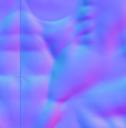
Then on the game engine I can set the opacity of the normal map to mimic the muscle morph without actually deforming the mesh, it looks great:
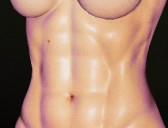
Thanks to everybody who jumped to help
The Newest Evolution Is Here: The Daz Season Pass!AllenArt said:
xyer0 said:
AllenArt said:
I am aware. And I'm not even sure it applies like it used to. V4 era, maybe. V8 era? Maybe some want a little more variation. After all, the store can't ALL be female. And the males for 8.1 so far are beyond disappointing. Mike 8.1 looks like a toon and I haven't seen a good character for 8.1 male yet.
@AllenArt Have you considered Torment 8.1? Nevermind the name/demon/pronoun bollocks and the albino eyebrows, his morph and skin are among the best of this generation, in my opinion, of course. Dain, Nix, Dasan, Floyd, Kwan, Vladimir, Edward would be on my list of best, with possibly Juan Carlos, Holt, & Kjaer added.
I do have Torment...lol. One of the last things I bought here. I do like him...he's worlds better than Mike 8.1 for sure ;). And I love Nix, Dasan, Floyd, Ollie, Edward, Holt, Diego, Leroy, Valentino - but my favorite will ALWAYS be Christian ;).
Yes, Mike was a huge disappointment to me, but his skin is pretty good.
Sorry for duplicating your question, @certaintree38, I must have a slow feed.
The Newest Evolution Is Here: The Daz Season Pass!xyer0 said:
AllenArt said:
I am aware. And I'm not even sure it applies like it used to. V4 era, maybe. V8 era? Maybe some want a little more variation. After all, the store can't ALL be female. And the males for 8.1 so far are beyond disappointing. Mike 8.1 looks like a toon and I haven't seen a good character for 8.1 male yet.
@AllenArt Have you considered Torment 8.1? Nevermind the name/demon/pronoun bollocks and the albino eyebrows, his morph and skin are among the best of this generation, in my opinion, of course. Dain, Nix, Dasan, Floyd, Kwan, Vladimir, Edward would be on my list of best, with possibly Juan Carlos, Holt, & Kjaer added.
I do have Torment...lol. One of the last things I bought here. I do like him...he's worlds better than Mike 8.1 for sure ;). And I love Nix, Dasan, Floyd, Ollie, Edward, Holt, Diego, Leroy, Valentino - but my favorite will ALWAYS be Christian ;).
The Newest Evolution Is Here: The Daz Season Pass!AllenArt said:
I am aware. And I'm not even sure it applies like it used to. V4 era, maybe. V8 era? Maybe some want a little more variation. After all, the store can't ALL be female. And the males for 8.1 so far are beyond disappointing. Mike 8.1 looks like a toon and I haven't seen a good character for 8.1 male yet.
@AllenArt Have you considered Torment 8.1? Nevermind the name/demon/pronoun bollocks and the albino eyebrows, his morph and skin are among the best of this generation, in my opinion, of course. Dain, Nix, Dasan, Floyd, Kwan, Vladimir, Edward would be on my list of best, with possibly Juan Carlos, Holt, & Kjaer added.
200 Plus Head and Face morphs for Genesis 8 (Commercial)They just have to be present on the figure itself. I assume some morph is causing a clash from another face morph pack. When you load in a new genesis 8 female figure in scene do you get a duplicate id popup?
Clothing creation & dforceI was hoping someone could help me with something. I created a t-shirt in marvelous designer, and have used the transfer utility on the t-shirt/g8 female figure. I tried dforcing said t-shirt with self collode off, the problem is:
1. It takes forever to do anything with dforce/t-shirt (and it doesn;t with any other clothing)
2. After after it gets to 2% it blows up
can anyone provide any solutions?
NPR and DAZ - post your renders, experiences and recipes.Here is how to start...
Download Unity Hub from: https://unity3d.com/get-unity/download
For simplicity I will be using Unity Personal Edition - free of charge for use,
if your yearly income made from the usage of Unity does not exceed $ 100 000
For NPR more realistic renders does not matter, so I will be using Unity 2019.4.25 f1
For saving images from Unity, I will be using a freebie:
https://assetstore.unity.com/packages/tools/utilities/screenshot-companion-67779
It works very well in almost any version of Unity and any Render Pipeline:
https://docs.unity3d.com/Manual/render-pipelines.html
For transfer items from Daz Studio to Unity, I am using Daz to Unity bridge:
https://www.daz3d.com/daz-to-unity-bridge
This bridge is the best thing, that has happened to me in my 3D life
and I am very grateful for all of the people involved at Daz 3D to make it done.
Vyk Marty missing filesThe missing maps for this character are detail weight maps for the new pbr shader tiled skin micro details. Otherwise the character only uses about 77 % Victoria 8.1 body morph. Skin detail you can simply disable in the surface setting so it won't matter much except for very close portraits.
As for how it looks without the Vic8.1 body morph:

On the left it`s with Victoria's body dialed in. On the right it's without it. Without the morph the body shape is less defined, more on the generic side and the breasts are larger.
I'd say it's usable, but I'd try to substitute some other character details to make up for the loss of body definition.
Muscularity Normal/Bump Maps for G3/G8 Females?RenderPretender said:
melissastjames said:
RenderPretender said:
melissastjames said:
RenderPretender said:
hazneliel_cc85b88108 said:
Are there any Muscularity Normal/Bump Maps I can apply to any character? I would like to use it for a game engine using Genesis 3 figures so a normal map would add nice muscle definition that is harder to get with an actual morph given the decimation.
Thanks
Can you please explain how this would achieve increased muscular definition? I have some of the characters listed in the above post, but satisfactory muscle definition without excessive HD morphs is something I've been struggling with for a while.
You wouldn't. Normal maps won't alter the actual 3D mesh...but they will help mimic the lighting/shadow that the muscles would create.
So then, would increasing the normal map values increase the effect you're describing? I guess that's what the OP is asking.
I suppose so? Think of what you'd see with painted on abs...that's pretty much what you'd end up with, lol. I'm not sure what video game OP is trying to mod or create, but I have a skin texture mashup that I made and shared for Skyrim and it's legit paint-on abs and other muscularity via normal maps, though the effect is left much more subtle. That's pretty much all you can do with games like that given the geometry you're working with -
So the geometry is the real limitation. Hence the value of muscle enhancement products such as DMaster's.
I know nothing about that product, so I can't say. By the promos, I'm guessing those are actual HD morphs, which do alter the mesh but would be entirely too high poly to use in games.
Scooby Morph for Millenium Dog
A Scooby morph for Mill. Dog, without need of any other morph. Plus a LIE for apply the spot on the fur, so you can use every skin you want.
Only at https://ext3ndstudio.blogspot.com/2021/04/scooby-for-daz.html
NOTE: WORK ONLY IN DAZ STUDIO - NOT POSER
Muscularity Normal/Bump Maps for G3/G8 Females?RenderPretender said:
melissastjames said:
RenderPretender said:
melissastjames said:
RenderPretender said:
hazneliel_cc85b88108 said:
Are there any Muscularity Normal/Bump Maps I can apply to any character? I would like to use it for a game engine using Genesis 3 figures so a normal map would add nice muscle definition that is harder to get with an actual morph given the decimation.
Thanks
Can you please explain how this would achieve increased muscular definition? I have some of the characters listed in the above post, but satisfactory muscle definition without excessive HD morphs is something I've been struggling with for a while.
You wouldn't. Normal maps won't alter the actual 3D mesh...but they will help mimic the lighting/shadow that the muscles would create.
So then, would increasing the normal map values increase the effect you're describing? I guess that's what the OP is asking.
I suppose so? Think of what you'd see with painted on abs...that's pretty much what you'd end up with, lol. I'm not sure what video game OP is trying to mod or create, but I have a skin texture mashup that I made and shared for Skyrim and it's legit paint-on abs and other muscularity via normal maps, though the effect is left much more subtle. That's pretty much all you can do with games like that given the geometry you're working with -
So the geometry is the real limitation. Hence the value of muscle enhancement products such as DMaster's.
I know nothing about that product, so I can't say. By the promos, I'm guessing those are actual HD morphs, which do alter the mesh but would be entirely too high poly to use in games.
Muscularity Normal/Bump Maps for G3/G8 Females?melissastjames said:
RenderPretender said:
melissastjames said:
RenderPretender said:
hazneliel_cc85b88108 said:
Are there any Muscularity Normal/Bump Maps I can apply to any character? I would like to use it for a game engine using Genesis 3 figures so a normal map would add nice muscle definition that is harder to get with an actual morph given the decimation.
Thanks
Can you please explain how this would achieve increased muscular definition? I have some of the characters listed in the above post, but satisfactory muscle definition without excessive HD morphs is something I've been struggling with for a while.
You wouldn't. Normal maps won't alter the actual 3D mesh...but they will help mimic the lighting/shadow that the muscles would create.
So then, would increasing the normal map values increase the effect you're describing? I guess that's what the OP is asking.
I suppose so? Think of what you'd see with painted on abs...that's pretty much what you'd end up with, lol. I'm not sure what video game OP is trying to mod or create, but I have a skin texture mashup that I made and shared for Skyrim and it's legit paint-on abs and other muscularity via normal maps, though the effect is left much more subtle. That's pretty much all you can do with games like that given the geometry you're working with -
So the geometry is the real limitation. Hence the value of muscle enhancement products such as DMaster's.
Muscularity Normal/Bump Maps for G3/G8 Females?RenderPretender said:
melissastjames said:
RenderPretender said:
hazneliel_cc85b88108 said:
Are there any Muscularity Normal/Bump Maps I can apply to any character? I would like to use it for a game engine using Genesis 3 figures so a normal map would add nice muscle definition that is harder to get with an actual morph given the decimation.
Thanks
Can you please explain how this would achieve increased muscular definition? I have some of the characters listed in the above post, but satisfactory muscle definition without excessive HD morphs is something I've been struggling with for a while.
You wouldn't. Normal maps won't alter the actual 3D mesh...but they will help mimic the lighting/shadow that the muscles would create.
So then, would increasing the normal map values increase the effect you're describing? I guess that's what the OP is asking.
I suppose so? Think of what you'd see with painted on abs...that's pretty much what you'd end up with, lol. I'm not sure what video game OP is trying to mod or create, but I have a skin texture mashup that I made and shared for Skyrim and it's legit paint-on abs and other muscularity via normal maps, though the effect is left much more subtle. That's pretty much all you can do with games like that given the geometry you're working with -
Muscularity Normal/Bump Maps for G3/G8 Females?melissastjames said:
RenderPretender said:
hazneliel_cc85b88108 said:
Are there any Muscularity Normal/Bump Maps I can apply to any character? I would like to use it for a game engine using Genesis 3 figures so a normal map would add nice muscle definition that is harder to get with an actual morph given the decimation.
Thanks
Can you please explain how this would achieve increased muscular definition? I have some of the characters listed in the above post, but satisfactory muscle definition without excessive HD morphs is something I've been struggling with for a while.
You wouldn't. Normal maps won't alter the actual 3D mesh...but they will help mimic the lighting/shadow that the muscles would create.
So then, would increasing the normal map values increase the effect you're describing? I guess that's what the OP is asking.
What are Face Groups for?Interesting. I have not gone so far yet. Right now I am using the Transfer Utility. Thank you again for the explanation, Richard! It is helpful.
Muscularity Normal/Bump Maps for G3/G8 Females?RenderPretender said:
hazneliel_cc85b88108 said:
Are there any Muscularity Normal/Bump Maps I can apply to any character? I would like to use it for a game engine using Genesis 3 figures so a normal map would add nice muscle definition that is harder to get with an actual morph given the decimation.
Thanks
Can you please explain how this would achieve increased muscular definition? I have some of the characters listed in the above post, but satisfactory muscle definition without excessive HD morphs is something I've been struggling with for a while.
You wouldn't. Normal maps won't alter the actual 3D mesh...but they will help mimic the lighting/shadow that the muscles would create.
Daz 3D is part of

Connect
DAZ Productions, Inc.
7533 S Center View Ct #4664
West Jordan, UT 84084Licensing Agreement | Terms of Service | Privacy Policy | EULA
© 2026 Daz Productions Inc. All Rights Reserved.