-
Early Access to Jacqueline 8.1?
Kaleb242 said:
So cool @The Blurst of Times!
How on earth did you transfer Lady Littlefox's Star 2.0 for G3F to G8.1 ??? I really need to figure out that workflow!
There's so many older shapes that I want to use with the newer mesh...No scripts, all done by hand via a tutorial on this very forum. Bethany 7 in Genesis 8.1? Star 2.0? All the same process... of course, replacing G8F with G8.1F for the new mesh/facial rig/etc.

EDIT: Also, SickleYield has a more detailed tutorial on her DA page:
Early Access to Jacqueline 8.1?The Blurst of Times said:
benniewoodell said:
That looks awesome!
Thanks

The skirt is a little weird... like any metal/armor piece that moves when you move the joints, so it might be better if I parented it instead. Same goes for the neck piece/choker.
I just really like the Betty Bot outfit, and I wanted to show that it could go a little more skimpy than the promo shots show. It's good Retro Sci Fi.
EDIT1: Also... the figure is a mix of things, including 3d Universe's Toon Gen 4, Lady Littlefox's Star 2.0 for G3F (transferred to Genesis 8.1 here), and Adiene & Jessaii's Niesha for G8F... The hardest part of playing with Jacqueline 8.1 is not morphing her face to fit my current Toon mood.
EDIT2: I think the belly button morph is actually from Angel-Wings, except I'm not sure it's available right now with her figures? (I probably picked up the dial from the other store, and her products are not available at that site.)
So cool @The Blurst of Times!
How on earth did you transfer Lady Littlefox's Star 2.0 for G3F to G8.1 ??? I really need to figure out that workflow!
There's so many older shapes that I want to use with the newer mesh...
For my own personal art, I really enjoy making stylized characters too... dial spinning FTW!Early Access to Jacqueline 8.1?benniewoodell said:
That looks awesome!
Thanks
The skirt is a little weird... like any metal/armor piece that moves when you move the joints, so it might be better if I parented it instead. Same goes for the neck piece/choker.
I just really like the Betty Bot outfit, and I wanted to show that it could go a little more skimpy than the promo shots show. It's good Retro Sci Fi.
EDIT1: Also... the figure is a mix of things, including 3d Universe's Toon Gen 4, Lady Littlefox's Star 2.0 for G3F (transferred to Genesis 8.1 here), and Adiene & Jessaii's Niesha for G8F... The hardest part of playing with Jacqueline 8.1 is not morphing her face to fit my current Toon mood.
EDIT2: I think the belly button morph is actually from Angel-Wings, except I'm not sure it's available right now with her figures? (I probably picked up the dial from the other store, and her products are not available at that site.)
Creating Rotatable Off-Shape Eyes (Non-Spherical Eyes)I'm fairly sure anime generally uses spherical eyeballs regardless of external eye shape (I mean, basically all anime is CGI now)? But anyway, couldn't you as an alternative, morph the eyeballs/sockets and possibly use extra JCMs for the eye movements to compensate? It's more work but should be a bit more robust in theory, and it's something vendors occasionally do for "extreme" eye shapes.
As a side note, most animals with non spherical eyes (like owls, who have tube eyes) don't rotate their eyes at all, just their heads. Though I assume you're using human characters!
Blender Sub-Forum?marble said:
I'm feeling the need for another sub-forum - a sub-forum beneath the Blender forum. It seems to me that most of the posts here are concerned with the bridge products and few about actually using Blender. I have been thinking recently about attempting to make a prop or perhaps geografts. I often use Blender to make morphs for figures and clothing. These subjects are all to do with Blender but have little to do with the bridge add-ons.
Obviously there is a wealth of tutorial material online for modelling, sculpting, rigging, UV unwrapping, etc. in Blender but little of it is focused on making (or kit-bashining) content for DAZ Studio. I suppose that most of the PAs here use ZBrush for that but some discussions aimed at amateurs who only have Blender might be nice.
Yeah I agree.. there are lot "layers" in Blender which we need to understand first before we decide to jump in "look like a simple one but more complex " stuff like Bridges and Add on . its like you start with Box Cutter without getting know about vanila Blender modelling . Its ok for quick job but still.... we need the basic
Basic things like Controlling Camera - Pointing Light to object - Exclude object from render or lights - Node shader types - render setting - Morph creation for DAZ contents and kitbashing until Compositor "101" are topics which still mystery for most of us in here .
You can create special thread/post about Tips of creating Morph for character and Clothing , so if people needed they know which one post/thread they need to follow .
Model center pointThat looks as if you have loaded a morph which was made with the figure moved forward from its default position. If that is what happened, the best solution would be to try to line the OBJ for the morph up with the default figure position, export the OBJ again to make the new positon permanent, and then import that OBJ as the morph.
----------------------------
看起来您好像已经加载了一个变形,该变形是通过将图形从其默认位置向前移动而制成的。 如果发生了这种情况,最好的解决方案是尝试将变形的OBJ与默认的图形位置对齐,再次导出OBJ以使新的正子永久化,然后将该OBJ导入为变形。
do you have a favorite artist or character for eyes?I haven't really found a any one single vendor, as it completely depends on what kind of eyes I'm needing at the time. Mousso figures have nice eyes, though the scleras can be a bit bright (which is an issue with so many eyes in general). There are also some G8 core figures who have really nice eyes...Monique 8 comes to mind. I also tend to use a mish mash...so like for example with this image, I used Mousso eyes with a manual shader adjustment to make them purple in conjunction with the Natural Eyes HD morph -
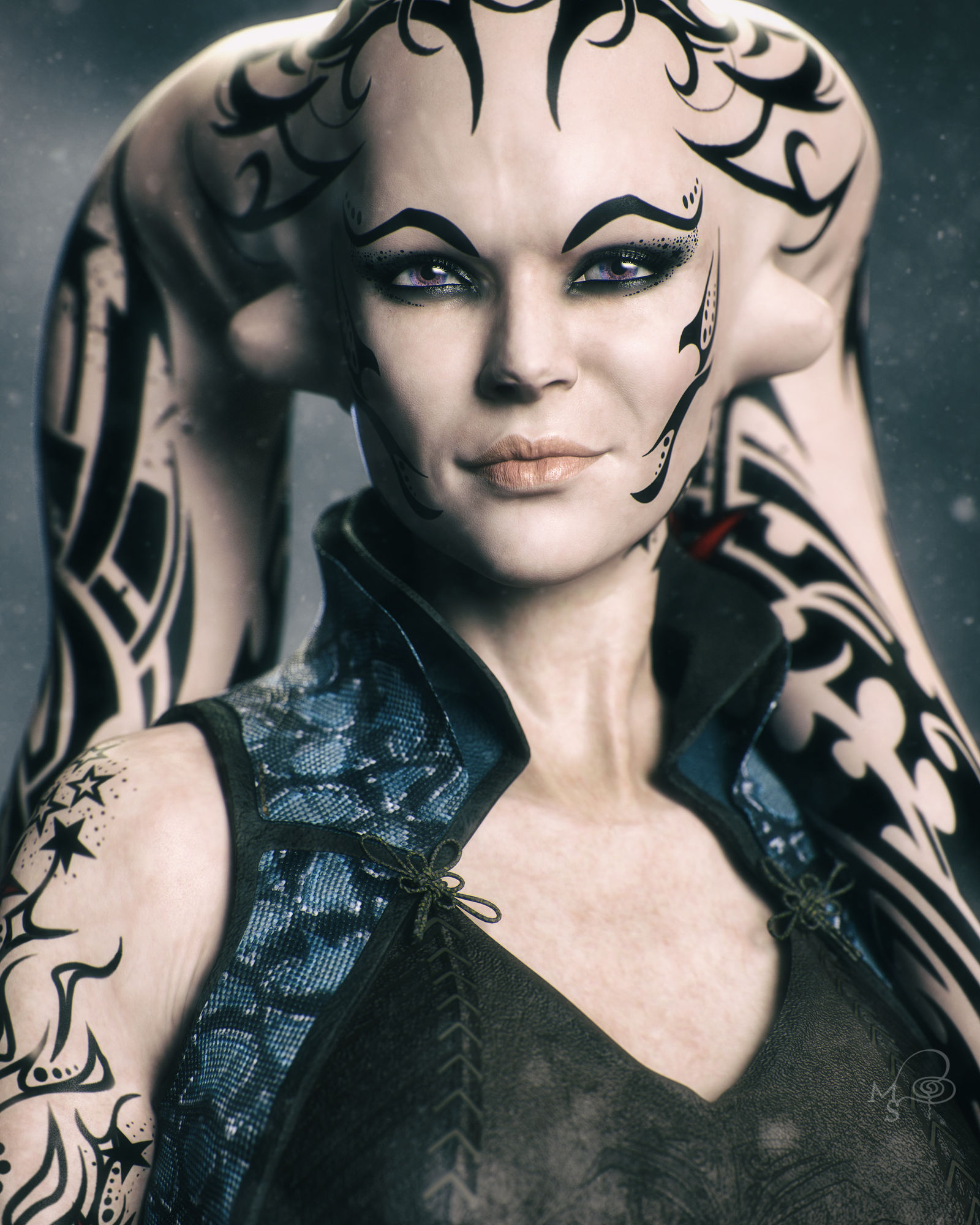
For G8.1, I really haven't found any eyes that I like more than the ones that come with the new core figures. I have Michael 8.1, Victoria 8.1, and Torment 8.1 and I just pick one of those eyes for whatever character I'm working on. I purchased a couple 8.1 eye products and I haven't been able to top the eyes that come with those three characters yet.
Why is my character doesn't look the same on daz and C4D ?Hey there,
It's been a looking i'm trying to find where the problem is.. it's look like the morph aren't exported or something. The mesh of the character is different for daz to C4D. Are you experiencng the same problem ?
If you have solution that be great. Have a good day
"Anatomy of Facial Expression": A Genesis 8.1 Companion Guide?Also trying to figure this out. This is my best guess currently. A few au seems to map to the same slider. Some are a bit more questionable, let me know if you find better matches.
Edit: Also most of those can be seperated into left and right morph.
AU FACS name DAZ AU FACS name DAZ 0 Neutral face 41 Lid droop ?? AU43 1 Inner brow raiser Brow Inner Up Left/Right 42 Slit ?? AU43 2 Outer brow raiser Brow Outer Up Left/Right 43 Eyes closed Eye Blink Left/Right 4 Brow lowerer Brow Down Left/Right 44 Squint ?? AU43 5 Upper lid raiser Eye Wide Left/Right 45 Blink AU43 6 Cheek raiser Cheek Squint Left/Right 46 Wink AU43 7 Lid tightener Eye Squint Left/Right 50 Speech 8 Lips toward each other ?? Partial Mouth Press AU24 51 Head turn left Neck-Head Twist 9 Nose wrinkler Nose Sneer Left/Right 52 Head turn right Neck-Head Twist 10 Upper lip raiser Mouth Upper Up Left/Right 53 Head up Neck-Head Bend 11 Nasolabial deepener 54 Head down Neck-Head Bend 12 Lip corner puller AU13 55 Head tilt left Neck-Head Side-Side 13 Sharp lip puller Mouth Smile Left/Right M55 Head tilt left AU55 14 Dimpler Mouth Dimple Left/Right 56 Head tilt right Neck-Head Side-Side 15 Lip corner depressor Mouth Frown Left/Right M56 Head tilt right AU56 16 Lower lip depressor Mouth Lower Down Left/Right 57 Head forward 17 Chin raiser Mouth Shrug Lower/Upper M57 Head thrust forward 18 Lip pucker Mouth Pucker 58 Head back 19 Tongue show Tongue Out M59 Head shake up and down 20 Lip stretcher Mouth Stretch Left/Right M60 Head shake side to side 21 Neck tightener 61 Eyes turn left Eye Look Side-Side Left 22 Lip funneler Mouth Funnel M61 Eyes left AU61 23 Lip tightener AU24 (partial) 62 Eyes turn right Eye Look Side-Side Right 24 Lip pressor Mouth Press Left/Right M62 Eyes right AU62 25 Lips part ??? Partial Mouth pucker 63 Eyes up Eye Look Up-Down Left/Right 26 Jaw drop Jaw Open @ 50% 64 Eyes down Eye Look Up-Down Left/Right 27 Mouth stretch Jaw Open @ 100 65 Walleye AU61/62 28 Lip suck AU24 66 Cross-eye AU61/62 29 Jaw thrust Jaw Forward (unknown placement for Jaw Recess) M68 Upward rolling of eyes AU63 30 Jaw sideways Jaw Left/Right 69 Eyes positioned to look at other person N/A 31 Jaw clencher M69 Head and/or eyes look at other person N/A 32 [Lip] bite 80 Swallow 33 [Cheek] blow 81 Chewing 34 [Cheek] puff Cheek Puff Left/Right 82 Shoulder shrug 35 [Cheek] suck M83 Head upward and to the side 36 [Tongue] bulge 84 Head shake back and forth 37 Lip wipe 85 Head nod up and down 38 Nostril dilator Nasal Flare 91 Flash 39 Nostril compressor 92 Partial flash 40 Sniff 97* Shiver/tremble 98* Fast up-down look Conflicting morphsI have two characters with the same name who have conflicting morphs. The one however is asking for files, including a couple of morph files, from a base character that I currently don't have (it works OK without it, the morphs are just different). As far as I'm aware though, installing the required base character won't make any difference in respect to the conflicting morphs, it's still a problem that needs to be reported. Is that correct?
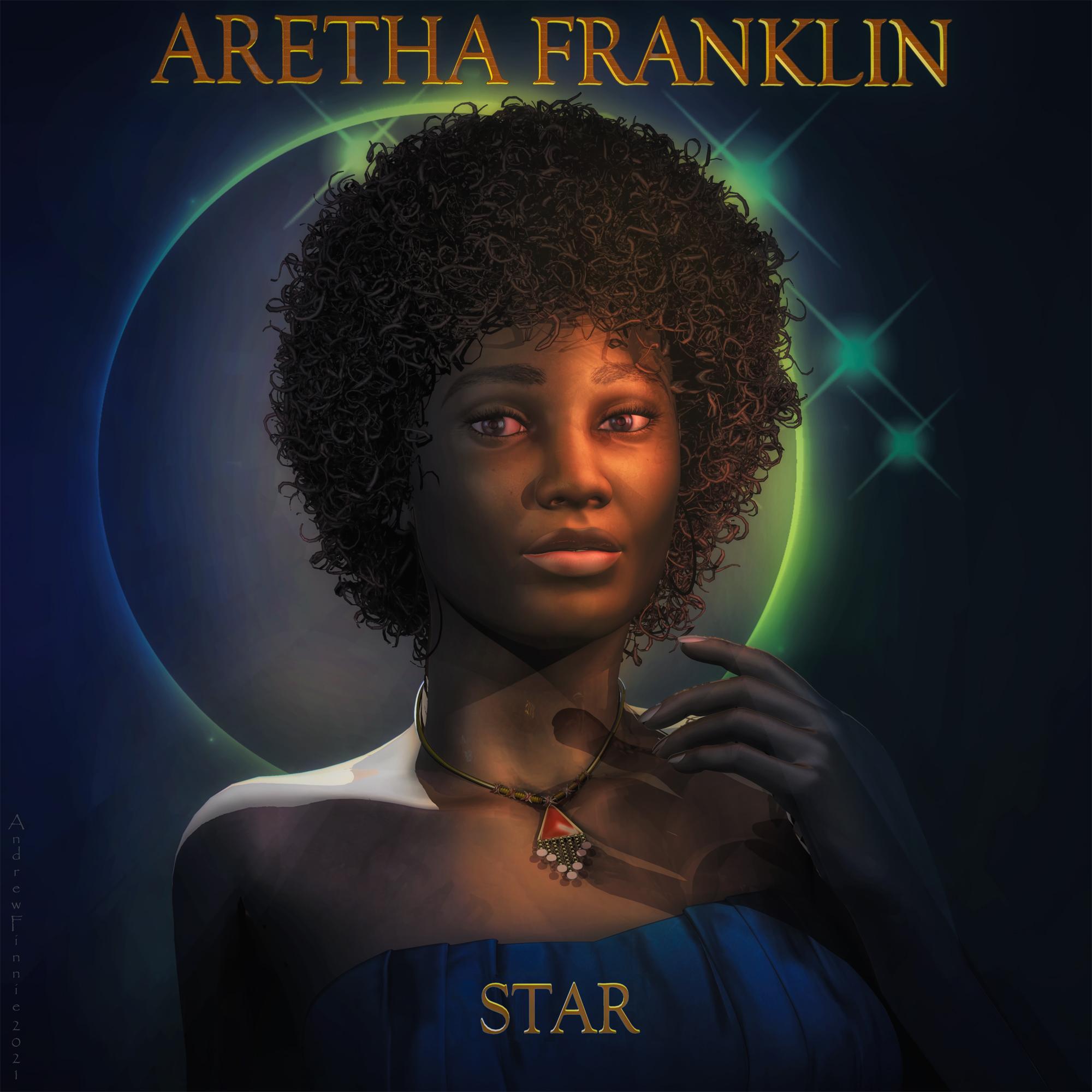
Carrara Challenge #57 - Album Cover (Entry thread - Winners!)Entry #15
Title: Aretha
Artist: Headwax
Links to WIP thread: https://www.daz3d.com/forums/discussion/comment/6647706/#Comment_6647706
Credits and Discussion:This fuzzy hair if you have it (Beautiful black hair styles) , it won't render till you remove the aplha channel in the texture room.
V4 with some daz shop textures and a random daz morph (elite?) Aretha was looking a little crosseyed - hopefully i fixed it up in post.
Used PhilW's excellent bright eye's produce for the corneal highlights - then tidy them up in post
 Carrara Challenge #57 - Album Cover (Entry thread - Winners!)
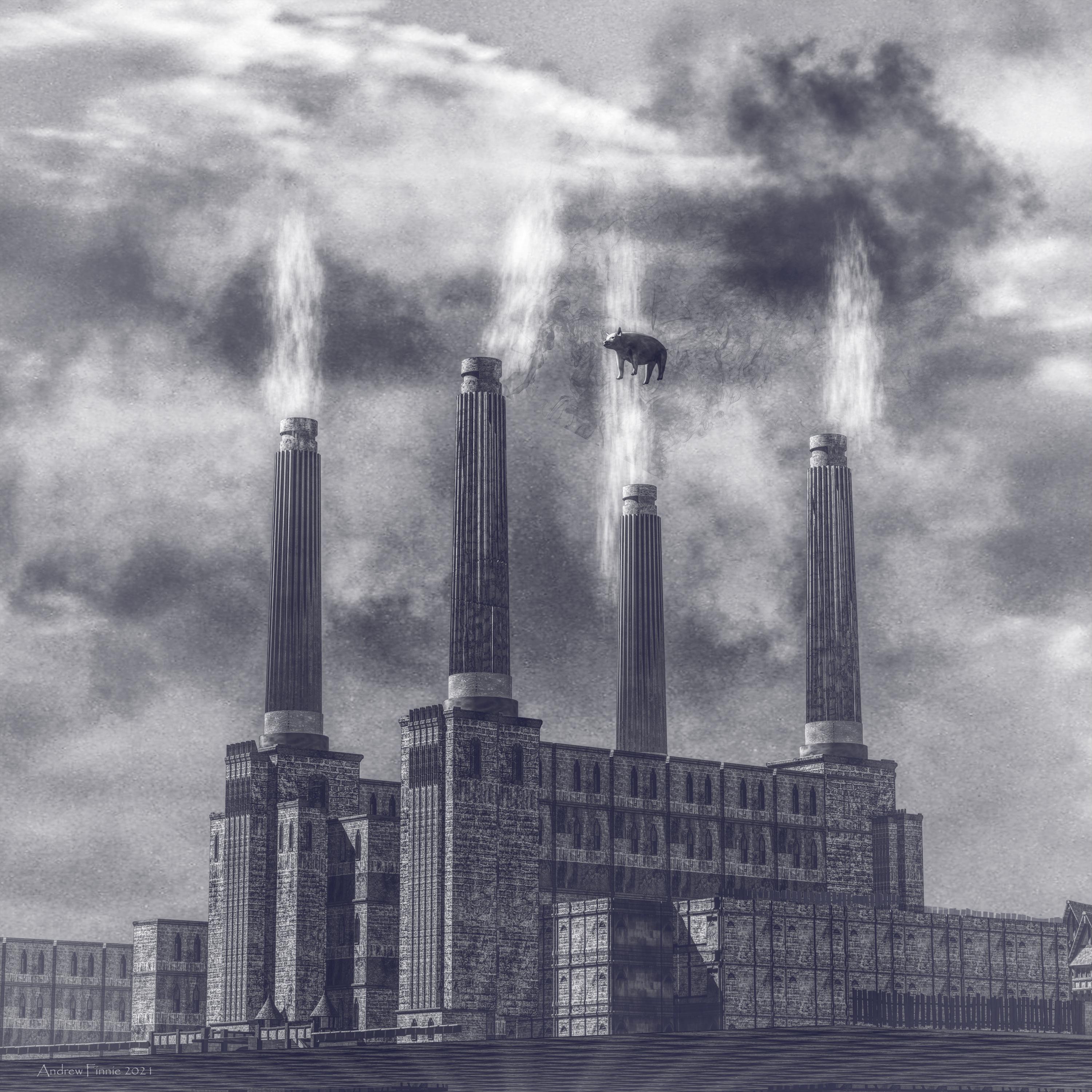
Entry #13
Title: Animals
Artist: Headwax
Links to WIP thread: https://www.daz3d.com/forums/discussion/comment/6630806/#Comment_6630806
Credits and Discussion:Never knew how much batter sea power station looked like a cathedral.
Built this from kit bashing daz medieval buildings. Made the chimneys myself.
Smoke - carrara cloud primitifs.
Pig daz piglet with a sherical morph to balloon him out.
Clouds in the background were a texture applied to background.
 Gen 8 Morph Bundle vs Parameters
RexRed said:
If you don't mind me asking examiner2, who or what inspired you to become a Daz Studio creator? And, welcome to the field!
I have often wondered the same question as you have posed.I find the morphs sometimes mix a lot of parameters into easy to use dials but many of the morphs affect the geometry in ways that the parameters do not. The geometry is a mesh and it can be deformed in unlimited ways. For instance, it is probably not possible to just use the stock parameter dials to take a Genesis 8 figure and turn them into a werewolf. This would take morphing dials instead. Many morphs use the parameter dials though not exclusively. Many morph dials are created in other programs and imported into Daz as animateable features.
Also, If you search Google with Daz Studio in the query title you will get better results in the Daz forums over the Daz forum search.
I also find the head morphs do not always work very well.
If I am going to take a figure and change their head over 50%, I am better off just loading that figure in instead. The morph geometry does not always translate well and this is where the parameters can help shave off the rough edges.
I use the head morphs to figure out which character I mostly want, then load them in and change the body to suit the head.
As for using your CPU to render. I have a 12 core 24 thread I9 CPU and I still shut that off while rendering. It is not faster than my graphics cards, not even close... and when I use it to render in Iray I cannot use my computer for much else and shutting off cores is a bother for what little it contributes. Yes, get a better graphics card, you need double the system ram for what you have in GPU ram and a better power supply forget about CPU rendering, it is a futile endeavor. Yes, not having your GPU and CPU fans on high you can burn out your hardware while rendering especially if anything is overclocked.
I'm revisiting this post and comments 1 year later. This comment is still very useful. I have 24G RAM now, but no major external GPU because I discovered that my motherboard is horrible and can't support more than 400 total watts flowing through it. I now have external power supplies sitting next to my machine to power everything but the motherboard. I wanted to get a thunderbolt 3 PCIe 3.0 card and connect a docked external eGPU, but my motherboard will not support that either and no drivers available. Thank you.
DAZ characters in SideFX HoudiniIt is impossible to exagerate how this would be a game changer.
Thank you!

I agree that JCMs are a #1 priority. I had previously tried various approaches to using DAZ characters in Maya, and while I had some success, it always felt like the export from DAZ Studio had to be perfect for everything to work as expected. And more importantly, if you wanted to change the DAZ character, then you would basically have to start over - i.e. none of the process was procedural. This was one of the things that led to me looking for other tools – and of course, nothing is more procedural than Houdini.
My goal with this Houdini work is for the base joint and pose morphs to be applied automatically as you pose the character in Houdini. To that end, I split the modifiers for a character into two groups:
- pre-pose, such as geo morphs that define a character's body shape, or joint modifiers that define their height and build
- post-pose, for any morph that has a joint rotation as one of its operator inputs
All of the pre-pose modifiers are applied when the character's geometry is created from the library scene (by setting calculated weights on blend shapes, or by changing the transforms of joints). All of the post-pose modifiers are applied by setting weights for JCM morphs in response to the current joint rotations. That way, only the post-pose modifier weights need to be updated in real-time, which keeps things performant. So far, this seems to be working well.
As an aside to that: I've also been experimenting with using Vellum (Houdini's cloth simulation tool) to fix self-collisions for the posed body geometry. One of the things that bugs me about 3D human renders is that you can always tell when the joint correction morphs have been pushed past their limits, and (for example) the character's calf and thigh have ended up intersecting, causing subsurface scattering glitches. These kinds of intersections are super-annoying to fix manually, and I haven't found a good automated solution, or at least not in Maya. With my new approach in Houdini, I've been able to paint weighted attributes for "fleshy" parts of the body like muscles, and run a Vellum sim to resolve those intersections. The nice thing about this is that the painted weights are topology-specific, and so the Vellum weights for any base character mesh should always be the same.
It's interesting that you mention an export of the DAZ subdivided model. One of my principles for this project has been "no exports from DAZ, ever", with a goal of keeping everything in Houdini, including all of the library parsing and geometry generation. I'm hoping to be able to replicate DAZ's subd in Houdini "precisely enough", but you make a good point - even small differences in the subd algorithm can cause the appearance to change. That said, if I can add support for DAZ HD morphs directly in Houdini, then in theory I can use the known-matching geometry topology to ensure a perfect match between base and HD meshes within the Houdini scene. (This was another thing I could never get to work to my satisfaction in Maya - even with a tool such as the excellent seUVBlendShape, I could never quite get Maya's subdivision of the exported base mesh to match up with a DAZ OBJ export of the same HD mesh, because at some point, floating-point precision became an issue. If it's all generated procedurally, however, then those problems should not occur.)
Thanks again for the kind words about the project - they are much appreciated! I've attached some more Redshift renders of a few different characters, to show how it is working for a variety of models (Daz Dog 8, Aiko 8, Ollie 8, and Michael 8.)
– Dave
Diffeomorphic DAZ Importer Version 1.5.1@Intycert You have to export the HD version for HD teeth to work fine, otherwise you get the base resolution version of the teeth, that's the same you get in daz studio if you disbale the HD morph.
Most geografts use shells to get their own uv map and mix the geograft material with the figure. DIffeo converts shells to material layers that are not supported by unreal. I know blender gets some baking features and you may try baking all the materials to a single layer, that's probably what unreal is expecting. But I don't know how good this will be, never did it myself.
As a side note, if you're looking for fast rendering you will get a much better material support with eevee. While if you're making a game pay attention to the daz eula because it requires a separate purchase of the interactive licenses, that's usually not viable as a cheap solution. Unless your game uses sprites instead of 3d but in this case I don't see what unreal is good for.
Muscularity Normal/Bump Maps for G3/G8 Females?melissastjames said:
RenderPretender said:
melissastjames said:
RenderPretender said:
melissastjames said:
RenderPretender said:
hazneliel_cc85b88108 said:
Are there any Muscularity Normal/Bump Maps I can apply to any character? I would like to use it for a game engine using Genesis 3 figures so a normal map would add nice muscle definition that is harder to get with an actual morph given the decimation.
Thanks
Can you please explain how this would achieve increased muscular definition? I have some of the characters listed in the above post, but satisfactory muscle definition without excessive HD morphs is something I've been struggling with for a while.
You wouldn't. Normal maps won't alter the actual 3D mesh...but they will help mimic the lighting/shadow that the muscles would create.
So then, would increasing the normal map values increase the effect you're describing? I guess that's what the OP is asking.
I suppose so? Think of what you'd see with painted on abs...that's pretty much what you'd end up with, lol. I'm not sure what video game OP is trying to mod or create, but I have a skin texture mashup that I made and shared for Skyrim and it's legit paint-on abs and other muscularity via normal maps, though the effect is left much more subtle. That's pretty much all you can do with games like that given the geometry you're working with -

So the geometry is the real limitation. Hence the value of muscle enhancement products such as DMaster's.
I know nothing about that product, so I can't say. By the promos, I'm guessing those are actual HD morphs, which do alter the mesh but would be entirely too high poly to use in games.
Correct, I prefer to solve this using a normal map because I exported a decimated G8 figure and and real mesh deformation for muscles would not look good.
Muscularity Normal/Bump Maps for G3/G8 Females?What I end up doing is use the Genesis 8 Muscular morph to bake my own Normal map using shader forge and it ended up looking like this:
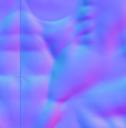
Then on the game engine I can set the opacity of the normal map to mimic the muscle morph without actually deforming the mesh, it looks great:
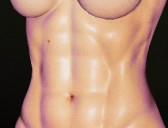
Thanks to everybody who jumped to help
The Newest Evolution Is Here: The Daz Season Pass!AllenArt said:
xyer0 said:
AllenArt said:
I am aware. And I'm not even sure it applies like it used to. V4 era, maybe. V8 era? Maybe some want a little more variation. After all, the store can't ALL be female. And the males for 8.1 so far are beyond disappointing. Mike 8.1 looks like a toon and I haven't seen a good character for 8.1 male yet.
@AllenArt Have you considered Torment 8.1? Nevermind the name/demon/pronoun bollocks and the albino eyebrows, his morph and skin are among the best of this generation, in my opinion, of course. Dain, Nix, Dasan, Floyd, Kwan, Vladimir, Edward would be on my list of best, with possibly Juan Carlos, Holt, & Kjaer added.
I do have Torment...lol. One of the last things I bought here. I do like him...he's worlds better than Mike 8.1 for sure ;). And I love Nix, Dasan, Floyd, Ollie, Edward, Holt, Diego, Leroy, Valentino - but my favorite will ALWAYS be Christian ;).
Yes, Mike was a huge disappointment to me, but his skin is pretty good.
Sorry for duplicating your question, @certaintree38, I must have a slow feed.
The Newest Evolution Is Here: The Daz Season Pass!xyer0 said:
AllenArt said:
I am aware. And I'm not even sure it applies like it used to. V4 era, maybe. V8 era? Maybe some want a little more variation. After all, the store can't ALL be female. And the males for 8.1 so far are beyond disappointing. Mike 8.1 looks like a toon and I haven't seen a good character for 8.1 male yet.
@AllenArt Have you considered Torment 8.1? Nevermind the name/demon/pronoun bollocks and the albino eyebrows, his morph and skin are among the best of this generation, in my opinion, of course. Dain, Nix, Dasan, Floyd, Kwan, Vladimir, Edward would be on my list of best, with possibly Juan Carlos, Holt, & Kjaer added.
I do have Torment...lol. One of the last things I bought here. I do like him...he's worlds better than Mike 8.1 for sure ;). And I love Nix, Dasan, Floyd, Ollie, Edward, Holt, Diego, Leroy, Valentino - but my favorite will ALWAYS be Christian ;).
The Newest Evolution Is Here: The Daz Season Pass!AllenArt said:
I am aware. And I'm not even sure it applies like it used to. V4 era, maybe. V8 era? Maybe some want a little more variation. After all, the store can't ALL be female. And the males for 8.1 so far are beyond disappointing. Mike 8.1 looks like a toon and I haven't seen a good character for 8.1 male yet.
@AllenArt Have you considered Torment 8.1? Nevermind the name/demon/pronoun bollocks and the albino eyebrows, his morph and skin are among the best of this generation, in my opinion, of course. Dain, Nix, Dasan, Floyd, Kwan, Vladimir, Edward would be on my list of best, with possibly Juan Carlos, Holt, & Kjaer added.
Daz 3D is part of

Connect
DAZ Productions, Inc.
7533 S Center View Ct #4664
West Jordan, UT 84084Licensing Agreement | Terms of Service | Privacy Policy | EULA
© 2026 Daz Productions Inc. All Rights Reserved.