-
The Newest Evolution Is Here: The Daz Season Pass!
The Dawn figures include a Bodysuit morph that bridges the creases between and under the breasts and between the buttocks. Genesis 8 should include this, as well as all new iconicbasecorecharacterfigures. This would solve/lessen many problems immediately.
The Newest Evolution Is Here: The Daz Season Pass!kyoto kid said:
tsroemi said:
I can't speak for 'women' in general, but being one, watching people doin' the doin' on camera / in pics just reminds me of how excessively hilarious all of it looks really, and so is rather a turn-down for me (or a laugh-up, but certainly not very romance-inspiring). Same goes for people's privates being on display, none of them thingies is so very appealing to me as, apparently, to lots of others. I still thought it was kind of refreshing to read about some of you guys just liking the stuff, though, and I do believe sex positivity is generally a good thing if coupled with informed consent. So, fine by me. BUT (yeah sorry, but there's always a but, isn't there ...) -
- I just wish the sexy clothing would not take up so very much space in the store, or the PA's would just make more variety possible. Like, give me more morphs to move down a hemline a bit, or close up a cleavage a little, etc pp. Some do, but many just don't, and since I mostly need old-fashioned and therefore generally more modest clothing for my renders, I'm often left with not much to buy if I don't want to go into major alterations. That's plain annoying to me. But that's just my personal dilemma.
- Also - and I'm really sorry if this goes too much of topic, and it'll also spoil the mood and all - I'll try to make it quick - I'm a bit sickened by seeing virtually every woman on promo pics here (and elsewhere in 3D land) being depicted with huge to enormous boobs plus, most times, a major cleavage to show them off. Yeah I get it, the female AND the male characters are mostly idealized versions of what the public thinks is attractive at the moment, and that's boring but quite alright, but - seriously, many of these women would have major health issues in real life. I wish we would just stop portraying such huge breasts as something to aspire to. There are women out there literally dying from having their boobs blown up like this. No, not kidding. (And even the non-artifical ones can hurt like hell on certain days, lemme just tell you that buddy ...) Could we not take sober facts like this into consideration just a teeny tiny little bit when having fun? - Okay, rant over, safe to read again ...
...and trying to simply reduce the size is does not always end up with the best results. Even with utilities like Zev0's Breast Control, Natural Petite Morphs, and other morph tools it isn't easy and deformities can show up in clothing fits. Speaking of clothing, so much female clothing, even everyday styles often end up with textures distorting badly if you try to fit them on a character with a reduced bust size. For example I rarely ever bother with striped textures on upper body clothing for many of my characters.
So true... Even if you find a working combination of morphs for making the bust smaller, quite often the clothing does not follow the form, especially underneath the bust
The Newest Evolution Is Here: The Daz Season Pass!tsroemi said:
I can't speak for 'women' in general, but being one, watching people doin' the doin' on camera / in pics just reminds me of how excessively hilarious all of it looks really, and so is rather a turn-down for me (or a laugh-up, but certainly not very romance-inspiring). Same goes for people's privates being on display, none of them thingies is so very appealing to me as, apparently, to lots of others. I still thought it was kind of refreshing to read about some of you guys just liking the stuff, though, and I do believe sex positivity is generally a good thing if coupled with informed consent. So, fine by me. BUT (yeah sorry, but there's always a but, isn't there ...) -
- I just wish the sexy clothing would not take up so very much space in the store, or the PA's would just make more variety possible. Like, give me more morphs to move down a hemline a bit, or close up a cleavage a little, etc pp. Some do, but many just don't, and since I mostly need old-fashioned and therefore generally more modest clothing for my renders, I'm often left with not much to buy if I don't want to go into major alterations. That's plain annoying to me. But that's just my personal dilemma.
- Also - and I'm really sorry if this goes too much of topic, and it'll also spoil the mood and all - I'll try to make it quick - I'm a bit sickened by seeing virtually every woman on promo pics here (and elsewhere in 3D land) being depicted with huge to enormous boobs plus, most times, a major cleavage to show them off. Yeah I get it, the female AND the male characters are mostly idealized versions of what the public thinks is attractive at the moment, and that's boring but quite alright, but - seriously, many of these women would have major health issues in real life. I wish we would just stop portraying such huge breasts as something to aspire to. There are women out there literally dying from having their boobs blown up like this. No, not kidding. (And even the non-artifical ones can hurt like hell on certain days, lemme just tell you that buddy ...) Could we not take sober facts like this into consideration just a teeny tiny little bit when having fun? - Okay, rant over, safe to read again ...
...and trying to simply reduce the size is does not always end up with the best results. Even with utilities like Zev0's Breast Control, Natural Petite Morphs, and other morph tools it isn't easy and deformities can show up in clothing fits. Speaking of clothing, so much female clothing, even everyday styles often end up with textures distorting badly if you try to fit them on a character with a reduced bust size. For example I rarely ever bother with striped textures on upper body clothing for many of my characters.
Carrara Handbooks for previous editions - Pinup ArtOn Dartanbeck.com you may also find (and a Lot More):
CARRARA ZONE
Carrara Zone - Currently mostly a landing page to hold all of the Carrara oriented pages, but will eventually also serve as a more Carrara-centric blog
Carrara Info
Carrara Info - A new Index for Carrara Information - features, guides, video links... this is meant to become a more cleanly placed and organized ►►► Carrara Information Manual ◄◄◄ sort of thing. It now houses a new Forum Help!!! Links index, but this time with Carrara Training videos from Cripeman and GKDantas, and will include my own as well.
-
Carrara Cafe - A word about an amazing site!
-
Cripeman Memorial - A loving dedication to a lost friend and the Index to his Cool Carrara Tricks
-
GKDantas' Carrara Training Videos - Wonderful guides into many of Carrara's features and tools
-
Installing Carrara - Just some important tips to get all you deserve from this incredible software. I'll be expanding this page soon
-
Custom Browser - Still needs support images to guide the text, but this is part of what keeps Carrara very efficient for me to work in
Carrara Plugins
An edited and updated version of Jay Nola's FAQ, this page also expands to several others filled with information, links and demonstrations. BrianOrca's Ocean, YaToons and more are on this main page within Jay's FAQ
-
>>> Alvin Bémar
-
>>> Fenric
-
>>> Frederic Rible
-
>>> Inagoni
-
>>> Philemo
-
>>> Sparrowhawke
-
>>> VWD
►►► Carrara Information Manual ◄◄◄ - talks about the origins of the post, etc.,
-
Dantanbeck's Articles - Meant to be an index to the hybrid Video/Written articles I create - currently just links to my articles
-
>>> Finding Carrara - a story of how I discovered my favorite reason to be on a computer!
-
3DXtract e-zine - Keeping this historic archive of greatness alive!
-
Physics and Particles - a branch off of the Forum Help!!! Links, specifically regarding Physics and Particles
Carrara CG Workshop
Carrara CG Workshop - In addition to being a landing page for all of the pages within, this page also explains the goal for this section
-
Story - It all begins with one of these, right?
-
-
Odysseon Station - What Happened on Odysseon Station?
-
-
-
Pacing and Rendering - A discussion regarding common film practices as well as render outputs for animations
Pre-Production Phase
Pre-Production Phase - The things we do to prepare for Production
-
Concept Art - I have a few of my designs in here. I'll be adding more along with descriptions of them... eventually
-
Concept Art > Kitbashing Marcoor - The process of making my cool Marcoor Hunter space vessel
Scene (stage) Setup - Currently only has one offering: Volumetric Lighting, which is an early hybrid video/written article. It doesn't have much of a written version yet - but does include a Base Scene Download
Character Setup - This seems to be my main interest lately, as it has quite a few articles. Don't worry, I'll be getting on to other stuff soon!
-
Introducing Rosie 5 - I needed to get something started to find a focus toward developing this web site. This was it
-
Making Rosie 5 - Developmental information on creating my main protagonist - to be developed further
-
Using Genesis in Carrara - A work in progress that will explore many ways to use various Genesis generations within Carrara
-
Genesis Morph Reduction - My method of not only reducing the weight of a Genesis figure, but also the number of available sliders in the Parameters tab
-
Dynamic Hair - One of the parts of the Hybrid Video/Written article for Introducing Rosie 5
-
EYEdeas 3+ - A look at using Arki's amazing 3D eyeballs! Another part of Introducing Rosie 5
-
Millennium Teeth - Using third-party teeth to get what my character (Rosie 5) needed to complete her ultimate look. Another part of Introducing Rosie 5
-
Character Transfer using NLA - I often like to update/upgrade my character to a fresh base figure with a different set of morphs (often when I buy new ones) - here's how I transfer the shape over
-
Character Design - With its Character Template Scene download, this video/article demonstrates how I build each of my characters, monsters, animals, etc., It also covers the basics of creating shaders for Genesis (or any other figure, for that matter)
-
Modeling for Genesis - A fresh look, rejuvenating an article I wrote here quite some time ago. The video I made then is still helpful in how to send models from Carrara into Daz Studio, rig them to conform to the intended figure, and save back into the library.
-
Character Shader Basics - Explore the absolute quickest and simplest way to get a Daz Figure's materials up and running in Carrara! A very basic approach with no frills for speedy renders
Production Phase
Animating - This is where my animation articles will continue. I placed some useful info in here to get it started
-
Hybrid aniMation - another hybrid article I'm working on now. Currently contains much of the info from aniMating in Carrara
-
aniMate 2 - Daz Studio comes with a free version, but when we buy the full version we get some really great bonus features!
The Scene - This is where we'll explore using the scenes we've stored with our actors and/or vehicles, etc., to create our animated sequences
FBX SmoothingI think there's some confusion here. Epic doesn't make a version of this plugin. I'm the original creator and sell it on the Epic Marketplace still. It says in multiple places on the page it's available from Daz for free. If you bought the one on the Epic Marketplace, you should probably return it, you can use the free version. You may have two versions of the plugin installed in Unreal now. That might be part of your issue.
I don't remember making a video for environment transfer. Do you have a link? I made some instructions here: http://davidvodhanel.com/daz-to-unreal-environment-transfer/
Just ignore the FBX smoothing thing. It doesn't matter.
If you have a specific prop that isn't working, post a link. If I have it I'll take a look. Otherwise someone at Daz will need to.
DAZ crashes during ERC freezeHi, when I tried to ERC freeze a morph after changing it's origin point and scale, it crashes every time and it shows the following message:
DAZStudio.exe caused ACCESS_VIOLATION in module "C:\Daz 3D\Applications\64-bit\DAZ 3D\DAZStudio4\dzcore.dll
DzMorphDeltas::clearVertCount()+124 byte(s)
And sometimes it just stright up crashed, no warning or crash window. Does anyone know how to fix it? Thanks!
Is there a way to transfer projection morphs between generations?I am not a fan of big foreheads (I'm undoubtedly biased because mine is so tiny), so I was really excited when I found the Forehead minimizer freebie on DA. But it's for G3 and I'm mostly using G8 these days. It's a projection morph, and I've tried transferring projection morphs in the past with Xtransfer with no luck. Everything seems to go fine, but the end result is a dial that doesn't do anything. Is there another way to do it that will actually work?
Early Access to Jacqueline 8.1?Kaleb242 said:
So cool @The Blurst of Times!
How on earth did you transfer Lady Littlefox's Star 2.0 for G3F to G8.1 ??? I really need to figure out that workflow!
There's so many older shapes that I want to use with the newer mesh...No scripts, all done by hand via a tutorial on this very forum. Bethany 7 in Genesis 8.1? Star 2.0? All the same process... of course, replacing G8F with G8.1F for the new mesh/facial rig/etc.

EDIT: Also, SickleYield has a more detailed tutorial on her DA page:
Early Access to Jacqueline 8.1?The Blurst of Times said:
benniewoodell said:
That looks awesome!
Thanks

The skirt is a little weird... like any metal/armor piece that moves when you move the joints, so it might be better if I parented it instead. Same goes for the neck piece/choker.
I just really like the Betty Bot outfit, and I wanted to show that it could go a little more skimpy than the promo shots show. It's good Retro Sci Fi.
EDIT1: Also... the figure is a mix of things, including 3d Universe's Toon Gen 4, Lady Littlefox's Star 2.0 for G3F (transferred to Genesis 8.1 here), and Adiene & Jessaii's Niesha for G8F... The hardest part of playing with Jacqueline 8.1 is not morphing her face to fit my current Toon mood.
EDIT2: I think the belly button morph is actually from Angel-Wings, except I'm not sure it's available right now with her figures? (I probably picked up the dial from the other store, and her products are not available at that site.)
So cool @The Blurst of Times!
How on earth did you transfer Lady Littlefox's Star 2.0 for G3F to G8.1 ??? I really need to figure out that workflow!
There's so many older shapes that I want to use with the newer mesh...
For my own personal art, I really enjoy making stylized characters too... dial spinning FTW!Early Access to Jacqueline 8.1?benniewoodell said:
That looks awesome!
Thanks
The skirt is a little weird... like any metal/armor piece that moves when you move the joints, so it might be better if I parented it instead. Same goes for the neck piece/choker.
I just really like the Betty Bot outfit, and I wanted to show that it could go a little more skimpy than the promo shots show. It's good Retro Sci Fi.
EDIT1: Also... the figure is a mix of things, including 3d Universe's Toon Gen 4, Lady Littlefox's Star 2.0 for G3F (transferred to Genesis 8.1 here), and Adiene & Jessaii's Niesha for G8F... The hardest part of playing with Jacqueline 8.1 is not morphing her face to fit my current Toon mood.
EDIT2: I think the belly button morph is actually from Angel-Wings, except I'm not sure it's available right now with her figures? (I probably picked up the dial from the other store, and her products are not available at that site.)
Creating Rotatable Off-Shape Eyes (Non-Spherical Eyes)I'm fairly sure anime generally uses spherical eyeballs regardless of external eye shape (I mean, basically all anime is CGI now)? But anyway, couldn't you as an alternative, morph the eyeballs/sockets and possibly use extra JCMs for the eye movements to compensate? It's more work but should be a bit more robust in theory, and it's something vendors occasionally do for "extreme" eye shapes.
As a side note, most animals with non spherical eyes (like owls, who have tube eyes) don't rotate their eyes at all, just their heads. Though I assume you're using human characters!
Blender Sub-Forum?marble said:
I'm feeling the need for another sub-forum - a sub-forum beneath the Blender forum. It seems to me that most of the posts here are concerned with the bridge products and few about actually using Blender. I have been thinking recently about attempting to make a prop or perhaps geografts. I often use Blender to make morphs for figures and clothing. These subjects are all to do with Blender but have little to do with the bridge add-ons.
Obviously there is a wealth of tutorial material online for modelling, sculpting, rigging, UV unwrapping, etc. in Blender but little of it is focused on making (or kit-bashining) content for DAZ Studio. I suppose that most of the PAs here use ZBrush for that but some discussions aimed at amateurs who only have Blender might be nice.
Yeah I agree.. there are lot "layers" in Blender which we need to understand first before we decide to jump in "look like a simple one but more complex " stuff like Bridges and Add on . its like you start with Box Cutter without getting know about vanila Blender modelling . Its ok for quick job but still.... we need the basic
Basic things like Controlling Camera - Pointing Light to object - Exclude object from render or lights - Node shader types - render setting - Morph creation for DAZ contents and kitbashing until Compositor "101" are topics which still mystery for most of us in here .
You can create special thread/post about Tips of creating Morph for character and Clothing , so if people needed they know which one post/thread they need to follow .
Model center pointThat looks as if you have loaded a morph which was made with the figure moved forward from its default position. If that is what happened, the best solution would be to try to line the OBJ for the morph up with the default figure position, export the OBJ again to make the new positon permanent, and then import that OBJ as the morph.
----------------------------
看起来您好像已经加载了一个变形,该变形是通过将图形从其默认位置向前移动而制成的。 如果发生了这种情况,最好的解决方案是尝试将变形的OBJ与默认的图形位置对齐,再次导出OBJ以使新的正子永久化,然后将该OBJ导入为变形。
do you have a favorite artist or character for eyes?I haven't really found a any one single vendor, as it completely depends on what kind of eyes I'm needing at the time. Mousso figures have nice eyes, though the scleras can be a bit bright (which is an issue with so many eyes in general). There are also some G8 core figures who have really nice eyes...Monique 8 comes to mind. I also tend to use a mish mash...so like for example with this image, I used Mousso eyes with a manual shader adjustment to make them purple in conjunction with the Natural Eyes HD morph -
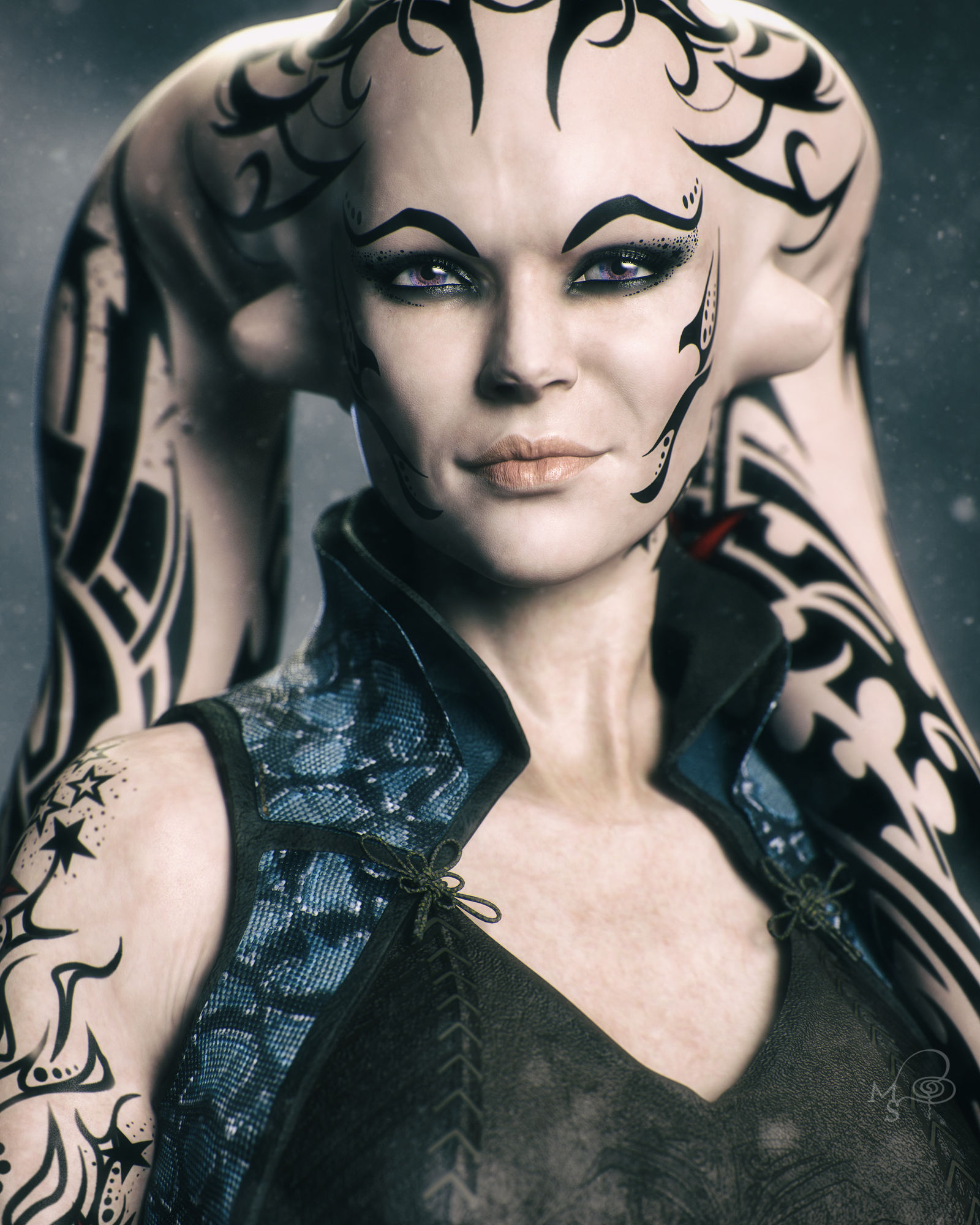
For G8.1, I really haven't found any eyes that I like more than the ones that come with the new core figures. I have Michael 8.1, Victoria 8.1, and Torment 8.1 and I just pick one of those eyes for whatever character I'm working on. I purchased a couple 8.1 eye products and I haven't been able to top the eyes that come with those three characters yet.
Why is my character doesn't look the same on daz and C4D ?Hey there,
It's been a looking i'm trying to find where the problem is.. it's look like the morph aren't exported or something. The mesh of the character is different for daz to C4D. Are you experiencng the same problem ?
If you have solution that be great. Have a good day
"Anatomy of Facial Expression": A Genesis 8.1 Companion Guide?Also trying to figure this out. This is my best guess currently. A few au seems to map to the same slider. Some are a bit more questionable, let me know if you find better matches.
Edit: Also most of those can be seperated into left and right morph.
AU FACS name DAZ AU FACS name DAZ 0 Neutral face 41 Lid droop ?? AU43 1 Inner brow raiser Brow Inner Up Left/Right 42 Slit ?? AU43 2 Outer brow raiser Brow Outer Up Left/Right 43 Eyes closed Eye Blink Left/Right 4 Brow lowerer Brow Down Left/Right 44 Squint ?? AU43 5 Upper lid raiser Eye Wide Left/Right 45 Blink AU43 6 Cheek raiser Cheek Squint Left/Right 46 Wink AU43 7 Lid tightener Eye Squint Left/Right 50 Speech 8 Lips toward each other ?? Partial Mouth Press AU24 51 Head turn left Neck-Head Twist 9 Nose wrinkler Nose Sneer Left/Right 52 Head turn right Neck-Head Twist 10 Upper lip raiser Mouth Upper Up Left/Right 53 Head up Neck-Head Bend 11 Nasolabial deepener 54 Head down Neck-Head Bend 12 Lip corner puller AU13 55 Head tilt left Neck-Head Side-Side 13 Sharp lip puller Mouth Smile Left/Right M55 Head tilt left AU55 14 Dimpler Mouth Dimple Left/Right 56 Head tilt right Neck-Head Side-Side 15 Lip corner depressor Mouth Frown Left/Right M56 Head tilt right AU56 16 Lower lip depressor Mouth Lower Down Left/Right 57 Head forward 17 Chin raiser Mouth Shrug Lower/Upper M57 Head thrust forward 18 Lip pucker Mouth Pucker 58 Head back 19 Tongue show Tongue Out M59 Head shake up and down 20 Lip stretcher Mouth Stretch Left/Right M60 Head shake side to side 21 Neck tightener 61 Eyes turn left Eye Look Side-Side Left 22 Lip funneler Mouth Funnel M61 Eyes left AU61 23 Lip tightener AU24 (partial) 62 Eyes turn right Eye Look Side-Side Right 24 Lip pressor Mouth Press Left/Right M62 Eyes right AU62 25 Lips part ??? Partial Mouth pucker 63 Eyes up Eye Look Up-Down Left/Right 26 Jaw drop Jaw Open @ 50% 64 Eyes down Eye Look Up-Down Left/Right 27 Mouth stretch Jaw Open @ 100 65 Walleye AU61/62 28 Lip suck AU24 66 Cross-eye AU61/62 29 Jaw thrust Jaw Forward (unknown placement for Jaw Recess) M68 Upward rolling of eyes AU63 30 Jaw sideways Jaw Left/Right 69 Eyes positioned to look at other person N/A 31 Jaw clencher M69 Head and/or eyes look at other person N/A 32 [Lip] bite 80 Swallow 33 [Cheek] blow 81 Chewing 34 [Cheek] puff Cheek Puff Left/Right 82 Shoulder shrug 35 [Cheek] suck M83 Head upward and to the side 36 [Tongue] bulge 84 Head shake back and forth 37 Lip wipe 85 Head nod up and down 38 Nostril dilator Nasal Flare 91 Flash 39 Nostril compressor 92 Partial flash 40 Sniff 97* Shiver/tremble 98* Fast up-down look Conflicting morphsI have two characters with the same name who have conflicting morphs. The one however is asking for files, including a couple of morph files, from a base character that I currently don't have (it works OK without it, the morphs are just different). As far as I'm aware though, installing the required base character won't make any difference in respect to the conflicting morphs, it's still a problem that needs to be reported. Is that correct?
Carrara Challenge #57 - Album Cover (Entry thread - Winners!)Entry #15
Title: Aretha
Artist: Headwax
Links to WIP thread: https://www.daz3d.com/forums/discussion/comment/6647706/#Comment_6647706
Credits and Discussion:This fuzzy hair if you have it (Beautiful black hair styles) , it won't render till you remove the aplha channel in the texture room.
V4 with some daz shop textures and a random daz morph (elite?) Aretha was looking a little crosseyed - hopefully i fixed it up in post.
Used PhilW's excellent bright eye's produce for the corneal highlights - then tidy them up in post
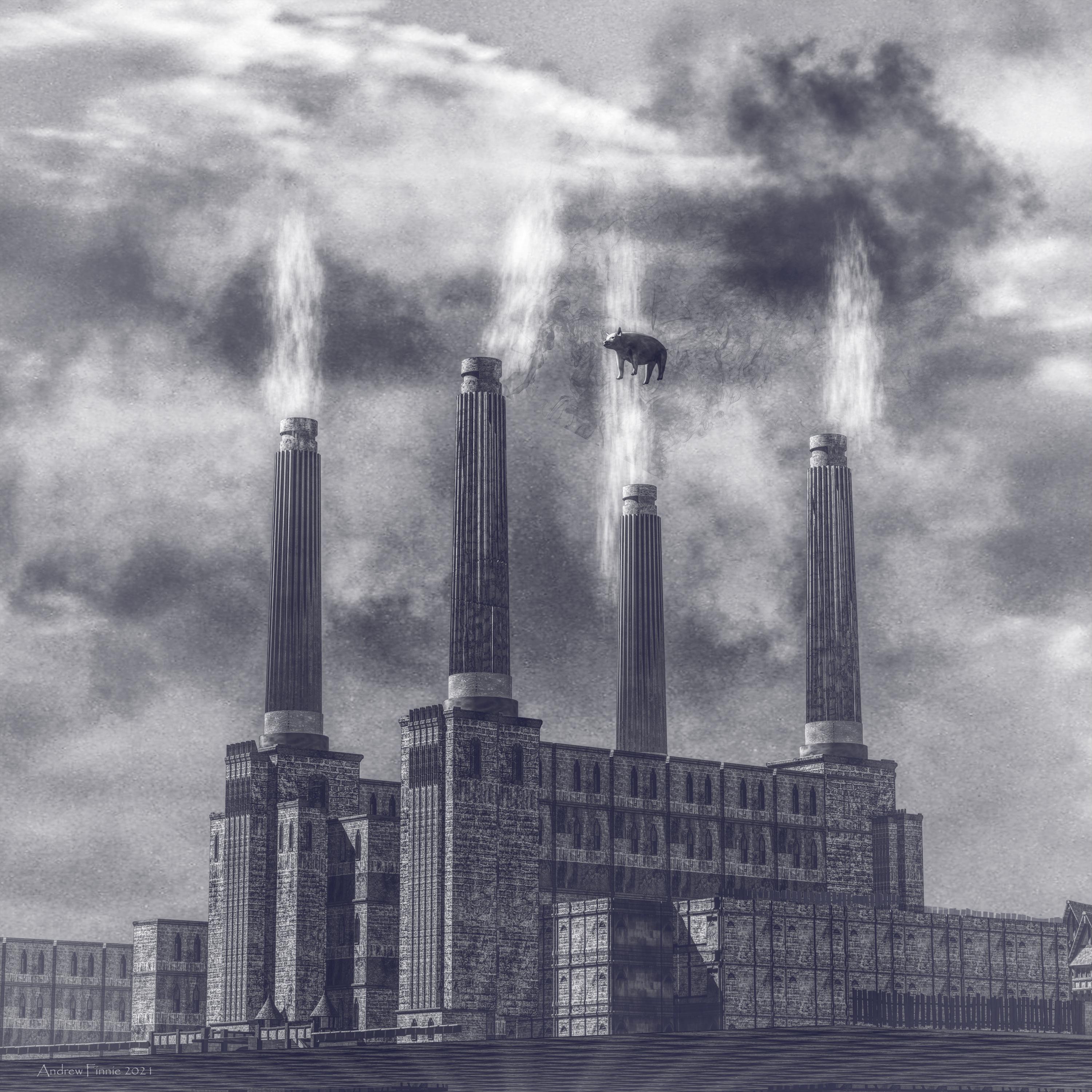
 Carrara Challenge #57 - Album Cover (Entry thread - Winners!)
Entry #13
Title: Animals
Artist: Headwax
Links to WIP thread: https://www.daz3d.com/forums/discussion/comment/6630806/#Comment_6630806
Credits and Discussion:Never knew how much batter sea power station looked like a cathedral.
Built this from kit bashing daz medieval buildings. Made the chimneys myself.
Smoke - carrara cloud primitifs.
Pig daz piglet with a sherical morph to balloon him out.
Clouds in the background were a texture applied to background.
 Gen 8 Morph Bundle vs Parameters
RexRed said:
If you don't mind me asking examiner2, who or what inspired you to become a Daz Studio creator? And, welcome to the field!
I have often wondered the same question as you have posed.I find the morphs sometimes mix a lot of parameters into easy to use dials but many of the morphs affect the geometry in ways that the parameters do not. The geometry is a mesh and it can be deformed in unlimited ways. For instance, it is probably not possible to just use the stock parameter dials to take a Genesis 8 figure and turn them into a werewolf. This would take morphing dials instead. Many morphs use the parameter dials though not exclusively. Many morph dials are created in other programs and imported into Daz as animateable features.
Also, If you search Google with Daz Studio in the query title you will get better results in the Daz forums over the Daz forum search.
I also find the head morphs do not always work very well.
If I am going to take a figure and change their head over 50%, I am better off just loading that figure in instead. The morph geometry does not always translate well and this is where the parameters can help shave off the rough edges.
I use the head morphs to figure out which character I mostly want, then load them in and change the body to suit the head.
As for using your CPU to render. I have a 12 core 24 thread I9 CPU and I still shut that off while rendering. It is not faster than my graphics cards, not even close... and when I use it to render in Iray I cannot use my computer for much else and shutting off cores is a bother for what little it contributes. Yes, get a better graphics card, you need double the system ram for what you have in GPU ram and a better power supply forget about CPU rendering, it is a futile endeavor. Yes, not having your GPU and CPU fans on high you can burn out your hardware while rendering especially if anything is overclocked.
I'm revisiting this post and comments 1 year later. This comment is still very useful. I have 24G RAM now, but no major external GPU because I discovered that my motherboard is horrible and can't support more than 400 total watts flowing through it. I now have external power supplies sitting next to my machine to power everything but the motherboard. I wanted to get a thunderbolt 3 PCIe 3.0 card and connect a docked external eGPU, but my motherboard will not support that either and no drivers available. Thank you.
Daz 3D is part of

Connect
DAZ Productions, Inc.
7533 S Center View Ct #4664
West Jordan, UT 84084Licensing Agreement | Terms of Service | Privacy Policy | EULA
© 2026 Daz Productions Inc. All Rights Reserved.