-
Matari3D I Need Some Clarification On A Product
The root reason of being unable to use it on G8M is that the product just gives separate Body and Head texture maps rather than holistic Torso maps...If the vendor made the latter, it can be used on both G8M / G8.1M ~~
So the description on the product page related to G8M is wrong. There's a way to split Torso surface on G8M into Body and Head and import as new UV Sets... so that all the shell product for G8.1 Only can be used on G8M. But I don't think it's really necessary to do so. Just simply upgrade your G8M characters to G8.1M if needed.
Finding an item from the scene.You can try to right click on the Scene tab > Edit > Scene Identification. Outside of characters, the Compatibility Base field should tell you the name of the product (at least the internal version).
@MikeD has a product to list the products used in a scene:
https://www.daz3d.com/forums/discussion/689571/list-of-products-used-script-commercial
https://www.daz3d.com/md-list-of-products-used
And if you know your ways around Daz script, this one is apparently capable of doing the list products used by an object:
Duplicating head shape to genesisPerttiA said:
crosswind said:
PerttiA said:
crosswind said:
PerttiA said:
crosswind said:
How to copy a Head to DS...? Parent? Geo-graft?
Export the base Genesis figure into Blender, bring the original figure there, line them up and use the basic tools to make the Genesis mesh to match the original figure, then import the Genesis figure into DS as a morph
FaceBuilder makes a Head (portraite) only geometry with unique shape as per the given photo, how could you "match" a Genesis Base figure to that Head geometry in Blender?
What has this to do with FaceBuilder?
The Genesis base figures are meshes that can be modified
One can import/open whatever source figure from where-ever to Blender, scale it and align it with the Genesis base mesh, and then scale/move the vertices of the Genesis mesh where needed (utilizing mirror and falloff)
Nothing fancy or difficultOP clearly asked if one can make head shape and textures from the head geometry created from keentools aka Facebuilder (based on a photo)... https://keentools.io/
It makes a mesh like any other mesh. After one has scaled and aligned it with the Genesis mesh, one can start moving the vertices of the Genesis head accordingly
As I said, the amount of vertices in Genesis (whatever generation) head is not that many and using mirror it even gets halved.Manually move the vertex position to match a fixed geometry ... ? Okay... I personally don't think this is a proper answer for any similar question like this one 'cause any Blender user should know how to move vertices...Well, based on a common sense, if one expects such a solution, I could've been hands-off from very beginning.
So, vertex count from a G8 Base Head is 5.8K (Face only, 5.0K), G9 Base Head is 5.5K (Face only... 4.2K), I DO believe one can "get the job done" given there's enough patience and time ( also with symmetry.. if possible ). I won't question about the final quality, however, head / portrait created by FB is usually asymmetrical and with denser mesh... In such a case, it's pretty challenging to assure precise vertex alignment, let alone using symmetry / mirroring, whatever..
Duplicating head shape to genesiscrosswind said:
PerttiA said:
crosswind said:
PerttiA said:
crosswind said:
How to copy a Head to DS...? Parent? Geo-graft?
Export the base Genesis figure into Blender, bring the original figure there, line them up and use the basic tools to make the Genesis mesh to match the original figure, then import the Genesis figure into DS as a morph
FaceBuilder makes a Head (portraite) only geometry with unique shape as per the given photo, how could you "match" a Genesis Base figure to that Head geometry in Blender?
What has this to do with FaceBuilder?
The Genesis base figures are meshes that can be modified
One can import/open whatever source figure from where-ever to Blender, scale it and align it with the Genesis base mesh, and then scale/move the vertices of the Genesis mesh where needed (utilizing mirror and falloff)
Nothing fancy or difficultOP clearly asked if one can make head shape and textures from the head geometry created from keentools aka Facebuilder (based on a photo)... https://keentools.io/
It makes a mesh like any other mesh. After one has scaled and aligned it with the Genesis mesh, one can start moving the vertices of the Genesis head accordingly
As I said, the amount of vertices in Genesis (whatever generation) head is not that many and using mirror it even gets halved.New World Building and Character Creation engines popping up in new video games3DLoki said:
From what I've seen in various company videos and whatnot, it's core use is to generate image textures for clothing or furniture/wallpaper etc
Deff no go for me, and kind of sucks cause it looked really cool
As I mentioned in my post immediately above, that's an optional feature.
If you don't like it, you don't have to use it. You can use one of the supplied defaults, just like any other game, or even use Photoshop etc to create your own textures and easily import them into the game.
Duplicating head shape to genesisJames said:
is the faceform able to wrap head only?
Yup, definitely ~ then merge the wrapped result with Genesis body. Then export the full OBJ from Wrap and import onto Genesis figure in DS with MLP + HeadSplit dFormer as you just need the Head morph.
There're a couple of tutorials on youtube from shinteo channel, like this one https://youtu.be/w0ci6kJmanI?si=R6NY6KJvSwno85Sr and some timelapses on his channel in which there're streams of wrapping a head only.
Duplicating head shape to genesisPerttiA said:
crosswind said:
PerttiA said:
crosswind said:
How to copy a Head to DS...? Parent? Geo-graft?
Export the base Genesis figure into Blender, bring the original figure there, line them up and use the basic tools to make the Genesis mesh to match the original figure, then import the Genesis figure into DS as a morph
FaceBuilder makes a Head (portraite) only geometry with unique shape as per the given photo, how could you "match" a Genesis Base figure to that Head geometry in Blender?
What has this to do with FaceBuilder?
The Genesis base figures are meshes that can be modified
One can import/open whatever source figure from where-ever to Blender, scale it and align it with the Genesis base mesh, and then scale/move the vertices of the Genesis mesh where needed (utilizing mirror and falloff)
Nothing fancy or difficultOP clearly asked if one can make head shape and textures from the head geometry created from keentools aka Facebuilder (based on a photo)... https://keentools.io/
Duplicating head shape to genesiscrosswind said:
PerttiA said:
crosswind said:
How to copy a Head to DS...? Parent? Geo-graft?
Export the base Genesis figure into Blender, bring the original figure there, line them up and use the basic tools to make the Genesis mesh to match the original figure, then import the Genesis figure into DS as a morph
FaceBuilder makes a Head (portraite) only geometry with unique shape as per the given photo, how could you "match" a Genesis Base figure to that Head geometry in Blender?
What has this to do with FaceBuilder?
The Genesis base figures are meshes that can be modified
One can import/open whatever source figure from where-ever to Blender, scale it and align it with the Genesis base mesh, and then scale/move the vertices of the Genesis mesh where needed (utilizing mirror and falloff)
Nothing fancy or difficultBaseball outfitI would love to see a actual baseball uniform in the shop. I looked in the shop, but can find anything. I want to make some Aaron judge fan art. But really need a good uniform. I hope this is the right place to request this. I'm just starting to dabble with making clothing, and no where near good enough to make anything like that. I also need to learn how to import what I did make. But yeah.... There is nothing in the shop for what I want to do.Duplicating head shape to genesisPerttiA said:
crosswind said:
How to copy a Head to DS...? Parent? Geo-graft?
Export the base Genesis figure into Blender, bring the original figure there, line them up and use the basic tools to make the Genesis mesh to match the original figure, then import the Genesis figure into DS as a morph
FaceBuilder makes a Head (portraite) only geometry with unique shape as per the given photo, how could you "match" a Genesis Base figure to that Head geometry in Blender?
Duplicating head shape to genesiscrosswind said:
How to copy a Head to DS...? Parent? Geo-graft?
Export the base Genesis figure into Blender, bring the original figure there, line them up and use the basic tools to make the Genesis mesh to match the original figure, then import the Genesis figure into DS as a morph
Duplicating head shape to genesisAlso: You could import the geometry to DAZ and then you could fit Genesis 9 to the shape of the Blender created geometry using DAZ Studio by treating the DAZ Genesis 9 model as if it were a full body piece of clothing and doing autofit. You want to scale and align them to be close in size and location. It will get you most of the way but all the bones and weight maps won't be properly aligned.
how to import udim from blender to dazhello I made a model on Zbrush and blender, I wish to import it on daz to apli textur and rigging and then render, but wen I import my model with 5 tiles idum I dont have the udim displayed on surface panel, wen I aply the first textur I dont have all the other textur loaded, they are option to activate or anything to have my udim tiles please??
Make a cloth stop moving with the figure without reseting it.As I said above, this is a dForce Coat, and auto-fit transfers almost 90% correct weight to its Joints, so as long as you well tweak the dForce weight, as well as optimize settings on the dynamic surface (already show you the settings), the coat will drape pretty well for various pose. For tiny distortion fixing, bring it to Blender or fix it with Mesh Grabber as needed,
If there's still "freeze issue" when simulating, still, first of all tweak the settings on dynamic surfaces (shown in 4th screenshot I attached above)
As for fixing corrective morphs in Blender, never touch Pose in blender. Export posed figure + clothing to Blender, fix on clothing only, then export to OBJ from which you import in to DS with Morph Loader Pro to update corrective morph.
I ever recorded full workflow for it but I couldn't find it by now, check this one from Jay: https://youtu.be/w2zngVlncec?si=s76ieYH8v86OU5Si
Make a cloth stop moving with the figure without reseting it.crosswind said:
Actually you don't need to follow that tutorial from Jay because what you need is just to tweak the weight on dForce Modifier rather than the weight on Joints for rigging & fitting. Well, in case there's very ugly / awful result after auto-fitting, you DO need to tweak Joints weight, you should do it with Figure in A-Pose. Besides, what Jay mainly showed in the tut, was fixing corrective morphs by re-painting / smoothing weight... however that way is cumbersome.
Oh, okay. I really don't understand why it's all about a Dforce modifier when I am not even using Dforce. I think I might missunderstand what was going on with that tool:
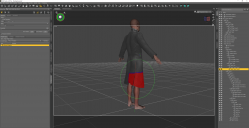
I thought you coud unpaint the red zone (here for the Right Tigh of the coat), and then when you move the Right Tigh of the G9, this part of the coat does not move with the figure anymore. But anyway, for this specific part, the Right Tigh Twist, I could not erase the red zone for some reason. I could totally erase it for many other bones, but not that one.
But I guess there must be a tool, or something, that link the bones of my character to the bones of the cloth. And if I can undo that link (for the bottom of the coat), perhaps it might solve my issue...?
If you know a sculpting software like Blender, I stongly suggest you direcly fix corrective morph in external software.
Yeah, I have some really basic Blender knowlegde. So what you tell me is to :
1 - move the top of my character as I want to, at least, the torso and arm parts of the coat fit the torso / arm of my G9,
2 - import Coat + G9 into Blender
3 - move the G9 legs in Blender so that the coat does not move with the legs?
You mean when you simulate the coat, you DS crahsed ?!
The Dforce windows opens up, it loads a bit, and then it freezes forever (at 0, 10, 20%, depends on the position of the G9 and how far I move away the cloth fabric from the G9).
Hoping, as you mention, that the issue comes from the G8 to G9 auto fit.
Or using a G8 character and redo the whole pose (I have a script that takes a pose from a G8 and applies it to a G9 but I am not sure it works the other way around).Agreed... to a certain extent, haha ~~

... I am actually not even sure about that anymore since I just tried that with a G8 and, well, when I move the G8 legs, the bottom of the coat moves as well!!! I am screwed. G8 or G9, it does not matter at the end. Daz still does not provide a simple way of freezing a cloth (without reseting it), not matter if you use a G8 or a G9... :/
GENERAL FREEBIE REQUESTS part 3DollyGirl said:
5 pc drum set 3ds - 3D Model - ShareCG Can use PoseRay (google.com) to convert to obj format and import into DAZ Studio.
Thank You very much.
New World Building and Character Creation engines popping up in new video gamesOso3D said:
Note it says it uses Generative AI.
ugh no thanks
The only generative AI I've seen in the demo was as an option if you want to create a custom texture for clothing. You can also import your own custom texture created in whatever app you wish. It's just there for players who want something other than the supplied options but don't want to take the time to create something in Gimp etc.
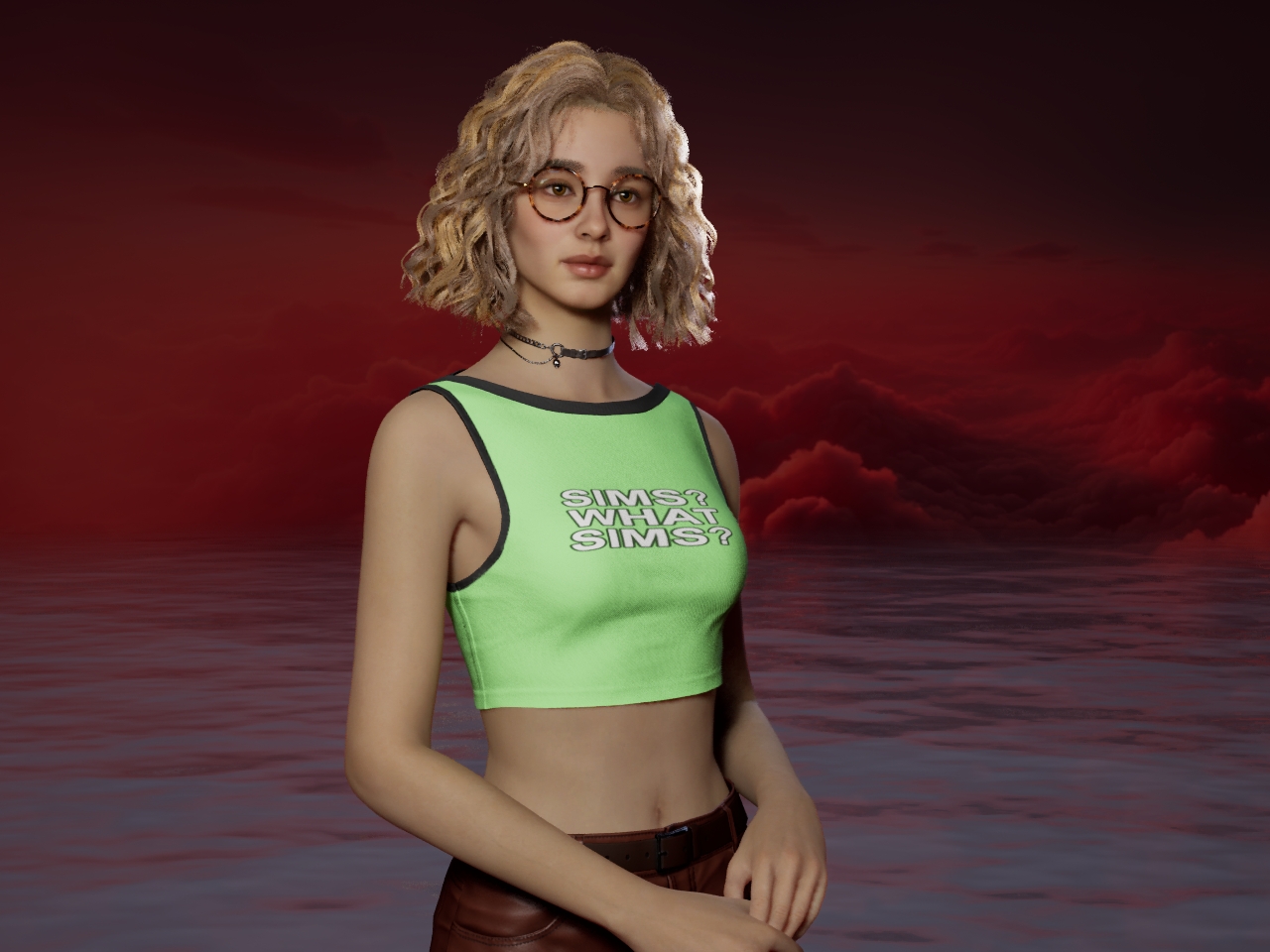
After adding a custom texture one way or another, you've got pretty good control over the UV mapping with scaling/tiling and offsets to tweak in realtime to get the appearance you want. As a simple example I tried adding text to a T-shirt:
 How do I find/add the correct image for smart content assets with no thumbnail?
Again, as I said last time in your another thread, DO NOT easily reset DB !!! unless you're very familiar with cms / metadata techniques ~~ In most of the cases I've ever helped with, one may find "old issues" are gone but "new issues" come. Especially, in fact, those "old issues" could've been easily fixed in other way rather than resetting content DB.
And again, there's a script which can import DSX file (metadta) individually into cms database rather than cumbersomely using Content DB Maintenance... but there's no script that can fix a missing thumbnail.
Normally there're 2 main culprits that may result in "missing thumbnail with a ! sign" in SC
1) There's no thumbnail image at all in installation package (IM package). This issue happens very frequently recently.. How to confirm: right-click on the problematic product, Edit Metadata, copy Token value, go to your runtime\support, search by Token, if you see no PNG/JPG, that's it.
2) Wrong metadata in DSX file. How to confirm: Following by step, 1)... After searching, you should find a DSX file (if not, that's another issue...). Open DSX file with Notepad++, search by /Runtime/Support/DAZ_ you should find a code line, check if DSX file name is 100% as same as the one locates in runtime\support folder.
So better name a problematic product, we chase down to the cause of issue... You confirm the reason first, then we proceed ~~
How do I find/add the correct image for smart content assets with no thumbnail?How do I find/add the correct image for smart content assets with no thumbnail?
I don't want to mess up my default runtime. It would be nice if simply refreshing metadata fixed this but it does not.
It would be nice if I could simply add an image there.
Wasn't there a script product that made this process easier?
I probably own it but I have forgotten what it is.
Thanks in advance for any help on this.
Other than a few missing thumbnails, my smart content folder is working great!
Books for those empty virtual bookshelves - and stacks too*Looks like around three years ?
Anyway, I've recently dusted the cobwebs off this book stuff and started playing around again and I now have a simple bookstack figure for creating wobbly stacks...
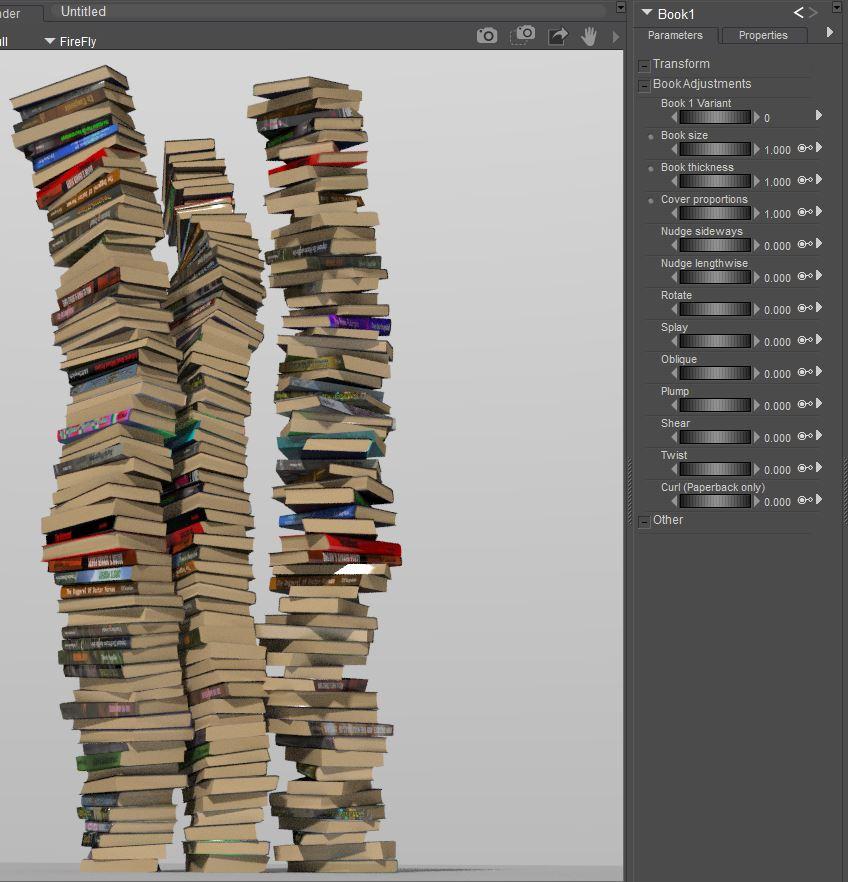
Test version uploaded to post #101 of my book stuff topic over at the HiveWire3D forum if anybody wants to give it a try -My rather infrequent, and possibly apocryphal, 'books project'. | Page 6 | HiveWire 3D Community (N.B. Poser only - *unfortunately DAZ Studio doesn't like it)
The basic figure is a four book stack which can be nested to make taller stacks.

The whole stack can be randomized with a simple Python script - from simple rotations and positional nudges...

...to a mix of hardbacks and paperbacks with various morphs

*I created it in Poser using alternate geometries and valueParm maths and it works rather nicely. But unfortunately DAZ Studio doesn't seem to like it. I can import the basic four book aligned stack but some of the adjustments do weird things to the books
Daz 3D is part of

Connect
DAZ Productions, Inc.
7533 S Center View Ct #4664
West Jordan, UT 84084Licensing Agreement | Terms of Service | Privacy Policy | EULA
© 2026 Daz Productions Inc. All Rights Reserved.