-
Death Strikes Again!! [Commercial]
IgnisSerpentus said:
Well tbh i didnt support torment natively in the outfit or hair. He dropped longggg after id done morphs. And im remiss to go backwards... so i usually add the new figures to the next set instead.
But I am tempted to add him lol i guess well see how well the set finishes.... maybe ill do an update
(it looks like zai did a morph on the braid or something)
Well I sure would love if you did support him! None of the hairs I have used with his horns work well but I have no issues with using morphs/Mesh Grabber/dformers/post work to get it to look decent.
Death Strikes Again!! [Commercial]Well tbh i didnt support torment natively in the outfit or hair. He dropped longggg after id done morphs. And im remiss to go backwards... so i usually add the new figures to the next set instead.
But I am tempted to add him lol i guess well see how well the set finishes.... maybe ill do an update
(it looks like zai did a morph on the braid or something)
Face Mojo [Commercial]I too am now a happy camper. My experiments aen't finished yet, but I've succeeded in superimposing my own facial movements onto one of my characters, and the results are what I'm looking for. It was simple enough to do, too. I used the Face Mojo iOS capture program. I recomment it, even though there are other ways to get the data into DAZ.
Now I'm going to see how easy it is to tweak the facial expressions in DAZ. My original video recording is much more expressive than the result in DAZ, so if I can, I'm going to bring them more into line with one another. I'm a bit concerned that there are many new morph controls with inscrutable names, and nothing more than YT videos as a guide. In fairness, it's a sign of the times.
Even if I totally fail at the tweaking part, the results just as they are are good enough that I would use them as is. Mocap rules. I'm sold.
Face Transfer Squash Faceswildbillnash said:
Hi, I've been playing around with Face Transfer a lot and I've noticed a problem with some of the results. The nose, lips, cheeks, and chins don't come out right. They get pushed in some. The image below shows a regular G8 figure on the left and the results of a Face Transfer on the right. They look alright when you look at it from the front but when you turn the figure around you see the face got pushed in some. Any ideas what's going on here?
Displayed is the reason why the more expensive face modeling plugins can make use of profile images ;-)
This product was made to address the issues in Face Transfer: https://www.daz3d.com/face-transfer-shapes-for-genesis-8
Morphs on Geografts... how?To make the morph, try with both the figure and geograft at base resolution. Detach [unfit] the geograft, shoot that over the bridge to Hexagon, make the morph. Then shoot it back over the bridge to D/S and create the morph. Providing no real changes were made to the mesh, it should happen, zero and save the morph. Then attach [fit to] the geograft to the figure, reapply the normal high resolution.
n.b. it is a good idea not to morph too close to the seam allowance of the geograft.
AJC Boogie Roller Girl OutfitRichard Haseltine said:
Unless someone can point out a reason for this (on the first, did you load the whole wearable at one go or was it separate parts?) please report these as possible bugs. Edit: Loking at the promo page the shirt should ahve a morph for use with the suspenders, does that help?
Well, I can point out a reason, but it would be highly speculative

I loaded the whole outfit preset. It looks a bit better on default G8F, but there is still some clipping.
Also, two new issues. The "shorts only" load without buttons and socks have a bad displacement map.
Daz to Cinema 4D Bridge - Meet the TeamI have tried both file types... Sometimes it appears to go through the process of calculating, but no matter what-- whether .DUF or cr2, on the C4D side it says that there is nothing to import.
I use to send things over by just exp[orting as FBX but the geometry gets all mangled... if I export as an OBJ, the geometry transfers fine but the rig and the mats don't transfer.
AJC Boogie Roller Girl OutfitUnless someone can point out a reason for this (on the first, did you load the whole wearable at one go or was it separate parts?) please report these as possible bugs. Edit: Loking at the promo page the shirt should ahve a morph for use with the suspenders, does that help?
Why is any new release at DAZ so 70's
We can't expect eyebrows with a male Daz Core character, I don't expect realistic quality clothing anymore. That way, when I do see something good it's a welcome surprise.3Ddreamer said:Now if they gave us a High Quality, Male Bundle based around Starky and Hutch, I'd be tempted - I could do some S&H renders, I've facegen-ed Paul Michael Glaser but not David Soul yet, got the car, but I need the clothes, like Starsky's bomber jackets. Starsky saw me into my Teens and I'll always have a softspot for him :-) Other than that I can live without the 70's (and just ignore the 80's, 90's onwards 'period' clothes). Could do with some timeless pieces that could be used in just about any time period, like well made demin shirt, demin jacket, jeans (not skin tight - modeled folds, maybe with a flair morph for people who need it) with stiffness like denim would have and not paperthin dforce.
Why is any new release at DAZ so 70'sNow if they gave us a High Quality, Male Bundle based around Starky and Hutch, I'd be tempted - I could do some S&H renders, I've facegen-ed Paul Michael Glaser but not David Soul yet, got the car, but I need the clothes, like Starsky's bomber jackets. Starsky saw me into my Teens and I'll always have a softspot for him :-) Other than that I can live without the 70's (and just ignore the 80's, 90's onwards 'period' clothes). Could do with some timeless pieces that could be used in just about any time period, like well made demin shirt, demin jacket, jeans (not skin tight - modeled folds, maybe with a flair morph for people who need it) with stiffness like denim would have and not paperthin dforce.
How do I set up a vascularity HD morph?Helo friends, obviously I'm a noob. I purchased some muscle morph sets that include vascularity. I am able to dial in the muscle morphs for shaping but I don't see how to get the vascularity to show up. Can anybody point me to a beginner tute or just tell me how this works? Much appreciated. peace
G8.1 figures and G8If a character is sold specifically for G8.1 then its morph will be located in G8.1 data folder, so it won't work with G8. And there's a good chance it will use the new G8.1 UVs, so the texture wouldn't work on G8 either, and/or the PBR skin shader, which requires 4.15 to work.
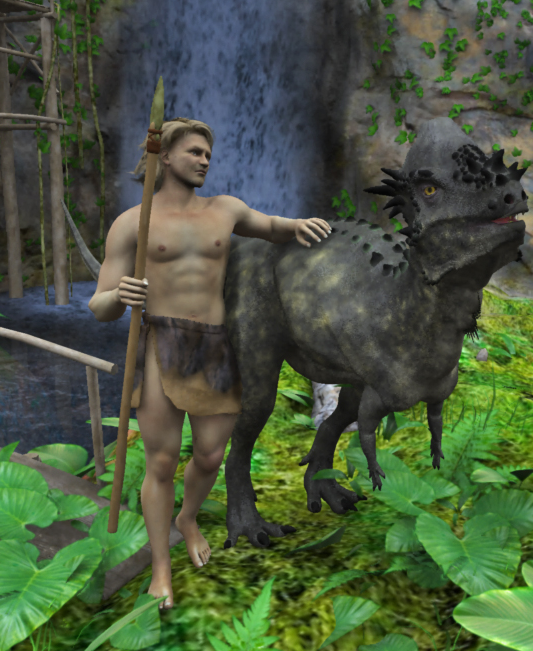
can i create feathers with the hair tool.Khoe, your dino reminds me of a book series I read: The Diaries of Nicholas Oldman. Mike Atkinson is a writer from Linconshire, England who wrote a 3 book series of a time traveller who was accidentally sent back to the South America 60 million years ago. He manages to survivie, then thrive and ends up building a tropical home-base, domesticates a few of the dinosaurs to pull travois/carts, and adopts and raises one from an egg who becomes his personal aircraft. He also keeps etched bone diaries which he deposits in tarpits. These are later discovered by palaeontogolists which is how his story comes into the 20th century. Read threm they are great fun, not too heavy or overly serious, evven the over-the-top baddies.
Anyways, I had to morph one of AM's dinos for a quickie story sketch idea to show what I thought Nicholas looked like (Michael 5) as I did recommend DS and Carrara to Mike, but I don't know if he ended up trying them out. Your dino brought back memories of three really fun books! (on Amazon).
Nicely done dino with feathers by the way!

 Silene
 Partial morph
margrave said:
There is a way to remove vertices from morphs using the Geometry Editor (I think), but I don't remember how to do it.
Again, it doesn't work on HD morphs. However, for future reference you need to make the morphs favourites, and have nothing else favourited (heart icon on the slider), then select the areas you want to exclude (you will need a vertex selection but it may be simpler in some cases to select polygons and then covnert by right-click menu); once you have the vertices selected and the tool in vertex selection mode the right-click menu has a morph editing sub menu with the command to remove selected from favourited morphs.
Partial morphThe GYN-01 uses 1 morph slider. Is there a way to disable just the head morph?
SereneNight’s Sci-Fi Fun Thread 3barbult said:
The PA simply didn't use the features of Daz Studio to make some morphs dependent on another morph. It is a product bug, not a Daz Studio limitation.
If just tried what Serene Night verbally explained with a character I expressly bought to mix with the Toon Generation 4 Mega Bundle, Otis, and it worked fine when I zeroed it out, both Otis, and the TG4 characters. It also didn't matter whether I loaded Otis first as the character and than applied & zeroed out TG4 sliders or loaded TG4 male first and then applied and zeroed out Otis sliders. See attached three images.
I do think the TG4 infant baby seems small compared to the older TG4s, at least when Otis as older than one is applied. I'll have to look at real life infant refences and older people in advertising photos.
That makes me think Serene has left out steps in her explanation, uses an old version of DS (I use 4.15.0.2, I think, whatever the lastest is), or has some way overwritten a default G8.1 Male configuration file of some sort.
SereneNight’s Sci-Fi Fun Thread 3The PA simply didn't use the features of Daz Studio to make some morphs dependent on another morph. It is a product bug, not a Daz Studio limitation.
Daz Character/Morph Load Time Atrociousif you installed via Daz Connect (that is, through Daz Studio) you could work with all but a select few characters and morph sets unisntalled - if you load a scene or preset that needs owned but not installed content then DS will offer to install it for you (but that itself may take a while since it has to be downloaded). You could use the Content Directory sets option to have another content set, with its own database, fully loaded fro character development and swap between them as needed.
Daz Character/Morph Load Time AtrociousI have a fix for this for Daz programmers. When we hold down control and click on many items in Daz, it gives us specific options. For example, on materials, we can choose to apply the materials "only to the selected surface". Well, once I have a scene and I save that scene, then if I ever want to open it, just let me have an option with a cntrl click. A little checkbox that says "Load only morphs used in scene". Yeah, I would not be able to use any other morphs on that scene as they would have all been ignored (except what was saved into the scene's character), but it would speed up the several minute load times. If it only loads whatever morphs I have used in a scene, the thing might open in 2 secs instead of 5 minutes as it loads tons of morphs I shan't use.
So, my question is, at this point in 2021 with this newest version of Daz, is there anything like this? Is there any way for me to improve the insane load times of saved scenes by disregarding unneeded morphs?
Morphs on Geografts... how?Edit->Obj->Morph Loader Pro
Are you bringing your obj in from Hex or Blender or something else?
Are you getting a vertex order problem or just nothing happening for the new slider?
Also which hair? I HAVE done this with hair, but not all hair will it work with.
Daz 3D is part of

Connect
DAZ Productions, Inc.
7533 S Center View Ct #4664
West Jordan, UT 84084Licensing Agreement | Terms of Service | Privacy Policy | EULA
© 2026 Daz Productions Inc. All Rights Reserved.