-
Something Wild
watchdog79 said:
WillowRaven said:
As a book cover artist, I have to agree that I need more dragons or even more modifications to dragon 3 or any older dragons ... once I use a dragon on a book cover, it's just bad business to use the same dragons on other covers for other authors. Same goes for all critters, fantasy and reality. I don't even buy 'babe' characters unless there are also 'interestingly unique or cool' sff variants with it. Versatility. And I know PAs need to see a profit from their hard work, but wouldn't it stand to reason expanding existing figures into new heights be profitable, too, rather than more cookie-cutter characters?
Perhaps you know of these, but just in case. There are quite a few wyvern variants available too:
https://www.daz3d.com/wyverdreki-the-wyvern
https://www.daz3d.com/raw-wyvern
https://www.daz3d.com/wyvern-2-0
https://www.daz3d.com/the-great-wyvern
https://www.daz3d.com/hh-wyvern
https://www.daz3d.com/hh-wyvern-textures
https://www.daz3d.com/born-in-fire-for-hh-wyvern
The HH Wyvern is customizable nicely.
There is also a skeletal dragon available:
https://www.daz3d.com/dforce-dragon-wraith-skeleton-and-accessories
You can dial-spin Dragon 3 all day long, but almost every time you'll still end up with those cartoony feet and claws. Dragon 3 is always given away by those feet.
As I said already, HH Wyvern is nice indeed, but it isn't very customizable at all. Texutres, yes...but you can't really alter the shape unless you morph it yourself. Longer neck, longer tail, wings/arms carried/folded lower...I'd love to know how to do that...then again, if I did, I'd be making the figures myself to begin with, haha.
Dial Fusion for Genesis 2 to 8.1 (Commercial)Not that I know of. The figure has to be reloaded to reflect any other new morph additions. The reason It reflects with DIal Fusion is because it is populated in the current scene on the current figure. If I add more morphs in via a normal copy paste into data it won't show unless I load in a new figure that scans the data folder again.
Problems with the DAZ to Blender Bridge 2.3.1.1Hello everyone,
I have problems with the DAZ to Blender Bridge, and hope, someone could help me.
I am using the Brigde to transfer a figure with the dForce Barbarian Queen Outfit for Genesis 8 Female(s) and a pose from the Stealth Fighter Poses for Genesis 8 Female and Tara. This is what it looks like in DAZ Studio:
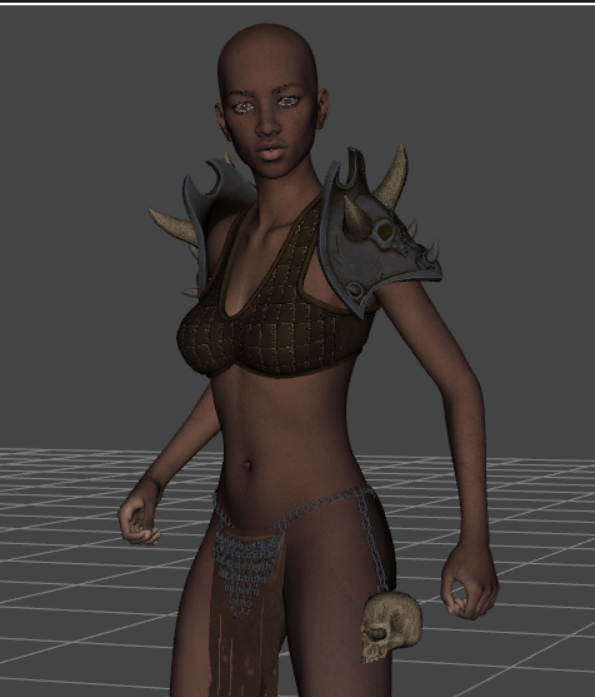
And after importing it into Blender it looks like this:

In the bridge I chose Genesis 8/3 with morphs and no animation.
Has someone an idea, why this happens, and how I can fix this?
Thank you
Christian
How to transfer morphs to non-autofitting clothes?Hello,
I have a freebie piece of clothing that fits a base G3 figure but if the G3 figure is morphed, the clothes don't follow the morph. Is there a way to transfer the character morphs to the clothing so that they will fit the morphed G3 figure? I have heard of the transfer utility but have never used it. Is this utility something that would work for me or does it only work on figures?
Thanks for any help.
nabob21
Something WildOKerya said:
WillowRaven said:
As a book cover artist, I have to agree that I need more dragons or even more modifications to dragon 3 or any older dragons ... once I use a dragon on a book cover, it's just bad business to use the same dragons on other covers for other authors. Same goes for all critters, fantasy and reality. I don't even buy 'babe' characters unless there are also 'interestingly unique or cool' sff variants with it. Versatility. And I know PAs need to see a profit from their hard work, but wouldn't it stand to reason expanding existing figures into new heights be profitable, too, rather than more cookie-cutter characters?
What about dialing your own dragon? There are quite a lot of morph packs for the Dragon 3:
https://www.daz3d.com/mythic-beasts-for-the-daz-dragon-3
https://www.daz3d.com/creatures-of-legend-for-daz-dragon-3
https://www.daz3d.com/capsces-shapes-dragon-3
https://www.daz3d.com/daz-dragon-3-morphs
This one was dialed with
Daz Dragon 3, Morphs and Textures - Daz
Mythic Beasts for the DAZ Dragon 3 - Sickleyield, Fuseling
Creatures of Legend - SickleYield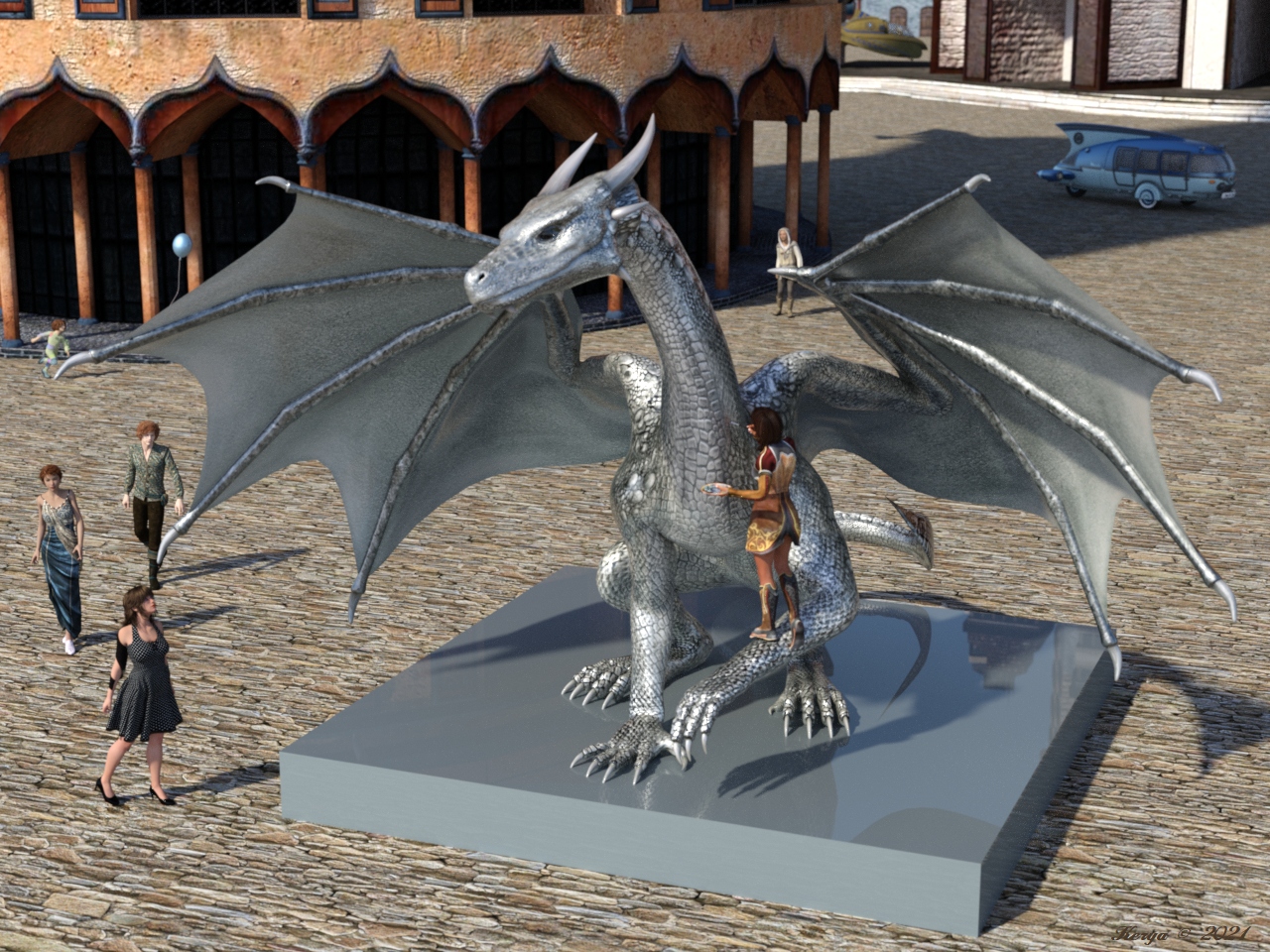
Yes! The whole fun of Daz is altering assets to make them unique. I would never give a client anything as it looks in the store. You might as well just use stock photos if you’re going to do that. Also, it’s easy to take skin files into Photoshop and be creative with them or even alter the skins quite a bit in surfaces. I think you can even use some randomizer scripts on the creatures although I haven’t tried that. But now I do want to try playing with some creatures since they are just sitting in my runtime unused.
Importing custom Blender Morph with Morph Loader on small figureThat kind of deformation usually means the vertex order has changed, but I see you have it prserved in the Blender options. Is it possible to tools you use in Blender affected the order? What happens if you export the model from DS, import into Blender, export without doing anything, and try loading as a morph?
Importing custom Blender Morph with Morph Loader on small figureHey,
maybe one of you have an idea.
I have a custom g8f which is notice smaller then the original g8f shape.
That g8f wears a shirt, where I shaped some custom morphs in Blender.
But as soon if I import the custom morph to the shirt, the morph makes just to explode the mesh. I guess it's because the shirt is much lower, than it used to be, because of autofit of the shirt.
I shaped the morph on my custom g8f in Blender (exportet g8f and shirt while fitting via autofit) with base mesh.
My Blender export settings and morph loader import settings are attached as screenshots.
There also a screenshot with the original shirt on the left and the custom morph importet as a new obj on the right. Of course they overlapping on the x axes. Just move on shirt a little bit to side, for this screenshot.
Any idea, why the mesh is just exploding? If I import the obj with my custom morph as a new obj, it looks fine.
Edit: I'm not using any bridge for exporting/importing.
Edit 2: Die Figure is shrunken via the classical DAZ height morph (not via scale)
AIUTO...CHI CONOSCE L’ITALIANO? PARTE TREDICIMuscleman said:
Silvhe said:
Muscleman said:
Guardate che NON tutto può essere usato in Dforce. Alcuni vestiti non sono "fatti" per essere "cambiati" in vestiti Dforce eh. Dipende dal PA, non da DS.
E per alcuni capelli che cambino per via dei morph, dipende da come sono fatti, molti non hanno intere liste di morphs all'interno, non è semplice inserire tutti (troppi forse) morphs dentro dei capelli . dipende dal PA, non da DS...e lo so, sono ripetitivo ma è così.
Veramente esplodono anche i vestiti (e anche i capelli, per la verità) che sono proprio nativi dForce. E' una cosa molto random, dipende da un sacco di fattori e comunque in genere si rimedia. Anche per la cosa dei morph, sebbene sia un po' una seccatura, basta apparentare i capelli alla testa. Invece la faccenda dei prop che se li parenti poi si spostano è una vera rottura di #%&* perché uno fatica mezz'ora per posizionare dei personaggi e poi li apparenta a un null per poterli spostare insieme. Una volta rimanevano immobili anche dopo apparentati, adesso no, appena li apparenti se vanno a spasso a casaccio e li devi riposizionare da capo

E' random perchè dipende sempre dal PA....cmq io ho provato a parentare un semplice cilindro ad un mano di g8 e mi si muovono sempre insieme....sto parlando di movimenti fatti con i dials eh, ora non voglio dire chissà che, ma cosa fai tu di diverso?
No, il problema non è che non si muovono insieme, quello funziona. E' che se prima di essere apparentati sono in una posizione, nel momento in cui li apparenti si spostano. Metti che prendo un bicchiere e lo posiziono sulla mano di G8, il posizionamento lo faccio senza apparentare l'oggetto perché è più facile muoverlo in xyz e ruotarlo ragionando in coordinate globali piuttosto che in quelle locali. Una volta posizionato bastava trascinare il bicchiere sulla mano di G8 (nel tab scene) e questo rimaneva dov'era solo che diventava child della mano. Ora quando fai questa cosa il bicchire (o quello che é) non rimane in posizione ma si sposta. Non so se ho toccato qualcosa io e ho fatto casino ma non mi pare...
EDIT: Risolto, nel tab scene tra le proprietà c'è un "parent items in place", se non è spuntato succede quanto sopra. Non sapevo nemmeno che esistesse quindi io non ci sono andato a spippolare di certo... non so se è qualcosa che ho installato o altro. Comunque ora è ok.
Using Marvelous Designer to refit clothes across generations?Hmm, I originally thought about importing a different generation base figure as avatar in MD, drape the clothing, export clothing as obj, then importing obj clothing into DS and use transfer utility to transfer target figure rigging into the obj clothing.Pax's Pretty Boys ThreadI just love your work. You haven't posted about him in a while, but I'm especially captivated by Vaana -- love his daring color scheme, love the use of the Fi brows! And I like that ear morph you use on him (and maybe some of your other pointed-eared characters, at the bottom of page one?). Long/pointed ear morphs don't tend to stretch the antihelix, but it looks so much more natural to me! Where's that morph from?
Something WildWillowRaven said:
As a book cover artist, I have to agree that I need more dragons or even more modifications to dragon 3 or any older dragons ... once I use a dragon on a book cover, it's just bad business to use the same dragons on other covers for other authors. Same goes for all critters, fantasy and reality. I don't even buy 'babe' characters unless there are also 'interestingly unique or cool' sff variants with it. Versatility. And I know PAs need to see a profit from their hard work, but wouldn't it stand to reason expanding existing figures into new heights be profitable, too, rather than more cookie-cutter characters?
What about dialing your own dragon? There are quite a lot of morph packs for the Dragon 3:
https://www.daz3d.com/mythic-beasts-for-the-daz-dragon-3
https://www.daz3d.com/creatures-of-legend-for-daz-dragon-3
https://www.daz3d.com/capsces-shapes-dragon-3
https://www.daz3d.com/daz-dragon-3-morphs
This one was dialed with
Daz Dragon 3, Morphs and Textures - Daz
Mythic Beasts for the DAZ Dragon 3 - Sickleyield, Fuseling
Creatures of Legend - SickleYieldMorphs Still Loading (With G8F) After They've Been UninstalledDrunkMonkeyProductions said:
I'd say you just missed some.
You'll probably need to manually delete them out of your data folder, and all associated files, character presets, morph presets etc. Material presets will generally still work if they don't have any uv mapping requirements(dsf files)
Make sure dim isn't set to auto install stuff, uncheck the box("install after downloading") and make sure your install list skips the particular items(uncheck them).
And don't log into your account in DS so as to avoid connect doing anything.
It's likely I may have missed some indeed. Since this post I've taken to checking parameter settings for hints. Some useful info has been gathered. Thanks.
AIUTO...CHI CONOSCE L’ITALIANO? PARTE TREDICISilvhe said:
Muscleman said:
Guardate che NON tutto può essere usato in Dforce. Alcuni vestiti non sono "fatti" per essere "cambiati" in vestiti Dforce eh. Dipende dal PA, non da DS.
E per alcuni capelli che cambino per via dei morph, dipende da come sono fatti, molti non hanno intere liste di morphs all'interno, non è semplice inserire tutti (troppi forse) morphs dentro dei capelli . dipende dal PA, non da DS...e lo so, sono ripetitivo ma è così.
Veramente esplodono anche i vestiti (e anche i capelli, per la verità) che sono proprio nativi dForce. E' una cosa molto random, dipende da un sacco di fattori e comunque in genere si rimedia. Anche per la cosa dei morph, sebbene sia un po' una seccatura, basta apparentare i capelli alla testa. Invece la faccenda dei prop che se li parenti poi si spostano è una vera rottura di #%&* perché uno fatica mezz'ora per posizionare dei personaggi e poi li apparenta a un null per poterli spostare insieme. Una volta rimanevano immobili anche dopo apparentati, adesso no, appena li apparenti se vanno a spasso a casaccio e li devi riposizionare da capo
E' random perchè dipende sempre dal PA....cmq io ho provato a parentare un semplice cilindro ad un mano di g8 e mi si muovono sempre insieme....sto parlando di movimenti fatti con i dials eh, ora non voglio dire chissà che, ma cosa fai tu di diverso?
Selling base characters without their additional morphsCora Regina said:
Oh no, which characters did you buy? M3 had some good ones, there were a couple that I adored. The Breathtaking Bishounen morph pack was a staple for me, and Kaleya's Ash'ale from over at Rendo. There have been some great advances but M3 was baby's first digital Ken doll, and I have a soft spot for him.
Those M3 characters should have a warning somewhere in big bold font about how they require morph packs that are no longer sold, and that they will not work if you did not purchase those morph packs in the past. I also ended up buying some characters where it turned out that the requisite morph product for it was no longer available (M4 Enhanced/Mina). That situation was even more complicated because the product I bought was a DO, but the required morphs were a PA product that Daz hadn't bought out the rights to. Fortunately it was all super cheap stuff since I forgot to return it, whoops.
I've run into other related issues, too. A G2M outfit was distributed missing either eight or ten (I forget which) out of the twelve advertised movement and adjustment morphs for the skirt. Got told that it's old and they're not gonna bother fixing it, thanks for the money. It's still in the store, promising twelve adjustment morphs and only delivering a fraction of them.
Daz's willingness to sell older content is high, which is AWESOME and I buy a lot of it. Some great legacy stuff out there. Less awesome is how their willingness to support the old content that they sell is non-existent to the point that they won't even update product pages for accuracy. Doesn't help that the "required products" section is still screwed up from November, too.
+1
I only purchased the Michael 3 base model. But had the Head and Body morphs been available, I would've purchased those too.
I love older content. My favourite is Aiko 3. I've bought lots of outfits for her, but I haven't got around to rendering any of them yet. ^^'
Ascania said:
If you were to somehow get your hand on 3D World magazine issue #114 then you'll find the head and body morphs for M3 on the included CD.
Thank you for replying ^^ Because (thanks to you), I've found (and bought) a copy on eBay! It was the only copy of the magazine (with the disc) on there. In fact, it was the only copy on there. I've got to wait a few weeks, though, as its in America.
Some Questions About HD Add-on Body MorphsThe figure isn't HD, the morph is (all of the Genesis figures are sub-divided, to smooth the emsh out; regular morphs move only the base geometry but HD morphs can move the vertices created by the sub division to give finer details). You can mix and match HD morphs just as you can regular morphs, how well they will mix depends on the morphs themselves.
Morphs Still Loading (With G8F) After They've Been UninstalledI'd say you just missed some.
You'll probably need to manually delete them out of your data folder, and all associated files, character presets, morph presets etc. Material presets will generally still work if they don't have any uv mapping requirements(dsf files)
Make sure dim isn't set to auto install stuff, uncheck the box("install after downloading") and make sure your install list skips the particular items(uncheck them).
And don't log into your account in DS so as to avoid connect doing anything.
Morphs Still Loading (With G8F) After They've Been UninstalledIn attempting to lessen G8F load times, I took the option to uninstall a host of morphs via DIM. Characters and morph packs were among those uninstalled. Some were deleted. On loading G8F again, I notice that the morphs still show up. Anyone know why this is or have a solution to permanently eradicating these morphs?
Broken bones for G8?Could try making a morph, adjust rigging to mesh, apply ERC freeze, zero morph and save.
AIUTO...CHI CONOSCE L’ITALIANO? PARTE TREDICIMuscleman said:
Guardate che NON tutto può essere usato in Dforce. Alcuni vestiti non sono "fatti" per essere "cambiati" in vestiti Dforce eh. Dipende dal PA, non da DS.
E per alcuni capelli che cambino per via dei morph, dipende da come sono fatti, molti non hanno intere liste di morphs all'interno, non è semplice inserire tutti (troppi forse) morphs dentro dei capelli . dipende dal PA, non da DS...e lo so, sono ripetitivo ma è così.
Veramente esplodono anche i vestiti (e anche i capelli, per la verità) che sono proprio nativi dForce. E' una cosa molto random, dipende da un sacco di fattori e comunque in genere si rimedia. Anche per la cosa dei morph, sebbene sia un po' una seccatura, basta apparentare i capelli alla testa. Invece la faccenda dei prop che se li parenti poi si spostano è una vera rottura di #%&* perché uno fatica mezz'ora per posizionare dei personaggi e poi li apparenta a un null per poterli spostare insieme. Una volta rimanevano immobili anche dopo apparentati, adesso no, appena li apparenti se vanno a spasso a casaccio e li devi riposizionare da capo
One Click Expression AdjustmentsYou could apply the expression to a fresh loaded Dev Load figure, export as OBJ, import with morph loader pro, adjust bones to shape, test, ERC freeze, zero morph, save as morph asset, repeat for the rest of the expressions you want to have sliders for. The new expressions might not play especially well with other expressions also dialed in, since they are now morphs and don't adjust bones, but they should be fine if used by themselves. If you're not already familiar with the morph loader, ERC freeze process, you may want to read up on it, there's plenty of threads about it. Hopefully this helps.
Daz 3D is part of

Connect
DAZ Productions, Inc.
7533 S Center View Ct #4664
West Jordan, UT 84084Licensing Agreement | Terms of Service | Privacy Policy | EULA
© 2026 Daz Productions Inc. All Rights Reserved.